Custom Validation for Blueprint to Enforce Mandatory File Uploads and File Extension C

Custom Validation for Blueprint to Enforce Mandatory File Uploads and File Extension C


Welcome to another exciting Kaizen post on Client Script!

Have you ever wanted more control over what gets uploaded to a File or Image field in Zoho CRM, like restricting file types, validating file names, or showing a custom error before an inappropriate file gets saved? 

Client Script now supports File Upload and Image Upload fields, giving you greater control over file validation and user experience.

In today's post, let's see how to make a file upload field mandatory in a Blueprint using Client Script, a solution to the question raised in our community forum.

In this Kaizen post,


  1. Use Case
  2. Solution
  3. Supported ZDKs
  4. Summary
  5. Related Links


1. Use Case

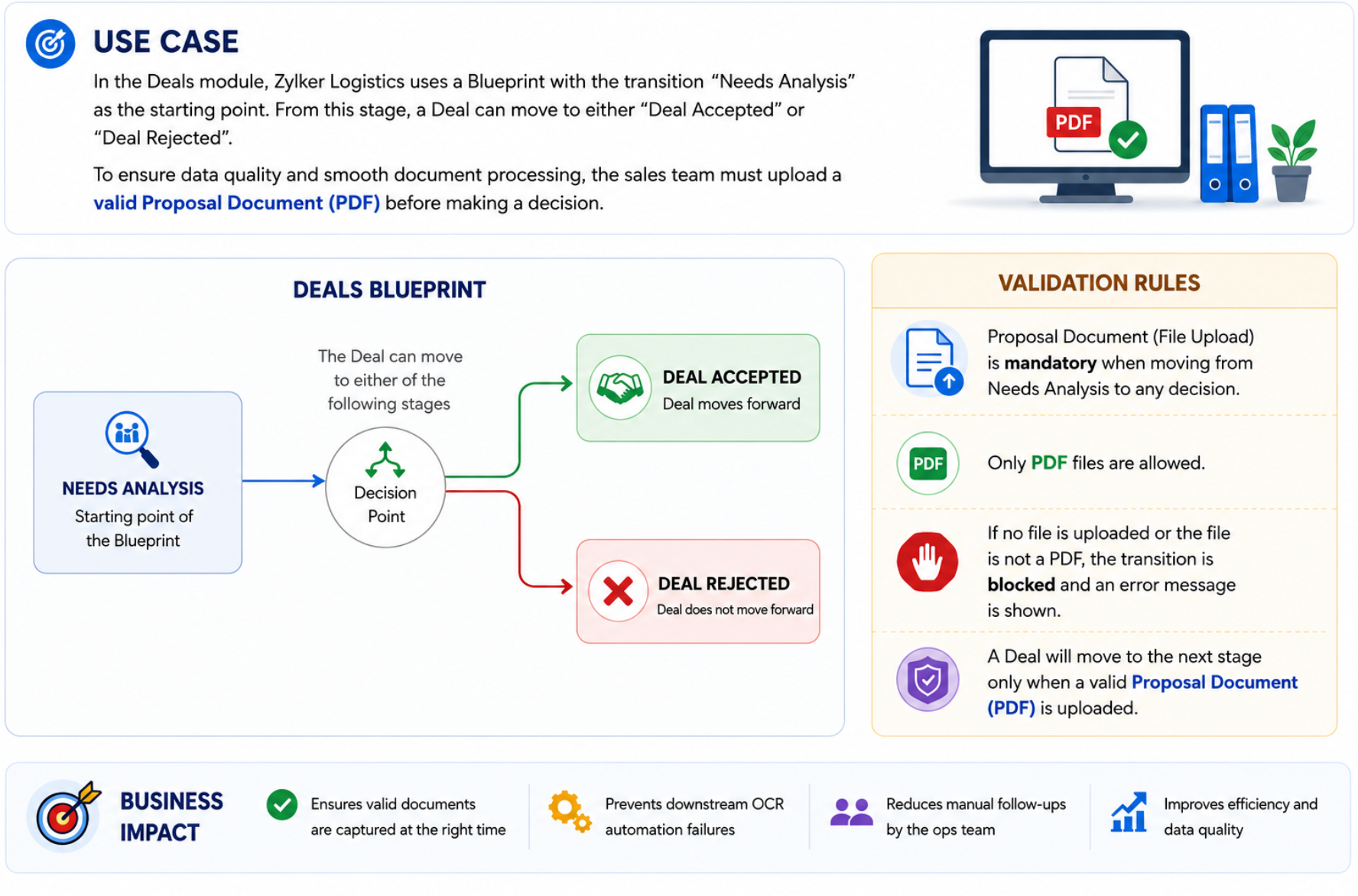
In the Deals module, Zylker Logistics uses a Blueprint with the transition "Needs Analysis" to "Deal Accepted" or "Deal Rejected". Sales agents were clicking this transition without uploading the Order Confirmation file, which caused downstream OCR automation to fail and forced the ops team to manually chase missing documents later. To fix this, the admin wants to check whether the Order Confirmation field has a file attached whenever a user tries to perform the transition. If no file is attached, the transition should be blocked and an error message should prompt the user to upload the file first. Additionally, if a file is attached, it should be a PDF only. This way, a Deal can only move to next transition once a valid PDF confirmation document has actually been uploaded.


2. Solution

This use case can be solved using Client Script. All you have to do is create a Client Script with the "beforeTransition" event for the Deals module. 
  1. Go to Setup > Developer Space > Client Script. Click +New Script . Specify the details to create a script and click Next.

  1. Enter the following script and click Save.

  1. // Check if the current blueprint transition being triggered is "Deal Accepted" or "Deal Rejected"
  2. if (transition.name == "Deal Accepted" || transition.name == "Deal Rejected") {

  3.     // Get the value of the Test field (file upload field)
  4.     var objectArray = ZDK.Page.getField('Test').getValue();

  5.     // Log the field value to console for debugging purposes
  6.     log(objectArray);

  7.     // Check if the field is empty - covers empty string, null, and empty array cases
  8.     if ((objectArray == '' || objectArray == null || objectArray == '[]')) {

  9.         // Show an error message to the user if no file is attached
  10.         ZDK.Client.showMessage("Upload a **valid Proposal Document PDF** to proceed", error)

  11.         // Stop/block the blueprint transition since validation failed
  12.         return false;

  13.     }
  14.     else {

  15.         // If a file is attached, get the name of the first uploaded file
  16.         var fileName = objectArray[0].File_Name;
  17.         log(fileName);

  18.         // Extract the file extension from the file name and convert it to lowercase
  19.         var extension = fileName.substring(fileName.lastIndexOf('.') + 1).toLowerCase();
  20.       
  21.  // Check if the uploaded file's extension is not "pdf"
  22.         if (extension != "pdf") {

  23.             // Show an error message asking the user to upload a valid PDF file
  24.             ZDK.Client.showMessage("The Proposal Document field accepts **only PDF files**. Please select a **.pdf file** and try again.", error);

  25.             // Stop/block the blueprint transition since the file is not a PDF
  26.             return false;
  27.         }
  28.     }
  29. }

This script runs before the "Deal Accepted" or "Deal Rejected" blueprint transition. It checks whether the Proposal Document field has a file attached. If the field is empty, it shows an error and blocks the transition. If a file is attached, it checks the file's extension. If the extension isn't "pdf", it shows an error and blocks the transition; otherwise, the transition proceeds normally.

Notes
Note:
The value of a File Upload field is an array of objects, even when only a single file is uploaded. Therefore, access the required file object (for example, objectArray[0]) before retrieving its properties, such as File_Name

  1. Here is how the Client Script works when no file is uploaded to the Proposal Document field.


  1. Here is how the Client Script works when a GIF file is uploaded to the Proposal Document field.


  1. If a valid PDF file is uploaded, the transition goes through smoothly without any issues.


3. Supported ZDKs

For File Upload and Image Upload fields, as of now only the following ZDKs are currently supported:

getValue() – Retrieves the file details currently populated in the File Upload or Image Upload field.
setValue() – Sets or updates the value of the File Upload or Image Upload field.

4. Summary

In this Kaizen post, we discussed:
  1. How to validate a file's extension and stop a Blueprint transition based on it.
  2. How to check whether a file has been uploaded using Client Script.
  3. ZDKs that can be used for File Upload and Image Upload fields.


    • Sticky Posts

    • Announcing the new SKILL.md for Zoho CRM and the updated OAS repository!

      We are introducing a new zoho-crm skill to make working with Zoho CRM Developer tools (like APIs, functions, widgets, client scripts, queries etc) easier and faster, with the help of AI in your preferred AI harness like Claude Code, Codex, Cursor, VSCode
    • Kaizen #256 - Build an Arrival Readiness Web Tab in Zoho CRM

      Hi everyone! Welcome back to the Kaizen series! In the post, we discuss a use case in hospitality industry: how an Arrival Readiness web tab widget can be used to let reception staff identify and resolve issues before arrival of guests. Use case In the
    • Kaizen #198: Using Client Script for Custom Validation in Blueprint

      Nearing 200th Kaizen Post – 1 More to the Big Two-Oh-Oh! Do you have any questions, suggestions, or topics you would like us to cover in future posts? Your insights and suggestions help us shape future content and make this series better for everyone.
    • Kaizen #226: Using ZRC in Client Script

      Hello everyone! Welcome to another week of Kaizen. In today's post, lets see what is ZRC (Zoho Request Client) and how we can use ZRC methods in Client Script to get inputs from a Salesperson and update the Lead status with a single button click. In this
    • Kaizen #222 - Client Script Support for Notes Related List

      Hello everyone! Welcome to another week of Kaizen. The final Kaizen post of the year 2025 is here! With the new Client Script support for the Notes Related List, you can validate, enrich, and manage notes across modules. In this post, we’ll explore how

    Nederlandse Hulpbronnen


      • Recent Topics

      • Important changes for users with Zoho accounts in the UAE and other Data Centers

        What's changing? Previously, the same email address could be used to create separate Zoho accounts in both the UAE data center and another Zoho data center (such as US, EU, IN, AU, JP, CA, SA or SG). With this change, an email address can be associated
      • 👍 Zoho CRM's Notes now gets Reactions and a new look

        Available in SA and JP DCs. Rolling out to other DCs in phases. Hello everyone, Notes help users capture important updates, collaborate with teammates, and maintain context for records. Now with Note Reactions, users can quickly acknowledge updates, express
      • Conditional Layouts On Multi Select Field

        How we can use Conditional Layouts On Multi Select Field field? Please help. Moderation update: Multi-select picklist fields are now supported in Layout Rules. Additionally, Layout Rules is now available in the Professional Edition. These updates have
      • Zoho Marketing Automation WhatsApp Campaign Import Sync for Zoho Analytics

        WhatsApp is a critical channel in modern marketing, yet WhatsApp Campaign metrics from Zoho Marketing Automation currently cannot be natively imported into Zoho Analytics via the default advanced analytics connector. Integrating this into the standard
      • merge the Multiple POs to single PO if Vendor of PO"s --in Zoho Inventory

        HI Merge the Multiple POs to single PO if Vendor of PO"s are Same ----in Zoho inventory Please provide any work around to achive this .
      • Is there a CRM Deluge function available to convert an RTF (rich text field) to plain text (with no formatting tags)?

        I know that we can run reports so that RTF fields can either show as plain text or the text or the text with the formatting fields included (which is wonderful, btw, as it helps me adjust tags when I need to troubleshoot and just see what I need to see
      • 【Zoholics Japan 2026】ITreview 口コミ投稿キャンペーンを実施します!

        ユーザーの皆さま、こんにちは! 2026年9月25日(金)開催の「Zoholics Japan 2026」会場にて、 Zoho CRM・Zoho Workplace・Zoho Mail を対象とした「ITreview 口コミ投稿キャンペーン」を実施します! Zoholics にご来場いただく皆さま、ぜひこの機会に普段お使いの Zoho 製品について、率直なご感想をお聞かせください。 【キャンペーン内容】 対象製品: ・Zoho CRM ・Zoho Workplace ・Zoho Mail キャンペーン実施時間:
      • Contact removed when picking ticket template.

        hi new to Desk rolling out to company, replacing Freshdesk. Is there way to keep the in context contact when selecting a template? When you choose a template you lose the contact!
      • Using IMAP configuration for shared email inboxes

        Our customer service team utilizes shared email boxes to allow multiple people to view and handle incoming customer requests. For example, the customer sends an email to info@xxxx.com and multiple people can view it and handle the request. How can I configure
      • Zoho Tables is now available in Zoho One!

        Hello Zoho One users, We’re excited to announce that Zoho Tables is now included as a part of Zoho One suite! As teams grow, managing projects, approvals, inventories, campaign trackers, and operational workflows across multiple spreadsheets become difficult.
      • Zoho Publish is now available in Zoho One!

        Hello Zoho One users, We’re excited to announce that Zoho Publish is now included as part of the Zoho One suite! As businesses grow, managing Google Business Profiles across many locations becomes challenging. Business information needs to stay accurate,
      • Global Sets for Multi-Select pick lists

        When is this feature coming to Zoho CRM? It would be very useful now we have got used to having it for the normal pick lists.
      • Bank Transaction Rules Link Under Each Bank Account

        Hello, can you'll move the "transaction rules" button or link back under each bank account? It is now on Bank Overview, if I am working on a specific bank account, I don't want to go out to overview to check the rules. That button displays rules for all
      • Nested notebooks

        Dear Sir/Madam, I would like to know if it is possible to nest notebooks. It would be very helpful when there are too many, as it would improve organization. Thank you for your response. Best regards.
      • Zia Agents looks promising, but I still cannot deploy my first agent or connect WhatsApp after weeks of support tickets

        Hi Everyone, I am posting here because I am stuck and need practical help from someone who has successfully deployed a Zia Agent with WhatsApp. Zia Agents looks like a very promising product. I have watched the platform expand quickly, and I have noticed
      • Zoho CRM

        Cuándo voy a adjuntar un archivo .pdf en un registro en el campo Archivo obtengo el siguiente error:
      • Implement Meeting Polls in Zoho Bookings

        Dear Zoho Bookings Support Team, We'd like to propose a feature enhancement related to appointment scheduling within Zoho Bookings. Current Functionality: Zoho Bookings excels at streamlining individual appointment scheduling. Users can set availability
      • Recording Salaries and wages in zoho books with bank fees

        Hello Community, I am posting this questions to understand the best way to record the salary and payroll expenses in zoho books. The way it works here, For example if I have 3 employees and each employee salary is lets say $1000. I usually use the bank
      • API - Available Stock Definitions

        Okay, Zoho team... your copywriters fell down on the job for this one :) I think these warrant a bit more explanation as to what they include and what they don't.
      • [BUG] WebTabs in ZohoCRM now have a spurious "\" displayed along with some additional HTML Head code included

        An example of the issue can be seen below:
      • CNIL - Suivi de Pixel

        Bonjour à tous, À la suite de la nouvelle recommandation de la CNIL sur les pixels de suivi dans les e-mails, savez-vous si Zoho Campaigns permet : de conditionner le suivi des ouvertures au consentement de chaque contact ; de proposer un lien permettant
      • Scheduled import

        The tutorial shows a scheduled import option but this option doesn't appear to be available when using Zoho DB.
      • #4 Choosing How My Invoice Should Look

        Day 4: Meera had the basics sorted. Her business name was there, the address looked right, and her logo finally appeared where it should. But the invoice still did not quite look like hers. Her old studio used invoices that were clean, tightly laid out,
      • Transaction rules for "Owner's Contribution" ?

        I have a bank account where a lot of the deposits are "Owner's Contributions" (i.e., the business owner investing money in the company). Is it possible to create a Transaction Rule to automatically recognize these? They all have the same verbiage from
      • DYK 12: Turn Email into Work Items

        Did you know you can add work items to your Zoho Projects portal directly from your inbox? The initial step of important collaborations start over an email, and most of these require an immediate follow-up by creating a task, or reporting an issue. During
      • Custom Function not getting package details when triggered from Workflow Rules.

        I have a custom function for Packages that submits a form in our Creator app that we use to generate custom shipping labels (internal staff complete deliveries so we cannot generate shipping labels straight from Inventory). When the function is executed
      • how to Solve Conflict Invoices in Zoho POS

        Hello Team, I am facing a repeated issue in Zoho POS while saving a sale that contains service-based items. My products are intentionally created as Service (Non-Inventory) items because I do not want to track stock for them. However, every time I try
      • ¿Cuándo estará disponible la edición de Zoho POS para México?

        He estado revisando las capacidades de Zoho POS y su evolución dentro de la estrategia de Zoho for Retail, y me parece que existe una oportunidad muy interesante para el mercado mexicano. Zoho POS ya ofrece funcionalidades para gestionar ventas, inventario,
      • Important update for Zoho RPA Windows Agent users

        Hi everyone, We would like to share an important update for Zoho RPA Windows Agent users running Windows Server 2016 or Windows Server 2019. The new Zoho RPA Windows Agent 6.0.0 and later versions are not supported on Windows Server 2016 and Windows Server
      • Multi-Option Estimates: One Estimate, Multiple Choices

        Every service request can have multiple solutions. Multi-Option Estimates help you present these different solutions in a single estimate with its own name, parts, price, and total. Each option can differ in scope, approach, or price — whatever choices
      • Delete CRM Portal

        How do I delete portals from my CRM? I created one just to test, it is not in use and is disabled but it's existence is preventing me from marking fields in modules as "required" unless I make it 'read/write' in the portal first. I'd rather just delete
      • Marketing Tip #32: Improve SEO and customer confidence with an FAQ section

        Before making a purchase, customers often have simple questions about delivery times, returns, product usage, or sizing. If they can’t quickly find answers, they may leave your store without buying. Adding a clear FAQ (Frequently Asked Questions) section
      • ZOHO Campaigns in ZOHO Analytics - Campaigns vs Contacts Table

        There seems to be information in the Zoho Campaigns table such as Unique Opens and Unique Clicks that can't be found in the Campaigns vs Contacts table where only Opens and Clicks are shown on a per contact level. Is there a way to bring Unique Opens
      • How to change an employee mail id

        Hi, Does the administrator have the rights to edit an  employees mail id. 
      • Cousin Domain Verification in Zoho Mail: Identify and block look-alike domains

        Phishing attacks often rely on domain names that closely resemble legitimate ones. This makes it difficult for users to identify fraudulent emails at first glance. Zoho Mail's Cousin Domain Verification feature allows administrators to define trusted
      • How do I add 2 agents under the same email?

        I have 2 agents who use the same email address. I added one, but when adding the second agent, it says that the email is already registered. How do I configure this properly?
      • Zoho Desk API modifiedTimeRange returns HTTP 500 around 2026-03-08T02:00:00.000Z

        Hello Zoho Support Team, We are experiencing a reproducible HTTP 500 Internal Server Error when querying the Zoho Desk API search endpoint with a specific modifiedTimeRange boundary. ### API Endpoint GET /api/v1/tickets/search ### Reproduction Steps &
      • Updating an Invoice Line Item's Discount Account via API Call / Deluge Custom Function

        I need help updating an invoice line item's discount account via API. Below is a screenshot of the line item field I am referring to. Now the field to the left of the highlighted field (discount account) is the sales income account. I am able to modify
      • Collaborate Visually with Whiteboard in Zoho Projects

        Whiteboard in Zoho Projects allows you to collaborate visually by creating diagrams, annotating designs, and sketching project workflows using shapes, text, and images within project modules. Team members can work simultaneously, improving productivity
      • Associate project with timer on iPhone

        When I start the timer without first associating a project (on my iPhone), its starts fine but now when I need to associate a project, and click on the link, I get a list of EVERY project I've ever put into Zoho Books. It used to just show active projects.
      • Next Page