Use Zoho Creator as a source for merge templates in Zoho Writer
Hello all!
We're excited to share that we've enhanced Zoho Creator's integration with Zoho Writer to make this combination even more powerful. You can now use Zoho Creator as a data source for mail merge templates in Zoho Writer.
Making more data from your favorite low-code development platform accessible in Writer will open new opportunities for users to create and send a wide variety of documents, manage business processes efficiently, and ensure security.
Features
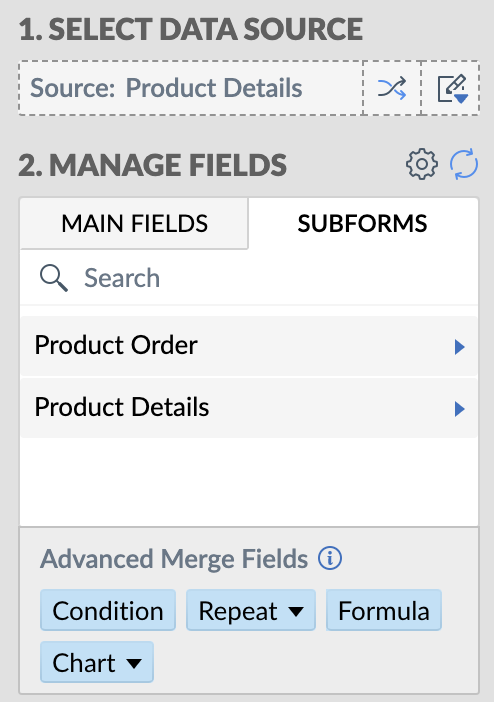
Seamless integration with subform fields
Zoho Creator users can now seamlessly utilize subform fields in Zoho Writer with the merge task feature. This empowers businesses to create documents that are more data-driven and user-friendly, and reduces the manual effort required for document preparation.
Zoho Creator users can now seamlessly utilize subform fields in Zoho Writer with the merge task feature. This empowers businesses to create documents that are more data-driven and user-friendly, and reduces the manual effort required for document preparation.
Access more Creator fields
Access to comprehensive data from Creator empowers users to produce intricate and data-rich documents. With this enhanced integration, you can access data in subform fields, and lookup fields.
Access to comprehensive data from Creator empowers users to produce intricate and data-rich documents. With this enhanced integration, you can access data in subform fields, and lookup fields.
This seamless data integration streamlines the creation of complex business documents, which is particularly beneficial for organizations dependent on data-intensive documents like contracts, reports, and financial statements.
Uses and benefits
Unlock the power of signatures
One of the standout features of this integration is the ability to use the signature field in Zoho Writer. For instance, in contract management, you can use electronic signatures to streamline the approval and signing process while ensuring security.
One of the standout features of this integration is the ability to use the signature field in Zoho Writer. For instance, in contract management, you can use electronic signatures to streamline the approval and signing process while ensuring security.

Turn IDs or fields into barcodes
Another exciting feature is the ability to convert Creator IDs or fields into barcodes with help of the mail merge templates. Using barcodes enables efficient data tracking and retrieval, enhances accuracy and accessibility, and much more.
Assume a Vendor management app which contains contracts. The mail merge templates feature will facilitate the seamless extraction data from Creator to Writer, and help you create a document for contracts. Within the Writer document, the fields, Product IDs, Alphanumeric or numeric fields can be shown can be visually represented as barcodes.
Another exciting feature is the ability to convert Creator IDs or fields into barcodes with help of the mail merge templates. Using barcodes enables efficient data tracking and retrieval, enhances accuracy and accessibility, and much more.
Assume a Vendor management app which contains contracts. The mail merge templates feature will facilitate the seamless extraction data from Creator to Writer, and help you create a document for contracts. Within the Writer document, the fields, Product IDs, Alphanumeric or numeric fields can be shown can be visually represented as barcodes.

How to get started
-
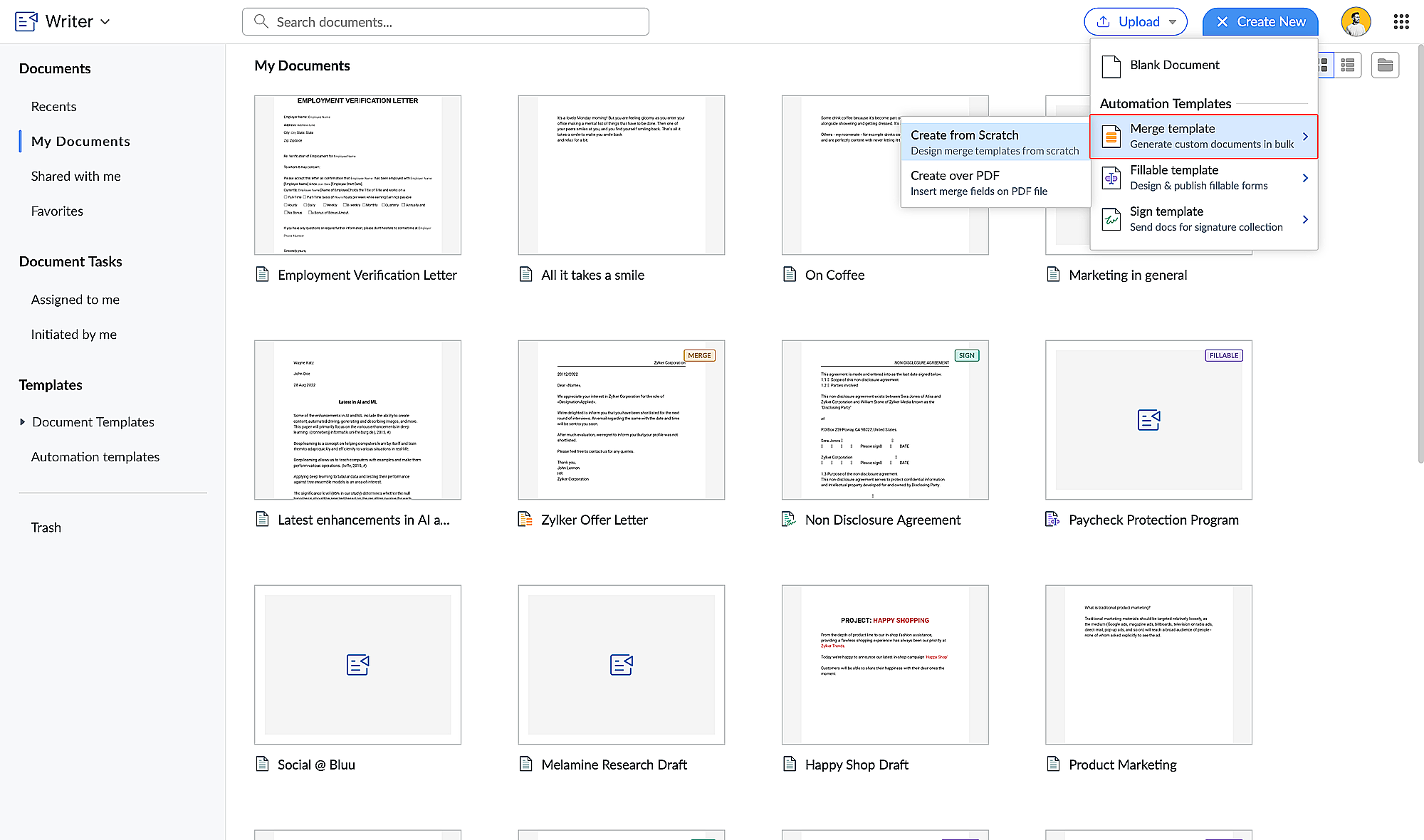
Go to writer.zoho.com and click
Create New.
-
Choose
Merge Template
under
Automation Templates
and click
Create from Scratch. Design your merge template
using these steps.
-
Click the hamburger menu on the left and click
Automate.

-
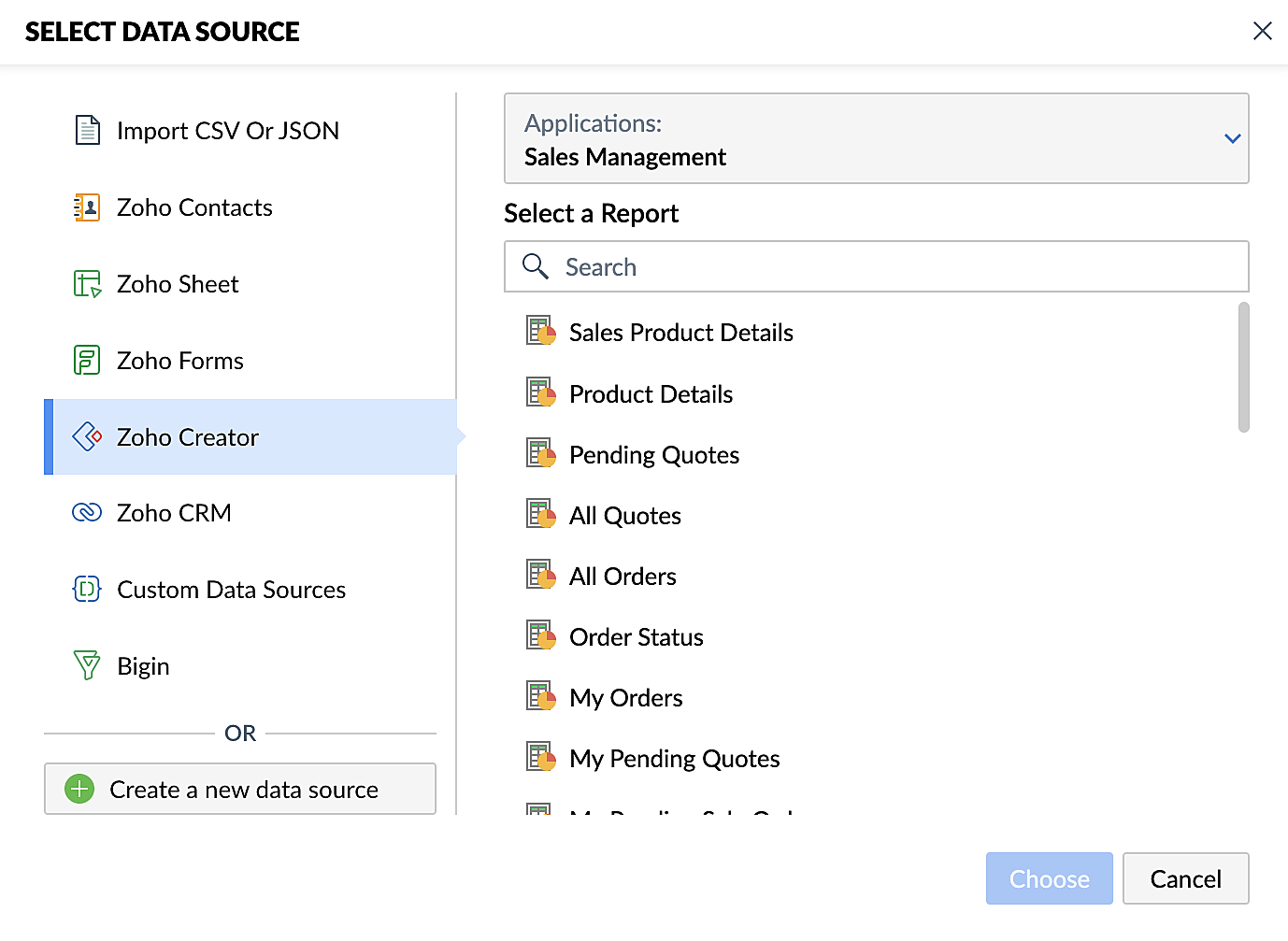
Under Select the Data Source, choose
Zoho Creator
and select your application.
-
Add the appropriate fields from your Creator application.
Click here for a detailed guide to working with fields.
Steps for creating merge documents using a Zoho Creator workflow
- Create a form in Zoho Creator with the necessary fields.
- Create a merge template in Zoho Writer using these steps.
- Create a workflow for your Creator form and choose Deluge Script as the workflow action. This allows you to perform custom functions with Writer's mail merge.
- Use the name of the connection you've added in the Deluge script to perform the function you've configured. Connections enable you to integrate cloud services via Deluge.
These enhancements make Zoho Creator and Zoho Writer an even more valuable combination for businesses looking to simplify document management. By harnessing the capabilities of both platforms, businesses can look forward to a future where document creation and data management are more efficient, secure, and user-friendly than ever before.
Also, do take a look at Zoho Writer's post regarding mail merge templates.
Feel free to test out this integration and provide your feedback by reaching out to
support@zohocreator.com or sharing your thoughts in the comments section below.
Regards,
The Zoho Creator Team
The Zoho Creator Team
Topic Participants
Ashwin Vishal R
Gordon Mankelow
User One
Damien Cregan
Rodrigo
Sticky Posts
Introducing Zoho Creator's 2025 Release Projection 2
Hello Creators! I'm Prakash, from the Creator product management team, and today I'm delighted to unveil our next set of features as part of Release Projection 2 for 2025. With thoughtful analysis and planning, we've curated powerful new capabilitiesZoho Creator - 2023 Release Projection 1
Hello everyone! A very Happy New Year to you and your family. Hope you're all good and having a great time using Zoho Creator to make your lives easier and your businesses prosper. 2022 was an action-packed year for us at Creator, and we hope to continueZoho Creator User Group meetups in a city near you! - Oct - Nov, 2023
Greetings from the Zoho Creator team! We're hosting a series of Zoho Creator meetups in various cities across the globe, and we'd love to meet you there! Our meetups are a great opportunity to network with industry peers, exchange ideas and best practices,Zoho Creator - 2023 Release Projection 2
Hello everyone! Time truly flies when you're having an incredible journey, and today we mark the completion of an eventful and action-packed six months. It feels like just yesterday when we embarked on this adventure together with the launch of our newUpcoming Updates - August 2022
Hi all, Greetings from the Zoho Creator team! Today we've got news for you on some exciting updates. And rest assured— there’s more to come! In this post, we'll be going over the upcoming features and improvements for this month as mentioned below. A
Nederlandse Hulpbronnen

Recent Topics
ZOHO FLOW - ZOHO CREATOR - ZOHO WRITER : Get Related records
Bonjour, J'ai besoin que vous m'ajoutiez la solution "Get related Records" dans la liste de choix de zoho creator (sous Zoho flow). En effet, j'ai besoin de récupérer les champs d'un sous formulaire pour l'ajouter à l'impression de mon document. MerWill zoho thrive be integrated with Zoho Books?
titleConnecting email for each department in ZohoDesk
Hi! Could someone help me to go through connecting emails for each department?How do I trigger a Flow based on a campaign response?
Is there a way to trgiider a Zoho Flow based upon a lead opening an email sent via Zoho Campaigns? I see that the data is recorded in the 'Campaigns' section of Zoho CRM under 'Member Status' and I want to trgigger a flow based upon that record changing.All Zoho Flows are filtered
My two flows operate perfectly when I run them as a test, but when they're activated each run ends with a status of neither success, nor fail, but filtered. I haven't set up any filters. I don't see where to turn off filters. When I test run on a sequenceCreating Multiple Items on Sales Order
Hi, I’m trying to automate some processes using Zoho Flow, specifically the creation of sales orders in my Zoho Inventory. However, Zoho Flow's Create Sales Order function can only add one item. I would like to include multiple items in a single salesProblem Connection from Zoho Flow and Gravity Form
I obtained my API key from Gravity Forms via WordPress. However, when I enter my Zoho Flow, it states: Gravity Forms says, 'You are not authorised to access the API." I tried recreating a new API key, but it is still not working.Eventbrite Email Field in Zoho Flow Returns "Info Requested" Instead of Actual Email
Hi Zoho team, I'm using Zoho Flow to connect Eventbrite with Zoho CRM. My goal is to automatically add event attendees as leads in Zoho CRM. I’ve set up the flow and mapped the ${trigger.profile_email}} field to the Email field in CRM. However, I'm running"Invalid value passed for Product ID" Error in Zoho Flow "Create Sales Order" Node
Hello Zoho Community, I’m facing an issue with Zoho Flow while trying to create a sales order in Zoho Inventory using the "Create Sales Order" node. Here’s a detailed explanation of my setup and the problem: What I’m Trying to Achieve I’m building anAssociating Project with an Account via Flow
I'm using flow to create a Project based on a Deal status update using flow. The fields exist to pass the Account Name through properly, but when you view the Projects module in a CRM Account Record it doesn't automatically associate the new Project RecordHow to follow up a member in a meeting?
Hello, I make weekly meeting online with a lot of people. I want(I've been using calendly to do it). I want to do a follow-up to it. I want to send messages via Zoho-flow to all the member that participated in the meeting. How can I do it?Setting Delays in Invoice Reminder Flow
I am currently working on a flow that sends reminders for unpaid invoices. The flow is designed to delay actions until specific intervals before the due date: A reminder should be sent 7 days before the due date. A second reminder should be sent 3 daysGet Sales Orders Related to Inventory Item
Dear Team, I'm just wondering if there is a way to get a list of all Sales Orders related to a specific Inventory Item. I did search all articles but couldn't find any article that could help.Endpoint Central Cloud Asset Update from Fresh Service
All, Does anyone use the asset management feature in Fresh Service? I'd like some help on building a flow to update asset attributes in Endpoint Central Cloud based off of an update to that same asset in Fresh Service. The trigger is "asset is updated"Zoho Flow Export to Deluge
It would be great to take a user built zoho flow and export the entire flow as a deluge script including having multiple connected applications (showing the API connections and webhooks) and different functionality in the other applications interactingAction Iteration/Loop using Zoho Flow
Trying to use Zoho Flow for automating following Context - A zoho form entry which has image upload field with upto 5 images setting and files are saved into Workdrive. After form is submitted need to create folder based on some fields and move filesZoho Flow - Unable to evaluate formatDate with Zoho Invoice Date Field for Calendar Integration
Hello Community, I'm trying to automate the creation of all-day events in Zoho Calendar whenever a new invoice is created in Zoho Invoice. I'm using Zoho Flow for this automation. My Goal: When an invoice is created with a specific "Event Date," I wantZoho Inventory Sales Order Items
I'm trying to build automation using Zoho Flow to add items to a Sales Order. In the automation options for both "create sales order" and "update sales order", The item ID is required. However, when I update the Sales Order, it's just replacing the itemPermissions for Azure Devops connection
I am trying to set up a connection with our Azure DevOps org but it keeps giving me this error. On Azure I should be able to have admin-level access to everything. Can you please point me to which permission this is checking for so I can enable it?Best way to start zoho inventory with bulk openning stock
We are already using zoho book since long time for cars trading company. Now to streamline more, would like to import the excel data of closing stock of inventory to zoho inventory and to start on. Since we need to track each VIN (unique vehicle id number)My IMAP mail suddenly stopped working
On my iPhone and iPad, IMAP stopped working for my Zoho account with the error "User name or password incorrect" and "Invalid credentials failure" however I was able to access via web with the same credentials. Also stopped working on Apple Mail client.Confused by the distiction between matched and categorized when reconciling a bank statement an how to
I used to use quickbooks. In quickbooks, it was possible to use the check writing feature to add an expense that was on the bank statement that did not go through the AP and check writing process. I would write a check, assign it a number like etf (forNot Receiving OTP • https://voters.eci.gov.in/home/family
Hello Customer, Greetings from Zoho Mail. Upon a detailed review of our delivery logs, we can confirm that other Zoho Mail users are successfully receiving OTP emails from eci.gov.in. However, in your specific case, it appears that the OTP emails areWorkDrive for Excel Add on
Dear Sir/Madam Have installed Workdrive for Microsoft add on But unable to view the same added in ExcelZoho Calendar s’enrichit avec une intégration à Zoho People et Zoho Cliq
Les journées de travail ne se déroulent jamais exactement comme prévu. Une conversation informelle devient une séance d’échange d'idées, une absence modifie un planning, et votre agenda se retrouve vite décalé par rapport à la réalité. Chez Zoho Calendar,Holidays
Hi; For defining Holidays, you need to add logic to handle the year as well as the month & day. We need to be able to enter Holidays for the next year. I need to add a holiday for January 2, 2017, but I can't until January 1st, which is a Sunday and weZoho public comments are confusing and unnecessary
Hi, we use zoho desk and have issues with public comments. We started using them because the "Reply" option just seemed very clumsy because of the following reasons: - the top "Reply" button starts what seems to be a regular email, showing the entireIntroducing parent-child ticketing in Zoho Desk [Early access]
Hello Zoho Desk users! We have introduced the parent-child ticketing system to help customer service teams ensure efficient resolution of issues involving multiple, related tickets. You can now combine repetitive and interconnected tickets into parent-childZoho API - ticket creation - Validation failed for the condition : Ticket Status Info should not be empty
Hi ! I'm trying to create ticket through Zoho API, and I'm getting a 422 response : "Validation failed for the condition : Ticket Status Info should not be empty" My request looks like this : curl --location 'https://desk.zoho.eu/api/v1/tickets' \ --headerDeleting unwanted ticket replies
Hello, In a Zoho Desk Ticket thread, sometimes one of the recipients has auto-reply activated. This creates a new message in the Ticket thread that not only pollutes the thread, but most importantly cannot be replied properly because usually auto-reply e-mails don't do "reply all", so the other recipients are not included. I want to delete such a message in the Ticket thread. I searched the help of Zoho Desk, but only found a way to mark as Spam (https://help.zoho.com/portal/kb/articles/marking-support-tickets-as-spam)Desk DMARC forwarding failure for some senders
I am not receiving important emails into Desk, because of DMARC errors. Here's what's happening: 1. email is sent from customer e.g. john@doe.com, to my email address, e.g info@acme.com 2. email is delivered successfully to info@acme.com (a shared inboxSystem-generated support email added in CC on “Reply All”
Hi, I recently set up Zoho Desk for a client and we are trying to prevent the Zoho Desk system-generated support email address (not the mailbox used as the department’s "From address") from being automatically added in CC when agents use “Reply All” onApplying Excess Payments & Conflict Invoices Due to Cancelled Items
I’m running into several issues that appear to stem from deeper-than-expected overlap between Zoho Finance (Books/Inventory) and Zoho POS. The level of coupling between these systems seems greater than what was originally communicated, and it’s leadingPlease, make writer into a content creation tool
I'm tired of relying on Google Docs. I'm actually considering moving to ClickUp, but if Writer were a good content creation tool instead of just a word processor, I would finally be able to move all my development within the Zoho ecosystem, rather thanZoho Sheet - Desktop App or Offline
Since Zoho Docs is now available as a desktop app and offline, when is a realistic ETA for Sheet to have the same functionality?I am surprised this was not laucned at the same time as Docs.Convenience Fees
I use Zoho Invoice for invoicing my billboard customers. I have a few customers that want to pay using credit cards and ACH. As a result, I have integrated an Online Payment Gateway (Stripe) for these customers. I currently charge these customers a "Convenience Fee" of 3% for using this service as I typically only take checks as payment (and the gateway charges 2.9% + $0.30 per transaction). I do this by creating a separate line item on the invoice and adding 3% to it. I would like to offerHTML Tags added to Reports with Notes
Recently Zoho added the ability to markup text within notes. That way, users can change font size, colors, etc. It's a great change. However, since the change, reports that include a column for "Note Content" are printing HTML tags within the report.New Feature: Audit Log in Zoho Bookings
Greetings from the Zoho Bookings team! We’re excited to introduce Audit Log, a new feature designed to help you track all key actions related to your appointments. With Audit Log, you can maintain transparency, strengthen security, and ensure accountability.Bill automation in Zoho Books
Hi I am looking for 3rd-party options for bill automation in zoho which are economical and preferably have accurate scanning. What options do I have? Zoho's native scanning is a bit priceyRestrict Payment Methods
Allow us to restrict certain payment methods specific for each customer.Next Page