What's New - August 2025 | Zoho Backstage
Every month, Zoho Backstage grows with you. These updates aren't just features and fixes, they're about making your workday smoother, your events more impactful, and your attendees happier. We’ve listened, learned, and shaped this release to keep things simple where they can be, powerful where they should be, and thoughtful all the way through. Think of it as a mini renovation where the walls stay up, but the lights shine brighter, the doors swing easier, and your coffee somehow refills itself. Let’s take a look at what’s new and enhanced this August.
Session registration
Turn your agenda into a choose-your-own adventure.
We’re excited to announce the arrival of session registration in Zoho Backstage. This feature gives event organizers more control over premium content, attendee scheduling, and capacity management while creating a more personalized experience for participants.
With session registration, organizers can monetize high-value content such as workshops, masterclasses, and sessions featuring high-profile speakers. Attendees can pre-select the sessions they want to attend, helping them build structured schedules that suit their interests. On the organizer’s side, this avoids overcrowding by enforcing capacity limits and provides valuable insights into which sessions generate the most demand for future planning.

How it works:
- Session registration can be enabled from the Manage > Agenda screen. Once configured and republished, sessions will appear on the event website with registration options.
- When attendees register for the event, they can now select tickets, choose sessions, provide attendee details, associate attendees with specific sessions, and complete their payments in a single flow.
- After logging in, registered sessions appear under a new Your Sessions tab, while order-level details are available in Your Orders. If a session is canceled, attendees will see the update under Cancel and Refund History.
- Even after ticket purchase, ticket holders can log into the event website, go to Agenda > Register, and sign up for sessions later. Please note that, in this release, purchasers can't register sessions on behalf of other ticket holders.
Event organizers will find new tools to manage and track session registrations:
- Session Registration tab: Displays a list of all registered attendees, with options to filter by track, sort by details, and manage visible columns such as session name, track, date, time, and attendee count.
- Register New Attendee: Organizers can register attendees directly from the Session Registration tab or from each session’s View Attendees section. Here, they can export data, apply filters like ticket class or check-in status, and customize visible columns.
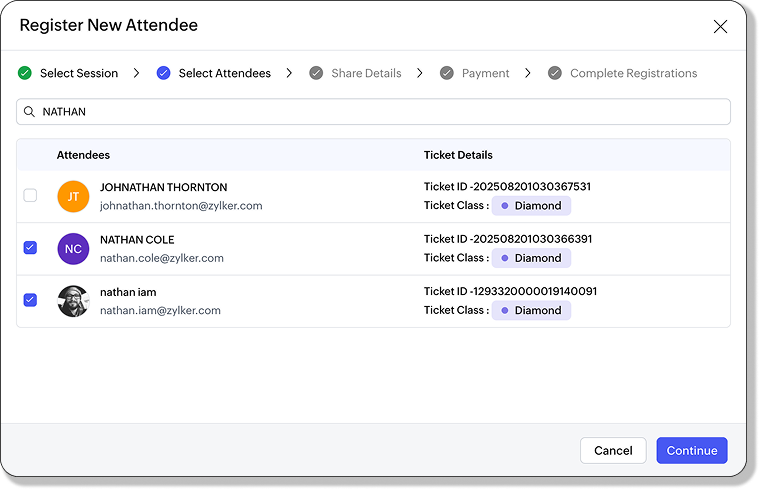
- Session Check-In: Supports both free and paid sessions. Organizers can register and check in attendees directly, even if they haven't registered in advance, through the Yet to Register section under Session Check-In.
After registration, attendees receive session details by email, similar to ticket confirmations. Email notifications also cover session cancelations. Within the Order Details tab, session information is listed alongside tickets, with cancelations and refunds captured in the Cancel & Refund History pane.

Plan availability: Available across all plans. Paid sessions are supported starting from Essentials and above.
Ticket grouping
Because tickets deserve a family tree too.
We’re adding more clarity and flexibility to how tickets are managed in Zoho Backstage with the introduction of ticket class grouping. This feature allows organizers to organize different ticket types into groups, making it easier to present a structured and intuitive registration flow for attendees.
Ticket classes such as General Admission, VIP, Free, Investor, or Partner passes can now be grouped together in a way that highlights their distinctions while still keeping the registration process simple. This helps attendees quickly understand the differences between options and choose tickets that best match their preferences, budget, or privileges.

How it works:
- Navigate to Registrations > Ticket Class > Add Ticket Group. Create a new group and assign ticket classes to it.
- Once created, groups can be edited at any time to add or remove ticket classes. If you need to rearrange, simply use the "Move to" option or drag and drop ticket classes within or across groups. If a group is deleted, only the group itself is removed, while the ticket classes remain available and appear as ungrouped.
This update gives organizers flexibility to design their ticketing structure around audience segments, ensuring clarity during registration while keeping the backend easy to manage.
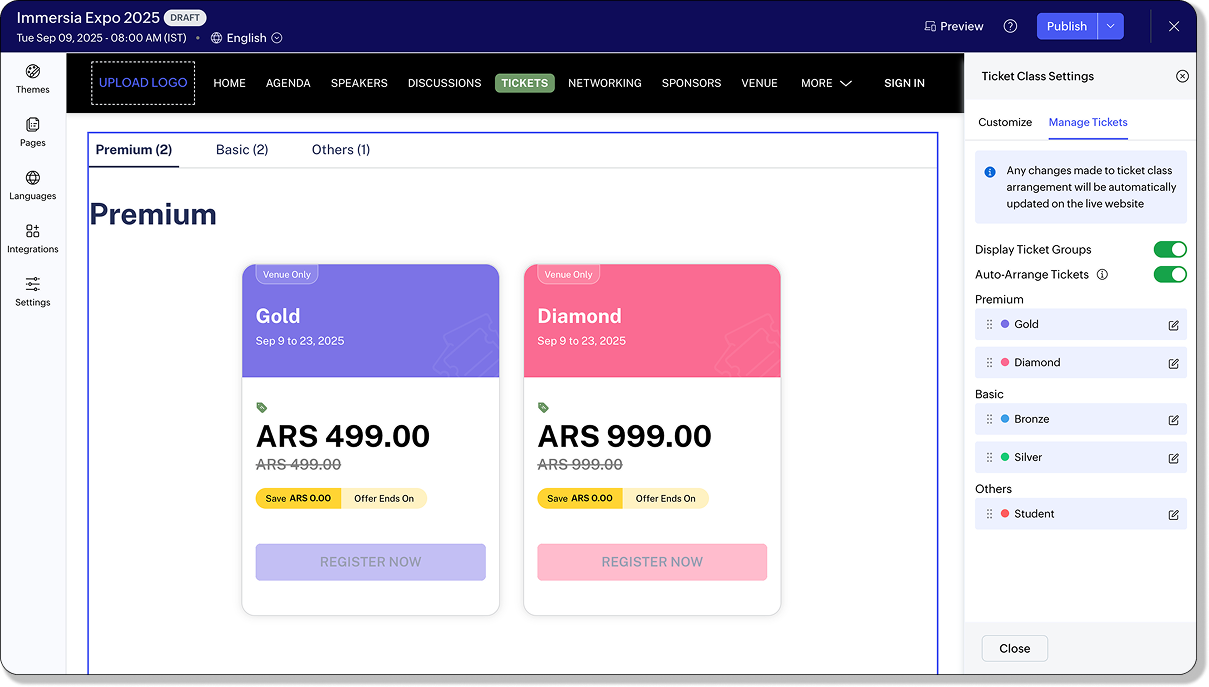
On the event website, tickets are displayed in their grouped structure by default, giving attendees a clear view of available options. Organizers can choose to disable this grouped display from the website builder if they prefer a simpler layout. Any ungrouped ticket classes are automatically displayed under an “Others” section, ensuring no ticket is left out. The grouped view is consistently shown across the Tickets page, the Select Tickets screen, and even when adding an order from the Orders tab.
By grouping ticket classes, event organizers can create a clearer, more organized registration experience that benefits both their team and their attendees.
Plan availability: Included in the Free, Essentials, Premium, and Ultimate plans.
Assign primary contacts for custom forms
No more “Who’s handling this?” moments.
Managing form responses just got a whole lot easier. With this update, Zoho Backstage now lets you assign a primary contact for each custom form. That means every submission reaches the right person without extra forwarding or missed follow-ups.

How it works:
- Navigate to Communicate > Preferences > Primary Contact > Module-Specific Primary Contact > Assign Primary Contact.
- Or, head to Manage > Custom Forms > Edit > Form Builder and set the contact directly from there.
- If you ever need to make a change, simply click Change, and you’ll be redirected back to the Primary Contact settings under Communicate. From there, you can update your configuration without any hassle.
Once a primary contact is set, every response submitted through your event website will trigger an email notification to the designated person. This means no more delayed follow-ups or confusion over who’s responsible for handling incoming submissions. Communication becomes more streamlined, and accountability is always clear.
The benefit of this update is simple: by assigning primary contacts, you ensure that form responses never slip through the cracks. The right people receive the right submissions, ownership is straightforward, and your team can manage event communications with greater confidence.
This enhancement is now available across all plans that support custom forms.
Plan availability: Included in the Premium and Ultimate plans.
Enhancements
A new look for order management in Zoho Backstage
Orders, organized!
The Orders tab in the Registration module has been reimagined. What was once a simple list of purchases is now a full-featured workspace where organizers can view, edit, and act on orders with far more control than before.

At the heart of the update is a redesigned Order Details view. Each order is now broken down into clear sections: Order Information, Purchaser Details, and Order Summary. This structure helps organizers quickly locate the information they need without extra effort. Attendees and session registrations are also displayed in separate panels, making it clear who is associated with each order.
If something needs to be updated, the new Edit Order pane lets organizers adjust purchaser information and access billing addresses quickly. For offline orders, payments can now be marked manually as paid or unpaid, with fields for payment mode, transaction ID, and notes.
From the More Actions menu, every order now comes with tools to:
- Resend order emails
- Edit purchaser information
- Cancel or refund orders (with adjustable fees and refund amounts)
- Check purchaser email history
- Track order activity in real time
This means fewer steps, less switching between screens, and a faster workflow for managing registrations.
Events can generate thousands of orders, and keeping them organized is now easier than ever. The Orders tab includes advanced filters for order status, type, payment method, payment mode, and source. Sorting by purchaser name, order ID, or date/time makes it simple to surface the right records. And with 18 column headers to choose from, organizers can design their own view of the data, showing only what matters most.
This release doesn’t just improve the present—it also prepares for what’s ahead.
Plan availability: Included in the Free, Essentials, Premium, and Ultimate plans.
Exhibitor categories made better
Give your categories a glow-up.
We’ve upgraded your exhibitor category setup and management in Zoho Backstage. The new design gives you a cleaner interface, more flexibility, and better visibility controls.
With this release, categories are now more customizable. Organizers can group and organize benefits within each category, assign distinct colors for easy identification, and use visibility toggles to decide what's shown. Flexible display options allow each event setup to match its specific requirements, ensuring categories are both functional and clear.
The new creation and management screens make it easier to move between categories and their associated benefits. Benefits can be enabled or disabled whenever required, and their availability, counts, and status are presented in a structured way. This gives organizers a complete view of what's currently active in each category.
Categories can also be linked directly to exhibitor or sponsor packages so that reserved benefits are applied consistently. Assigning unique colors to categories adds another layer of clarity, making it simpler to manage and distinguish them.

On the website, organizers can now decide how categories are displayed to attendees. Categories may be shown or hidden, and exhibitor listings can appear in either a card view or a table view, depending on the style that best suits the event.
To start using it:
- Navigate to Exhibitors > Exhibitor Categories, or configure the display preferences in Design > Website.
With Exhibitor Categories V2, organizers gain more control over how exhibitors are managed and presented, while attendees receive a clearer and more organized view of event participants.
Plan availability: Included in the Essentials, Premium, and Ultimate plans.
New withdrawal flow in Registration Approval
Sometimes “no thanks” deserves its own button.
Event registration just got more flexible. We’ve added a new Withdrawn status to make the ticket request process smoother for both attendees and organizers. From now on, attendees who no longer wish to attend can simply withdraw their registration requests directly from the event website. These requests will be neatly recorded in the system and can be found under the Canceled filter in the Registration Approval tab.
On the website, attendees will see their request clearly marked as Withdrawn, ensuring there’s no confusion about whether their registration is still pending. For event organizers, this new status provides better visibility by separating attendee-initiated withdrawals from organizer-declined requests. This way, you’ll always know which cancelations were voluntary and which were rejected during approval.

To help you stay on top of your workflow, the Registration Approval tab now follows a simple guide. Pending requests are those awaiting review, approved requests are the ones you have confirmed, rejected requests are those you have declined, and withdrawn requests are those attendees have chosen to cancel themselves.
This update not only simplifies your approval process but also gives attendees more control over their registrations, making the overall experience clearer, more transparent, and easier to manage for everyone involved.
Plan availability: Included in the Free, Essentials, Premium, and Ultimate plans.
More flexibility with Transaction ID requests
Ask for details only when you really need them.
We’ve introduced a new level of flexibility to how transaction details are collected during ticket registration. Event organizers can now choose whether to display the Transaction ID pop-up when attendees select an offline payment option.
By default, the Transaction ID request will appear for Bank Transfer, Check, and Other payment modes, ensuring that important reference details are collected upfront. However, if you prefer not to request these details, you now have the option to disable it with a simple setting change. On the other hand, for Pay at Venue, the Transaction ID request will remain disabled by default, but you can easily enable it if your workflow requires attendees to provide transaction details in advance.

To keep things transparent, any changes you make to the offline payment settings will be automatically recorded in the activity logs. This gives you a reliable trail of updates and ensures accountability across your event management team.
With this enhancement, you have greater control over how payments are managed, offering both convenience and flexibility for your attendees while keeping your processes streamlined.
Plan availability: Included in the Essentials, Premium, and Ultimate plans
Other updates
New UI in Marketing Plus
A refreshed Zoho Backstage interface has been introduced in the Marketing Plus and CRM Plus bundles. The updated design improves navigation, creates consistency across modules, and helps organizers manage events with greater clarity and ease.
New themes: Velvet and Neo Noir
The Velvet and Neo Noir themes has been added to the website, giving organizers a bold and stylish option to match event branding. These modern designs introduce a darker palette with sleek layouts for professional-looking event pages.
New session card layout
A third layout style has been released for session cards under Design > Website settings. Organizers can select from multiple layouts to better highlight speakers, timings, or details, creating an agenda design tailored to their event.
Publish events without a location
Events can now be published without requiring a location to be entered, giving organizers more flexibility when setting up offline or hybrid events. This change makes publishing faster while accommodating events that may not need a physical address.
Schedule Demo option for Trial plans
Trial plan users are given the option to schedule a demo directly from their account. This addition makes it easier for new users to explore features, understand workflows, and receive guided assistance before moving to a paid plan.
Host parallel sessions
The restriction limiting organizers to a single active session has been lifted. Organizers gain more flexibility to test, manage, and run multiple tracks or parallel sessions without interruption, making event operations more efficient.
That’s everything we have for this month. Every improvement comes from your feedback, ideas, and support. Thank you for being part of this journey and for trusting Backstage to power your events. We'll be back soon with more updates. Until then, here’s to smoother planning, stronger connections, and events that leave lasting memories.
All the features and enhancements mentioned in this article are available across all Zoho Backstage-supported data centers.
For additional assistance or questions regarding these new features, contact support@zohobackstage.com. Stay tuned for continued updates designed to enhance your event management capabilities.
Topic Participants
Jithan Raghuraj
Nederlandse Hulpbronnen

Recent Topics
Ability to assign Invoice Ownership through Deluge in FSM
Hi, As part of our process, when a service appointment is completed, we automated the creation of the invoice based on a specific business logic using Deluge. When we do that, the "Owner" of the invoice in Zoho FSM is defaulted to the SuperAdmin. ThisAll new Address Field in Zoho CRM: maintain structured and accurate address inputs
Availability Update: 29 September 2025: It's currently available for all new sign-ups and for existing Zoho CRM orgs which are in the Professional edition exclusively for IN DC users. 2 March 2026: Available to users in all DCs except US and EU DC. LatestEnhancement to ICR’s field prompting: Preferred data extraction using advanced field prompting
Dear Customers, We hope you’re well A quick background Intelligent Character Recognition (ICR) comes as part of Zia’s optical recognition capability called Zia Vision. When we introduced it last April, the data extraction was training-based and was applicableSee a list of all records enrolled in a cadence?
I am looking for a way to see a list of all leads or contact currently enrolled in a cadence. I do not see any way to do this through the cadence UI.Limitation in chart of accounts
There is a limitation of 4000 accounts in chart of accounts Zoho needs to remove this limitHow do I change the account bank charges are charged to?
I want bank charges charged to my Credit Card Fees account. Is there a way to do this?Real signature in Zoho Expense PDF report ?
Hello ! Is there a way to put a real signature on the signature line when a PDF report is generated in Zoho Expense? Through Zoho Sign or another way? Can't seem to make it work.Copy paste settings
Hello all i have 2 organizations running in ZOHO books in one organization i have customised Tax rates, codes and customized templates instead of manually doing again in org 2 can i have some shortcut to copy paste or export and import??Custom TDS on Vendor Credits via API
Hi, We are using Zoho Books APIs for posting Bills and vendor credits. We are unable to post custom TDS amount posting vendor credits. Can you please share the API spec and Payload that need to be sent for Custom TDS for Vendor Credits."Unlink" Advance from Bill without Deleting the Payment Record
I am writing to highlight a significant workflow issue in Zoho Books (India Edition) regarding Vendor Advances and Bills. The Scenario: I recorded an Advance Payment to a vendor. I matched/reconciled this payment in the Banking module. I received a BillAdvance Payment Record Removed When Deleting Applied Credit from Bill
Hello, So while working with vendor advance payments, I noticed that removing the applied credit from a bill also removes the corresponding entry from the Payments Made section. What I did : Recorded an advance payment to a vendor through Payments Made.What is the best way to convert MSG file to Word format?
The best way to convert MSG files to Word format is by using a reliable and professional tool Aryson MSG file Converter. Manual methods are often time-consuming and may not preserve email formatting, attachments, or metadata accurately. In contrast, ArysonAddress Typeahead Extension for Zoho Books
I installed the Address Typeahead extension for zoho books but when I went to configure it, it said that that version was deprecated. Is there a newer version somewhere?Zoho Projects : Task should auto-update to 'In Progress' if timer started
Namaskaram. Right now, if a Task's timer is started, the Task stays in 'Not Started' status. One has to manually update it to 'In Progress'. From a #uxdesign standpoint, it is an unnecessarily two step process to start working on a task. It would be better that, if I start the timer on a task, it should automatically change to 'In Progress' status. Crafted with ❤️ Zoho Gurus | Zoho One Practice Team @ CubeYogi Zoho Authorised Partner | 7+ Yrs | 200+ Projects | 100+ CustomersInvoice template with sales tax totals
Hi everyone, I am trying to edit my invoice template so that only the total sales tax collected for my tax group shows up. Right now, under by sub total, each individual tax shows up and that takes up a lot of unnessary space, so I just want the oneZoho Delayed Posting & Loss of Article Thumbnails on BlueSky
Hello! I am wondering if anyone else has had the either of the following issues when posting to socials via Zoho and if there is a fix? 1. Post says it is scheduled or it is live when sent off via Zoho but it doesn't show up on socials till some timeConnection Not Secure (Certificate Mismatch) Error
Hi, Just a fyi, when you go to https://bigin.zohocloud.ca/bigin/Home you get a "Your Connection Is Not private" error. (Certificate mismatch to domain.) I get to that page after I have signed up and signed in as a customer and select the Access BiginRecording the Investment
Hello, - One Investor Invested to our company, So how do we record investment which we received in our bank in the Zoho books ? - How do we record if we provide shares to the investor in the Zoho books? ThanksExport Invoices to XML file
Namaste! ZOHO suite of Apps is awesome and we as Partner, would like to use and implement the app´s from the Financial suite like ZOHO Invoice, but, in Portugal, we can only use certified Invoice Software and for this reason, we need to develop/customize on top of ZOHO Invoice to create an XML file with specific information and after this, go to the government and certified the software. As soon as we have for example, ZOHO CRM integrated with ZOHO Invoice up and running, our business opportunitiesClient and Vendor portal at the same time
We have companies that serve both as clients and vendors and they are linked. However, we have a problem giving them access to the vendor/client portal. If they accept the invitation from the client portal, when we try to invite them to the vendor portalIntegrate Multiple ZohoBooks organization with zoho projects
We have successfully connected our Zoho Books with Zoho Projects for synronizing timesheet data. Our Business specialty is, that the staff of the Main company (A) is working on several projects, but the Clients are sometimes contracted and paying to aWays to calculate the difference form two years or months
Hi to everyone I have this request: I need to show the difference or variation from two periods (years or months) whether using a Pivot View or a graph, in this is case is better in a Pivot view. In the pivot view I will have the amount or results fromCareer site URL - Suggestion to modify URL of non-english job posting
Hi, I would like to suggest making a few modification to career sites that are not in english. Currently, the URL are a mix of different languages and are very long. It makes for very unprofessional looking URLs... Here is an example of one of our URLCliq iOS can't see shared screen
Hello, I had this morning a video call with a colleague. She is using Cliq Desktop MacOS and wanted to share her screen with me. I'm on iPad. I noticed, while she shared her screen, I could only see her video, but not the shared screen... Does Cliq iOS is able to display shared screen, or is it somewhere else to be found ? RegardsIntroducing Contract Settings & Backdated Contracts in Zoho Contracts
We are rolling out updates that give you more control over how contracts are created and managed in Zoho Contracts. From defining default workflows with Contract Settings to aligning agreements with real timelines using Backdated Contracts, these enhancementsCelebrating our customers on International Client's Day
Hi everyone, Every customer is part of our Zoho Desk family, and we wouldn’t want to miss celebrating you on this special day. This International Client's Day, we’d like to take a moment to appreciate every customer who has helped us grow and build meaningfulZoho Books | Product updates | February 2026
Hello users, We’ve rolled out new features and enhancements in Zoho Books. From Advanced Reporting Tags to the ability to mark projects as completed, explore the latest updates designed to improve your bookkeeping experience. Introducing Advanced ReportingFaster Ticket Response with use of Snippets in comments
Hello everyone, Responding to tickets often involves repeating the same messages, whether it is sharing updates with customers or leaving notes for internal collaboration. To make this easier and more consistent, we are allowing agents to use snippetsImproving Zoho Creator's email deliverability
Hi all, We're pleased to announce updates to email handling in Zoho Creator to improve the deliverability of the emails sent from the Creator platform. These updates have been designed keeping in mind the fact that emails from domains with strong senderWhat's New in Zoho Billing | February 2026
February brings a powerful set of updates to Zoho Billing, from smarter subscription management and flexible payment options to better reporting and more control over your hosted pages. Here's everything that's new this February. Create SubscriptionsReassign Partially Saved Entries
Hi, I would like to be able to go to Partially Saved Entries and like the option to delete them I would like the option to multi-select and be able to reassign them to another user to complete (Such as when a user has left the company). Thanks DanCan we rely on order of returned ids when inserting multiple records?
Hello! API https://www.zoho.com/crm/developer/docs/api/v8/insert-records.html does not mention that the response array will match the input array*, keeping this important information implicit and someone might have doubts to rely on it. (*the responseDisplaying only unread tickets in ticket view
Hello, I was wondering if someone might be able to help me with this one. We use filters to display our ticket list, typically using a saved filter which displays the tickets which are overdue or due today. What I'd really like is another filter thatWhat is a realistic turnaround time for account review for ZeptoMail?
On signing up it said 2-3 business days. I am on business-day 6 and have had zero contact of any kind. No follow-up questions, no approval or decline. Attempts to "leave a message" or use the "Contact Us" form have just vanished without a trace. It stillZoho Books: tax is not automatically pulled from product-data anymore - why?
Hi, until a short time ago, you could set a default taxrate for each product/item. This taxrate automatically appeared each time the item was chosen in an invoice or quote. Why does this not work anymore? The field is still there at the product record,Issue creating a YTD report with last years numbers
I am looking to create a widget to compare the YTD leads we have in 2023 to the YTD leads we had in 2022. I'm having issues with the aggregate formula creation to gain access to the 2022 Leads YTD data point. Feeling like this is a common view of dataBrand Studio Projects in Analytics
Hi All, Currently pulling my hair out over trying to link together some social media posts for a reporting dashboard in Analytics, so I thought I'd see if anyone on here had a solution. Our Marketing Team created a LinkedIn campaign in Zoho Brand Studio,Manage Testing Process in Zoho Sprints
Agile framework supports a robust quality assurance system that incorporates continuous testing throughout the development lifecycle of the product. The agile testing team focuses on planning the testing around the development, identifying defects earlyAnnouncing the Zohotshots of the ZDC Hackathon 2025
Hey everyone, The wait is finally over! After weeks of building, experimenting, and pushing creative boundaries, we’re excited to announce the winners of the second edition of the ZDC Hackathon. This edition brought together an incredible community ofZOHO CRM Button Integration
Hi Team, I’m currently working with Zoho CRM along with a custom application where I fetch deal details from the CRM and use them based on my requirements for each deal. Now, I want to enhance this setup. I plan to create a button on the Deal Detail pageNext Page