What's New in Zoho Payroll 2022 (India)
We are thrilled to bring you all the updates that we were working on over the past months. We have enhanced Zoho Payroll to be intuitive and easy to use so that both employers and employees have a great payroll experience. Here are the significant updates we've brought to Zoho Payroll:
HSBC Direct Deposit
HSBC Direct Deposit
If your organisation has an HSBC corporate account, you can now directly integrate it with Zoho Payroll and deposit salaries directly into your employee bank accounts.
Once you approve the pay run for a particular period, you can initiate the salary payment via HSBC. After the payment is authorized, salaries are transferred to employees immediately. Learn More
Note: NEFT will be the default payment mode for the payments initiated from Zoho Payroll using the HSBC integration. If payments are initiated during non-business hours, the payments will be processed only on the next business day.
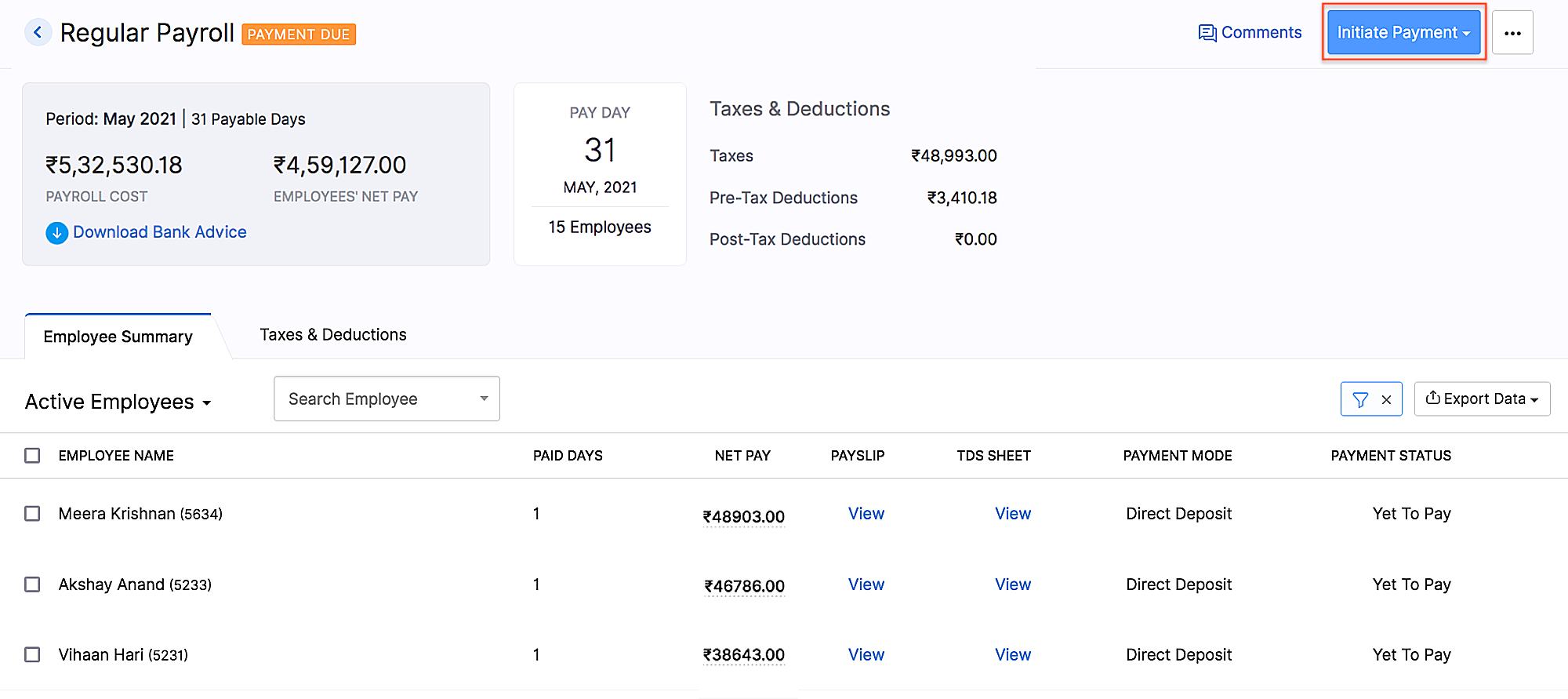 HSBC integration
Add Non-Employee as Tax Deductor
You can now add a person who is not your employee, such as a third-party accountant or auditor, as a Tax Deductor in Zoho Payroll. The tax deductor will be responsible for remitting your tax to the government. Additionally, you will have to provide details such as the Deductor's name and designation.
To add the tax deductor, go to Settings > Taxes > Select Non-Employee as Tax Deductor.
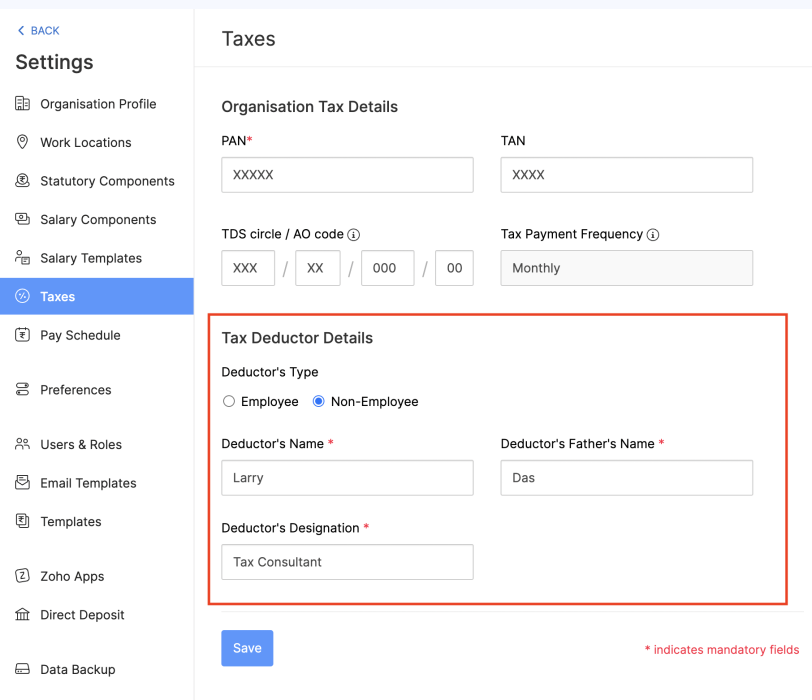 Adding Non-Employee as Tax Deductor
User Permissions for Approvals
Configure permissions such that only users who belong to roles that have approval permissions will be able to access those related modules.
To configure user permissions for approval: Go to Settings > Users & Roles > New Role. Next, select the modules and the level of access you want to provide for the role.
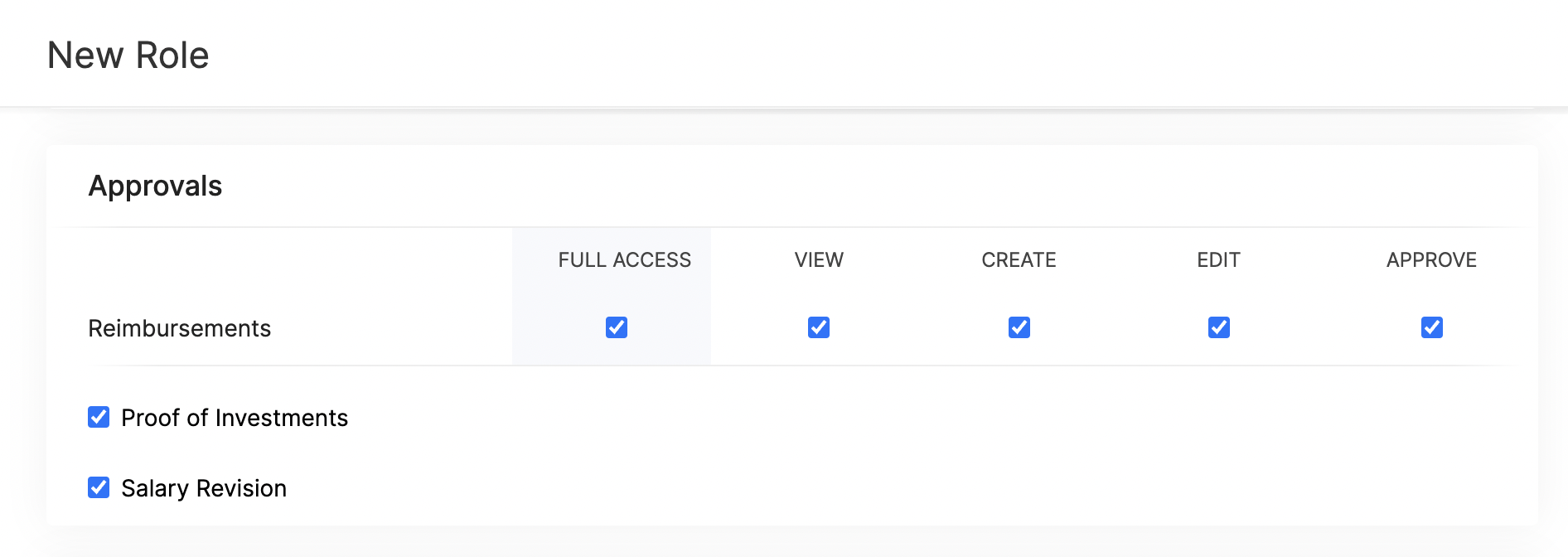 Approval User Permissions
Updates Related to Proof of Investments
- Filter employees who are yet to submit their Proof of Investments. Once you filter the employees, you can also export them in XLS, XLSX, and CSV formats.
- If you want to remind your employees to submit their Proof of Investments, you can now send them a system-generated email reminder.
- Previously, once admins configured the tax regime, they would not have been able to change it. Admins can now switch between the old and new tax regimes while recording the IT declarations and Proof of Investments, provided you've configured preferences to change regimes.
- You can mandate employees to upload attachments while submitting their Proof of Investments.
- In addition to uploading Proof of Investments in other formats, you can also upload .zip files.
New Form 24Q Format
The Central Board of Direct Taxes (CBDT) has introduced a new Format for Form 24Q. Zoho Payroll now supports the new format and the text files will be generated automatically in the new format.
Unique Identifiers for Loans
When you record a loan, Zoho Payroll will automatically assign a unique number to the loan. This number will help you to search and find a particular loan quickly.
If you are importing loans, loan numbers are mandatory. So, ensure the files you upload have loan numbers in them. If the imported loan numbers match the existing loans in Zoho Payroll, the existing loan will be updated with the imported details.
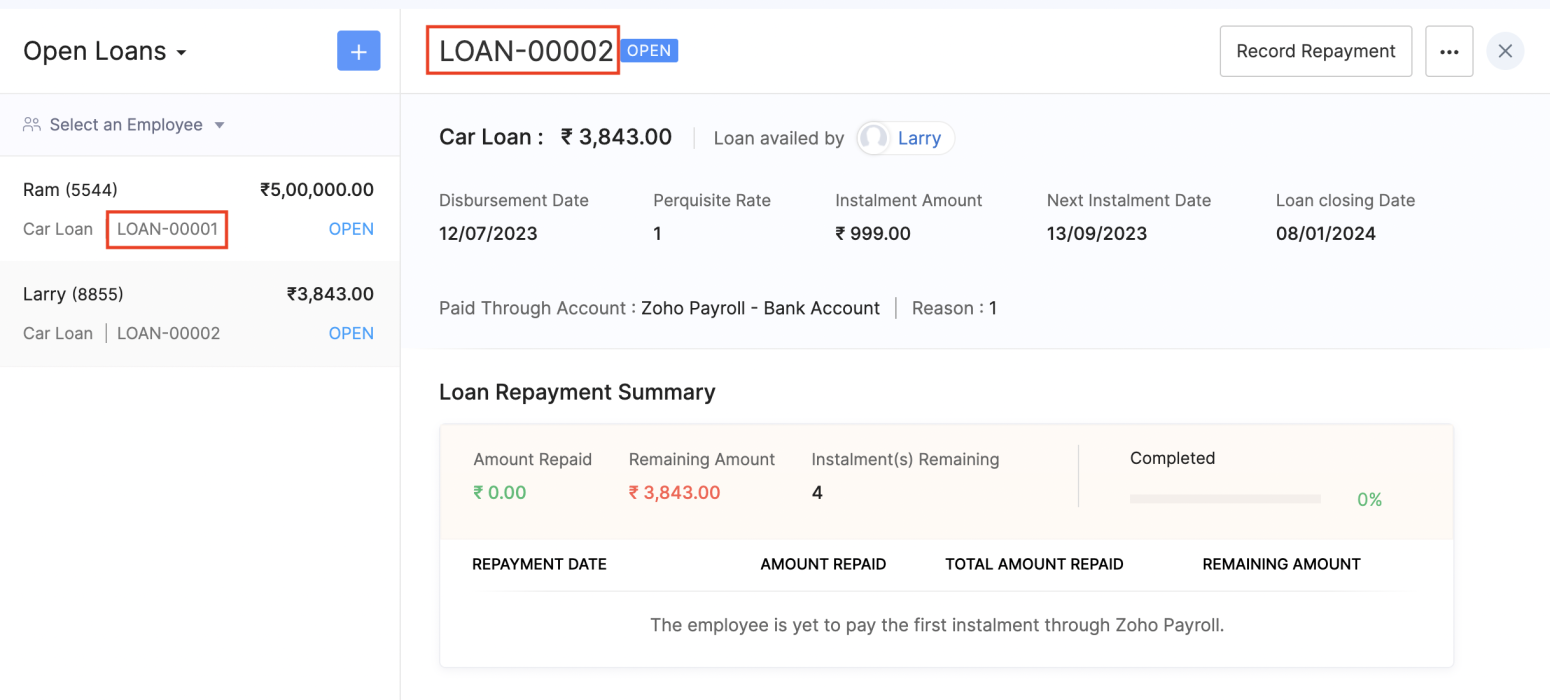 Unique Identifier for Loans
View Vehicle and Driver Perquisites
You can view the vehicle and driver perquisites in the Perquisite section of an employee's Salary Details. In this section, you will be able to view the vehicle and driver perquisite that will be added to payroll every month.
To view vehicle and driver expenses, go to Employee > Salary Details > Perquisites.
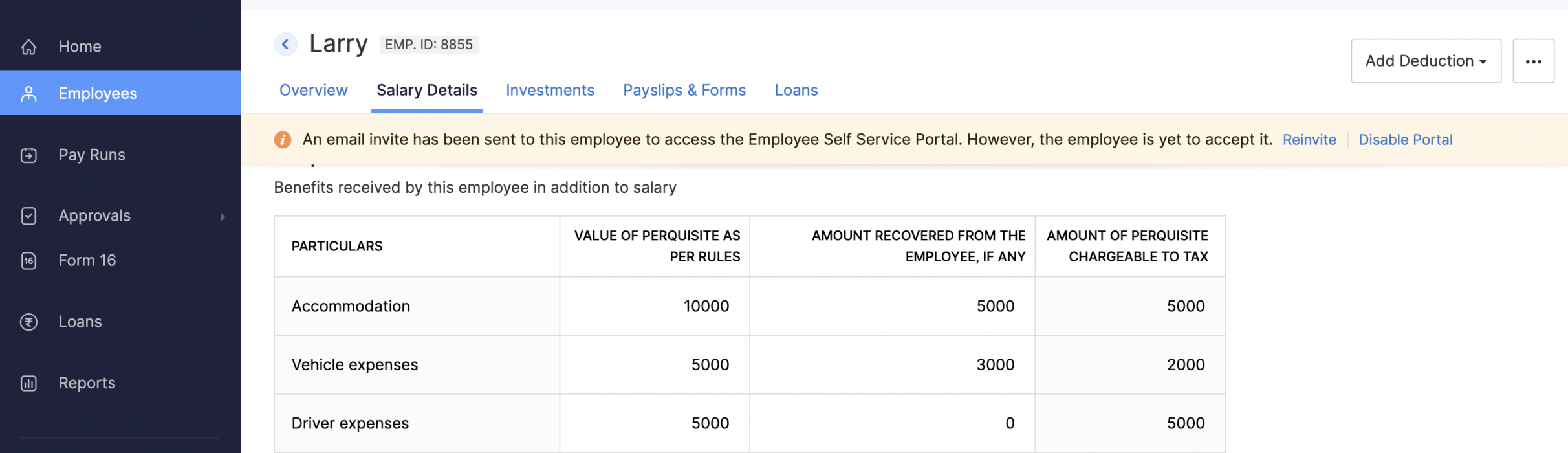 Viewing Vehicle and Driver Perquisites
Updates to Reports
We've added three new reports: the FBP Declaration Report, Investment Declaration Report, and Proof of Investment Report. These reports will help you view employees' declaration and investment details.
- FBP Declaration Report: This report lists the employees who have declared their FBPs. The report also provides the earnings and reimbursement details. You can view the report from any particular date.
- Investment Declaration Report: This report lists the employees who have declared their investments. Additional details such as the Total Chapter VI-A amount, total allowance and HRA income amount, and total Direct Tax amount will also be listed in this report. You can view the report from any particular date.
- Proof of Investment Report: This report lists the employees who have submitted their proof of investments. You can view the report for any given financial year.
Employee Portal Updates
We've made some changes and rearrangements and introduced new modules to enhance your employee portal experience.
- We've now introduced the Documents module in the left sidebar, where your employees can view and download their pay slips and Form 16.
- Your employees can view notifications when Flexible Benefit Plan, Reimbursement Claims, Income Tax Declarations and Proof Of Investments are released or locked and when pay slips are released.
- View the preview of reimbursement when you upload it.
- Employees can now view TDS worksheet and Pay Slip details such as Earnings and Deductions.
- Employees can now add claims for their bills from the home page of the employee portal.
- If you have any queries related to Section 80DDB, you can use the Learn More link in the Investments module for more details.
Note: The product updates listed above are the significant features and enhancements we've released from January 2022 to October 2022. However, you can view all the enhancements from our What's New timeline. From December, we will inform you about the product updates regularly in this space - as and when they happen.
That's a wrap for now! We are always eager to hear your suggestions so we can help you better. If you have a feature request, please share it in the comments below.
If you require assistance, please write to us at support@zohopayroll.com, and we'll get back to you. Stay tuned for more updates from Zoho Payroll!
Regards,
The Zoho Payroll Team
The Zoho Payroll Team
Topic Participants
Bennet Noel L
Nederlandse Hulpbronnen

Recent Topics
Zoho Inventory - Managing Items With Multiple Suppliers
Hi community, I'm working on a project at the moment for a car parts wholesale business. Each Item (part) has its own original manufacturer part number (sometimes more than one part number for the same item). When purchasing parts from 3rd party suppliers,How do I see the total leads during a certain period?
I understand I can get the count of leads and potentials but the total number of leads in a certain period should be equal to Leads+potentials because when we convert a lead it gets moved to potentials and no longer exists there. is there a way i couldWhere is the Global Search field?
I am looking for an alternative to SF.com. Zoho CRM seems to be work fine, and be customizable in terms of the fields and reports. But there's one big thing missing and it's going to prevent us from using it: there's no global search box at the top ofKeeping start and end time logged, when using the timer
As it seems to be now: I sometimes forget to stop and restart the timer, when switching projects. And switching between projects happens upto 10 times a day. Since there's no indication to when a timer was started or stopped, I have to guess how many hours I have to remove from one project and add it to another.API 500 Error
Hello amazing ZOHO Projects Community, I get this message. How can we solve this? { "error": { "status_code": "500", "method": "GET", "instance": "/api/v3/portal/2010147XXXX/projects/2679160000003XXXX/timesheet", "title": "INTERNAL_SERVER_ERROR", "error_type":In place field editing for candidates
Wondering about any insight/best practices for efficiently updating candidate records while reviewing them in a Job Opening pipeline. We can do in-field editing (e.g. update job title or City) only when we have the full candidate record open, howeverDefault tax type for mileage?
Where we are, mileage includes a government tax. Is there any way to set a default tax for the Personal Car Mileage category of expense? (Or any other way?)Cliq File Upload
While uploading large file like 500MB, it takes time, that fines. But if you resize window or move window in other screen, that uploading disappears. After upload complete & sent it will be visibleConstant color of a legend value
It would be nice if we can set a constant color/pattern to a value when creating a chart. We would often use the same value in different graph options and I always have to copy the color that we've set to a certain value from a previous graph to makeWhat's New in Zoho POS - October 2025
Hello everyone, Welcome to Zoho POS's monthly updates, where we share our latest feature updates, releases, changes, and more. Let’s take a look at how October went. Process returns for refunds, exchanges, or offer store credit Returns and exchanges canZoho Connect Module in Zoho Trident
Hi I really like where Zoho Trident is going. Having Mail and Cliq in one place is especially powerful. However, Zoho Connect really needs to be included to make this a true communication and collaboration hub. I would like to request that Zoho ConnectFile Field Validation
Hello all, We are tracking our customer NDA agreements in our CRM and have created 2 fields to do so, an execution date field and a file upload field. I want to create a validation rule to ensure that when the execution date field is populated that the100 record view limitation
I have just migrated from another CRM and am starting in ZOHOcrm with over 5000 contacts. It seems that my searches and sorts are limited to 100 live records....or am I missing something. This seems to be very limiting...in a lot of scenarios (mass email,Categorise Attachments
We take ID, proof of address, right to work documentation and more. I can upload a single file in to field, but we often receive multiple files for each category e.g. someone may send a separate file for the front and back of their national ID card. My team don't have time to manipulate the files in order to upload them as a single file. The options, as far as I can tell, would be to create additional fields on attachments in order to categorise what the file is, or to be able to upload singleScheduling a meeting for just a 1:1 phone call
My business is B2C and many of my customer's don't want to engage in an online meeting for what can be handled in a regular phone call. I am trying to create a new meeting invitation, but there is no venue optoin for "phone call". How are other's handlingNeed more details on API Usage Dashboard
Hi Team, We have implemented Zoho Expense for a client and has done some integrations with well known third party ERP via api. Recently we have noticed a huge spike in the API consumption. But we couldn't get the root cause for the same. I accept therePower of Automation:: Automating SLA Timelines for First Response & Resolution for Issues module.
Hello Everyone, Ever wished SLAs could update automatically based on issue severity i.e no manual tracking, no missed timelines? That is exactly what one of our customers, Alex, wanted to achieve in the Issues module. So, we have setup a simple automationPower of Automation :: Quick way to associate your Projects with Zoho CRM
A custom function is a software code that can be used to automate a process and this allows you to automate a notification, call a webhook, or perform logic immediately after a workflow rule is triggered. This feature helps to automate complex tasks andMove orders scan ISBN
Hi We have ISBN setup to be searched in items zoho but move orders dissent recognize the ISBN is there q missing configuration? regards, JSWhat's New - October 2025 | Zoho Backstage
Hey everyone! We’ve been busy rolling out a host of upgrades for Zoho Backstage. While some major features are still going through final rounds of testing to make your event experience smooth as butter, here’s what was new and improved in October 2025.Zoho People Attendance Regularization – Wrong Total Hours Displayed
While using Zoho People, I observed that the attendance regularization is showing wrong total hours when applied to past dates. For example, if a check-in is added at 10:00 AM and check-out at 6:00 PM for a previous date, the system sometimes calculatesAdd Flexible Recurrence Options for Meeting Scheduling in Zoho Cliq (e.g., Every 2 Weeks)
Hello Zoho Cliq Team, We hope you are doing well. Currently, when scheduling a meeting inside Zoho Cliq, the recurrence options are limited to Daily, Weekly, Monthly, and Yearly. There is no ability to set a meeting to occur every X weeks — for example,Subform Disabled Fields Should Remain Disabled on Edit/View
Currently, when we disable a subform field using on user input or on add new row, it works perfectly during the initial data entry. However, when the record is saved and reopened for viewing or editing, these disabled fields become editable again. ThisHide "Section" headers when using a form as a subform in "List view"
When using a form as a subform and setting the "View Type" to "List View" it is not possible to hide the section headers. This can become an issue if I have a section which is not applicable to this subform and I hide the fields within that section andAdd additional field to quick search results
IN the advanced search, we can add any field to the columns. In the regular search results (before you press enter, there is no option to modify the results. It would be super useful to include a custom field where it currently displays the pipleineNeed Help: Updating Related Records via Subform Entries in Zoho Creator
Hi everyone, I’m trying to set up a workflow in Zoho Creator where each row in a subform updates related records in another form automatically. Here’s the situation: My main form (e.g., “Receipts”) contains a subform where each row selects a related recordDisable signing in using email aliases?
Hi, I currently have user accounts that have multiple aliases, for example: Main: name@domain.com Alias: alias1@domain.com, alias2@domain.com Currently, I am able to use any of those 3 emails in the 'username' box during login, and it will log me into the email. Is there a way to setup so that email aliases cannot be used to sign on? I'd still be able to receive and send emails using those aliases in the main email account like it works now, except only the main email can be used to login. Cheers!Zoho Desk - Community - Customer Portal - Description Field UX Improvement
Hi Zoho Desk Team, As a prolific user of Zoho Cares Community, I find it very frustrating that I cannot increase the size of the Description box (this one which I am typing this message). Many apps with multi line text fields have a small handle in theAdd the same FROM email to multiple department
Hi, We have several agents who work with multiple departments and we'd like to be able to select their names on the FROM field (sender), but apparently it's not possible to add a FROM address to multiple departments. Is there any way around this? Thanks.Lead to Contact Conversion with multiple email address fields
We are a B2C business with a strong repeat cycle, and as such it's not uncommon for customers to use multiple email addresses with us. We have both our Contacts & Leads modules set up with 3 email fields. (Primary Email / Secondary Email / Historic Email)Exporting Charts from ZohoCRM
Hi...I'm relatively new to ZohoCRM, but very happy with it so far. I have all my leads and potentials accurately entered, and like the reports that I can view, with charts at the top of the data. But when I export the data, I'm receiving only the data, whether I export as excel, csv or pdf. How can I export both the chart and the data? In case it makes a difference, I'm using the free version right now. I tried researching the other editions to see if a paid version of the software offered the abilityAutomatically Update Ticket Status in Zoho Desk Based on Actions in Zoho Projects
Hi Zoho Desk Team, Hope you’re doing well. We’re using the Zoho Desk–Zoho Projects integration to manage tasks related to customer tickets, and it works well for linking and tracking progress. However, there are a few important automation capabilitiessms long credits
I’m trying to purchase Long Code credits so I can send SMS campaigns to my contacts. However, when I click the “Buy Now” button, the page appears blank and doesn’t load any purchase options. Could you please assist me in purchasing the Long Code creditsTip #48- Power Your AI Workflows with Zoho Assist on Zapier’s MCP- 'Insider Insights'
We’re thrilled to announce that Zoho Assist is now part of Zapier’s Model Context Protocol (MCP), bringing remote support automation right into your AI ecosystem. What is MCP? The Model Context Protocol (MCP) is Zapier’s new framework designed to connectInsert Cookie Policy in Zoho Sites
Hello, i need to insert a banner on my site because i'm in Italy so i have to respect EU laws for Cookie Policy and Privacy Policy. I see that i need to insert a code in <head> section of my site to show a banner/popup with cookie info. How i can do this? Thank you LucaForced Logouts - Daily and More Frequent
In the last month or so, I've been getting "power logged out" of all of my Zoho apps at least daily, sometimes more frequently. This happens in the same browser session on the same computer, and I need to re-login to each app separately after this happens.ENTER key triggering Submit
Is it possible to stopped the ENTER key from the mandatory triggering of the Submit button on Creator form? I want forms submitted "ONLY" when the Submit button is pressed.Is it possible to assign Client user to external task ON PROJECTS' TEMPLATES?
Is it possible to assign Client user to external task ON TEMPLATES PROJECTS?Cliq does not sync messages after Sleep on Mac
I'm using the mac app of Cliq. When I open my mac after it was in sleep mode, Cliq does not sync the messages that I received. I always have to reload using cmd + R, which is not what I want when using a chat application.Link to images
I have added images in pages. I would like to link those images with linked in URL so that they open in new window. There is an option of image -> link but I am not able to use the same to open URL in new window. Please check the attached image. Can youNext Page