What's New - September 2025 | Zoho Backstage
September has been a different month for Zoho Backstage. Instead of rolling out a long list of new features, we focused on something just as important:
Performance, reliability, and stability
The event season is in full swing, and organizers are running larger and more complex events. Our goal this month was simple: make your experience faster, smoother, and more intuitive.
That said, we do have a few updates to share with you.
Tax Rules – South Africa
Accurate tax calculation is vital for ensuring compliance and transparency in event management. With the new Tax Rules feature for South Africa, you can now automatically apply the correct VAT rates to your events, making tax management simpler and more efficient. Zoho Backstage automatically configures tax rules based on your organization and event location, ensuring compliance with the South African Revenue Service (SARS) regulations.

This feature supports in-person, hybrid, and virtual events, helping organizers stay compliant while reducing manual tax management.
How do taxes work on South African events?
VAT registration thresholds
- Businesses must register for VAT if their annual taxable sales exceed ZAR 1 million.
- Businesses may choose to register voluntarily if their taxable sales are above ZAR 50,000.
VAT rates
- Standard rate: 15%
- Zero rate: 0%
VAT terms
- VAT: Value-Added Tax
- VAT Registration Number Label: TIN (Tax Identification Number)
- VAT Registration Number Format: 10-digit number
In-person and hybrid events
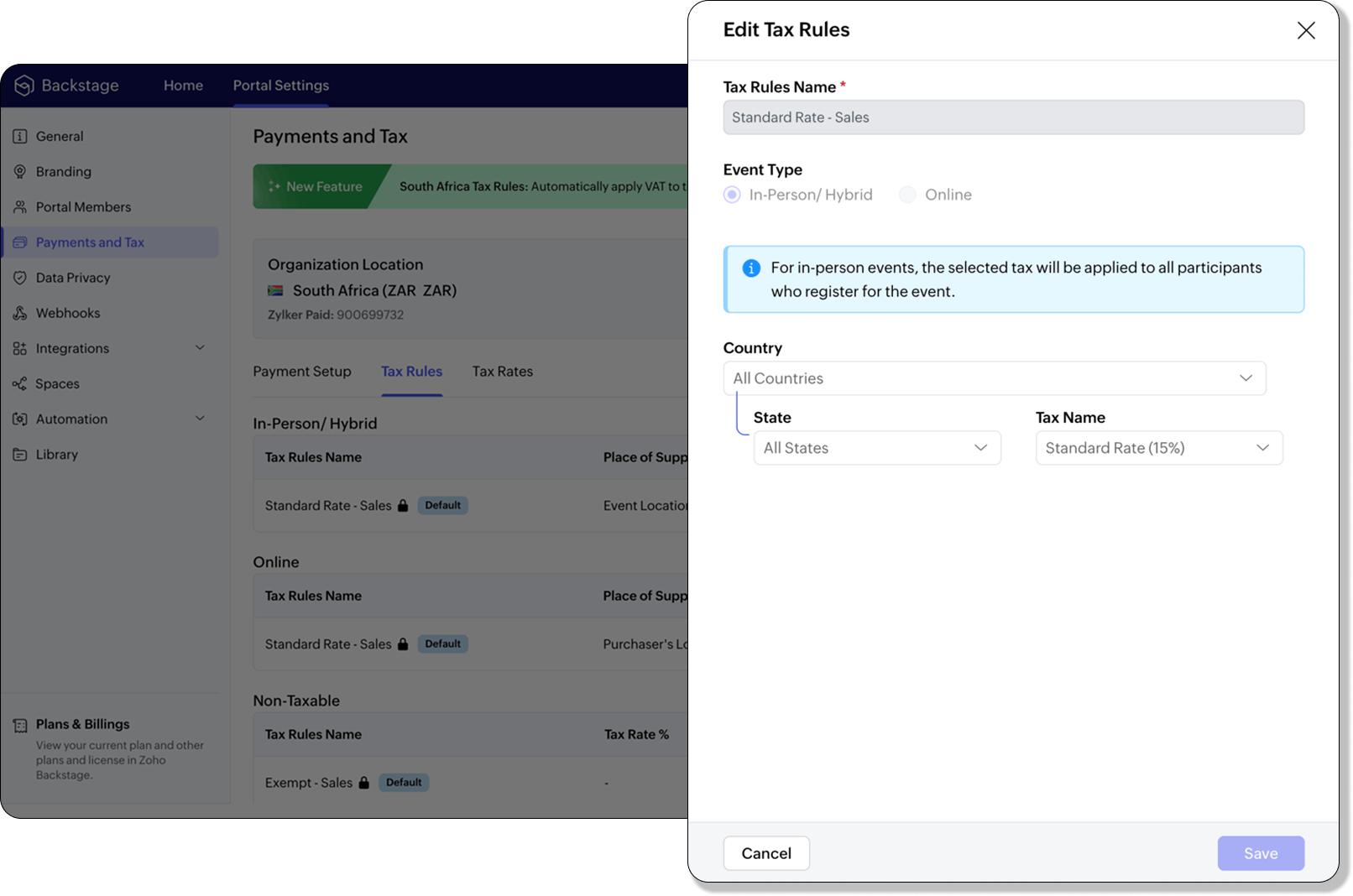
If an event is held in South Africa, the place of supply is considered within South Africa, and 15% VAT must be charged on ticket sales (unless exempt or zero-rated).
Virtual events
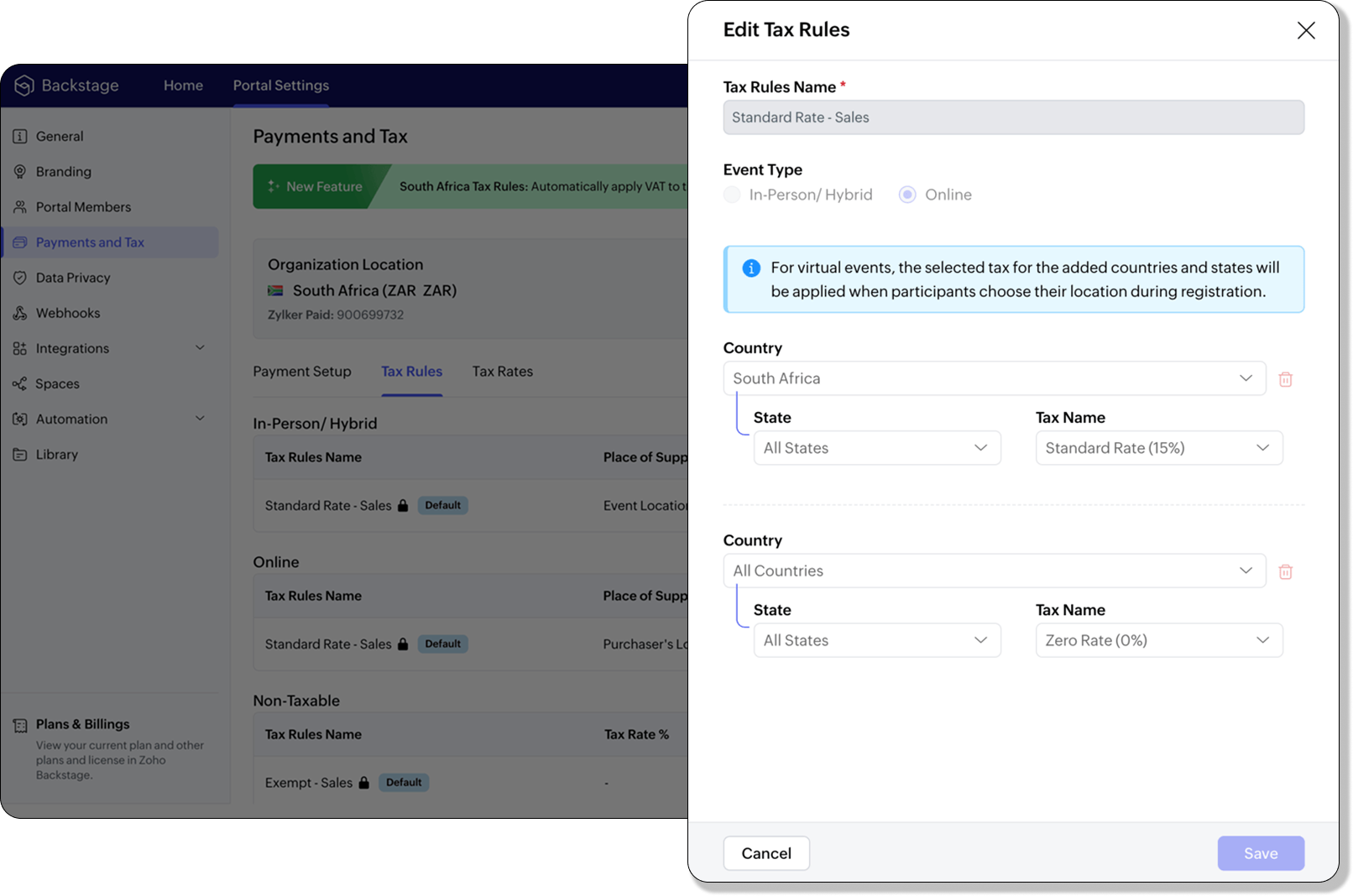
For virtual events, the attendee’s location determines the place of supply. For foreign attendees, the transaction is treated as an export of service and is zero-rated.
How to use
To enable South Africa tax rules, configure your organization’s location:
- Navigate to Portal Settings > Payments and Tax.
- Select South Africa as the organization location.
- The system automatically populates:
- 2 default tax rates (15% and 0%).
- 4 tax rules (in-person/hybrid, virtual, and two non-taxable rules).
Unlike other countries, South Africa Tax Rules are predefined. You can't edit existing rules or add new ones.
Applying Tax Rules to in-person and hybrid events
When South Africa is selected as the organization location, Zoho Backstage automatically applies the correct VAT (15%) to in-person and hybrid events. This ensures compliance with SARS requirements. A preview of the tax to be applied is shown during event publishing, so organizers know exactly what their attendees will be charged.
Applying Tax Rules to virtual events
For virtual events, Zoho Backstage automatically applies the zero-rated VAT rule for foreign attendees. South African attendees are charged the standard 15% VAT. This setup ensures accurate handling of local and international transactions without manual intervention.

- Tax rules in Zoho Backstage are fixed for South Africa. They can't be edited or expanded.
- Organizers can change the applied rule during event setup, but updates only affect new transactions. Existing transactions retain their original tax rule.
- If the event location is set to any country other than South Africa, South African VAT won't be applied.
Plan availability: Included in the Essentials, Premium, and Ultimate plans
Full page floor plan
We’ve taken the exhibitor experience to a whole new level with the introduction of the full page floor plan. This enhanced layout gives everyone including organizers, exhibitors, and attendees a more immersive and detailed view of the event venue.

For organizers, the full-page view provides better visibility and control when managing booth layouts and exhibitor placements. Whether you’re reviewing space allocation or showcasing your setup, the new Fit to Screen option lets you adjust the view instantly, making it ideal for large displays and on-site monitors.

Visitors can explore the floor plan in full-screen mode, view the exhibitor list, and discover details about each exhibitor. Signed-in attendees can further filter exhibitors by category and mark their favorites to plan their visit efficiently. Exhibitors can browse the directory or register directly from the same page, making navigation and engagement effortless.
Plan Availability: All plans that include the Exhibitor management module
Date & Time form field
We’ve enhanced the existing Date field to support time preferences, giving you more flexibility when collecting scheduling details. By enabling the Include Time toggle, you can now capture both date and time within a single field.
Similar to the standalone Time field, organizers can configure properties to accept entries in either 12-hour or 24-hour format and even set restrictions within a specific time range. A default date and time value can also be defined to simplify form submissions.
The default time format for this field automatically aligns with your event’s configuration under Manage > Event Info, ensuring consistent formatting across your forms.
Plan availability: Included in the Ultimate plans
With the event season in full swing, we’re focused on making your experience with Zoho Backstage faster, more reliable, and ready for every challenge. We look forward to bringing you more updates next month.
All the features and enhancements mentioned in this article are available across all Zoho Backstage-supported data centers.
If you need further assistance with our features, please contact support@zohobackstage.com.
Topic Participants
Jithan Raghuraj
Nederlandse Hulpbronnen

Recent Topics
Can I add Conditional merge tags on my Templates?
Hi I was wondering if I can use Conditional Mail Merge tags inside my Email templates/Quotes etc within the CRM? In spanish and in our business we use gender and academic degree salutations , ie: Dr., Dra., Sr., Srta., so the beginning of an email / letterZoho mail account ownership transfer
We recently took over another company and have assumed responsibility for its Zoho account, including Zoho Mail and all related services. We would like to formally transfer ownership of this account to our organization. Could you please outline the completeEmail Authentication is Failing
I'm trying to setup gitlab with email authentication. I used the following configs picked up from: https://docs.gitlab.com/omnibus/settings/smtp/ gitlab_rails['smtp_enable'] = true gitlab_rails['smtp_address'] = "smtp.zoho.com" gitlab_rails['smtp_port']DMARC reports for mail I didn't send: how to deal with?
I know the enthusiastic amateur's bare minimum about e-mail; am able to set up a Thunderbird account and know the basic acronyms. I have a Zoho Mail account connected to my domain, and have set up SPF, DMARC and DKIM successfully according to Zoho's instructionms
Email set up for communicationFix the speed
It takes ages to load on every step even though my dataset is quite small.Capture Bank Charges for Invoice Payments
We've added the Bank Charges field in the "Add Payments" page both in Zoho Invoice & Zoho Books. So all you need to do is to enter the bank charges when you record a payment for the invoices. This bank charge will be included to the amount paid for that invoice. Steps to add the bank charges while you record the payment: 1. Click the "Invoices" sub-tab under the "Money-In" tab. 2. Click the 'add payment' link for the invoice that you wish to record the payment for. 3. On the addImage field in custom module
Hi guy, Is there any hope of adding a custom image field in the custom module? We created a custom module to keep track of assets, and it would be helpful if we could attach an image to the record. Thanks RudyDeluge Function to Update Custom Field
I'm trying to get a Deluge function (which will run as part of a Schedule in Desk) that retrieves all tickets with the status "Recurring" and updates the custom field checkbox "cf_recurring" to "true". Here's what I have, which doesn't work: searchValue"View ticket" link is broken
The "View ticket" link in our Zoho ticketing system confirmation emails is broken (please see attached). Impacts ability to update/review details, and, refresh recollection at a later date. Any help would be much appreciated.import data from Apollo.ai into zoho crm via zoho flow
I might be asking this question in the wrong forum. We use Apollo.ai to find potential new leads for our business, there are around 10000 leads that we have initially found. We have an Apollo.ai account but just to do searches, we dont use it as a crm.Woocommerce Line Item Information
I'd like to add each line item from a Woocommerce order to a zoho creator form record. The line items are found within the line items array, but I'm not sure how to get each item out of the array? Any help would be much appreciated.Synching changes to Stripe when changes are made in Zoho Billing
We have a situation where we have merged customers in Zoho BIlling and then found out later that the payment in Stripe was not updated and still associated with the old customer record. The card gets updated and billed, but that payment is still associatedHow do I fix this? Unable to send message; Reason:554 5.1.8 Email Outgoing Blocked.
How do I fix this? Unable to send message; Reason:554 5.1.8 Email Outgoing Blocked.Disable Smart Filters By Default
The smart filters "feature" is causing confusion for Zoho Mail users. New emails should be delivered to the inbox unless they have specifically opted to redirect them somewhere else. People don't understand that new emails might be waiting in a randomME SALE ESTE ERROR: No fue posible enviar el mensaje;Motivo:554 5.1.8 Email Outgoing Blocked
Ayuda!! Me sale este error al intentar enviar mensajes desde mi correo electronico de Zoho! Tampoco recibo correos pues cuando me envia rebotan. Ayuda, Me urge enviar unos correo importantes!! Quedo atenta MAGDA HERNANDEZ +5731120888408Client Script | Update - Client Script Support For Custom Buttons
Hello everyone! We are excited to announce one of the most requested features - Client Script support for Custom Buttons. This enhancement lets you run custom logic on button actions, giving you greater flexibility and control over your user interactions.Zoho Mail not working
Zoho Mail not workingQueries on Project-Based Inventory Consumption and Proforma Invoice in Zoho ERP
We would appreciate your clarification on how Zoho ERP plans to handle the following: Project-based inventory consumption without itemized sales orders Accurate project cost tracking along with inventory reduction Proforma Invoice usage We look forwardI can't add a new customer in Zoho invoice? Anyone had this issue before?
Ive been using Zoho invoice for over 6 years. Today I wanted to add a new customer to send an invoice to but it doesn't save when I try to access it from the pulldown menu when you go to send a new invoice.Spreadsheet View click & focus issue in Arabic (RTL) localization
Hello Zoho Support Team, I am facing an issue in Zoho Creator Spreadsheet View when using Arabic localization (RTL). Scenario: My app supports English (LTR) and Arabic (RTL). I created a Spreadsheet View for a form. In English, everything works correctly.Customer address in Zoho Bookings
Hello, Is it possible to add customer address information to the Zoho bookings appointment screen? Or have it pull that information automatically from the CRM? We are wanting to use this as a field management software but it is difficult to pull the address from multiple sources when it would be ideal to have a clickable address on the appointment screen that opens up the user's maps. It would also be advantageous for the "list view" to show appointment times instead of just duration and bookingGhost email notification on a form
Hello, We have recently encountered an error where I can not see a email notification set up for a form which I am currently the owner, although neither the form nor the notification were created by me. However, neither can the Super Admin access thebulk edit records and run internal logic
hi there is few logics in manner "it this than that" logics work well when i edit entry openning it one by one (via workflow "on add/edit - on success" , for custom field "on update/on user input") but when i try bulk edit records - logic does not work. how can i turn on logic to work as programmed - for mass editing records via bulk edit?Bulk bank rule creatioin
Hi team, I am exploring Option to create a multiple bank rule. Could please suggest the option to implement this?Limitations on editing a message in Cliq
Hi I've checked the documentations and there's no mention of how many times a message can be edited. When trying with code, I get various numbers such as ~1000 edits or so. Please mention if there's a limit on how many times one can change a message viaemail address autocomplete
Is there a way to eliminate certain addresses from showing up in auto complete when entering an address? Many old and unused addresses currently show up, many of which I would like to get rid of. ThanksHow to use MAIL without Dashboard?
Whenever I open Mail, it opens Dashboard. This makes Mail area very small and also I cannot manage Folders (like delete/rename) etc. I want to know if there is any way to open only Mail apps and not the Dashboard.How can i download and secure all my mails from the archive folders?
Hi, i would like to download all my mails from my archive folders and secure it on my external HDD. Is this possible? Thx. amirHow to open filtered report in popup using Zoho Creator Deluge?
First report: There is so many records in Report, If I click one record, pop up is occur. Second report (Pop up): there is also so many record data, and this pop up is also Report, not Form. First report: It has got "Sales Order" field. when I click anyCan you default reports/charts to report the current week?
Our data table maintains two years of data. Management wants certain report to automatically filter the report to the latest calendar week. I know I can do this manually with filters but I want the report to automatically default to the latest calendarRendering PDF to view on page
My company upload lots of PDF files onto Zoho. But every time we open it, it downloads the file instead of viewing it on the web page. Does Zoho allow uploaded PDF files to be rendered to view on web page yet? I've been trying to use <embed> or <object> but it cannot be loaded. (similar thread: https://help.zoho.com/portal/community/topic/how-to-open-a-pdf-file-of-a-view-in-preview-mode)Overlapping Reports in Dashboards
It's rare, but occasionally it would be a good feature if I were able to overlap reports, either fully or partially in the Dashboards. Also, then having the ability to move objects to the front or rear, or make them transparent/translucent would be goodFeature request - pin or flag note
Hi, It would be great if you could either pin or flag one or more notes so that they remain visible when there are a bunch of notes and some get hidden in the list. Sometimes you are looking for a particular name that gets lost in a bunch of less importantAdmin guide: Handling Mailbox Settings for better user management
Managing day-to-day email scenarios, such as supporting users with multiple email addresses, ensuring uninterrupted email access during employee absences, enabling secure mailbox sharing, and enforcing organizational security and compliance, can be challengingCisco Webex Calling Intergration
Hi Guys, Our organisation is looking at a move from Salesforce to Zoho. We have found there is no support for Cisco Webex Calling however? Is there a way to enable this or are there any apps which can provide this? Thanks!Designing a practical Zoho setup for a small business: lessons from a real implementation
I recently finished setting up a Zoho-based operating system for a small but growing consumer beauty business (GlowAtHomeBeauty), and I wanted to share a practical takeaway for other founders and implementers. The business wasn’t failing because of lackDKIM (Marketing emails) UNVERIFIED (Zoho One)
I'm having a problem with Zoho One verifying my Marketing Email DKIM Record for MYFINISHERPHOTOS.COM. I have removed and re-entered the ownership, DKIM (Transactional emails), SPF and Marketing DKIM and all of them come back verified except the DKIM (MarketingZoho Recruit Community Meet-up - India
Namaste, India. 🙏🏼 The Zoho Recruit team is hitting the road—and we 're absolutely excited behind the scenes. Join us for the Zoho Recruit India Meet-up 2026, a morning designed to make your recruiting life easier (and a lot more effective). Date CityGenerate a Zoho Sign link
From time to time I get a response "I never received your you e-document for electronic signature" is there a way to generate a Zoho Sign link to share.Next Page