Zoho Creator Developer Console | Improved Distribution and Lifecycle Management for apps

Zoho Creator Developer Console | Improved Distribution and Lifecycle Management for apps

Hello everyone,

We're excited to introduce new enhancements now in the Zoho Creator Developer Console. These updates strengthen private app distribution through licensing controls and extend environment support across all installed apps, helping teams test changes safely before going live.

What is private sharing?
Private sharing of apps gives you the flexibility to distribute your apps directly to specific clients using their Zoho email address. This is especially useful for developers and Partners who want to deliver tailored solutions to select customers.

Why this matters
Many of our Partners would like to distribute applications directly to clients and manage payments offline. Until now, Zoho Creator had no in-product mechanism to enforce app validity based on your payment or agreement status with clients. This meant that even if a client stopped renewing their license, the application remained fully functional in their account.
This new enhancement solves that issue by allowing Partners to define a clear validity period. Once expired, the app automatically becomes disabled, and the Partner gains the ability to block access fully. This protects your IP and ensures fair usage of your apps.

Additionally, there was previously no way to share apps for evaluation purposes. With this update, the Trial License feature enables developers to offer a time-bound preview before subscription.

While Developer Console already supported private sharing, we recognized that the existing flow was limited and didn't fully address the diverse requirements of our Partners. That’s why we've rolled out this new update to make the flow more robust and professional.

Here's how the new flow works:
  1. Evaluation: You can now offer your client a Trial License for your app. Once the client is added and the app is shared with a trial license, they'll receive an installation email. After they install the app using the provided link, it becomes available in their Creator account for the trial period.

  2. Post-evaluation: If an agreement isn't reached, the application will be disabled after the evaluation period ends. This means the app will switch to read-only mode, where the client would have access to existing data but won't be able to add new entries. At any point after the trial period expired, the developer will have the option to delete the disabled application (along with its data) from the client's account.

  3. Subscription: Following the evaluation, if the client decides to proceed with a purchase, you can offer them a Subscription License after completing the transaction through your preferred channels. Based on your agreement, the subscription can be granted for as little as one month or set to lifetime validity.

    Once the subscription period ends, the application is automatically disabled and moved to read-only mode, allowing clients to view existing data but not perform any actions. If required, developers can further restrict the application, completely blocking client access. If the client and developer agree to extend the subscription, the app can be unblocked and access restored. 

    These safeguards ensure clients can't continue using your app beyond your agreed terms with the client, giving you complete control, since payments are handled outside Zoho Creator. 
 
To share applications with your clients:
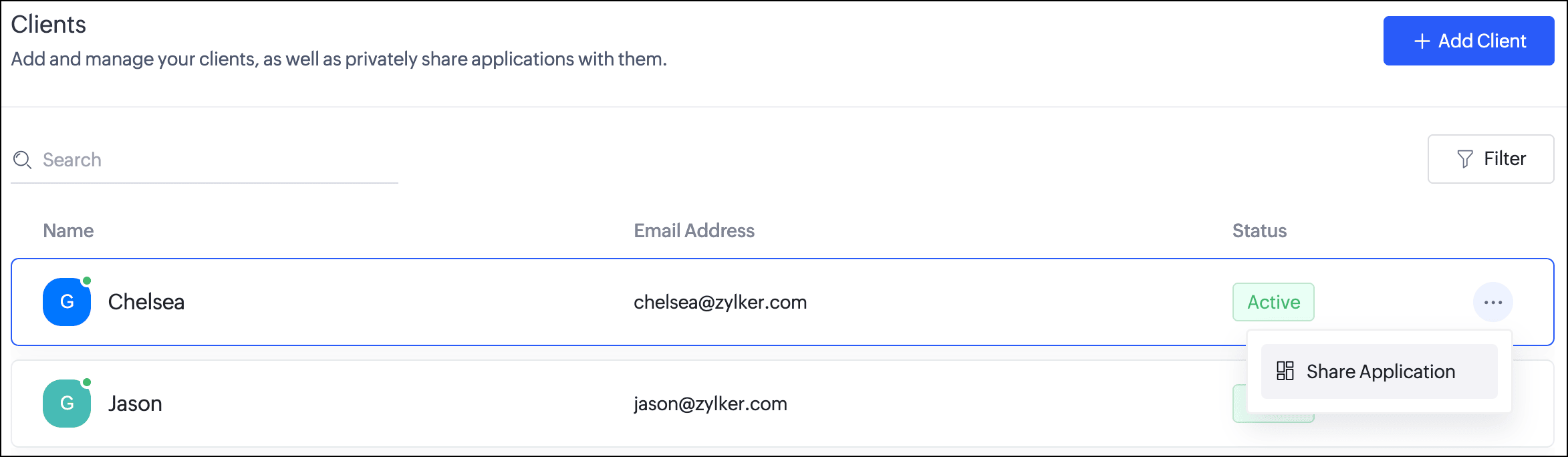
  1. Navigate to the Clients section. Click the horizontal ellipsis icon next to a client and select Share Application.
  2. In the popup, you can choose the Application and the version to be shared with the client.
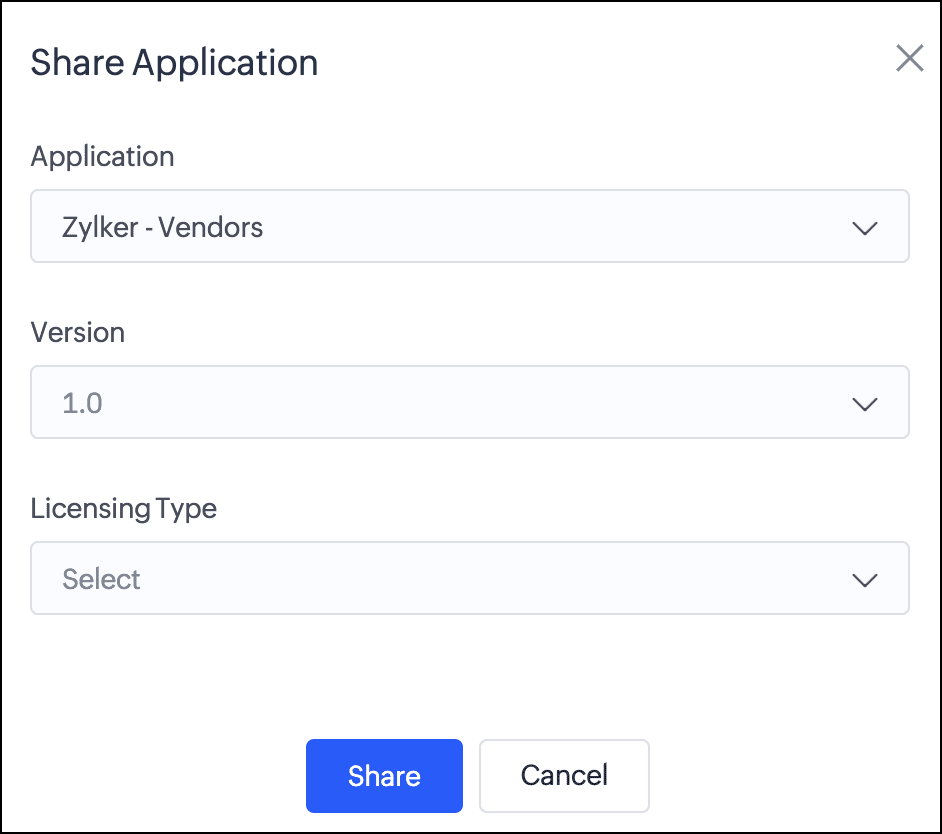
  3. Next, you can choose from two license types:
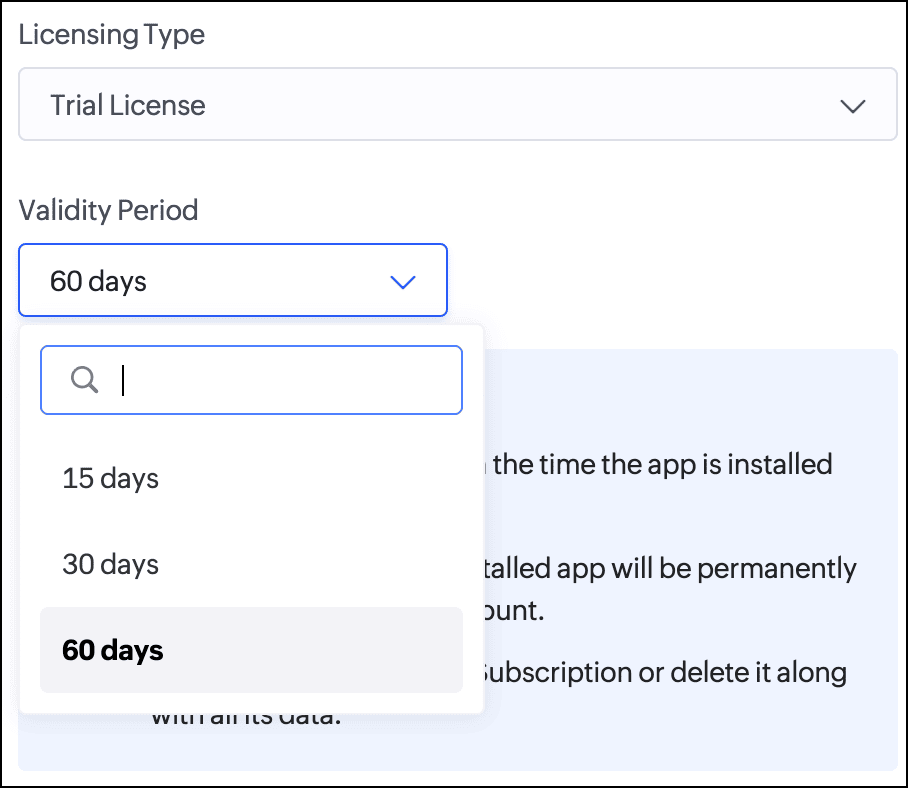
    Trial License: Provide your client with a trial period to evaluate the app. You can set the duration to 15, 30, or 60 days.
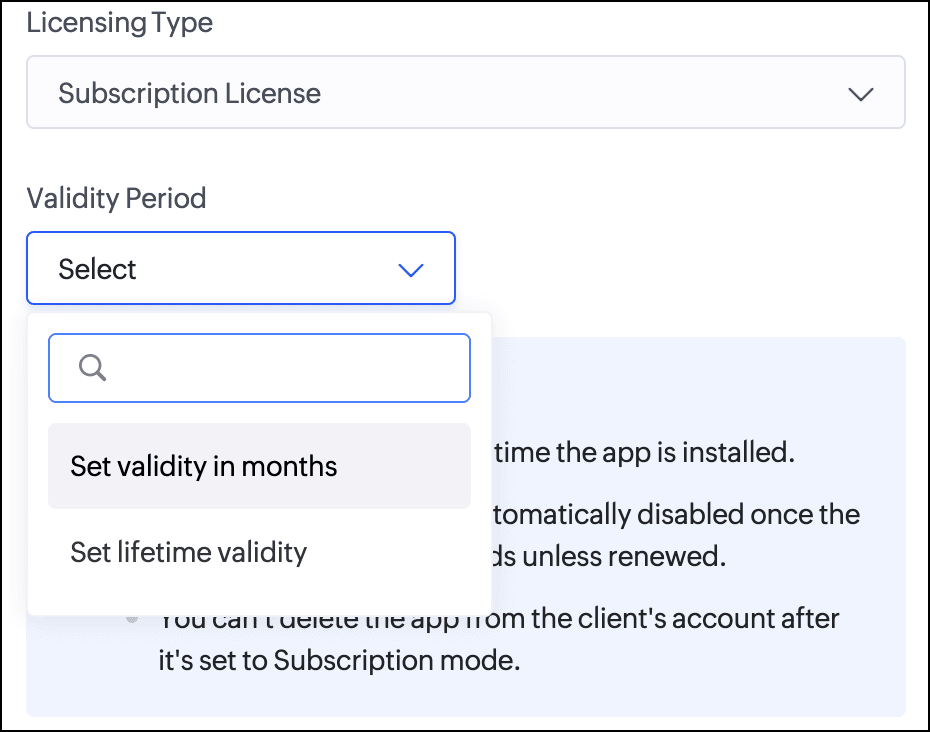
    Subscription License: Once you've finalized the subscription terms with your client, you can issue a subscription license. You have the option to set a fixed validity period in months (from 1 to 36) or grant lifetime access to the app.

Consequently, with the introduction of this new flow, we've implemented automated email reminders to keep clients informed about their subscription status and expiry timelines. Developers will be proactively notified about client subscription activity and upcoming license expirations. This ensures both parties stay in sync throughout the subscription lifecycle.

Documentation
To help you better understand these changes, we've provided comprehensive resources to assist you with the private sharing of applications. They can be accessed at the Understanding private distribution of apps help page.

Environment support for installed apps  
Along with the above enhancements, we're also introducing environment support for apps you've distributed. Your clients will now be able to add installed apps to environments and thoroughly test them in the staging environment before publishing them to production. This ensures the changes to apps are validated before they become accessible to end users.

This enhancement removes the earlier limitation that prevented distributed apps from being added to environments. Please note that while your clients can add distributed apps to environments, they will not have access to development. This continues our policy of protecting intellectual property and ensuring that developers remain in control of their apps.

For more information, visit the Installing and managing distributed apps help doc.

Timeline
These enhancements have already been rolled out and are now accessible to users in all DCs.

We believe this new enhancement to the private sharing feature will provide you with greater control and flexibility when distributing your Zoho Creator applications. We hope you love it!

We'll be back soon with more exciting updates, so stay tuned.

Regards,
The Zoho Creator Team

    • Sticky Posts

    • Introducing Zoho Creator's 2025 Release Projection 2

      Hello Creators! I'm Prakash, from the Creator product management team, and today I'm delighted to unveil our next set of features as part of Release Projection 2 for 2025. With thoughtful analysis and planning, we've curated powerful new capabilities
    • Zoho Creator - 2023 Release Projection 1

      Hello everyone! A very Happy New Year to you and your family. Hope you're all good and having a great time using Zoho Creator to make your lives easier and your businesses prosper. 2022 was an action-packed year for us at Creator, and we hope to continue
    • Zoho Creator User Group meetups in a city near you! - Oct - Nov, 2023

      Greetings from the Zoho Creator team! We're hosting a series of Zoho Creator meetups in various cities across the globe, and we'd love to meet you there! Our meetups are a great opportunity to network with industry peers, exchange ideas and best practices,
    • Zoho Creator - 2023 Release Projection 2

      Hello everyone! Time truly flies when you're having an incredible journey, and today we mark the completion of an eventful and action-packed six months. It feels like just yesterday when we embarked on this adventure together with the launch of our new
    • Upcoming Updates - August 2022

      Hi all, Greetings from the Zoho Creator team! Today we've got news for you on some exciting updates. And rest assured— there’s more to come! In this post, we'll be going over the upcoming features and improvements for this month as mentioned below. A

    Nederlandse Hulpbronnen


      • Recent Topics

      • Update latitude & longitude address field API

        How do I update the coordinates of an address field from a widget? I can't modify the latitude and longitude of the address field. I think the problem is how I'm writing formdata variable. zoho_init.then(function (data) { var queryParams = ZOHO.CREATOR.UTIL.getQueryParams();
      • Zoho Forms - Feature Request - Past Into Scanning/OCR Field

        Hi Zoho Forms Team, You recently introduced the OCR/Scanning field which I have found great use for with one client who receives work orders as a screenshot from one customer. I want to raise a feature request here which would make that field even more
      • Zoho Forms - Feature Request - Year Field

        Hi Zoho Forms Team, You currently have the following date and time fields: Date Time Date and Time Year and Month It would be useful if you could include a "Year" field For example a recent application I completed said "What year was your house built?"
      • inability to use different primary address on invoice per location

        my company operates in two different locations with different email address. The problems then is the inability to edit the primary to suite the invoice for the second location.
      • Zoho Books - Breaking A Working App

        We've been using Zoho for many years now. Across all apps, entering phone numbers in standard formats was enabled in all apps. These formats are: xxx.yyy.zzzz xxx-yyy-zzzz (xxx) yyy-zzzz and we were able also to add extension numbers in these formats:
      • No Need To Fix Something That Is Working

        Zoho Books is a great financial tool which helps businesses to become more efficient and productive with day-to-day operations. As such, every change, upgrade, improvement needs to be carefully thought before implemented in the software and I'm sure Zoho
      • Use Zoho Creator as a source for merge templates in Zoho Writer

        Hello all! We're excited to share that we've enhanced Zoho Creator's integration with Zoho Writer to make this combination even more powerful. You can now use Zoho Creator as a data source for mail merge templates in Zoho Writer. Making more data from
      • Anyone in Australia using Zoho Books AND has their account with NAB?

        Hi I have an account with both NAB and Suncorp. Suncorp transaction come in the next day however NAB transactions take 4-5 business days to appear. eg: A deposit made today in my Suncorp will be imported into Zoho tomorrow. A deposit made today to the NAB account will be imported maybe Saturday (Friday overnight). I have contacted both Zoho and NAB but noone seems to know why. I was just wondering if anyone else in Australia uses NAB and has this issue (or doesn't) maybe we could compare notes and
      • Detailed Balance Sheet for tax preparer

        I'm using the free edition of Zoho Books. My tax preparer is asking for "detailed" Profit & Loss and Balance Sheet reports which include all the activity and transactions within the various categories. The default reports do not include these details.
      • On Edit Validation Blueprint

        Hello, I have a notes field and a signature field. When the Approve button is clicked, the Signature field will appear and must be filled in. When the Reject button is clicked, the Notes field will appear and must be filled in. Question: Blueprint will
      • Zoho Projects - Cloning a task does not trigger task workflow when created

        Hello! I have a Project where my team uses a set of tasks from a tasklist as templates, so we could simply clone it and drag it to another list in kanban view to avoid creating a new one from scratch. The process works well, but after cloning it the new
      • Host Group Appointments Online in Zoho Bookings

        Greetings from the Zoho Bookings team! We’re excited to announce a new enhancement to Group Booking that makes hosting online group events smoother and more professional than ever. You can now conduct online group events with auto-generated meeting links
      • Can't rename groups on Mac desktop app

        I'm working on an up-to-date Mac with a freshly downloaded Notebook app. I'm trying to rename a group within a notebook. Here I have, left to right, a note, a group, and a note. I select the group. On the top left, I select Action. On the dropdown, "Rename"
      • Workdrive Collaboration with an External User

        I would like to know if I can setup a collaboration space with an external user in workdrive or do I need to add them as a user on my system? If I need to add them, can I add them on Workdrive only and give limit access to our space only?
      • Delete button

        Hi, The delete button were hide into the three dot button. Can I display outside? why Zoho make this update?
      • FSM integration with Books

        Hi, I have spent a few months working with FSM and have come across a critical gap in the functionality, which I find almost shocking....either that, or I am an idiot. The lack of bi-directional sync between Books and FSM on Sales Orders/ Work Orders
      • Marketing Tip #23: Help customers with how-to guides and usage tips

        Customers don’t stop needing you after they place an order. Helping customers use your product correctly and confidently can improve satisfaction, reduce returns, and increase repeat purchases. Sharing simple how-to guides, usage tips, or care instructions
      • Powering Customer Support with our women

        In Zoho Desk support, women make up 50% of our team. We see this as one of our strengths, reflecting the spirit of this year’s theme, "Give to Gain". Our women find their balance Women carry many responsibilities — they represent frontline support, lead
      • Function #25: Automatically generate purchase orders from a sales order

        We kicked off the "Function Fridays" series with the goal of helping you automate your everyday accounting tasks. As we delve into today's post, I'm delighted to announce that we're here to present the 25th custom function in this series. While it is
      • Looking for Guidance on Building a Zoho Website

        I'm exploring the possibility of building a custom website with specific features using Zoho as an alternative platform. My goal is to create something similar to https://gtasandresapk.com , with the same kind of functionality and user experience. I'd
      • ZOHO Reports are taking longer time to get refresh

        Hi Team, Since last few days, I'm facing issues in getting updated reports. For eg: right after making an expense entry or even posting a journal, it is taking longer then expected for the updated reports. Refer below: "You are viewing the report that
      • Invalid scope choice: Workdrive integration in CRM

        Bug: There is an invalid option in the permission choices for Workdrive integration in CRM. If the entry "WorkDrive.teamfolder.CREATE" is selected, it will return a message indicating invalid OAuth scope scope does not exist.
      • Sales IQ chat is not working in signed android apk

        I have integrated ZOHO sales IQ support chat and i have followed each step and its working fine in my development build but when i create signed APK for it. Chat does not work in it and showing awaiting for detail. I previously asked the same query but
      • How to add line breaks in zoho.cliq.postToUser(...) message?

        In a CRM function using Deluge I'm sending this message and attempting to add some line breaks but they are ignored. Is there another way to add these breaks? My message: message: New urgent task\nDescription \nThis is a fake description.\n A new line?
      • Project Notifcatiion Emails - Milestone

        Hello: I cannot get myself, or most importantly my portal client user to recieve an email upon completion of a milestone. I have set up our 1st project. I have set up a test client user. (accepted the invitation and is listed in the system as a client
      • Enable Free External Collaboration on Notecards in Zoho Notebook

        Hi Zoho Notebook Team, I would like to suggest a feature enhancement regarding external collaboration in Zoho Notebook. Currently, we can share notes with external users, and they are able to view the content without any issue. However, when these external
      • Problem with CRM Connection not Refreshing Token

        I've setup a connection with Zoom in the CRM. I'm using this connection to automate some registrations, so my team doesn't have to manually create them in both the CRM and Zoom. Connection works great in my function until the token expires. It does not refresh and I have to manually revoke the connection and connect it again. I've chatted with Zoho about this and after emailing me that it couldn't be done I asked for specifics on why and they responded. "The connection is CRM is not a feature to
      • Update Existing Records greyed out in Free Version

        Trying to update records from an Excel sheet, and not getting the option to update. Only option is to add as new accounts. All documentation I can see says update should be an option! Accounts, Leads, Contacts, all the same.
      • emailing estimates

        Shows up in the customer mail logs as sent but nobody is receiving them, even when I send them to myself I don't get them ??? Something wrong with the mail server or my end ?
      • Help with deluge script

        Hi Community, this is my first Deluge script. I've pieced it together from reading various articles I want to use it in a workflow to 1 Convert a lead to a contact 2. Create a record in a custom module Below is what I have got so far but it does not fire
      • How to use OR when filtering using two fields

        I want to create return a list of Account Names by filtering on Field1 = "yes" OR Field 2 = "no" I can't see how to use the OR in the filter.
      • Mobile phone version not working well

        I am working on the Zoho Site Builder. In the preview the desktop version looks okay, but in the mobile phone preview many words are cut off in the weirdest (wrong) way. How can I fix that?
      • Zoho - Please explain difference between Thread view and Conversation view on Ticket

        I have reviewed the help document here but am still not clear on the difference between the two views. As an example, I just had a back and forth on a ticket: - Customer emails support email. - I email back from Desk. - Customer responds back. - I email back from Desk. On the upper left drop down box on the ticket Zoho Desk now says this is "4 Threads" and "4 Conversations" . How is that 4 threads?? By my count it is 1 thread and 4 conversations (assuming by "conversation" Zoho means number of total
      • I need help to take Reports for tickets moved between departments.

        Hi, I need help to take Reports for tickets moved between different departments. Pls guide Shyam
      • Export to excel stored amounts as text instead of numbers or accounting

        Good Afternoon, We have a quarterly billing report that we generate from our Requests. It exports to excel. However if we need to add a formula (something as simple as a sum of the column), it doesn't read the dollar amounts because the export stores
      • Increase Round Robin Scheduler Frequency in Zoho Desk

        Dear Zoho Desk Team, We hope this message finds you well. We would like to request an enhancement to the Round Robin Scheduler in Zoho Desk to better address ticket assignment efficiency. Current Behavior At present, the Round Robin Scheduler operates
      • Automation #6 - Prevent Re-opening of Closed Tickets

        This is a monthly series where we pick some common use cases that have been either discussed or most asked about in our community and explain how they can be achieved using one of the automation capabilities in Zoho Desk. Typically when a customer submits
      • Zoho Desk EU slow/unresponsive

        Has anyone else got issues with ZohoDesk today in the EU? It takes an age to come back and if you do start typing something and try and send or save it looks like it times out. We are also getting this pic. ot I can't see anything on https://status.zoho.eu/
      • EU DC Partial Outage Resolved: A Detailed RCA

        Incident Summary Due to an overload on one of the nodes in the EU DC for Zoho Desk, the system was unable to handle the heavy load, causing a slowdown in requests and resulting in a partial outage for customers with data residing in that node. On May
      • Perfomance Management - Zoho People

        Hi team, I am looking for performance management data such as KRA, goals, feedback, appraisals, etc., in Zoho Analytics. However, I am unable to find these metrics while editing the setup. Could you please confirm whether these fields are available in
      • Next Page