
Moderated on 14th February, 2023:
Dear All,
We hope you're well! We're here with a useful update for Canvas in Zoho CRM.
Canvas is our flagship feature that helps you add context to your record details pages. With the help of templates, elements, and styles, you can design your CRM records in a way that's coherent and relevant to your business. However, it hasn't been possible so far to share a Canvas template.
In this update, we're adding a new capability to share templates with different CRM organizations. Imagine your business has multiple CRM organizations for different purposes. If you wanted to apply your brand elements uniformly for all your CRM organizations, you had to create new templates each time, one by one. With this new sharing feature, you can now easily transmit templates created in one organization to another.
How is a template transmitted?
You can share a template from one organization to another via a unique key. This key is a combination of alphanumeric characters that is specific to each template. All you have to do is to export the key from one CRM organization and import it into the other. Your template UI will be transmitted immediately.
Let's get further into the details!
Exporting a template: As mentioned above, you can export a template by sharing a unique key with the recipient.
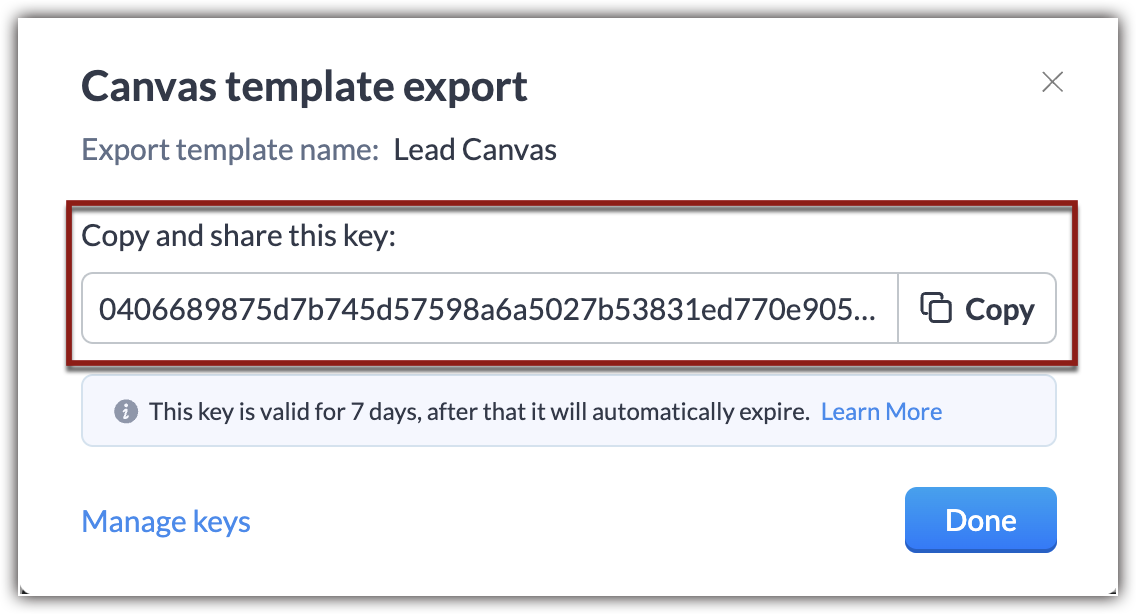
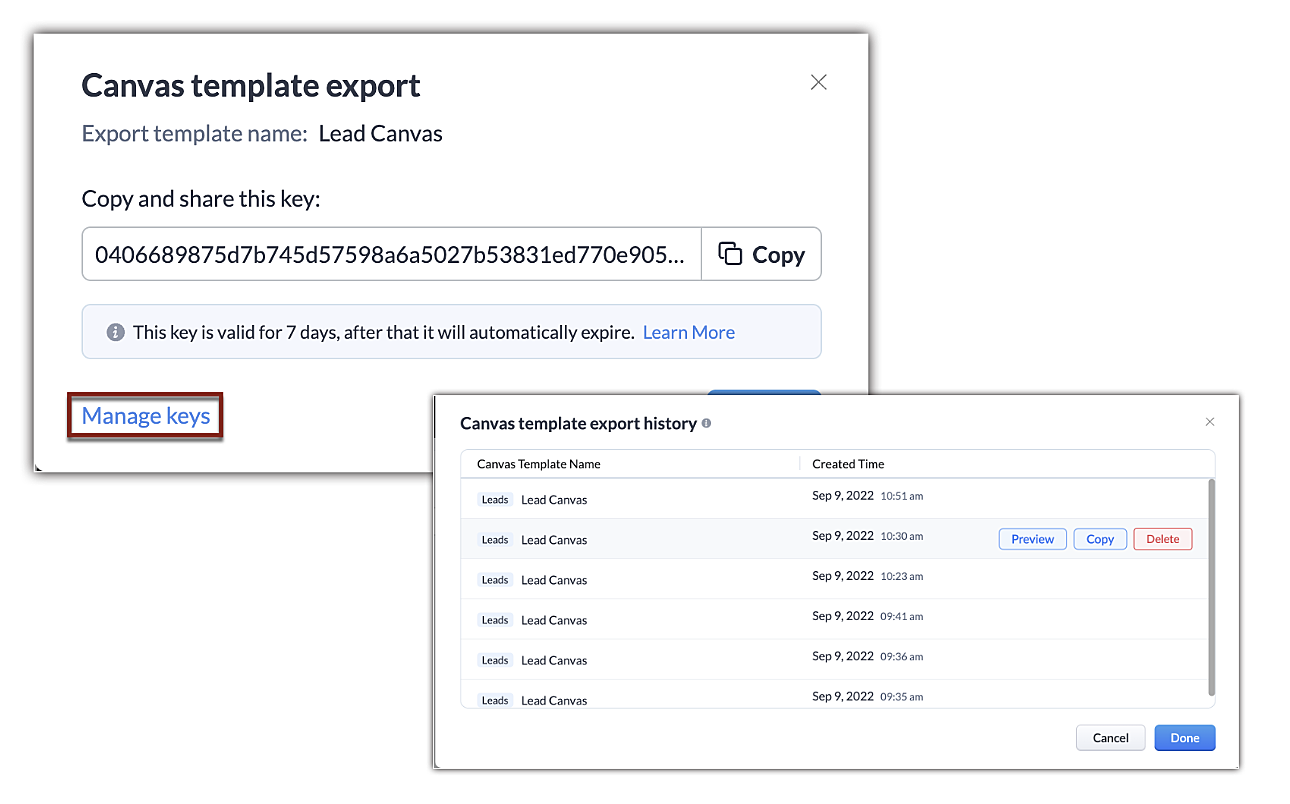
This key is valid for seven days after the date of export, and an organization can have up to 10 active exports at a time. In the event you reach this limit, you'll have to delete old keys to enable new exports.
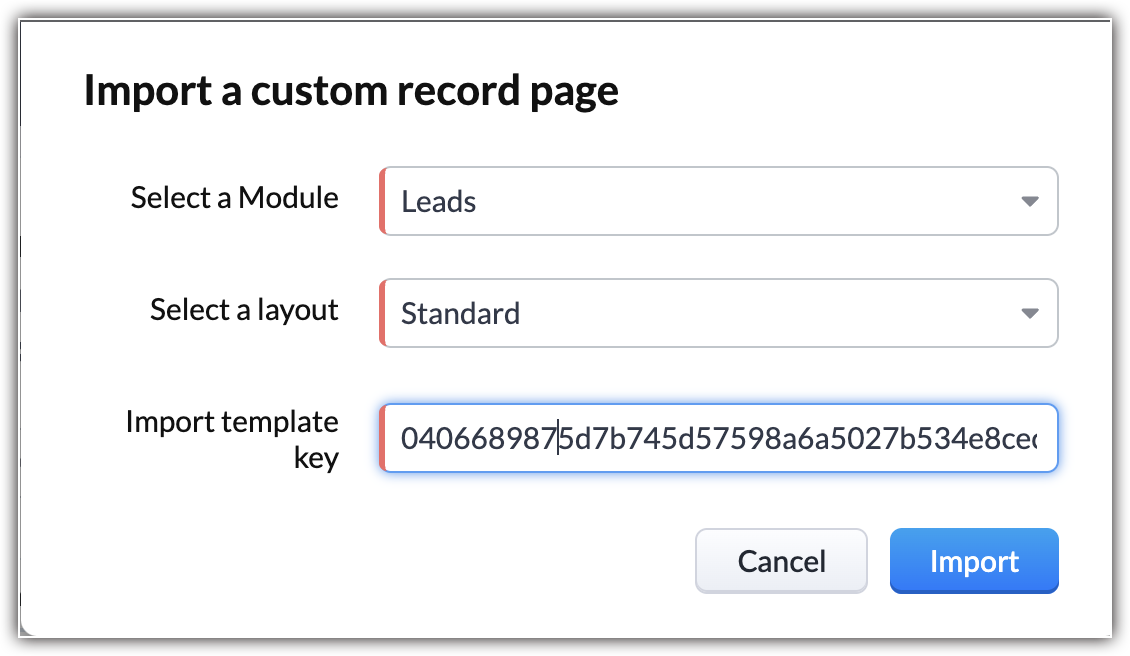
Importing a Canvas template: You can import a canvas template by applying the unique code shared with you. This code will transmit the design elements from the source and Canvas will automatically incorporate values in accordance to the module you're importing the template into.
Some additional pointers about importing/exporting templates:
- In addition to the template transfer between CRM organizations, you can also transmit a canvas within the organization.
- There is no limit to the number of times you can import a template using a key. You can have multiple imports as long as the key is valid.
- You can import a template into any module or layout.
- Importing a template counts as creating a new template. CRM follows the same template limits as usual. Click here to learn about the limits of each module.
- If the export code is deleted or expires before you import, the code will no longer be valid and you'll have to obtain the updated code.
- Only the formatting and UI placeholders of the template will be transmitted. The values, images, and rules ascribed to them will not be transmitted.
- Components and presets you've saved to reuse will be carried over.
That's it for the update. We have opened this feature for all users in US DC for now. For the rest of the DCs, it will be gradually opened.
We hope this added capability will make your work easier. If you have feedback or comments, feel free to start a conversation.
Thanks and have a good one!
Kind Regards,
Saranya Balasubramanian
Recent Topics
Zoho Creator Calendar - Sorting Events
Hi, I have a calendar view to hold the schedule for a group of engineers. I have created a formula field to show the combination of fields I want visible as the title of the event, but I need to be able to sort the list by something other than the event
Upcoming Update: Disposition Sync for Indeed
We’re updating our Indeed integration to support Disposition Sync, improving how candidate application statuses are communicated. This change is scheduled to go live on 15 June, 2026. What’s changing? Once enabled, this allows candidate application statuses
Joining Two Tables on Multiple Ids
Hello all, I'm guessing there is an obvious solution for this, but definitely not an expert in sql. On our Deals module, we have two user lookup fields. In Analytics, those fields have the user's ids in those table rows, and I'm trying to create a query
auto update of item purchase cost
Would be nice if, when entering bills, the price of the item varied from the stored item price, we could have a user dialogue "Update item price" | "yes / no". Simple, but saves a lot of additional work !
Journeys - How to set up a webhook that triggers when a contact meets the goal criteria?
Hi there, I'm setting up a journey on Marketing Automation. The main goal of the journey is to get the leads to reply our emails. Is there a way to trigger a webhook when that goal is met? The webhook would then trigger a notification. Is that possible?
Latest updates in Zoho Meeting | Personal Meeting Rooms and Zoho Meeting Annotator
Hello everyone, We’re excited to share a few updates for Zoho Meeting. Here's what we've been working on lately: Introducing Personal Meeting Rooms - Tailored for private discussions, this secure meeting space is yours alone, accessible via a unique link.
New in WorkDrive: Organize your storage using Data Templates
Organizations generate huge volumes of data day in and out. From financial reports, client details, and resumes to promotional images, product videos, and more. The list is endless. When you have so much data to manage, you need to classify your documents and structure them in a way that makes them more accessible. This is exactly what WorkDrive's Data Templates lets you do! You can create Data Templates, add meta data as custom fields, and associate those fields with files and folders based on
Emoji support in workdrive
Hello, We are using emojis in our filenames and folder to help visually find relevant data. Currently Workdrive is stripping out emojis and the rest of the filename (along with the suffix), making the file unreadable when they are synchronized with desktop.
New UI for Writer - Disappointed
I've been enjoying Zoho Writer as a new user for about 6 months, and I really like it. One of my favorite things about it is the menu bar, which you can hide or leave out while still seeing most of your page because it is off to the left. I think this
The reason I switched away from Zoho Notebook
My main reason for switching to Zoho was driven by three core principles: moving away from US-based products, keeping my data within India as much as possible, and supporting Indian companies. With that intent, I’ve been actively de-Googling my digital
Introducing the enhanced Zoho People integration
We're excited to announce an enhancement to the integration between Zoho Recruit and Zoho People, designed to streamline your data management processes and boost efficiency across your recruitment and HR workflows. With this latest update, you can now
Zia should track how customer relationships evolve over time
Here's a feature idea that I've been thinking about The Problem Zia is great at analyzing individual interactions email sentiment, call transcription, best time to contact. But here's what it can't do: tell you how a relationship has evolved over time.
Add an option to disable ZIA suggestions
Currently, ZIA in Zoho Inventory automatically provides suggestions, such as sending order confirmation emails. However, there is no way to disable this feature. In our case, orders are automatically created by customers, and we’ve built a custom workflow
Filter our rejected quote items from the inventory quote template
Hello, I am trying to have rejections at the line level on my quotes so I can track what items are often removed, I do not want to claim the whole quote as lost just the individual items for better data tracking. However I cannot figure out how to filter
Error AS101 when adding new email alias
Hi, I am trying to add apple@(mydomain).com The error AS101 is shown while I try to add the alias.
Gamescope is leveling upto Motivator for Zoho CRM
Hello, As you are aware, we recently made Motivator for Zoho CRM available for Zoho One, CRMPlus and CRM Ultimate editions. Since Motivator has all the features of Gamescope and even more advanced gamification, we are planning to EOL Gamescope on 30th
Print JV of an Expenses in ZohoBooks
When an expense is created in Zoho Books, the related journal entry can be viewed at the bottom of the expense record. However, when printing the expense, the journal entry is not included in the printed document, and there does not appear to be an option
Kiosk waiting for completion breaks previous field updates from occurring, yet timeline of record show changes
hi 1) I set to statuses on a Get record . 2) Next i run a function and capture the result i.e. wait for completion 3) Then a Screen The record's timeline show the status changes. Yet the record has not changed. I can repeat this. I had another route in
Write-Off multiple invoices and tax calculation
Good evening, I have many invoices which are long overdue and I do not expect them to be paid. I believe I should write them off. I did some tests and I have some questions: - I cannot find a way to write off several invoices together. How can I do that,
Partner with HDFC And Sbi Bank.
Hdfc and sbi both are very popular bank if zoho books become partner with this banks then many of the zoho books users will benefit premium features of partnered banks.
Print shipping label on Zebra Label printer from ZOHO Creator deluge
Hi All, Allow me to guide you through the process of printing a shipping label from ZOHO Creator to a Zebra label printer (ZD421D). Step 1: To start, configure the SendFileToPrinter API, which enables the transmission of a file to a Zebra Link-OS printer.
Zoho Books Placeholder: Inventory Counts
I was hoping to figure out how to find the placeholders for inventory counts by item. We use Location based inventory tracking, so I dont know if that affects things. I want my PDF and Printed PICK LISTS to show the Quantity Available to Pick. I have
Can't delete shared mailbox emails from mobile app
I have the mobile app on iOS and cannot seem to find a way to delete an email from a shared mailbox. Is there something I'm missing here? Michael
Simple Custom Function to Update Candidate status
Hi folks, We are currently using Zoho Recruit and have sources from where candidates are applying. Currently all candidates are being set to 'Associated' when they apply via 3rd party sources but that is not useful for us under our business process. I
Zoho FSM Work Order Creation Failure
Hello FSM team and Latha, This automation is built in Zoho Creator and is triggered when a “New Repair Order” is created or updated through form submission. Once the form is submitted, the script automatically retrieves the related customer and company
A method for renaming tab titles in Creator to display more relevant information
Hi Zoho Devs, Updates: Rules Export File attached; you can now import this into Tab Modifier instead of manually entering the rules yourself) 2022-06-08: Updated rules so that crm.zoho.com tabs are not affected; uploaded new .json import file 2022-06-09:
Options on the New Auto Logged In User Profile for the Name Field
Hi, I love the new function, but when used it automatically formats the record and therefore the export with comma separated values, so id you enable First Name & Last Name it puts "First Name, Last Name" rather than just "First Name Last Name". Could
Zoho Practice Roadmap
Hi - interested to understand the roadmap for this product. I think a number of people are watching to see if this is receiving investment prior to exploring more - but it appears to be very quiet on the development front.
CRITICAL DOWNTIME IN ZOHO PRACTICE!! NO RESPONSE FROM SUPPORT TEAMS
Dear Team, We are randomly unable to login to Zoho Practice since this morning. All our team members are reporting this issue. Work has come to a grinding halt and we are not getting any support or answers. This is a highly serious matter of concern for
Tip 49#: Obtaining global reports in Zoho Sprints
Zoho Sprints comes with data analysis capabilities like reports and dashboards that enable the project teams to introspect quantifiable information. These reports and dashboards are project specific. Recently, a user contacted us regarding a requirement
Clone entire dashboards
If users want to customize a dashboard that is used by other team members, they can't clone it in order to customize the copy. Instead they have to create the same dashboard again manually from scratch. Suggestion: Let users copy the entire dashboard
Zoho Cliq REST APIs v3 : A complete guide to what's changed and why
APIs are not just consumed by a developer with numerous automations and a series of open browser tabs. They are parsed by LLMs, fed into agent pipelines, and auto-completed by AI coding assistants that have zero tolerance for inconsistency. A verb tucked
Allow native Webhooks to authenticate via Connections
Allow native Webhooks to authenticate via Connections (Basic Auth) instead of plaintext custom headers Summary Please allow native Webhooks (Workflow Rules > Instant Actions > Webhooks) to authenticate against the destination endpoint using the existing
Zoho desk extension update custom field
Hi all, I'm trying to update a custom field in my zohodesk extension. But the documentation is fairly unclear. The custom field is named "testveld". The api name is cf_testveld I'm trying to update it like this: ZOHODESK.set('ticketForm.cf_testveld',
Introducing Custom Columns in Forecasts in Zoho CRM
Release Plan: Enabling in Phased Manner, Enabled for JP DC Hello all, Forecasts in Zoho CRM help sales representatives, managers, and business stakeholders evaluate performance and plan future sales activities. While standard metrics such as Target, Achieved
Zoho Expense Auto Tracking Sync Fails "Request Timed out"
I am testing this feature to move away from MileIQ who significantly raised their prices. It seems to be tracking but it is not syncing unless I manually perform a resync under "Drives pending Sync". I am not sure what would be causing this, as some drives
Zoho projects dependancies is a joke
About to cancel our Zoho One subscription because Zoho Projects is a mess. Can't build a proper progream in it because the dependancies doesn't work properly. Can't believe this software is promoter as a project program when one can't even build a proper
How to show product cards in your chatbot
Hey everyone, If you are using Guided Conversations to help customers find products, you have probably run into this problem: the bot gives customers a list of options, but they still have no idea which one to pick. There will be no images, no specs,
Zoho Team Inbox - roadmap
Hi, would be good to understand the Teaminbox roadmap, in particular: 1. API / Zoho Deluge connections. We have a process where the each email needs to be either tagged or assigned daily. It would be great if we could automate a 5pm alert for any exemptions
Zoho Projects Coming to CRM Teamspaces
Availability: The US DC Standard Edition is now available. It will be rolled out to customer accounts in all DCs in phased manner. Hello all, You are probably already familiar with Teamspaces, the dedicated workspaces where teams organize the CRM modules
Next Page