Découvrons Zoho Projects 8.0 : Rapprocher les fonctionnalités et l'expérience utilisateur

La nouvelle version de Zoho Projects a été conçue avec la mission de rapprocher les fonctionnalités et l'expérience utilisateur, afin de créer une plateforme sur laquelle il est agréable de travailler. Nous croyons fortement que Zoho Projects 8.0 peut faire cela !
Zoho Projects 8.0 est doté d'une toute nouvelle interface utilisateur conviviale et intuitive . Avec une vue éditable des feuilles de travail, des modèles spécifiques à chaque secteur d'activité, une application mobile améliorée et plus encore, la 8e version a de quoi satisfaire tous les utilisateurs - existants et nouveaux, de divers secteurs d'activité, travaillant au bureau ou à distance. Découvrons les nombreux avantages de Zoho Projects 8.0.
La navigation facilitée
Que vous ajoutiez des étapes ou des tâches, que vous créiez un projet complet à partir de zéro ou que vous personnalisiez les détails d'un projet, avec les flèches de votre clavier, le travail est fait en un rien de temps. Cela signifie que vous n'avez pas besoin d'ouvrir la page des détails à chaque fois. Vous pouvez également déplacer vos tâches entre les listes de tâches et les jalons, vos sous-tâches entre les tâches, et ajouter des tâches prédécesseurs et successeurs pour les dépendances à partir de la page de détails des tâches, afin de simplifier votre organisation tout en gagnant en efficacité.
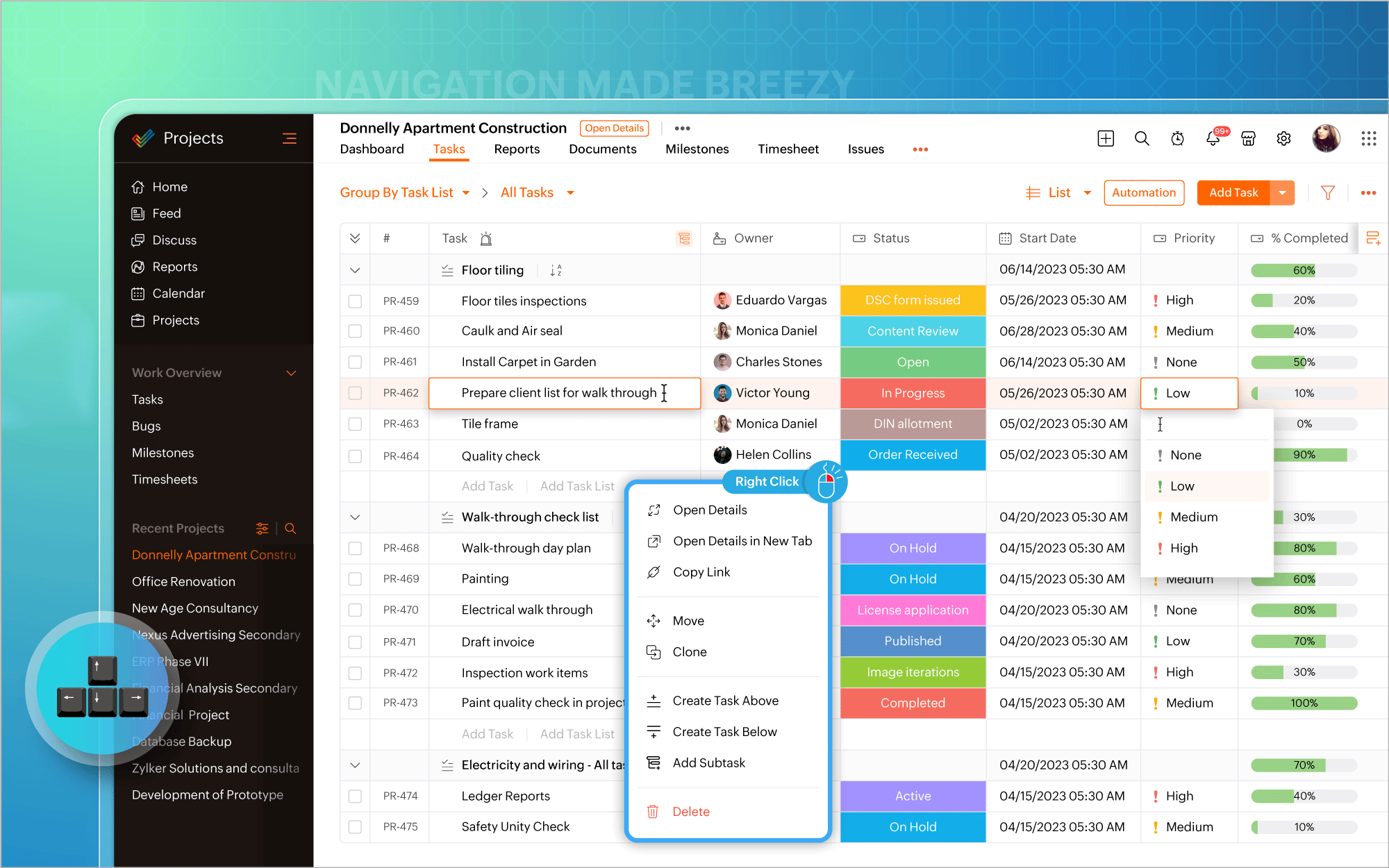
Gantt Charts
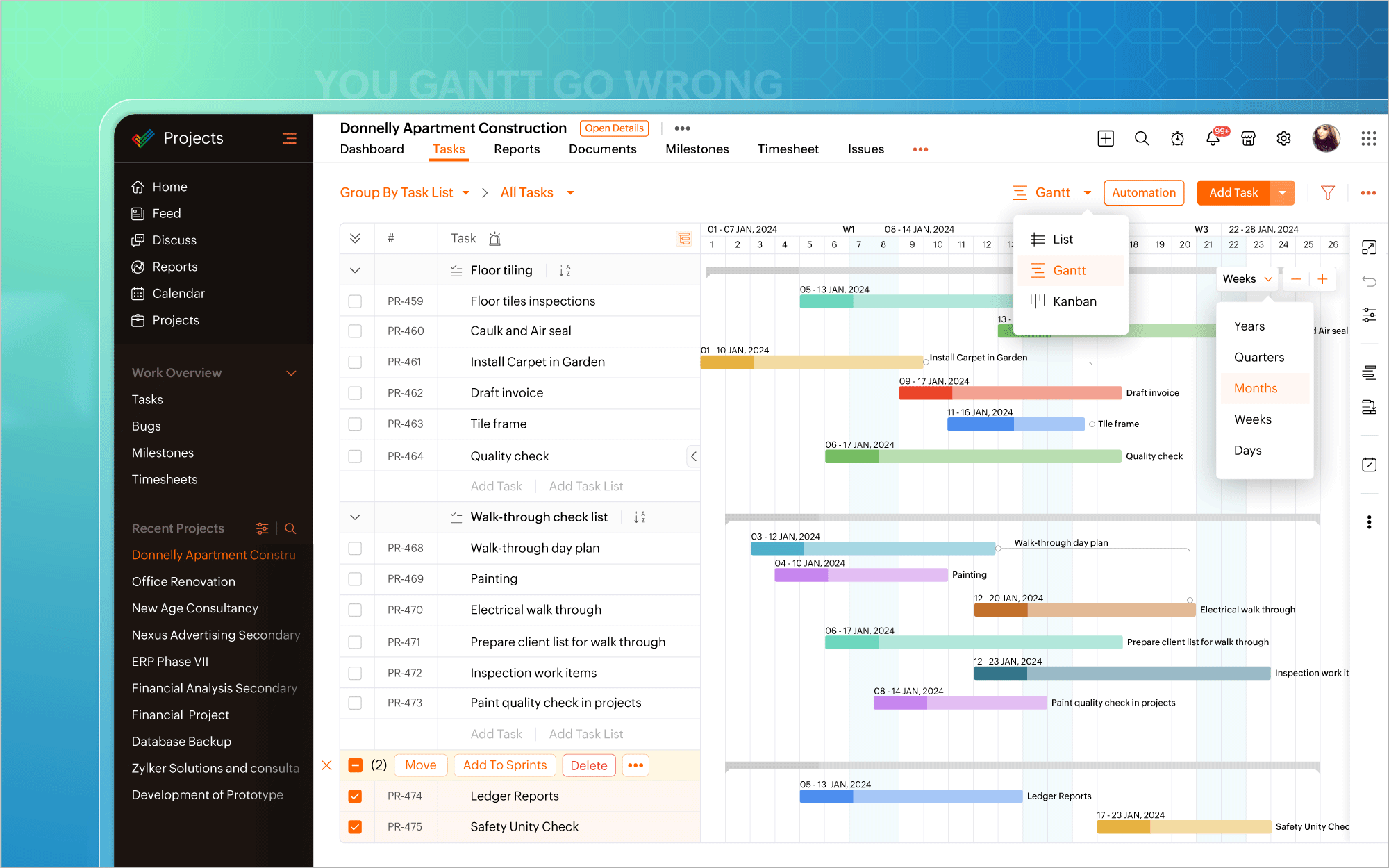
Nous avons modifié l'emplacement du diagramme de Gantt. Vous pouvez désormais y accéder directement dans la vue en liste et mettre à jour les éléments de travail en masse à partir du diagramme lui-même. Les vues quotidiennes, hebdomadaires, mensuelles, trimestrielles et annuelles de la chronologie du projet sont prises en charge, permettant de visualiser le travail depuis le point de vue qui vous intéresse, afin d'être toujours sur la bonne voie. En plus des rapports de Gantt habituels pour les tâches, vous pouvez également générer des rapports de Gantt spécifiques aux jalons et aux projets, et exporter ces données à tout moment.
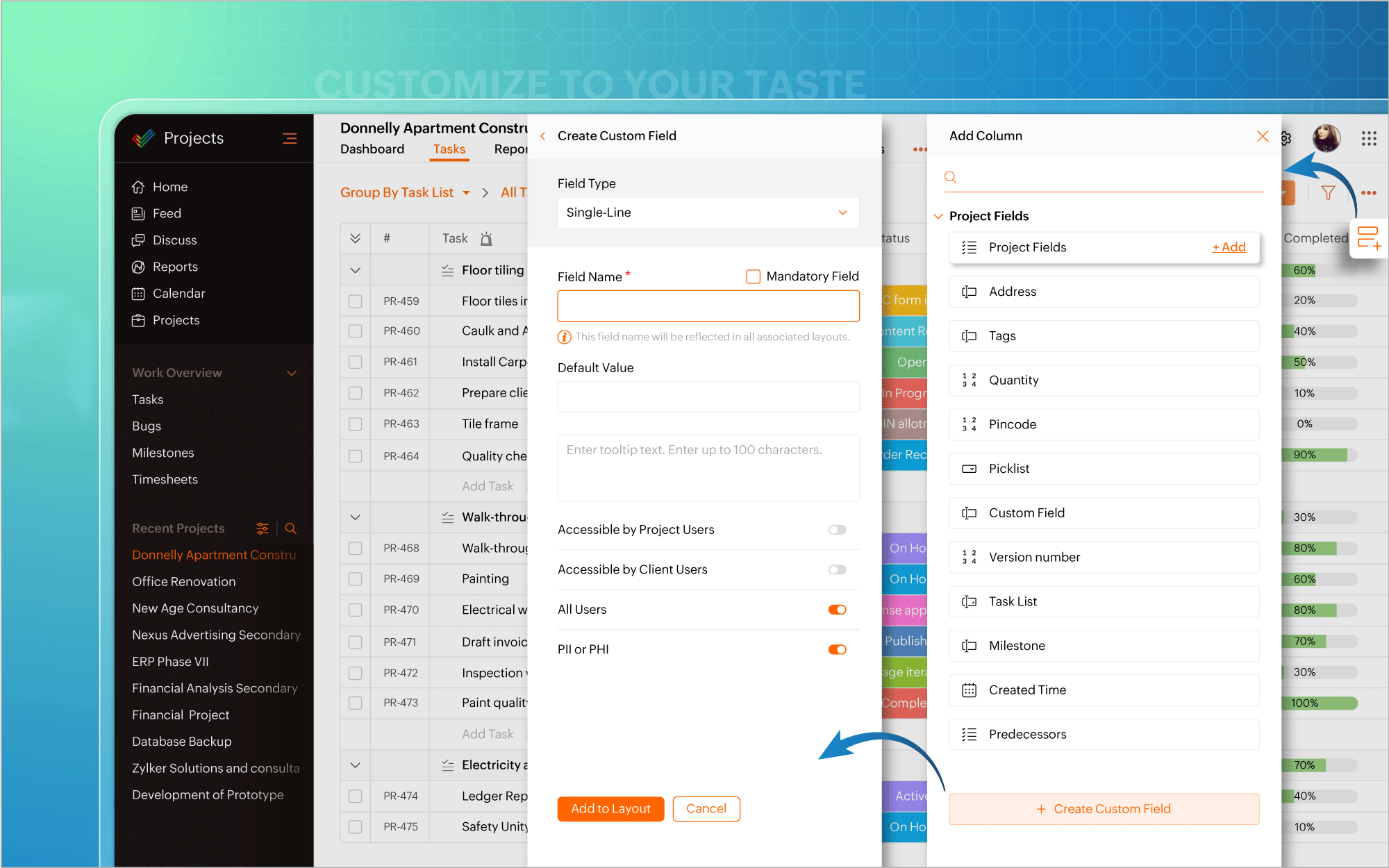
Personnaliser selon vos goûts
L'icône de personnalisation située dans le coin en haut à droite de l'écran vous permet d'ajouter facilement des champs personnalisés. Il existe également plus de 20 modèles de projets adaptés aux besoins de différents secteurs d'activité, ce qui vous permet d'éviter de créer des projets à partir de zéro. De plus, la possibilité vous est offerte de créer et de personnaliser des mises en page privées pour certains projets, tout en gardant les autres projets en l'état. Transformez chaque projet en un succès, avec une facilité accrue.
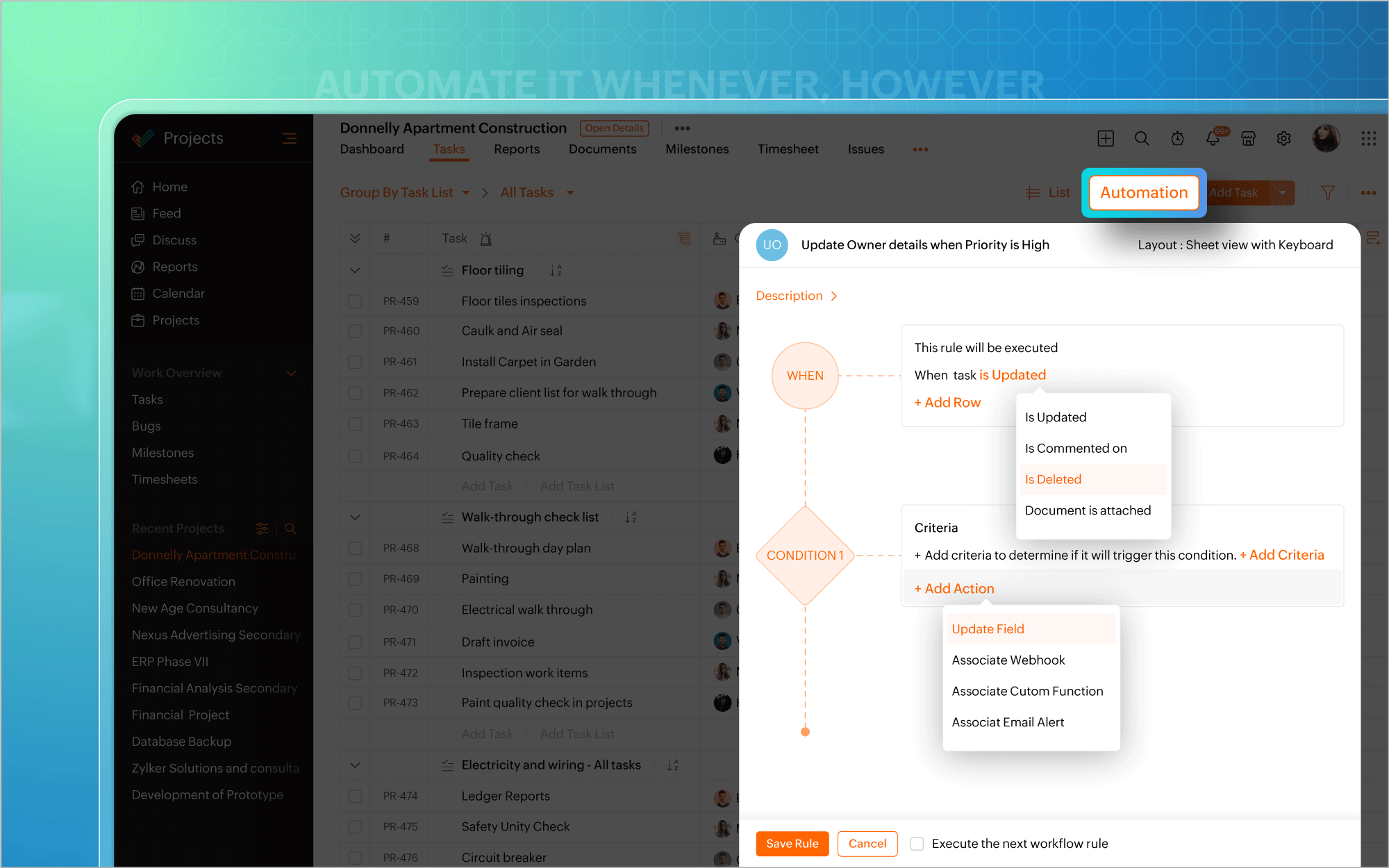
Automatiser à tout moment
Nous avons également introduit l'automatisation dans la vue en liste. Plus besoin d'aller à la page de configuration chaque fois que vous souhaitez créer des règles de flux de travail pour des projets ou des tâches. Mettez l'accent sur l'automatisation et faites en sorte que les tâches routinières fonctionnent à votre convenance.
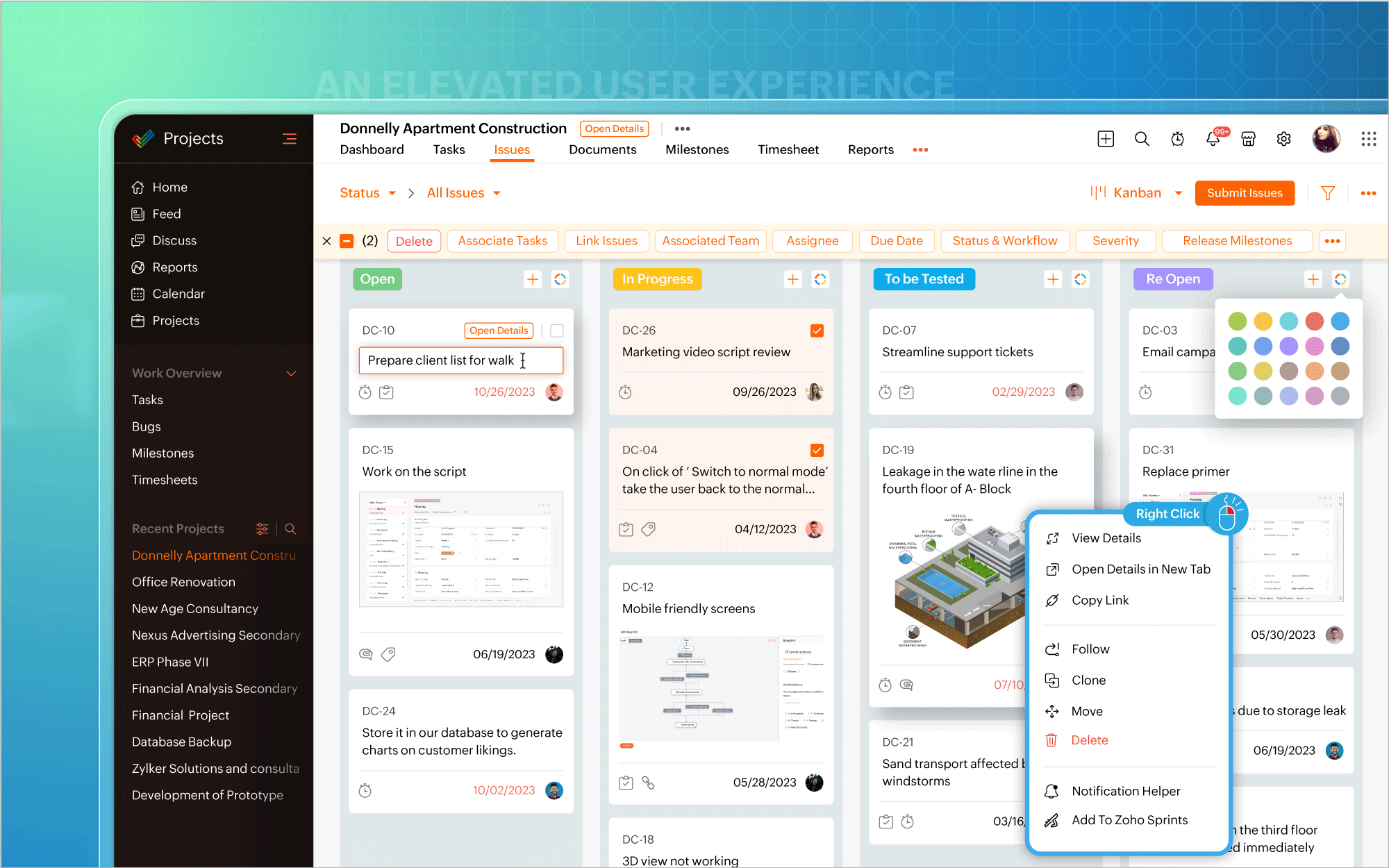
Une interface utilisateur améliorée
Vous pouvez ainsi effectuer des modifications, éditer les détails d'un projet, mettre à jour en masse des éléments de travail ou inclure des commentaires et des pièces jointes directement à partir de la vue du tableau Kanban. Un clic droit sur des modules tels que Liste, Kanban ou Gantt fait apparaître un menu contextuel qui vous permet d'effectuer des actions pertinentes, telles que consulter les détails du projet, cloner des tâches ou personnaliser les couleurs des barres de Gantt. Une page dédiée aux détails du projet s'ouvre si vous avez besoin d'informations spécifiques au projet ou si vous souhaitez apporter des modifications à votre projet.
Une expérience utilisateur améliorée sur mobile
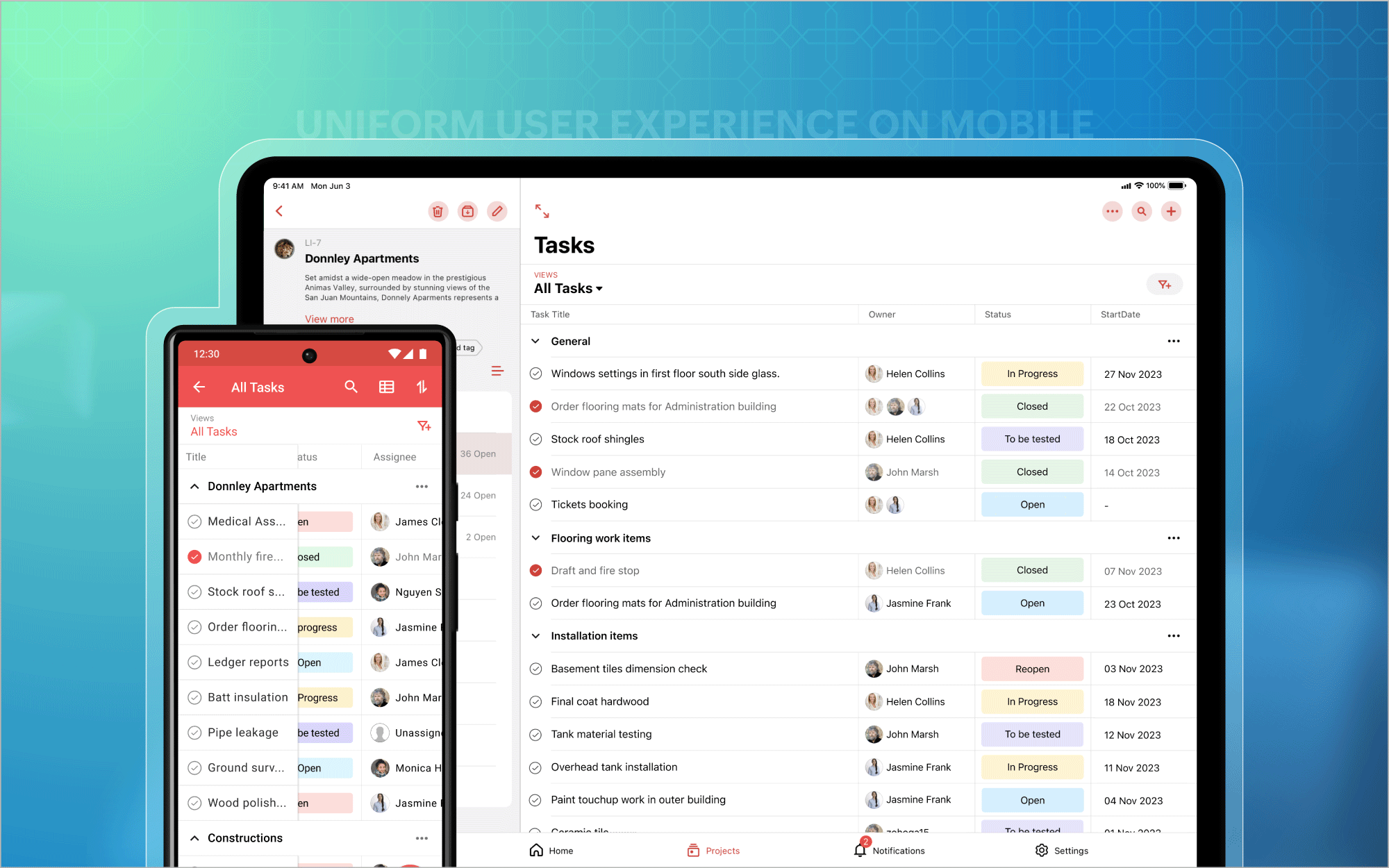
Nous avons également étendu l'affichage des listes aux appareils mobiles et aux tablettes, afin que vous puissiez profiter d'une expérience utilisateur homogène et standardisée sur toutes les plateformes. En outre, vous avez désormais accès aux tableaux de bord des projets et au module Calendrier sur les plateformes Android et iOS. Et bien plus encore est à venir !
Bon à savoir
Zoho Projects 7.0 sera inaccessible après le 31 mars 2024. Nous vous recommandons donc fortement de passer à la dernière version dès que possible. Nous avons hâte que vous l'essayiez !
N'hésitez pas à nous faire part de vos commentaires et de vos réactions sur les fonctionnalités préférées de la nouvelle version.
Plus simple, plus pratique, c'est Zoho Projects 8.0 !
L'équipe Zoho France
Topic Participants
Kinjal Lodaya
Sticky Posts
Les Zoholics sont de retour !
Bonjour à tous, Nous avons (encore une fois) une bonne nouvelle à vous partager : nous allons enfin pouvoir nous rencontrer ! Et pas dans n'importe quel contexte, mais lors de notre conférence annuelle : les Zoholics ! Mais que sont les Zoholics me direz-vousNovembre : un résumé de ce qui s'est passé le mois dernier sur Community
Bonjour à tous, L'année 2021 arrive presque à sa fin, mais nous continuons à avoir de nombreuses actualités à vous partager. En voici un résumé ! Nous avons eu notre première session "Ask The Experts" sur notre nouvelle version Zoho One 2021 et vousAoût : Un résumé de ce qui s'est passé le mois dernier sur Community
Bonjour à tous, Et bonne rentrée ! Comme chaque mois voici un résumé de ce qui s'est passé sur Community et dans l'actualité de Zoho en général. La grande nouvelle de mois d'Août est l'arrivée de la fonction Canvas : le premier studio de conception pourJuillet : Un résumé de ce qui s'est passé le mois dernier sur Community
Bonjour à tous, Le premier mois de l'été se termine, et si certain profitent d'un repos bien mérité, sur Community on continue à en apprendre toujours plus sur nos produits Zoho. Notre série sur Zoho CRM se réinvente avec la découverte de notre fonctionCommunity Digest - Résumé de mai 2021
Bonjour à tous, Que s'est il passé en Mai sur notre page Community France ? En plus de nos articles Trucs et Astuces, vous avez été nombreux a réagir, nous poser des questions ou encore publier vos propres conseils ! Vos les différents sujets abordés
Recent Topics
Zoho Inventory Sales Order Items
I'm trying to build automation using Zoho Flow to add items to a Sales Order. In the automation options for both "create sales order" and "update sales order", The item ID is required. However, when I update the Sales Order, it's just replacing the itemPermissions for Azure Devops connection
I am trying to set up a connection with our Azure DevOps org but it keeps giving me this error. On Azure I should be able to have admin-level access to everything. Can you please point me to which permission this is checking for so I can enable it?Best way to start zoho inventory with bulk openning stock
We are already using zoho book since long time for cars trading company. Now to streamline more, would like to import the excel data of closing stock of inventory to zoho inventory and to start on. Since we need to track each VIN (unique vehicle id number)My IMAP mail suddenly stopped working
On my iPhone and iPad, IMAP stopped working for my Zoho account with the error "User name or password incorrect" and "Invalid credentials failure" however I was able to access via web with the same credentials. Also stopped working on Apple Mail client.Confused by the distiction between matched and categorized when reconciling a bank statement an how to
I used to use quickbooks. In quickbooks, it was possible to use the check writing feature to add an expense that was on the bank statement that did not go through the AP and check writing process. I would write a check, assign it a number like etf (forNot Receiving OTP • https://voters.eci.gov.in/home/family
Hello Customer, Greetings from Zoho Mail. Upon a detailed review of our delivery logs, we can confirm that other Zoho Mail users are successfully receiving OTP emails from eci.gov.in. However, in your specific case, it appears that the OTP emails areWorkDrive for Excel Add on
Dear Sir/Madam Have installed Workdrive for Microsoft add on But unable to view the same added in ExcelSplitting Transactions in Zoho Books
I have read in past forum posts that the ability to split bank transactions would likely be implemented - it's definitely a typical accounting program feature. I'm new to Zoho and thought I'd found nirvana until I realized this feature doesn't seem toZoho Calendar s’enrichit avec une intégration à Zoho People et Zoho Cliq
Les journées de travail ne se déroulent jamais exactement comme prévu. Une conversation informelle devient une séance d’échange d'idées, une absence modifie un planning, et votre agenda se retrouve vite décalé par rapport à la réalité. Chez Zoho Calendar,Holidays
Hi; For defining Holidays, you need to add logic to handle the year as well as the month & day. We need to be able to enter Holidays for the next year. I need to add a holiday for January 2, 2017, but I can't until January 1st, which is a Sunday and weZoho public comments are confusing and unnecessary
Hi, we use zoho desk and have issues with public comments. We started using them because the "Reply" option just seemed very clumsy because of the following reasons: - the top "Reply" button starts what seems to be a regular email, showing the entireZoho API - ticket creation - Validation failed for the condition : Ticket Status Info should not be empty
Hi ! I'm trying to create ticket through Zoho API, and I'm getting a 422 response : "Validation failed for the condition : Ticket Status Info should not be empty" My request looks like this : curl --location 'https://desk.zoho.eu/api/v1/tickets' \ --headerDeleting unwanted ticket replies
Hello, In a Zoho Desk Ticket thread, sometimes one of the recipients has auto-reply activated. This creates a new message in the Ticket thread that not only pollutes the thread, but most importantly cannot be replied properly because usually auto-reply e-mails don't do "reply all", so the other recipients are not included. I want to delete such a message in the Ticket thread. I searched the help of Zoho Desk, but only found a way to mark as Spam (https://help.zoho.com/portal/kb/articles/marking-support-tickets-as-spam)System-generated support email added in CC on “Reply All”
Hi, I recently set up Zoho Desk for a client and we are trying to prevent the Zoho Desk system-generated support email address (not the mailbox used as the department’s "From address") from being automatically added in CC when agents use “Reply All” onApplying Excess Payments & Conflict Invoices Due to Cancelled Items
I’m running into several issues that appear to stem from deeper-than-expected overlap between Zoho Finance (Books/Inventory) and Zoho POS. The level of coupling between these systems seems greater than what was originally communicated, and it’s leadingConvenience Fees
I use Zoho Invoice for invoicing my billboard customers. I have a few customers that want to pay using credit cards and ACH. As a result, I have integrated an Online Payment Gateway (Stripe) for these customers. I currently charge these customers a "Convenience Fee" of 3% for using this service as I typically only take checks as payment (and the gateway charges 2.9% + $0.30 per transaction). I do this by creating a separate line item on the invoice and adding 3% to it. I would like to offerHTML Tags added to Reports with Notes
Recently Zoho added the ability to markup text within notes. That way, users can change font size, colors, etc. It's a great change. However, since the change, reports that include a column for "Note Content" are printing HTML tags within the report.New Feature: Audit Log in Zoho Bookings
Greetings from the Zoho Bookings team! We’re excited to introduce Audit Log, a new feature designed to help you track all key actions related to your appointments. With Audit Log, you can maintain transparency, strengthen security, and ensure accountability.Restrict Payment Methods
Allow us to restrict certain payment methods specific for each customer.Emails Getting Delay Error Messages - Status: 451
Hi. Hoping someone can help. I've been using Zoho for over a year now with no problems at all. Today, the majority of my emails I send out or reply to are getting this error: This message was created automatically by mail delivery system. THIS IS A WARNING MESSAGE ONLY. YOU DO NOT NEED TO RESEND YOUR MESSAGE. The original message was received at Sun, 22 Dec 2019 18:20:19 -0800 from wazza@amninjas.com [wazza@amninjas.com] ----- The following addresses had fatal errors ----- [Status: ERROR, Address:Add Domain
Hello Zoho Support, My Zoho Sites project accidentally auto-added domains with http:// prefix and duplicated domain entries. Current domains list shows: http://www.kinhtethethao.com.vn (Primary – cannot be removed) http://www.kinhtethethao.com.vn (verificationKaizen #221: Workflow & Actions Reports APIs
Over the last few weeks, we have joined Zylker Cloud Services as they restructured their automation ecosystem using Workflow APIs and Actions APIs. Along the way, we discovered how to audit workflows, update old rules, create new ones, and manage associatedHaving an Issue with the Entity ID
I'm having an issue when trying to use Zoho Flow and the notes function. I currently have it set up when a new response comes into a particular form, all of their responses will go into the notes section of their contact on the CRM. I'm currently mappingFor Each Loop in Zoho Flow
I am using Zoho flow to create rows in an google sheets for every new order in Shopify but the issue is that it is creating one row per order and all line items are comma separated values but I want separate rows for each line item. Is there a way toDebug and Test not receiving updates
Hello, I've been trying to debug two of my simple flows between Zoho Projects and Clockify but it seems like the Debug and Test feature is not working for me. When I click the Play button on any of the flows and then perform the trigger actions nothingAttendance, Reimagined: Smarter Views for Teams and Individuals
Tracking attendance shouldn’t feel like a chore. With the revamped Attendance module UI, Zoho FSM makes it easier than ever to monitor work hours, check-in activity, and team availability—whether you’re managing an entire workforce or just keeping anLogistics Industry: Learn to create amazing appointment scheduling sites
In the logistics industry, the quality of service is something that cannot be shown to others unless they experience it. Sure, there are metrics that show how you fare when compared to your competition, but then, it only communicates little with respect to quality. The usual route which firms in logistics took are advertisements, to which the internet has opened alternatives in today’s digital age like websites and appointment scheduling sites. A great online presence can help you communicate withCustomer Management: # 1 Pick a Convenient Way to Onboard Customer
When Meera opened her bookstore, onboarding customers was effortless. A customer walked in, picked a book and left with a handwritten bill. As the store gained popularity, things changed. " Can I place an order over the phone?" a customer asked one day.Tracking Emails sent through Outlook
All of our sales team have their Outlook 365 accounts setup with IMAP integration. We're trying to track their email activity that occurs outside the CRM. I can see the email exchanges between the sales people and the clients in the contact module. ButFetch ALL items from Inventory and send to Google Sheet using Flow
The title says it all -- I want to fetch the Item name, SKU, Purchase rate, and Sales rate for ALL items in Zoho Inventory and have them populate a tab in an existing Google Sheet. I have already successfully made this work for one item, so the flow isWhy Document Integrity Matters at Every Stage of the Contract Lifecycle
Contracts are legal records that must stay authentic and traceable from creation to expiry or termination. In Zoho Contracts, several design decisions focus on protecting the integrity of every document. These measures ensure that no important detailsaffichage pièces jointes impossible
Bonjour, aujourd'hui je n'arrive pas à afficher ni à télécharger les pièces jointes dans ZOHO CRM. J'utilise Chrome, j'ai vidé les caches et les cookies. Mais cela ne change rien. Merci de votre aideReminder to renew subscription.
Whenever I try to add to one of my notes a " renew your subscription" window pops out and won't Close disallowing me to edit. Why should I renew my subscription on an application with at best such bugs and at worse such underhanded ways to force renFields not coming through, not pulling data
Forgive the noviceness of my vocabulary. I am in Zoho flow connecting CRM and Projects. When an opportunity hits a certain stage, it will create the project in Projects, and bring in data from the opportunity. Everything is working, except for two fieldsSmartsheet Integration
Has any in the community been able to integrate Zoho Desk with Smartsheets using Zoho Flow? I am trying to get the Smartsheet Row ID based on ticket data and cannot find documentation on the Get Row function for Smartsheet. It is asking for a Query StringCRM Campaign - how to mass remove contacts?
Does anyone have a solution for removing all contacts from a CRM campaign. Seems that one by one is the only option.Send out follow-up email in the same thread (threaded conversations in individual emails) from Zoho CRM
Hi, I'm new to Zoho. I'm trying to send individual emails to my leads one by one. And I'll send out follow up email if I don't hear back from them later. However, instead of sending a new email, I want to reply in the same email thread so that the recipientsCadence Support in Zoho Vertical Studio
We would like to know whether it is possible to create and configure Cadences in Zoho Vertical Studio, similar to the Cadence feature available in Zoho CRM. Please confirm if Vertical Studio supports creating cadences for modules and users, and whetherRemoving "Products" as mandatory field from Sales Order creation page
Hello, friends According to our workflow, we should: 1) create Sales Order (Stage "New") 2) call and discuss the Products with a customer (Stage "Communication") 3) add the Products to the Sales Order during the call However, "Products" is mandatory toZoho Books says "The customer "Hakimuddin P A Ali" already exists. Please specify a different name.""
One of my transaction is not getting posted from Stripe to Zoho books. I already checked in Zoho books that there is no customer already present in Zoho books with the same name (as the error mentions) I already raised this complaint on Zoho flow portal,Next Page