New Feature: Audit Log in Zoho Bookings
Greetings from the Zoho Bookings team!
We’re excited to introduce Audit Log, a new feature designed to help you track all key actions related to your appointments. With Audit Log, you can maintain transparency, strengthen security, and ensure accountability.
What you can do with Audit Log:
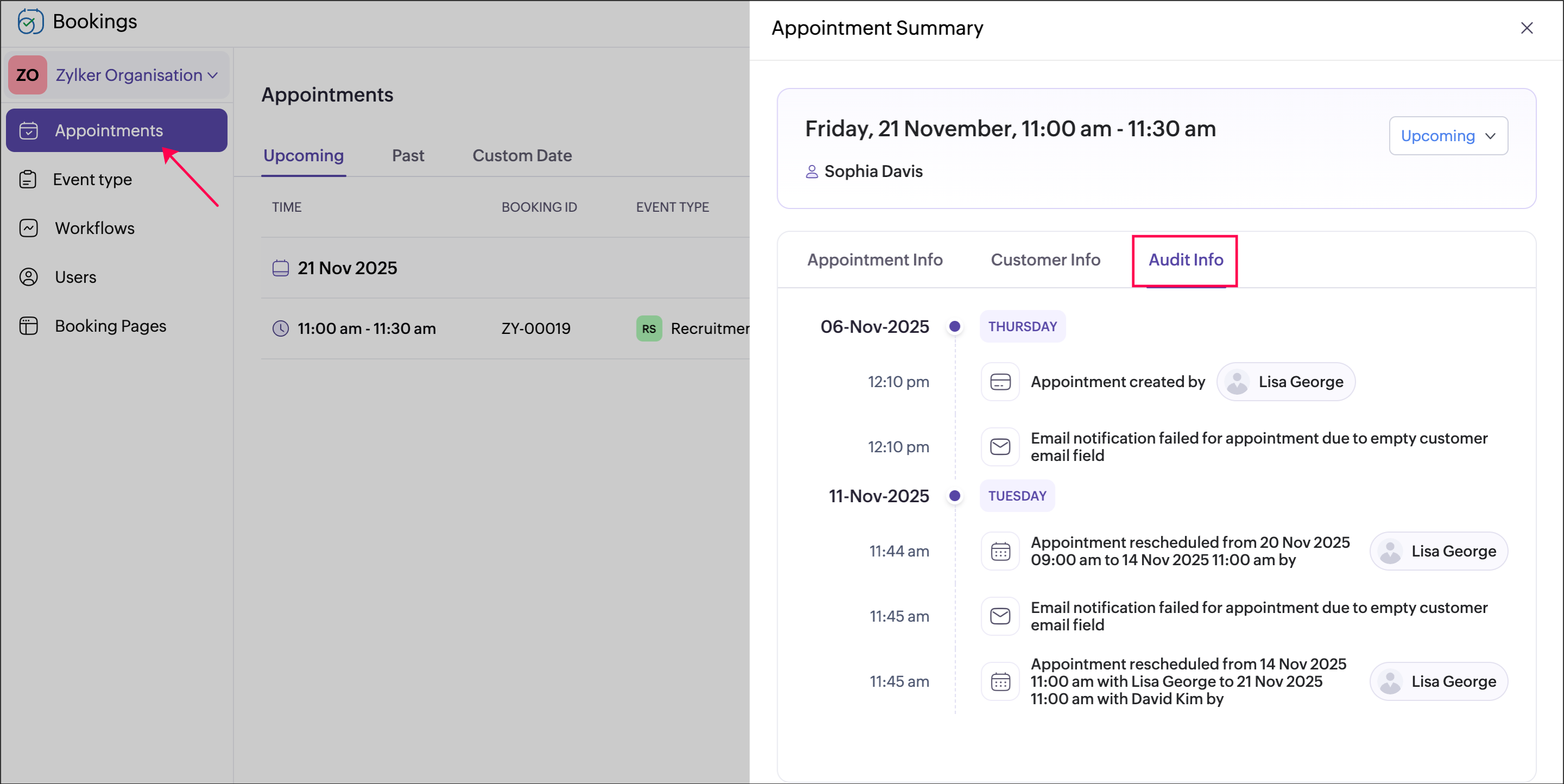
- Track all critical activities, such as updates, reschedules, cancellations, status changes, payments, and configuration changes.
- Monitor user actions with details of who performed the action, what was changed, and when it happened.
- Gain complete visibility into your bookings and user actions to maintain reliability and trust.
- Identify and resolve failures, such as notification, workflow, or integration errors, directly by using the Retry option to restore failed actions quickly and maintain smooth operations.
Getting started is simple.
Go to Admin Center → Data Administration → Audit Log
to view all actions across your organization.

To check logs for a specific appointment, open the appointment summary and click the Audit Info tab.
Examples:
- A training institute can track all updates to class schedules and instructor assignments. Audit Log shows who made the changes and when, helping admins maintain accuracy, clarify differences, and build trust with instructors and students.
- A SaaS company can monitor role changes and configuration updates across multiple teams to maintain security and streamline internal processes.
Availability: This feature is only available in the Premium plan.
Roles: Super admins and admins can view all logs; Workspace admins and managers can view the audit log info only for their assigned workspaces; Staff can view the audit log info related to the appointments assigned to them.
Roles: Super admins and admins can view all logs; Workspace admins and managers can view the audit log info only for their assigned workspaces; Staff can view the audit log info related to the appointments assigned to them.
We're confident that the Audit Log feature will be an invaluable tool for managing your bookings, ensuring accountability and data integrity. Share your feedback in the comments or email us at support@zohobookings.com.
We'll be back soon with more existing updates!
The Zoho Bookings Team
The Zoho Bookings Team