Kaizen #111 : Set default values based on Page Layouts using Client Script
Hello everyone!
Welcome back to another interesting Kaizen post.
In this post, let us discuss how to set default values for fields based on different layouts using Client Script.
In this Kaizen post,
- What are Page Layouts?
- Client Script is specific for each layout
- Use Case
- Solution
- Summary
- Related Links
1. What are Page Layouts?
Page layouts in Zoho CRM enables you to manage the organization and display of fields, sections, and associated details on a record's page. These page layouts are instrumental in personalizing the user interface and optimizing the data entry process to align with your organization's unique requirements. You can assign layouts to user profiles based on your business requirements.
2. Client Script is specific for each layout
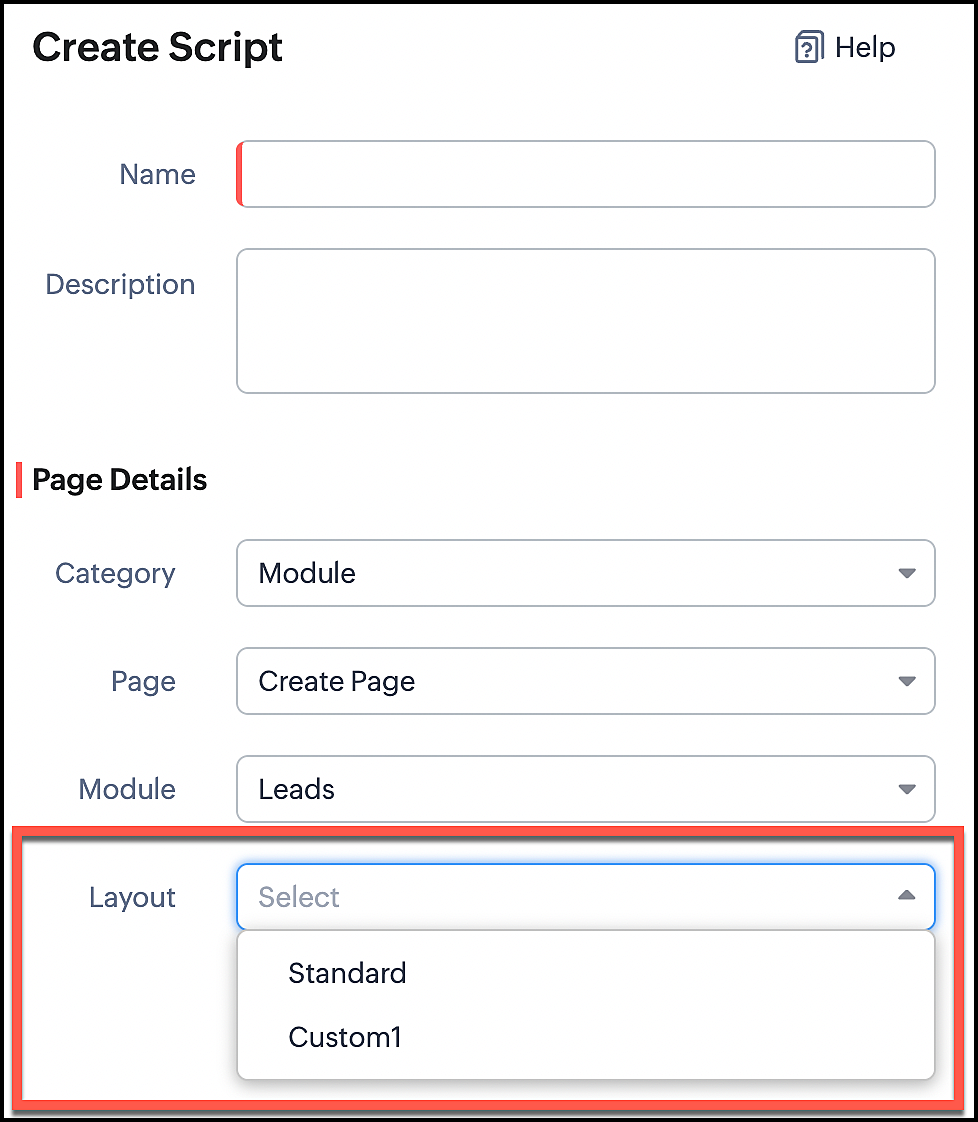
Whenever you create a Client Script, you should mention the layout for which the Client Script should work. So whenever you want to perform actions specific to a particular layout, you can easily accomplish it using Client Script.
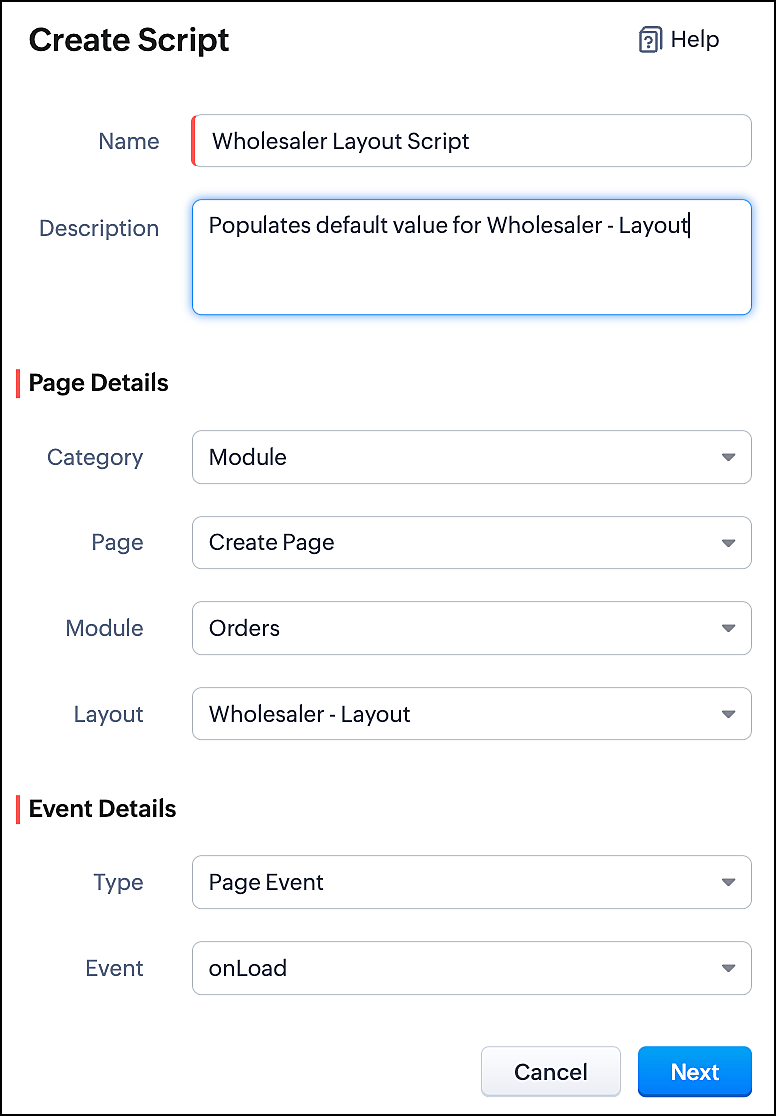
In the image below, you can observe that selecting a layout name is a necessary step for configuring a Client Script.
3. Use Case
Consider that Zylker is a manufacturing Company. The customers include both Wholesalers and Retailers. For this purpose, Zylker has two Page Layouts in a custom module named as Orders. One is the Wholesaler-layout and the other is the Retailer-layout. The Wholesaler-layout is assigned to the wholesaler profile and the Retailer-layout is assigned to the retailer profile.
1. Whenever a customer with retailer profile creates an order, the read-only field Account Type should be auto-populated as Retailer. In the Create page of the Orders module, when the value entered in the field "Number of pieces" is more than 100, then the Payment Method should get populated as Prepaid and should be read-only.
2. Whenever the customer with wholesaler profile creates an order, the read-only field Account Type should be auto-populated as Wholesaler and the Payment Method should be populated as Prepaid and should be read-only.
4. Solution
For a particular module, the number of Client Scripts to be created differs based on
The page for which you want the script to work.
The events that should trigger the script.
The layouts for which you want the script to work.
To accomplish this requirement, you need to create three Client Scripts, one for each layout.
- Client Script for Retailer Layout with onLoad Page event
- Client Script for Retailer Layout with onChange Field event
- Client Script for Wholesaler Layout with onLoad Page event
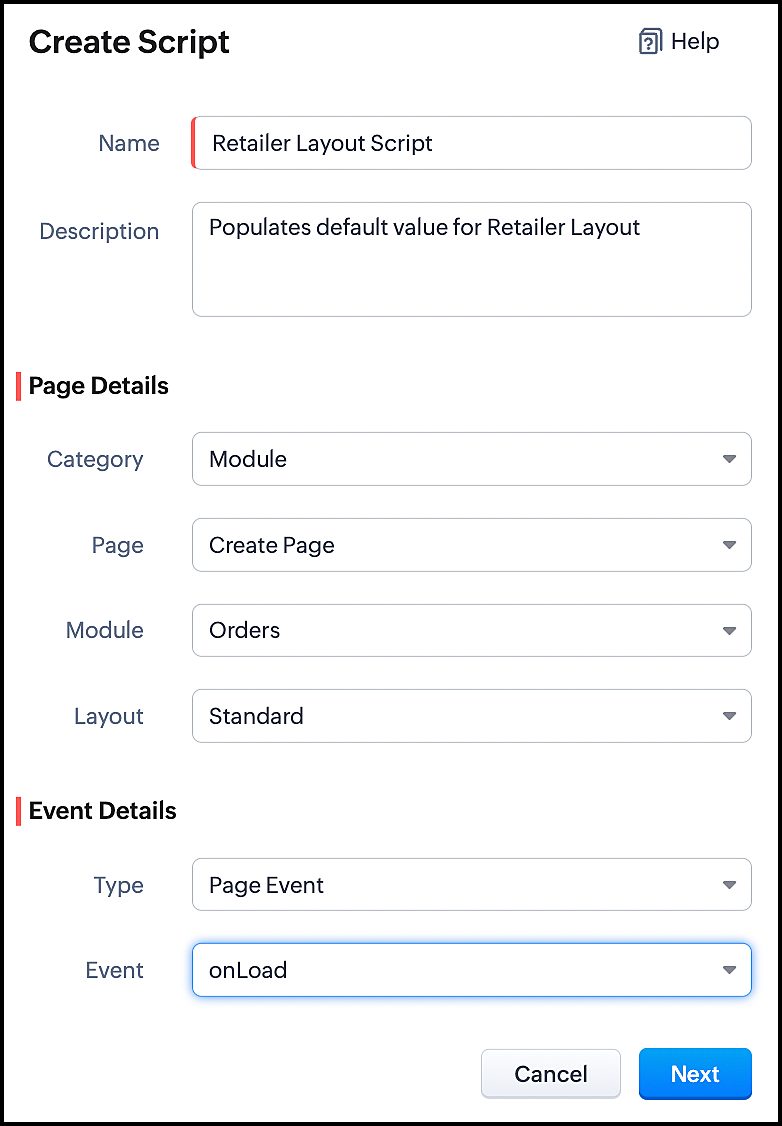
1. Client Script for Retailer Layout with onLoad Page event
- Go to Setup > Developer Space > Client Script. Click +New Script.
- Specify the details to create a script and click Next.
- Enter the following script and click save.
//To populate default value for Account Type var acc_type = ZDK.Page.getField("Account_Type"); acc_type.setValue("Retailer"); // To make the field "Account Type" read-only acc_type.setReadOnly(true); |
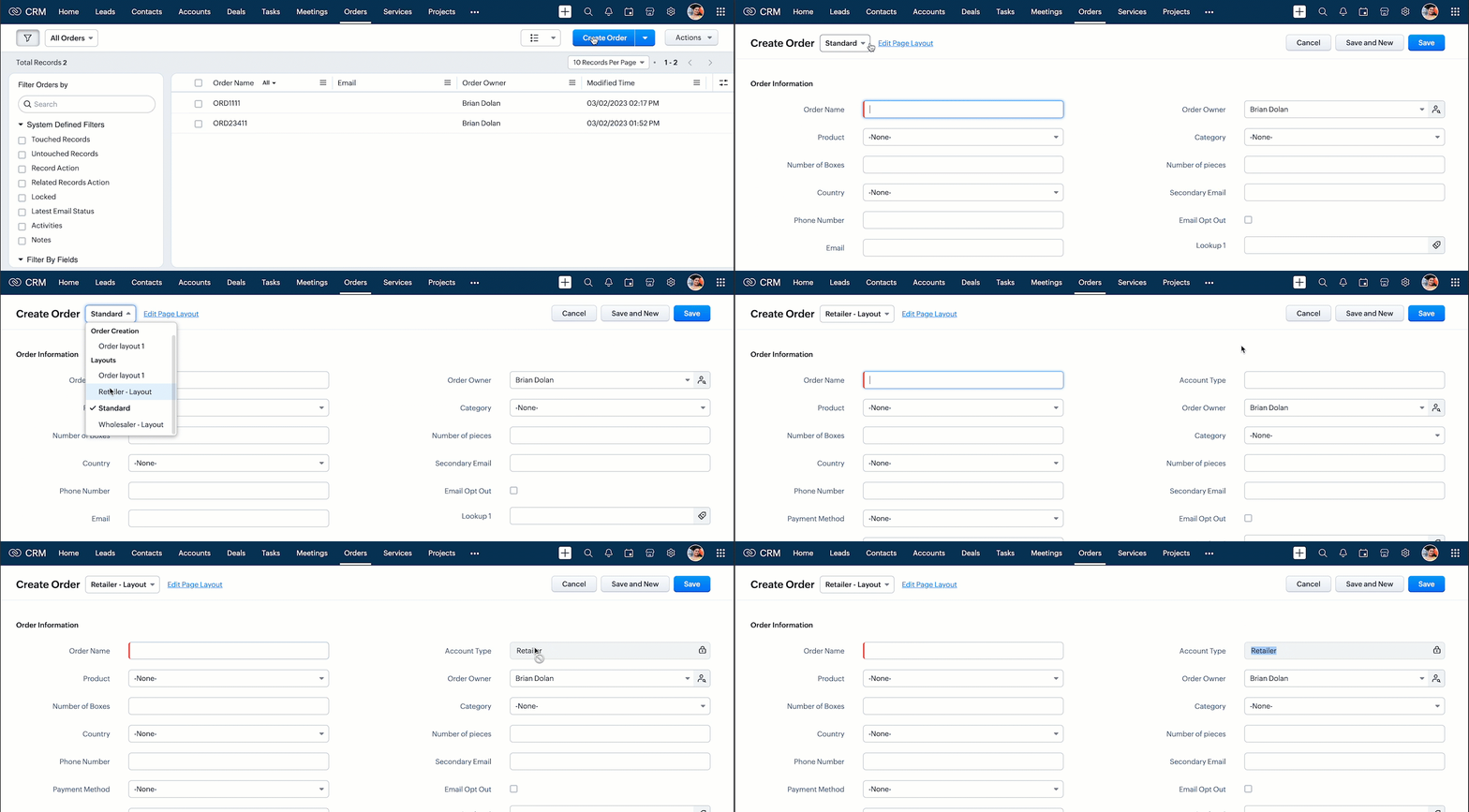
- This script gets executed whenever the Retailer - Layout, Create Page of Orders module gets loaded. The getField ZDK fetches the object details about the field Account Type. The value, Retailer can be populated to this field using setvalue(). You can make Account Type field read-only using setReadOnly().
- Here is how this Client Script works.
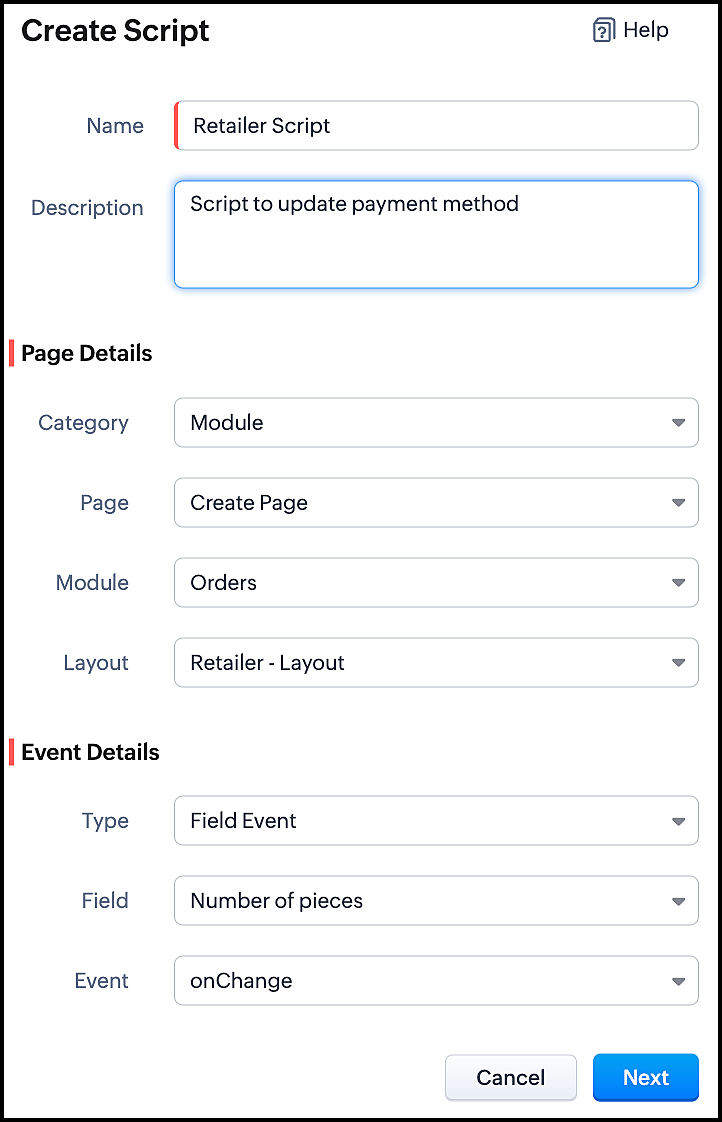
2. Client Script for Retailer Layout with onChange Field event
- Go to Setup > Developer Space > Client Script. Click +New Script.
- Specify the details to create a script and click Next.
- Enter the following script and click save.
//To populate Payment Method when the quantity is more than 100 var no_of_pieces = ZDK.Page.getField("Number_of_pieces"); var payment_method = ZDK.Page.getField("Payment_Method"); if (no_of_pieces.getValue() > 100) { payment_method.setValue("Prepaid"); // To make the field "Payment Method" read-only payment_method.setReadOnly(true); } |
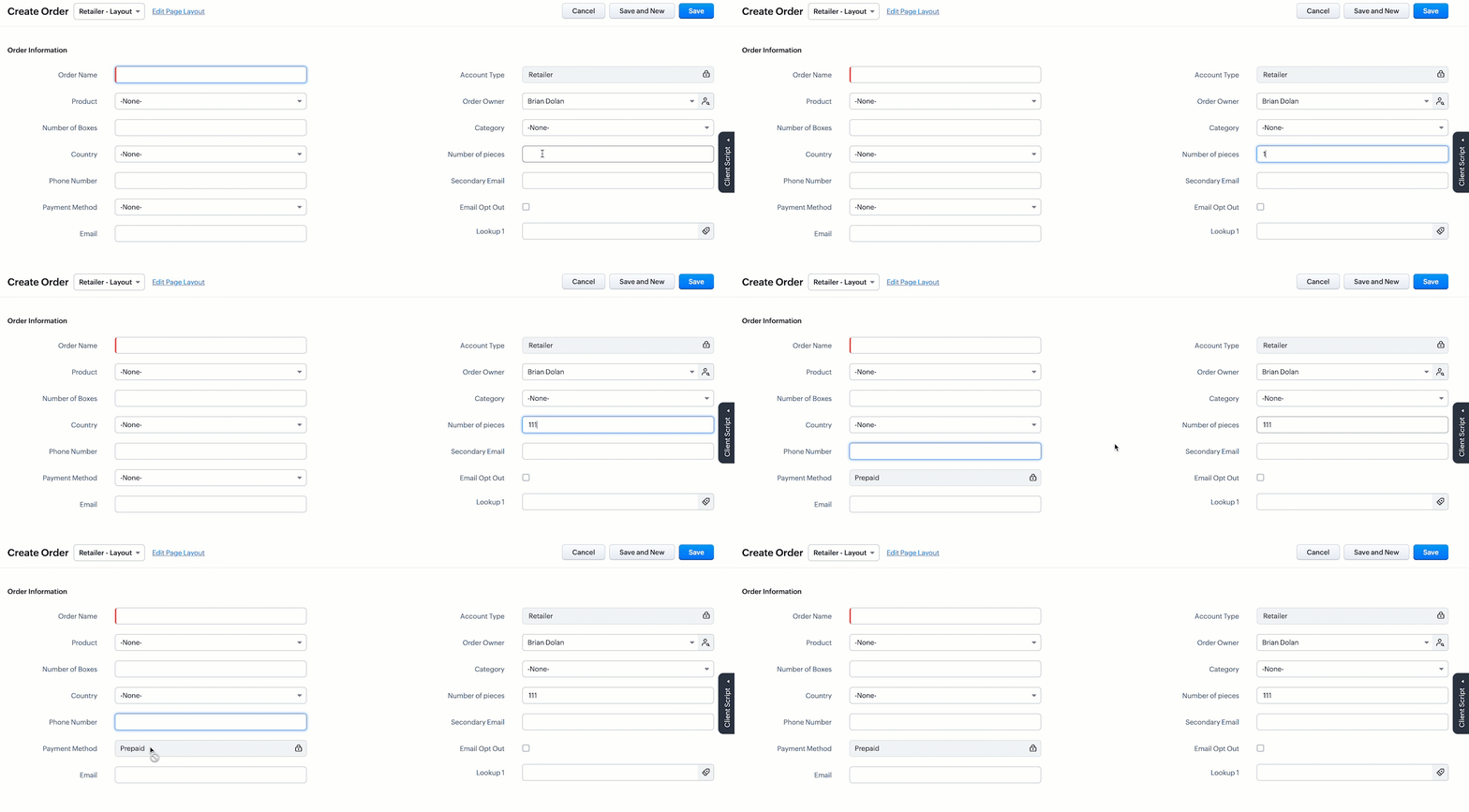
- This script gets executed whenever the user enters a value in the Number of Pieces field in the Retailer - Layout's Create Page of Orders module. The getField ZDK fetches the object details about the fields Number of Pieces and Payment Method. The value, Prepaid will be populated to Payment Method using setvalue(), whenever the value entered in the Number of Pieces is more than 100. You can use getvalue() to get the value entered in a field. You can make this field read-only using setReadOnly().
- Here is how this Client Script works.
3. Client Script for Wholesaler Layout with onLoad Page event
- Go to Setup > Developer Space > Client Script. Click +New Script.
- Specify the details to create a script and click Next.
- Enter the following script and click save.
//To populate default value for Account Type var acc_type = ZDK.Page.getField("Account_Type"); acc_type.setValue("Wholesaler"); // To make the fiels "Account Type" read-only acc_type.setReadOnly(true); //To populate default value for Payment Method var payment_method = ZDK.Page.getField("Payment_Method"); payment_method.setValue("Prepaid"); // To make the fiels "Payment Method" read-only payment_method.setReadOnly(true); |
- This script gets executed whenever the Wholesaler - Layout, Create Page of Orders module gets loaded. The getField ZDK fetches the object details about the fields Account Type and Payment Method. The value, Wholesaler and Prepaid can be populated to the corresponding fields using setvalue(). You can make Payment Method field read-only using setReadOnly().
- Here is how this Client Script works.
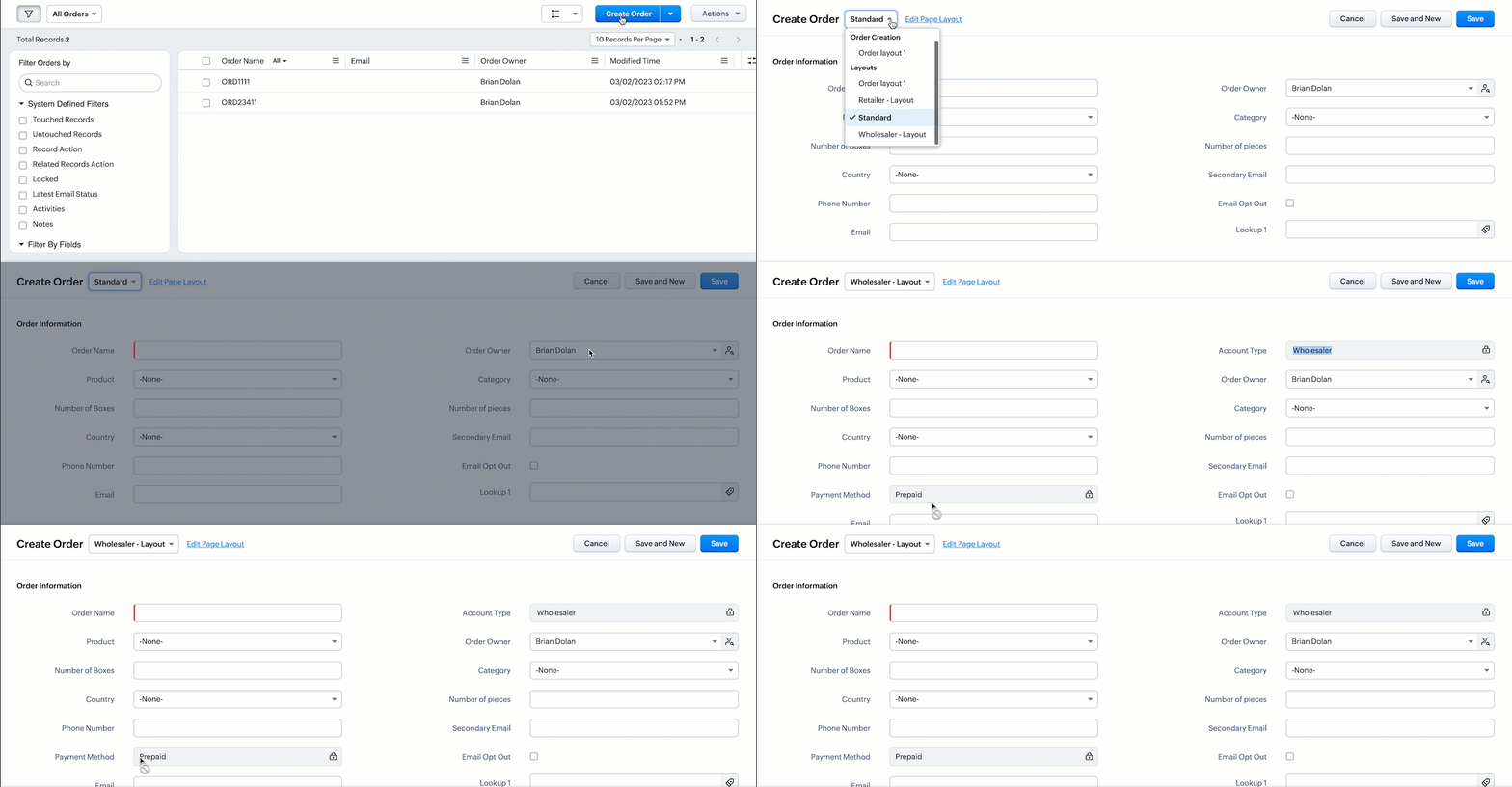
- Thus using Client Script, you can populate different default values for the same fields located in different page layouts, based on custom conditions.

Note :
Alternatively, you can achieve this using workflow rules. However, if you want instant actions i.e., before updating or saving a record, or if you have exceeded the workflow limit, you can implement this using Client Script.
5. Summary
In this post, we have discussed,
1. Configuring Client Script based on Layout.
2. Choosing the type of Event for a requirement.
3. Using setValue & setReadOnly for the ZDK.Page.getField().
We hope you found this post useful. We will meet you next week with another interesting topic!
If you have any questions let us know in the comment section.
Click here for more details on Client Script in Zoho CRM.
6. Related Links
Please take a look at our Kaizen collection here.
Cheers!
Previous Kaizen - Kaizen #110 Record Locking APIs in Zoho CRM
Topic Participants
Maadhari M
Vigneshwaran K
varun
Anamika Prasanth
Ishwarya SG
Sticky Posts
Kaizen #198: Using Client Script for Custom Validation in Blueprint
Nearing 200th Kaizen Post – 1 More to the Big Two-Oh-Oh! Do you have any questions, suggestions, or topics you would like us to cover in future posts? Your insights and suggestions help us shape future content and make this series better for everyone.Kaizen #226: Using ZRC in Client Script
Hello everyone! Welcome to another week of Kaizen. In today's post, lets see what is ZRC (Zoho Request Client) and how we can use ZRC methods in Client Script to get inputs from a Salesperson and update the Lead status with a single button click. In thisKaizen #222 - Client Script Support for Notes Related List
Hello everyone! Welcome to another week of Kaizen. The final Kaizen post of the year 2025 is here! With the new Client Script support for the Notes Related List, you can validate, enrich, and manage notes across modules. In this post, we’ll explore howKaizen #217 - Actions APIs : Tasks
Welcome to another week of Kaizen! In last week's post we discussed Email Notifications APIs which act as the link between your Workflow automations and you. We have discussed how Zylker Cloud Services uses Email Notifications API in their custom dashboard.Kaizen #216 - Actions APIs : Email Notifications
Welcome to another week of Kaizen! For the last three weeks, we have been discussing Zylker's workflows. We successfully updated a dormant workflow, built a new one from the ground up and more. But our work is not finished—these automated processes are
Recent Topics
using the Client script I want to Hide Show the Fields
if Related to service means some of the field like service no want to shoe and hide Amc no , purchase no how i achive this let issu = ZDK.Page.getField('Issue_Related_To').getValue(); if (issu == 'Service') { var field_obj = ZDK.Page.getField('Warranty_Cases');Write-Off multiple invoices and tax calculation
Good evening, I have many invoices which are long overdue and I do not expect them to be paid. I believe I should write them off. I did some tests and I have some questions: - I cannot find a way to write off several invoices together. How can I do that,Kaizen #210 - Answering your Questions | Event Management System using ZDK CLI
Hello Everyone, Welcome back to yet another post in the Kaizen Series! As you already may know, for the Kaizen #200 milestone, we asked for your feedback and many of you suggested topics for us to discuss. We have been writing on these topics over thevendors / customers with 2 different address and gst no
Why can't we have option for more than one address and depending on the state option for more than 1 GST no. ? We have customers / vendors PAN india with different addresses and GST no. for different states.Recurring Automated Reminders
Hi, The reminders feature in Zoho Books is a really helpful feature to automate reminders for invoices. However, currently we can set reminders based on number of days before/after the invoice date. It would be really helpful if a recurring reminder featureFail to send Email by deluge
Hi, today I gonna update some email include details in deluge, while this msg pops up and restrict me to save but my rules has run for one year. can you tell me how to use one of our admin account or super admin account to send the email? I tried to updateTransitions do not update fields until the record moves to next stage
We have a blueprint where a couple of stages have multiple transitions. If only some of the transitions are completed, but not all, Zoho does not update any of the fields impacted by the completed transitions. Is there any way Zoho can udate the fieldsZoho CRM - Kiosk Studio : Use action responses across your kiosks with sequential actions
Hello Everyone, Imagine building a kiosk that gives you full control over how actions are executed in later screens in that same kiosk. What if you could use data from a previous action later in that kiosk—with no interruptions or data gaps? This is exactlyGet Cliq Meetings in my O365 calendar
Hi, we are currently evaluating to replace the Teams Messaging and Meetings with Cliq. We currently still have all our email and calendars in O365. What i want to achieve is, to create a (ZOHO) meeting from Cliq and have this meeting added to my Outlook/O365Custom Button to convert a Deal to a Custom Module?
Hello Community I am in process of building out a custom CRM for my team and part of this is looking at building out a Custom Button or function of some sort where when a Deal is marked Closed Won the system will allow for a "Convert to Job" option toChange eMail Template for Event-Invitations
Hello ZOHO-CRM Team How I can change the eMail Template for Event-Invitations? I work with the German Version of the Free Version. I know how I can modify eMail alerts or Signature Templates, but where I can other eMails modify you send out? Thank youWorkdrive Oauth2 Token Isn't Refreshing
I have set up oauth for a bunch of zoho apis and have never had a problem with oauth. With workdrive i am using the exact same template i usually use for the other zoho apps and it is not working. All requests will work for the first hour then stops soMigrate Your Notes from OneNote to Zoho Notebook Today
Greetings Notebook Users, We’re excited to introduce a powerful new feature that lets you migrate your notes from Microsoft OneNote to Zoho Notebook—making your transition faster and more seamless than ever. ✨ What’s New One-click migration: Easily importHow can I import OLM to Yandex Mail easily?
For migrating Mac Outlook OLM data to Yandex Mail efficiently, the Aryson OLM Converter is a reliable professional tool that ensures complete data integrity throughout the process. Unlike manual methods, which can risk inconsistent formatting or missingIntroducing Radio Buttons and Numeric Range Sliders in Zoho CRM
Release update: Currently out for CN, JP, AU and CA DCs (Free and standard editions). For other DCs, this will be released by mid-March. Hello everyone, We are pleased to share with you that Zoho CRM's Layout Editor now includes two new field formats—Is it possible to setup bin locations WITHOUT mandating batch tracking?
Hi fellow zoho users, I'm wondering if anyone else has a similar issue to me? I only have some products batch tracked (items with shelf life expiry dates) but I am trying to setup bin locations for my entire inventory so we can do stock counting easier.Implementing Inventory Process
I am just starting to create an inventory system through Zoho for a nonprofit. We receive in-kind donations of items for kids, and utilize them in 2 or 3 different programs. Then families come in and take the items. I'm thinking of this structure: OurBest way to start zoho inventory with bulk openning stock
We are already using zoho book since long time for cars trading company. Now to streamline more, would like to import the excel data of closing stock of inventory to zoho inventory and to start on. Since we need to track each VIN (unique vehicle id number)Service Reports.
Hello Team, I have a requirement to create multiple service reports for a single AP. That means, in one AP I have 5 service line items, and all line items are linked to assets. Once I complete the AP, I want to generate 5 individual service reports, oneBlueprint enhancements - Parallel and multiple transitions, and more
Last modified on Sep 4, 2023: All Zoho CRM users can now access these enhancements. Initially, these features were available only on an early access basis and by request. However, as of August 2, 2023, they have been made available to all users in allItem Bulk Edit - Allow for Reorder Level
We're implementing a process for using the Reorder Level field for Items, and I have to go through and add this value to a huge chunk of our Items. It's driving me bonkers that I have to do this individually through the UI rather than bulk updating. ItZoho CRM || Unable to Bulk Assignment of Territories for Contacts
Dear Zoho CRM Support Team, I hope this email finds you well. We recently performed a bulk upload of Contacts into Zoho CRM using the official sample Excel template downloaded from the CRM. The upload itself was completed successfully; however, we encounteredWhat's New in Zoho Inventory | August – October 2025
Hello customers, The last quarter has been incredibly productive! We've released a powerful slate of new features and enhancements in Zoho Inventory designed to give you better control, greater efficiency, and expanded functionality across your inventoryDisable Zoho Inventory Tracking / Delink Zoho Books & Inventory
We have integrated zoho inventory with zoho books? Now after a long time, we want to disable inventory tracking and delink these 2 modules. Zoho says we cant do it. Anybody else going thru the same ? Any possibility at all? Why does zoho not allow toTracking Non-Inventory Items
We have several business locations and currently use zoho inventory to track retail items (sales and purchase orders). We were hoping to use zoho inventory to track our non-inventory items as well (toilet paper, paper towels, etc). I understand that wePrice Managment
I have been in discussions with Zoho for some time and not getting what I need. Maybe someone can help explain the logic behind this for me as I fail to understand. When creating an item, you input a sales rate and purchase rate. These rates are justSet Warehouse based on Vendor
Greetings. I would like to set automaticaly the Warehouse based on the Vendor. Context: I am working on an adaptation of a Purchase Order to be used as a Quotation. I have defined that when a user has to raise a quote the Vendor will be "PROCUREMENT" I would like to set the Warehouse to a predefined value when "PROCUREMENT" is set as Vendor. I have tried to do with the Automation feature using the Field Update option, but Warehouse does not is listed as a field. Can you help? Thanks in advance.How do I save audio files to my PC that I record into Zoho Notebook from my phone?
I was thinking of using Zoho Notebook as a way to store composition ideas, as well as for other things if it can handle this. For this to be useful for me though, I need to be able to have an easy way to download those audio files to my PC, either individuallySearch mails in shared mailbox
Hi everyone, is there a way to search mails in shared mailbox's? Search in streams or mail doesn't return anything from mails in shared mailboxes. Thanks! RafalZoho Landing Page "Something went wrong" Error
Hello, Every time I try to create a new landing page, I receive a "Something went wrong" error with no explanation. I cannot create any new pages, which means we cannot use this application. I did create one landing page successfully over a month ago,Writing SQL Queries - After Comma Auto Suggesting Column
When writing SQL Queries, does anyone else get super annoyed that after you type a comma and try to return to a new line it is automatically suggest a new column, so hitting return just inputs this suggested column instead of going to a new line? AnyoneSync your Products Module for better context.
In customer support, context is everything. The integration between Zoho Desk and Zoho CRM helps your sales and support teams function as one, delivering better customer experiences. With the latest update to this integration, you can now sync the Product module in your Zoho CRM with your Zoho Desk portal. This feature enables products from Zoho CRM to reflect in the "product" field in Zoho Desk. This can save your support team valuable time and effort. Some things to note when syncing the two:Where is the desktop app for Zoho Projects???
As a project manager, I need a desktop app for the projects I manage. Yes, there's the web app, which is AWESOME for cross browser and platform compatibility... but I need a real desktop app for Projects that allow me to enter offline information whereCRM verify details pop-up
Was there a UI change recently that involves the Verify Details pop-up when changing the Stage of a Deal to certain things? I can't for the life of me find a workflow or function, blueprint, validation rule, layout rule ect that would randomly make itopenUrl in blueprints
My customer wants to open a URL at the end of a blueprint transition. Seems this isn't possible right now but it would be very useful. In this thread, https://help.zoho.com/portal/en/community/topic/openurl-not-working the Zoho agent said that it's logicallyDropshipping Address - Does Not Show on Invoice Correctly
When a dropshipping address is used for a customer, the correct ship-to address does not seem to show on the Invoice. It shows correctly on the Sales Order, Shipment Order, and Package, just not the Invoice. This is a problem, because the company beingPrepayment of a sales order
How does everyone handle this common (at least it is common for us!) situation? We require all our orders to be fully prepaid before shipment since we manufacture made to order, custom products. Since ZOHO does not allow a sales order to be prepaid, we are forced to create an invoice at the time an order is placed to allow the customer to pay it. Our sales category is therefore skewed, since the sale was actually booked at the time an order was placed, rather then at the time it is shipped, whichAccess to Specific Zoho Desk layout for external parties
Hi, We have a partner who handles for us sales requests from specific markets. He is not a Zoho Desk user. But we want him to b part of a specific Zoho Desk layout to handle inquiries. How to achieve it in the easiest way possible?Deposit on a Sales Order
Good day, 100% of my business is preorders, no inventory. I am trying to run away from QB for one of my businesses, but I require two options that I don't seem to find with Zoho Books. 1 - If there is a way to apply a deposit on a sales order, as withBulk Delete Attachments
Is there a way to bulk delete attachments on the form entries? our storage is full and deleting files one by one is pain taking process.Next Page