Hello code enthusiasts!
Welcome to a fresh week of Kaizen! In this post, you will learn how to build a custom button widget to boost mass communication of your business using SMS notifications and pre-recorded calls within Zoho CRM.
Business Scenario
Timely communication with customers is crucial in any business to send important updates, reminders, and promotional messages.
Imagine you are managing a sales team, and your business regularly sends promotional offers to hundreds of customers. Typically, you would need to export customer details to a separate broadcasting system, create the messages, and send them manually.
Instead of manually making individual calls and messages about the offer, you can now leverage this custom button widget placed in the mass menu within Zoho CRM to send personalized SMS notifications or even recorded voice calls to your customers.
Creating a Custom Button Widget
Let us look at the steps to create a widget for the above-mentioned functionality.
1. Log in to your Zoho CRM, go to Setup>Customization>Modules and Fields and select your desired Module. For this demo, we will choose the Leads module.
2. In the Leads module, switch to the Buttons tab and click Create New Button.
3. Follow the steps outlined in
this help page and create a new button in the
Mass Action Menu with its action defined by a
widget.
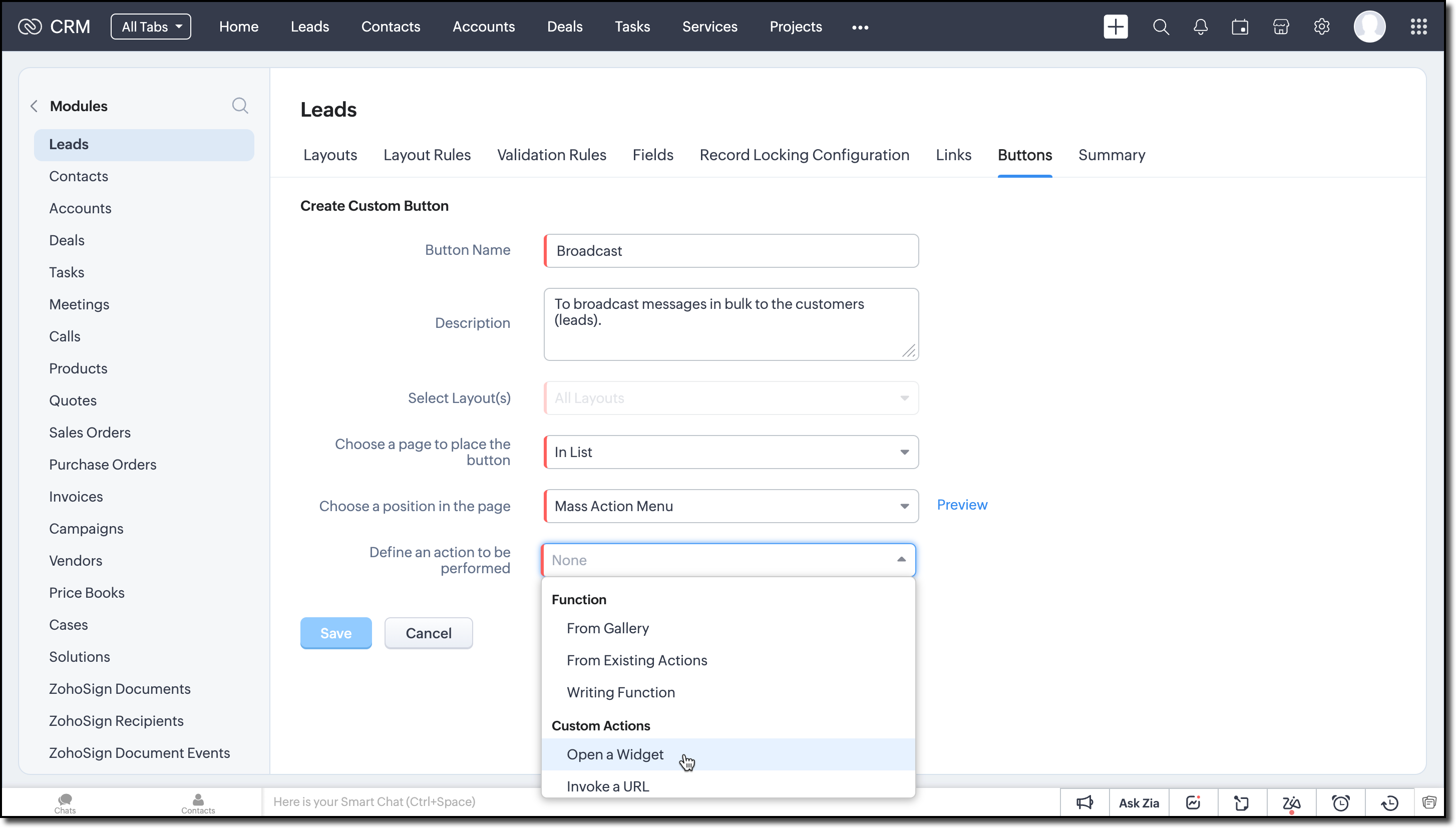
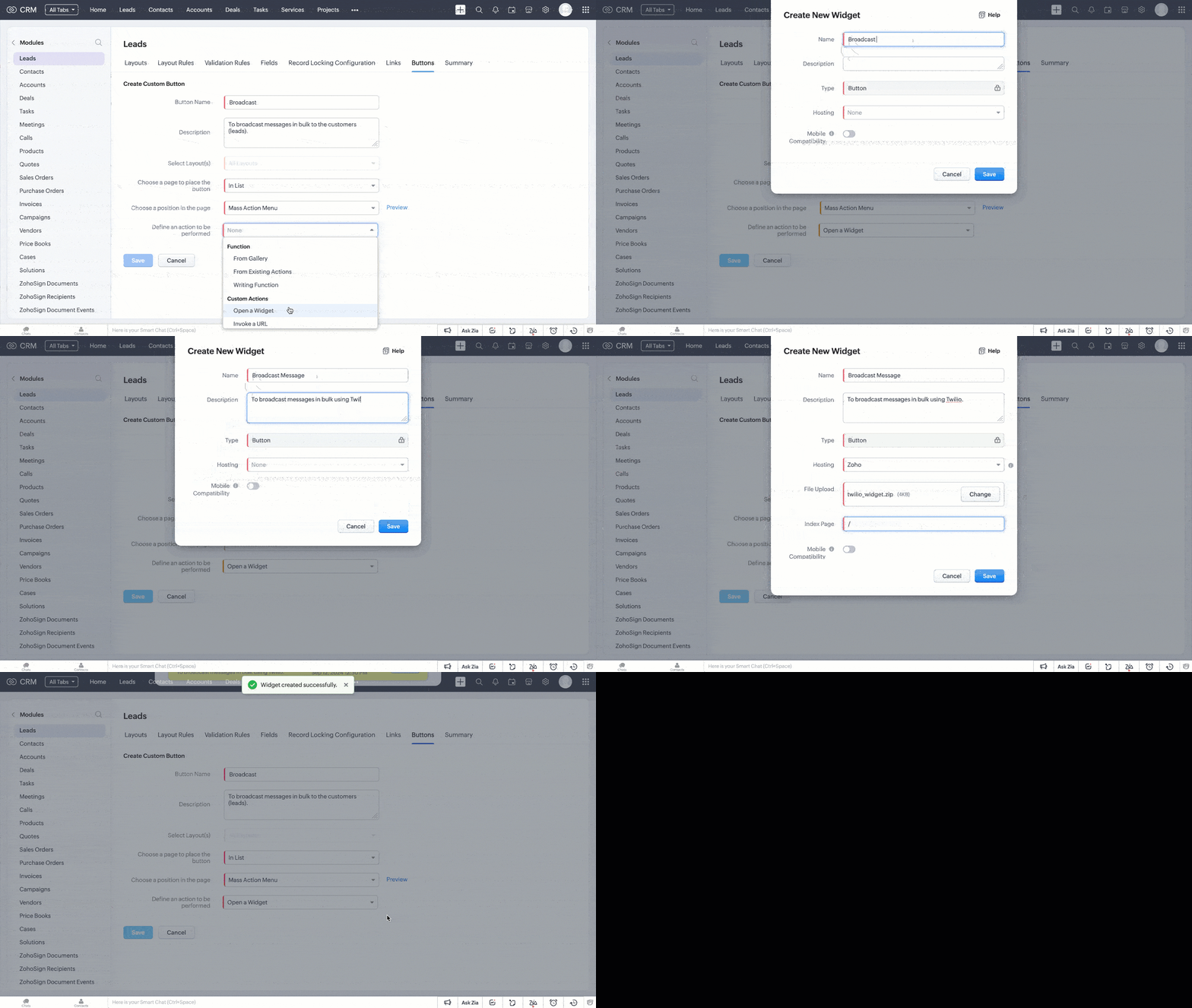
4. A pop-up appears for you to choose either from the available local widgets or create a new widget.
5. Follow the steps provided in this
kaizen to create a new widget for this use case.
Code Logic for Mass Communication
6. Here is the code logic to send broadcast SMS notifications and pre-recorded calls to the selected leads.
- Build the widget HTML page with the following elements shown in the GIF for obtaining user input like phone fields, sms/voice call preference, and the message content.
For voice calls, the entered text message will be converted to speech using Twilio's services.
- The current module (Leads) and the selected record IDs are passed to the widget through the on PageLoad callback function.
- For the current module, we used the Zoho CRM Meta JS SDK to get fields that have phone data type in it. These fields are listed in the Phone Fields dropdown, allowing the user to select the desired phone numbers that Twilio should use to send SMS or make calls.
- The COQL API SDK helps fetch values from the selected Phone fields in the dropdown for the selected record IDs.
- Depending on the selected action SMS or Voice Call tab, the corresponding Twilio Message or Call API will be triggered for communication.
For this demo, we used the Twilio APIs for sending SMS and making pre-recorded calls, but you can use any cloud communication platform of your choice.
const context = { }; async function getPhoneNumbers() { const phoneFieldsDropdown = document.getElementById('phone-fields-dropdown'); const selectedValues = Array.from(phoneFieldsDropdown.options).filter(option => option.selected).map(option => option.value); if (!selectedValues.length) { return showAlert('error', 'Please select atleast one phone field'); } const ids = context.recordIds.map(x => `'${x}'`).join(', '); const select_query = `SELECT ${selectedValues.join(', ')} FROM ${context.module} WHERE id in (${ids})`; const {data} = await ZOHO.CRM.API.coql({select_query}); const phoneNumbers = []; data.forEach(x => { Object.keys(x).forEach(key => { if (key !== 'id' && x[key]) { phoneNumbers.push(x[key]); } }); }); return phoneNumbers; } ZOHO.embeddedApp.on("PageLoad", function (data) { // Get the current module name and selected record ids const {Entity, EntityId} = data; context.module = Entity; context.recordIds = EntityId; // Get the phone fields for current module ZOHO.CRM.META.getFields({Entity}).then( function (response) { const {fields} = response; const phoneFields = fields.filter(x => x.data_type === 'phone').map(x => ({value: x.api_name, label: x.display_label })); new Choices('#phone-fields-dropdown', { removeItemButton: true, choices: phoneFields, placeholder: true, placeholderValue: 'Select Phone Fields to be used' }); ZOHO.CRM.UI.Resize({height:"400", width:"700"}); }); // Initialize twilio credentials twilio.init("$YOUR_ACCOUNT_SID", "$YOUR_AUTH_TOKEN", "+YOUR_TWILIO_NUMBER"); }) ZOHO.embeddedApp.init(); |
Try It Out!
To try this out, a fully functional code sample is attached to this post. All you have to do is replace your Twilio credentials on line 185 and everything else is already setup for you.
- Select multiple records in the Leads module.
- Click Broadcast (custom widget button) to open a streamlined interface (we have used Twilio for this demo).
- Select the Phone Fields to which you need to send the message / pre-recorded call.
- Choose SMS or Voice Call in the tab based on your requirement.
- Enter your message and hit Send.
Ta-daa! The messages go out to all the selected records immediately. You can also use any other third-party cloud communication platform of your choice instead of Twilio.
Caution!
Since the Twilio Message and Call APIs are triggered from the UI, the Twilio authentication will be accessible to anyone with access to the Zoho CRM organization where this widget is deployed.
Recent Topics
Spotlight series #6: The Show app for Android TV has a new look!
Hello everyone! We are delighted to introduce our revamped and redesigned Show app for Android TV. Smart TVs are exploding in popularity. Android TV alone has over 110 million active monthly devices. Zoho Show, as part of a constant effort to improve
Employee Appraisal Applicability - Why is Date of Joining Hard-Coded?
In the new (to me, at least) Performance Appraisal Cycle wizard, it's possible to set criteria to determine for whom the appraisal process should apply. This makes sense on its face. However, one MUST use the Date of Joining criterion as a filter. Why
WorkDrive for Excel Add on
Dear Sir/Madam Have installed Workdrive for Microsoft add on But unable to view the same added in Excel
CRM x WorkDrive: We're rolling out the WorkDrive-powered file storage experience for existing users
Release plan: Gradual rollout to customers without file storage add-ons, in this order: 1. Standalone CRM 2. CRM Plus and Zoho One DCs: All | Editions: All Available now for: - Standalone CRM accounts in Free and Standard editions without file storage
Zoho Books integration sync from Zoho CRM does not work
Hi Zoho Community & Zoho Support We just tried to get a sync some products into Zoho Books from CRM using the native sync and we're getting an error: "It looks like some mandatory fields you're trying to map are empty. Please provide valid field names
Appraisals - Order of Previous Reviews Should Be Newest to Oldest
The new Zoho People layout generally does a decent job at providing the necessary information for performing appraisals of employee performance. One example of this is the Previous Reviews section: This information is helpful when conducting a review.
Is it possible to remove filtering options?
My CRM has a lot of custom fields that should not be used in filters or views. Fields that are automated and exist only to store temporary values that get used in functions. These create a lot of noise in the list of fields to filter. Isn't there any
auto close automated alert tickets which are similar
Hello ZOHO Community, we are using ZOHO Desk to process automated monitoring alerts. Scenario: Our monitoring system creates a ticket when a threshold is exceeded, e.g. Subject: Computer 1 – CPU usage 100% – Error A few minutes later, once the issue resolves
Paging through API results. a major gap in your documentation.
There is no way for me. to get all of my data through a single API call. Typically REST APis have mechanisms for paging through API results. But the documentation for the API I am using: https://desk.zoho.com/DeskAPIDocument#Introduction Has no mention
RouteIQ for Zoho FSM
Beste, Zou wel top zijn dat we een RouteIQ hebben voor FSM aangezien we constant moeten zien wat de beste route is voor onze monteurs. Nu moeten we een speciale aparte programma hebben om de beste route te berrekenen voor onze monteurs aangezien de planning
How do people handle using Outlook and Zoho Project calendar at the same time?
We have an ongoing problem in our organisation where we use Zoho Projects to plan all of our projects tasks and that also allows us to look forward using the workload report to see which of our consultants are overstretched etc and which are available.
Knowledgebase SEO
We have a custom-domain mapped help center that is not restricted via login. I have some questions: a) will a robots.txt file still allow us to control indexing? b) do we have the ability to edit the sitemap? c) do category URLs get indexed by search
Please, make writer into a content creation tool
I'm tired of relying on Google Docs. I'm actually considering moving to ClickUp, but if Writer were a good content creation tool instead of just a word processor, I would finally be able to move all my development within the Zoho ecosystem, rather than
Changing field types
Question im a Zoho CRM user and curious, if I change a flied type from single or multi line text to a URL field type will i lose the data in the field or will it be converted to website link automatically. Thanks
How do I associate pricebooks to a customer?
I setup a few pricebooks, that worked fine. But now the only thing I can do with it, when I enter a quote or sales order, I can select which pricebook to use, but I have to do this product by product every time I add one. Is there a way to connect a pricebook
Write-Off multiple invoices and tax calculation
Good evening, I have many invoices which are long overdue and I do not expect them to be paid. I believe I should write them off. I did some tests and I have some questions: - I cannot find a way to write off several invoices together. How can I do that,
Leave Report Emailed Weekly
I am wondering if someone knows how to have a report generated either weekly or monthly or both for department heads and ownership of upcoming employee leave. For instance, it would be nice to get an emailed report on Friday for the upcoming week of who
Zoho desk desktop application
does zoho desk has a destop applicaion?
Tip #54- Exploring the Files Icon in Zoho Assist- 'Insider Insights'
As we’re already in mid-December, it’s a good time to take a closer look at one of the most useful options in the Zoho Assist remote support dashboard—the Files icon. To get started, log in to Zoho Assist using your credentials. Once you’re in, navigate
Tip#47: Estimation planner
Sprint planning becomes easier, smoother, more collaborative and more accurate with the Estimation Planner extension. Most work items involve multiple users, and each user's role and effort vary. To provide an unbiased and fair estimation point to the
Painfully Slow Zoho mail
Since yesterday Zoho Mail seems to have starting functioning very slowly and having a few bugs. It's slow to open mails, slow to send, slow to change between email accounts. Sometimes clicking on a particular folder (eg Sent folder) stops working and
Upcoming update to Google Drive integration in Zoho Creator
Hello everyone, We're writing to inform you about an upcoming update to how Zoho Creator integrates with Google Drive. In Zoho Creator, during actions like importing files to create an app or attaching files to fields, you can choose files directly from
Changing Default PDF Name
Is it possible to change the default name of a PDF? As of right now, all of my quotes are named 'QT_$QuoteNumber' (i,e: 'QT_19803471298374) - would it be possible to change this to: '$CompanyName - $AccountName - $QuoteNumber' for instance?
Time Tracking on Iphone doesn't stop
When I start a time tracking session the timer starts as expected. However when I hit stop, the timer remains on that project. The only buttons available are discard and start. Start runs the timer more and discard says it will throw away the data from
Zoho Sign - Zoho CRM extension upgrade
Hi everyone, We've updated Zoho Sign extension for Zoho CRM with significant internal changes. Impact on existing Zoho Sign extension users Users using the extension without customization If you are using the integration without implementing Zoho Sign's
Zoho Books blocks invoicing without VeriFactu even though it is not mandatory until 2027
I would like to highlight a very serious issue in Zoho Books for Spain. 1. The Spanish government has postponed the mandatory start of VeriFactu to January 1st, 2027. This means that during all of 2026 businesses are NOT required to transmit invoices
Group by Owner/ Owner Kanban /Group by Custom Field
Hi, We are missing the option of viewing Tasks grouped by their owner, as it is an essential function for us to manage our employees' working tasks. We find it hard to inspect what are the tasks that our employees are working on. We are seeking an option
Flow using way too many tasks
I built a flow that is using way too many tasks for what it is doing. I reached out to support a week ago but never heard back so hoping the community can help. Does a filter count as a task? I am seeing tons of records filtered with < 1 Sec Time Taken
Regarding the integration of Apollo.io with Zoho crm.
I have been seeing for the last 3 months that your Apollo.io beta version is available in Zoho Flow, and this application has not gone live yet. We requested this 2 months ago, but you guys said that 'we are working on it,' and when we search on Google
Start Workflow from Deluge Script
I have developed a customized process from our CRM that leverages a deluge script to create a statement of work document. Once the document has been created via the merge and store function, I would like the ability to start a workdrive review & approve
Saved Sections?
In sites editor, the + button reveals options to add a section, element, etc. It includes Saved Sections, but I can find no way to save a section I've already created. Otherwise, is there a way to copy a section from one page to another?
Marketer's Space: Unable to select a sender address? Here's the fix
Hello Marketers, Welcome back to yet another post! So you've added a sender address in Zoho Campaigns and later found that you're not able to select it while creating an email campaign. Has this ever happened to you? If so, don't worry—you're not alone.
Loading Project Balances in ZOHO Books for each project
Hello, What is the best method for loading project balances actual and budget into ZOHO books to provide tracking to our project managers. We have projects and federal awards (also treated as projects) which span multiple years. We are converting from
Auto-Invite Users to Portals in Zoho CRM based on Conditions
Hello Everyone, You can now automate portal invitations in Zoho CRM with the new Auto-Invite users feature in Portal management. No more manually enabling portal access one by one. With this enhancement, you can automatically send invites for users to
Scale up your writing style with content analysis tool in Knowledge Base
Hello everyone, Sometimes writers may have strong knowledge about the subject but may find it challenging to articulate clearly or produce comprehensible, jargon free content. To make the process easier and to ensure consistent, high-quality articles,
Zoho Books "Update" Trigger for Zapier?
Hi Zoho Team, I've been in talks with Zapier about using their services to connect my Zoho Books account to various apps, but I require an additional trigger beyond the "New" trigger. I require an "Update" trigger, which will allow me to filter and create Zaps only when certain conditions are fulfilled on the Zoho Books end before I automate a separate app. Specifically this will help me create invoices in QuickBooks Online only when payments are recorded in Zoho Books, rather than when a new invoice
How to prevent editing of closed tickets in Zoho Desk?
I would like to confirm whether it is possible to completely prevent agents from editing tickets once their status is set to Closed. Is there any configuration, permission, or best practice in Zoho Desk to ensure that closed tickets remain read-only and
Zoho Desk Limitations
Good day, all, I would like to know whether others share my frustration with some of Zoho's limitations. Don't get me wrong, I like Desk (and I also have a subscription for Analytics), I have been with them for close to 10 years, and unfortunately, I
Cliq iOS can't see shared screen
Hello, I had this morning a video call with a colleague. She is using Cliq Desktop MacOS and wanted to share her screen with me. I'm on iPad. I noticed, while she shared her screen, I could only see her video, but not the shared screen... Does Cliq iOS is able to display shared screen, or is it somewhere else to be found ? Regards
New Mandatory One-Click Unsubscribe Link Overshadowing Custom Unsubscribe Link
I was recently informed by Zoho CRM Support that they are now mandated by the large email service providers like Google and Yahoo to provide a one-click unsubscribe option in the header (not the body) of all mass emails. I have a custom unsubscribe link
Next Page
