Kaizen #91: Dynamic Lookup filters using Client Script
Hello everyone!
Welcome back to another captivating Kaizen post. In this post, we will explore the process of implementing lookup filters using Client Script.
What is a dynamic lookup filter?
A dynamic lookup filter is a feature that allows you to specify conditions or rules for filtering the options displayed in a lookup field based on the values of other fields or related data . It dynamically adjusts the available lookup options to provide a more targeted and relevant selection for users. It enables a more intuitive user experience by presenting only relevant choices based on the user's selections. Not by just using the field value on that page, you can also filter the results of the lookup with current date/time, logged-in user, or any custom condition that you can handle using Client Script. You can achieve this in Create, Edit, Detail (Standard) and Clone pages.
You can apply dynamic filters to the following fields using Client Script.
- lookup fields
- sub-form lookup fields
Use Case 1 -Lookup field filter in a form
Consider a Manufacturing company, ABC. The Admin wants to get the list of accounts that have the Account Type as Vendor for the lookup field name "Linked Account" in the Leads module only for standard layout.
Solution
- Go to Setup > Developer Space > Client Script. Click +New Script.
- Specify the details to create a script and click Next
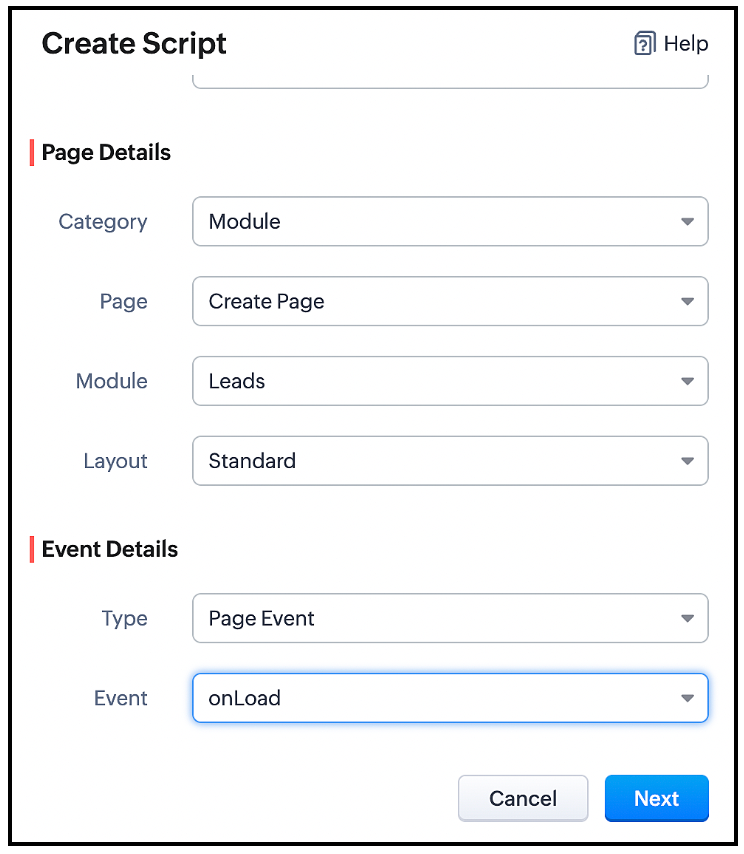
You can filter the list of Accounts visible in the lookup field using the ZDK setcriteria() , so that only the accounts of Account Type Vendor will be visible when the user clicks the lookup icon.
- Go to Setup > Developer Space > Client Script. Click +New Script.
- Specify the details to create a script and click Next .
- Enter the following script in the Client Script IDE and click save.
var field_obj = ZDK.Page.getField('Linked_Account'); field_obj.setCriteria("(Account_Type:equals:Vendor)", { filterOnSearch: true }); |
You should use the ZDK setCriteria along with the filter condition, in order to apply filters.
setCriteria() ZDK
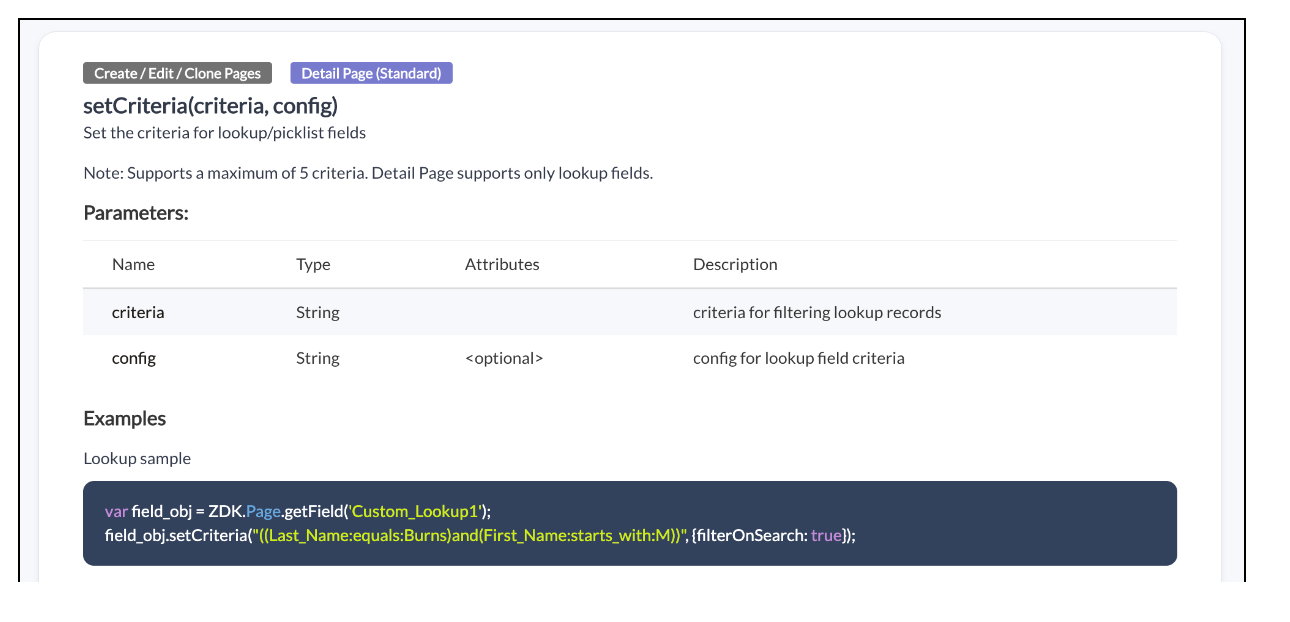
You can view the ZDK Documentations in the Library section of Client Script IDE
Here is how the Client Script works.
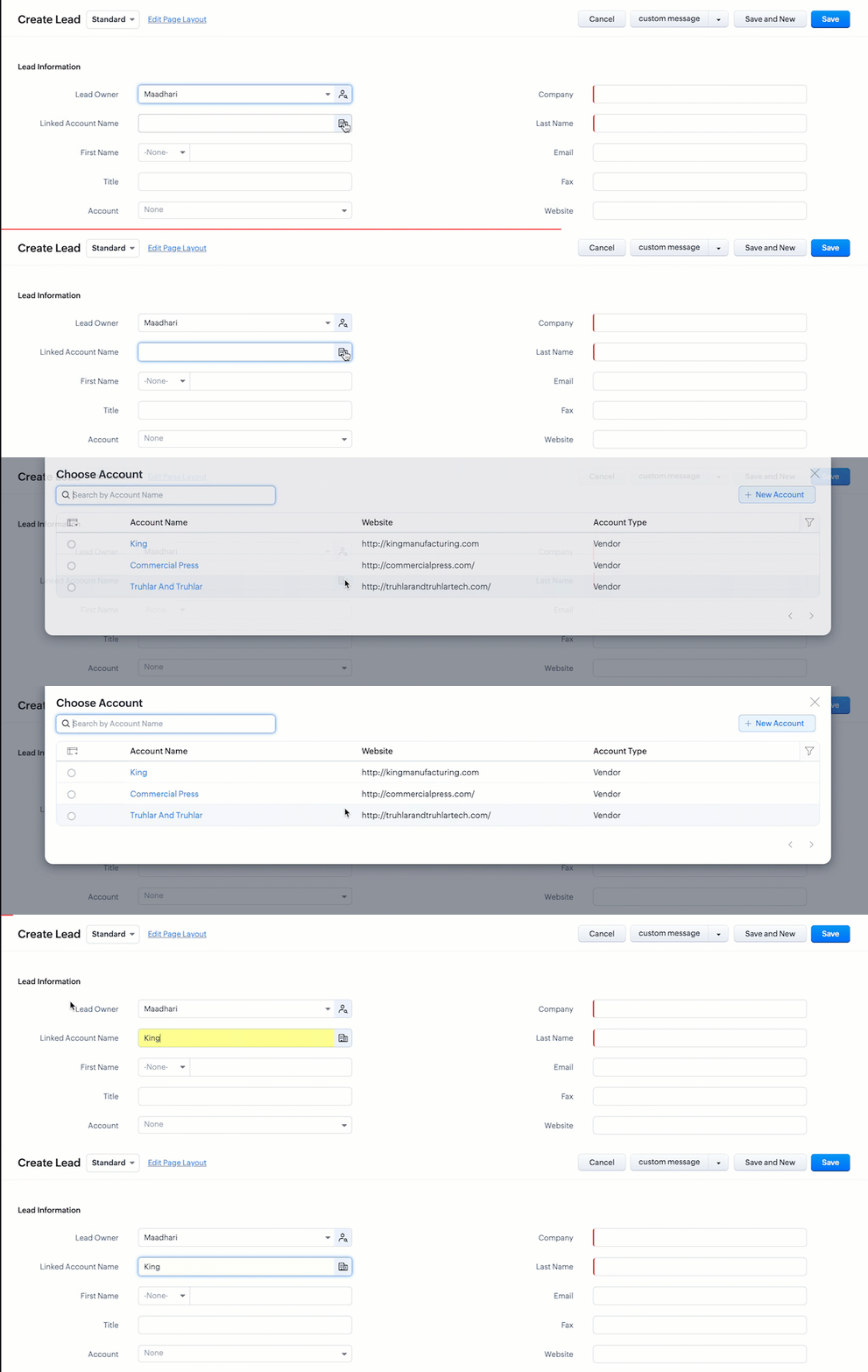
Use Case 2 - Dynamic lookup filter in a sub-form
Zylker is a health care company. The Admin wants to list the available instruments in the lookup field " Instrument Name " based on the type of Instrument that a service agent selects in the field "Type" only for standard layout. For example, if the service agent selects the Type as "Surgical Instruments", then he should be allowed to choose only instruments of such type in the subform.
Solution:
- Go to Setup > Developer Space > Client Script. Click +New Script.
- Specify the details to create a script and click Next .

- Enter the following script in the Client Script IDE and click save .
var Product = ZDK.Page.getSubform("Product_list").getField("Product_Name"); Product.setCriteria("(Product_Category:equals:"+value+")", { filterOnSearch: true }); |
- Here, based on the value the user selects in the "Product Category" , the Product Name will be displayed by picking the Instruments from Product module where the category is equal to the user selection.
- Here is how the Client Script works.
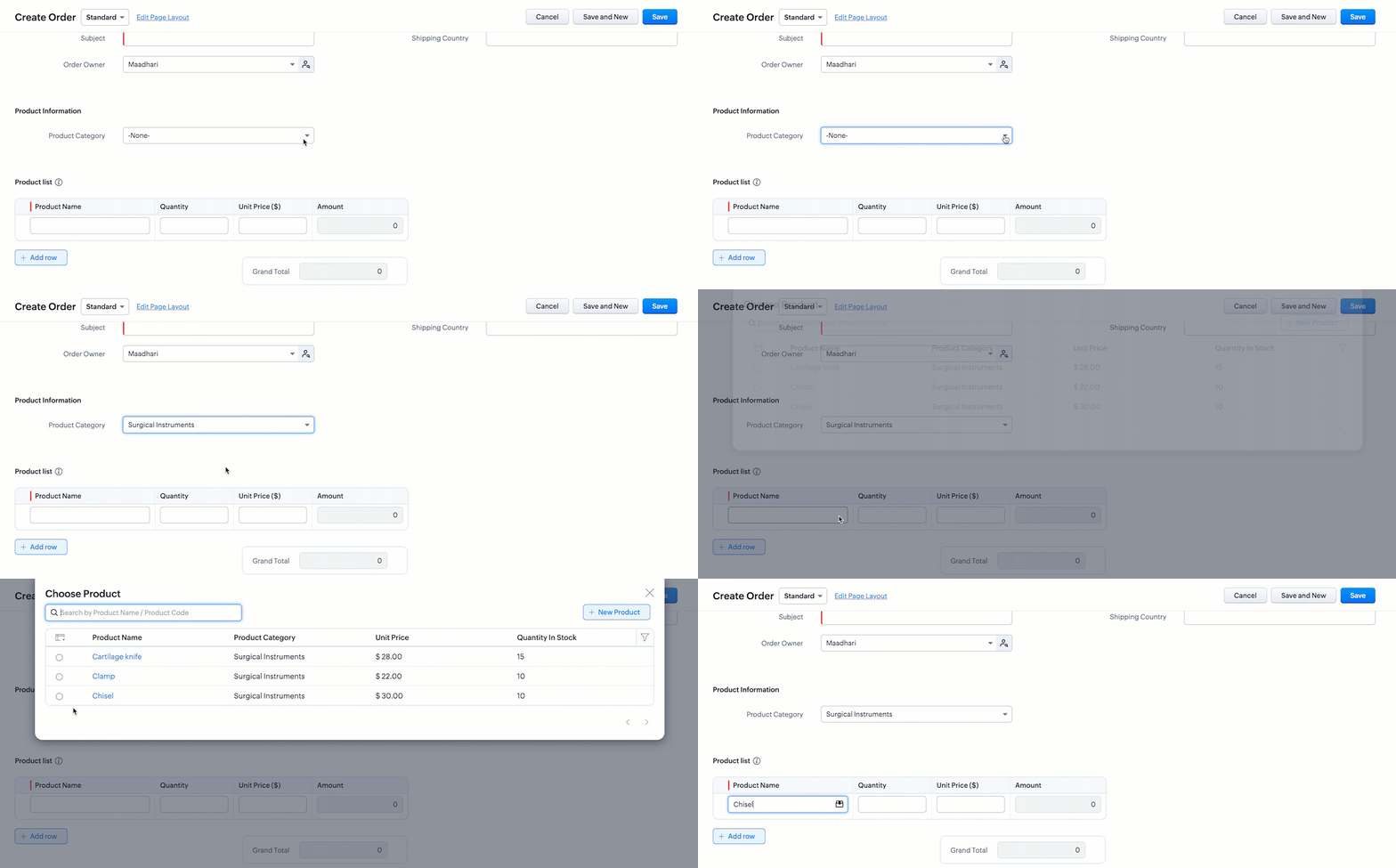
You should use setCriteria ZDK in order to apply filters for lookup fields in Client Script.
Now, you may wonder what about Lookup filters of the field properties in layouts, when to use them and what is the difference.
Here is the comparison which shows when to use lookup filters in Client Script!
( Please note that this comparison holds good as on June 2023, there may be updates made to below features )
( Please note that this comparison holds good as on June 2023, there may be updates made to below features )
Lookup filters in field properties | Lookup filters in Client Script |
Use this when you want to apply filters based on entity criteria. | Use this when you want to apply filter based on user selected field value. |
The filter criteria is specific to the module . i.e The lookup filter will be the same for all the layouts of the module. | The filter criteria is specific to the layout. i.e The lookup filter will be not be the same for all the layouts of the module. |
Sample use case You can use this when you want to apply filters where you know the values involved in the criteria like Created Date is Today, List the Accounts where the account Type is 'Supplier', Modified by Logged in user. | Sample use case You can use Client Script when the criteria depends on user selection like to list the available instruments in the lookup field "Instrument Name" based on the type of Instrument that user selects in the field "Type". |
We hope you found this post useful. We will meet you next week with another interesting topic!
If you have any questions let us know in the comment section.
Cheers!
Topic Participants
Maadhari M
Sruly Friedman
Ashika Suresh
Shippy140
jason
Sticky Posts
Kaizen #217 - Actions APIs : Tasks
Welcome to another week of Kaizen! In last week's post we discussed Email Notifications APIs which act as the link between your Workflow automations and you. We have discussed how Zylker Cloud Services uses Email Notifications API in their custom dashboard.Kaizen #216 - Actions APIs : Email Notifications
Welcome to another week of Kaizen! For the last three weeks, we have been discussing Zylker's workflows. We successfully updated a dormant workflow, built a new one from the ground up and more. But our work is not finished—these automated processes areKaizen #152 - Client Script Support for the new Canvas Record Forms
Hello everyone! Have you ever wanted to trigger actions on click of a canvas button, icon, or text mandatory forms in Create/Edit and Clone Pages? Have you ever wanted to control how elements behave on the new Canvas Record Forms? This can be achievedKaizen #142: How to Navigate to Another Page in Zoho CRM using Client Script
Hello everyone! Welcome back to another exciting Kaizen post. In this post, let us see how you can you navigate to different Pages using Client Script. In this Kaizen post, Need to Navigate to different Pages Client Script ZDKs related to navigation A.Kaizen #210 - Answering your Questions | Event Management System using ZDK CLI
Hello Everyone, Welcome back to yet another post in the Kaizen Series! As you already may know, for the Kaizen #200 milestone, we asked for your feedback and many of you suggested topics for us to discuss. We have been writing on these topics over the
Recent Topics
In-person ZUG Meetups for Real Estate Professionals - US Q1 2026
The Real Estate Zoho User Group is going on a multi-city, in-person meetup tour across the US, and we’d love to see you there! These meetups are a great opportunity to: Connect with fellow real estate professionals using Zoho Share challenges and discoverZoho CRM custom fields not showing in zoho creator
Hi Team, I have created a Products form with Zoho CRM integration and connected it to Products module of CRM. But when I see the reports of Products in Zoho creator then I am not able to see custom fields of Products module. Only standard fields of ProductsSending email notifications based on language
Hello. I would like to know how we can bypass the default notifications (which are just in English) for when a ticket is created/replied to/closed, to be in other languages, based on the language field in the ticket? I can create other email templates,Zoho Error: This Operation has been restricted. Please contact support-as@zohocorp.com for further details
Hello There, l tried to verify my domain (florindagoreti.com.br) and its shows this error: This Operation has been restricted. Please contact support-as@zohocorp.com for further details. Screenshot Given Below - please check what went wrong. ThanksDownload a file from within a zoho creator widget
I have a widget running in Zoho Creator , it displays uploaded documents in a table file, and I have added a download link in the view. ( The widget is created with html, css and javascript). I do not succeed in getting the download working. Do I haveCorrelated subqueries not supported in Zoho Analytics. This creates huge limitations
Running into a major limitation in Zoho Analytics: correlated subqueries simply don’t work, even in completely standard SQL patterns inside a JOIN. Example: LEFT JOIN "Bills" b ON d."Id" = b."Deal ID" AND EXISTS ( SELECT 1 FROM "BillZoho / Outlook Calendar sync
The current Marketplace -> Microsoft -> Meetings integration needs 2 changes. 1. The current language for the Two-Way sync option should be changed. It currently states, "Sync both your Zoho CRM Calendar and Office 365 Calendar meetings with each other."Email content just contain 'OK' ,not what we expect
create campaign API URL: https://campaigns.zoho.com/api/v1.1/createCampaign req params: {'campaignname': 'General_Outreach_d0cfc415-43aa-4b96-bb09-558e76a3dda3_50_20251117_214806_660', 'from_email': 'admin@allinmedia.ai', 'subject': 'ALL IN MEDIA', 'list_details':Possible to connect Zoho CRM's Sandbox with Zoho Creator's Sandbox?
We are making some big changes on our CRM so we are testing it out in CRM's Sandbox. We also have a Zoho Creator app that we need to test. Is it possible to connect Zoho CRM's Sandbox to Zoho Creator's Sandbox so that I can perform those tests?Reopen ticket
Hello! Can I reopen a ticket just using the API ticket/sendReply ? What's the rules to do it? I'm trying but it doesn't reopen the ticket, it just send the replyAllow Admins to Transfer Ownership of Their Own Files & Folders
Hi Zoho WorkDrive Team, Hope you are doing well. We would like to request an important enhancement to the ownership-transfer functionality in Zoho WorkDrive, specifically regarding administrator capabilities. As administrators, we have the ability toTip#46: Capture accurate log hours
Hello everyone, Use the newly introduced timer settings that will streamline the usage of timers and help admins or workspace owners to manage the time entries of the workspace users better. Check out the below mentioned timer settings added to the TimesheetMoving to app-specific authentication for Google integrations
Hello everyone, We’re making an important change to how Google integrations work in our platform. Until now, we used a common Google project across Zoho to enable integrations like Google Drive, Calendar, and more. Going forward, we’ll be moving to anLost the ability to sort by ticket owner
Hi all, in the last week or so, we have lost the ability to sort tickets by Ticket Owner. Unlike the other columns which we can hover over and click on to sort, Ticket Owner is no longer clickable. Is it just us, or are other customers seeing this too?How Can i put a form in Zobot
Hi,how can i integrate a form which has a multiple options to choose from.the form should be opened or displayed by zobot after it meets a requirement in the conversation. Thanks in advance !Playback and Management Enhancements for Zoho Quartz Recordings
Hello Zoho Team, We hope you're all doing well. We would like to submit a feature request related to Zoho Quartz, the tool used to record and share browser sessions with Zoho Support. 🎯 Current Functionality As of now, Zoho Quartz allows users to recordZoho Analytics - Feature Request For Time Based Data Source Fetch
Hi Analytics Team, I have a client using Zoho CRM and they want a weekly report at 4:30pm every Friday, emailed to the sales team showing a pie chart of Closed Won Deals for that week. This is easy to achieve in Analytics but not so easy to ensure theWhich user's capacity is used for Shared Mailbox storage?
We use shared mailboxes at our company, and their size is increasing daily. Which user(s)'s total mailbox limit is being used up by this space?Inserting the current date / time
I'd like to use Zoho Notebook as a log - so it would be great to be able to insert the current date and time at the beginning (or end) of each my log/journal entries - or wherever I want. Something simple, like pressing a button/icon to insert it wherever my text cursor is. It could be formatted like "Mon Dec 11, 2017 - 11:43p".Campaign editor overrides href value
I've been trying to insert a deep link in an email campaign so recipients can directly open a native app on their device. My deep link looks something like "myapp://". The options to insert links in the campaign editor are limited to strict urls, emails,Bug Report and Suggestions for Improvement in Zoho Applications
Hi Zoho Team, I’d like to report a few bugs and improvement suggestions I’ve noticed while using Zoho products: Zoho Cliq Video Call: The camera sometimes turns off automatically during video calls. This seems to be a bug — please check and fix it. ZohoCanvas Flex Box containers should not require a width/height.
Flexbox containers are often used as organizational concepts, to ease re-flow on mobile etc. - I cannot use % for flexbox W or H - I cannot omit W or H This means that the content cannot dictate, and a Flexbox container cannot be used merely as an organizationalZoho Desk Android app update: Filter enhancement, Save Filters
Hello everyone! We have now enhanced the filter section on the ticket listing screen of Zoho Desk Android app as it is on the web(desk.zoho.com). Also, we have introduced an option to save filters for tickets on the mobile app. You can easily apply, rename,Very long loading times | bad performance [ZOHO DC: EU]
Hello there, we have recently noticed that the loading times have become extremely long when retrieving tickets and ticket details. For example, I open any ticket and get the following view. The subject and standard information (ticket owner, status etc.)Zia Profile Summary now supports six languages and responds faster
After numerous customer requests, we’ve expanded Zia Profile Summary to do more than just summarize resumes quickly. It can now summarize them in six different languages and deliver results even faster. What’s New 1. Extended language support Zia canIntroducing Zoho Show Android 3.0
Good ideas need the right space to grow. They deserve tools that move as fast as your thoughts and make creating feel effortless. And that is why we are bringing you Zoho Show Android 3.0! From a brand-new look and smoother navigation to improved collaborationProperly Capture Dropdowns & Hover Elements When Recording a Window/Tab
Hi Zoho WorkDrive Team, Hope you are doing great. We encountered a limitation when recording a selected window or browser tab: Certain UI elements, such as dropdown lists, hover menus, and overlays, are not captured unless we record the entire screen.Peppol integration zoho invoicefu
Hi, Belgium will require Peppol invoicing as of 2026. I found that this is being prepared for Zoho books, to be released in Sep 2025. Will Zoho Invoice get this functionality too? I like the Invoice app for my part-time side business as bike mechanicAllow Recording Only a Selected Portion of the Screen
Hi Zoho WorkDrive Team, Hope you are doing well. We would like to request a more flexible recording option in Zoho WorkDrive. At the moment, we can record either the entire screen or a specific window/tab — but not a custom selected portion of the screenRestricting Calendar View to Working Hours
Hi: I'm trying to implement a calendar which displays all of my customer appointments. Currently, the calendar shows all 24 hours of the day. Is there a way to restrict the hours to simply the times my business is open? Thanks!Add Camera Background Blur During Recording
Hi Zoho WorkDrive Team, Hope everything is well. We would like to request an enhancement to the video recording feature in Zoho WorkDrive. Currently, the camera preview displayed during a recording does not support background blur. This is an essentialAmazon FBA integration - Handle invoice reconciliation under different GSTINs,
Dear Zoho Community, Thank you for the clarification regarding the Amazon FBA integration, default warehouse, and GSTIN mapping in Zoho Inventory. I understand that Zoho currently supports only one warehouse for Amazon FBA, and that all FBA orders areWhatsapp Integration questions
Hi Questions: 1. Whatsapp messages are not reaching our CRM, is there a delay? 2. Is there any way to create a whatsapp catalog on a number that is integrated with ZOHO? 3. How do I configure my profile picture on a number that is integrated with ZOAllow Font Size 11 in Editors...
That is basic functionality...link mail.zoho.com/UnblockMe to unblock
Could you please unblock my account heloisa.bomfim@expansaodenegocios.comUnblocked me
Please can you help unblocked my account thanks materiauxjcbrunet2000@zohomail.comIntegrating External Portal Tickets Into Zoho Desk
A B2B travel company has a customer portal where clients can raise and submit tickets related to their bookings. These tickets need to be handled and managed in the backend through Zoho Desk. Ticket updates and replies from Zoho Desk should also be visibleMake Camera Overlay & Recording Controls Visible in All Screen-Sharing Options
Hi Zoho WorkDrive Team, Hope you are doing well. We would like to request an improvement to the screen-recording experience in Zoho WorkDrive. Current Limitation: At the moment the recording controls are visible only inside the Zoho WorkDrive tab. WhenSend WhatsApp voice messages from Bigin
Greetings, I hope all of you are doing well. We're happy to announce this enhancement we've made to Bigin. Bigin's WhatsApp integration now supports audio messages, so you can record and send voice messages. This makes it easier to handle customer questionsCUSTOM FUNCTION GIVE ERROR #EVAL!
CUSTEM FUNCTION CREATE KYA ZOHOSHEET ME US FUNCTION KO USE KIYA LEKIN DATA TO SAHI HAI LAKIN DATA SHEET ME NAHI LAG LAHA HAI KRUPYA SOLVE KARE MY CODE IS float ADDTWO_TWO(float NO1, float NO2) { ADD = NO1 + NO2; return ADD; }Next Page