Kaizen #91: Dynamic Lookup filters using Client Script
Hello everyone!
Welcome back to another captivating Kaizen post. In this post, we will explore the process of implementing lookup filters using Client Script.
What is a dynamic lookup filter?
A dynamic lookup filter is a feature that allows you to specify conditions or rules for filtering the options displayed in a lookup field based on the values of other fields or related data . It dynamically adjusts the available lookup options to provide a more targeted and relevant selection for users. It enables a more intuitive user experience by presenting only relevant choices based on the user's selections. Not by just using the field value on that page, you can also filter the results of the lookup with current date/time, logged-in user, or any custom condition that you can handle using Client Script. You can achieve this in Create, Edit, Detail (Standard) and Clone pages.
You can apply dynamic filters to the following fields using Client Script.
- lookup fields
- sub-form lookup fields
Use Case 1 -Lookup field filter in a form
Consider a Manufacturing company, ABC. The Admin wants to get the list of accounts that have the Account Type as Vendor for the lookup field name "Linked Account" in the Leads module only for standard layout.
Solution
- Go to Setup > Developer Space > Client Script. Click +New Script.
- Specify the details to create a script and click Next
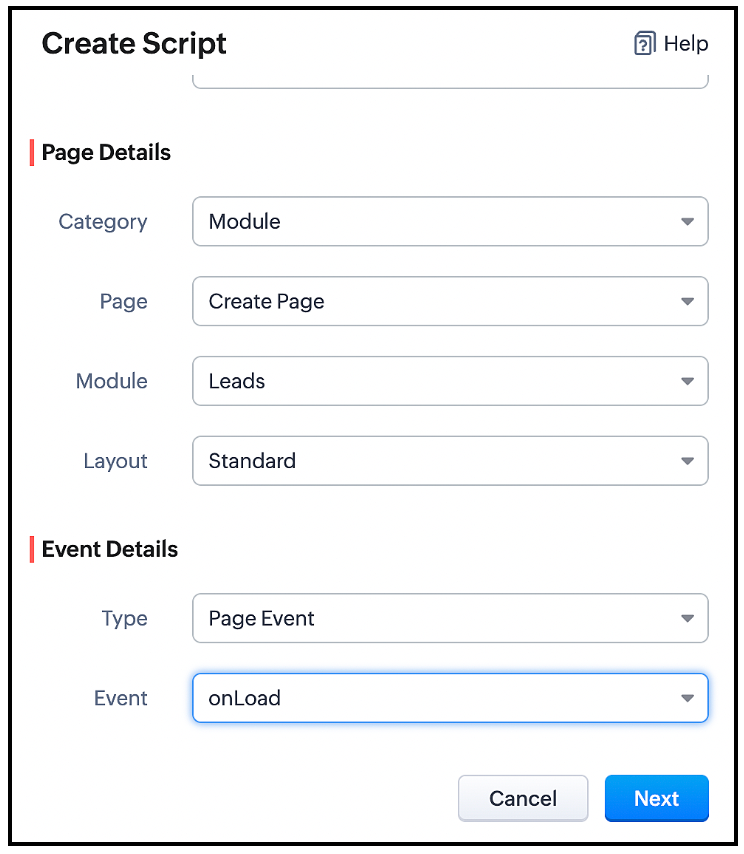
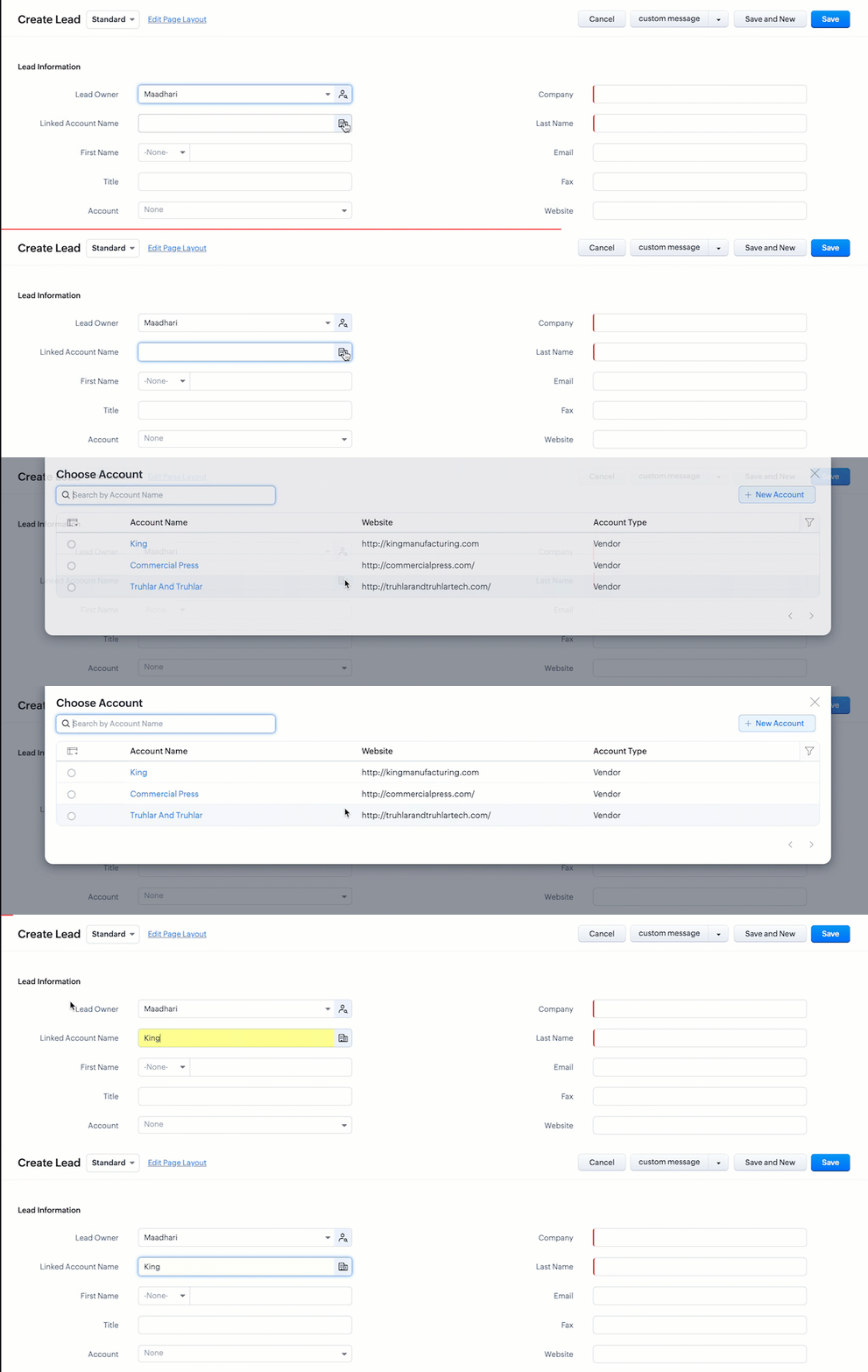
You can filter the list of Accounts visible in the lookup field using the ZDK setcriteria() , so that only the accounts of Account Type Vendor will be visible when the user clicks the lookup icon.
- Go to Setup > Developer Space > Client Script. Click +New Script.
- Specify the details to create a script and click Next .
- Enter the following script in the Client Script IDE and click save.
var field_obj = ZDK.Page.getField('Linked_Account'); field_obj.setCriteria("(Account_Type:equals:Vendor)", { filterOnSearch: true }); |
You should use the ZDK setCriteria along with the filter condition, in order to apply filters.
setCriteria() ZDK
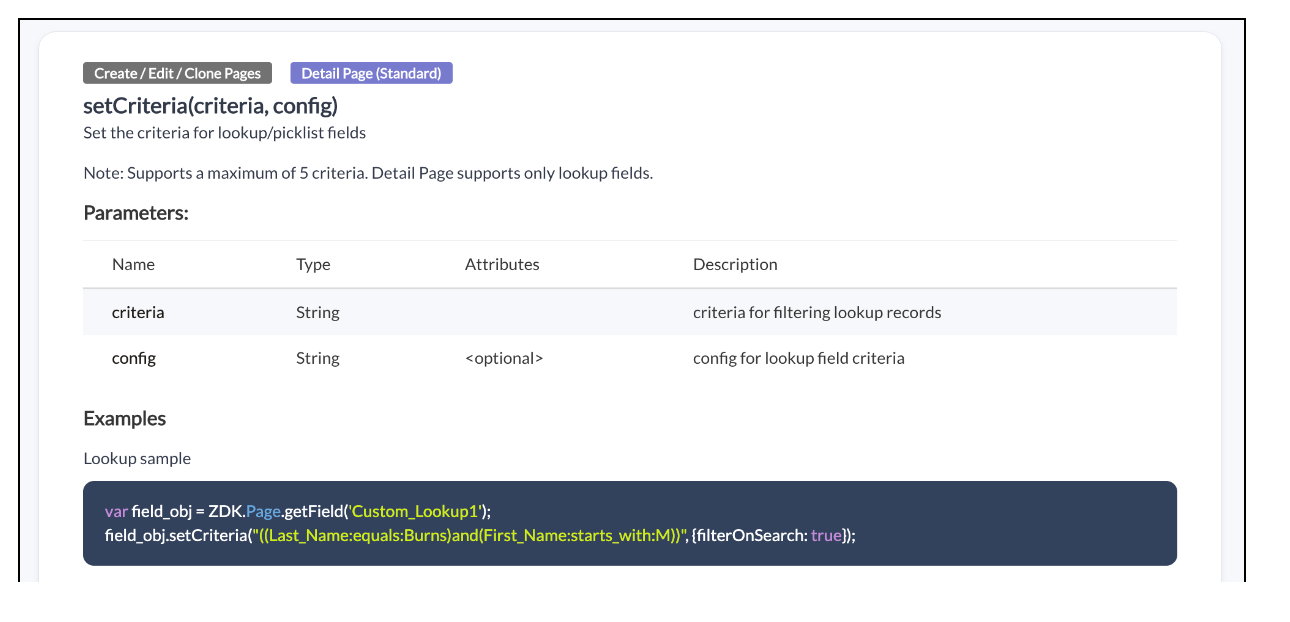
You can view the ZDK Documentations in the Library section of Client Script IDE
Here is how the Client Script works.
Use Case 2 - Dynamic lookup filter in a sub-form
Zylker is a health care company. The Admin wants to list the available instruments in the lookup field " Instrument Name " based on the type of Instrument that a service agent selects in the field "Type" only for standard layout. For example, if the service agent selects the Type as "Surgical Instruments", then he should be allowed to choose only instruments of such type in the subform.
Solution:
- Go to Setup > Developer Space > Client Script. Click +New Script.
- Specify the details to create a script and click Next .

- Enter the following script in the Client Script IDE and click save .
var Product = ZDK.Page.getSubform("Product_list").getField("Product_Name"); Product.setCriteria("(Product_Category:equals:"+value+")", { filterOnSearch: true }); |
- Here, based on the value the user selects in the "Product Category" , the Product Name will be displayed by picking the Instruments from Product module where the category is equal to the user selection.
- Here is how the Client Script works.
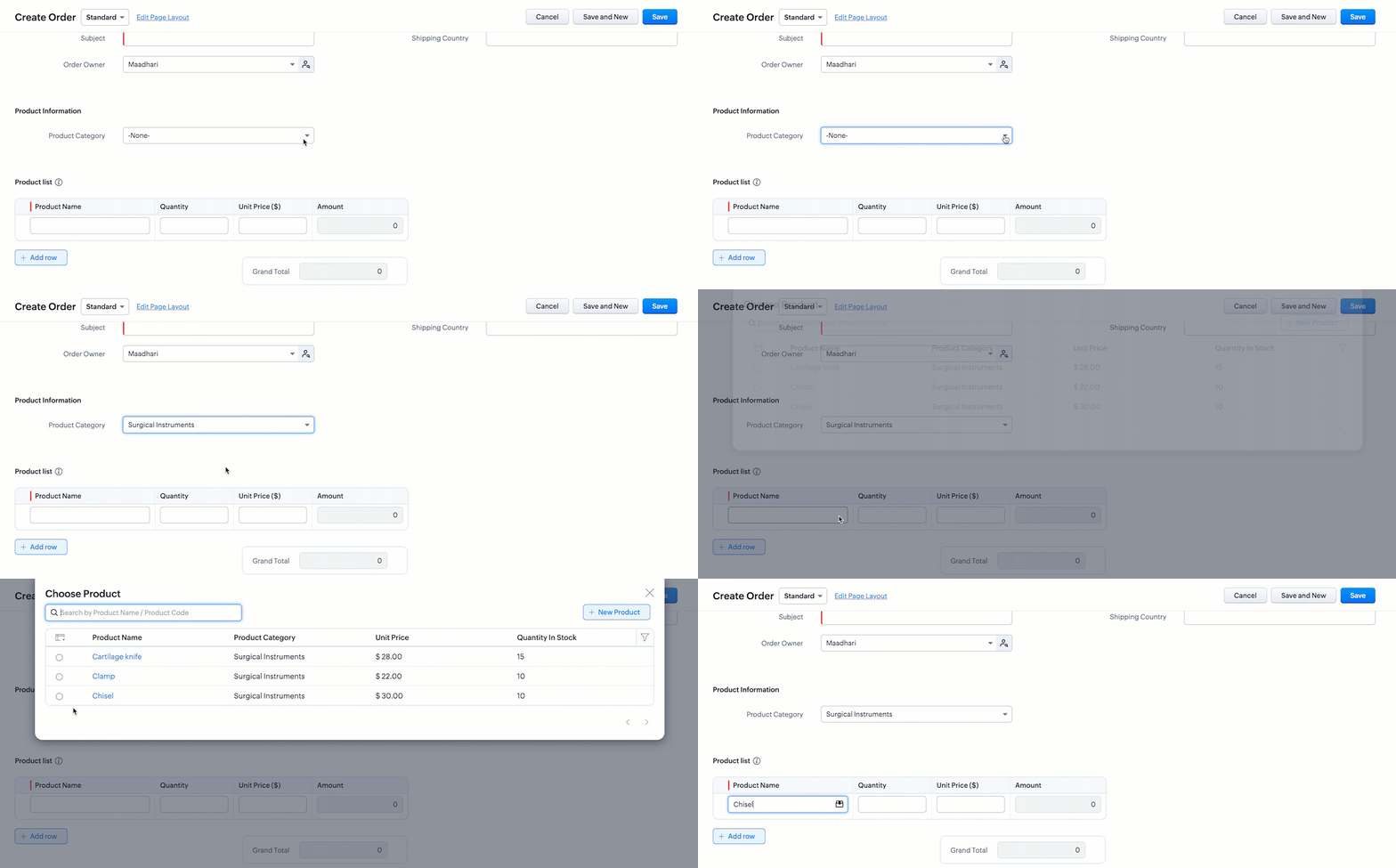
You should use setCriteria ZDK in order to apply filters for lookup fields in Client Script.
Now, you may wonder what about Lookup filters of the field properties in layouts, when to use them and what is the difference.
Here is the comparison which shows when to use lookup filters in Client Script!
( Please note that this comparison holds good as on June 2023, there may be updates made to below features )
( Please note that this comparison holds good as on June 2023, there may be updates made to below features )
Lookup filters in field properties | Lookup filters in Client Script |
Use this when you want to apply filters based on entity criteria. | Use this when you want to apply filter based on user selected field value. |
The filter criteria is specific to the module . i.e The lookup filter will be the same for all the layouts of the module. | The filter criteria is specific to the layout. i.e The lookup filter will be not be the same for all the layouts of the module. |
Sample use case You can use this when you want to apply filters where you know the values involved in the criteria like Created Date is Today, List the Accounts where the account Type is 'Supplier', Modified by Logged in user. | Sample use case You can use Client Script when the criteria depends on user selection like to list the available instruments in the lookup field "Instrument Name" based on the type of Instrument that user selects in the field "Type". |
We hope you found this post useful. We will meet you next week with another interesting topic!
If you have any questions let us know in the comment section.
Cheers!
Topic Participants
Maadhari M
Sruly Friedman
Ashika Suresh
Shippy140
jason
Sticky Posts
Kaizen #217 - Actions APIs : Tasks
Welcome to another week of Kaizen! In last week's post we discussed Email Notifications APIs which act as the link between your Workflow automations and you. We have discussed how Zylker Cloud Services uses Email Notifications API in their custom dashboard.Kaizen #216 - Actions APIs : Email Notifications
Welcome to another week of Kaizen! For the last three weeks, we have been discussing Zylker's workflows. We successfully updated a dormant workflow, built a new one from the ground up and more. But our work is not finished—these automated processes areKaizen #152 - Client Script Support for the new Canvas Record Forms
Hello everyone! Have you ever wanted to trigger actions on click of a canvas button, icon, or text mandatory forms in Create/Edit and Clone Pages? Have you ever wanted to control how elements behave on the new Canvas Record Forms? This can be achievedKaizen #142: How to Navigate to Another Page in Zoho CRM using Client Script
Hello everyone! Welcome back to another exciting Kaizen post. In this post, let us see how you can you navigate to different Pages using Client Script. In this Kaizen post, Need to Navigate to different Pages Client Script ZDKs related to navigation A.Kaizen #210 - Answering your Questions | Event Management System using ZDK CLI
Hello Everyone, Welcome back to yet another post in the Kaizen Series! As you already may know, for the Kaizen #200 milestone, we asked for your feedback and many of you suggested topics for us to discuss. We have been writing on these topics over the
Recent Topics
How to add Connector in developer platform zoho?
Hi, I am working on creating an Extension, and part of the development is to retrieve Email templates. In my CRM instance I can invokeURL by creating Zoho OAuth connection and get the template. But developer platform does not provide Zoho OAuth or anyHow to archive Lost/Junk Leads so sales reps don’t see them, but keep them for reporting?
Hi everyone, In our Zoho CRM we have two Lead Status values: Lost Lead and Junk Lead. What I want to achieve is: When a lead is marked as Lost or Junk, it should disappear from my sales reps’ Lead views (so they only see active leads). At the same time,Zoho CRM Canvas Copy Original Layout
Hello all, I want to use Canvas to make small changes to certain views, not to make huge changes. Is it possible to copy the original Zoho layout and set-up and start from there? I checked and all I can find are some templates which are far from the originalRevenue Management: #5 Revenue Recognition in SaaS
If you're building or running a SaaS business, you've probably encountered this. You get paid upfront for a subscription and a one-time onboarding fee, but you end up with confusion about when to consider it revenue. Can I book all of it now? Should IMS Teams for daily call operations
Hello all, Our most anticipated and crucial update is finally here! Organizations using Microsoft Teams phone system can now integrate it effectively with Zoho CRM for tasks like dialling numbers and logging calls. We are enhancing our MS Teams functionalityZoho Learn Course Access Issue
One of the learners in a specific course can't see any lessons. They are registered as both a user and learner for this course in Zoo Learn. What could be the reason?ZOHOLICS Japan 2025 開催のお知らせ(再投稿)
【コミュニティユーザーの皆さまへお知らせ】 Zoho 最大のユーザーイベント「ZOHOLICS Japan 2025」を9月19日(金)に開催します。 AI活用に関する特別講演、ユーザー事例、Zoho 製品の活用例のご紹介など、Zoholicsならではのセッションをご用意しています。 Zoho コミュニティ開催のMeetupとはまた違った雰囲気のイベントです。 ご都合のつく方はお気軽にご参加ください✨ 詳細はこちら https://events.zoho.jp/zoholics2025#/?affl=forumpost2Phone Number format for Bulk Upload via csv for Zoho Sign
What is the phone number format that we need to use for a bulk recipient upload via csv in zoho sign, should the country code be included for ex if its US should it be +18889007865 ior 18889007865 or without country code 8889007865? the sample csv providedFilter Page Elements By Selectable Date Range
I have created a basic Page that will serve as a client dashboard with elements that will provide simple counts & sums of data in reports. There are no reports or forms added to the page, just elements. It currently functions as needed, but shows theCan’t Enter my Notebook is Locked
I’ve been using Notebook for taking notes at my college for a month and I never signed in and I never established a password. Today I tried to enter the app after the update and it asked me for a password. I need to access to my notes urgently and I can’tSend Email Directly to Channel
Hi, We are coming from Slack. In Slack each channel has a unique Email address that you can send emails too. I currently forward a specific type of email from my Gmail InBox directly do this channel for Verification Codes so my team doesn't have to askSecure your external sharing process with OTP Authentication
For any business, it's crucial to share files externally in a way that is both secure and controlled. Let's say you want to share confidential data with your partners and vendors. You must ensure that only your intended recipients can access the sharedItems attribute questions
Many of my items have attributes, such as size and color. How can I add new fields to the "New Items" screen to capture that in my Purchase Orders, Items, and Sales Order pages? I only see these attribute fields when adding an Item Group. Also, on theIs there a way to search mail for items you haven't yet responded to?
I'm trying to create a search to show emails that haven't been responded to and that have also been assigned a tag or label. Is there a way to search for the inverse of replied?Subtotals per Header
Hey, we would like to display subtotals per header in our invoices:upgrade storage
how to upgrade my storageLinking items from books and subscription
Linking books and subscription It is a pity that it is not possible to associate with a product an article present in ZohoBooks This would make it possible to manage products composed of a nomenclature of articles of booksAdd the ability to view number of hours planned for a workorder while in the Dispatch Console
Hi Zoho, When dispatching a work order through the Dispatch Console, there's currently no way to view the number of planned hours for the service tasks associated with that specific work order. Having to click into the details each time to check plannedUploading Files from uploads api
I tried uploading the image from the API call but its giving me unauthorized error even i have given valid token in header. After uploading i need that id to pass in create ticket api uploads but its not uploading that file. Please help me out in thCategorize Items with Item Headers
Hello customers, Did you ever want to classify items based on specific categories to help your customers understand your invoice better? With the new Item Header feature, you can easily categorize items in your invoices and estimates and give them a common title. Item Headers are available in the Invoices, the Recurring Invoices and the Estimates module. It can be carried forward from estimates to invoices at the time of converting the estimates. To add an item header: Go to the Estimates, InvoicesChange format of quantity format
Hi, I would like to change the qunatity format from 1,00 to 1. Is this possible? thanks!square up and Zoho books
Since we set up the app connection between square up and Zoho books we have realised that when the amounts are getting transferred Zoho is adding VAT again making the numbers 20% more than they should be. We have checked our settings and they VAT/ TaxHow to provide Access rights to specific Bank accounts
We have several bank accounts. I want to provide certain members access to only 2-3 accounts. It appears that when I give permissions, they are for ALL bank accounts. How do I do that?Errors Getting a Bank Transaction
Using Postman(for testing), I am receiving errors when attempting to get a single bank transaction. I am able to receive the list of bank transactions with https://www.zohoapis.com/books/v3/banktransactions/?organization_id={org_id} but when I try toSubscriptions Plans and CRM Products Integration?
Is there any way to set up plans and pricing in Zoho Subscriptions and have those available as Products in the CRM? We are trying to set up the CRM and the Products seem to be more geared toward selling products that are not subscription based. So if we sell annual or monthly contracts which are $10/seat/month, I can set this up as a plan in Subscriptions, but how can I set the same thing up in the CRM for the salespeople to sell/quote? What is the best practice for setting up the CRM Products toMapping Zoho Subscription Plans and Products to CRM and Books
We have products that are one time products and subscription products. 1) We would like to have the ability to create an opportunity in CRM that includes both one-time charge products and subscription products. Currently the only way of creating a subscription product is by defining a "Product->Plan" hierarchy in Zoho Subscription. It appears that the only SYNC between Subscription and CRM is around contacts and the Product->Plan hierarchy doesn't sync to CRM, thus, you would need a duplicateBulk update fields based on date
Hi! I need all the quotes with "Quote Stage" set to "Next Year" to update to "Draft" every January 8 (every year). Can you help?Target for a campaign
Hi, Hope you can help me. I need to create a report (for a marketing campaign) that combines Deals and Contacts to export all the contacts with closed deals. I can easily do that, what I cannot do is to remove from the target the contacts that have moreZoho Desk + Jira integration - Email notifications and comments posted by administrator instead of real user
Dear All, I set up the integration under my admin account, and now when users leave comments in Jira (to created tickets in Zoho Desk), the email notifications show that the ‘Administrator’ left a comment, not a real user. The same happens in the ticketCelebrating the power of visuals
On World Photography Day, we would like to highlight the power of visuals in customer service. Visuals promote learning and understanding in less time. A photograph can rekindle a memory, convey more than words, and give a fresh perspective. How doesCustomer address in Zoho Bookings
Hello, Is it possible to add customer address information to the Zoho bookings appointment screen? Or have it pull that information automatically from the CRM? We are wanting to use this as a field management software but it is difficult to pull the address from multiple sources when it would be ideal to have a clickable address on the appointment screen that opens up the user's maps. It would also be advantageous for the "list view" to show appointment times instead of just duration and bookingBlocking / black listing customers
Hi, We have a situation, we observed that certain customers are blocking multiple appointments with our advsiors but not showing up. Some of these are repeat offenders. This leads to those service hours getting blocked and not available for genuine customers.Feature Request: Email Templates for notifications accross all services
Currently in Zoho Bookings, email notifications (such as booking confirmations, reminders, and cancellations) must be customized individually for each service. This becomes time-consuming and error-prone when managing multiple services that require consistentApproval-based booking with Zoho Creator and Zoho Bookings
Hi community members, We have developed a workaround for approval-based booking using Zoho Creator and Zoho Bookings! This provides a temporary solution as we work on the native feature, and it's useful for anyone needing an approval workflow when confirmingMember Accounts in Related List
Hi Team, Currently, when a parent account is associated with an account in FSM, there is no related list displaying the associated member accounts under the parent account’s related list section. To view member accounts, I have to manually search usinghow do i remove a specific Zoho Service from my account
I no longer need Zoho CRM, ZRM Assist nor ZRM BugTracker. How do I remove them from the list of apps for my account?I Want migarte all invoice details to zoho sheets
I want to migrate all existing invoice details to Zoho Sheet, and automatically update the sheet whenever a new invoice is created.were can i find my invoices i need this for my accountant
were can i find my invoices i need this for my accountant, how can i get id direct to my email?ONLY email field not populating Writer fillable document (randomly)
I have a Zoho Writer fillable document that has pulled all my data from my Zoho Sheets file, EXCEPT the email column. It pulled every data before and after that column with no issues. Screenshots attached. It's not my first time using the app or the feature,My number is marked as spam
Hello Zoho Mail Support, My phone number was incorrectly flagged as “spam” during sign-up. This is my personal number, and I have not engaged in any spam activities. Kindly review and verify my account so I can proceed with my email setup. Thanks.Next Page