Make scheduling appointments seamless with Zoho SalesIQ and Zoho Bookings integration
You have streamlined your business’s engagement and customer communication by implementing versatile engagement software like Zoho SalesIQ. And now, you have your customer relationships, engagement, analytics, and more overseen from a single dashboard. But the one thing that is missing is the ability to make the appointment booking platform seamlessly flow along with the customer conversation.
You are currently using outdated apps to send calendar invites and exchange texts with visitors and operators to schedule appointments. Rescheduling, checking slot availability, and canceling appointments can be a tedious process.
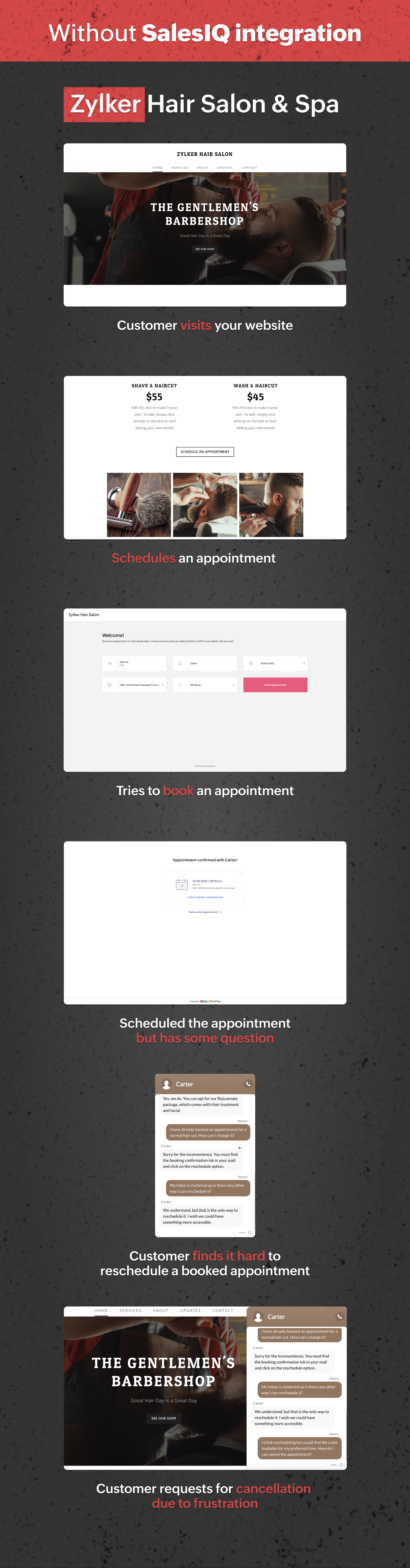
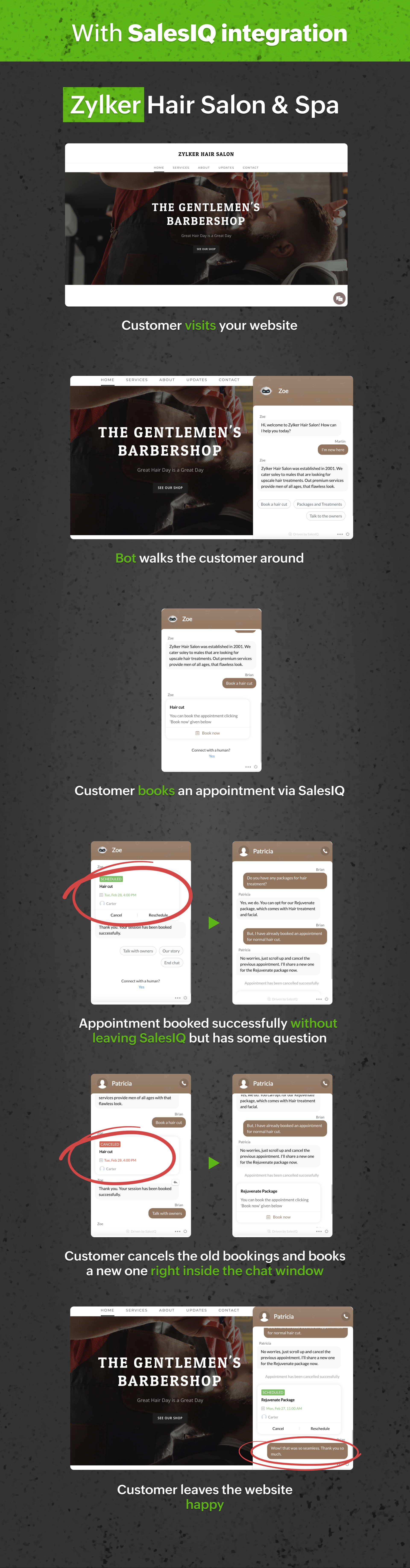
Let’s look at a customer journey with and without Zoho Bookings integration.
From the above journey, we can quickly identify how drastically Zoho Bookings integration has uplifted the customer journey.
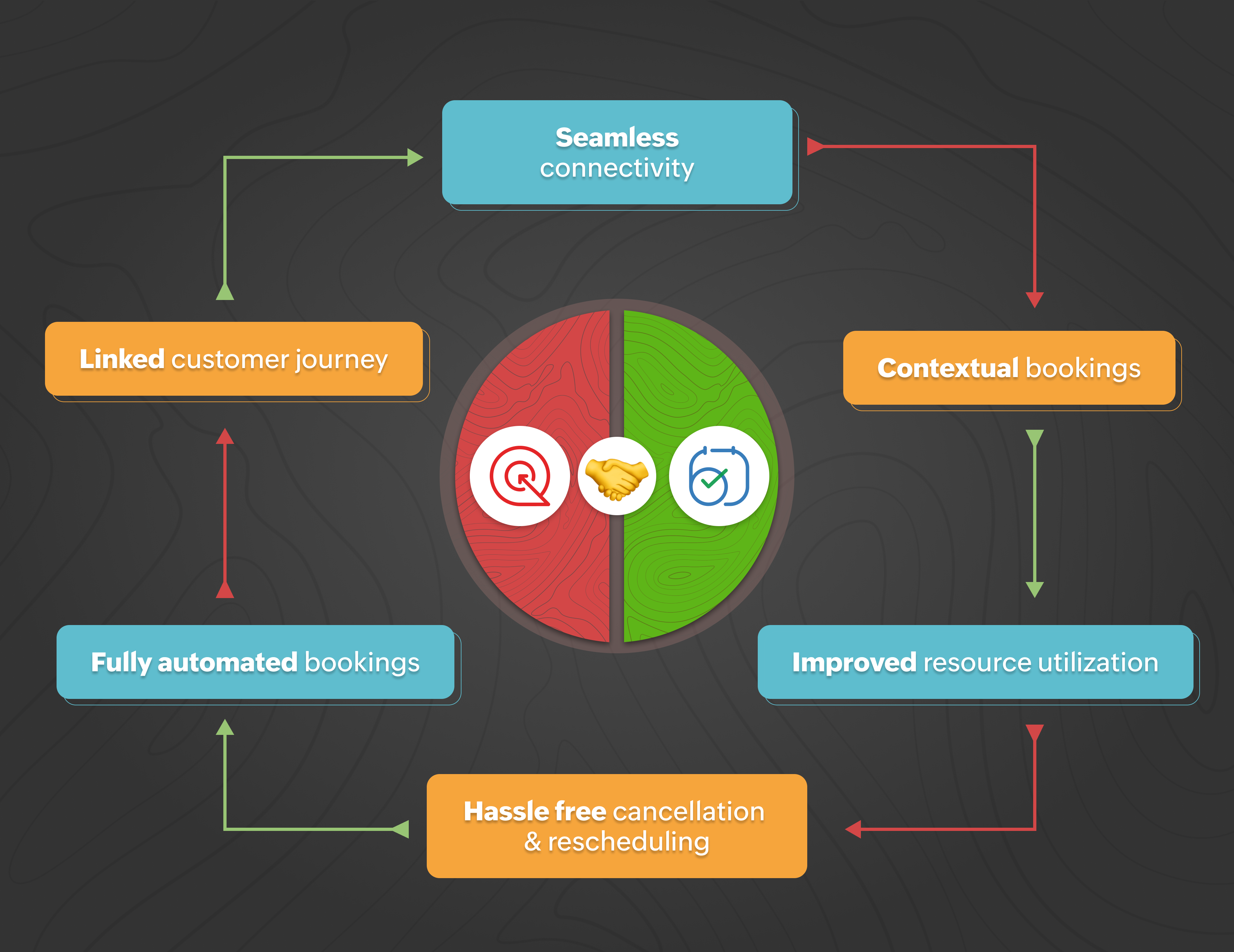
Seamless Connectivity: Leverage the integration with Zoho Bookings to allow operators and bots to quickly access Zoho Bookings and share suitable appointments with visitors.
Contextual bookings: Interact with your customers and allow them to book appointments from the chat window during an ongoing conversation.
Improved resource utilization: The one-click integration with Zoho Bookings will help you save the resource that would have been spent in developing and integrating a third-party or custom appointment scheduling software.
Hassle-free rescheduling and cancellation: Save your operators’ and customers' time and make it an effortless process by allowing them to re-schedule and cancel appointments right from the chat window.
Fully automated bookings: Maximize your operators’ efficiency by implementing bots that can fully handle bookings for your business.
Linked customer journey: Create a smoother customer experience by providing an all-in-one solution from the SalesIQ chat window.
What can your visitors do with this integration:
This integration provides a streamlined way of booking appointments or sessions while conversing with your operators without leaving the SalesIQ chat window, keeping the appointments in the loop with the conversation.
Visitors can view all the available slots dynamically and select them per their preference.
Visitors can reschedule or cancel the appointments anytime directly from the conversation without contacting the operator.
Here are some business scenarios where you can use Zoho SalesIQ + Bookings:
Dental clinics
Salons and Spas
Automotive repair shops
Physical therapy clinics
Fitness studios
Law firms
Real estate agencies
Photography studios
Tutoring centers
Home repair and maintenance services
Benefits of integrating Zoho Bookings with Zoho SalesIQ:
Your visitors can now book sessions directly from the SalesIQ chat window.
Appointment/session slots will be updated dynamically as visitors book them.
Booking confirmation over email.
Completely automating your appointment scheduling with chatbots:
One of the most significant benefits you can unlock with this integration is to use the Zoho Bookings in bots, especially in the codeless bot builder, to build chatbots that can automate scheduling appointments and sessions for your business. With these chatbots, your visitors can plan and reschedule appointments anytime without the need for operators.
To conclude, integrating Zoho Bookings with SalesIQ is a powerful solution for businesses looking to streamline their appointment scheduling process. With this integration, companies can provide an enhanced customer experience and improve efficiency. With customer information and appointment history stored in one place, businesses can personalize communication and support, further enhancing customer satisfaction. If you already use Zoho SalesIQ and Zoho Bookings, we recommend integrating them to take your customer experience to the next level.
Integrate Now
Regards,
Naveen
Topic Participants
Naveen Chandar
premiumsidingwindows
Ashish Bhatnagar
pragadeesh.j
Recent Topics
Client Script Payload Size Bug
var createParams = { "data": [{ "Name": "PS for PR 4050082000024714556", "Price_Request": { "id": "4050082000024714556" }, "Account": { "id": "4050082000021345001" }, "Deal": { "id": "4050082000023972001" }, "Owner": { "id": "4050082000007223004" }, "Approval_Status":lead convert between modules
Hello, The workflow we set up to automatically transfer leads registered via Zapier into the Patients module to the Leads module started to malfunction unexpectedly on September 25, 2025, at 11:00 AM. Under normal circumstances, all fields filled in theFlow Task Limits - How to Monitor, Understand Consumption?
So, I got an email last night saying that I've exhausted 70% of my tasks for this month, and encouraging me to buy more tasks. I started to dig into this, and I cannot for the life of me figure out where to find any useful information for understanding,Cross References Do Not Update Correctly
I am using cross references to reference Figures and current am just using the label and number, i.e. Figure #. As seen here: When I need to update the field, I use the update field button. But it will change the cross reference to no longer only includingHow to Track and Manage Schedule Changes in Zoho Projects
Keeping projects on track requires meticulous planning. However, unforeseen circumstances can cause changes to schedules, leading to delays. It becomes important to capture the reason for such changes to avoid them in the future. Zoho Projects acknowledgesIs there a notification API when a new note is addeding
Trying to push to Cliq, or email notification when there's a new note added in module. How to implement this?Collaborate Feature doesn't work
Hello Team. It seems that the collaborate section is broken? I can post something but it all appears in "Discussions". In there is no way how I would mark something as Draft, Approval, post or any of the other filter categories? Also if I draft a postEdit Permission during and after approval?
When a record is sent for approval Can a user request for edit permission from the approver? We don't want to give edit permissions for all the records under approval Only on a case-by-case basis How can we achieve this?Zoho web and mobile application not workingn
Both zoho forms web and mobile application aren't working. I have checked my network connections and they are fine.Bulk Moving Images into Folders in the Library
I can't seem to select multiple images to move into a folder in order to clean up my image library and organize it. Instead, I have to move each individual image into the folder and sometimes it takes MULTIPLE tries to get it to go in there. Am I missingLatest updates in Zoho Meeting | Breakout rooms and End to end encryption
Hello everyone, We’re excited to share a few updates for Zoho Meeting. Here's what we've been working on lately: Introducing Breakout Rooms for enhanced collaboration in your online meetings and End-to-end encryption to ensure that the data is encryptedAccidentally deleted a meeting recording -- can it be recovered?
Hi, I accidentally deleted the recording for a meeting I had today. Is there a way I can recover it?How to access email templates using Desk API?
Trying to send an email to the customer associated to the ticket for an after hours notification and can't find the API endpoint to grab the email template. Found an example stating it should be: "https://desk.zoho.com/api/v1/emailtemplates/" + templateID;Update Portal User Name using Deluge?
Hey everyone. I have a basic intake form that gathers some general information. Our team then has a consultation with the person. If the person wants to move forward, the team pushes a CRM button that adds the user to a creator portal. That process isUnable to retrieve Contact_Name field contents using Web API in javascript function
Hello, I've added a field in the Purchase Order form to select and associate a Sales Order (Orden_de_venta, lookup field). I've also created a client script to complete some fields from the Sales Order (and the Quote), when the user specifies the relatedUpdating Woocommerce Variation Products Prices Via Zoho CRM
I can update product prices with this flow: But I can't update variant products. I got a code from Zoho for this, but I couldn't get it to work. It needs to find the product in the CRM from the SKU field and update the variation with the price there.Emails Disappearing From Inbox
I am experiencing the unnerving problem of having some of the messages in my inbox just disappear. It seems to happen to messages that have been in there for longer than a certain amount of time (not sure how long exactly). They are usually messages that I have flagged and know I need to act on, but have not gotten around to doing so yet. I leave them in my inbox so I will see them and be reminded that I still need to do something about them, but at least twice now I have opened my inbox and foundPower of Automation :: Automatic removal of project users once the project status is changed.
A custom function is a software code that can be used to automate a process and this allows you to automate a notification, call a webhook, or perform logic immediately after a workflow rule is triggered. This feature helps to automate complex tasks andCustomizing Form Questions per Recipient Group in Zoho Campaigns/Forms
Hello everyone, I would like to ask if it’s possible in Zoho Campaigns or Zoho Forms to send out a campaign where the form questions can be customized based on the group of recipients. Use case example: I have prepared 20 questionnaire questions. ForForms - Notification When Response Submitted
How do I set it up to generate an email notification when a response (class request) is submitted?How to disable user entry on Answer Bot in Zobot
Hi, I have an Answer Bot in my Zobot, here is the configuration: I only want the user to choose 1 of the 4 the options I have provided: When no answer found, user chooses 'I'll rephrase the question' or 'Ask a different question When answer is found,More admin control over user profiles
It's important for our company, and I'm sure many others, to keep our users inline with our branding and professional appearance. It would be useful for administrators to have more control over profile aspects such as: Profile image User names Email signaturesPlease Make Zoho CRM Cadences Flexible: Allow Inserting and Reordering Follow-Up Steps
Sales processes are not static. We test, learn, and adapt as customers respond differently than expected. Right now, Zoho Cadences do not support inserting a new step between existing follow-ups or changing the type of an existing primary step. If I realizeClear Tag & Linking Between Quotes and Sales Orders
Hi Zoho Team, In Zoho Books, when a quote is converted into a sales order, it would be extremely useful to have: A clear tag/indicator on the quote showing that it has been converted into a sales order. A direct link in the sales order back to the originatingAdd Direct Ticket Link to Zoho Help Center Portal in Email Replies
Hi Zoho Support Team, We hope you're doing well. We’d like to request a small but valuable improvement to enhance the usability of the Zoho Help Center portal (https://help.zoho.com/portal/en/myarea). Currently, when someone from Zoho replies to a support[Webinar] Deluge Learning Series - AI-Powered Automation using Zoho Deluge and Gemini
We’re excited to invite you to an exclusive 1-hour webinar where we’ll demonstrate how to bring the power of Google’s Gemini AI into your Zoho ecosystem using Deluge scripting. Whether you're looking to automate data extraction from PDFs or dynamicallyNew in Cadences: Option to Resume or Restart follow-ups when re-enrolling records into a Cadence, and specify custom un-enrollment criteria
Managing follow-ups effectively involves understanding the appropriate timing for reaching out, as well as knowing when to take a break and resume later, or deciding if it's necessary to start the follow-up process anew. With two significant enhancementsIm Stuck in an EDIT ONLY WITH WIZARD issue
So I found Wizards to be a really helpful tool in minimizing the exposure of redundant, superfluous fields to staff that would never otherwise have to edit those fields. My issue is, that when the record (in this case a lead) is created with a wizard,Account upgrade
Good evening, I upgraded my account and paid for it. From standard to professional. Unfortunately after the paiment my account was not upgraded. Please your advise. Best Regards Erik van StaverdenHow to set ALL default dates of my organization to DD-MM-YYYY format?
All replies to this question comes from a time where the UI was different. It's extremely frustrating not being able to find how to do this simple setting change. I want everything and everyone in my organizations to have DD-MM-YYYY date format by default.How can I sync from Zoho Projects into an existing Zoho Sprints project?
Hi I have managed to integrate Zoho Projects with Zoho Sprints and I can see that the integration works as a project was created in Zoho Sprints. But, what I would like to do is to sync into an existing Zoho Sprints project. Is there a way to make thatCan we generate APK and IOS app?
Dears, I want to know the availability to develop the app on zoho and after that .. generate the APK or IOS app and after that I added them to play store or IOS store.. Is it possible to do this .. I want not to use zoho app or let my customers use it. thanksZoho Subform Workflows onAdd of Row
Suppose I have a form with attached workflows onLoad. If I use the form as a subform, will it inherit the workflows or do I need to create new ones onAdd of row?Super Admin removal
I brought a sub, and I gave the Super admin rights to a person who is no longer with us, so I need to change, and I need to make myself the Super adminBetter Notes Commenting
Hi, I'd like to suggest better collaboration tools for NOTES. The current notes section for Accounts, Contacts and Deals is not ideally suitable for any degree of communication or collaboration. When responding to a note, there is no ability to leaveExporting Templates
I have just spent 2 hours creating a project template for a Netsuite configuration, and want to share it with other Zoho Projects users - who have a different account. Is there any way to do this?Power of Automation:: Streamline Associated Teams based on the Task Owner update.
Hello Everyone, A Custom function is a user-written set of code to achieve a specific requirement. Set the required conditions needed as when to trigger using the Workflow rules (be it Tasks / Project) and associate the custom function to it. Requirement:No Response from Zoho Support in 8 Days - Typical?
I have a couple of issues I'm trying to work through. Initially, I was getting support from support@zohofsm.com, but I have not received a response in 8 days (11 on another question). Is this typical? Can I pay for support? For context, I am not spammingAdd QUOTE OWNER profile image to a Quote Template
I can add their email address.. phone number, DOB. I need to add a users profile picture so when they assign a template to a quote they own it adds their picture to the cover page. I've tried hacking a solution together but there has to be an easier way.Zoho Connections Desk API relative URL PATTERN_NOT_MATCHED
While i am trying to do this: async function fetchTicketsFromDesk(timeFilter = 'current_month') { try { const response = await ZOHO.CRM.CONNECTION.invoke("desk_connection", { url: "/api/v1/tickets", method: "GET", }); const data = response.details ? JSON.parse(response.details)Next Page