Hello Everyone,
We’re thrilled to announce a powerful set of enhancements to Kiosk Studio in Zoho CRM. These new updates give you more flexibility, faster record handling, and real-time data capture, making your Kiosk flows smarter and more efficient than ever.
What's New?
- Launch Kiosks Anywhere with Client Script Support (Phase 1)
- Capture data live during Kiosk execution
- GetRecords Screen Enhancements :
- Fetch all records from a module
- View more records with pagination
- Find records faster with the new Search & Filters
- Select more records at a time with increased selection limits
- GetRecords first screen loads Instantly with no refresh needed
- Kiosk Studio now available in the Standard Edition
Let's dive into the details below:
Launch Kiosks anywhere with Client Script Support
The first phase of Client Script support for Kiosk is here.
Now users can open a Kiosk directly through scripts anywhere within Zoho CRM.
As part of this update, there’s an important change to note. We’ve introduced a Unified API Name which is a unique identifier that stays consistent across all versions of the Kiosk. While creating Kiosks, users must now also add this API name so it will be easier to manage and track Kiosks while ensuring smooth integration with scripts.
Kiosks can be opened using Client Scripts in both Modules and Commands.
To open Kiosks using client scripts in Modules : Navigate to Settings < Developer hub < Client Script < Module. Then select where the Kiosk should open from (while creation or editing or cloning, etc), the layout and choose the event.
To open Kiosks using client script in Commands: First create the command to open kiosks from anywhere in the CRM by navigating to Settings < Developer hub < Client Script < Command. Next you can open the command from the Command Palette or use keyboard shortcuts from any module in your CRM account to open Kiosks.
Kiosks can open in three ways either as Pop-up, Flyout or a Callout.
Given below are some sample codes to open Kiosk for the above ways.
openPopup() : This will open a Kiosk as a modal popup.
Learn more
Sample Code :
ZDK.Client.openPopup(
{ api_name: 'test', // Required: Unified Kiosk API name
type: 'kiosk', // Required
header: 'Kiosk Header', // Optional
height: '500px', // Optional
width: '200px', // Optional
animation_type: 4 // Optional
},
{
data: 'sample data' // Optional: Passed to PageLoad event
}
);
openFlyout() : This will open a Kiosk in a flyout panel.
Learn more var flyout;
try {
flyout = ZDK.Client.getFlyout('newFlyout');
} catch (error) {
flyout = ZDK.Client.createFlyout(
'newFlyout',
{
type: 'kiosk', // Required to execute Kiosk
animation_type: 4, // Optional
header: 'Sample Kiosk' // Optional
}
);
}
flyout.open({
api_name: 'testNew', // Required: Unified Kiosk API name
type: 'kiosk', // Required
data: 'Sample data' // Optional
});
openCallout() : This will open a Kiosk as a callout anchored to a field on the record details page. Learn more
ZDK.Client.openCallout(
{
api_name: 'test', // Required: Unified Kiosk API name
type: 'kiosk', // Required
header: 'Sample Kiosk', // Optional
height: '450px', // Optional
width: '450px' // Optional
},
{
type: 'field', // Required
api_name: fieldApiName // Required: Field API name
},
{
data: fieldApiName // Optional
}
);
This is just the beginning! Phase 1 lays the foundation for deeper client script integrations coming soon.
Some of the upcoming client script support enhancements include :
- Allow users to add clients scripts for a screen from both a screen in Kiosk or from a command in Client Script.
- Add multiple client scripts for a Kiosk screen,
- Invoke responses from a Kiosk for a call back function from Client Script.
Capture data live during Kiosk Execution with new create record actions
1 - Predefined Configuration (Existing Action)
The current create record action will be retained and renamed as 'Predefined Configuration'.
Records will be created automatically during the execution of a Kiosk. They require you to add pre-defined values either as static values or data from previous screens. This is ideal for predefined updates or recurring tasks where information is known in advance.
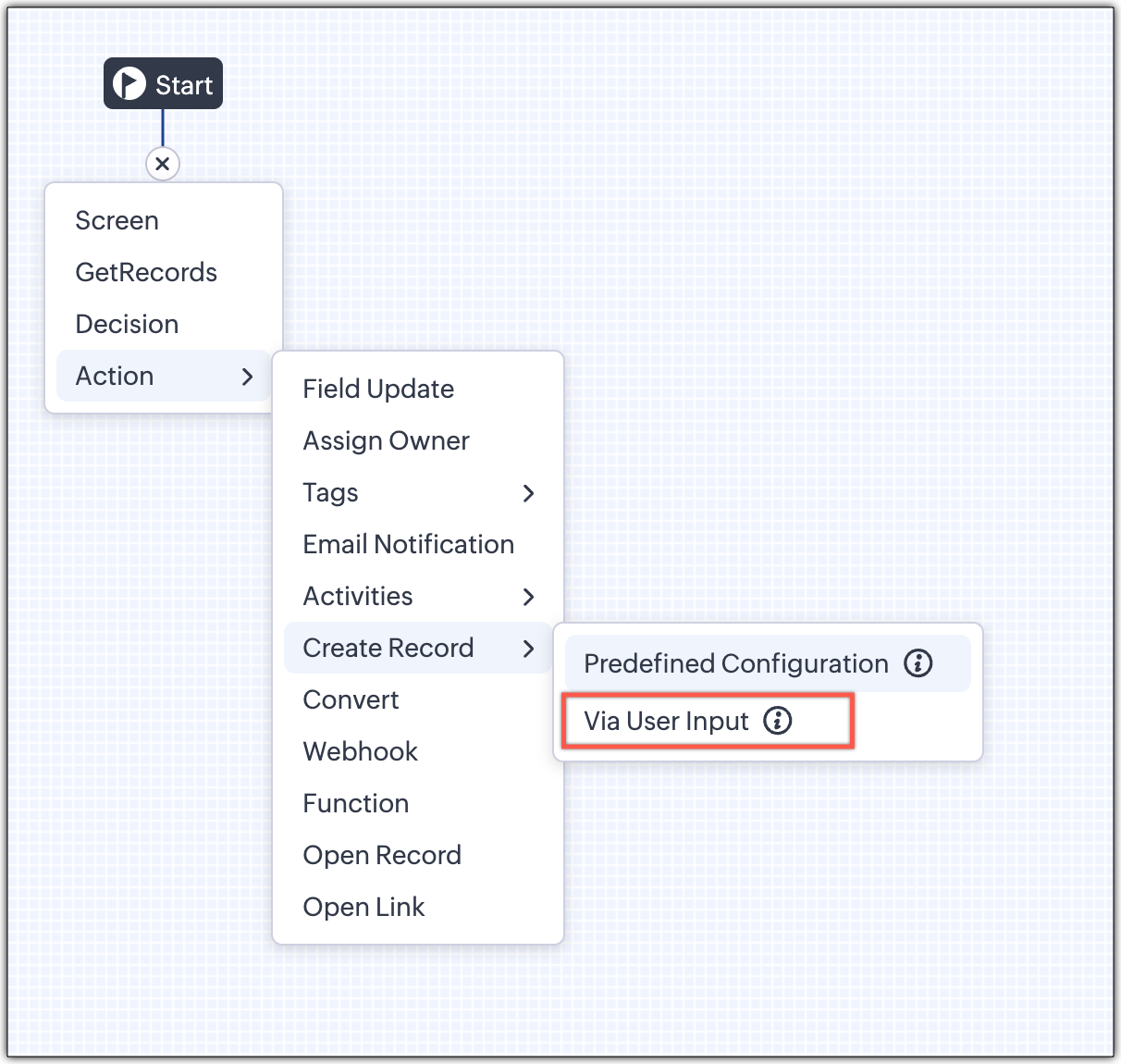
2 - Via User Input (New Action)
The key advantage of this update is that it simplifies how admins configure record creation in Kiosk Studio. Earlier, admins had to manually create a separate screen replicating all the fields of a module and then map them in the Create Record action. Moreover, if there were changes made to the fields in the module, the admin would have to edit the Kiosk and add/map the new field. All this was time-consuming and complex to setup.
Now, admins can choose to allow records to be created during the Kiosk's execution and eliminate the need to replicate, map and merge fields to save time and effort through the use of Quick Create pop-up.
Through this enhancement, real-time record creation is possible during live Kiosk execution. Users can input values in the Quick create layout that would pop-up during execution to create new records in a module. Perfect for real-world scenarios, the exact information needed to create a record only becomes available during the live execution of the Kiosk.
Real-time scenarios
Let's say you run a Kiosk for your sales team. During a call, a customer requests a product demo and shares their availability Or, your support team receives a call and has to log the customer’s issue details or updated contact info.
With this enhancement, the sales rep or support executive can create records instantly while the Kiosk is running, to input the information they get during their call to provide a smooth customer experience.
How does it work?
- While setting up the Kiosk, select Create Record > Via User Input.
- Enter Action Name, then choose the Module and Layout.
- During execution, the Quick Create layout for the selected module appears.
- There is an option to pre-fill frequently used field values during configuration.
- Now, users can enter details directly while the Kiosk is being executed.
- Note: If a user lacks Create permission for a module, this step is skipped, and related values will show as null.
Take a look at the GIF below to understand how this action can be setup and executed.
GetRecords just got smarter with these new enhancements
Fetch All Records from a module to your GetRecords Screen
You can now choose to fetch all records from a module to be displayed in your GetRecords Screen.
Previously, you could select a single record or multiple records based on the limit set for record preferences. Now, we've given you a choice to be able to select Some Records or All records. This is useful in scenarios when users need to view or act on a complete set of records in a module rather than on a limited number of them.
New pagination making easier to navigate records
We’ve added pagination to the GetRecords screen, making it easier to navigate and locate specific records quickly, even when dealing with large data sets.
Search or filter records in GetRecord screen s
Quickly find records in GetRecords screens with this new addition to Kiosk.
Increased selection limit to select more records
We have increased the GetRecord selection limit from 10 to 100.
GetRecords First-Screen Loads Instantly - No Refresh Needed
Currently, only Kiosks opened through user actions (like Blueprint or Custom Buttons) loaded records directly, while others showed a 'Refresh to load' button.
Now, every Kiosk auto-loads the first-screen of GetRecords without the need to manually refresh. When a Kiosk opens with GetRecords on the first screen, records now load instantly, regardless of whether it’s on the Home Page, Canvas, Record Detail View, Blueprint, or a Custom Button.
Kiosk Studio Added to the Standard Edition
We have extended the ability to create Kiosks to all paid editions in Zoho CRM including the Standard Edition. We aim to allow more users to create and manage Kiosks for their business processes. Take a look at the table below to know Kiosk creation limits for each Zoho CRM edition.
| Standard | Professional | Enterprise | Ultimate / CRMPlus / ZohoOne |
Number of Kiosks | 2 | 7 | 25 | 50 |
- These enhancements is available for all users in all data centers.
Start exploring these new features today and experience a faster, smarter, and easier way to capture data with Kiosk Studio.
Stay tuned for even more exciting enhancements coming your way!
Regards,
Serena Woolridge
Recent Topics
Need to be able to save Customized Reports
There are several standard reports in zoho books. Each of these can be 'customized' with various parameters - BUT, these cannot be saved for re-use later. In several of the zoho modules you can customize a search list (eg for Estimates or Invoices etc)
Split Bills/Expsense between multiple projects and/or clients
I need to be able to split vendor invoices/ expenses between multiple clients. Entering the bill multiple times is not only time consuming, it defeats the purpose of having a unquie identifity bill number and will allow for possible duplicated entry. Below is an example from Quickbooks Desktop. Splitting costs over various projects is a common job costing function that I am very sad and surprised is not an option in Zoho Books. Unless I am missing it somewhere? Thanks for your help!
Vendor bills cannot be assigned to a customer or a customer project?
I'm confused on how to handle outsourced contractor expenses on a customer project. Between my business and the contractor, the invoice they send me fits obviously into Zoho Books as a Bill. However, I need to be able record those expenses to the client
A few suggestions for Zoho Books
Hello. I've been evaluating Zoho Books for a small law firm practice. The interface is solid and I like the integration of accounting and time tracking, which is hard to find among cloud based services. I have a few suggestions that would be very helpful in determining whether we can adopt Zoho Books: 1. Be able to assign bills to clients/projects. Quickbooks desktop allows this and is very helpful in keeping track of bills that haven't been paid, but will be invoiced to clients as an expense. Creating
Book project costs to tasks
Hi all, New to zoho but far from new to this sort of platform. I've been scouring the web for a suitable platform for my growing business. I'm currently using Xero and WorkFlow Max but it lacks a key need. I signed up to zoho projects and books to test
Project expenses in Zoho Books
Just the way timesheet is used to calculate labour cost for a particular project, how do i record other expenses against a project such as materials and consumables used for the project? So that under report, I can view the total amount expended on each
Supplier Purchase Orders applied to a Project
We are finding it difficult to decide the best way track project expenses in Zoho books and would like to know how other users are handling this task. We provide Professional Services and engage 3rd party Suppliers on most projects and provide them with
Anyone using Books to track Project Profitability? If so, I could use some guidance
Hello Zoho Community. I am a recent subscriber to Zoho, and its part of an ongoing evaluation. My company (and my clients) have extensive project-tracking needs. The Projects module seems to be good from a project management standpoint, but I am perplexed
Deluge Error: "Data type of argument of function 'get' did not match required type [BIGINT]" when working with Lookup fields
Hi everyone, I’m facing an issue in Zoho CRM Deluge while working with lookup fields. Setup: Module: Monthly Bills Field: Customer (Lookup → Accounts) Module: Laundry Orders Field: Laundry_Account_Name (Lookup → Accounts) Field: Expected_Revenue (Currency)
Opt-out from mailing list means can't email at all??
It seems that if a contact unsubscribes from a mailing list the only way to email them is to uncheck the email opt-out box first, then re-check after the email has been sent. I've been through a chat with support and they confirmed this. This seems bizarre. Many of my clients don't want to receive a monthly newsletter but they definitely want to be in email communication with me, often on a daily basis. Any thoughts out there?
Email Opt Out Question
Has the problem where if a customer is emailed opt out prevents you sending standard emails? For me this feature is simply to stop any email marketing and should not block people from receiving emails via Zoho mobile, which makes no sense.
Zoho TeamInbox stuck / unusable – possible orphaned organization?
Hi all, I’m running into an issue with Zoho TeamInbox under Zoho One Trial and wondering if anyone has seen this before. We’re trying to set up a shared inbox for orders (orders@), but TeamInbox appears to be in a broken state: • The app does not load
Audio transcript not working in Zoho notebook
Greetings all! I'm enjoying the Zoho notebook as I tested out over other notebook applications. I would really love the audio transcripts to work as that would save us a lot of time so that we can utilize the notes from an audio recording. Currently when
Re: Application Architecture in Zoho Creator — A Platform-Specific Deep Dive
A recent community post on application architecture made some excellent points about planning architecture early in Zoho Creator projects. The core message is right — Creator applications have a habit of growing organically into maintenance nightmares,
Schedule Timeout 5 minutes vs. stated 15 minutes
I am running into a function run timeout error after 5 minutes for my schedules. The Functions - Limits documents states it should be 15 minutes: Functions - Limits | Online Help - Zoho CRM. What should it actually be? Due to the 5 minute timeout, I'm
Cliq iOS can't see shared screen
Hello, I had this morning a video call with a colleague. She is using Cliq Desktop MacOS and wanted to share her screen with me. I'm on iPad. I noticed, while she shared her screen, I could only see her video, but not the shared screen... Does Cliq iOS is able to display shared screen, or is it somewhere else to be found ? Regards
Placeholders in Ticket Templates
We should be able to use placeholders in ticket templates. When we create a new ticket, our description field is shown to the client in the email they receive. It would be very handy to be able to personalize that description field in our ticket templates to pull in the name of the client that the ticket is for. Using them in the subject field as well, so we can auto populate Account Names, etc.
Favorite Views list sort order?
Is there a way to rearrange the Favorite Views list?
Will I see emails sent via campaigns in CRM?
It would be useful for people to be able to see emails sent via campagins in Zoho CRM is that possible?
Introducing Product Catalog in Bigin
Greetings, I hope all of you are doing well. For many small businesses, sharing products and collecting customer interest often involves multiple tools, manual follow-ups, or even building a full ecommerce website. To address this challenge, we're excited
Products in Email Template
I’m a little confused as to how to add the listed products, from within a specific deal, to an email template. I want to generate said email template when a deal reaches a specific stage and include the products that have been selected for the deal in
Option for - CSV Export from Pipeline Deals by Stage (Including Products, Companies, and Contacts)
I would like to know when we will be able to export a simple CSV file from pipeline deals, with the option to select a specific stage within the pipeline. This export should include data for products, companies, and contacts, all in a single view. For
Zoho Billing Partial Proration...
Hi, In Zoho billing, we offer upgrades, downgrades, suspends, and resumes. We use online payment for most subscriptions, but have only a few that are offline, but we treat them the same either way.. We prorate only parts of these changes.. Right now zoho
Announcing Zoho Sheet desktop app for macOS and Windows (Beta)
Hello Sheet users, We know you’ve been waiting for this one. It has always been the top priority on our roadmap to provide a single native desktop app for macOS and Windows that works both online and offline. Today, we are excited to announce that the
What is the maximum length/size of a presentation on Apple TV?
Hello, I have a presentation here that I regularly show on Apple TV. It’s always the same presentation, which keeps getting longer and more extensive over time. Almost every slide contains a graphic or photo that takes up the entire slide. That means:
CRM Notes
Hello, We want to add a Note to the Contact record when a Note is added to a Case or Deal. I wasn't able to do this using a workflow, so I tried using Zoho Flow, but that didn't work either. Does anyone have a suggestion on how we can accomplish thi
Zoho Books | Product updates | April 2026
Hello users, Welcome to our April 2026 product updates roundup! Highlights include profit margin for sales transactions, insights in reports, recording deposits from undeposited funds in banking, and faster production workflows with improved assembly
Sorter View No Longer Works Properly
Today I realized that sorter view no longer works properly. I believe just yesterday, I was able to drag a slide or a group of slides and move it/them to the place I want to move it/them to. While I was dragging, I got a visual feedback of where I could
Ignroe_filtrers and drill through
I have two charts, where one is connected to the other using drill-through. The issue is with the second chart (the drill-through target). It contains an aggregation formula that uses the ignore_filters function. Under normal conditions, the formula works
Installation error: Zoho Books Extension in Zoho Bookings
Dear Zoho Support Team, I am reaching out for assistance with an integration issue that I believe is related to a recent change in my subscription model. Background: I initially started with individual subscriptions for Zoho Sites and Zoho Bookings. To
zoho creator panel add formula
Hello. I'm using zoho panels which works good for me but i need to add an extra calculation the predefined sum function provided by zoho. not sure if this is possible? The code zoho is generating for the sum is as follows; <text margin='0px' padding='0px'
Kaizen #238: Fetching Employee Data from Microsoft SQL Server into Zoho CRM Using Queries
Hello everyone! Welcome back to the Kaizen series! Many organizations manage workforce data such as employee designations, contact details, salary bands, and joining dates in an HRMS backed by Microsoft SQL Server, while their sales teams work in Zoho
Du prompt à la production : comprendre le fonctionnement du MCP
Le Model Context Protocol (MCP) est un protocole ouvert qui standardise la manière dont les applications se connectent aux modèles de langage (LLM). En termes simples, le MCP est le « USB-C des agents IA » : une interface universelle qui relie l’intelligence
Add Flexible Recurrence Options for Meeting Scheduling in Zoho Cliq (e.g., Every 2 Weeks)
Hello Zoho Cliq Team, We hope you are doing well. Currently, when scheduling a meeting inside Zoho Cliq, the recurrence options are limited to Daily, Weekly, Monthly, and Yearly. There is no ability to set a meeting to occur every X weeks — for example,
filter on sheets mobile (iOS, iPadOS) does not work
re-posting this as a question because reporting as a problem netted zero responses... I have this issue on every spreadsheet, whether imported or created natively in Zoho Sheets. I can use on desktop without issue: but on iOS the filter dropdowns are
Inactive License for free account.
I recently upgraded my Cliq subscription not my team (on the free version), are unable to login to their accounts. The error message received is Inactive License Looks like you have not been covered under the current free plan of users. Please contact
Zoho Books recurring invoicing link to a Zoho CRM Deal?
With the Zoho CRM Finance Integration setup, normally when creating an invoice via Zoho CRM Finance Integration on a Deal, it creates the invoice in Zoho Books with the CRM Deal *Potential link for that invoice. Alternatively, if you create the invoice
No background for video recordings, no playback speed, can't even playback longer recordings - have to download…
Hi. We utilize heavily video messages on Slack, but wanted to migrate to Cliq with Zoho One, however very basic yet very frequently used feature is missing: backgrounds for video recordings and playback speed. We were not happy with Slack's 5 minute limits
Introducing PDF conversion in Deluge
Hello everyone, We're pleased to introduce built-in PDF conversion capabilities in Deluge with the launch of the convertToPDF task. As PDF is one of the most widely used formats in professional environments, this task helps streamline document generation
Changing naming convention for Estimates
Hi there, How do I customise the naming of the filenames for estimates when sending them? Currently they are named literally just ES11.PDF or whatever the number of the estimate is. There is no Company name, description of the work, customer name, date
Next Page