Qu'est-ce qu'un Blueprint ?

Prenons comme exemple le cas de la société Zylker Inc. Une enquête interne menée par les responsables de l'entreprise a révélé que les nouveaux employés n'étaient pas satisfaits du processus d'intégration. Il est apparu que les premières semaines étaient problématiques car certains employés n'avaient pas reçu les informations nécessaires pour préparer leur arrivée. Une enquête plus approfondie a mis en lumière des problèmes de communication entre les différents services impliqués dans l'intégration des nouveaux employés, le responsable du recrutement, l'équipe des ressources humaines, l'équipe d'administration et l'équipe d'administration du système d'information.
Les organisations sont souvent confrontées à de tels problèmes. Mais comment s'assurer que le processus reste efficace même lorsque de plus en plus de collaborateurs sont recrutés?
Pour être efficace, un processus doit être :
- Complet - Tous les aspects du cycle de l'expérience de l'utilisateur final/client doivent être couverts de bout en bout.
- Défini clairement - Les différentes étapes du processus, les activités à réaliser, le responsable de chaque activité, les mesures à prendre en fonction du résultat de chaque activité et tous les domaines critiques de ce type doivent être définis et documentés.
- Reproductible et cohérent - La documentation doit être suffisamment claire pour que tout nouvel utilisateur du système puisse facilement la suivre et la mettre en œuvre. Cette documentation est essentielle car elle réduit également le temps et les efforts à investir dans la formation des nouveaux utilisateurs au processus.
Il s'agit là des qualités qu'un Blueprint entend conférer à vos processus pour vous aider à surmonter vos difficultés.
Que signifie "Blueprint" ?
Un Blueprint est une représentation informatisée d'un processus concret. Il ressemble à un simple flowchart, mais il est beaucoup plus dynamique et détaillé. Plusieurs utilisateurs/équipes peuvent être engagés dans l'exécution d'un seul Blueprint, ou un seul utilisateur/équipe peut exécuter l'intégralité d'un Blueprint.
Chaque plan d'action est composé de trois éléments clés :
- États : les différentes phases/étapes du processus
- Transitions : il s'agit de la phase intermédiaire entre deux états. Les activités que les utilisateurs doivent réaliser pour passer d'un état à l'autre sont définies.
- Connecteurs : composants qui définissent la relation entre les différents états et transitions.
Avec Blueprint, assurez-vous que vos processus d'entreprise sont bien définis, rationalisés du point de vue organisationnel et qu'ils ne comportent pas d'erreurs. En outre, vous pouvez vous assurer que tous les processus sont conformes aux plans d'entreprise et vérifier facilement la progression de vos processus et intervenir en cas de besoin.
Utilisation du Blueprint - Exemple
Voyons un exemple de l'utilisation de blueprint - comment un plan d'action améliore les opérations du support d'une agence de voyage.
Zylker Inc. est un organisateur de voyages nationaux et internationaux pour les particuliers et les organisations. L'entreprise est spécialisée dans la fourniture de services de voyage de bout en bout, y compris la réservation d'hôtels, la préparation d'itinéraires de voyage, la prise de dispositions spéciales pour les personnes âgées/à mobilité réduite, l'organisation de change, etc.
L'un des forfaits de Zylker, Premium, propose des itinéraires internationaux personnalisés et ne demande qu'un minimum d'efforts au client pour planifier son voyage.
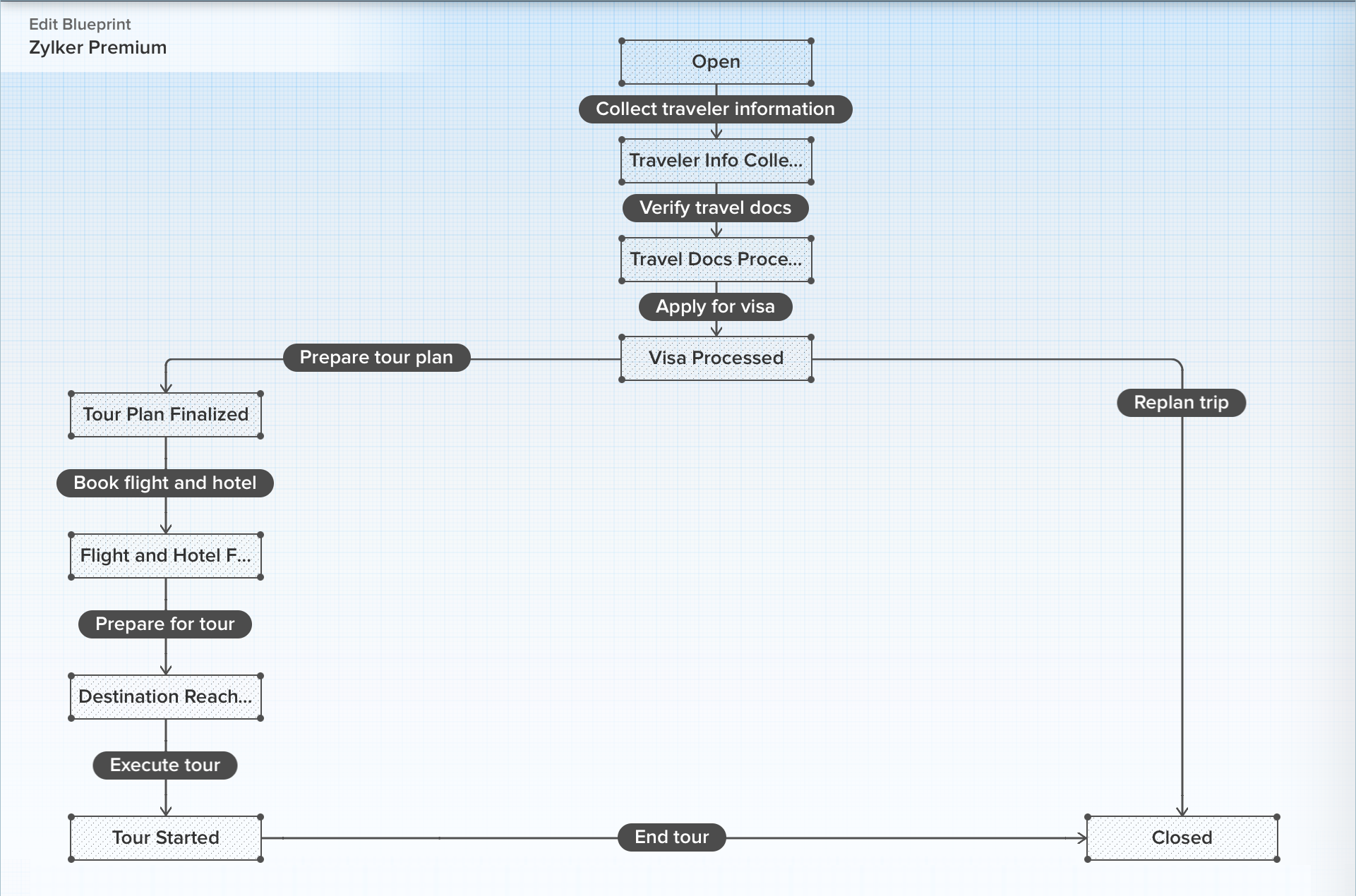
Le programme Premium exige que les étapes suivantes soient réalisées :
- Collecte des informations sur le voyageur
- Traitement des documents de voyage
- Demande de visa
- Élaboration du plan de voyage
- Réservation des billets d'avion et des chambres d'hôtel
- Accueil des invités dans le pays de destination
- Exécution du voyage
Blueprint du forfait Premium de Zylker :
- Les différentes étapes du processus sont définies en tant qu'états.
- Les activités réalisées par le personnel de Zylker sont définies comme des transitions.
- La progression d'un état à un autre, en fonction du résultat de l'état actuel, est définie à l'aide de connecteurs.
- Les différentes personnes/équipes qui effectuent les transitions sont désignées comme des propriétaires de transition.
Réalisation du Blueprint
Le Blueprint a été configuré de telle sorte qu'il s'applique automatiquement à tout ticket contenant une demande de package Premium. Par conséquent, chaque fois qu'un client s'inscrit pour un forfait Premium, la demande est enregistrée comme un ticket et le Blueprint est automatiquement exécuté. C'est donc sur la page de détail du ticket que se déroulent toutes les actions liées au Blueprint.
Le champ "Statut" du ticket est associé aux différents états du Blueprint. Par conséquent, celui-ci est verrouillé et ne peut pas être modifié manuellement. Lorsque le responsable de la transition effectue la transition associée, le champ statut est automatiquement mis à jour pour afficher l'état suivant dans le Blueprint. L'état continue de changer au fur et à mesure que les transitions suivantes sont exécutées.
Dans ce scénario, le responsable du service client de Zylker Inc. peut facilement suivre l'évolution d'une demande, simplement en consultant le ticket. De même, les différentes parties prenantes impliquées dans le processus peuvent également être tenues pour responsables car elles sont désignées comme propriétaires des transitions.
Ainsi, grâce à la mise en œuvre de ce Blueprint dans son service d'assistance, Zylker Inc. peut désormais offrir une expérience cohérente à tous ses clients, veiller à ce que tous les employés s'approprient les activités qu'ils réalisent et suivre facilement l'évolution de chaque client.
Avez-vous utilisé Blueprint ? Faites-nous part de la manière dont il vous a aidé à affiner vos processus.
L'équipe Zoho France
Topic Participants
Kinjal Lodaya
Coraline, Customer Success MOBIX
Sticky Posts
Desk - Astuce #5 : Déplacer les tickets entre les départements
Bonjour à tous, Il n'est pas rare que vos clients créent des tickets dans un département qui n'a pas l'expertise requise pour les traiter. Vous devez transférer ces tickets vers le département concerné, afin qu'ils ne passent pas à travers les maillesZoho Desk - Nouveautés 2023
Bonjour à tous, Comme vous le savez, Zoho cherche en permanence à vous proposer des logiciels complets et au plus proche de vos attentes. C'est pourquoi toute l'équipe Zoho Desk est fière de vous présenter la nouvelle version de votre logiciel de serviceDesk : Le cycle de vie d'un ticket - Introduction
Voici une nouvelle série en 3 chapitres, dans laquelle nous allons vous dévoiler comment Zoho gère l'intégralité de son service client sur Zoho Desk. Zoho compte plus de 60 millions d'utilisateurs à travers le monde et offre plus de 50 différentes solutions.Zoho Desk - Chapitre 1 : Anticipez vos besoins
Bonjour à tous, Continuons notre série de la rentrée et découvrons comment Zoho gère 60 millions de clients grâce à Zoho Desk. Contrairement à ce que l'on peut penser le cycle de vie d'un ticket commence bien avant qu'il arrive dans notre logiciel client.Desk Astuce #6 : Ajouter plusieurs comptes réseaux sociaux
Bonjour à tous, Découvrons dans cet article comment vous pouvez ajouter plusieurs pages d'un meme réseau social dans Zoho Desk. Pour cela suivez les étapes suivantes : Connectez-vous à Zoho Desk avec les privilèges d'administrateur. Cliquez sur les paramètres
Recent Topics
Configurable Zoho Cliq Notifications for Zoho People Alerts
Hello Zoho People Product Team, Greetings and hope you are doing well. We would like to request an enhancement to Zoho People notifications, enabling a native delivery via Zoho Cliq with admin-level control, similar to the notification settings availableAdd Israel & Jewish Holidays to Zoho People Holidays Gallery
Greetings, We hope you are doing well. We are writing to request an enhancement to the Holidays Gallery in Zoho People. Currently, there are several holidays available, but none for Israel and none for Jewish holidays (which are not necessarily the sameKeep Zoho People Feature Requests in the Zoho People Forum
Hello Zoho People Product Team, Greetings. We would like to submit a feature request regarding the handling of feature requests themselves, specifically for Zoho People. Issue: Feature Requests Being Moved to Zoho One Zoho People feature requests areZO25: The refreshed, more unified, and intelligent OS for business
Hello all, Greetings from Zoho One! 2025 has been a remarkable year, packed with new features that will take your Zoho One experience to the next level! From sleek, customizable dashboards to an all-new action panel for instant task management, we’veIntroducing Multi-Asset Support in Work Orders, Estimates, and Service Appointments
We’re excited to announce a highly requested enhancement in Zoho FSM — you can now associate multiple assets with Work Orders, Estimates, and Service Appointments. This update brings more clarity, flexibility, and control to your field service operations,[Product Update] Locations module migration in Zoho Books integration with Zoho Analytics
Dear Customers, As Zoho Books are starting to support an advance version of the Branches/Warehouses module called the Locations module, users who choose to migrate to the Locations module in Zoho Books will also be migrated in Zoho Analytics-Zoho BooksIntroducing Schedules for smarter availability management
Greetings from the Zoho Bookings team! We’re excited to introduce Schedules, a powerful enhancement to manage availability across your workspace. Schedules are reusable working-hour templates that help you define and maintain consistent availability acrossWhy Zoho Contracts Prefers Structured Approvals Over Ad-hoc Approvals
Approvals are one of the most important stages in a contract’s lifecycle. They determine whether a contract moves forward, gets revised, or needs further discussion. The approval process also defines accountability within the organization. Zoho ContractsWhatsapp Connection Status still "Pending" after migration
Hello, I migrated my WhatsApp API to Zoho from another provider a day ago. So far the connection status is still “Pending”. There is a problem? How long does it usually take?Kaizen #226: Using ZRC in Client Script
Hello everyone! Welcome to another week of Kaizen. In today's post, lets see what is ZRC (Zoho Request Client) and how we can use ZRC methods in Client Script to get inputs from a Salesperson and update the Lead status with a single button click. In thisSearch Bar positioning
Why is the Search bar on the far right when everything is oriented towards the left?How to use Rollup Summary in a Formula Field?
I created a Rollup Summary (Decimal) field in my module, and it shows values correctly. When I try to reference it in a Formula Field (e.g. ${Deals.Partners_Requested} - ${Deals.Partners_Paid}), I get the error that the field can’t be found. Is it possibleHow to Filter timewise question to check uploaded one month or two months before in these community question ?
i want to find the question that is asked some month or before any particular year, so how can i filter it ?Proposal for Creating a Unique "Address" Entity in Zoho FSM
The "Address" entity is one of the most critical components for a service-oriented company. While homeowners may change and servicing companies may vary, the address itself remains constant. This constancy is essential for subsequent services, as it providesWorkflow Down/Bug
We have a workflow that sends an email to one of our internal departments 10 minutes after a record is created in a custom module. The workflow actually works correctly. However, we have now noticed that on January 8, between 3:55 p.m. and 4:33 p.m.,Service Locations: Designed for Shared Sites and Changing Customers
Managing service addresses sounds simple—until it isn’t. Large facilities, shared sites, and frequently changing customers can quickly turn address management into an operational bottleneck. This is where Service Locations deliver clarity and control.Can I re-send the Customer Satisfaction Survey after a ticket closure?
Hello, Some customers does not answer the survey right after closure, is it possible to re-send after a few days or weeks? Best Regards!Filter contacts based on selected category in Zoho Desk ticket
Hello community, I’m setting up the Tickets module in Zoho Desk and I need help implementing the following: When a category is selected in a ticket, I want the Contact field to be filtered so that it only displays contacts that are related to that category.Mapping a new Ticket in Zoho Desk to an Account or Deal in Zoho CRM manually
Is there any way for me to map an existing ticket in Zoho desk to an account or Deal within Zoho CRM? Sometimes people use different email to put in a ticket than the one that we have in the CRM, but it's still the same person. We would like to be ableAssign Income to Project Without Invoice
Hello, Fairly new user here so apologies if there is a really obvious solution here that I am just missing... I have hundreds of small deposits into a bank account that I want to assign to a project but do not want to have to create an invoice every timeTracking Non-Inventory Items
We have several business locations and currently use zoho inventory to track retail items (sales and purchase orders). We were hoping to use zoho inventory to track our non-inventory items as well (toilet paper, paper towels, etc). I understand that weProfile Page View Customization
I need to change the fields, sections from the profile view of an emplyoyee.Zoho Desk Android app update: Filter, Sort and Saved filters Enhancements
Hello everyone! We are excited to introduce the below features on the Android version Zoho Desk mobile app: 1. Filter & Sort support has been introduced for the Contacts and Accounts modules. 2. Sort options is now available in Custom Modules as well.Accessing shared mailboxes through Trident (Windows)
Hi, I have a created a couple of shared mailboxes. The mailboxes are showing up on the browser based Zoho workplace, but I cannot seem to figure out how to access my shared inboxes through Trident (Windows). Am I missing something or is this feature notFeature Request: Ability to set Default Custom Filters and apply them via URL/Deluge
I've discovered a significant gap in how Zoho Creator handles Custom Filters for reports, and I'm hoping the Zoho team can address this in a future update. This limitation has been raised before and continues to be requested, but remains unresolved. TheClosing the Loop: Why Lookup Asymmetry is Harming Data Integrity in Creator
TL;DR: Lookup fields allow users to add new related records inline via the "+" icon, but there's no equivalent ability to edit an existing related record without navigating away and losing form context. Adding a native "Edit" icon—with automatic Userfiltering lookup field options based on information in another module.
In our CRM system. We have the standard Accounts and Deals modules. We would like to introduce the ability to classify Accounts by Sector. Our desired functionality is to have a global list of all sectors that an Account can select, with the ability toReally want the field "Company" in the activities module!
Hi team! Something we are really missing is able to see the field Company when working in the activities module. We have a lot of tasks and need to see what company it's related to. It's really annoying to not be able to see it.🙈 Thx!Service op locatie organiseren met Zoho FSM: waar lopen organisaties tegenaan?
Bij organisaties met service teams op locatie merken we vaak dat de complexiteit niet zozeer in de planning zelf zit, maar in wat er rond die planning gebeurt. Denk aan opvolging na interventies, consistente servicerapporten, en het bijhouden van installatiesIntroducing Assemblies and Kits in Zoho Inventory
Hello customers, We’re excited to share a major revamp to Zoho Inventory that brings both clarity and flexibility to your inventory management experience! Presenting Assemblies and Kits We’re thrilled to introduce Assemblies and Kits, which replaces theDoes the ability exist to make tax on the customer profile mandatory?
I am reaching out to inquire about the possibility of making the "Customer Tax" field mandatory when creating a new customer in Zoho. We want to ensure that all customers have their tax information recorded to maintain compliance with our internal processes.How to integrate XML with Zoho CRM
Hi, I have an eCom service provider that gives me a dynamic XML that contains order information, clients, shipments... The XML link is the only thing I have. No Oath or key, No API get... I want to integrate it into Zoho CRM. I am not a developer noremail association with CRM
Why is it 2024 (almost 2025) and Zoho has not figured out how to integrate email with CRM? It is so inconsistent at associating emails within CRM. I am an attorney. I have clients and work with other attorneys. Attorney John Doe is associated with multipleFix the speed
It takes ages to load on every step even though my dataset is quite small.Credit Note for Shipped and Fatoora pushed invoices
We have shipped a Sales Order and created an Invoice. The Invoice is also pushed to Fatoora Now we need to create a credit note for the invoice When we try it, it says we need to create a Sales Return in the Zoho Books, we have already created a SalesFSM - Timesheet entires for Internal Work
Hi FSM Team, Several of my clients have asked how they can manage internal timesheets within Zoho FSM. Since their technicians already spend most of their day working in FSM, it would be ideal if they could log all working hours directly in the FSM app.Add a way of clearing fields values in Flow actions
It would be great if there was an option to set a field as Null when creating flows. I had an instance today where I just wanted to clear a long integer field in the CRM based on an action in Projects but I had to write a custom function. It would beRole Management
I am creating an analytics dashboard for a company that will be utilized by its various departments such as Finance, Marketing, and HR. My goal is to design the dashboard with separate tabs for each department. Additionally, I plan to implement role-basedHighlight a candidate who is "off limits"
Hello: Is there a way to highlight a candidate who is "off limits"? I would like to have the ability to make certain candidate and / or Client records highlighted in RED or something like that. This would be used for example when we may have placed a candidate somewhere and we want everyone in our company to quickly and easily see that they are off limits. The same would apply when we want to put a client or former client off limits so no one recruits out of there. How can this be done? Cheers,Announcing new features in Trident for Windows (v.1.37.5.0)
Hello Community! Trident for Windows just received a major update, with a range of capabilities that strengthen email security and enhance communication. This update focuses on making your mailbox safer and your overall email experience more reliable.Next Page