Revenue Management: #3 Revenue Recognition Simplified
In continuation of the previous post on how to compute revenue recognition, let's explore a solution that helps businesses handle real-world complexities. While the Accounting Standards provide a clear framework for recognizing revenue, the real challenge lies in implementing that guidance in daily practice. Managing multiple contracts, bundled offerings, and varying billing models can quickly complicate things and delay financial reporting.
To bridge the gap between the guidelines and the actual business routine, you need a tool that can automate the entire process. Zoho Billing brings the five-step model to life through its full-fledged, automated revenue reporting.
Zoho Billing flexes into Revenue Recognition reporting by adopting the Accounting Standards of IFRS 15 and ASC 606. With Zoho Billing, one can define when and how revenue can be recognized. Its reporting provides businesses with a detailed breakdown of when revenue is recognized, when it is kept as deferred, and its projections.
In Zoho Billing, you can define a "Recognition Rule" where you can create and assign different rules for your services. The attributes, while configuring the rules, are:
Recognition Period:
Define how often you wish to recognize your revenue.
Monthly: The revenue will be recognized every month. This is ideal for subscription-based services that offer monthly or weekly renewals.
Quarterly: Revenue will be recognized every three months, which aligns with most businesses' standard financial reporting cycle.
Yearly: The revenue will be recognized after every year. This is suitable for long-term contracts and high-value payments.
Once: The revenue will be recognized once and for all. This is suitable for milestone-based businesses or one-time service deliveries.
Recognition Method:
This will help you determine what and how revenue is recognized. For your simple understanding, we will provide one example for each of these recognition methods.
Daily: Total revenue is divided over the service period and recognized based on the number of days in the service period.
Evenly Distributed: Total revenue is divided evenly across the subscription or recognition period.
Evenly Distributed (with Prorated Values): Revenue that is recognized will be prorated based on the start date of the subscription.
Recognition Time:
Businesses need to define when to recognize revenue. You can determine whether revenue is recognized at the period's start or end.
If you choose,
Period Start: Revenue will be recognized when the service period begins. Prepaid subscription-based services commonly follow this. In this way of recognition, January's revenue is recognized in January itself.
Period End: Revenue will be recognized when the service period ends. This is suitable for contacts who bill quarterly.
These rules ensure that the revenue is recognized automatically and periodically as and when the service is delivered.
Zoho Billing automatically allocates the revenue between Recognized Revenue and Deferred Revenue. Over the contract term, the deferred revenue decreases as recognized revenue increases. The system will auto-generate:
Recognized Revenue Report: This report reflects income from completed performance obligations, providing insights into current financial performance. We have narrowed it down to give recognized revenue by customers as well as items.
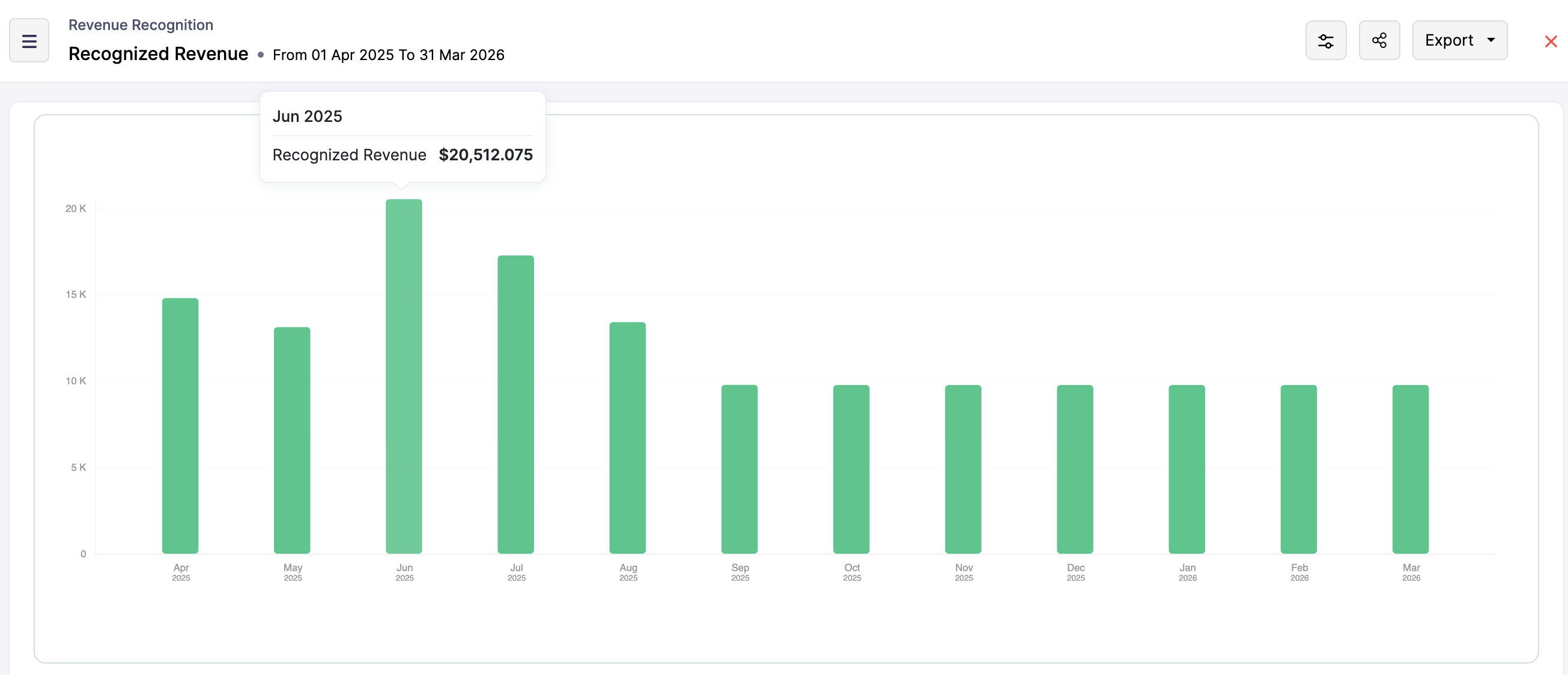
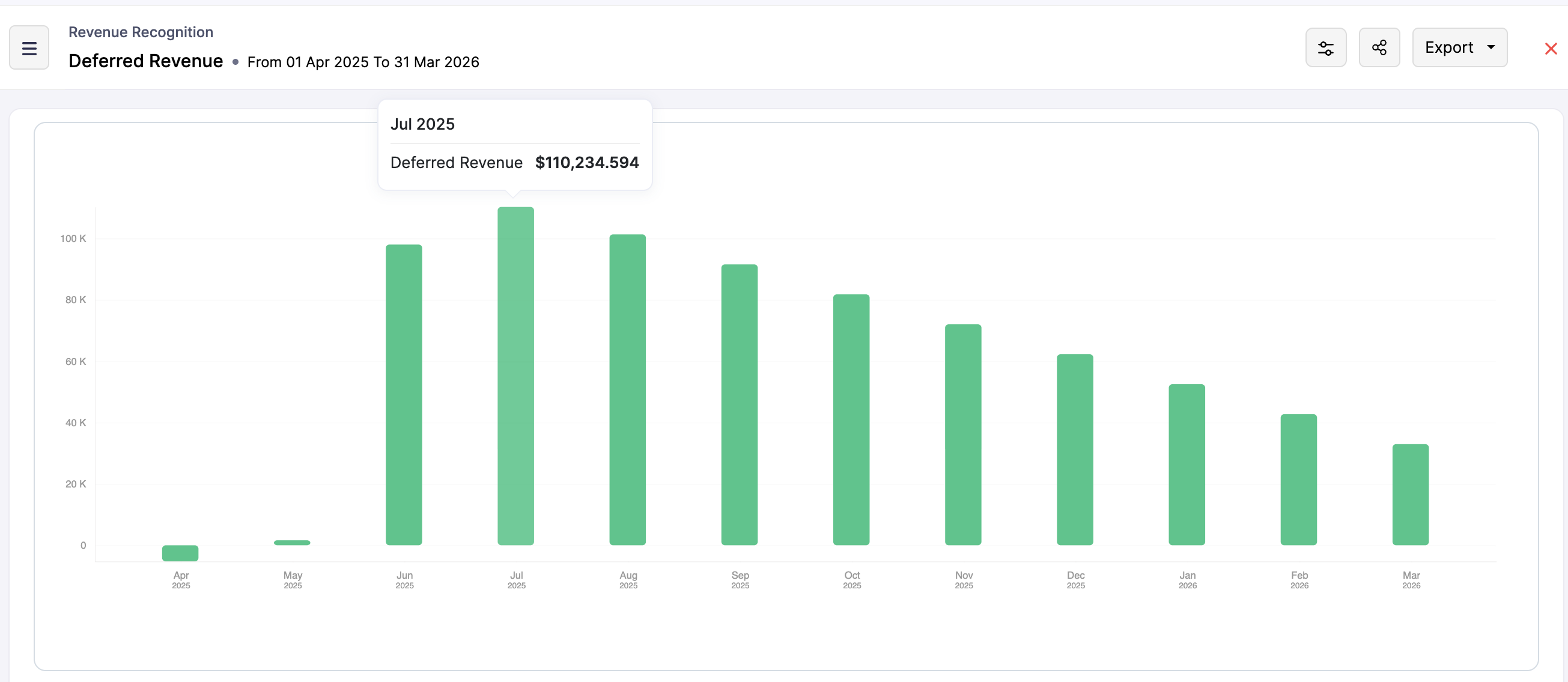
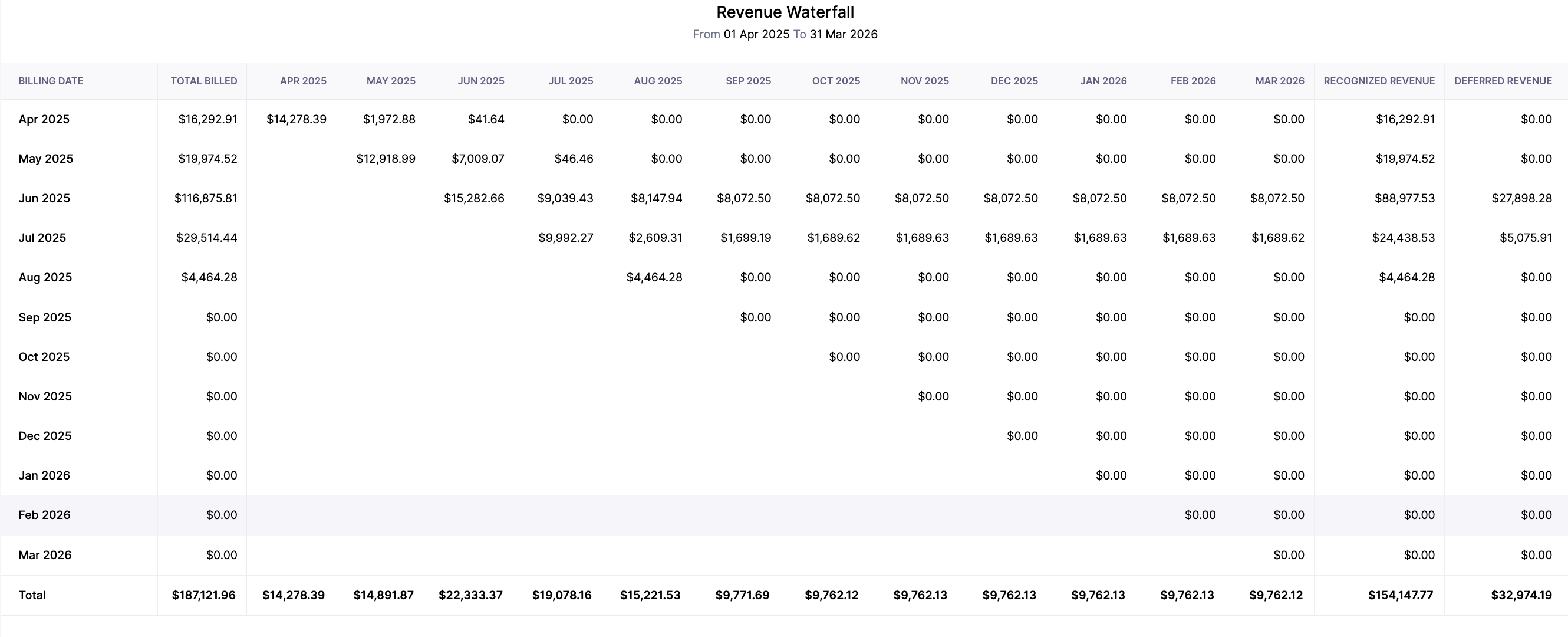
Zoho Billing simplifies revenue recognition by transferring complex accounting standards into practical, automated processes. With configurable rules, flexible methods, and in-depth reporting, businesses can ensure that their recognized and deferred revenue is tracked accurately and transparently. This automated process removes guesswork for a subscription-based model and helps the finance team stay on top of their revenue reporting.

In the next post, we will understand the logic behind the Manual Revenue Recognition that Zoho Billing offers.
Topic Participants
Hari | Zoho Billing
Sticky Posts
Community Learning Series | Digest #5 — September 2020
Dear customers, We're happy to bring you the September edition of our #CommunityDigest! Keep track of your subscription KPIs right from your smartphone: Last month, we enhanced our Android mobile app to help our customers get daily updates on their business health. We got to know from a lot of customers that this has made their job much more easier because they no longer have to keep a reminder to manually check on the previous day's revenue or activations. If you have not downloaded it yet, here'sCommunity Learning Series | Digest #4 - August 2020
Dear customers, We hope you're staying safe and healthy. I'm happy to bring you the fourth edition of our #CommunityDigest with some brand-new updates from us. 1. Daily Business Updates (for Android users) The Zoho Subscriptions Android app has got a cool new update: You can now get a push notification to your smartphone that lets you know how many activations and cancellations have taken place, and what's the net revenue for the previous day. The best part is, you can tell the app when exactly youCommunity Learning Series | Digest #3 - July 2020
Dear customers, We hope you're staying safe and healthy. We're glad to bring you the July edition of our #CommunityDigest. New community members can view our previous newsletters here. This time, we have two major updates and three interesting topics for you: 1. Zoho Subscriptions Developer Community Since the inception of Zoho Subscriptions, our team believed that the recurring billing platform we provide should be able to offer an extensive API library that empowers businesses to automate mostIntroducing: Community Learning Series | Digest #1 - May 2020
Dear customers, We hope you are staying safe and healthy. Helping businesses manage their customer subscriptions more efficiently has always been, and always will be, our goal at Zoho Subscriptions. We strongly believe this is possible if we grow together as a community and share what we know with each other. To nurture this shared learning experience, here is our brand-new Community Learning Series! Welcome to the first edition of our digest! Each edition of our community digest includes guides
Recent Topics
Agent assignment filter?
Godo day, We are starting to play with FSM to see if it's going to work for our needs. Now so far we have found that it's very restrcitve in the field department you you have layout rules or can't even hide fields depending on the users roles. We can'tDKIM Now Mandatory - Changes to Zoho Forms Email Policies
Hello Zoho Forms Users, This post is to inform you about an important update regarding the authentication of all email domains in your Zoho Forms account. This year, we are doubling down on our commitment to deliver a secure, seamless, and empoweringis it possible to add more than one Whatsapp Phone Number to be integrated to Zoho CRM?
so I have successfully added one Whatsapp number like this from this User Interface it seems I can't add a new Whatsapp Number. I need to add a new Whatsapp Number so I can control the lead assignment if a chat sent to Whatsapp Phone Number 1 then assignKiosk Page Refresh
We have a Kiosk running from a button in contacts to update values and also add related lists, which works great, but when the kiosk is finished the page does not refresh to show the changes. Is there a way to force the contact to refresh/update whenTips & tricks: Make SalesIQ automations work for you
Every day, thousands of visitors land on your website. Some browse, some buy, and some leave without a word. But, wouldn’t it be great if you could automatically know who’s interested, engage them at the right moment, and never miss a lead, and all thisAdd Custom Reports To Dashboard or Home Tab
Hi there, I think it would be great to be able to add our custom reports to the Home Tab or Dashboards. Thanks! ChadDigest Octobre - Un résumé de ce qui s'est passé le mois dernier sur Community
Chers utilisateurs, Faisons le point sur les temps forts du mois d'octobre au sein de notre Community Zoho France. Partager des informations sensibles, comme des mots de passe, peut vite devenir compliqué et risqué. Les données circulent par email ouHow do I fully delete a user account
Hi, I have two old accounts on my CRM which are inactive and show as 'Closed' in the list of users. BUT they are basically still there. How do I fully delete these accounts? They appear in some parts of CRM still such as the on the contact record emailsAutomatically Add Recurring Zoho Meeting Events to Zoho Calendar / Zoho Meeting Calendar
Hello Zoho Meeting Team, Hope you are doing well. We would like to request an enhancement regarding recurring meetings created inside Zoho Meeting. At the moment, when we schedule a recurring meeting in Zoho Meeting, it does not appear in Zoho CalendarCredit Management: #6 Tackling Common Mistakes in Credit Based Billing
Businesses extend credit to build relationships, make buying easy, and drive more sales. But somewhere between extending and collecting, things begin to slip. A few late payments here and there, an overlooked invoice, and a backlog make cash flow feelTasks Statuses
Hi, The task status "Completed" is a final status which closes the task. We need to have a status "Cancelled". However, when the status is set to "Cancelled", the task prompt still has a blue button to Close Task. When the customer clicks that and closesUpdating Blueprint stage from my Deluge function
Hi all, I need to update the blueprint stage. Its almost working, but ONLY if the current Deal stage is 'Closed Lost'. On any of my custom stages that Ive specified in the pipeline it doesnt work! My code: dealmap = Map(); deal_stage = deal.get("Stage");Canvas: is it possible to have a fixed header?
Hello. Does Canvas provide the option to have a fixed header, similar to the standard view? It would also be interesting for other parts of the interface, like the header or sidebar of the tab section. Thanks!Limited layout rules in a module
There is a limit of 10 layout rules per module. Is there a way to get that functionality through different customization or workflow + custom function (easily accessible), etc. Having just 10 is limiting especially if module contains a lot of data. AreIntroducing Lead Capture: Empower exhibitors to capture leads effortlessly
Events provide a great opportunity for exhibitors to generate awareness and engage with potential customers. Efficiently distributing attendee information to exhibitors through a seamless and secure way is of paramount importance. Introducing Lead Capturedealing with post dated cheques
Hi, can you help me please the best way to deal with this We sell an item of three months duration that is paid for with post dated cheques in monthly stages example - item is sold £3000 Cheque 1 is for £1000 due at time of sale (say Sept) cheque 2 is dated 25th of next month (Oct) cheque 3 is dated 25th of next month +1 (Nov) Now, with invoice number one it's simple - i send a standard invoice as usual But with the other two here's what i want zoho to do next month i want it to send an invoice onUsing Contains as a filter
We are using Zoho Reports, ServiceDesk Plus analytics. I do not see how to create a report filter using Contains comparison of a string values, is one string contained in another. For example, Task Title contains the word Monitor. Is this possible in Zoho Reports? This reporting feature is available in SDP reporting. Thanks in advance, Craig RiceMass import of documents into Zoho Writer
I'm using Google's word processor at the moment but feel that Zoho does a better job (on the online apps market). Iwant to move my documents (about 50-70) to Zoho but it seems to me that I have to import them seperately. Is it already possible to upload several documents at a time or is this a forthcoming feature? Cheers Rolli :?:Set off Unearned Revenue
Hi, I would like to get a clarification on the below. I have an opening balance of BD.725/- in my Unearned Revenue A/c which includes the overpayments of 6 clients. No One of my clients settled his invoices by paying the value of the invoice less theHow Zoho Desk contributes to the art of savings
Remember the first time your grandmother gave you cash for a birthday or New Year's gift, Christmas gift, or any special day? You probably tucked that money safely into a piggy bank, waiting for the day you could buy something precious or something youAdd Webhook Response Module to Zoho Flow
Hi Zoho Flow Team, We’d like to request a Webhook Response capability for Zoho Flow that can return a dynamic, computed reply to the original webhook caller after / during the flow runs. What exists today Zoho Flow’s webhook trigger can send custom acknowledgementsWhen moments in customer support get "spooky"
It’s Halloween again! Halloween is celebrated with spooky symbols and meanings based on history and traditions, with each region adding its own special touch. While we were kids, we would dress up in costumes along with friends, attend parties, and enjoyHow can I delete duplicate transactions?
I want to delete the duplicates not simply exclude them. I have duplicates, because I had automatic bank feeds turned on (had to make sure this critical functionality was working before migrating to Zoho). Now when I import my csv's exported from Wave,Python - code studio
Hi, I see the code studio is "coming soon". We have some files that will require some more complex transformation, is this feature far off? It appears to have been released in Zoho Analytics alreadyMultiple email addresses
Multiple email addresses: I understand there is the ability to add an additional email field to a contact, but the functionality here needs to be drastically revised. Currently, this second email address does not log under the contact email history, nor is it available as a send address when using the Send Mail button within CRM. We recently migrated from GoldMine. I hate GoldMine, but there is one thing they did well: Email. I suggest copying them. Change the email field to an editable picklist,ViewID and Zoho Desk API
I'm looking at the documentation for Listing contacts and it looks like you can filter by ViewID. I assume this is views created in a department or all departments. Is this correct? And if so, how do I find the ViewID for that view? EDIT: I see the viewAbility to Link Reported Issues from Zoho Desk to Specific Tasks or Subtasks in Zoho Projects
Hi Zoho Desk Team, Hope you're doing well. When reporting a bug from Zoho Desk to Zoho Projects, we’ve noticed that it’s currently not possible to select an existing task or subtask to associate the issue with. However, when working directly inside ZohoPrint Tickets
We have field engineers who visit customers. We would like the option to print a job sheet with full details of the job and account/contact details.Zoho Desk integration with Power BI
Hi, I want to be able to create a Power BI report which has live updates of ticket data from zoho desk, is this possile at all? Thanks JackAbility to Attach Images When Reporting Issues to Zoho Projects from Zoho Desk
Hi Zoho Desk Team, Hope you’re doing well. We’re using the Zoho Desk–Zoho Projects integration to report bugs directly from support tickets into the Zoho Projects issue tracker. This integration is extremely useful and helps us maintain smooth coordinationAbility to Choose Task List and Add Subtasks When Creating Tasks from Zoho Desk
Hi Zoho Desk Team, Hope you’re doing well. We’re using the Zoho Desk–Zoho Projects integration to seamlessly connect customer tickets with project tasks. While the integration works great overall, we noticed two important limitations that affect our workflowSync Task Status from Zoho Projects to Zoho Desk
Hi Zoho Desk Team, Hope you’re doing well. We’re actively using the Zoho Desk–Zoho Projects integration, which helps our support and project teams stay aligned. However, we noticed that when we change a task’s status in Zoho Projects, the change is notDefault/Private Departments in Zoho Desk
1) How does one configure a department to be private? 2) Also, how does one change the default department? 1) On the list of my company's Zoho Departments, I see that we have a default department, but I am unable to choose which department should be default. 2) From the Zoho documentation I see that in order to create a private department, one should uncheck "Display in customer portal" on the Add Department screen. However, is there a way to change this setting after the department has been created?Zoho CRM IP Addresses to Whitelist
We were told to whitelist IP addresses from Zoho CRM. (CRM, not Zoho Mail.) What is the current list of IP Addresses to whitelist for outbound mail? Is there a website where these IP addresses are published and updated? Everything I could find is overColor of Text Box Changes
Sometimes I find the color of text boxes changed to a different color. This seems to happen when I reopen the same slide deck later. In the image that I am attaching, you see that the colors of the whole "virus," the "irology" part of "virology," andThe difference between Zoho Marketing Automation and Zoho Campaigns
Greetings Marketers! This post aims to differentiate between Zoho Marketing Automation and Zoho Campaigns. By the time you get to the end of the post, you will be able to choose a product that objectively suits you. What is Zoho Marketing Automation?How to use Rollup Summary in a Formula Field?
I created a Rollup Summary (Decimal) field in my module, and it shows values correctly. When I try to reference it in a Formula Field (e.g. ${Deals.Partners_Requested} - ${Deals.Partners_Paid}), I get the error that the field can’t be found. Is it possibleZoho Mail Android app update - View emails shared via Permalink on the app.
Hello everyone! In the latest version(v2.8.2) of the Zoho Mail Android app update, we have brought in support to access the emails shared via permalink within the app. Earlier, when you click the permalink of an email, you'll be redirected to a mobileLet us view and export the full price books data from CRM
I quote out of CRM, some of my clients have specialised pricing for specific products - therefore we use Price Books to manage these special prices. I can only see the breakdown of the products listed in the price book and the specialised pricing forWeekly Tips: Manage External Images in Zoho Mail
When you receive emails every day, whether from clients, newsletters, or services, many of them contain external images that automatically load when you open the message. While this can make emails look more engaging, it can also impact your privacy andNext Page