Tip 52: Practical uses of Zia Search in Zoho Sprints | Zoho Sprints
Tip 52: Practical uses of Zia Search in Zoho Sprints | Zoho Sprints

If your agile team uses multiple Zoho apps, your team members might often find themselves switching between those apps looking for related information. When the data you're looking for is spread across different workspaces within Zoho environment, rely on Zia Search to find specific details across those varied workspaces.

Zia Search eliminates the overhead of scrambling across different tabs. This unified search center acts like a search engine that retrieves results from across Zoho apps using a single input. For agile teams inside Zoho Sprints, this implies quick access to relevant data.


How can the search be carried out?

Zia Search indexes the following entities mapped against the corresponding search parameters:

Entity

Search Criteria

Work Items

Item name/title, Item number

Sprints

Sprint name

Epics

Epic name

Releases

Release name

Users

Name of the assignee, creator, or person adding a comment

Comments

The text of the added comment


Let us observe a few practical, day-to-day scenarios in which Zia Search helps expedite the work of Zoho Sprints users.

Use Case 1: Find information related to an item name

Let's assume your Q1 sprint has an item called "Reminder notification" and multiple subitems for the same. Your sprint team uses Zoho Cliq for chat-based collaboration and Zoho Mail for email collaboration. Each work item will have its own Cliq conversations and mail threads.

Requirement: You want to find all the communication activities related to the reminder notification feature.

Zia Search: Open Zia Search and select the All apps option to search across Zoho Apps. Enter the item name in the search bar.

Result: All the data related to that item name will be listed along with the emails under Zoho Mail section and chat conversations under Zoho Cliq within the Zia Search result window.

Use Case 2: Find information using item number

Let's assume your agile team uses Zoho Sprints to manage development activities and Zoho Desk to manage customer support tickets. You have a work item BVM-I18 which is a high priority bug that multiple customers have reported. The work item is associated with customer tickets on Zoho Desk.

Requirement: You want to find all the Zoho Desk tickets for this work item.

Zia Search: Open Zia Search and select the All Apps option to search across Zoho Apps. Enter the copied item number in the search bar.

Result: All the Zoho Desk tickets that refer to the work item number VM-I18 are listed on the search window under Desk section.

Use Case 3: Search for details in a specific workspace

Because your organization has several projects catering to different verticals, you might have multiple workspaces. Let's assume you want to find work items that are related to payments across projects in the insurance vertical. You need not switch to that workspace to find those work items.

Zia Search (Advanced Filter):
  1. Open Zia Search window in your Zoho Sprints application.
  2. Click the filter icon to open advanced filters.
  3. Select Zoho Sprints app, select the Insurance vertical workspace, select All projects, and provide the criteria to find matching work items.
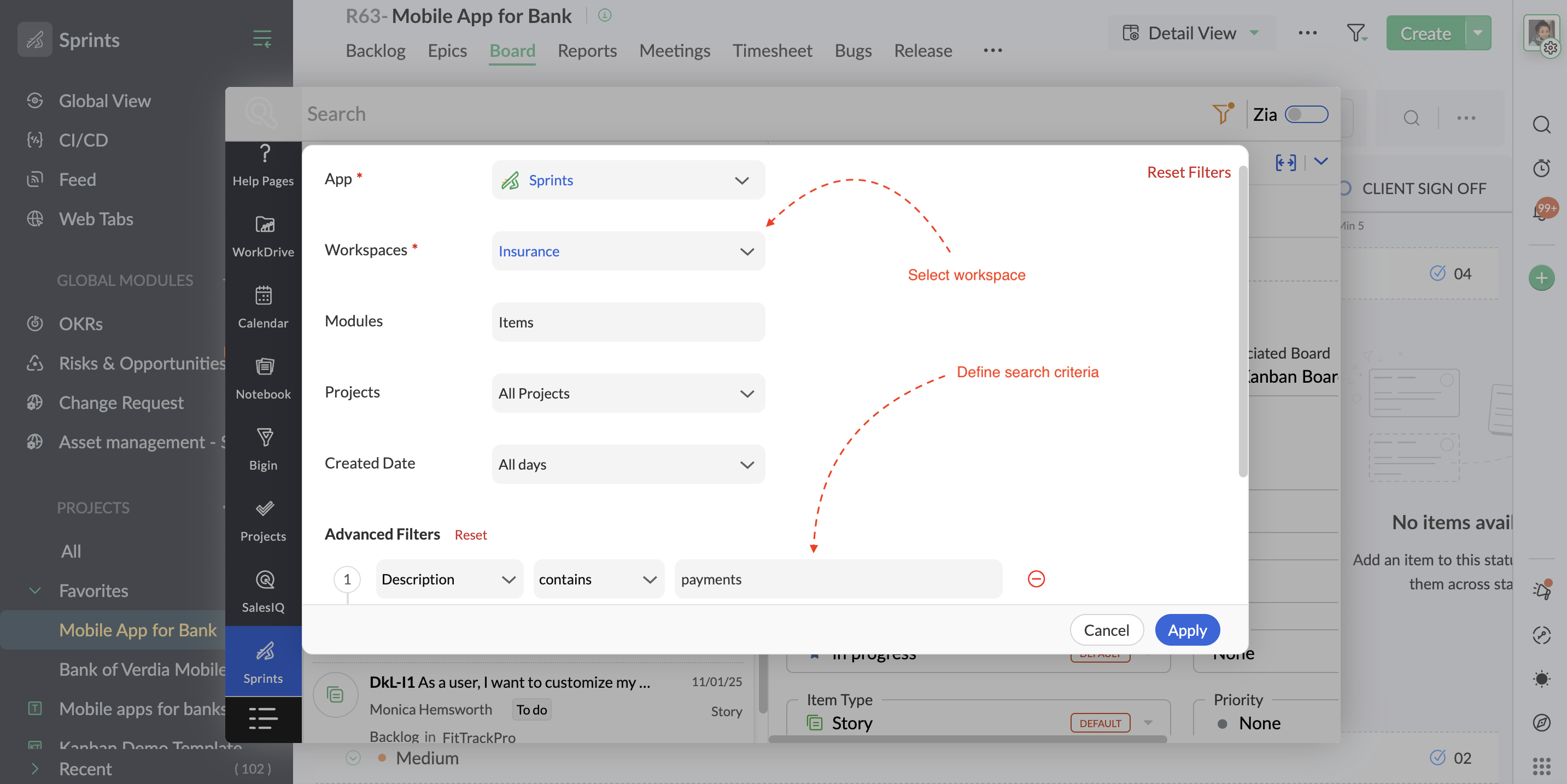
Result: The results display all the work items that specify payments across projects within that workspace.

Use Case 4: Find all items assigned to a user across projects  

If you are a technical lead doing a quick item reallocation for a developer who is overloaded, you might want to see everything currently on that specific developer's plate across all active projects.

Zia Search: Open the Zia Search and select Sprints. In the search bar, @ mention the user's name.


Result: All the items assigned to that user (along with the items created by that user and items in which the user has added comments) will be displayed in the search window, providing a comprehensive view of your search. Alternatively, narrow down your search using advanced filter criteria parameters to sift out specific work items of that user.

Zia Search is available as an in-built capability on all Zoho Sprints plans. Visit the Zia Search help page for more details or reach us at support@zohosprints.com.

Thanks,
Zoho Sprints Team
    • Sticky Posts

    • Tip #48: An exclusive system for risk management

      Zoho Sprints' risk management feature gives teams a structured, industry-grade system for identifying, quantifying, and mitigating risks to eliminate probable impact. Project or product teams that run on Zoho Sprints might be using sprints, work items,
    • Comprehensive guide to add users

      We've received quite a few questions regarding adding users to the Zoho Sprints workspace. So we decided to address it through a comprehensive post covering the locations (modules or tabs) from which you can add your users. Adding users to your workspace
    • Leverage layout rules to customize workflow

      Layout rules in Zoho Sprints primarily aim to customize the field layout of your creation forms to meet complex requirements. But it doesn't stop there. Its customization can push the boundaries of how your fields behave, how data is gathered, how processes
    • Tip #40 - Control entity and field permissions using profiles

      Building profiles using permission sets equips you with the ability to permit and restrict data access to members belonging to those profiles. Creating different profiles with different combinations of permission sets allows you to set a hierarchical
    • Recent Topics

    • Handle Leading Zeros in a Number Field

      Hi, If I use a Number Field, set with Min 7 Digits and Max 7 Digits, and enter 0000001, it will result in 1 and an error as it removes the leading zeros, the same with entering 0012340 will result in 12340 and error. So I have to use a Text Field and
    • can't access zoho account

      I can't log in to my zoho account, can you help me
    • Cliq iOS can't see shared screen

      Hello, I had this morning a video call with a colleague. She is using Cliq Desktop MacOS and wanted to share her screen with me. I'm on iPad. I noticed, while she shared her screen, I could only see her video, but not the shared screen... Does Cliq iOS is able to display shared screen, or is it somewhere else to be found ? Regards
    • HTML PDF Templates / Build From Scratch option not visible for Custom Modules

      Hi everyone, I am working with Zoho Books Custom Modules and trying to create a custom 4x4 package label PDF template using HTML/CSS. According to the official Zoho Books documentation for HTML PDF Templates, there should be an option like: Settings →
    • Virtual Option for Fields

      Hi, I would like to be able to choose another option other than Read-Only or Disabled, such as Virtual. And with Virtual, the field is shown on the form and avilable in rules, but NOT saved to the Database. A use case is having multiple Large Lists of
    • Prefix & Suffix on Single Line, Number, etc.

      Hi, I would like to have the same Prefix and Suffix that was added to the Unique ID on Text and Number Fields. Use case could be as basic as temperature, as per another Idea I have to use Single Line (Text) for a number that might have leading zeros today,
    • Customer User Fields for use in Rules

      Hi, I would like to be able to add custom fields to the users, such as Department or Role, which can then be used in Rules, Reports, etc. as a condition. A use case is limiting Global lists or Choices based on the users Custom Field, so one form can be
    • Locked out of MFA due to changing phones

      I have been locked out of my Zoho Books account since i changed my mobile phone over. I can get the OTP through the ZOHO Books software but i cant confirm using my phone app as nothing appears to authorise. I need to know how to register/set up my new
    • 👍 Zoho CRM's Notes now gets Reactions and a new look

      Available in SA and JP DCs. Rolling out to other DCs in phases. Hello everyone, Notes help users capture important updates, collaborate with teammates, and maintain context for records. Now with Note Reactions, users can quickly acknowledge updates, express
    • All new Address Field in Zoho CRM: maintain structured and accurate address inputs

      Availability Update: 29 September 2025: It's currently available for all new sign-ups and for existing Zoho CRM orgs which are in the Professional edition exclusively for IN DC users. 2 March 2026: Available to users in all DCs except US and EU DC. 24
    • Zoho books and venmo

      Hi, Is there a way to hook Venmo into zoho books? I have a Venmo business account and want to be able to sync that. I know you can do it with the paypal integration but I dont want to use paypal for the fees and that doesnt allow me use/integrate my current
    • Updating Unit Code for New Item Creation, Quote and Invoicing is so inconvenient

      The Zoho Team has implemented many updates, but these updates should be optional. Before rolling out any new feature, they should already have a solution in place that allows users to remove or disable it if they choose not to use it. Just yesterday,
    • Payroll needs to automatically remit taxes, not just give me the calculations

      Wagepoint, PayEvo, Waveapps, etc... All your competitors deposit employee payroll, but they ALSO remit taxes automatically. Get with the program, your Payroll app is extremely sparse.
    • Creating new Teams meeting from CRM doesn't enable Team functions in the meeting

      Hi I'm trying to set up the meeting integration and I've seen that when I create a Meeting in the CRM and set the location to Online and the Provider to Teams, and complete the boxes, add a participant etc, whilst the meeting is created in Teams, the
    • Approval Process configuration is now more flexible and fully customizable

      The Approval Process is back with an improved user experience designed to make it easier to build structured, flexible, and intuitive approval workflows. Here’s a look at some of the key enhancements: Name Your Rules & Stages You can now give each approval
    • Admin Logging in as another User

      How can a Super Admin login as another user. For example, I have a sales rep that is having issues with their Accounts and I want to view their Zoho Account with out having to do a GTM and sharing screens. Latest Update (27th April 2026): With the early
    • Introducing Approval SLA for Approval Processes

      Approvals can sometimes be delayed when approvers do not respond within the expected timeframe, which can slow down your recruitment processes. With the new Approval SLA in Zoho Recruit, you can set deadlines for approval requests and define automated
    • Introducing Microsoft Word Integration in Zoho Contracts

      We are excited to announce a new feature that brings contract authoring and negotiation in your familiar environment — the Microsoft Word Integration. What This Integration Brings The Microsoft Word Integration connects Zoho Contracts with the Microsoft
    • Map My Client Locations for Zoho CRM Extension: Turn CRM Addresses Into Action

      Hello everyone, Your CRM knows who your customers are. Now, see where they are on the interactive map directly from Zoho CRM. Introducing Map My Client Locations for Zoho CRM, an extension built for businesses that rely on sales visits, field service,
    • Scheduled and Automated Report Delivery from Zoho Projects

      Zoho Projects has useful reports including task reports, timesheet summaries, and workload charts. However, there is currently no way to schedule these reports to be automatically delivered to stakeholders on a recurring basis. This means: Project managers
    • How can I filter inactive/disable agent tickets?

      Hello, We have an user-agent that left the company and we inactive/disabled his agent. So, now I can no longer filter or search tickets that he is the current owner, or even create a rule to reassign tickets to another person when the ticket is reopen.
    • Add Reauthentication Option for Zoho Bug Tracker Integration in Zoho Desk

      Hello Zoho Desk Team, We hope you're doing well. We would like to request an enhancement to the Zoho Bug Tracker integration within Zoho Desk. Current Limitation: At the moment, there is no option to reauthenticate the Zoho Bug Tracker integration in
    • Dashboards for Customers

      Is it possible to build dashboards for each customers in the community for their tickets?
    • Collaborate Visually with Whiteboard in Zoho Projects

      Whiteboard in Zoho Projects allows you to collaborate visually by creating diagrams, annotating designs, and sketching project workflows using shapes, text, and images within project modules. Team members can work simultaneously, improving productivity
    • Fields in MS-Word Template

      With the new MS-Word integration, how does one create fields in an imported MS-Word document which can then automatically be populated with an Intake Form?
    • Displaying only unread tickets in ticket view

      Hello, I was wondering if someone might be able to help me with this one. We use filters to display our ticket list, typically using a saved filter which displays the tickets which are overdue or due today. What I'd really like is another filter that
    • Zoho Bookings Flow Step not Triggering on Appointment booked

      I noticed yesterday that my appointment booked flows were not triggering when we had booked appointments in Zoho Bookings. I checked the trigger and noticed the trigger values updated to be defined to a workspace and service event rather than our whole
    • UCP: Why We Killed the Multi-Portal Mess and Simplified Customer Self-Service

      Let's talk about the multi-portal mess nobody wants to admit that it exists. Your customer needs an invoice from one app, wants a ticket update from another, and has a project waiting in a third, each behind its own login, its own UI, its own "was it
    • Zoho Tables is now available in Zoho One!

      Hello Zoho One users, We’re excited to announce that Zoho Tables is now included as a part of Zoho One suite! As teams grow, managing projects, approvals, inventories, campaign trackers, and operational workflows across multiple spreadsheets become difficult.
    • Zoho Publish is now available in Zoho One!

      Hello Zoho One users, We’re excited to announce that Zoho Publish is now included as part of the Zoho One suite! As businesses grow, managing Google Business Profiles across many locations becomes challenging. Business information needs to stay accurate,
    • 📣 Ask the team behind Zoho SalesIQ: Summer '26 Q&A

      Hi everyone! Following our recent webinars, Summer '26 Release: What's New in Zoho SalesIQ—where we walked you through all the new features, what they do, and how they work—and Driving the AI Evolution: Building Smarter Customer Experiences with Zoho
    • Upcoming update to field values in Zoho Books - Zoho Analytics integration

      Hello Users, We'd like to inform you of an upcoming update to the tax_category values in the Zoho Books integration for Zoho Analytics from October 20, 2026. What's Changing? tax_category field values are being renamed to align with the conventions already
    • Announcing the new SKILL.md for Zoho CRM and the updated OAS repository!

      We are introducing a new zoho-crm skill to make working with Zoho CRM Developer tools (like APIs, functions, widgets, client scripts, queries etc) easier and faster, with the help of AI in your preferred AI harness like Claude Code, Codex, Cursor, VSCode
    • Kaizen #259 - Working with Zoho CRM APIs using zoho-crm skill

      In the previous Kaizen, we introduced the zoho-crm skill and discussed how it can work with different CRM developer capabilities. The zoho-crm skill makes it easier to work with Zoho CRM without having to remember every API endpoint, request structure,
    • How can I populate dropdown data with information from another source or app?

      I want to maintain a list of items in another app (say in excel or another database) and sync those as items in a drop down menu, instead of copy pasting to import. Is this kind of a feature available?
    • Zoho Community Digest - September 2026 | Part 1

      Hi everyone, and welcome back! September opens with a strong set of updates. Zoho CRM brings workflow automation down to the subform row level and ships a new SKILL.md for AI-assisted development, Zoho Desk introduces conditional branching with Automation
    • Tip #88 – Manage Incoming Support Requests Efficiently with the Service Queue – 'Insider Insights'

      Hello Zoho Assist Community! Not every team has a dedicated IT department or a fully built-out sysadmin setup. For smaller teams, when something breaks, there's no internal ticket system to log into, no helpdesk queue to route through, and no clear way
    • Delete CRM Portal

      How do I delete portals from my CRM? I created one just to test, it is not in use and is disabled but it's existence is preventing me from marking fields in modules as "required" unless I make it 'read/write' in the portal first. I'd rather just delete
    • Zoho Books | Product updates | July 2026

      Hello users, We’re excited to bring you the latest updates in Zoho Books for July 2026! This month's release introduces Terminal Payments, CMP-08 filing for composition taxpayers, SEPA Credit Transfer support, and Self-Billed Credit Notes and Debit Notes
    • Calendar invites from Contacts not being assigned to Account in CRM

      Hi all It's that time of year again when I try to get calendar and meetings sorted in CRM. I have two way sync enabled. I have the option set to check for customer meeting invitation mail and to add them as meetings. However, whilst those meetings show
    • Next Page