Tip #7: Customize the appointment confirmation page

Tip #7: Customize the appointment confirmation page

A confirmation page plays a crucial role in creating the first impression, as that's where customers land when booking with you. It shows your brand identity, engages your audience, and drives more conversions. Yet, this section is often overlooked when establishing an online scheduling process. That's why Zoho Bookings makes it simple to create your own confirmation page.


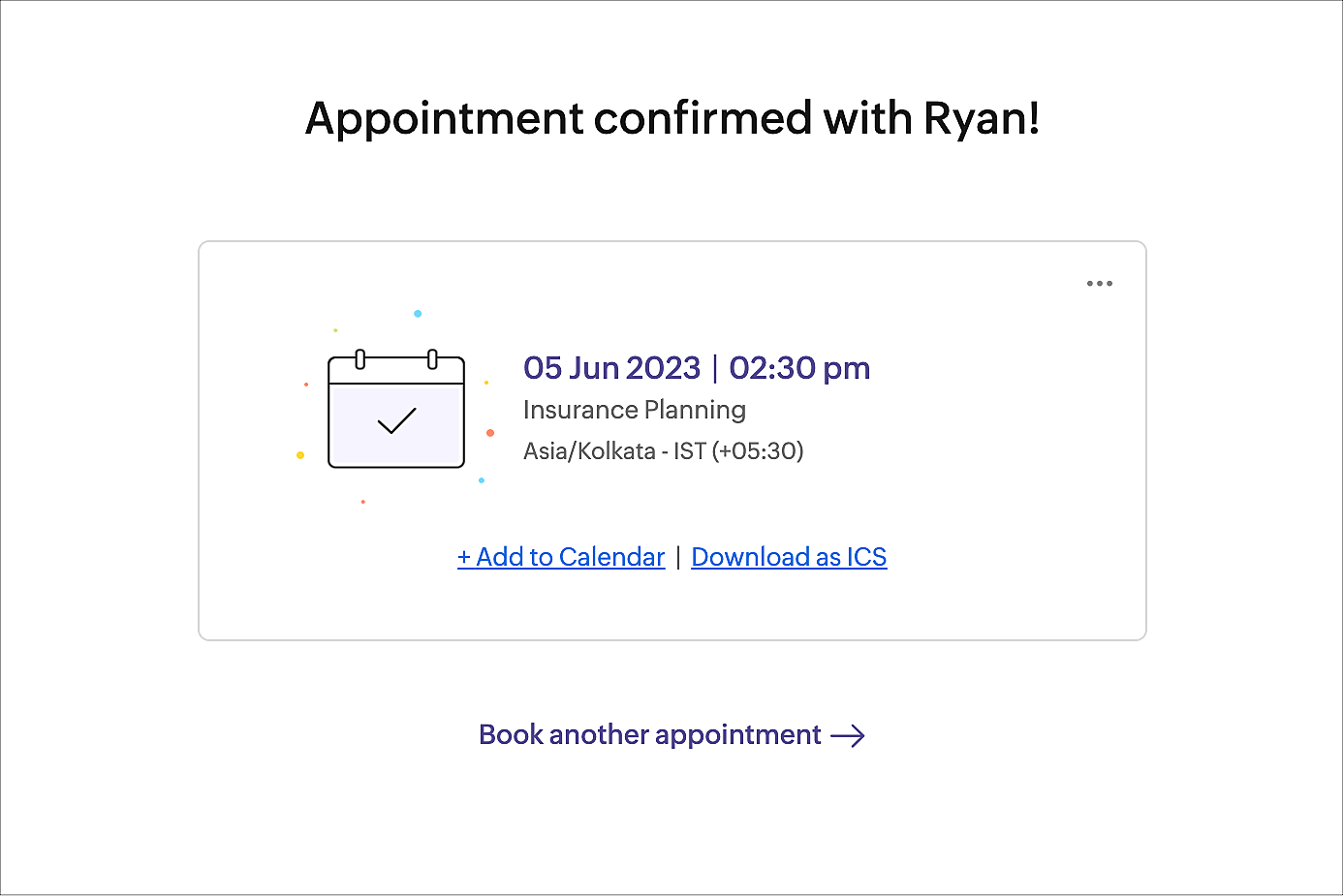
After booking an appointment, the customer will see a confirmation page. This is the default confirmation page of Zoho Bookings.


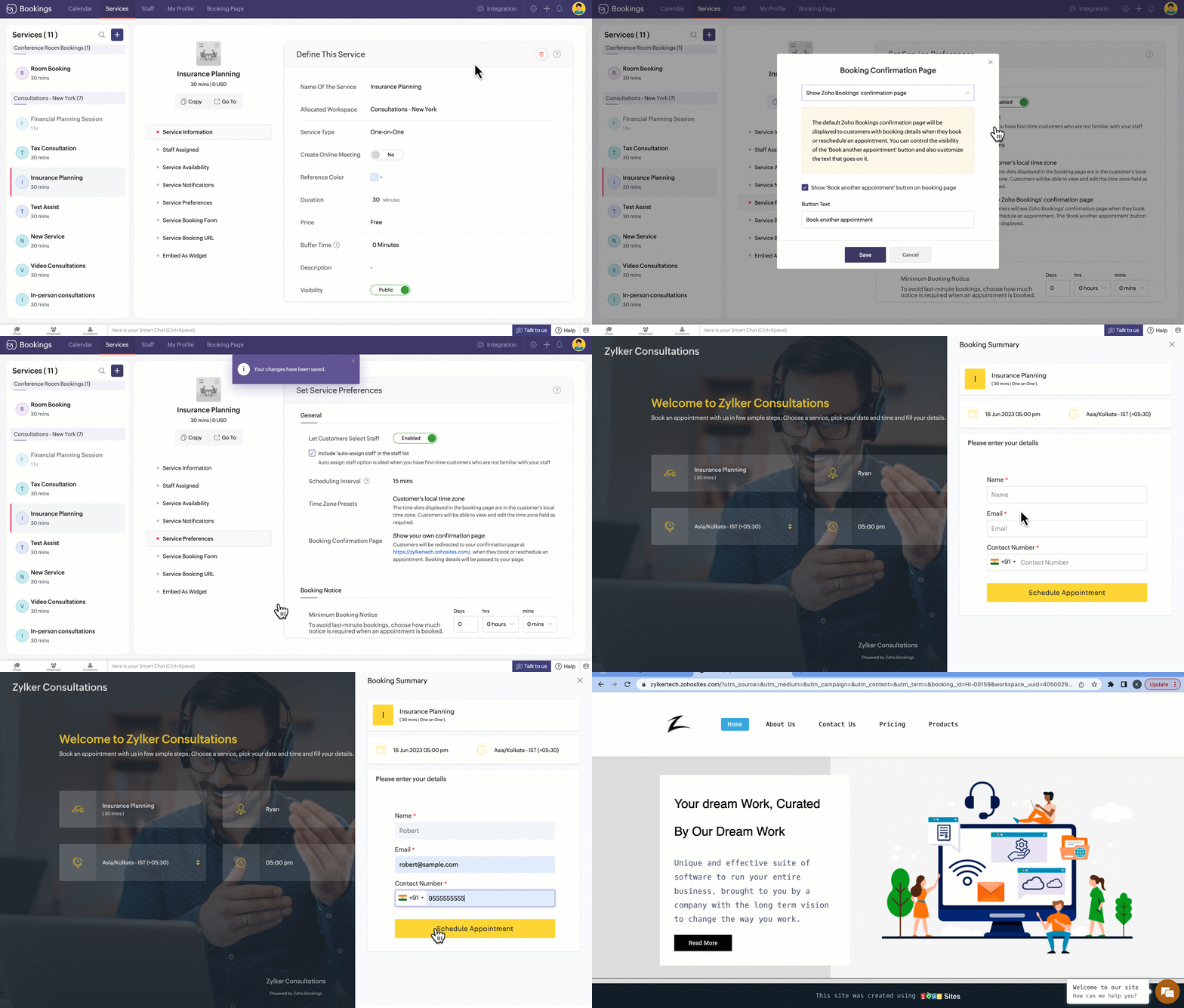
If you'd like, you can redirect the customer to your website instead. You can also get the customer and appointment details through the URL and utilize it to enhance the user experience.


Redirecting to your webpage offers many advantages.

     Better branding: Gain better control over the page design and give the customer a more cohesive navigation experience.

     Cross-promotion: Promote other services and encourage the user sign up for your newsletter or promotional emails to improve revenue.

     Additional information: Show additional details than that of the existing confirmation page and customize according to your need.

Use case
Jacob is a financial advisor in Zylker Consultations. Whenever a customer books a Medical Insurance Planning session with him, he wants the customer to explore other services related to it (say, life insurance or car insurance). So, he sets the confirmation page so that it lands on his site's insurance page. This way, he attracts more business by offering special discounts for further bookings.


Please note that each service can have different confirmation pages.


To customize the confirmation page for a service 

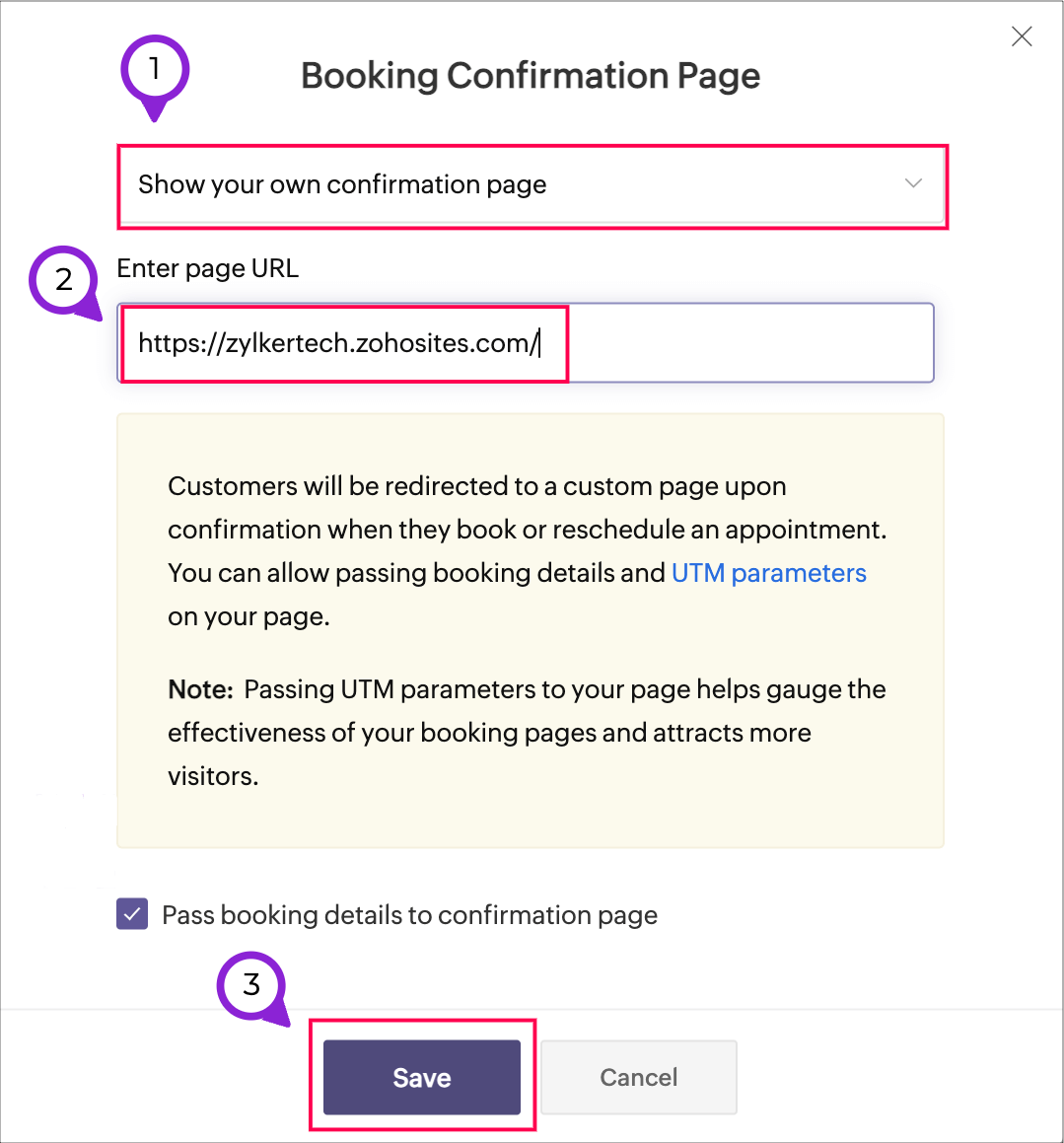
  1. Navigate to Services > (Select the required service) > Service Preferences. 

  2. Under General, click the edit icon next to the option Booking Confirmation Page. 
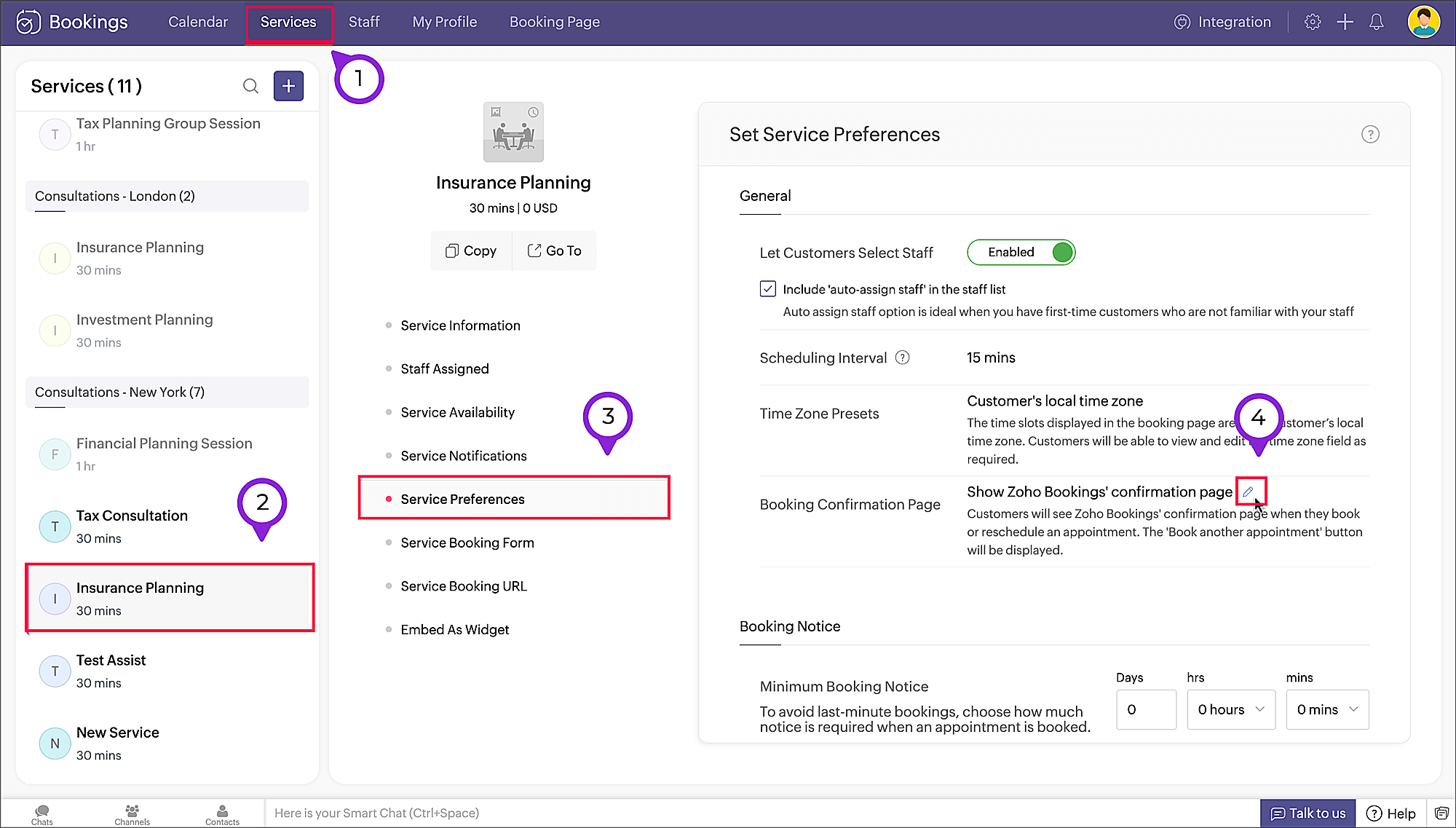


  3. A pop-up appears. From the dropdown, select Show your own confirmation page.

  4. In the Enter page URL textbox, enter the url of your preferred confirmation webpage


Have a look at how to set a custom confirmation page and how it works


Get appointment details from the URL

The appointment details are included in the URL and can be used to show customer or service details on your website. This is useful if, for instance, you'd like to retrieve the customer's age range and show them relevant services.
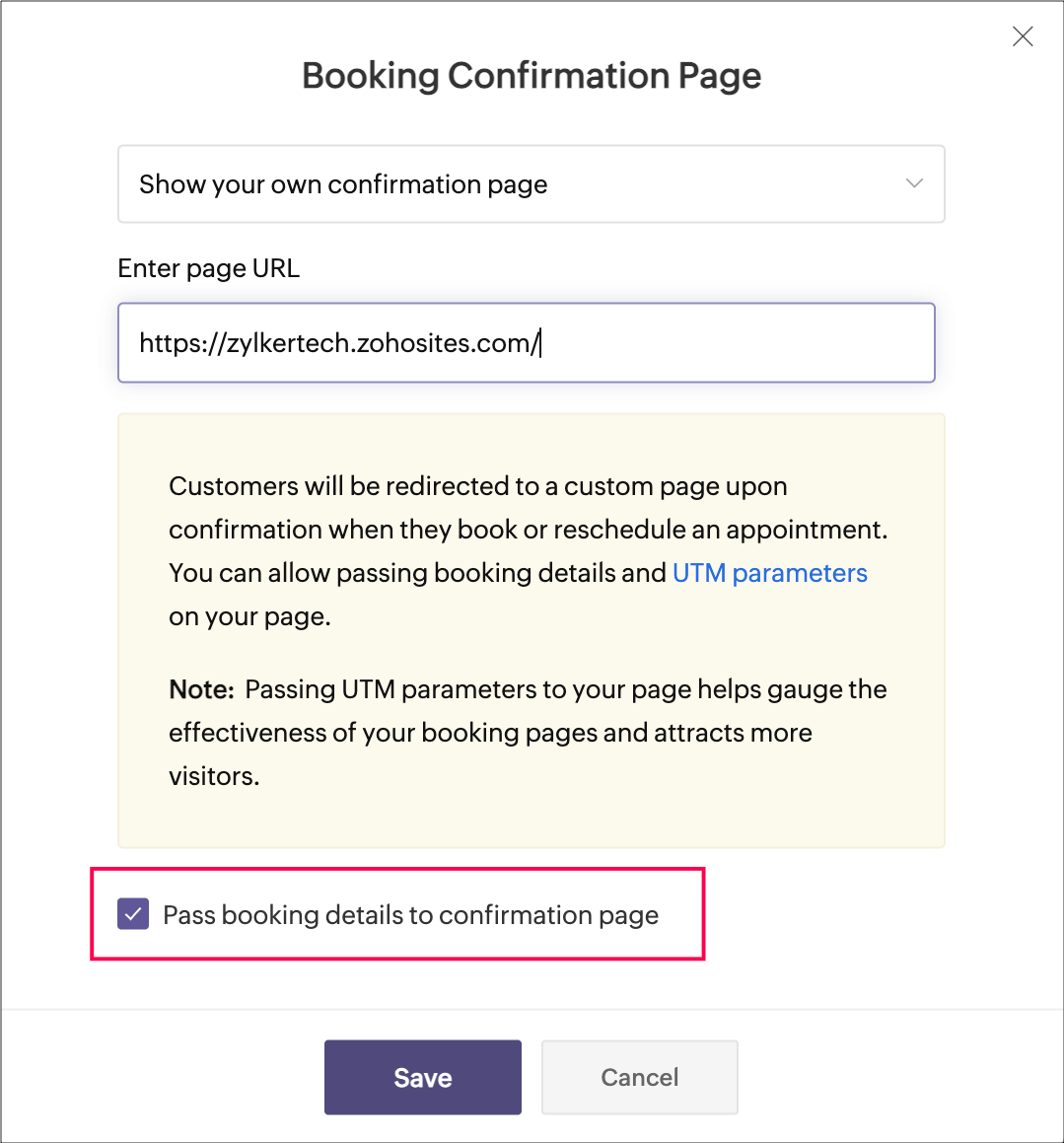
To pass these appointment details to the URL, select the checkbox Pass booking details to confirmation page while adding the confirmation page.


Below is the list of parameters that are passed. 

Booking details

          1. booking_id=<value>

          2. workspace_uuid=<value>

          3. workspace_name=<value>

          4. assigned_to=<value> (staff or resource name)

          5. service_uuid=<value>

          6. service_name=<value>

          7. booking_start_time=<value> (represented in ISO 8061 format in customer timezone)

          8. booking_end_time=<value> (represented in ISO 8061 format in customer timezone)

          9. booking_cost=<value>

          10. booking_cost_paid=<value>

          11. booking_currency=<value>


Customer details


          12. customer_name=<value>

          13. customer_first_name =<value> (if applicable)

          14. customer_last_name=<value> (if applicable)

          15. customer_contact_no=<value>

          16. customer_email=<value>


Custom fields


          17. customer_<custom_field_name>=<value>


You can fetch these values and use them on your confirmation page as you wish.

This is an example of the redirected URL in which the bookings values are passed.

https://zylkertech.zohosites.com/?utm_source=&utm_medium=&utm_campaign=&utm_content=&utm_term=&booking_id=HI-00152&workspace_uuid=4050029000000026019&workspace_name=4050029000002958058&assigned_to=Ryan&service_uuid=4050029000002958058&service_name=Insurance%20Planning&customer_name=Robert&customer_first_name=&customer_last_name=&customer_contact_no=%2B916111111111&customer_email=robert@sample.com&booking_start_time=2023-06-05T10:00:00Z&booking_end_time=2023-06-05T10:30:00Z&booking_cost=0&booking_cost_paid=0&booking_currency=USD


In the above case, you can fetch the customer name (Robert) and the service he booked (Insurance Planning) from the URL. This can be used to display the confirmation message of your choice ("Hey Robert! Thanks for booking the Insurance Planning consultation."). 

This custom confirmation page can also be set at the workspace level. Refer to the help articles below for more info.

Workspace Preferences - Confirmation Page

Service Preferences - Confirmation Page


Hope you find this tip helpful. Let us know in the comments if you have any questions.

Stay tuned and happy scheduling!


    • Sticky Posts

    • Tip #13: Identify where your bookings come from with Source Tracking

      Source tracking is the practice of identifying where your bookings originated. This is important, because online bookings come from a wide variety of sources like social media platforms, your website, email and ad campaigns, partner websites, organic
    • Tip #17: How to mandate partial payment for your appointments

      When you require partial payments during the booking process, customers can only schedule with you after paying a certain amount in advance. This deposit acts as a commitment between both parties. Apart from that, it has many more advantages. Benefits
    • Tip #18: Organize a group workshop in a few steps

      It's the season for workshops—they're everywhere, catering to diverse interests and needs. Whether for more professional goals like leadership development or creative endeavors like painting, there's an abundance of workshops offered every day. A scheduler
    • Tip #16: Custom labels for staff, service, and resources

      Every industry uses its own jargon. Take healthcare, for example; when you visit a doctor, it's not just an appointment, it's a consultation. The people who provide consultations are the providers. Similarly, in the tranquil world of a spa, a massage
    • Tip #15: Customize service prices for each staff member

      It's common practice for a service to be priced differently based on the staff member providing it. For example, an experienced hair stylist may charge more for a haircut compared to the other stylists. This pricing strategy allows businesses to charge
    • Recent Topics

    • Zero Customer Support

      I have been a paying customer on Zoho Mail Premium, which clearly advertises a 40MB attachment limit. However, for a long time now, I have been experiencing ongoing issues sending PDF attachments over 10MB. Instead of sending properly as attachments,
    • Unable to send message;Reason:554 5.1.8

      Dear Zoho Support Team, I have attempted to send multiple documents in several different ZIP files containing PDF and Word documents. Initially, I received the following notification: “When Office 365 tried to send your message, the receiving email server
    • SOLVED - Unsubscribe Feedback Page inexplicably presenting in French, German, etc. not default language of English

      As the titles says, had the "Unsubscribe Feedback Page" for two different clients presenting the feedback options to unsubscribers in French, German, etc., not in English like it should. And no, it wasn't due to user preferences, embedded web translators,
    • Identify and clean hard bounce lists in Automation 2.0

      Hello. 1. I want to know how I can identify hard bounces in the lists I created to clean them before sending an email, given that the bounce rate has increased and it is necessary to clean the lists. 2. How can I exclude hard bounces and invalid emails
    • Catalyst DB is insufficient for many use cases

      Hi all: I've been diving deep on full stack application development inside Zoho Catalyst. I've been using catalyst for serverless compute and API gateway for a few years, but I haven't used the DB beyond simple storing of app data. As I was working through
    • Edit a previous reconciliation

      I realized that during my March bank reconciliation, I chose the wrong check to reconcile (they were for the same amount on the same date, I just chose the wrong check to reconcile). So now, the incorrect check is showing as un-reconciled. Is there any way I can edit a previous reconciliation (this is 7 months ago) so I can adjust the check that was reconciled? The amounts are exactly the same and it won't change my ending balance.
    • How to change column headings in pivot table?

      Hi, Is there a way to rename the column headers of a pivot table? Now some the columns are named with value labels: 'SUM of .....'. We would like to rename those headers. As of now we couldn't find any direct solution to adjust the headers, besides copying and reformat. We want to avoid these extra steps. Best, Tiemen
    • Native QuickBooks integration for Zoho CRM: Connecting sales and finance

      Greetings, I hope all of you are doing well. We're excited to announce Zoho CRM's integration with QuickBooks Web, which is designed to synchronize your CRM data with your QuickBooks accounting records and bridge the gap between sales and finance. This
    • Rename system-defined labels in Zoho CRM

      Renaming system-defined labels is now available across all DCs. Hello everyone, Zoho CRM includes predefined system fields across modules to support essential CRM operations. Until now, the labels of these fields were fixed and could not be edited from
    • Report/All Entries Filter Contains to support multiple values

      Hi, I use different fields to filter All Entries before Export, one is the Added Email ID (May soon replace with the new Logged in User Name Field!!), and I want to filter for more than one person, so select "Contains", but I try with a comma seperating
    • Marketing Tip #32: Improve SEO and customer confidence with an FAQ section

      Before making a purchase, customers often have simple questions about delivery times, returns, product usage, or sizing. If they can’t quickly find answers, they may leave your store without buying. Adding a clear FAQ (Frequently Asked Questions) section
    • Zobot with Plugs

      Hello, I am having a problem with Zobot using Plugs. Here is my current flow: When I run the flow, I should immediately see the messages from the initial cards (Send Message cards), then after running the plug, and finally, see the messages after the
    • Zoho Creator é para você? Saiba quando escolher (e quando não escolher) essa plataforma

      Todo mês alguém me pergunta: "Leandro, vale a pena usar o Zoho Creator para o meu projeto?" A resposta honesta é: depende. E neste artigo vou te dar os critérios reais que uso para tomar essa decisão — sem marketing, sem generalização. O que é Zoho Creator,
    • Control Fields on Mobile App

      On the mobile app, how do we control which fields appear on the screen for records that have a related list? In the example below I want the Inspection Stage and Inspection Type fields to appear, not the record owner (Dev Admin). I changed the Inspections
    • Show Zoho Marketing Automation Messages in SalesIQ Chat

      When the same number is used in Zoho Marketing Automation and SalesIQ, campaign messages should be visible inside the SalesIQ chat. Currently, when customers reply to marketing campaign messages, SalesIQ chat owners get confused because they cannot see
    • Switch between multiple LLMs instantly for tailored Zia experiences

      Availability Editions: Professional , Enterprise, Ultimate , CRMPlus , ZohoOne Release Plan: Available for all DCs Hello everyone. Earlier, the Multi-LLM feature supported only one LLM at a time for Zia Record Assistant bot restricting flexibility from
    • Lost the ability to sort by ticket owner

      Hi all, in the last week or so, we have lost the ability to sort tickets by Ticket Owner. Unlike the other columns which we can hover over and click on to sort, Ticket Owner is no longer clickable. Is it just us, or are other customers seeing this too?
    • SalesIQ Chat Owner to CRM Lead Owner Mapping

      There is no proper mapping between the SalesIQ chat owner and the CRM lead owner. When a chat is assigned to an agent, the lead created in CRM is often assigned to a different user, forcing admins to manually change ownership every time. This creates
    • Automatic Email Alerts for Errors in Zoho Creator Logs

      Hello, We would like to request a feature enhancement in Zoho Creator regarding error notifications. Currently, Zoho Creator allows users to view logs and errors for each application by navigating to Zoho Creator > Operations > Logs. However, there is
    • [Webinar] Agentic AI and its influence on analytics and autonomous decision-making

      Analytics is evolving from passive reporting to proactive, intelligent systems. Agentic AI is at the center of this shift, bringing context-aware reasoning, continuous learning, and the ability to act on data in real time. Join this webinar with Michael
    • Zoho One: books and inventory working together

      Hi, I was very pleased when I saw that in Zoho Inventory can now pull the orders from Woocommerce. They are now fed in Inventory as Sales order and with choosing convert invoice as Instant Invoice I am getting the exact data as they appear in Woocommerce.
    • Zoho Forms - Form Availability Redirect Option

      Hi Forms Team, It would be great if there was a redirect URL option on the Form Availability settings. For example, I would like to create a support form which is only available outside business hours and if the current data and time is not Mon-Fri 9-5
    • VAT and Taxes option not available

      Dear ZOHO Team , The VAT and Taxes options in my ZOHO books account not available,I tried to find how to enable or check the way to use this option but unfortunately couldn't find it anywhere ,I'm in UAE ,kindly let me know what to do to solve this issue
    • Syncing zoho books into zoho crm

      I was wondering how I can use zoho books in crm as I have been using them separately and would like to sync the two. Is this possible and if so, how? Thanks
    • Client requests I submit invoices using bill.com

      The title states it all. I have a reoccurring invoice setup for this client who has been manually paying by credit card. We are both experiencing merchant costs/fees. The use of bill.com's direct deposit is not far removed from Zoho's, only the client
    • Zoho Inventory Feature Roadmap Visible To All

      Hello, please consider making your feature roadmap visible to us users so that we know what to expect in future. This may appease current users who are seeking clarification on feature implementation dates, so that they can make an informed decision whether
    • Can't Remove Payment Gateway

      I am getting the error "Settings cannot be cleared as some of the transactions are still in progress." when trying to remove the PayGate payment gateway which I was unable to get working. I am now using paystack and I want to remove Paygate.
    • Improve Zoho Vault search

      Hello, we started using Zoho Vault and we really appreciate the app. At the moment, when searching passwords, the search query only targets the password name. I think having the query search among Name, User name, URL, Notes and Tag would be a better
    • New in WorkDrive: Personalize your file system with Labels

      Data is the driving force behind every decision made by businesses today. We at WorkDrive know every employee needs reliable access to their information and be able to locate the data they need at the right time.  Introducing Labels: organize your files in a way that's personal to you.  While WorkDrive's Data Templates feature focuses on adding structure to your organization's data, Labels help your team members classify files based on their preference. The Labels created will appear only to the
    • Custom Buttons & Links Now Supported in Portals

      We’ve just made portals in Zoho Recruit more powerful and customizable than ever! You can now bring the power of Custom Buttons and Links to your Candidate, Client, Vendor, and Custom Portals, enabling portal users to take direct action without recruiter
    • No Ability to Rename Record Template PDFs in SendMail Task

      As highlighted previously in this post, we still have to deal with the limitation of not being able to rename a record template when sent as a PDF using the SendMail Task. This creates unnecessary complexity for what should be a simple operation, and
    • Integrate your Outlook/ Office 365 inbox with Zoho CRM via Graph API

      Hello folks, In addition to the existing IMAP and POP options, you can now integrate your Outlook/Office 365 inbox with Zoho CRM via Graph API. Why did we add this option? Microsoft Graph API offers a single endpoint to access data from across Microsoft’s
    • Work Type Section in Field Service Settings

      Hello Team, We are trying to understand how skills are managed in the system. During our review, we found an article mentioning a section called Work Type, which is used to manage skill assignment. According to the documentation, this section should be
    • Mirror Component in Zoho CRM: Access real-time related data without leaving your record

      Hi everyone, This feature is now available for the JP, CA, SA, UAE, and AU DCs. We're excited to bring to you Zoho CRM's mirror component, which presents relevant data on a record's details page and keeps everything users need in one place without having
    • Clone a Module??

      I am giong to repurpose the Vendors module but would like to have a separate but very similar module for another group of contacts called Buyers. I have already repurposed Contacts to Sellers. Is it possible to clone (make a duplicate) module of Vendors
    • Is there lead tracking in Bigin? There should be.

      Is there a way to track leads before they are ready to be added to Pipelines? I'm afraid we're going to lose opportunities. Example: We're sending out small batches of 25 emails to those we collected at tradeshows. They are all qualified leads. Out of
    • How to get static reports via Desk API

      Hello, we are hoping to use the Desk API to automatically export the default static reports in Zoho Desk, or reconstruct them via other API calls. What's the best way to do this? For example, if I want to recreate the Response Time static report via the
    • Product updates in Zoho Workplace applications | April 2026

      Hello Workplace Community, Let’s take a look at the new features and enhancements that went live across all Workplace applications for the month of April. Zoho Mail Enhance group member exports with additional data fields Customize your group member exports
    • Billing Status Update

      Hello Latha, I’m working on a new automation (deluge) to fulfill one of our requirements. In this automation, there is a step to update the Work Order billing status from “Not Yet Invoiced” to “Non-Billable.” I tried to find the API information relevant
    • Zoho Projects Coming to CRM Teamspaces

      Availability: The US DC Standard Edition is now available. It will be rolled out to customer accounts in all DCs in phased manner. Hello all, You are probably already familiar with Teamspaces, the dedicated workspaces where teams organize the CRM modules
    • Next Page