Unlock seamless data-capturing with QR codes
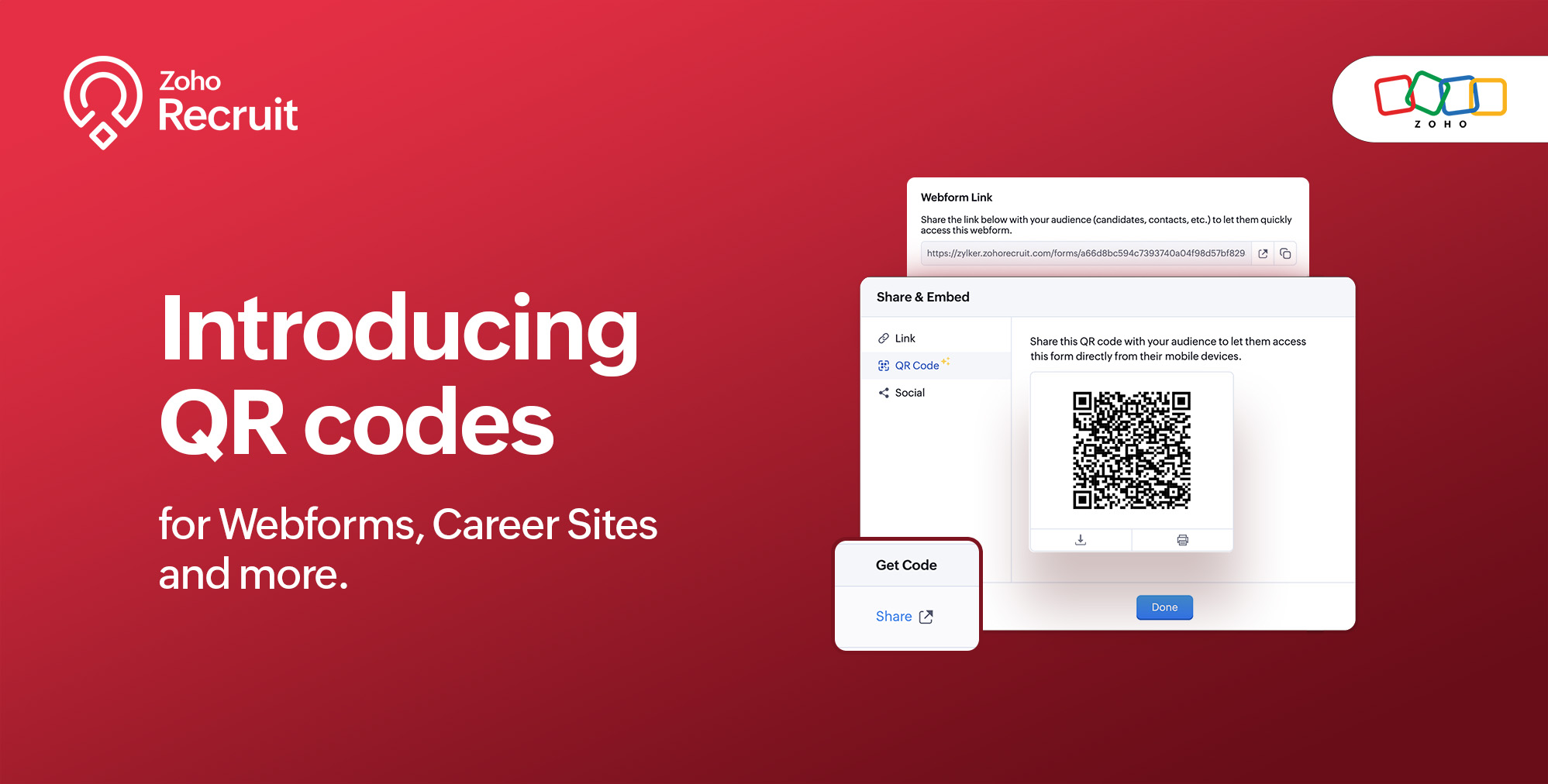
We're thrilled to share a groundbreaking enhancement that will reshape the way you connect with candidates. In our continuous efforts to enhance your recruiting experience, we proudly present the QR Code feature for Webforms, Career Sites and more. This exciting addition aims to simplify and amplify the way you engage with potential hires, promising a more efficient and seamless process.
Benefits
Unleash the full spectrum of advantages that QR Codes bring to your recruitment toolkit.
Effortless Sharing
Simplify the distribution of application forms and job listings by sharing QR codes effortlessly. Whether you're networking at an event, collaborating with partners, or reaching out through various channels, the QR codes make the process seamless. Recruiters can now disseminate vital information with just a scan, facilitating quicker connections with potential candidates.
Enhanced Candidate Experience
Elevate the candidate journey by providing swift and hassle-free access to application forms. The convenience of scanning a QR code enables candidates to engage with your opportunities instantly, reducing friction in the application process. This enhancement aims to leave a positive and lasting impression on candidates, reflecting your commitment to a user-centric recruitment experience.
Time-saving Recruitment
Say goodbye to manual data entry woes. The QR Code feature significantly reduces the time and effort invested in data collection. Candidates can efficiently fill out forms, and recruiters can focus on analyzing and selecting the best-fit talent. This time-saving aspect not only boosts overall productivity but also allows recruiters to invest more energy in strategic aspects of the recruitment process.
Streamlined Data Collection
Embrace a new era of streamlined data collection. With QR codes seamlessly linking candidates to your forms, you eliminate the need for manual information input. This not only reduces the risk of errors but also ensures that your database is populated with accurate and relevant candidate information. Streamlining data collection is a pivotal step towards creating a more efficient and error-free recruitment process.
Use Cases
Explore the various ways in which QR Codes can be seamlessly integrated into your recruitment strategy, catering to diverse scenarios and enhancing your overall outreach.
Event Recruiting
Picture a bustling career fair or industry conference where capturing candidates' attention is crucial. Utilizing QR codes to provide instant access to your Webforms and Career Sites, turns casual interactions with candidates into potential job applications. This empowers recruiters to make a lasting impression at events, fostering a bridge between in-person engagement and online application processes.
Printed Materials
Enrich your printed marketing materials, such as brochures, posters, or promotional handouts, with QR codes. Instead of directing candidates to lengthy URLs, a quick scan seamlessly guides them to relevant application forms or job listings. This not only simplifies the candidate's journey but also transforms your print materials into interactive gateways, blending the physical and digital realms for a more engaging experience.
Onboarding Efficiency
Beyond the recruitment phase, leverage QR codes to streamline the onboarding process for new hires. Include QR codes in onboarding materials, facilitating quick access to essential forms, training materials, and relevant documentation. This enhances the efficiency of the onboarding journey, ensuring a smooth transition for new employees and reinforcing a positive impression from the start.
Cross-Platform Consistency
Achieve cross-platform consistency by incorporating QR codes across various channels. Whether engaging candidates at events, through printed materials, or in the digital landscape, the QR Code feature ensures a unified application experience. This consistency not only reinforces your brand identity but also simplifies the candidate journey, making it seamless and accessible, regardless of the engagement platform.
How to get started?
Zoho Recruit automatically generates QR codes for your Webforms and Career Sites, which you can directly print or download with a click of a button. Given below are step-by-step instructions on how to find the generated QR codes.
To access the QR code of a webform;
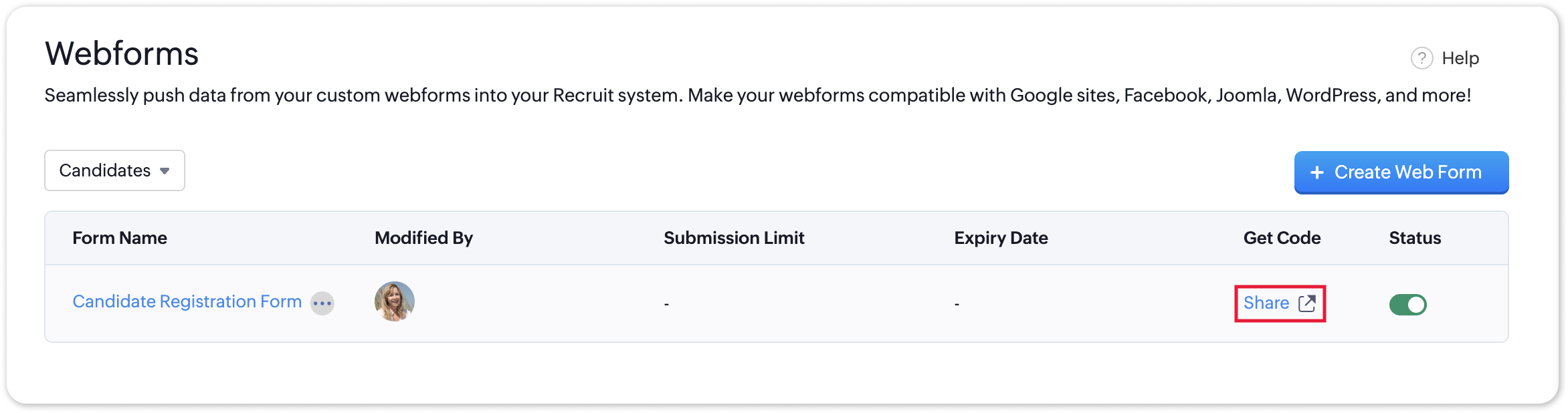
- Navigate to Setup > Career Website > Webforms and click the Share button for the webform of your choosing.
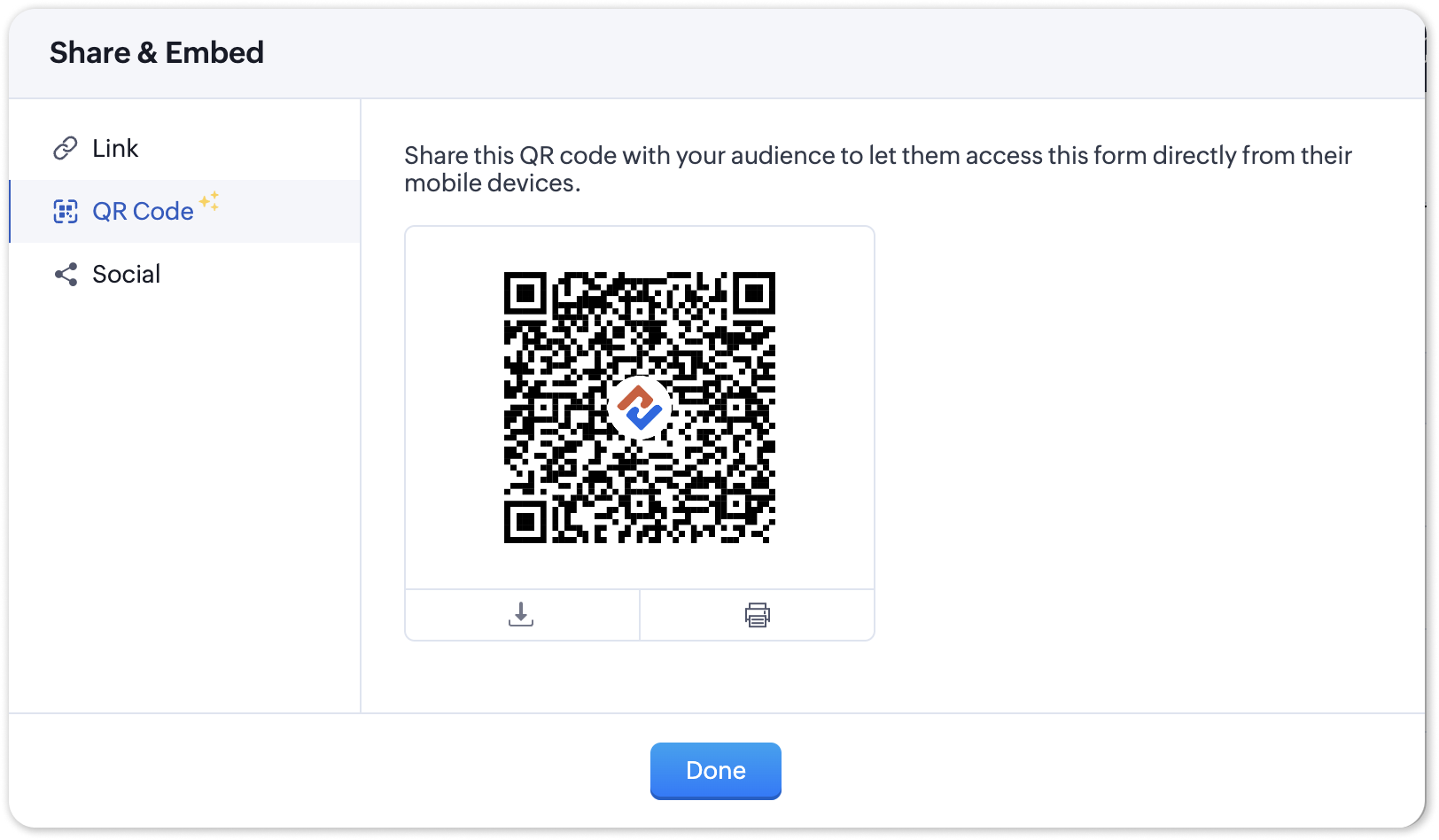
- In the Share & Embed pop-up, select the QR section.
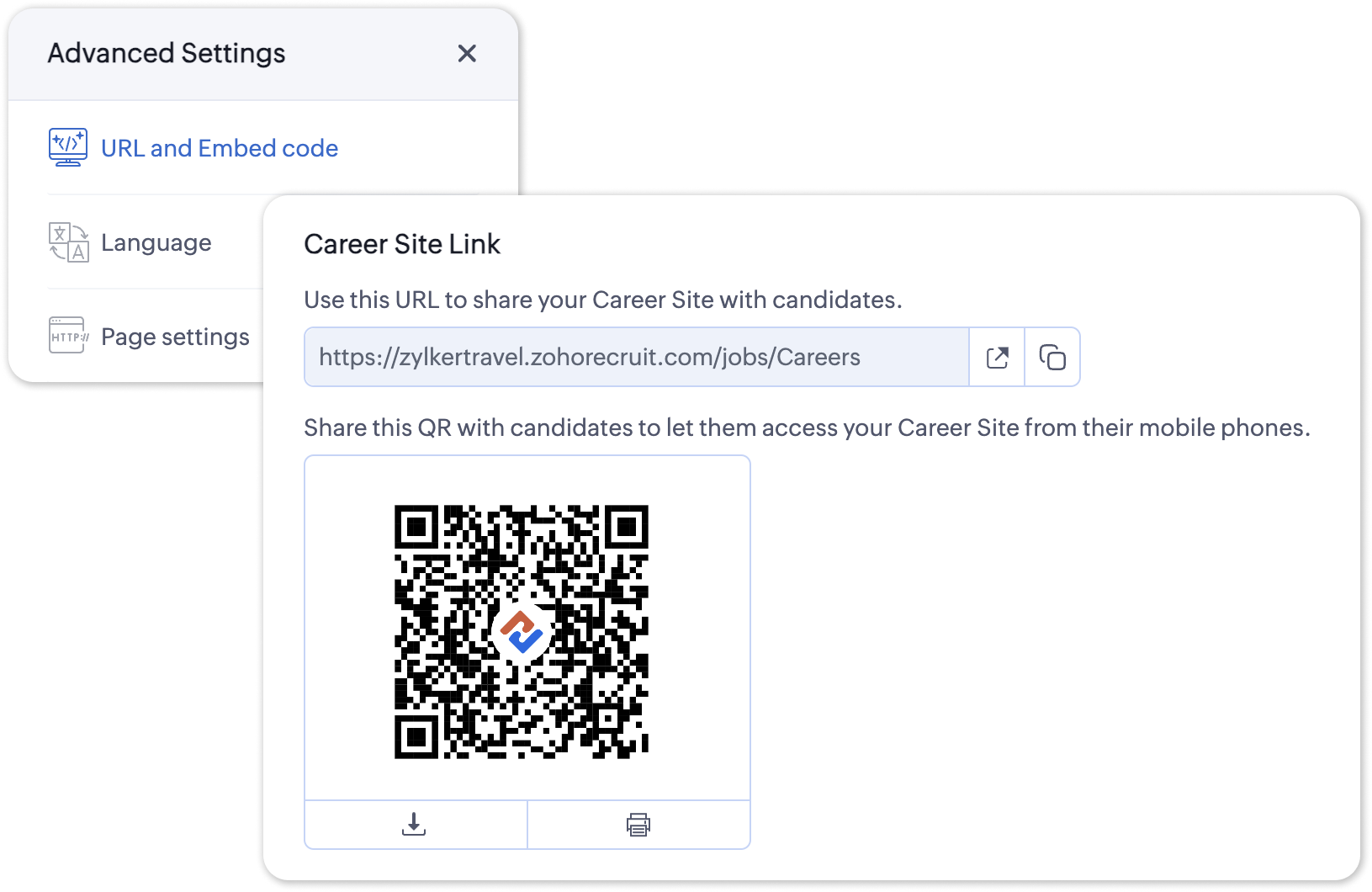
To access the QR code for your Career Site;
- Navigate to Setup > Career Website > Career Site and Customize a career site of your choosing.
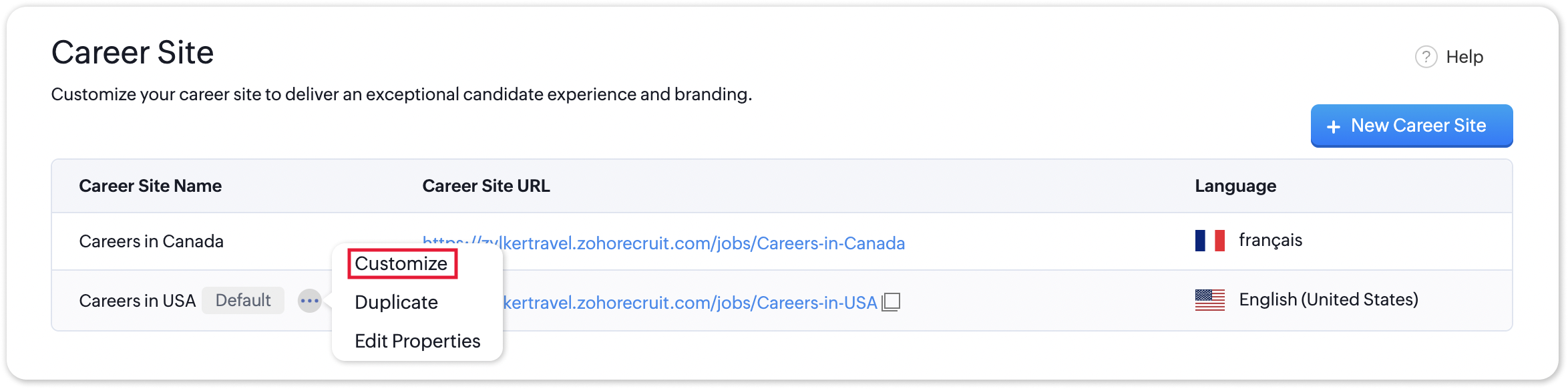
- Under the Advanced Settings section, select URL and Embed Code. The QR code for the selected career site will be displayed here.
Additional Details
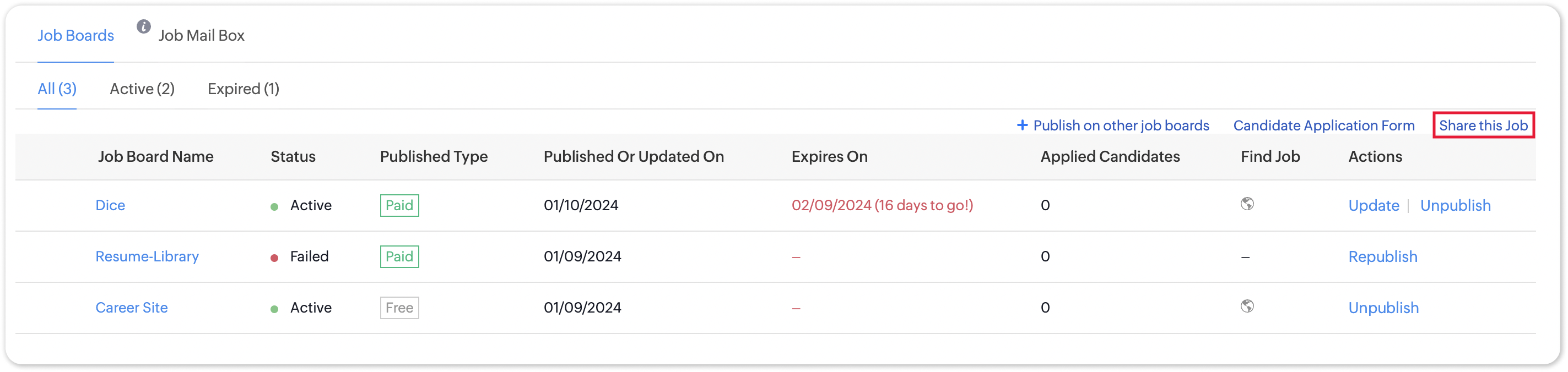
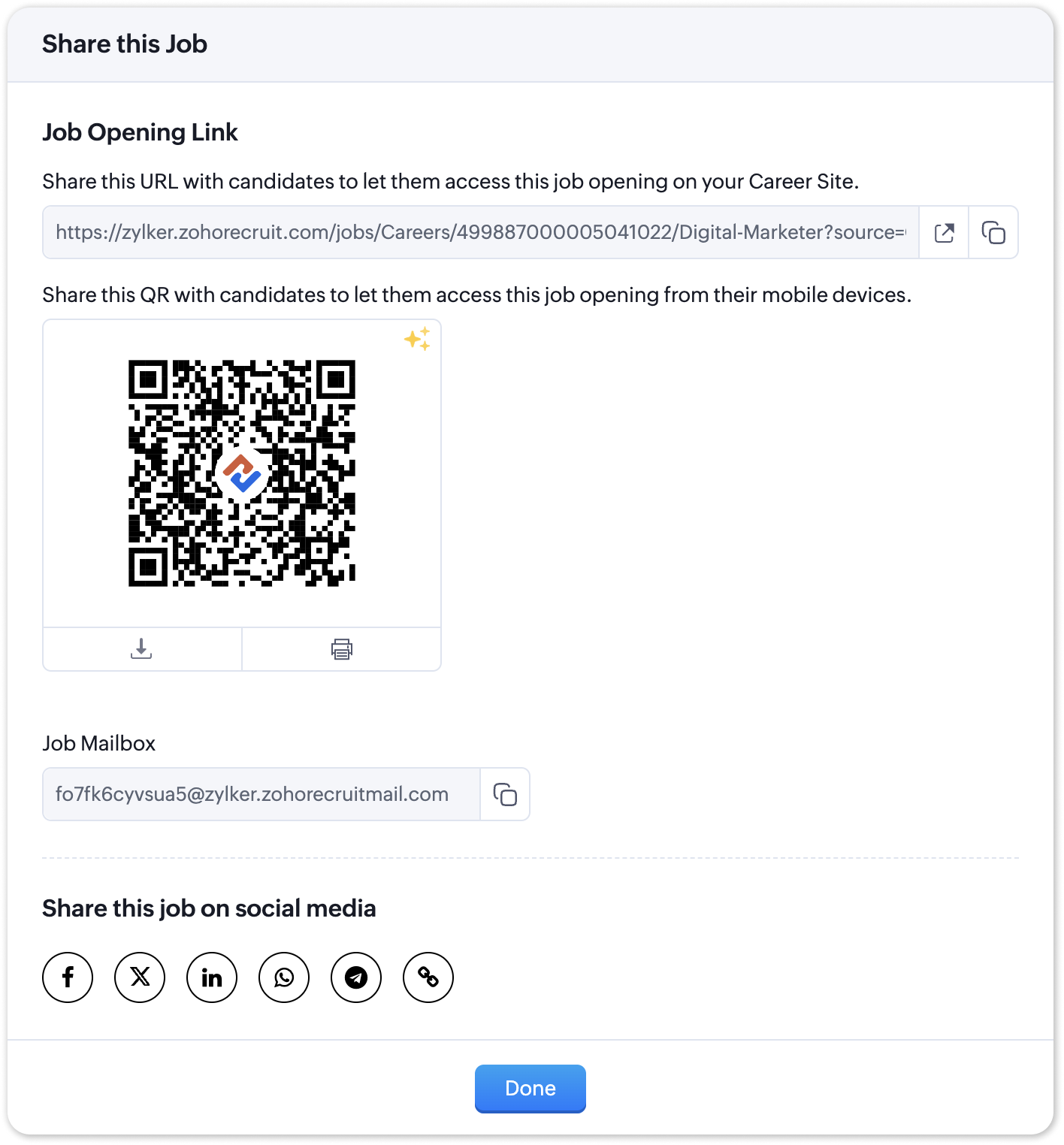
Zoho Recruit generates QR codes for every individual job listing added to your Career Site. Follow the steps given below to access the generated QR code for a published job opening.
To access the QR code for a specific Career Site job listing;
- Navigate to the published job opening and click Sourcing Summary from the Quick Access panel on the left. In the sourcing summary section, click Share this Job.
- In the pop-up that is displayed, you will be able to access the QR code for the job's Career Site listing and other key information.

Note:
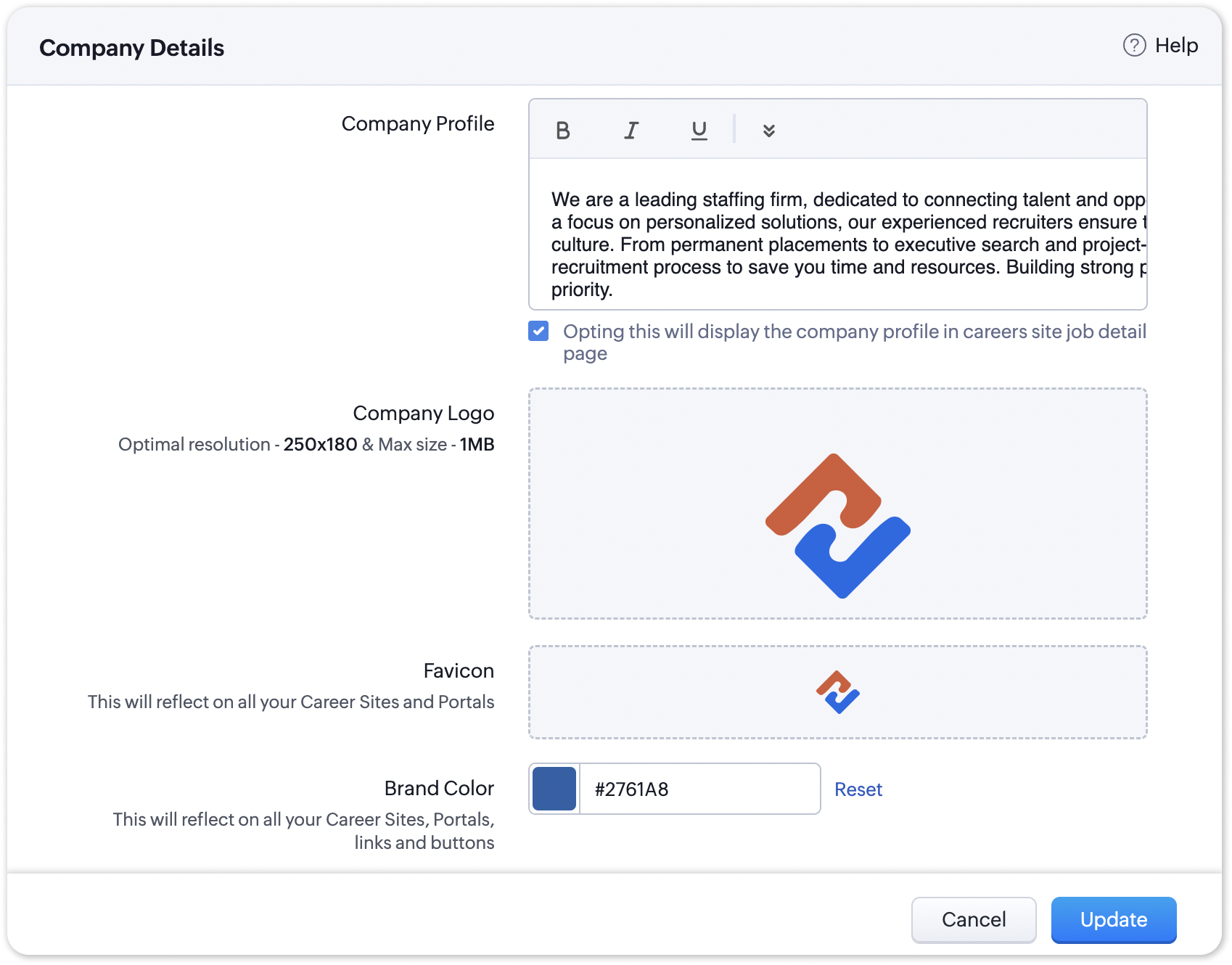
The favicon you upload during the Company Profile Verification stage will be added to your generated QR codes.
Join us in transforming recruitment into a streamlined, dynamic experience—where QR codes open doors, candidates find their path, and your team discovers a new era of efficiency.
Questions? Suggestions? Leave a comment below or reach out to our customer support team at support@zohorecruit.com.
Regards,
Team Zoho Recruit
Team Zoho Recruit
Topic Participants
Pradyumn K
Sticky Posts
Zoho Recruit Community Meet-up - India (Venues Finalised)
Zoho Recruit Community Meet-up - India (Venues Finalised) Namaste, India. 🙏🏼 The Zoho Recruit team is hitting the road—and we're absolutely excited behind the scenes. Join us for the Zoho Recruit India Meet-up 2026, a morning designed to make your recruitingZoho Recruit Community Meetup - London 🇬🇧 (Venue Finalised)
Hello Recruiters! We’re excited to announce that the Zoho Recruit team is coming to the UK for an in-person Zoho User Group (ZUG) Meetup in London! This is your chance to connect with fellow Zoho users, learn from experts, and walk away with actionableAn update to improve email delivery | Email Authentication & Relay
Update Rollout Latest Update: Enterprise users (8th July, 2025) This update is now live for Enterprise plan users in all regions. This includes People Plus, but not Zoho One, which will be covered in an upcoming update. Professional users (31st May 2025)Zoho Recruit User Group Meet-up | INDIA 2025 (Venue Finalised)
Hello Zoho Recruit users from India, We’re pleased and excited to announce our 2025 edition of Zoho user group meet-up in India in five cities! In this meet-up, our team of experts will help you understand the intricate nuances to use Zoho Recruit better,Zoho Recruit is coming to the UK | Zoho Community Learning Series
Customers from the United Kingdom, Exciting news: We will be in London for the Zoho Recruit user meet up. Our team will help you better understand the intricate nuances of Zoho Recruit to help you hire faster, inform about new and upcoming features, and
Recent Topics
Monthly Webinar - Getting Started with Zoho LandingPage
Are you building your first landing page and want a little guidance? Join our monthly Getting Started with Zoho LandingPage webinar and learn how landing pages fit into your marketing strategy, drive lead generation, and improve conversions. Here’s whatView all email threads directly from record's History and Interactions
Greetings all, We've introduced the ability to view complete email thread conversations directly from records' History and Interactions sections, along with email delivery status and sentiment insights on the Interactions page—which makes it easier forMarketing Tip #22: Check website and navigation for broken links
Do you inspect your online store frequently? If not, here's your reminder to do it now. Broken links frustrate customers and make your store feel unreliable. Whether it’s a missing product page, an outdated menu item, social media accounts, or a brokenOnline Payment Fees
We don't take many online credit card payments so the merchant service provider (PayPal) charges us the 2.9% fee for processing the amount. I would like the ability for the fee to be automatically added to the total amount for "ease of payment". We'dpush notification to Cliq when user is @mentioned in CRM notes
push notification to Cliq when user is @mentioned in CRM notes. Currently users that is @mentioned gets an email to be notified. User/s that is @mentioned should get a Cliq notification.How to make entries for restaurant sales in Zoho Books?
Hello, I'm new to Zoho Books. I need to understand how to record our restaurant sales in Zoho Books. We can't raise invoices for each bill from the daily sales report generated by our POS (duplicated effort). We need a means of entering cumulative salesIntegrate with WooCommerce using Wordpress Plugin
We’re thrilled to announce a powerful update to the Zoho Marketing Automation WordPress plugin with WooCommerce integration! This enhancement enables new possibilities for businesses running online stores using WooCommerce, empowering them to merge seamlessHow do I sync multiple Google calendars?
I'm brand new to Zoho and I figured out how to sync my business Google calendar but I would also like to sync my personal Google calendar. How can I do this so that, at the very least, when I have personal engagements like doctor's appointments, I canDomain already exists
Hi, I tried to add my domain creativecolumnist.com but its showing as Domain already exist. Please release if it has already been associated with Zoho, I am the real owner of that domain.Select forwarding
For Zoho mail online on PC in web browser: I had forwarding enabled in section "Mail accounts / Forwards", and I also have some filters that send emails from some unwanted senders to Archive. But it doesn't work as intended, it forwards everything (obviouslyPay Pal Paylater button
I am testing the paypal setup to have my customers pay invoices with paypal and credit cards. But it seems to have two options. Paypal and Pay later. I don't want my customers access to pay later feature. How can I turn that part off.. My other integrationsystem not picking my default custom service report template
Can you tell me why when we create a service report always pick the (standard old) template? Even when I have a custom service report selected as Default.Restrict Appointment Booking to Approved Clients
Dear Zoho Bookings Support Team, We'd like to propose a feature enhancement for managing appointments within Zoho Bookings. This feature would ensure only pre-approved clients can schedule meetings. Desired Functionality: We propose the introduction ofAutomate Credit Card Surcharge
Is there a way to create an automation that will add a 3.0% credit card surcharge to a subscription whenever a customer pays via credit card?I have the item field and Quantity field in the sub form , on the submit of the form if the quantity is grater than inventory means show alert on submit validation only for item type goods ,
I have the item field and Quantity field in the sub form , on the submit of the form if the quantity is grater than inventory means show alert on submit validation . Stock Check Validation only for item type goods , not for item type service . For theDisappearance of all articles in the knowledge base
Hi there! It seems like all of our articles have disappeared from the knowledge base: However, the names still appear in the "sort articles" section:Logic for sending to a non-primary email address
Hi, I have a scenario where contacts are able to sign up for emails with 2 different email addresses (example: work, personal). I've mapped both to Campaigns from Zoho CRM, but when I go to target an email only the primary email addresses are pulling in. How can I update this to look at both of the email addresses - or specifically the secondary email address in Campaigns? Thanks, JennyAdd "Reset MFA" Option for Zoho Creator Client Portal Users
Hello Zoho Creator Team, We hope you are doing well. We would like to request an important enhancement related to Multi-Factor Authentication (MFA) for client portal users in Zoho Creator. Currently, Creator allows us to enforce MFA for portal users,Tables for Europe Datacenter customers?
It's been over a year now for the launch of Zoho Tables - and still not available für EU DC customers. When will it be available?NOTAS INVISIBLES
Siempre que abro mis notas salen invisibles, muchas no resaltan las *negritas* en la vista previa hasta que te metes en ellas y modificas algo. Pero omg con el equipo de Zoho. Les dije que las usaba mucho precisamente por la VISTA PREVIA y encontrar lasDoes Zoho has chatroom/chatbot url feature?
Hi Zoho community! I’m looking for a quick "Yes/No" answer for my dev team regarding Zoho’s capabilities. We currently use Zoho Desk for our Service Team and Zoho CRM for our Marketing Team to bring both functions under one platform. Our question: DoesOne Support Email Managed By Multiple Departments
Hello, We use one support email (support@company.com). Incoming emails come to the "Support Department" and based on what the customer is asking, we route that ticket to different departments (billing, technical support, etc.). When users in these differentIs it Possible to Modify Standard Report Urls
Is there a way to permanently modify standard report Urls? Use case: Suppose I have a Products report. Showing list as timeline, calendar, or kanban doesn't make sense. Want to hide that from users by adding #Report:Products?zc_ShowAs=false&zc_Print=falseUpdated font library: New font styles and custom font options in Zoho Sheet
Zoho Sheet's font library now supports 500+ font styles in 60+ languages! The updated font library is stacked with new font styles, and some of the previously available font styles have been replaced with equivalent options. There are two ways you canscope for phonebridge in CRM and phonebridge API documentation
Hi I cannot find the scope to be used for phonebridge in CRM API V2 calls. I am getting OAUTH_SCOPE_MISMATCH for scope group ZohoCRM.modules.ALL,ZohoCRM.setttings.ALL Also I am not able to locate the documentation for the same, All I have is phonebridgeJob Alerts for Candidates
hi All, I have 2 questions relating to sharing job details with candidates. 1. is there a way to notify candidates that meet certain criteria of current jobs available? eg. I run a candidate search, and identify 50 candidates that might be suitable. CanZoho Wiki or new Zoho Learn
We are currently evaluating if we should move off confluence. At present in Confluence we have multiple levels within our documentation but with learn it looks like you can only have Space - Manual - Chapter Is it possible to have levels below Chapter? Also the same question for the existing wiki, can I have more sub-levels?Fix image at bottom of a page fot automatic proposal creation
I'm working on a proposal document to automate our proposal creation process. So far it works fine, but I experience some problems with an image I want to have fixed at the bottom of the page AND above the footer. This section of the document consistsCan't scroll the page down unless I refresh the page
Hello, This issue has been going on with me and a lot of other users in my organization, we can't scroll down! the scrolling side bar doesn't appear and scrolling down through mouse or keyboard keys doesn't work, it seems that the page just ends in thePrice List
II want to restrict the items to display in sales, quote, etc for which custom rates are added in price list. How I can do the same in Zoho booksLet’s Talk Recruit: Still switching tabs to source?
Welcome back to the Let’s Talk Recruit series. Let’s talk about how you actually source talent. Do you open multiple job boards every single time a role opens? Run the same keyword searches you ran yesterday? Download, upload, rename, and then do it againKaizen #231 - Embedding Zoho Desk Tickets in Zoho CRM
Hello, CRM Wizards! This week, let us enhance cross-team visibility between Zoho CRM and Zoho Desk. We will use the Zoho Request Client inside a Related List widget to display open Zoho Desk tickets directly within the Contact record in Zoho CRM. ThisIntroducing a smarter, faster, and more flexible charting experience
Hello Zoho Sheet users, We're delighted to share the latest news about a major update to charts in Zoho Sheet! The new version supports dynamic data ranges, granular styling options, faster loading, and other interesting enhancements that allow you toIntroducing Job Alerts
Keeping candidates engaged beyond their first application is one of the most consistent hiring challenges. Many interested candidates simply do not revisit career sites regularly, which can result in missed opportunities and reduced re-applications. ToTask status - completed - other options
I have a dumb question I know i can make custom statuses for the tasks - but is there anyway to make additional "completed" statuses like for instance if i have a task "call back customer" and i leave a vm for them to call back marking it "completed -Bank feed integration First Abu Dhabi Bank (FAB) to Zoho? (UAE)
Hello everyone, Is First Abu Dhabi Bank in the list of banks available for bank feed integration with Zoho Books? Thank you.How to Export Filtered List of Contacts?
This seems like it should be simple, but I'm stymied. I'm trying to export a filtered list of my Contacts for analysis in a spreadsheet. The use case is that I'm an ecom business based in the US. The bulk of our customers are individuals stored as Contacts.Quick Create needs Client Script support
As per the title. We need client scripts to apply at a Quick Create level. We enforce logic on the form to ensure data quality, automate field values, etc. However, all this is lost when a user attempts a "Quick Create". It is disappointing because, fromcan we add product images in Zoho CRM Quote PDF template?
I want to create a quotation format in Zoho CRM similar to the attached PDF, where each product is displayed in a table with rpoduct image I need the product image to appear inside the line items section of the quote. However, while checking the QuoteDoes Zoho Writer have Dropdowns
I want to add a drop down field in Zoho writer. Is this possible?Next Page