Voici Zoho Sprints 2.0 : Gestion de projet plus pratique et plus intuitive
Avec Zoho Sprints, nous perfectionnons constamment le parcours utilisateur de notre produit afin que vous puissiez profiter de tous les avantages que notre plateforme a à offrir. Nous avons le plaisir de vous annoncer le lancement de la version 2.0 de Zoho Sprints, qui présente une nouvelle interface élégante et de puissantes améliorations. La nouvelle version de Sprints est plus intuitive, pratique et facile à utiliser que jamais !
Accès en quelques clics à tout ce que vous voulez
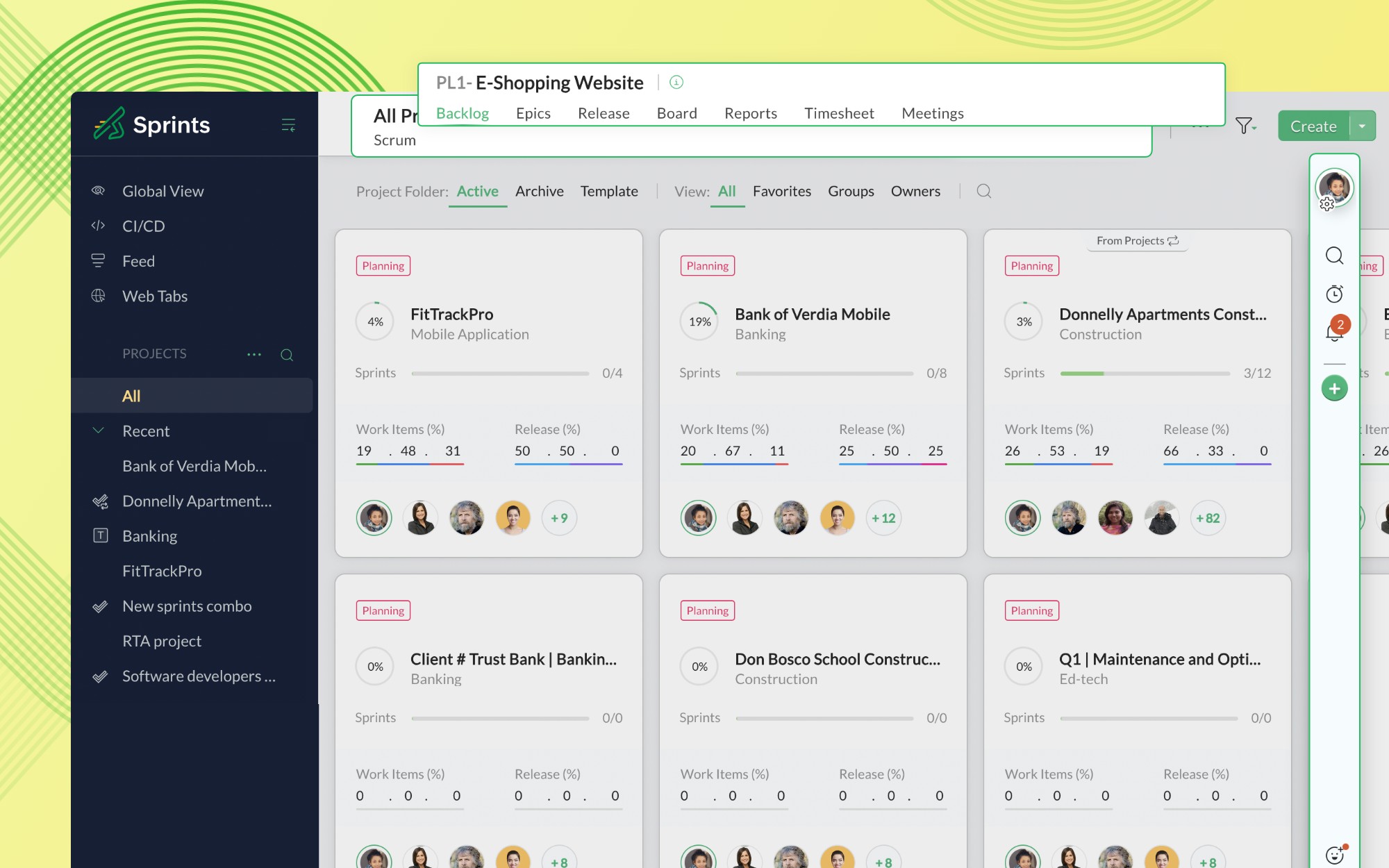
Notre page d'accueil se présente comme une page unique et raffinée, qui vous permet d'accéder à l'ensemble de votre espace de travail. Avec les fonctionnalités principales, les projets enregistrés, les modules de projet et les paramètres accessibles en un seul endroit, notre nouvelle interface est à la fois compacte et pratique.
Nouvelles fonctionnalités et options de gestion de l'espace de travail
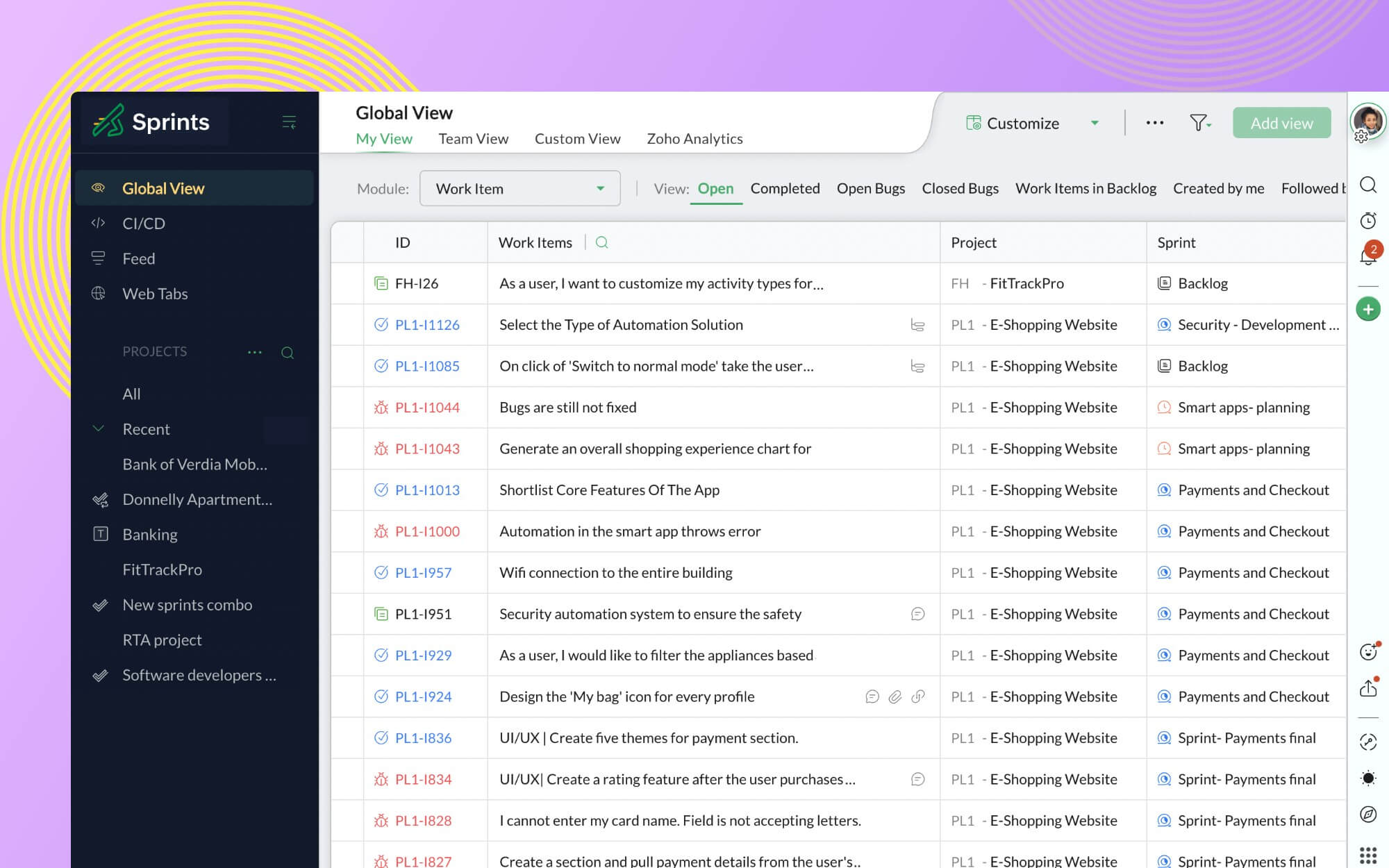
Nous avons introduit deux nouvelles fonctionnalités globales dans le panneau de gauche : Vue globale et Flux global. Naviguez dans tous vos projets et passez d'une vue à l'autre grâce à l' "Affichage global". Consultez ensuite le fil d'actualité pour être sûr de ne jamais manquer les mises à jour de projets et les discussions d'équipe.
Vues améliorées : Liste, Feuille et Carte
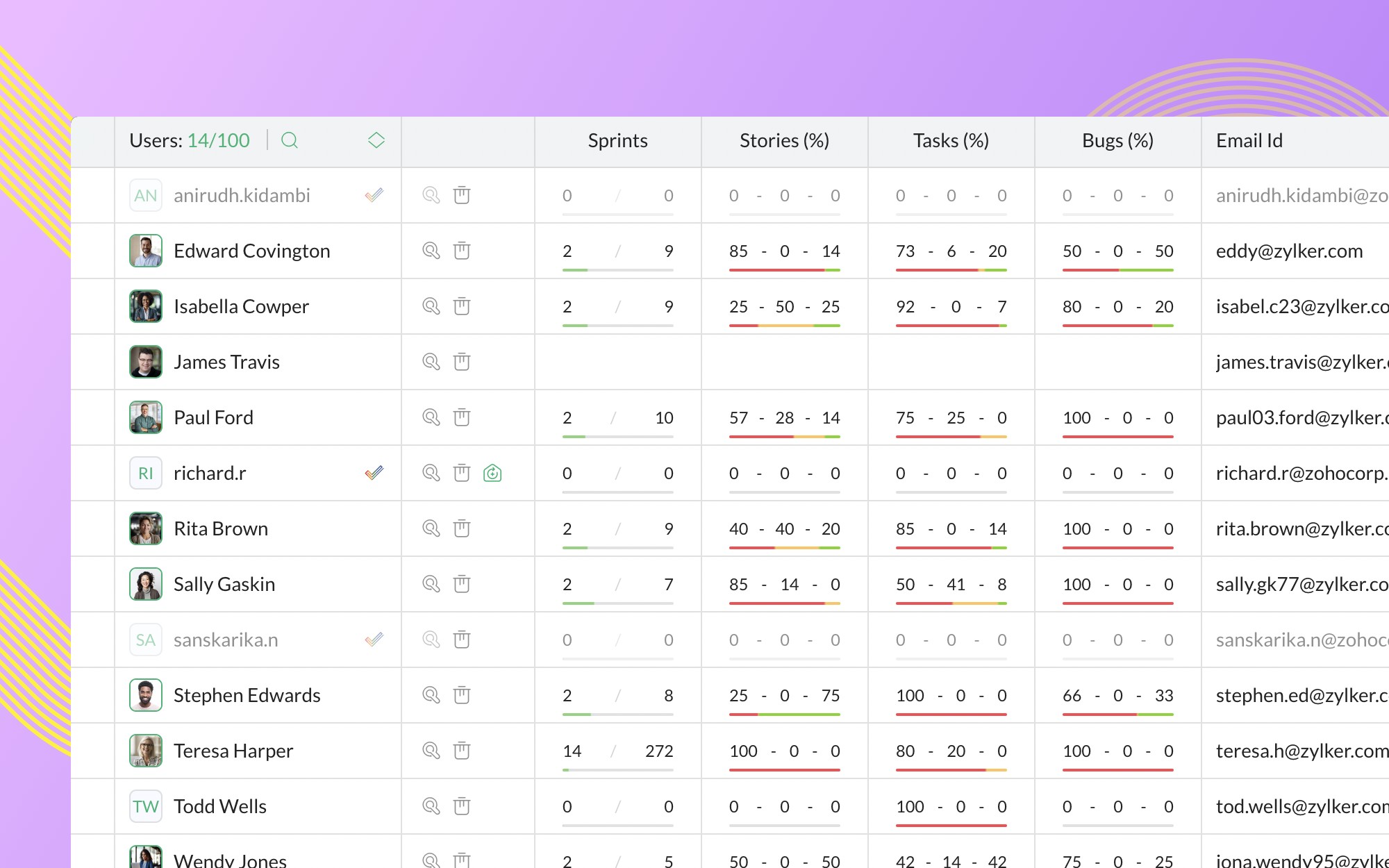
Nous avons amélioré votre expérience dans les modules Projets, Utilisateurs, Backlog et Board en modifiant les vues Liste, Feuille et Carte. Les listes de projets et d'utilisateurs facilitent la gestion des projets, qu'il s'agisse de trier les projets ou les utilisateurs en fonction de leur nom, de limiter la visibilité des champs ou d'examiner les mesures en ligne.
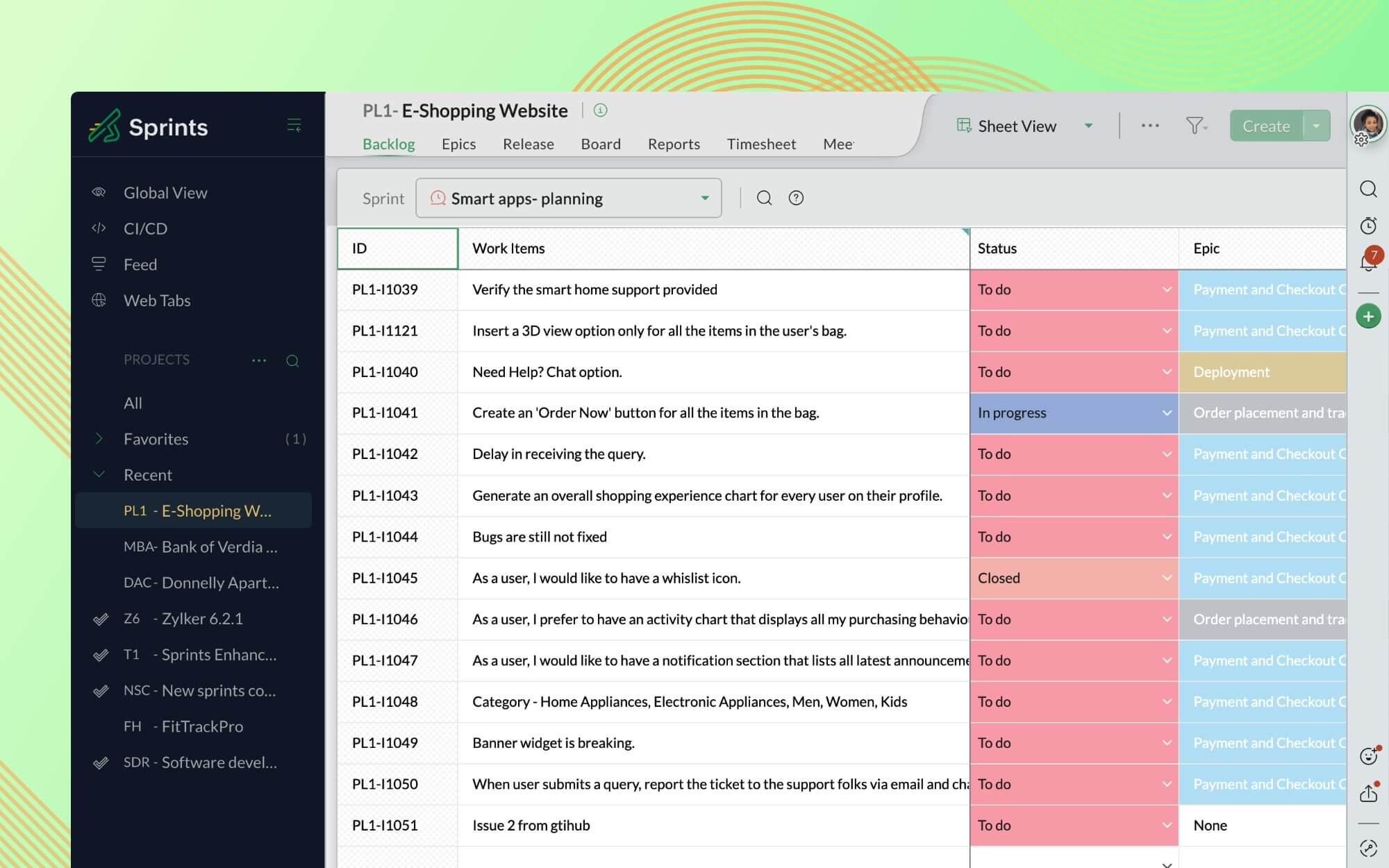
Les modules Backlog, Board, Release et Epic offrent une meilleure expérience de visualisation des feuilles. Non seulement vous pouvez gérer un sprint entier à partir d'une feuille de calcul, mais vous pouvez également générer un nombre illimité de graphiques à partir de la vue étendue, sans aucun compromis sur le style et la présentation visuelle.
Il est possible de personnaliser le Backlog et les Board Cards en fonction des besoins du projet grâce aux tout nouveaux paramètres Backlog View et Card View. Vous pouvez également gérer la visibilité des champs et des balises personnalisables, et ajouter des champs au menu Action selon vos besoins. Grâce aux paramètres de statut du board, personnalisez votre sprint board et construisez-le exactement comme vous le souhaitez. Vous pouvez également gérer et réorganiser les statuts personnalisés et définir les types d'encours en fonction de votre projet.
Fonctionnalités de filtrage améliorées
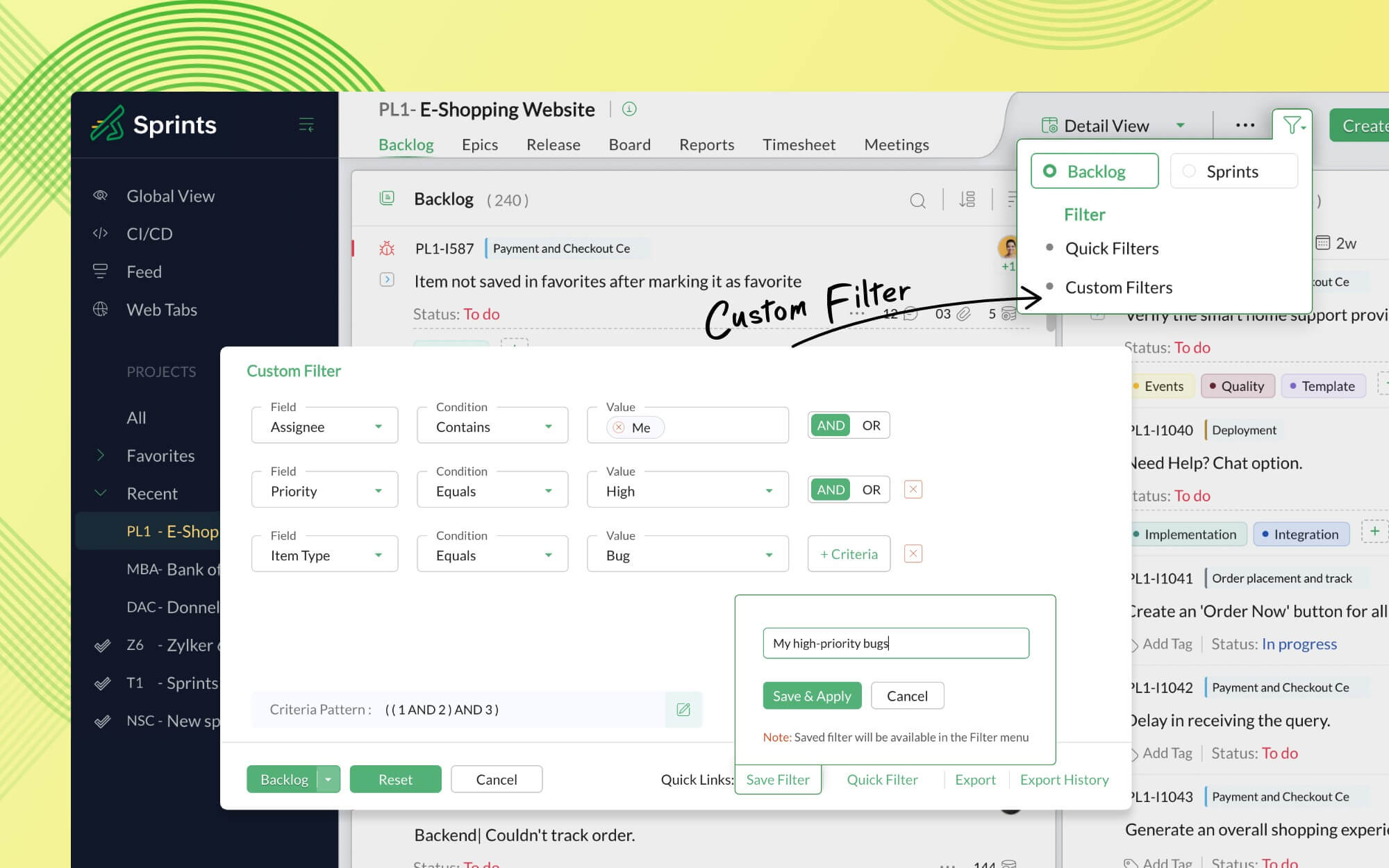
Il est plus facile de gérer un projet avec précision grâce à nos nouvelles options de filtrage : Filtres rapides et Filtres personnalisés. Le filtre rapide vous permet d'extraire instantanément les données d'un projet en utilisant les critères de filtrage existants, tandis que le filtre personnalisé vous donne la possibilité de créer des critères de filtrage à partir d'un ensemble de conditions.
Conception unifiée et tableaux de bord intelligents
L'un de nos principaux objectifs était de fournir une interface unifiée permettant de visualiser tous les modules de projet et les éléments de travail dans l'espace de travail. Pour y parvenir, nous avons adopté une mise en page commune à toutes les pages de détails.
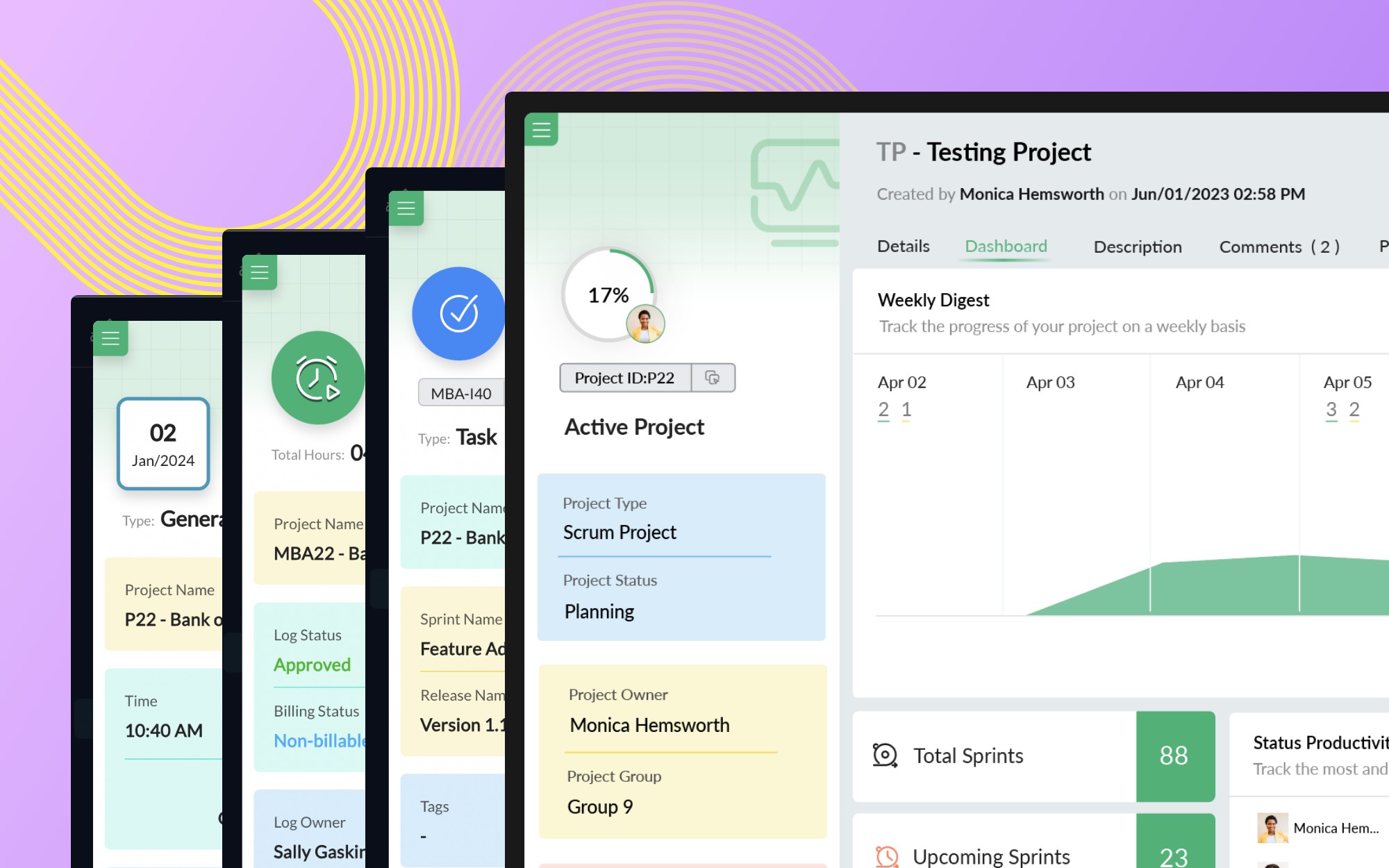
Précédemment, la fonction de tableau de bord n'était disponible qu'au niveau du projet. Il est désormais possible d'obtenir des informations sur chacun de vos modules grâce au tableau de bord consacré à chacun de ces derniers.
Nouvelle section de commentaires : Code, Markdown, Threads
Chaque équipe agile a besoin d'un endroit pour discuter des extraits de code
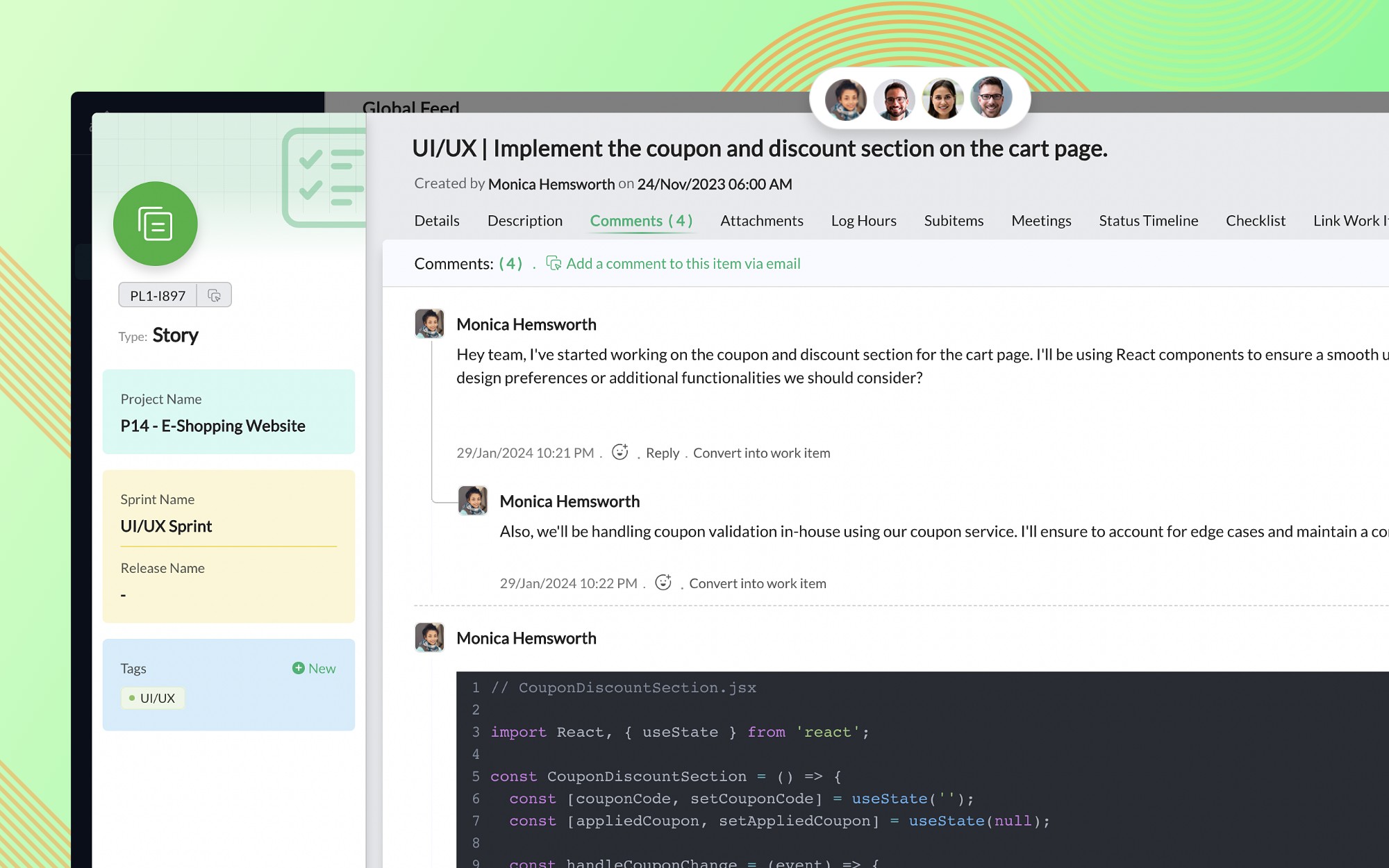
Pour vous permettre de communiquer plus facilement et et plus clairement avec vos collègues programmeurs, nous avons ajouté des éditeurs de code et de markdown à nos sections de description et de commentaire. Vous pouvez vous engager dans des discussions approfondies sans perdre de vue le contexte grâce aux commentaires en fil de discussion.
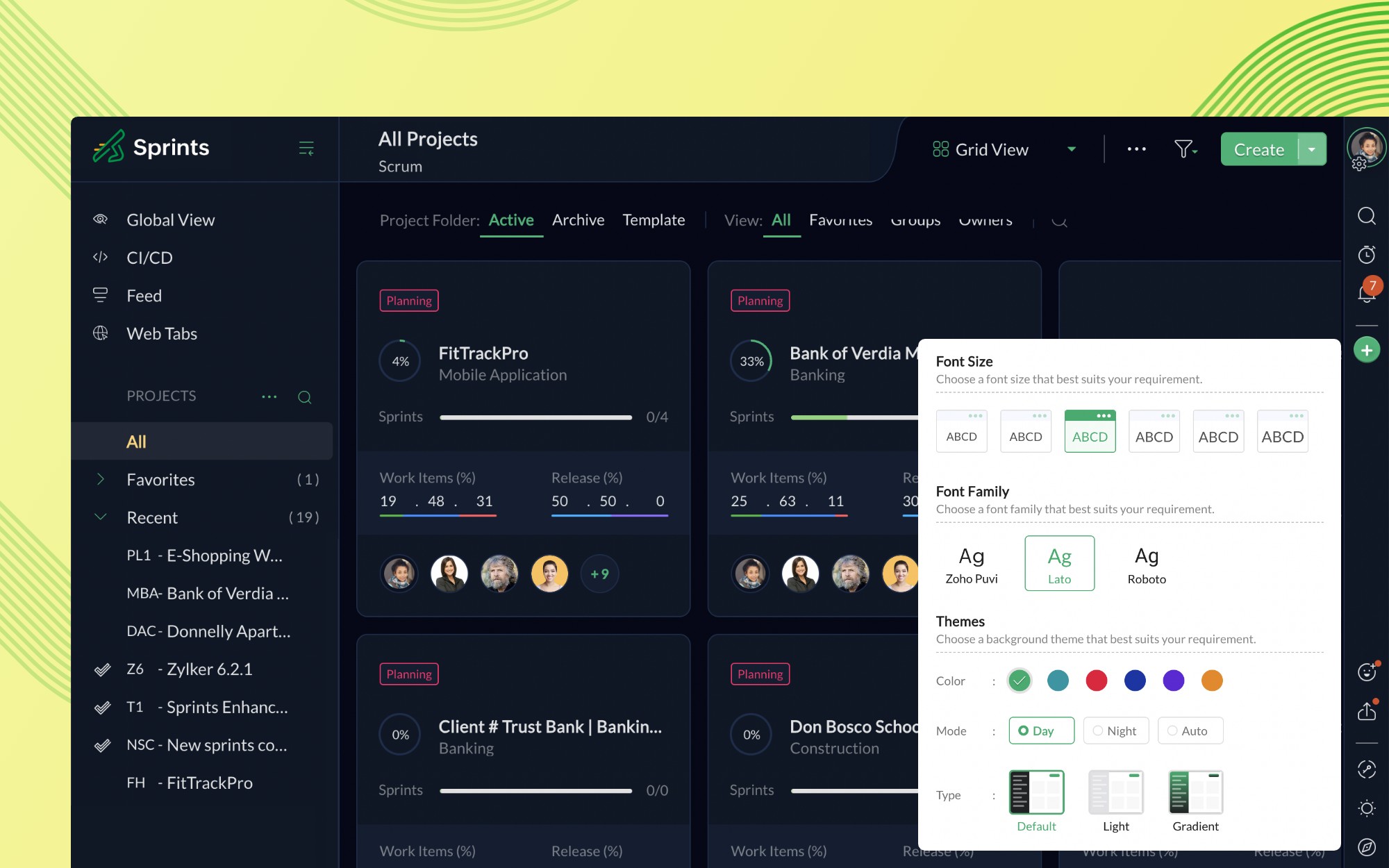
Le mode nuit pour faciliter la visualisation
Le portail Sprints peut être personnalisé en ajustant les thèmes et les polices de votre profil dans la section "Modifier les préférences". Vous pouvez également basculer entre les modes jour et nuit (ou automatique) pour optimiser les performances visuelles.
Note : Zoho Sprints 1.0 ne sera plus disponible à partir du 30 avril 2024. Nous vous recommandons fortement de passer à la dernière version et de vous familiariser avec l'application dès que possible.
Nous espérons que vous profiterez de ces améliorations apportées à cette version !
N'hésitez pas nous faire part de vos impressions sur ce lancement.
Bonjour à tous, Vous aimez travailler avec Zoho CRM Plus ? Et bien vous avez maintenant la possibilité de le recommander autour de vous pour aider votre réseau à améliorer son expérience client. Et bien sur c'est gagnant-gagnant ! Comment cela fonctionne
Bonjour à tous ! Un domaine personnalisé est devenu une nécessité absolue, non seulement pour les grandes entreprises, mais aussi pour les petites ou, dans certains cas, les familles. Nous avons toujours pensé que se lancer ne devrait pas coûter cher,
Bonjour à tous, Nous sommes très heureux de vous présenter Zoho Learn ! Commençons par vous expliquer ce qu'est Zoho Learn et comment il peut vous accompagner dans vos processus de formation. Qu'est-ce que Zoho Learn ? Zoho Learn est une solution complète
Hi Zoho One Team, We would like to raise a concern about the current overlap of core functionalities across various Zoho applications. While Zoho offers a rich suite of tools, many applications include similar or identical features—such as shift management,
This is a monthly series where we pick some common use cases that have been either discussed or most asked about in our community and explain how they can be achieved using one of the automation capabilities in Zoho Desk. Email is one of the most commonly
Hello! I would like to know if it is possible (and how) to do the following actions: 1. To generate an article from a ticket (reply + original message) 2. Easy convert an answer to an email template
Dear Zoho SalesIQ Team, We would like to suggest a crucial improvement to the current setup and configuration experience within SalesIQ. Problem Statement Zoho SalesIQ currently offers three primary mechanisms for handling customer chats: Answer Bot –
Hi everyone, Is there API doc for Zoho Survey? Currently evaluating a solution - use case to automate survey administration especially for internal use. But after a brief search, I couldn't find API doc for this. So I thought I should ask here. Than
Support Team, Can you submit the following request to your development team? Here is what would be optimal in my opinion from UX perspective: 1) In the "Application Menu", add a menu item to Exit the app, as well as an alt-key shortcut for these menus
Hello everyone! Welcome back to another post in the Kaizen series! This week, we will discuss an exciting enhancement in Queries in Zoho CRM. In Kaizen #190, we discussed how Queries bridge gaps where native related lists fall short and power custom related
I believe the Zoho for Desktop app is built using a proprietary protocol. For the growing number of people using services such as odrive to sync multiple accounts from various providers (Google, Dropbox, Box, OneDrive, etc.) it would be really helpful
Release plan: Gradual rollout to customers without file storage add-ons, in this order: 1. Standalone CRM 2. CRM Plus and Zoho One DCs: All | Editions: All Available now for: - Standalone CRM accounts in Free and Standard editions without file storage
Has anyone noticed that the creator applications when viewed in a mobile browser (iPad) lost its responsiveness? It now appears very small font size and need to zoom into to read contents. Obviously this make use by field staff quite difficult. This is not at all a good move, as lots of my users are depending on accessing the app in mobile devices (iPads), and very challenging and frustrating.
Hello Everyone! We’re excited to invite you to another edition of Learning Table Series, where we showcase how Zoho Creator empowers industries with innovative and automated solutions. About Learning Table Series Learning Table Series is a free, 45-60
Currently i am working on a Learner Transcript app for my employer using Zoho Creator. The app is expected to accept assessment inputs from tutors, go through an approval process and upon call up, displays all assessments associated with a learner in
Anyone know when these roadmap items are scheduled for release? They were originally scheduled for Q4 2025. https://www.zoho.com/creator/product-roadmap.html
Hi Zoho CRM Team, I would be very useful if we could set default values for meeting parameters. For example, if you always wanted Reminder 1 Day before. Currently you need to remember to choose it for every meeting. Also being able to use merge tags to
For years, the Zoho Creator community has requested a more transparent and participatory approach to beta testing and feature previews. Today, I'm thrilled to highlight that Zoho has delivered exactly what we asked for with the launch of the Early Access
Hi All, I am reaching out today because of a big issue we have at the moment with Zoho Analytics and Zoho Invoice. Our organization relies on Zoho Analytics for most of our reporting (operationnal teams). A few days ago we observed a sync issue with the
I created a Rollup Summary (Decimal) field in my module, and it shows values correctly. When I try to reference it in a Formula Field (e.g. ${Deals.Partners_Requested} - ${Deals.Partners_Paid}), I get the error that the field can’t be found. Is it possible
Right now, I am trying to setup a Notes form within Zoho Creator. This Notes will note the Note section under Accounts > Selected Account. Right now, I use Zoho Flow to push the notes and it works just fine, with text only. Images do not get sent (there
Hello all, We've introduced a new way to work with location data in Zoho CRM: the Map View. Instead of scrolling through endless lists, your records now appear as pins on a map. Built on top of the all-new address field and powered by Mappls (MapMyIndia),
Hi Team, While we are implementing client scripts for the automation, it is working fine in few accounts but not working for others. So, it would be great if we can have error Logs for client scripts also just like custom functions. Is there any way that
Through our Zoho One subscription we have both Zoho CRM and Zoho WorkDrive. We have regular backups setup in Zoho CRM. Once the backup is created, we are notified. Since we want to keep these backups for more than 7 days, we manually download them. They
I would like to highlight a very serious issue in Zoho Books for Spain. 1. The Spanish government has postponed the mandatory start of VeriFactu to January 1st, 2027. This means that during all of 2026 businesses are NOT required to transmit invoices
Hi there, I've been waiting for zoho team to get back on this for last couple of days. Anyone else have the problem to access zoho flow? everytime I click on zoho flow it redirects me to zoho creator. I tried incognito mode but it still direct me to zoho
Hi all, We’re configuring our Accounting department to handle tickets from both customers and vendors (our independent contractors). Right now, ticket association seems to be built around linking a ticket to a Customer / Customer Contact, but for vendor-originated
Some clients like keeping tabs on the developments and hence would like to be notified of the progress. Continuous updates can be tedious and time-consuming. Zoho Sprints has now introduced a Client and Vendor Portal where you can add client users and
With Zoho People, absences need not keep employees waiting with their approval requests. When you are not available at work, you can delegate approvals that come your way to your fellow workmate and let them take care of your approvals temporarily. Learn more!
We have had an ongoing issue with how the system recognizes an apostrophe in the name of customers and vendors. The search will not return any results for a name that includes the mark; ie one of our vendors names is "L'Heritage" and when entering the
I have done a data sync between Zoho CRM and Zoho Analytics, and the recycle bin is empty. Why do I see deleted leads/deals/contacts in Zoho Analytics if it doesn't exist in Zoho CRM? How can I solve this problem? Thanks
¡Hola Comunidad! ¿Te gustaría obtener respuestas en directo sobre Zoho CRM, Zoho Desk u otra solución dentro de nuestro paquete de CX (Experiencia del Cliente? Uno de nuestros expertos estará disponible para responder a todas tus preguntas durante nuestra
Whenever I open Mail, it opens Dashboard. This makes Mail area very small and also I cannot manage Folders (like delete/rename) etc. I want to know if there is any way to open only Mail apps and not the Dashboard.
Hi, This topic might help you if you're facing the same in Belgium. We are facing an issue while accepting a supplier bill received by Peppol in Zoho Books. There is a popup with an error message: This bill acceptance could not be completed, so it was
Hello everyone, We're glad to be announcing that Zoho Books is now integrated with Zoho Checkout. With this integration, you can now handle taxes and accounting on your payment pages with ease. An organization you create in Zoho Checkout can be added to Zoho Books and vice-versa. Some of the key features and benefits you will receive are: Seamless sync of customer and invoice data With the end-to-end integration, the customer and invoice details recorded via the payment pages from Zoho Checkout
I want to have the QTY of an item on the sales orders and invoices to be the first column, then description, then pricing. Is there a way to change the order? I went to the Items tab in settings but don't see how to change the order of the columns on
Hi All, Given the ability of Zoho Learn to function as a knowledge base / document repository type solution and given the rapid advancements that Zoho is making with Zia LLM, agentic capabilities etc. (not to mention the rapid progress in the broader
Hello everyone, We are thrilled to launch Zoho ERP (India edition), a software to manage your business operations from end to end. We’ve created this community forum as a space for you to ask questions, comment answers, provide feedback, and share your
Hi, I am trying to use Zoho Creator for Restaurant management. While using the android apps, I reliased the apps would not auto refresh if there is new entries i.e new kitchen order ticket (KOT) from other users. The apps does received notification but would not auto refresh, users required to refresh the apps manually in order to see the new KOT in the apps. I am wondering why this features is not implemented? Or is this feature being considered to be implemented in the future? With the
I'm hoping to see this feature to be available but couldn't locate in anywhere in the trial version. Is this supported? The main aim to go to ERP is to have visibility of the multi-organisation in once place. I'm hopeful for this.