What's New - January 2026
Hello Users!
We are starting the year with a strong lineup of updates, marking the beginning of many improvements planned to enhance your analytics experience. Explore the latest improvements built to boost performance, simplify analysis, and help you extract more value from your data.

Archive Data
No more querying all records while generating reports! Analyze data faster and optimize workspace performance with Archive Data. Move older or less-frequently used records out of active tables, and store them securely.
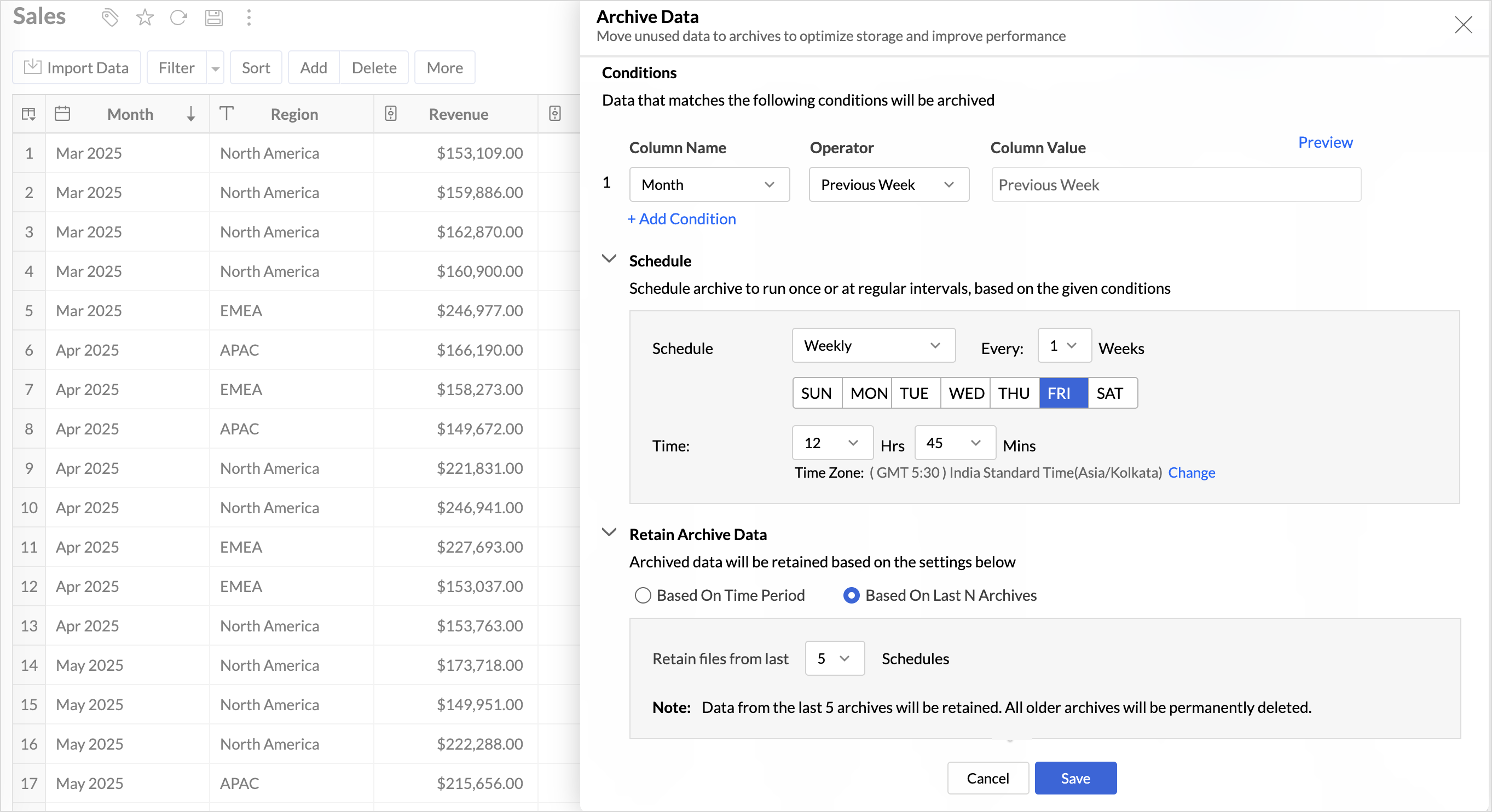
Key Benefits
- Pay only for what you analyze: Active data is reserved for analysis, while historical data is retained without impacting usage limits.
- Improved Querying and Faster Analysis: By limiting queries to relevant data, report generation and dashboard loading times are significantly reduced, resulting in faster insights and a more responsive analytics experience.
- Optimized Storage Usage: Archiving older data helps control table size, preventing unnecessary growth, and better management of row limits.
Organize Views with Tags
Group related views, and manage reports and dashboards effortlessly. Use tags to organize views by teams, departments, projects, or specific use cases, making it easy for users to navigate large workspaces.
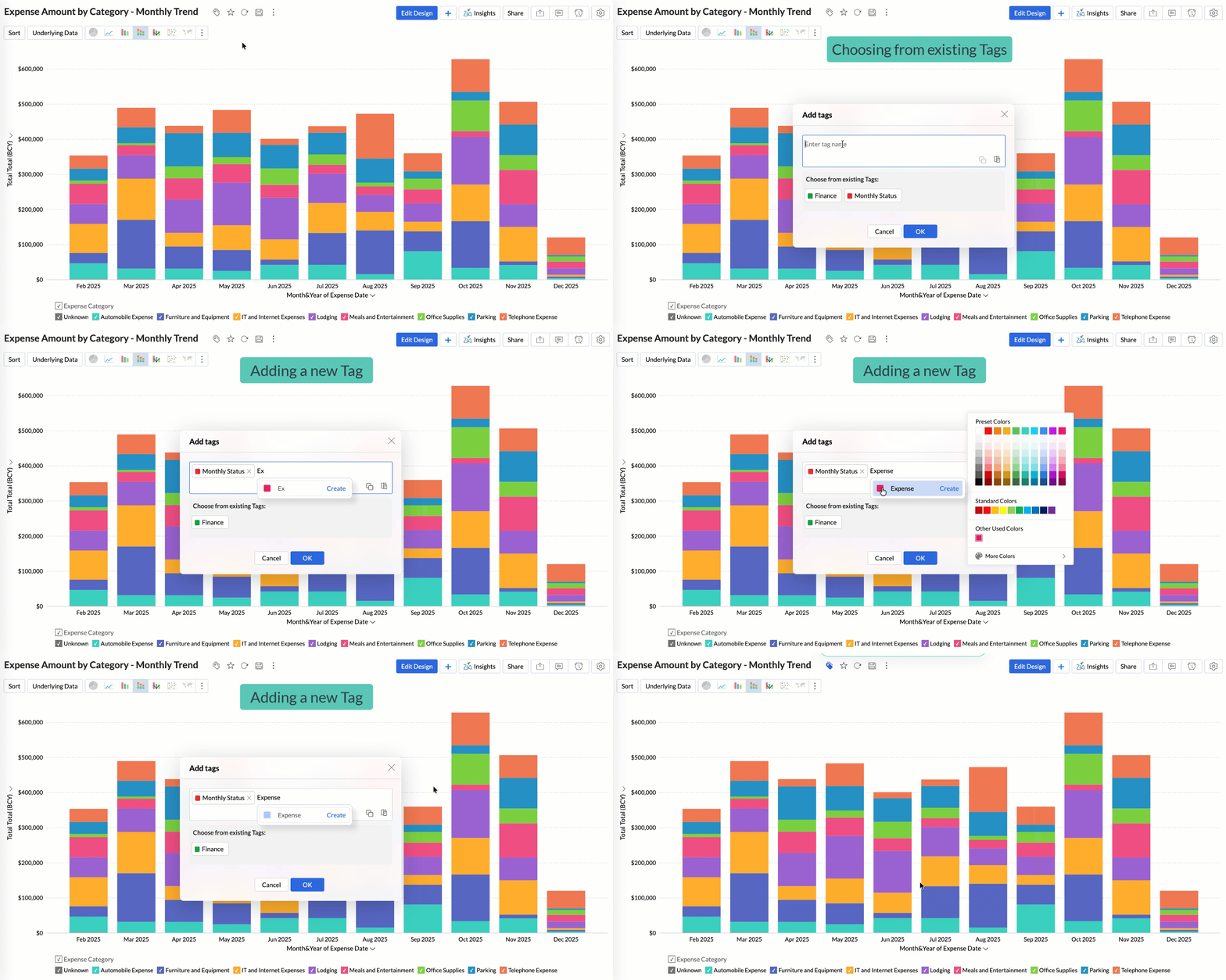
Quickly filter and find the right reports and dashboards, reduce clutter, and ensure teams always have access to the views that matter most to them.
Global Custom Sort
Custom sort was limited to individual reports previously. With recent enhancements, you can now define the sort order for text data types at the workspace level.
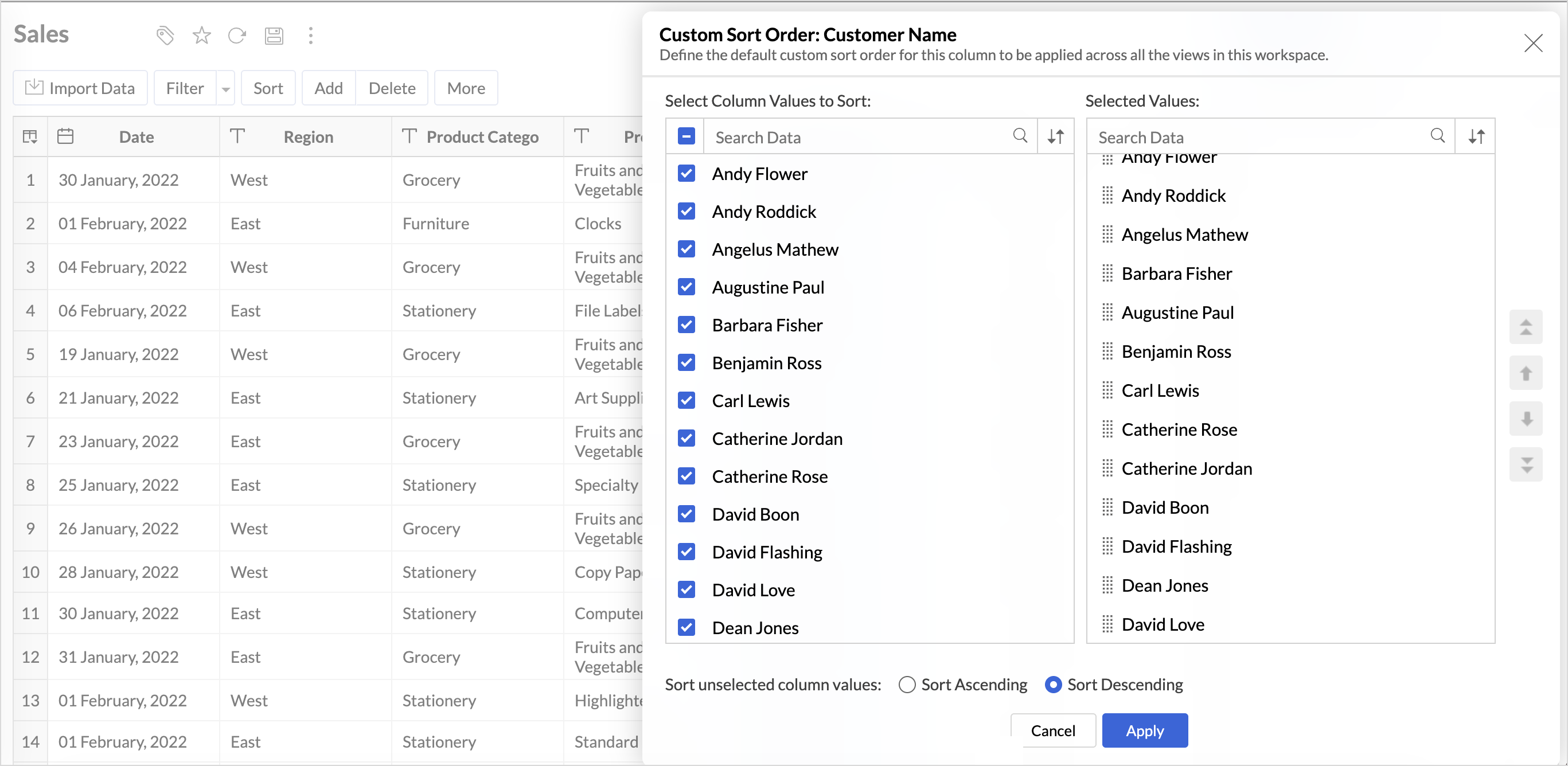
This improvement helps you maintain a consistent sorting across all reports, reduces repetitive setup, and saves time. It also ensures a standardized view of your data throughout the workspace.
Timeframe Selection for Overview Charts
Overview charts now offer flexible timeframe selection, allowing you to focus on relevant periods for deeper trend analysis.
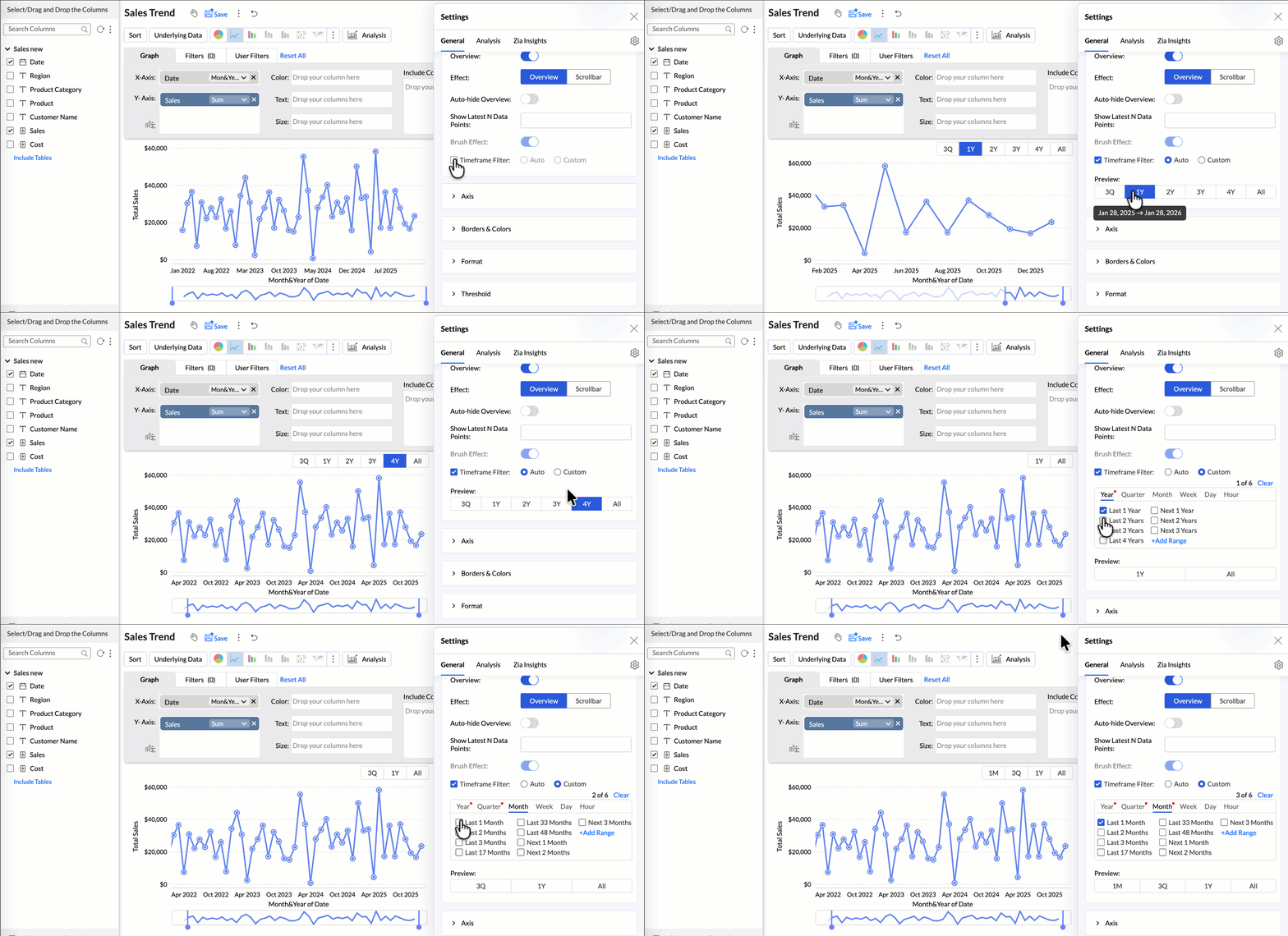
By narrowing the time range, you can better compare performance, identify patterns, and gain clearer insights without distraction from older data.
Customize Zia Insights placement in Dashboards
Choose where and how the insights are displayed, so that they complement your analysis without disrupting your dashboard layout. This gives you greater flexibility to present insights in the way that best suits your audience and reporting style.
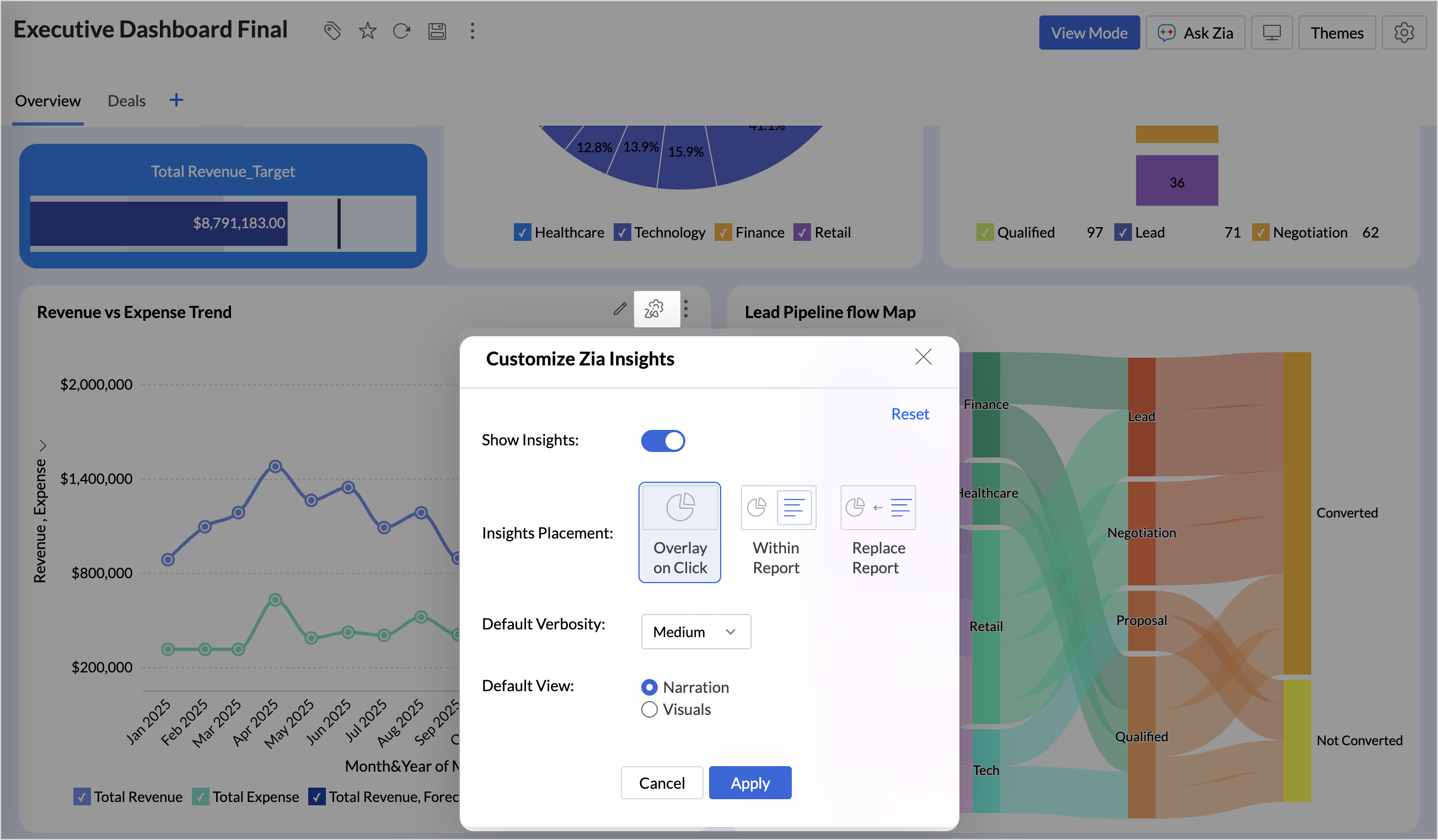
- Overlay: Displays insights in a floating panel that opens on demand, allowing users to review insights without leaving or altering the report view.
- Within Report: Embeds insights directly within the report, enabling users to view data and insights together in a single, continuous view.
- Replace Report: Displays insights as the primary view by replacing the report entirely, offering an insight-first experience focused on conclusions, rather than raw data.
Customize Image Size in Dashboards
Dashboards now support image size settings that let you control how images are displayed.
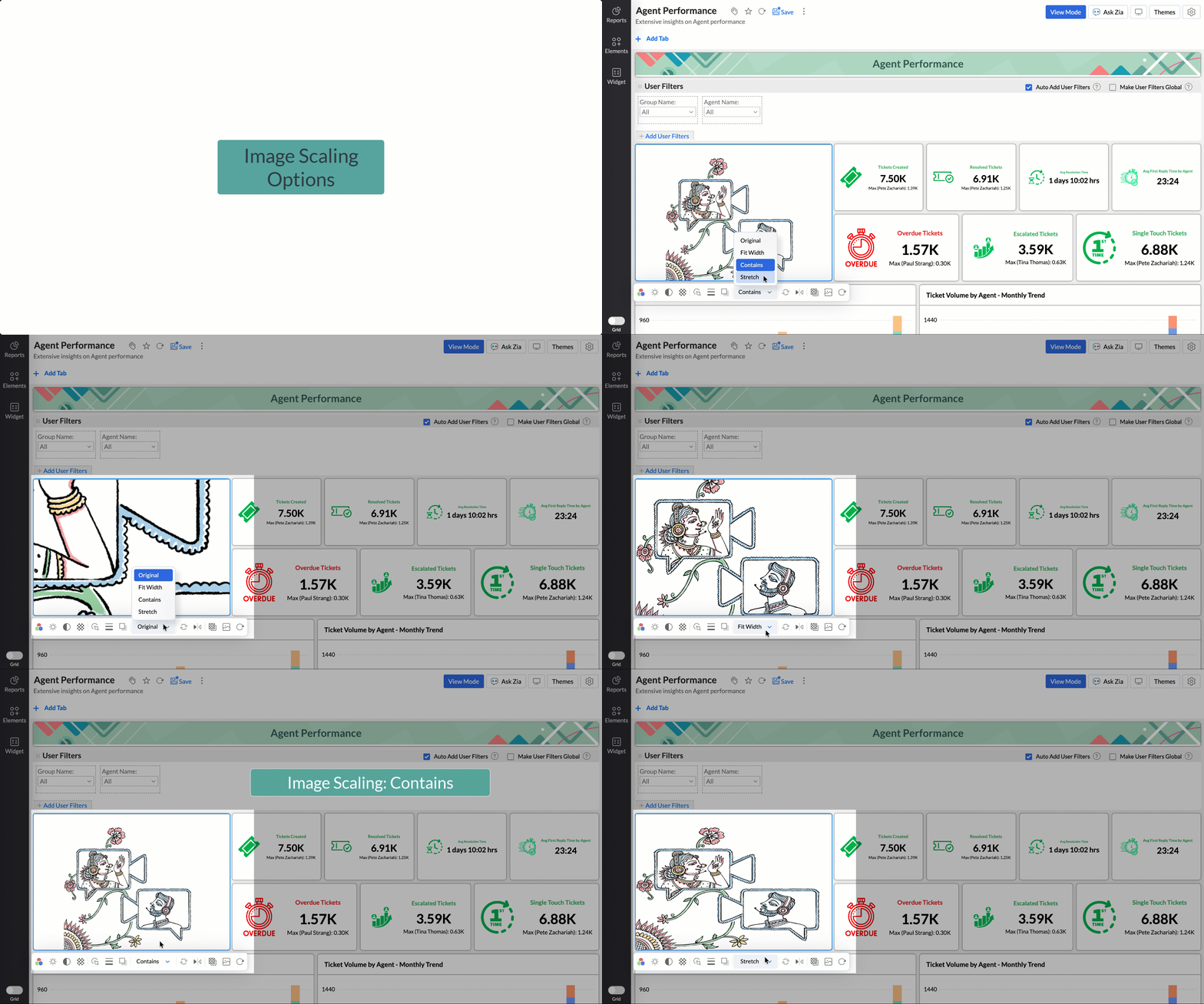
Choose from options like Original, Fit to width, Contain, or Stretch to ensure images align well with your dashboard layout, and thus improve visual clarity.
Tabular View Enhancements
- With this enhancement, all tables linked via lookup columns are now available in the Filter Criteria tab. This makes it easier to share views with users using associated filters, ensuring the specified criteria are automatically applied to the shared report.
- You can now customize lookup columns and the join paths used within Tabular View. This enhancement gives you control over how related tables are connected, helps avoid incorrect or ambiguous joins, and ensures more accurate and reliable data representation in your tabular reports.
New Business App Connectors
We have now introduced integration with two new business connectors Zoho FSM and Magento.
Zoho FSM
Connect your Zoho FSM Data with Zoho Analytics to analyze your field service operations in depth. Identify bottlenecks, optimize resource allocation with interactive reports and dashboards. Analyze revenue, service costs, and customer trends to improve profitability and service quality.
Adobe Commerce (Magento)
Analyze sales, orders, customers, and product performance with ready-made reports and dashboards. Track key metrics like revenue trends, average order value, and top-selling products. Gain insights into customer behavior and regional sales patterns. Make faster, data-driven decisions to optimize store performance and growth.
Topic Participants
Nisha Angel J
Sticky Posts
What's New in Zoho Analytics - January 2026
Hello Users! We are starting the year with a strong lineup of updates, marking the beginning of many improvements planned to enhance your analytics experience. Explore the latest improvements built to boost performance, simplify analysis, and help youWhat's New in Zoho Analytics - November 2025
We're thrilled to announce a significant update focused on expanding your data connectivity, enhancing visualization capabilities, and delivering a more powerful, intuitive, and performant analytics experience. Here’s a look at what’s new. Explore What'sWhat's New in Zoho Analytics - October 2025
Hello Users! We're are back with a fresh set of updates and enhancements to make data analysis faster and more insightful. Take a quick look at what’s new and see how these updates can power up your reports and dashboards. Explore What's New! ExtremeWhat’s New in Zoho Analytics – September 2025
Hello Users!! In this month’s update, we’re raising the bar across multiple touchpoints, from how you bring in data, plan and track projects to how you design and brand your dashboards. We’ve added the all-new Gantt chart for project visualization, expandedAnnouncing Agentic AI - Ask Zia!
We are delighted to roll out the new agentic AI capabilities in Ask Zia, where every stage of the BI workflow is assisted by AI. With a human-in-the-loop approach, Ask Zia ensures that you’re in command of the decision, while AI handles the complexity.
Recent Topics
Incoming mails blocked
Zoho User ID : 60005368884 My mail Id is marketing#axisformingtechnology.com .I am getting following message "Your Incoming has been blocked and the emails will not be fetched in your Zoho account and POP Accounts. Click here to get unblocked." PleaseConfiguring Email Notifications with Tautulli for Plex
Hi I'm new to Zoho. I am from Canada and I have a I use a web based application called Tautulli for Plex that monitors my Plex media server. It also sends a newsletter to my followers. To set this up they require a "From" email address., a smtp serverHow to Set Up Zoho Mail Without Cloudflare on My Website
I'm having some trouble with Cloudflare here in Pakistan. I want to configure Zoho Mail for my domain, but I'm not sure how to set it up without going through Cloudflare. My website, https://getcrunchyrollapk.com/ , is currently using CF, but I'd likeSpam is Being Forwarded
I am filtering a certain sender directly to the Trash folder. Those messages are still being forwarded. Is this supposed to happen?IMAP Block
My two accounts have been blocked and I am not able to unblocked them myself. Please respond to email, I am traveling and this is urgent."DKIM not configured"
Hello. I have been attempting get the DKIM verified but Toolkit keeps sending the message that it is not configured, but both Namecheap and Zoho show it as configured properly. What am I missing?Zoho mail with custom domain not receiving email
i registered zoho mail with my own domain. I can login and access the mail app. I tried to send email from an outlook email account and an icloud email account. Both emails were not received. My plan is free. I also tried to send email from this zohoA Sales Ebook to help Sales representatives increase Sales.
I worked in sales for twenty years with the same company. I was an outdoor sales representative selling health insurance. My first Year I made it into the company's President's club. I wrote an Ebook sharing how I was able to achieve success in salesWaterfall Chart
Hello, I would like to create a waterfall chart on Zoho analytics which shows the movement in changes of budget throughout a few months, on a weekly basis. Should look something like the picture below. Does anyone know how to?Issue with Importing Notes against Leads
Hi, I am attempting to import some Notes into Zoho CRM which need to be assigned to various Leads. I have created a csv file which I am testing that contains just one record. This csv file contains the following columns: Note Id Parent Id (I haveOption to Hide Project Overview for Client Profiles
In Zoho Projects, the Project Overview section is currently visible to client profiles by default. While user profiles already have the option to restrict or hide access to the project overview, the same flexibility isn’t available for client profiles.Creator Add Records through API - Workflows not triggered ?
Hi Everyone, I am trying to add records to my Creator application through a third party app that I am developing. Currently, I am testing this through Postman. The records I need to add have a lot of workflows to run to populate dropdowns, fields, useImportant Update: Changes to Google Translate Support in Zoho SalesIQ
We’re updating our default chat translation options across all Zoho SalesIQ data centres to offer a more secure, in-house solution for your translation needs. What’s changing? We will be offering Zoho Translate (our in-house tool) as the default translationZoho CRM Community Digest - July 2025 | Part 1
Hey everyone, The start of July 2025 marked a special milestone: 200 posts in our Kaizen series! For those new here, Kaizen is a go-to series for Zoho CRM developers, where we regularly share best practices, tips, and expert insights to help you buildWhat’s New in Zoho Expense (April – July 2025)
Hello users, We're happy to bring you the latest updates and enhancements we've made to Zoho Expense over the past three months, which include introducing the Trip Expense Summary report in Analytics, extending Chatbot support to more editions, rollingWeekly Tips: Insert frequently used phrases in a jiffy using Hotkeys
You often find yourself using similar phrases in an email —like confirming appointments or providing standard information. Constantly switching between the mouse and keyboard interrupts your flow and slows you down.Instead of typing the same phrases overUndo Command in Notebook
It would be handy to have an Undo in the row of icons at the bottom of the notes.Narrative 9: GC—Meaningful conversations that benefit your customers
Behind the scenes of a successful ticketing system - BTS Series Narrative 9: GC—Meaningful conversations that benefit your customers Customers often seek immediate solutions, which is why self-service options are essential. Guided Conversations providesFSM App Oddity
We recently rolled out FSM to our technicians, and only one technician is having an issue. He's using an iPhone with iOS 18.6 installed. When he goes to service appointments using the calendar icon at the bottom of the app, he gets a list view only. Typically,Cliq Not Working !
Zoho Cliq has been experiencing connectivity issues since this morning. The app is unable to establish a connection with the server.Injecting CSS into ZML pages
Is there a way to inject CSS into ZML pages? Use case: 1. Dashboard displays 'Recent Activities' card displaying a list of newly added records 2. Each item in list links to the record onClick 3. When a user points the cursor over an item in the list,Power of Automation :: Automated Weekly Notifications for Unapproved Timesheets
Hello Everyone, A custom function is a software code that can be used to automate a process and this allows you to automate a notification, call a webhook, or perform logic immediately after a workflow rule is triggered. This feature helps to automateExtracting Data from Sitelink APIs
Hi All, I'm working to pull data on Sitelink using API calls but i can't seem to extract it. If you click expand, you will see it has a lot of data in it. I tried extracting from the map but it's not giving me anything. Is there a workaround on this orExport a list of fields for all modules in a spreadsheet with specific field data
Many of my clients are using spreadsheets to create lists of fields for all modules when starting a new implementation or when updating an existing setup. This is a useful process but also a very time consuming one. It would be good a list of fields could[Important announcement] Zoho Writer will mandate DKIM configuration for automation users
Hi all, Effective Dec. 31, 2024, configuring DKIM for From addresses will be mandatory to send emails via Zoho Writer. DKIM configuration allows recipient email servers to identify your emails as valid and not spam. Emails sent from domains without DKIM【Zoho Backstage】2025年7月のアップデート紹介
本投稿は、本社のZoho Desk コミュニティに投稿された以下の記事を翻訳し、一部抜粋したものです。 What's New - July 2025 | Zoho Backstage ユーザーの皆さま、こんにちは。コミュニティチームの中野です。 本投稿では、Zoho Backstage の直近のアップデートを3点抜粋して、ご紹介します。 目次 1.参加可否の確認:RSVP 2.証明書作成ツール:Certificate Builder 3.登録の承認 :Registration Approval 1.参加可否の確認:RSVPCan we have Backorder Management ?
Can we have Backorder Management ?Display a field of an Account on the Ticket view
Hi there, We would like to display of the Account of the user submitting a ticket on the ticket view. See for example: How can this be achieved? It doesn't really matter where it will be placed as long as it is shown there. Thanks, SnirInsurance Agencies
I am reaching out to see if anyone has any experience in the Insurance Agency world with using Zoho exclusively for the CRM and commissions side of things. Lots of strong features like drip campaigns, meeting, calendars, emails, can all be found in here.Problem with Egyptian internet ISP
Dears, We have problem with our ADSL internet SP, That your site not working with. So, we contact them and they asking us to contact you to solve this problem. The problem that when we are connecting to Tedata ADSL your website not working (Business Email). BR,, Mohamed OmarMail Not Showing In Inbox or Sent Box
Hi, there are mails that are not displaying in both my inbox and sent box. I just tried the iPad app and it is the same but there is a blank field where a mail should be and it refers to a server error. Please fix this.Marketing Automation List Entry Criteria is no longer an option
For a couple of years now we have used the "List Entry Criteria" option to filter our Journey recipient list. All of a suddent the option no longer exists for New Lists and I can only delete the option from existing lists but can no longer edit it. AnyoneGCLID arrives not in CRM with iframe integrated ZOHO Form
Hello amazing community, I enabled Adwords integration in ZOHO CRM. I have a ZOHO Form integrated in a wordpress. I tested iframe and Javascript. I enabled the "handover" GCLID in the ZOHO Form. When I add a GLID with http://www.example.com/?gclid=TeSter-123.Bidirectional sync between Zoho Bookings and Zoho CRM - Part 1
Hey, community members! The default integration between Zoho CRM and Zoho Bookings is unidirectional, which means that any appointments booked, rescheduled, or deleted in Zoho Bookings will be reflected in Zoho CRM. However, any modifications made toIs it possible to edit placeholder text?
In the master slides I want to make sure my templates have more meaning for the users and want to replace the standard placeholder text with something more instructional. Instead of "Click to edit Mast subtitle styles" I want to have "Click to enter reportingHow to allow download of a file AFTER information is collected?
I can't find this anywhere. Can someone help with what seems to be a pretty basic web function today? - File is stored in Workdrive - Prospect goes to a URL where the file is located - System requests prospect to enter "Name" and "Email" - An email isAdd Baseline methods to API
There are no API methods for creating or querying baselines, Use case: Customer is notified of the current project start date according to plan via another product/integration. We would like to auto create a baseline (Automated via API) at the pointFixed Assets beg balance
Hello, I trust you are well I'm a new zoho books user and I find it difficult to plug in the fixed assets balance and here's what I have done: 1- I imported the fixed assets data into the fixed assets module as per the instructions 2- the import processCRM Deluge how can link attach file with workdrive file.
Hi, We have create file at workdrive and would like to link to attachment at crm module by deluge. Right now can only upload it to attachment but can not link the file from workdrive. Thank youFeature announcement: AI-powered document generator in Zoho Sign
Hi there! We recently announced manual document creation by offering an editor within Zoho Sign. Today, we are excited to announce AI-powered document generation to help you draft agreements, purchase orders, and other important business documents inNext Page