What's New - January 2026
Hello Users!
We are starting the year with a strong lineup of updates, marking the beginning of many improvements planned to enhance your analytics experience. Explore the latest improvements built to boost performance, simplify analysis, and help you extract more value from your data.

Archive Data
No more querying all records while generating reports! Analyze data faster and optimize workspace performance with Archive Data. Move older or less-frequently used records out of active tables, and store them securely.
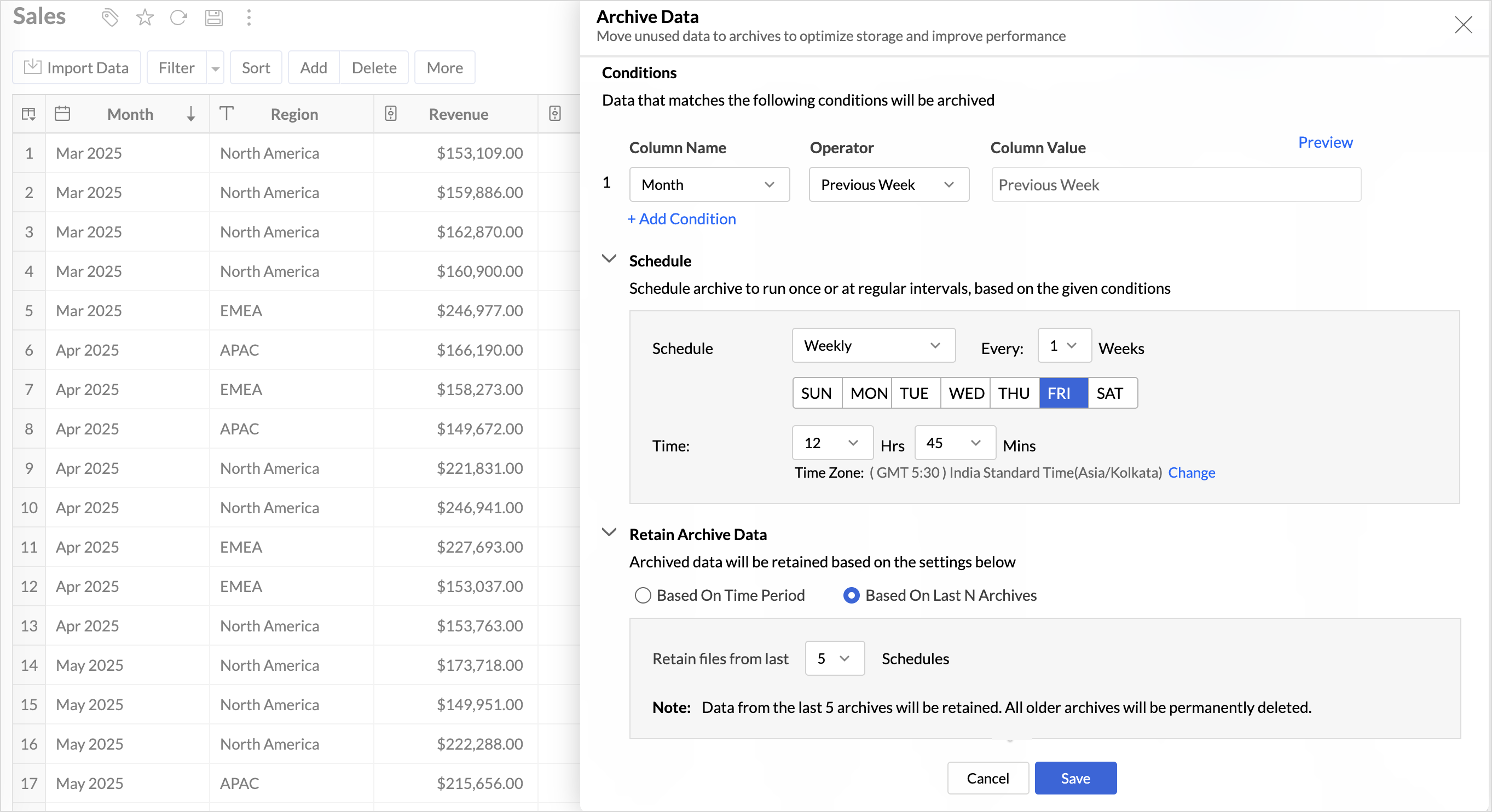
Key Benefits
- Pay only for what you analyze: Active data is reserved for analysis, while historical data is retained without impacting usage limits.
- Improved Querying and Faster Analysis: By limiting queries to relevant data, report generation and dashboard loading times are significantly reduced, resulting in faster insights and a more responsive analytics experience.
- Optimized Storage Usage: Archiving older data helps control table size, preventing unnecessary growth, and better management of row limits.
Organize Views with Tags
Group related views, and manage reports and dashboards effortlessly. Use tags to organize views by teams, departments, projects, or specific use cases, making it easy for users to navigate large workspaces.
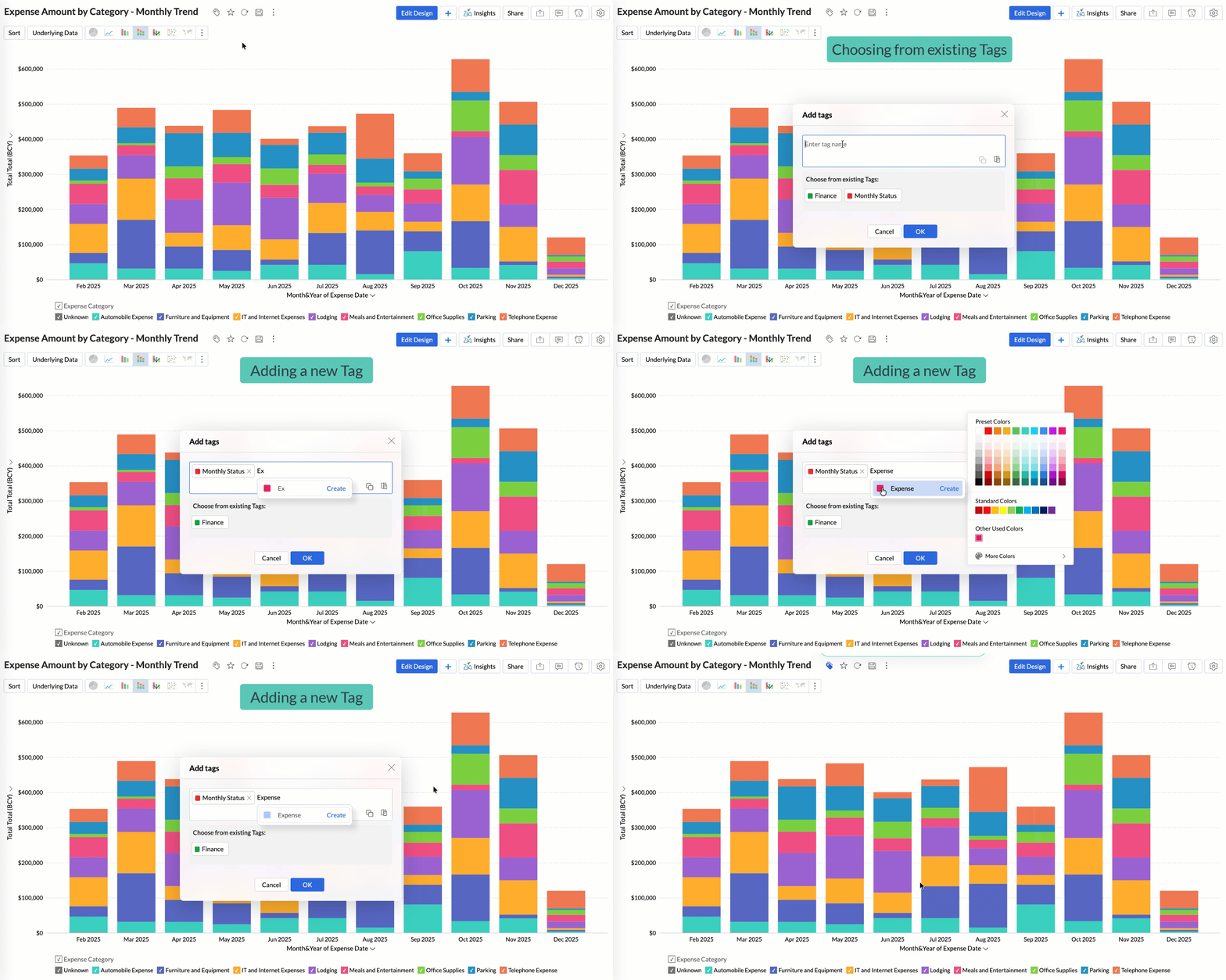
Quickly filter and find the right reports and dashboards, reduce clutter, and ensure teams always have access to the views that matter most to them.
Global Custom Sort
Custom sort was limited to individual reports previously. With recent enhancements, you can now define the sort order for text data types at the workspace level.
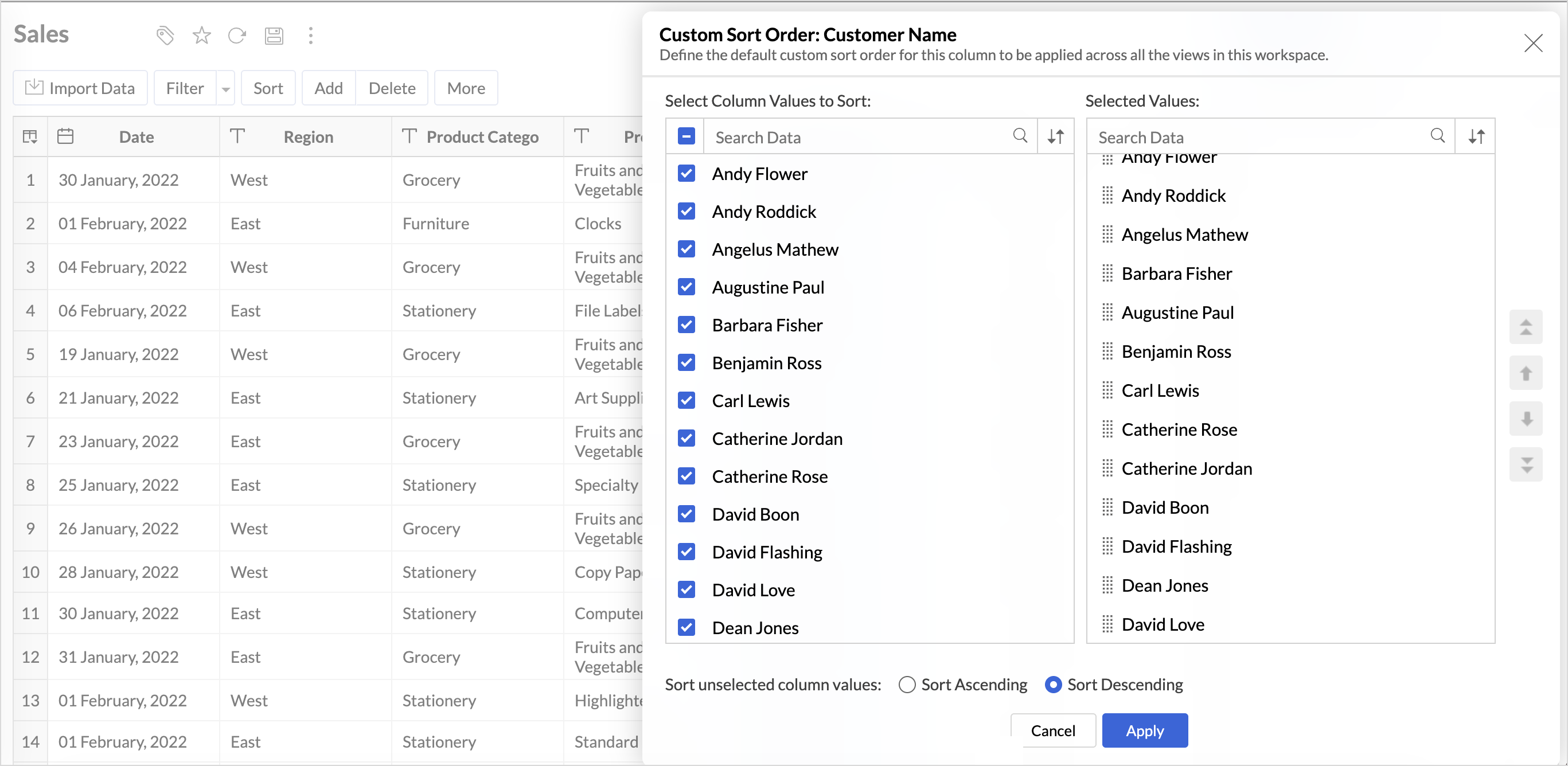
This improvement helps you maintain a consistent sorting across all reports, reduces repetitive setup, and saves time. It also ensures a standardized view of your data throughout the workspace.
Timeframe Selection for Overview Charts
Overview charts now offer flexible timeframe selection, allowing you to focus on relevant periods for deeper trend analysis.
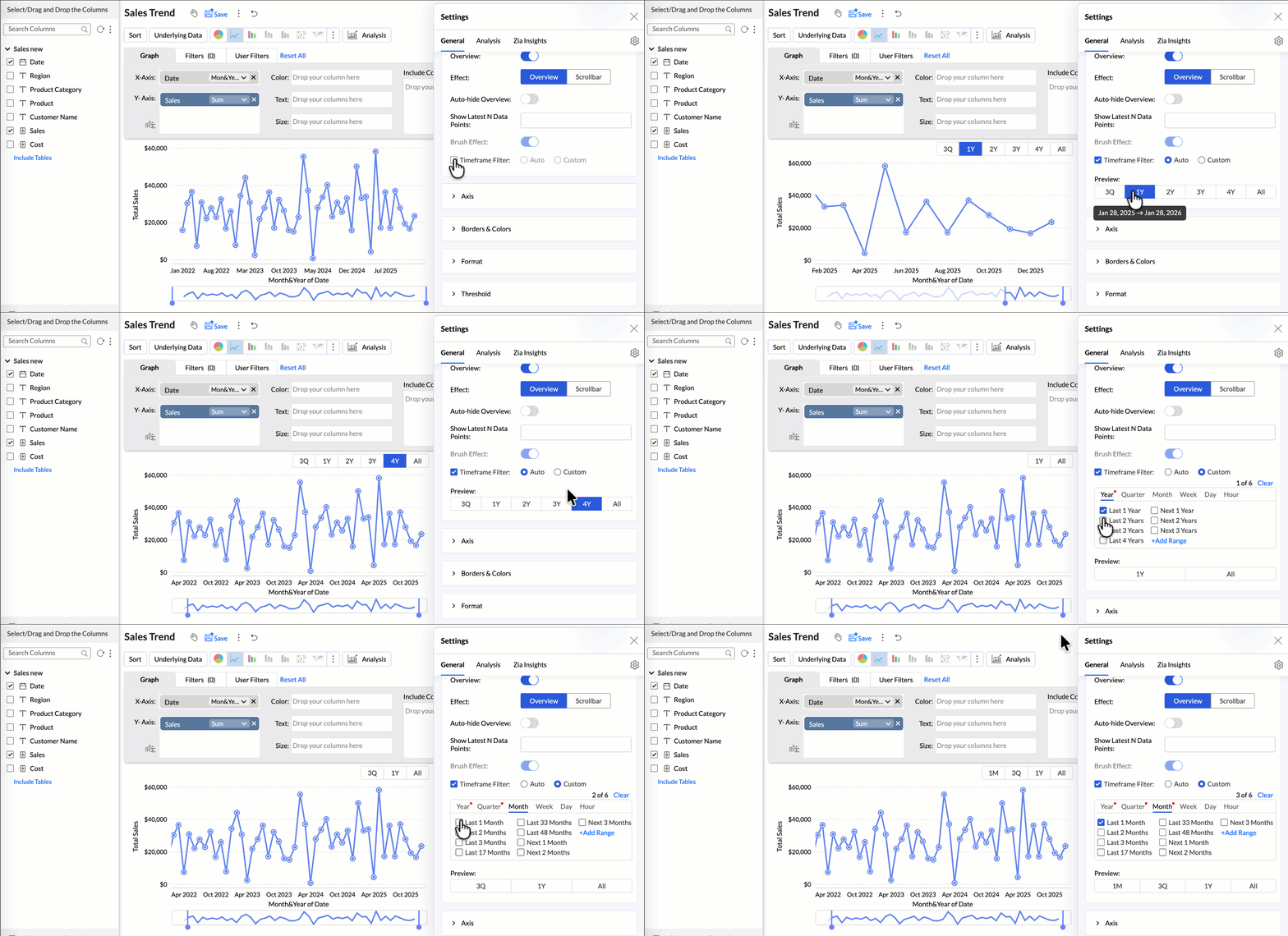
By narrowing the time range, you can better compare performance, identify patterns, and gain clearer insights without distraction from older data.
Customize Zia Insights placement in Dashboards
Choose where and how the insights are displayed, so that they complement your analysis without disrupting your dashboard layout. This gives you greater flexibility to present insights in the way that best suits your audience and reporting style.
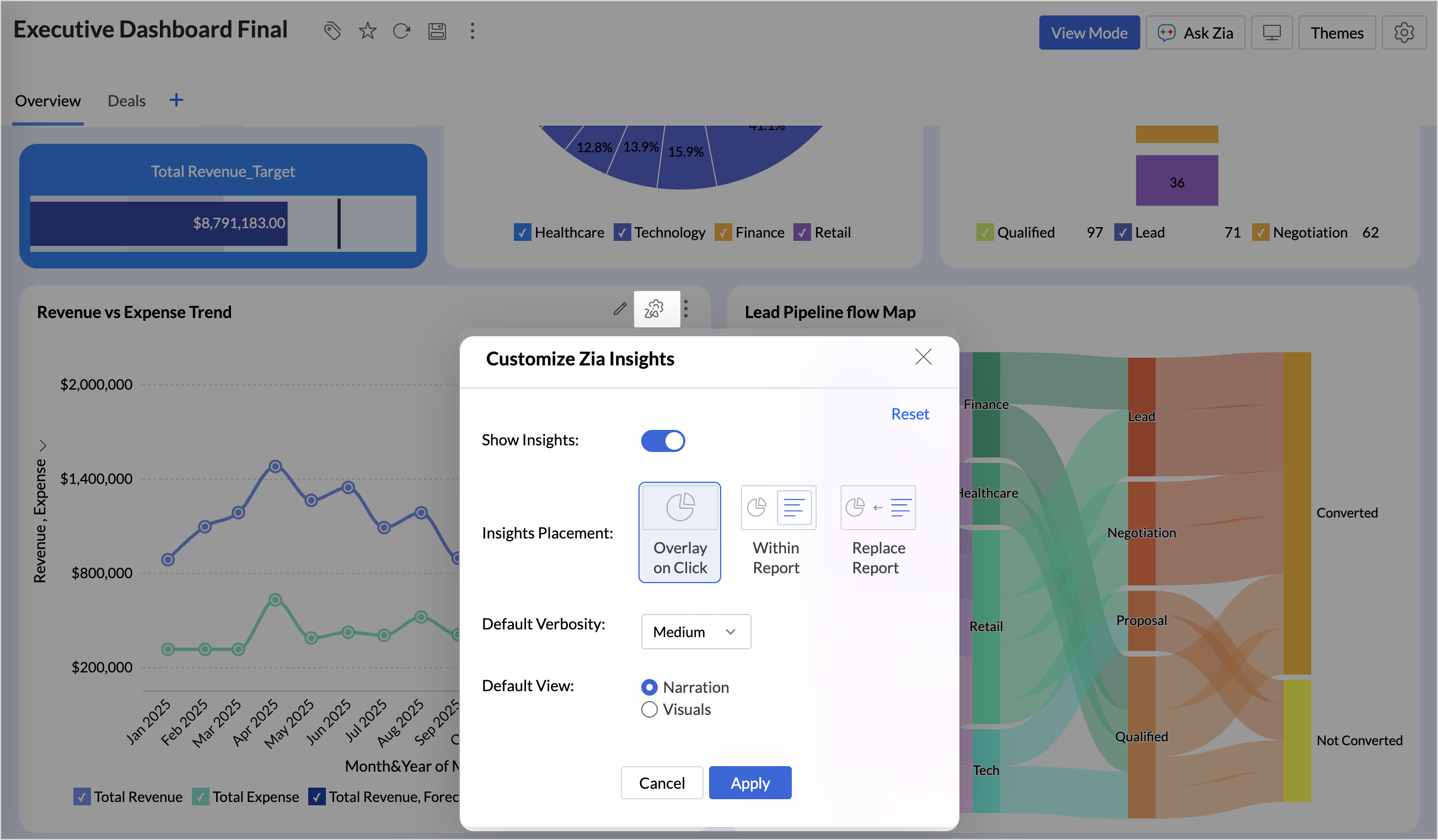
- Overlay: Displays insights in a floating panel that opens on demand, allowing users to review insights without leaving or altering the report view.
- Within Report: Embeds insights directly within the report, enabling users to view data and insights together in a single, continuous view.
- Replace Report: Displays insights as the primary view by replacing the report entirely, offering an insight-first experience focused on conclusions, rather than raw data.
Customize Image Size in Dashboards
Dashboards now support image size settings that let you control how images are displayed.
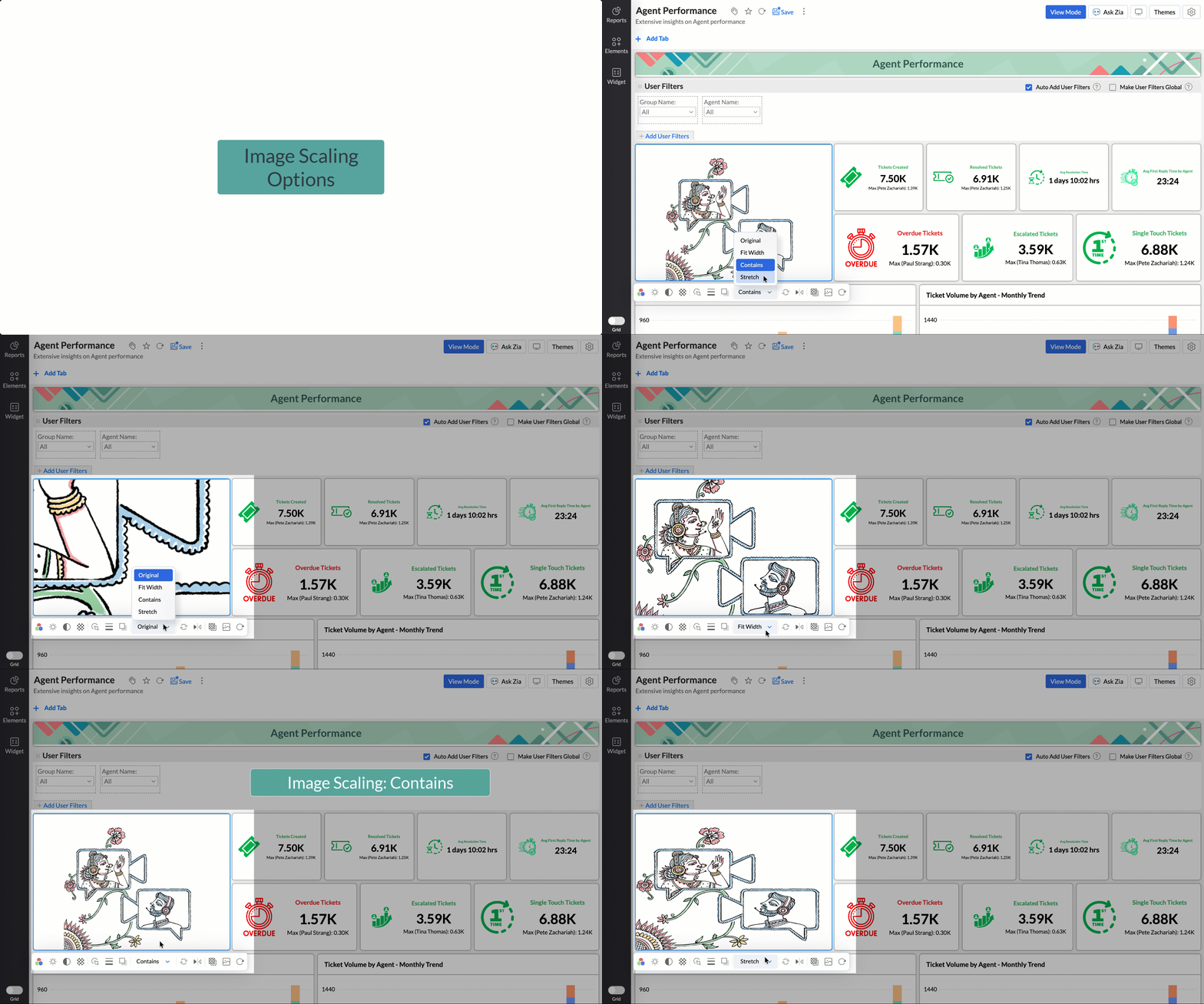
Choose from options like Original, Fit to width, Contain, or Stretch to ensure images align well with your dashboard layout, and thus improve visual clarity.
Tabular View Enhancements
- With this enhancement, all tables linked via lookup columns are now available in the Filter Criteria tab. This makes it easier to share views with users using associated filters, ensuring the specified criteria are automatically applied to the shared report.
- You can now customize lookup columns and the join paths used within Tabular View. This enhancement gives you control over how related tables are connected, helps avoid incorrect or ambiguous joins, and ensures more accurate and reliable data representation in your tabular reports.
New Business App Connectors
We have now introduced integration with two new business connectors Zoho FSM and Magento.
Zoho FSM
Connect your Zoho FSM Data with Zoho Analytics to analyze your field service operations in depth. Identify bottlenecks, optimize resource allocation with interactive reports and dashboards. Analyze revenue, service costs, and customer trends to improve profitability and service quality.
Adobe Commerce (Magento)
Analyze sales, orders, customers, and product performance with ready-made reports and dashboards. Track key metrics like revenue trends, average order value, and top-selling products. Gain insights into customer behavior and regional sales patterns. Make faster, data-driven decisions to optimize store performance and growth.
Topic Participants
Nisha Angel J
Sticky Posts
What's New in Zoho Analytics - January 2026
Hello Users! We are starting the year with a strong lineup of updates, marking the beginning of many improvements planned to enhance your analytics experience. Explore the latest improvements built to boost performance, simplify analysis, and help youWhat's New in Zoho Analytics - November 2025
We're thrilled to announce a significant update focused on expanding your data connectivity, enhancing visualization capabilities, and delivering a more powerful, intuitive, and performant analytics experience. Here’s a look at what’s new. Explore What'sWhat's New in Zoho Analytics - October 2025
Hello Users! We're are back with a fresh set of updates and enhancements to make data analysis faster and more insightful. Take a quick look at what’s new and see how these updates can power up your reports and dashboards. Explore What's New! ExtremeWhat’s New in Zoho Analytics – September 2025
Hello Users!! In this month’s update, we’re raising the bar across multiple touchpoints, from how you bring in data, plan and track projects to how you design and brand your dashboards. We’ve added the all-new Gantt chart for project visualization, expandedAnnouncing Agentic AI - Ask Zia!
We are delighted to roll out the new agentic AI capabilities in Ask Zia, where every stage of the BI workflow is assisted by AI. With a human-in-the-loop approach, Ask Zia ensures that you’re in command of the decision, while AI handles the complexity.
Recent Topics
Announcing new features in Trident for Windows (v.1.27.4.0)
Hello Community, Trident for Windows is here with exciting new features to elevate your communication and enhance productivity. Let’s dive into what’s new! Smart Sign-in. You can now sign in to Trident with Smart Sign-in. With this new addition, you canTime Entry : Auto fill fields Hours minutes seconds
Hello world, Do someone know a script (for workflow rules) which fill automatically fields hours spent, minutes spent, seconds spent when we fill Executed time and End time Formula should start from (End time - Executed time) Thx in advanceZoho Forms - edit the settings of the Zoho CRM field to change the integration with CRM
I've created a Zoho CRM field in my form to pre-populate selected CRM details into the form, following the instructions here https://help.zoho.com/portal/en/kb/crm/integrations/zoho/zoho-forms/articles/zoho-forms-crm-integration#Step_2_-_Add_Zoho_CRM_Field_in_the_formAbility to add notes to an appointment and add notes/attach docs to a consultation
As an idea for the future, it would be helpful to be able to add notes to an existing appointment--there is a place to add notes for the customer, but I don't see one for the appointment. It would also be helpful to be able to add notes or attach documentsIm trying to white list domain dynamically in zoho desk extension
Im trying to white list domain dynamically in zoho desk extension. But it show error Error: {errMsg: 'No entry found in plugin-manifest whiteListedDomains for requested URL'} syntax "config": [ { "displayName":"Shopify Admin API access token ", "name":Zoho Payroll: Product Updates for India - May 2025
This May, we are glad to unveil new capabilities in Zoho Payroll that simplify your payroll activities. Here's the list: Let Employees Choose Their Tax Deduction Method for One-Time Payments Calculate variable earnings based on percentage of CTC CarryBulk Update Tasks/Task Lists/Milestones
Is there a way to bulk update tasks/task lists/milestones? We have several projects that are in the same template, and our staff complete them tasks at a time - and would like to go in an bulk update all related tasks/task lists/milestones at once. But you can't do this. I remember in an old version you could export your tasks, update the excel doc and reimport. But it doesn't seem like that option is available anymore. Can someone provide a solution/idea? Otherwise we are spending a lot of timeSync failed: Invalid Date value
Hi, I have a local .sqlite database. After importing one table through the Databridge, and produced my dashboards, I cannot sync. I get an error regarding the date column: [Line: 2 Field: 4] (2018-07-12) -ERROR: Invalid Date value The data found at theOffice 365 is marking us as "bulk"
All of a sudden (like a couple of days ago) all of our customers who are on Office 365 are getting our mails in their junk email. This is not the case with Gmail or other random mail servers, nor between us. We got a 10/10 score on mail-tester.com. Also,Zoho Assist
Hi, We are using zoho assist unattended access in some windows server 2012 and recently the agent lets you connect but not let you do anything on the remote machine. Sometimes you can click on something but nothing happens. There's a issue with this newModify workflow from "ON CREATE & EDIT" to "ON CREATE" only
Salut, Is there a way to easilly change my choice of trigger of workflow from on create & edit to on create only, or do I have to re-do the whole worklow from scratch ? SylvainAccess custom modules via API?
Is it possible to access a custom module in Zoho Inventory via the API? I can not find any reference to this in the API docs.Welcome to the Zoho Service Plus community
Hey everyone, We are excited to welcome you to be a part of the Zoho Service Plus community. Here's a quick overview of what Service Plus is all about and how the community can help us work together. What's Zoho Service Plus? Zoho Service Plus is a unifiedRestrict Zoho Cliq Webinars and Announcements to Admins Only
Hi Zoho Team, We hope you're doing well. We would like to raise a feature request regarding in-app announcements in Zoho Cliq, such as the recent webinar popup about the Cliq Developer Platform: While these announcements are useful, they are not alwaysShare Notebook with group created in Zoho One
I have created a group in Zoho One for a section in my company. Is it possible to share a notebook with that Zoho One Group? Currently, it seems only possible to share to emails. Unfortunately for large teams, this will mean we are constantly having toCreate Tasks in arbitrary Zoho Project triggered from CRM [Zoho Flow]
Community, hello What I'm trying to do is to create a Zoho Project when a Deal is created in CRM and then to be able to add tasks to this Project also from Zoho CRM with the trigger (Blueprint/ Workflow). I succeeded in creating Project using Zoho Flow,Outlook Add-in security times out needs to login 10 times a day
hi we've just switched the Zoho. We use Azure SSO. All users have stopped using it. Sometimes it asks every 5 minutes. What should I lot at to solve this?Simplify Zoho API integration with Deluge’s invokeAPI task
Hello all! Happy New Year! As we kick off 2025, we’re excited to share some of the latest updates to enhance your Deluge experience. While Deluge already offered robust API integration capabilities, we’ve taken it to the next level with the introductionSimplify Zoho API integration with Deluge’s invokeAPI task
Hello all! Happy New Year! As we kick off 2025, we’re excited to share some of the latest updates to enhance your Deluge experience. While Deluge already offered robust API integration capabilities, we’ve taken it to the next level with the introductionAttention: Display Issues on Chromium Browsers with Intel® Core™ Ultra Processors
Dear Customers, We've recently identified a display-related issue that may affect some of our Zoho Assist users, particularly technicians using devices powered by Intel® Core™ Ultra Processors. What’s Happening? If you're running a Chromium-based browserIs the "schedule 10 mass emails/module" limit a per user or per organization limit?
For scheduling emails out of Zoho CRM, there is a 10 scheduled mass emails per module limit according to Zoho documentation (https://help.zoho.com/portal/en/kb/crm/faqs/emails/articles/how-to-schedule-mass-emails-in-zoho-crm). Is this limit per user orHow do I show file uploads in my Zoho Creator approval workflow?
As far as I can tell I'm not able to add the file upload field to the approval workflow show fields list. As a work around I'm making a plain text field that links to the files URL. But I'm not sure how to get a link to that url that will me to previewZoho Bookings - variable appointments
Hello, I am looking to see if its possible for zoho bookings to recognise booking slots in the calendar or a way to do this. I would like appointments only booked in at certain times of the day and this could vary per host. I have provided a calendarBest Practices - Extensions for Zoho Finance Suite
With Sigma, the extension developer platform, you can create custom extensions that enhance the functionality of Zoho Finance apps like Zoho Books, Zoho Billing, Zoho Inventory, Zoho Expense, and Zoho Invoice. Here’s how to get started: Sign up: CreateQR code image is not exported in PDFs
The new QR code field works fine when I include it in a report template and I choose the print option: https://creatorapp.zoho.com/<username>/<app_link_name>/record-print/<report_link_name>/<record_ID>/ But when I try to save the document to a .pdf fileZoho Form to Zoho Form Integration
I've created an application form that asks for references. I would like the submission of the application form to trigger a form to the reference using the email id and name entered in the first form. In the reference form that is triggered I need toCRM: related table using module queries, are links possible?
Hello. I was exploring the possibility of using a module query to get a filtered related list. For example, I'm using a Canvas custom details page and if an account has an open deal I'd like it to appear at the very beginning of the account page, withBetter reorder point functionality?
1. How about having item reorder point warehouse level instead branch? 2. Considering committed stock and to be received quantity also as reorder point calculation? 3. Considering associated items as committed when sales order created on composite iBatch tracking updates
I applaud the Zoho team for their recent updates to batch tracking information and even though I have 'chatted' to the Zoho team, I'm still batteling to understand the reasoning on the below. We buy stock in bulk and it is received into the Bulk Warehouse.Custom Button in Shipments
Custom buttons feature is very much needed in shipments. Please work on this feature request!Zoho Support is Dysfunctional & Don't Know Their Own Support Hours
Seeking clarification on Zoho support hours and contact numbers please. We have been trying to phone Zoho support on +61 2 8066 2898 at 9:20am AEDT for the second day in a row, and gotten a message on Zoho's support line: "support is open monday throughWhat are the knowledge database limit for AnswerBot and which app its integrate?
1) Can AnswerBot be integrated in Trainer Central? 2) Can AnswerBot learn from external websites and excel spreadsheets? 3) Is there a limit size or number of documents for the knowledge based content to train AnswerBot? ThanksReports showing 24hr days instead of business hours
I am not sure what I am missing, I created a report to look at resolution times in business hours but it is displaying hours based on 24hr days. I have business hours set (7am-5pm) and all that functionality is working, the reports are displaying 2 daysSkip Pages - Zoho form
Hi Team, I need help with skipping pages based on the below logic in Zoho form: If field number of borrowers is 1 and field number of dependants is 0 then do not show page borrower 2 and 3 If field number of borrowers is 2 and field number of dependantsHow to print blank form and also how to use form offline
I have created a form in PC and want to use the form in the field to gather information. Can I use the form offline in PC - in case I have no internet access? As a fail safe, I'd like to print the blank form ut just in case the PC form doesnt work forUsing Marketing Automation Journey to associate lead record with a campaign?
Hello, I am trying to push people from a Marketing Automation Journey to a CRM campaign so I can track lead journeys and lead conversions however I am hitting a roadblock. When a lead hits particular scores or does specific actions in marketing automationExpose FIFO COGS in Invoice API
Currently, in the Invoice API, the line_items array contains the purchase_rate field. Unfortunately, this purchase_rate field is the Cost Price of the Item, not the FIFO cost journaled into COGS for that sale. There seems to be no current way to get theDrag-and-Drop Customization Interface for Help Center in Zoho Desk
Hi Zoho Desk Team, We hope you're doing well. We’d like to submit a feature request regarding the customization of the Help Center in Zoho Desk. 🔧 Current Limitation: At present, Help Center customization options are quite limited through the Zoho DeskStop selling out of stock Items.
Hi I have been using Zohobooks for a around 8 month now. I am not involved in selling process but my staff cant stop selling product which they do not hold in stock, this is a big headache for me as physical count never matches what is shown on the books.Importing New Items to be Added to Existing Item Group
How to use the import sheet to import new items to be added to an existing item group. The import gives me an error that the item group name already exists and won't proceed. If it's possible, how should my import spreadsheet should look like?Next Page