Hello everyone,
We're excited to introduce new enhancements now in the Zoho Creator Developer Console. These updates strengthen private app distribution through licensing controls and extend environment support across all installed apps, helping teams test changes safely before going live.
What is private sharing?
Private sharing of apps gives you the flexibility to distribute your apps directly to specific clients using their Zoho email address. This is especially useful for developers and Partners who want to deliver tailored solutions to select customers.
Why this matters
Many of our Partners would like to distribute applications directly to clients and manage payments offline. Until now, Zoho Creator had no in-product mechanism to enforce app validity based on your payment or agreement status with clients. This meant that even if a client stopped renewing their license, the application remained fully functional in their account.
This new enhancement solves that issue by allowing Partners to define a clear validity period. Once expired, the app automatically becomes disabled, and the Partner gains the ability to block access fully. This protects your IP and ensures fair usage of your apps.
Additionally, there was previously no way to share apps for evaluation purposes. With this update, the Trial License feature enables developers to offer a time-bound preview before subscription.
While Developer Console already supported private sharing, we recognized that the existing flow was limited and didn't fully address the diverse requirements of our Partners. That’s why we've rolled out this new update to make the flow more robust and professional.
Here's how the new flow works:
- Evaluation: You can now offer your client a Trial License for your app. Once the client is added and the app is shared with a trial license, they'll receive an installation email. After they install the app using the provided link, it becomes available in their Creator account for the trial period.
- Post-evaluation: If an agreement isn't reached, the application will be disabled after the evaluation period ends. This means the app will switch to read-only mode, where the client would have access to existing data but won't be able to add new entries. At any point after the trial period expired, the developer will have the option to delete the disabled application (along with its data) from the client's account.
- Subscription: Following the evaluation, if the client decides to proceed with a purchase, you can offer them a Subscription License after completing the transaction through your preferred channels. Based on your agreement, the subscription can be granted for as little as one month or set to lifetime validity.
Once the subscription period ends, the application is automatically disabled and moved to read-only mode, allowing clients to view existing data but not perform any actions. If required, developers can further restrict the application, completely blocking client access. If the client and developer agree to extend the subscription, the app can be unblocked and access restored.
These safeguards ensure clients can't continue using your app beyond your agreed terms with the client, giving you complete control, since payments are handled outside Zoho Creator.
To share applications with your clients:
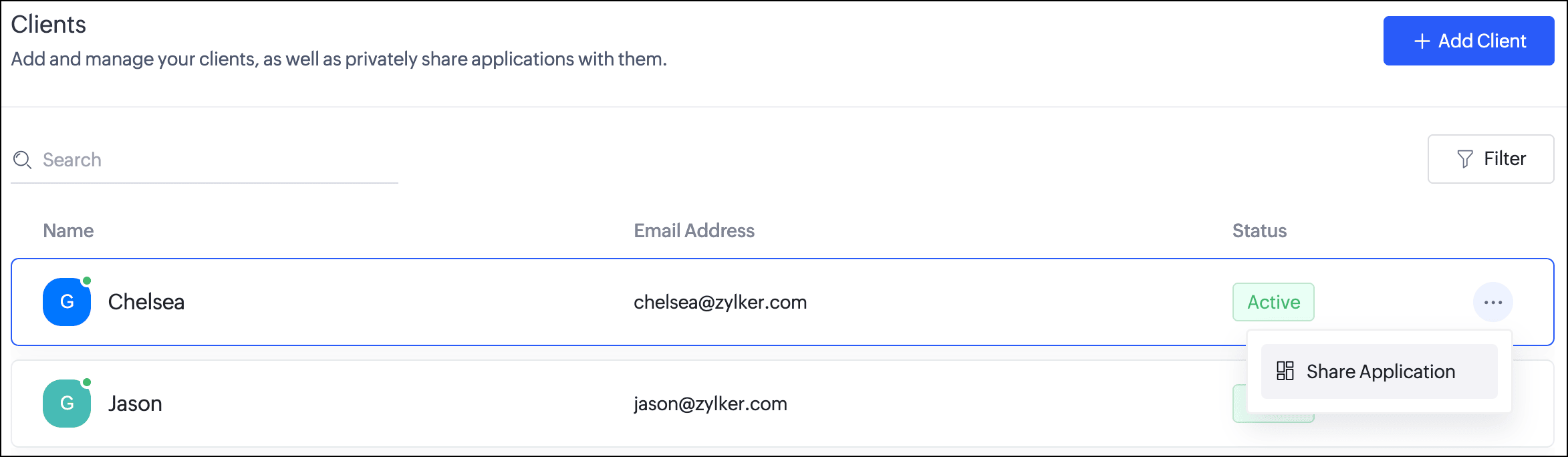
- Navigate to the Clients section. Click the horizontal ellipsis icon next to a client and select Share Application.
- In the popup, you can choose the Application and the version to be shared with the client.
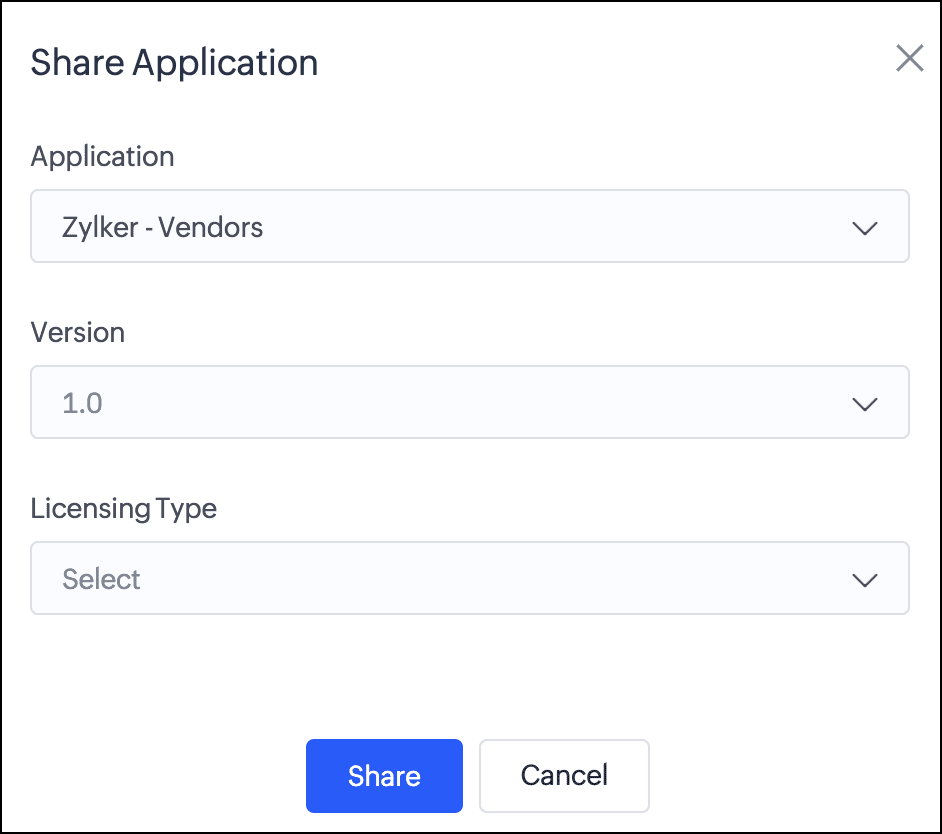
- Next, you can choose from two license types:
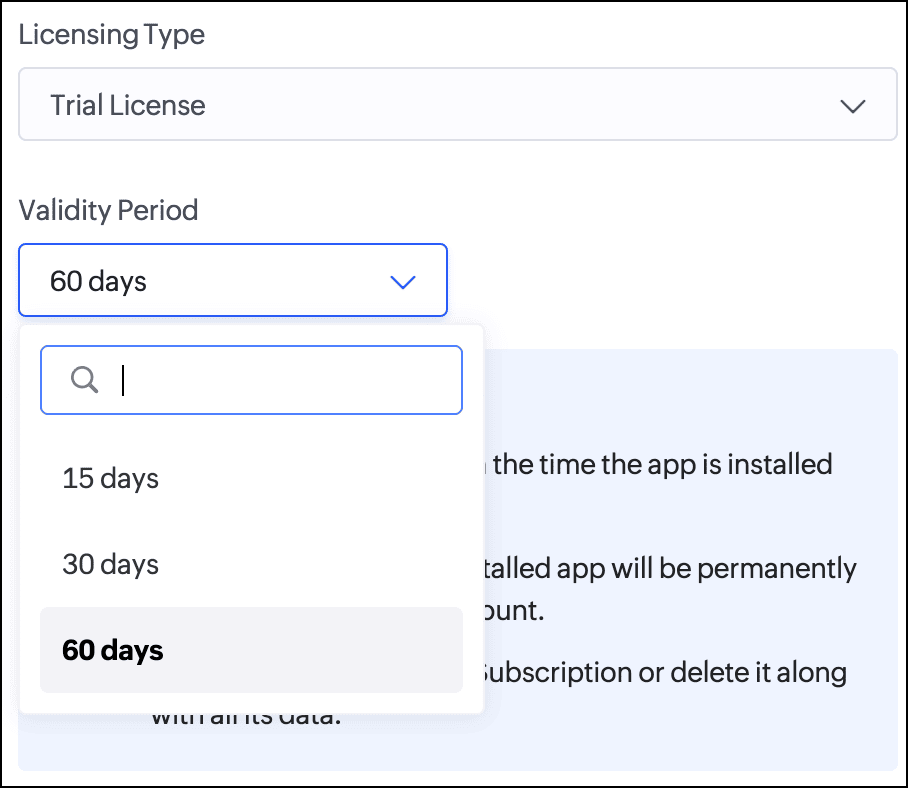
Trial License: Provide your client with a trial period to evaluate the app. You can set the duration to 15, 30, or 60 days.
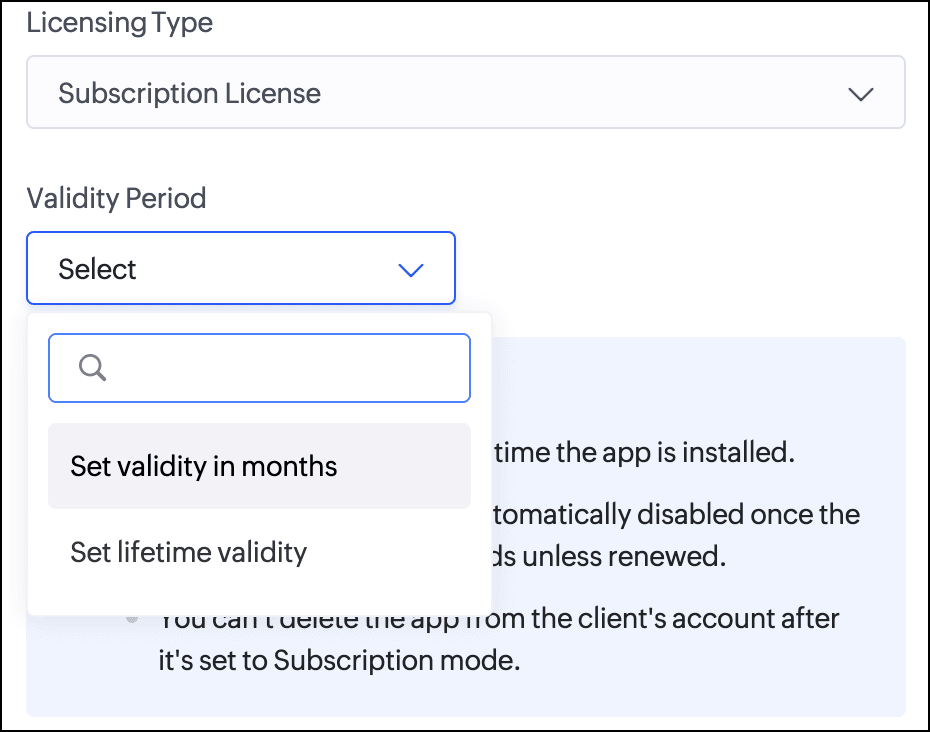
Subscription License: Once you've finalized the subscription terms with your client, you can issue a subscription license. You have the option to set a fixed validity period in months (from 1 to 36) or grant lifetime access to the app.
Consequently, with the introduction of this new flow, we've implemented automated email reminders to keep clients informed about their subscription status and expiry timelines. Developers will be proactively notified about client subscription activity and upcoming license expirations. This ensures both parties stay in sync throughout the subscription lifecycle.
DocumentationTo help you better understand these changes, we've provided comprehensive resources to assist you with the private sharing of applications. They can be accessed at the
Understanding private distribution of apps help page.
Environment support for installed apps
Along with the above enhancements, we're also introducing environment support for apps you've distributed. Your clients will now be able to add installed apps to environments and thoroughly test them in the staging environment before publishing them to production. This ensures the changes to apps are validated before they become accessible to end users.
This enhancement removes the earlier limitation that prevented distributed apps from being added to environments. Please note that while your clients can add distributed apps to environments, they will not have access to development. This continues our policy of protecting intellectual property and ensuring that developers remain in control of their apps.
Timeline
These enhancements have already been rolled out and are now accessible to users in all DCs.
We believe this new enhancement to the private sharing feature will provide you with greater control and flexibility when distributing your Zoho Creator applications. We hope you love it!
We'll be back soon with more exciting updates, so stay tuned.
Regards,
The Zoho Creator Team
Recent Topics
Report Configuration - Unable to select "File_Upload" under Supporting Document
Good day everyone. I encounter this issue whereby i have difficulty to select "File_Upload" under Supporting Document when i configuring my report. Ps: I have create Supporting Document in Zoho creator form as subform and the add this "File Upload" inside
Zoho CRM Multi-select values not translated
Hello! I have some issue with translate custom multi-select fields in zoho CRM in other language. I download export file, but it has all my custom fields and picklist values exept multi-select fields picklist values. Please, help me to undestand, is
Go Multilingual with Instant Bot Auto-Translation
Imagine you run a travel company with customers across different regions. Your website chatbot helps visitors discover travel packages, answers questions, and makes bookings. As your business expands into new markets, you want to offer the same experience
Create Flexible Layouts with Layout Rules
In a project, when a work moves from planning to execution, the information teams need can change at every stage. A project can need one set of details, a phase can need another, and a custom process may require an entirely different set of information.
Zoho Sites after login page blank
after i login to zoho sites, it stalls at a blank screen please help
Map My Client Locations for Zoho CRM Extension: Turn CRM Addresses Into Action
Hello everyone, Your CRM knows who your customers are. Now, see where they are on the interactive map directly from Zoho CRM. Introducing Map My Client Locations for Zoho CRM, an extension built for businesses that rely on sales visits, field service,
Find the conversions hiding outside your funnel: User Journeys is now live in PageSense
Hello Everyone, We are excited to announce that User Journeys is now live in Zoho PageSense. Here is what that means for you. Funnels are great for one thing. They tell you how the path you designed is performing. Homepage to product to cart to checkout,
Zoho CRM Error message #2 : Fixing [Invalid Credentials] and [Authentication Fail] while configuring IMAP
Hi Everyone! As a part of our Zoho CRM Error messages series, we're going to focus on couple of error messages that you might encounter while configuring IMAP and ways to resolve them. These are: [Invalid Credentials] [Authentication Fail] The annoying
Zoho Community Digest - August 2026 | Part 4
Hi everyone, and welcome back! We're closing out August with a strong final week, from Incentives for Zoho CRM bringing commission management inside the platform to Sequences in Bigin automating customer follow-ups end to end. There's also an IP allowlist
Related Lists: Consolidate cross-module data
A new and efficient way to connect your project data across the boundaries of modules, entities, and applications. Introducing related lists to incorporate related records from any module, entity, or external source directly into the detail view of a
Zoho Workshops in Frankfurt a.M. | 07. & 08. Oktober 2026 | Nur noch 1 Monat
Liebe deutschsprachige Zoho Community, Nur noch einen Monat bis zu den Zoho Workshops in Frankfurt! Am 7. und 8. Oktober ist es soweit: Die Zoho Workshops kehren zurück und finden dieses Mal im Radisson Blu Hotel, Frankfurt am Main, statt. Wenn Sie Ihre
Need to set workflow or journey wait time (time delay) in minutes, not hours
Minimum wait time for both Campaigns workflows and Marketing Automation journeys is one hour. I need one or the other to be set to several minutes (fraction of the hour). I tried to solve this by entering a fraction but the wait time data type is an integer
Zoho Assist Remote Desktop on Android grey screen
With Zoho Assist Remote Desktop for Android when I connect to an unattended device I see only a Grey Screen. It worked fine before. This is a recently issue. I tried to clean data and cache, reinstall app, try and old version... but nothing. Always grey
Integration Multiple WooCommerce Stores
Currently, Zoho Marketing Automation supports connecting only one WooCommerce store per account. For businesses managing multiple brands or stores, this creates operational challenges, as they are forced to maintain separate accounts for each store. Suggested
Introducing Smart Fields in Zoho Forms
Hello form builders! We are excited to introduce Smart Fields in Zoho Forms - a faster way to add calculations to your forms without writing formulas. Instead of creating multiple fields and configuring complex calculations yourself, you can now drag
Feature Request: Add Sort by Cell Color and Text Color functionality
Hello Zoho Sheet Development Team, I am writing to suggest a feature enhancement for Zoho Sheet. Currently, the platform supports "Filter by Color," which is incredibly useful. However, there is no native option to "Sort by Color" (by cell fill or text
MCP for Zoho Sign is not working
I'm using the mcp builder at mcp.zoho.com and selected Zoho Sign. I have created it 4 different times but my other mcp servers are working. However, mcp for zoho sign WILL NOT WORK. It throws a 400 error. I've checked everything. I tried with both Grok
Automating CRM backup storage?
Hi there, We've recently set up automatic backups for our Zoho CRM account. We were hoping that the backup functionality would not require any manual work on our end, but it seems that we are always required to download the backups ourselves, store them,
Android screen dissapeared
While running assist on an android tablet, screen poofs out of existence, have to restart sharing.
Kaizen #229: Email-Deal Associations in Zoho CRM
Hi All, Welcome back to another week of Kaizen! Emails are a core channel for customer communication in any CRM system. In Zoho CRM, emails can be associated with records across multiple modules. In this post, we will focus on email associations with
Cross-application Deluge calls fail when application link name starts with a number
I encountered an issue when calling a custom function in another Zoho Creator application within the same account. The target application’s URL/application link name began with a number, similar to: 27_example_application The following cross-application
Bank charges
Hello, team zoho I have a difficulty, in the form to register the payment of the customer has a field "bank charges" more when registering an expense or payment to the supplier that field does not appear. And I think that's a mistake because in my account
Bank Feeds - Multiple Orgs / Multiple LLCs
Hi, We are migrating our books over from another service, and trying to connect our bank feeds. We have 3 separate LLCs, and 3 separate orgs in Zoho Books. We want to connect the bank feeds for each entity to each org. However, when we connect the 2nd
WORK DRIVE CUSTOMIZATION
WORK DRIVE CUSTOMIZATION Create folder for every Case by “Contact Name “in Work Drive under Associate Deals Folder Directory: User Work Drive Accounts: Route Directory Associate Cases Case Name, Case Number Client Upload- Shared with contact (for collaboration)
All new Address Field in Zoho CRM: maintain structured and accurate address inputs
Availability Update: 29 September 2025: It's currently available for all new sign-ups and for existing Zoho CRM orgs which are in the Professional edition exclusively for IN DC users. 2 March 2026: Available to users in all DCs except US and EU DC. 24
Vendor payment unexpectedly routed through Prepaid Expenses instead of Accounts Payable
Hello, We are investigating an unexpected accounting behavior in Zoho Books. We created vendor bills and vendor payments for two suppliers using what appears to be the same workflow, but the journal entries are different. Vendor 1 – UZ Store (works correctly)
BANK CHARGES
When paying a supplier via credit card we are charged a fee. I process the payment through payments made and then enter the fees in bank charge. However i get this message : Bank charges are applied. Please select a bank account. And it will not let
JOIN with Select and TOP not returning data to results
hi when I add TOP to yellow it does not return cl."Id", cl."Date",cl."Outcome", cl."Membership" from the join. Remove it and they appear. The TOP and the ON seem to work as in the number of rows returned. Doing the classic join log table and return only
[Free webinar] Blueprint as a business process engine - Creator Tech Connect
Hello everyone, We are excited to invite you to another edition of the Creator Tech Connect webinar. About Creator Tech Connect The Creator Tech Connect series is a free monthly webinar comprised of pure technical sessions, where we dive deep into the
Allow Email Attachments to Be Opened Directly in Zoho CRM
Hi all, It would be very helpful if attachments linked to an email in Zoho CRM could be clicked and opened directly from the email preview. Currently, the attachment names are displayed, but the experience of viewing them is unnecessarily limited. Users
Dashboard Metric Drill-Down Shows Stale Data
Summary: When clicking between different metric components on a custom dashboard, the drill-down list shows data from the previously opened metric instead of the one just clicked. Steps to Reproduce: Create a custom dashboard with multiple pre-defined/templatized
Zoho email suddenly stopped working - any ideas to fix this ?
Zoho email suddenly stopped working. although got this sent to me Reporting-MTA: dns; mx.zohomail.eu Arrival-Date: Wed, 26 Aug 2026 12:48:05 +0100 Original-Recipient: rfc822; Final-Recipient: rfc822; Status: 421 Action: delayed Last-Attempt-Date: 26 Aug
GCLID and Zoho Bookings
Is there anyway to embed a Zoho Bookings signup on a landing page and pass the GCLID information? More specifically, can this be done using auto-tagging and not manual tagging the GCLID? I know Zappier has an integration to do this but is there a better
Calendar Booking - Rescheduled and cancelled appointments not deleting in G Suite calendar
We started using the built in calendar booking feature and are really liking it! However, we are having one issue. If a client reschedules an appointment using the reschedule feature the original appointment doesn't get deleted out of our g suite calendar
Automate pushing Zoho CRM backups into Zoho WorkDrive
Through our Zoho One subscription we have both Zoho CRM and Zoho WorkDrive. We have regular backups setup in Zoho CRM. Once the backup is created, we are notified. Since we want to keep these backups for more than 7 days, we manually download them. They
Backup to external location (Dropbox etc)
Dear Zoho Team, I've set the CRM Backup schedule to once a month, which when complete sends me an email. Of course I then need to manually login and download the file. Nice but VERY 20th century and relies on us humans not to fail. Can you please provide
Cloud backup for CRM
This is an idea / feature request for ability to periodically export CRM backup to an external cloud provider, similar to Zoho Vault: https://www.zoho.com/vault/data-backup.html Alternatively I would help being able to access manual data backup programatically
Introducing throw statements in Deluge
Hello everyone, We're introducing a powerful addition to Deluge that gives you more precise control over error handling in your scripts. Whether you're calling an external API, validating user input, or enforcing a business rule, there are moments when
WhatsApp Coexistence
Hello, please implement WhatsApp Coexistence, we need to track staff whatsapp chats on their PC and they need to be able to use WhatsApp on their mobile in around the office and warehouse, as we video call customers and send them product pictures. Thank
Zoho Creator to Zoho Writer for prefilled documents...
In response to the question about connecting Zoho Creator to Zoho Writer for prefilled documents, I wanted to share a working implementation that demonstrates how to use the record_id parameter with the Zoho Writer Merge API. This allows Writer to automatically
Next Page