User Tips: Adding Multiple Products (Package) to a Quote v2.0 (with Client Script)

User Tips: Adding Multiple Products (Package) to a Quote v2.0 (with Client Script)

This solution is an improvement on the original idea which used deluge. My solution was posted in the comments are: https://help.zoho.com/portal/en/community/topic/adding-multiple-products-package-to-a-quote

The updated version uses client script instead of deluge.

Hopefully this might help a few people. It helps our reps speed up the process of creating quotes and quoting accurately.

Details below:


Problem:

We run numerous manufacturer promotions with various bundled items and discounts. Reps struggle to remember all details, leading to incorrect discounts on quotes.


Solution

I created a custom module for Product Packages. For each promotion, we create a "Package" including all products, discounts, and start/end dates. A quote lookup field allows users to select a package, automatically adding the related products with accurate pricing and information.

When a user selects a package, a client script retrieves all related products and discounts, adding them to the quote. The lookup field is then reset for additional product entries.

Some fields on the package layout include:

  1. Promotion type
  2. Status
  3. Start / End dates for the promotion. 
  4. Pop-up message field if we want to show the rep a message when quoting the package

I also have a workflow that sets the package to “Expired” when the record expiration date hits. The lookup is filtered in the quotes module to only show “Active” packages.

In Action (with lookup field to the package module):
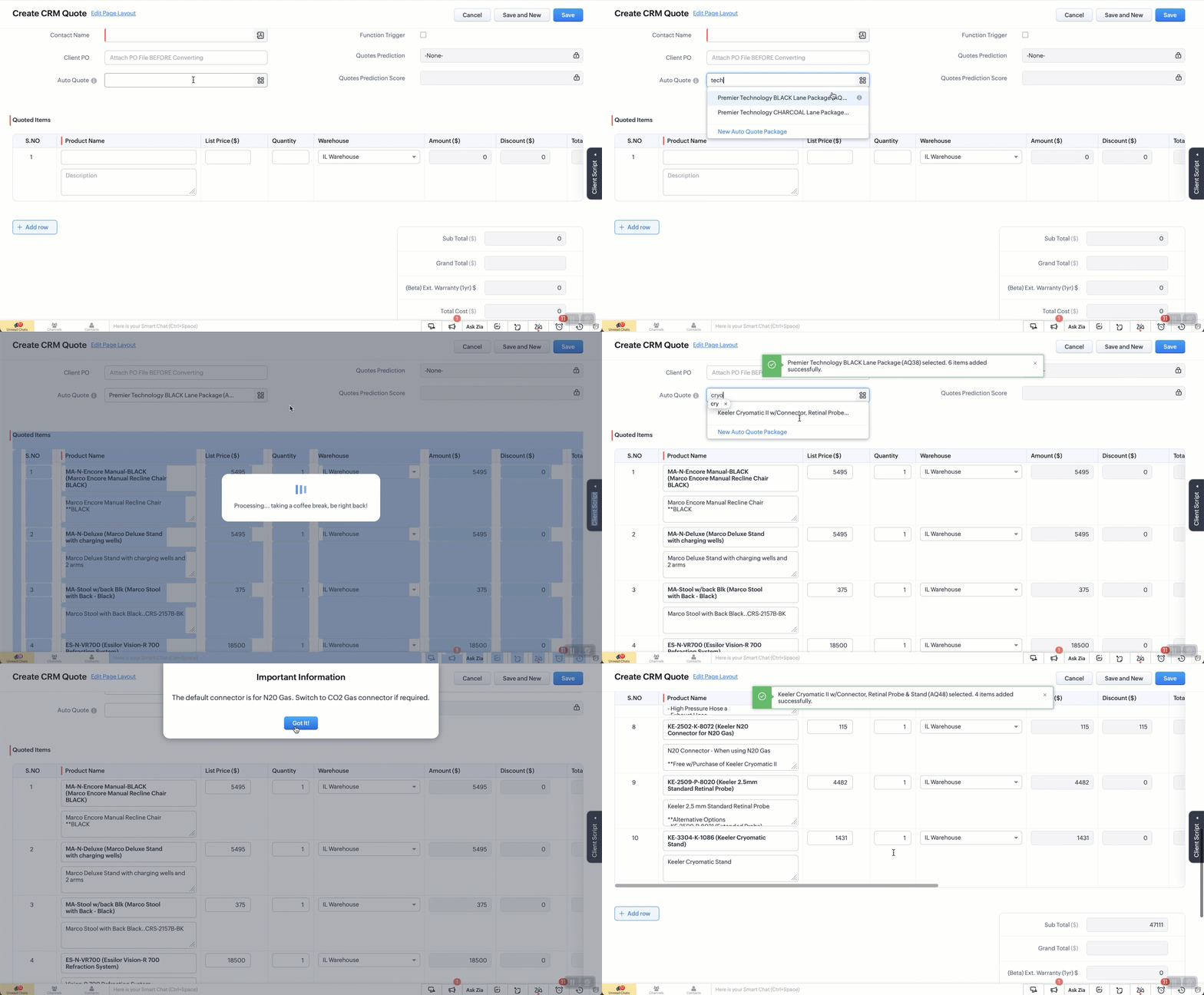


The Setup:
Create a custom module “Package Items”. Add the fields as below. 
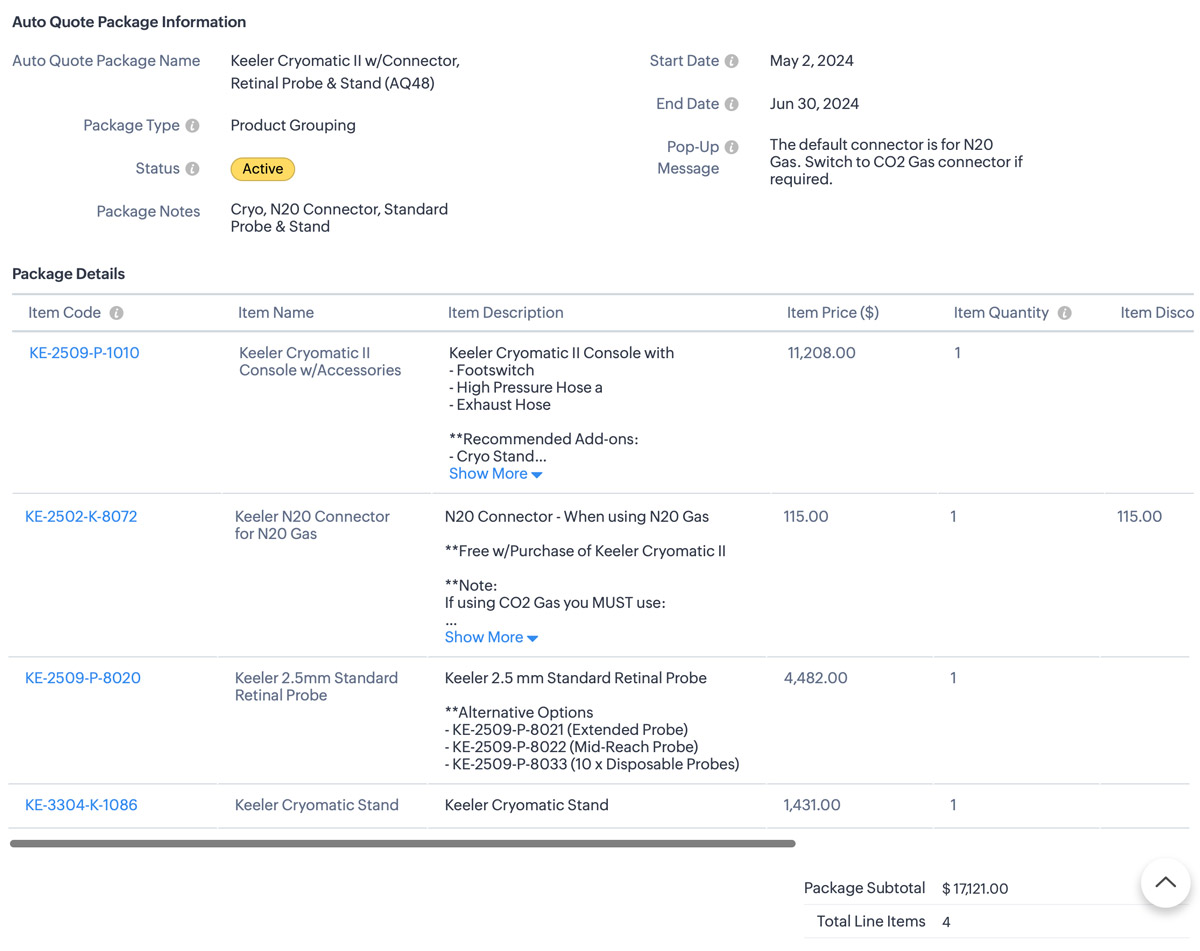


Additional Info
1. I also use client script to hide the “Auto-Quote” field when in a standard view page
2. When I name a package, a deluge script runs to append the Package ID number which is an auto-number field.


The Code: 

  1. try {
    // List of funny loading messages
    var loadingMessages = [
    "Cranking up the quote machine...",
    "One sec... just stepped out for coffee.",
    "Hold tight! The hamsters are running the wheels.",
    "Almost there... giving it a little extra attention.",
    "Loading... probably faster than your internet speed.",
    "Please hold while we make magic happen.",
    "Just a moment... our servers are stretching their legs.",
    "Your patience is appreciated... and rewarded!",
    "Brewing up your quote right now...",
    "Give us a second... we're flexing our technical muscles.",
    "Our system is doing some yoga... stay calm!",
    "Loading... don't worry, it's not stuck!",
    "Fetching your data... hopefully with no detours!",
    "Keep calm and let us handle the rest.",
    "Processing... taking a coffee break, be right back!",
    "Stay tuned... greatness is loading.",
    "Our system is running... faster than a cheetah!",
    "Looks like you're going all in on this quote!",
    "Getting things ready... just need a moment.",
    "Hold on... we're aligning some stars for you.",
    "Please wait... we're feeding the server squirrels.",
    "One moment... your quote is coming fresh out of the oven.",
    "Loading... just making sure everything is perfect!",
    "Generating your quote... thanks for your patience!",
    "Almost there... your quote is worth the wait!"
    ];

    // Select a random message from the list
    var randomMessage = loadingMessages[Math.floor(Math.random() * loadingMessages.length)];

    // Log the entire value object to see its structure
    log("Full value object: " + JSON.stringify(value));

    // Ensure value.id is defined before proceeding
    if (!value || !value.id) {
    log("No product selected or value.id is undefined");
    return; // Exit the script quietly since no valid product was selected
    }

    // Show loader
    ZDK.Client.showLoader({ type: 'page', template: 'vertical-bar', message: randomMessage });

    // Extract the product ID and name from the value passed in
    var packageId = value.id;
    var packageName = value.name;
    log("Product ID: " + packageId);
    log("Package Name: " + packageName);

    // Get the subform field from Quotes module
    var quotedItemsSubform = ZDK.Page.getField("Quoted_Items");

    // Fetch product information for the package ID
    var packageDetails = ZDK.Apps.CRM.Auto_Quote_Packages.fetchById(packageId);


    var packageStatus = packageDetails.Status; // Active or Expired.
    var popUpMessage = packageDetails.Pop_Up_Message; // Check the package for any Pop-up message we want to show
    log("Package Details: " + JSON.stringify(packageDetails));
    log("Package Status: " + packageStatus);
    log("Pop-Up Message: " + popUpMessage);

    // Initialize array for existing line items.
    var existingLineItems = quotedItemsSubform.getValue() || [];
    log("Existing line items: " + JSON.stringify(existingLineItems));
    //
    // Only include rows with products. Excude any blank rows from the quote
    var filteredExistingLineItems = existingLineItems.filter(function(item) {
    return item.Product_Name && item.Product_Name.id;
    }).map(function(item) {
    return {
    id: item.Product_Name.id // Include only the item ID
    };
    });
    log("Filtered existing line items: " + JSON.stringify(filteredExistingLineItems));

    // Array to hold new line items we are adding
    var newLineItemArray = [];

    // Check if package is active and populate new line items
    if (packageStatus === "Active") {
    var packageItems = packageDetails.Package_Details;
    packageItems.forEach(function(item) {
    var productLineItem = {
    Product_Name: {
    id: item.Item_Code.id,
    name: `${item.Item_Code.name} (${item.Item_Name})`
    },
    Product_List_Price: item.Item_Price,
    Description: item.Item_Description,
    List_Price: item.Item_Price,
    Quantity: item.Item_Quantity ?? 1, // Default to 1 if Qty is null or undefined
    Discount: Math.abs(item.Item_Discount ?? 0) // Get the discount or default to 0 if null
    };
    log("New product line item: " + JSON.stringify(productLineItem));
    newLineItemArray.push(productLineItem);
    });
    } else {
    // Show error message if the package is not active
    // My layout to only show Active items but if you don't do that this solves it.
    ZDK.Client.showMessage('This package / promo is no longer active. Please contact the admin for details.', { type: 'error' });
    ZDK.Client.hideLoader();
    return; // Exit the script since the package is not active
    }

    // Combine existing line items with new line items
    var updatedLineItemArray = filteredExistingLineItems.concat(newLineItemArray);
    log("Updated line items array: " + JSON.stringify(updatedLineItemArray));

    // Add all updated items to the Quotes page
    quotedItemsSubform.setValue(updatedLineItemArray);

    // Reset the pick list field so user can re-use
    ZDK.Page.getField("Auto_Quote").setValue(null);

    // Hide loader
    ZDK.Client.hideLoader();

    log("Final updated line items: " + JSON.stringify(updatedLineItemArray));

    // Function to show confirmation and number of items added back to the user
    var showSuccessMessage = function() {
    ZDK.Client.showMessage(`${value.name} selected. ${newLineItemArray.length} items added successfully.`, { type: 'success' });
    };

    // Function to show popup message and then success message
    var showAlertAndSuccess = function(message, heading, buttonText) {
    ZDK.Client.showAlert(message, heading, buttonText);
    showSuccessMessage();
    };

    // Check for pop-up message and show alert if it exists
    if (popUpMessage) {
    showAlertAndSuccess(popUpMessage, "Important Information", "Got It!");
    } else {
    // No pop-up message, show the success message
    showSuccessMessage();
    }
    } catch (error) {
    // Log the error
    log('Error: ' + error.message);

    // Show error message
    ZDK.Client.showMessage('An error occurred while adding items. Please try again.', { type: 'error' });

    // Hide loader
    ZDK.Client.hideLoader();
    }

    • Recent Topics

    • Enable Credit Note creation for Sales Returns BEFORE receiving goods

      Currently, it is not possible to issue a Credit Note linked to a Sales Return until the goods have been officially marked as "received" in the system. In our business, we often need to issue a credit note to our clients immediately upon the initiation
    • Best way to setup Inventory bin tracking for products with multiple boxes/crates

      Hi - we need some advice from the community on setting up Items in the Inventory for products with multiple crates. We have large products in our warehouse where the product is delivered as two large (double pallet) crates. We've setup the Items for these
    • Getting Internal Server Error message when filing for MTD

      I am trying to file for the MTD submission, and after I filled in all the information and click (Fetch Obligation) this message "Internal Server Error [500]" pops up. I have been trying for awhile and its still the same. What shall I do as today is deadline
    • No access to change view permission for team members

      Hi, I want team members to be able to update the percentage progress on their goals at mid year. Currently they cannot edit this, they can only update the comments against the goals. The ability to add view permission to goal progress for team members
    • Turn your Zoho One Home into your workspace with Dashboard 2.0

      When you open Zoho One, you probably don't need to see everything. You need to see what matters to you. A sales manager may want to track pipeline and revenue. An HR manager may want to monitor employee information. A business leader may want a quick
    • Zoho Assist Feature Update: August 2026

      Web Forms Web Forms in Zoho Assist help you collect support requests directly from your website and route them to the right team. Embed a customizable form so customers can raise issue details or join an active remote session using a session ID. Depending
    • Tip #84 – A More Natural Remote Experience with Custom Cursor Support – 'Insider Insights'

      Hello Zoho Assist Community! Anyone who has spent time in a remote support session knows the feeling. You're guiding a customer through a task, moving the cursor across the screen, and something feels just slightly off. The cursor doesn't behave the way
    • 【無料/オンライン】8/20開催|Zoho ワークアウト|ユーザー同士で学び合うオンラインもくもく会

      ユーザーの皆さま、こんにちは。 コミュニティグループの中野です。 8月20日(木)開催の「Zoho ワークアウト」をご案内します。 Zoho ワークアウトは、参加者それぞれが取り組みたいテーマを持ち寄り、 ユーザー同士で交流しながら、設定・検証・運用改善を進めるオンラインの「もくもく会」です。 「作業を進めたいけれど、一人だと手が止まってしまう」 「他社がどのように活用しているのか知りたい」 「同じ課題を持つユーザーと情報交換したい」 そんな方は、ぜひお気軽にご参加ください。 ▶︎ 参加登録はこちら(無料)
    • Assign Price Book to Accounts (again!)

      I can see this topic has been bumping about for over 10 years and unfortunately Zoho hasn't seen the need (or use case) in CRM to be able to assign an account to a price book to automate quoting (amongst other things). Strange given they DO assign price
    • Custom Statuses - Can You Do Anything With Them?

      As far as I can tell, one really cannot do much with custom statuses. I created a new custom status for sales orders called "Customizing / Hold". This is for sales orders that have the Confirmed status. The use case here is that, as an e-commerce company,
    • Price Book in foreign currency

      We have many customers who buy in foreign currency (USD), where our base currency is our local currency (AUD). It would be normal (it is in Zoho Books, Zoho Inventory etc.) to assign a currency to a price book, but I cannot find this option in Zoho CRM
    • How to disable option to search (In Advanced Field > Matrix Choice > Dropdown)

      In Advanced Field > Matrix Choice > Dropdown I don’t want the option to search or type to fill in words. How can I disable or remove this function?
    • Layout rules in Zoho FSM

      As titled, is there an item in the pipeline or an ETA for the implementation of layout rules in Zoho FSM? Similar to how they work in Zoho CRM https://help.zoho.com/portal/en/kb/crm/customize-crm-account/customizing-page-layouts/articles/create-conditional-layouts
    • Marketing Tip #45: Use WhatsApp to engage customers and drive more sales

      Email is great. Social media is useful. But when it comes to getting a message actually read? WhatsApp wins. In general, open rates on WhatsApp messages are significantly higher than email, and the conversation feels personal rather than promotional.
    • Client Script also planned for Zoho Desk?

      Hello there, I modified something in Zoho CRM the other day and was amazed at the possibilities offered by the "Client Script" feature in conjunction with the ZDK. You can lock any fields on the screen, edit them, you can react to various events (field
    • View Answer Bot conversations?

      We are trialing Zia and are experimenting with Answer Bot on our knowledge base. So far so good! Management asks me if it is possible to view Answer Bot conversations, the purpose being to look over its shoulder and confirm that it is working as des
    • Add Comment workflow action delayed by 1–2 minutes in Zoho Desk

      Hello Zoho Support team, We are experiencing an issue with a workflow in Zoho Desk. The workflow is triggered when the Quote ID field is updated and performs two actions: A standard Field Update An Add Comment custom action When the Quote ID field is
    • Where do I edit the "Welcome to [portal name]" message

      I am looking for a way to edit the "Welcome to" part of the message that is seen on the landing page (ex: https://help.zoho.com/portal/en/home). When I use the French interface, it doesn't make sense... I want to change it from "Bienvenue chez" to" Bienvenue au". Thanks!
    • Zoho Books | Product updates | August 2026

      Hello users, July has been an exciting month for Zoho Books! This month, we're excited to introduce HTML PDF Templates, Placeholders as Pills, expanded approval workflows for Sales Returns and Journals, and significant compliance updates across the India,
    • Zoho CRM Layout Rules: Nine New Actions, Profile-Based Execution, and Interactive Preview

      Hello everyone, Availability: This feature is now available for customers in the JP and SA DCs. It is planned to be released for other customers in soon. We’re excited to announce powerful new enhancements to Layout Rules in Zoho CRM - a feature built
    • Zoho Books and TRAINING SALES receipt label for eTims?

      Hi, Can Zoho Books implement TRAINING SALES receipts and push them to eTims for test? In other words how can we send to Zoho or even create in Zoho training mode invoices and TEST the workflow POS>Zoho Books>eTims and back without actually registering
    • Reporting Tags and COGS

      Is there any way to get COGS recorded against reporting tags? The use cases seems very straightforward to me. If I'm running a P/L report against a specific reporting tag (I use mine for customer type, but it could be used for regions, etc.), the revenue
    • Hide Custom Fields for Customers or Vendors

      For whatever reason, all custom fields added to the Customer module also get added to the Vendor module. This leads to a clunky experience for users, as many custom fields we add only apply to one or the other. There should be a "hide" option to hide
    • Onboarding process

      I urgently need onboarding support. My account still shows trial period.
    • Detailed General Ledger - Display Transaction Description in Reports

      Hi Zoho Team, I'm currently using Zoho Books and have a question regarding the Detailed General Ledger report. When we enter a description or narration in transactions (Bills, Journal Entries, Expenses, etc.), the report does not display this description.
    • Zoho Mail Does Not Integrate with Analytics

      Hello everyone, Just wanted to make a quick post about the problem with zoho mail. Currently it does not connect to Zoho Analytics, which I think is crazy considering both of these applications have existed for a long period of time. Even zoho voice a
    • Net ##th Terms (e.g. due on the following 15th)

      I have a client who pays me twice monthly per our contract. It would be helpful to have terms on my invoices where the invoice is due on the 15th or the 30th of the same or the following month.
    • Project status update visibility within a project

      Currently the only place within Zoho projects to see status updates for a given project is actually not in the project it's self it's in the Collaboration section and then by searching for a given project and clicking on the status tab. It would be great
    • Using custom CRM fields

      I have created a series of fields in the Deals module that need to be linked to fields in a contract I have customized. I can only see how to map standard fields, not the custom ones. How do I do this?
    • Como limitar o Zia Agent?

      Geralmente quando estamos criando um agente de IA no ZIa Agent Studio, colocamos o que ele deve fazer, utilizando as instruções que colocamos no Knowledge Base. Mas como colocamos limites que não devem ser ultrapassados? Para isso utilizamos os Guardrails,
    • An important update for Zoho Cliq desktop users

      The latest version of the Zoho Cliq desktop app (v1.8.0) will no longer be supported on macOS 10.15 Catalina and earlier versions. This is because the framework we use (Electron) no longer supports some older macOS versions. If you’re using macOS 10.15
    • All new Address Field in Zoho CRM: maintain structured and accurate address inputs

      Availability Update: 29 September 2025: It's currently available for all new sign-ups and for existing Zoho CRM orgs which are in the Professional edition exclusively for IN DC users. 2 March 2026: Available to users in all DCs except US and EU DC. 24
    • Zoho Flow - Zoho Desk trigger "Ticket created or updated" overrides Department

      Just in case anyone else has this issue. We had a Zoho Flow with the Zoho Desk trigger "Ticket created or updated". In the trigger I had selected a Department (Sales). What happens is that the Department ID (Sales) is submitted as part of the request
    • 2026 Product Roadmap and Upcoming Features

      This is your guide to what is coming in Zoho Vertical Studio throughout 2026. We’ll update this post throughout the year as items move from development to release, and as and when new initiatives are added. Once a feature is released, it will be reflected
    • Introducing Canvas templates: Design once, apply everywhere

      Greetings all! We're happy to introduce Canvas templates, a Forms view enhancement that enables you to design form layouts just once and apply them seamlessly across multiple modules. Imagine you use five CRM modules (Contacts, Deals, Leads, and more),
    • Zoho Projects - Will there ever be a send email feature in Zoho Project?

      Hi team, Are there plans to or will there ever be a sendemail feature in Zoho Projects, brining it in line with other similar platforms like Asana, ClickUp and Monday? I know that you can add comments via email to a specific task, but I believe this only
    • Why cant i see the Campaigns module in my Zoho app

      I am on the ZOHO CRM Standard edition. I can clearly see and use the Campaign module when viewing the ZOHO CRM desktop. When I switch to my phone, the Campaign Module does not show. I have gone through all the settings I can think of, but I still can't
    • 📣 Ask the team behind Zoho SalesIQ: Summer '26 Q&A

      Hi everyone! Following our recent webinars, Summer '26 Release: What's New in Zoho SalesIQ—where we walked you through all the new features, what they do, and how they work—and Driving the AI Evolution: Building Smarter Customer Experiences with Zoho
    • Always display images from this sender – Is this feature available?

      In Zoho mail, I had my "Load external images" setting set to "Ask me", and that's fine. That's the setting I prefer. What's not fine though is I always need to tick "Display now" for each email I get, regardless if I've done that multiple times from several
    • Set Custom Icon for Custom Modules in new Zoho CRM UI

    • Next Page