Apple iOS 17 and iPadOS 17 updates for Zoho Desk users
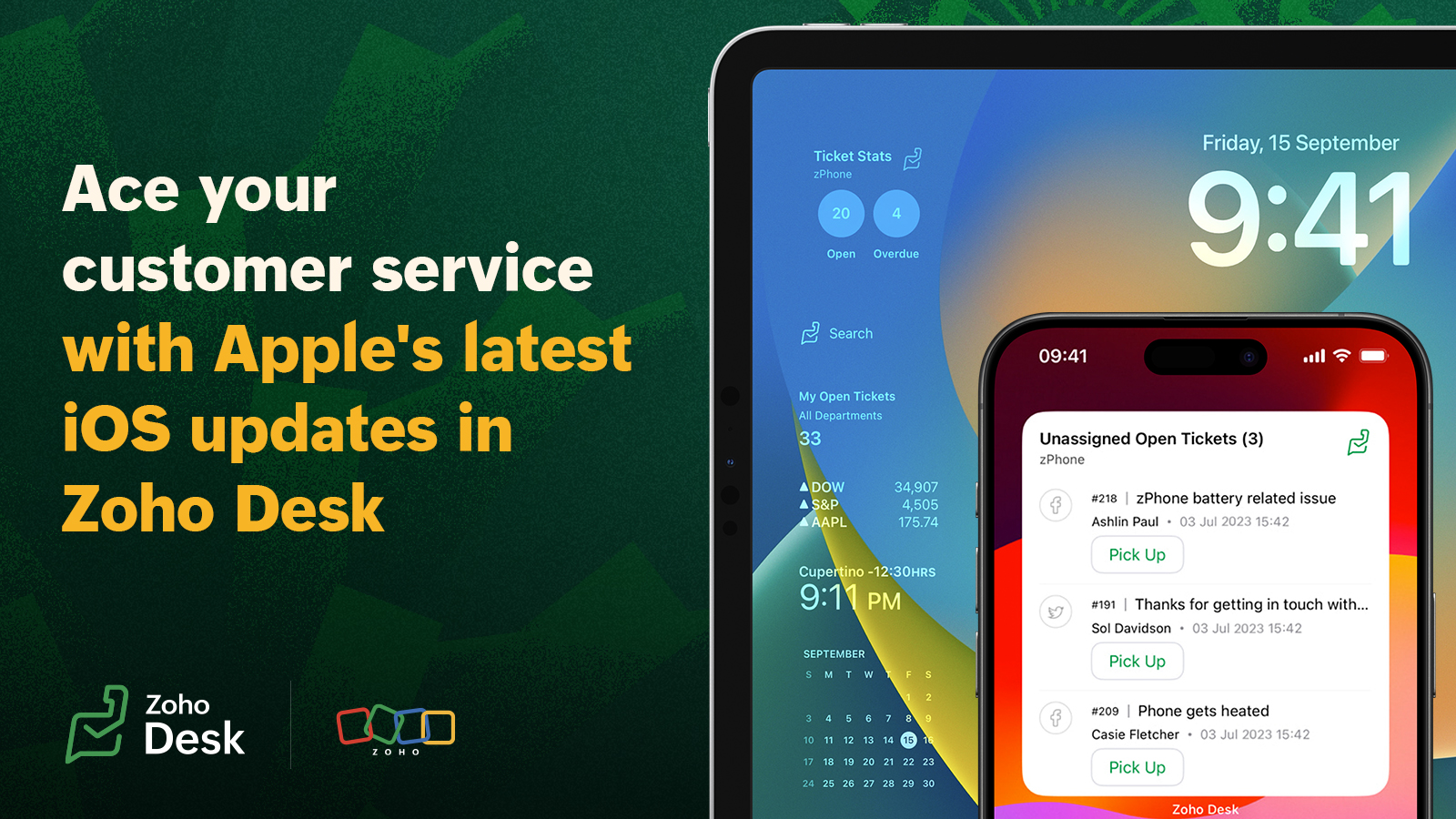
1. Easy and actionable ticketing widgets
With iOS 17 and iPad OS 17, Apple offers interactive user experiences in your device home screen. Leveraging this enhancement, Zoho Desk has introduced actionable widgets for ticket management.
Support teams have to stay proactive with customer tickets so that they don't get missed. We have introduced two new updates for the Apple device users through this new iOS and iPad OS update.
The newly added Pending approval widget will help support supervisors to manage requests from team, from the new widget on their phones.
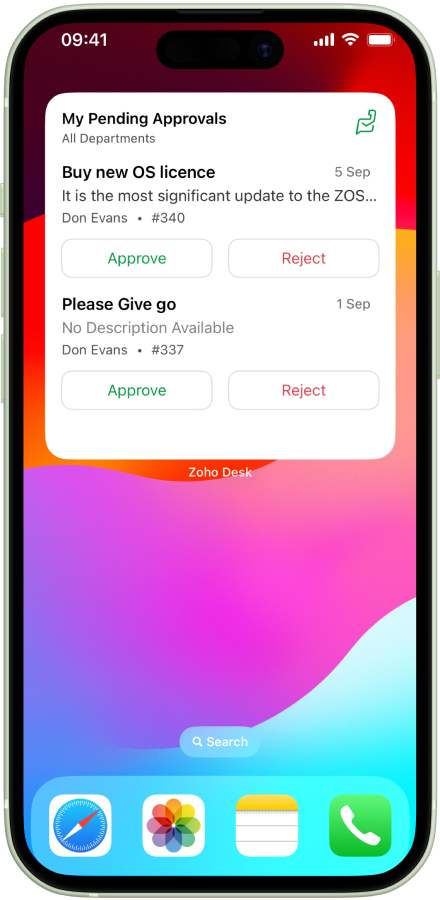
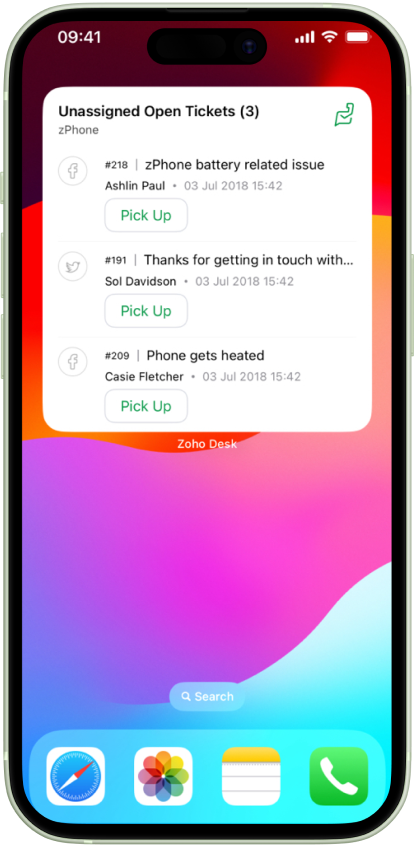
2. Enhanced Lockscreen Widgets
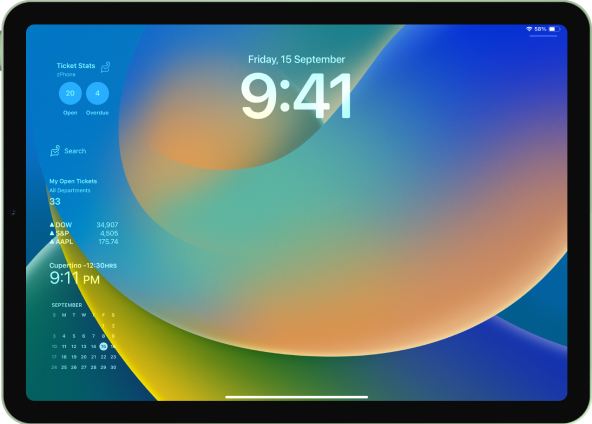
With the new OS enhancement for iPad, users can view updates on locked iPad screens. Zoho Desk users can now take a quick glance at the open ticket count right from their iPad's dormant lock screen.
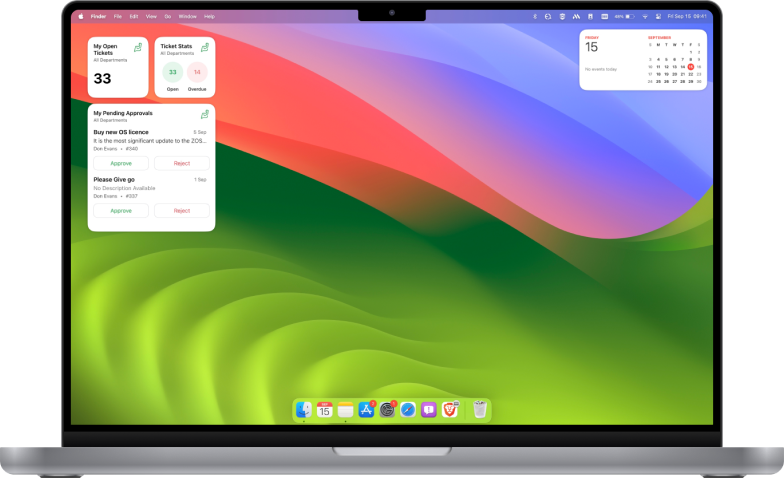
3. Mac Sonoma for Zoho Desk users
With the latest update, support teams can view all crucial info available on their phone via a Mac screen. This will help agents prioritise tasks and schedule their works from laptop, without having to go back and forth between the devices.
4. Update for the StandBy mode
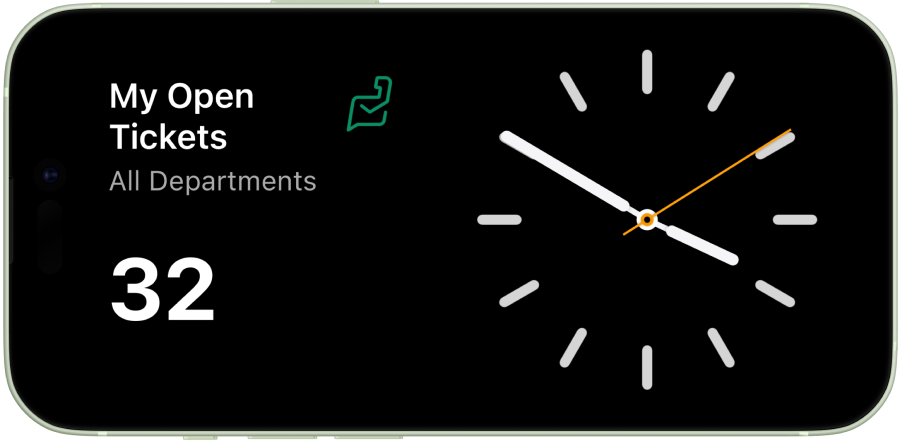
iOS 17 includes StandBy mode, which presents a full-screen display of glanceable information, ideal for viewing notifications, widgets, and more from a distance when your iPhone is on its side and charging.
Taking advantage of this unique capability, Zoho Desk has introduced the Ticket Stat view for StandBy mode.
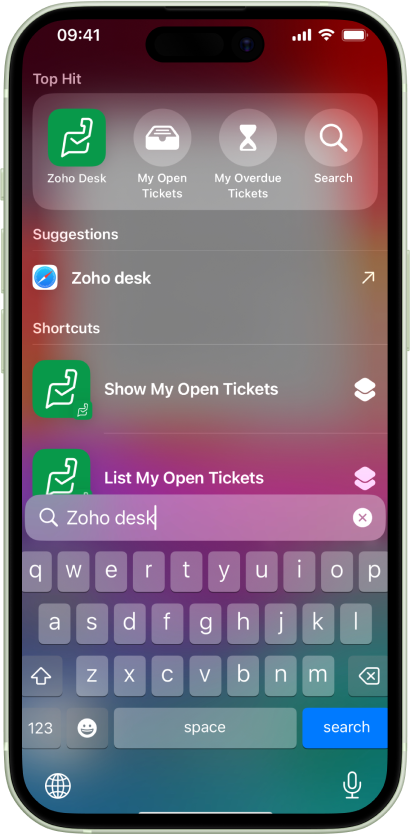
5. Quick access to help desk info
With the release of iOS 17, we have automated our home screen shortcuts. Your support reps can now access crucial info through search, and view open and overdue tickets and help desk notifications from the app shortcuts.
Watch the video for all the updates in action:
Topic Participants
Sangeeta Priyadarshini
Sticky Posts
Zoho Desk Partners with Microsoft's M365 Copilot for seamless customer service experiences
Hello Zoho Desk users, We are happy to announce that Zoho Desk has partnered with Microsoft's M365 to empower customer service teams with enhanced capabilities and seamless experiences for agents. Microsoft announced their partnership during their keynoteWhatsApp pricing changes: Pay per message starting July 1, 2025
Starting July 1, 2025, WhatsApp is shifting from conversation-based pricing to per-message billing. That means every business-initiated message you send will count. Not just the first one in a 24-hour window. Pricing updates on the WhatsApp Business PlatformLive Webinar - Work smarter with Zoho Desk and Zoho Workplace integration
Hello customers! Zoho Desk and Zoho Workplace are coming together for a webinar on 14th May, 2024. Zoho Workplace is a suite of productivity apps for email, chat, docs, calls, and more at one single place. Zoho Desk is closely integrated with a few toolsApple iOS 17 and iPadOS 17 updates for Zoho Desk users
Hello Zoho Desk users! Apple recently announced the release of iOS 17 and iPad OS 17. These latest OS updates will help you stay productive and efficient, through interactive and seamless user experiences. Zoho Desk has incorporated the updates to helpZoho Desk Cheat Sheet For The Year-End
Check out these Zoho Desk best practices to end this year on a high and have a great one ahead! #1 Set Business (Holiday) Hours - If you have limited working hours, please make sure you restrict your business hours or set them as holidays for the coming days. Let your customers know when you will, and won't, be available. #2 Update the Annual Holiday List - Check the holidays for the new year and update the holiday schedule. Usually, holidays from the current year will be carried over for the next
Recent Topics
[Free Webinar] Learning Table Series - AI-Enhanced Insurance Claim Management in Zoho Creator
Hello Everyone! We’re excited to invite you to another edition of Learning Table Series, where we showcase how Zoho Creator empowers industries with innovative and automated solutions. Struggling with lengthy claim processes, a lack of visibility intoNot sure how to use credits to my account
Hi I have a $50 credit to my account. I'm just wondering how I can apply that to either a current invoice or to try a new service. Any advice would be great, thanks. Kind Regards ChrisControl who sees Timeline and Interactions in Zoho CRM through Profiles
The feature has been enabled for all DCs (except US, EU, and IN DCs). We will be rolling it out to the other DCs in the upcoming days. Dear All, In a CRM, not all users would require access to the history of a record. For instance, a Marketing OperationsZoho Desk Integration - Add the option to send the estimate from the Zoho Desk Ticket Integration
Hi, Currently in the Zoho Desk integration, the user is able to create an estimate from a ticket, once the estimate is created the user can see the estimate under the ticket (see screenshot below), but is not able to send that estimate from Zoho Desk.CRM Validation Rules Support Only Single Condition
Simply put, CRM validation rules support only a single condition for each field on "All Records". You also cannot specify additional validation rules on the same field because it has already been used in an existing validation rule. The ONLY solutionUnapproved Leaves are hard to distinguish in Attendance View
This is a an unapproved leave request It appears in the Attendance view without any visual indicator if its approved or not For a whole day request this might be manageable but for hourly requests it gets very hard to know which are approved, which arePerformance Appraisal Probation Period
Hello All, Is there any possible way to create an appraisal cycle for new staff members, at the end of probation period? Many thanks!Zoho Creatorの一括操作における処理の同期/非同期について
現在、Creatorのレポート機能を利用して、複数のレコードに対して一括で処理を実行しようとしていますが、処理の実行順序について確認したいことがあります。 レポート内の複数レコードに一括で処理を実行した際、処理は同期的に行われるのでしょうか?それとも非同期的に行われるのでしょうか? 【同期処理の場合】 レコード①に対する処理が開始され、終了後にレコード②に対する処理が開始され、最後にレコード③に対する処理が実行されるように、処理が順番に行われる場合。 【非同期処理の場合】 レコード①、レコード②、レコード③の処理が一斉に開始され、それぞれ並行して処理が行われ、全処理が終了する場合。Why I always need to reauthorize the connection, what should I need to refresh connection automatically.
Hi good day, I'm having a problem with the custom connection, i'm sending webhooks (BULK READ API) from crm and process the rest in zoho flow, at first the connection is working but an hour, it give me that error (invalid token), and it need to createMail Delivery Failed
Good morning, I have just set up an account with 5 users, however each time a message is sent to 1 user a m'mail delivery failed' message is generated. See below. Any ideas Thanks Rob This message was created automatically by mail delivery software. A message that you sent could not be delivered to one or more of its recipients. This is a permanent error. The following address(es) failed: robb@thesmartgroup.ae mailbox is full: retry timeout exceeded ------ This is a copy of the message,Delete commerce website
I need to delete a commerce website, but the only option is to click on settings, REQUEST DELETE, choose an urgency notice, add a message....AND THEN nothing, no way to send the request. Why is nothing simple!?!?! I just want to delete the store. TheAdding external users to Zoho Social under Zoho ONE licence - how to best achieve this
My client has a small business, and we are looking to implementing Zoho ONE with a single flexible user licence as that is all they really need and offers the best pricing for the range of modules we eventually wish to set them up with, one of which willThis mobile number has been marked spam. Please contact support.
Problem Description: One of our sales agents in our organization is unable to sign in to Zoho Mail. When attempting to log in, the following message appears: This mobile number has been marked as spam. Please contact support at as@zohocorp.com @zohocorpWhat’s New in Zoho Inventory | April 2025
Hello users, April has been a big month in Zoho Inventory! We’ve rolled out powerful new features to help you streamline production, optimise stock management, and tailor your workflows. While several updates bring helpful enhancements, three major additionsPass current date to a field using Zoho Flow
I am trying to generate an invoice automatically once somebody submits a record in Zoho CRM. I get an error in the invoice date. I have entered {{zoho.currentdate}} in the Date field. When I test the flow, I get "Zoho Books says "Invalid value passedAPI: Mark Sales Order as Open + Custom Status
Hi, it's possible to create Custom Status (sub-status actually) states for the Sales Order. So you have Open, Void. Then under Open you can have Open, and create one called Order Paid, Order Shipped, etc etc...which is grouped under Open. I can use theTip 26: How to hide the "Submit" button from a form
Hi everyone, Hope you're staying safe and working from home. We are, too. By now, we at Zoho are all very much accustomed to the new normal—working remotely. Today, we're back with yet another simple but interesting tip--how to hide the Submit button from your forms. In certain scenarios, you may want to hide the submit button from a form until all the fields are filled in. Use case In this tip, we'll show you how to hide the Submit button while the user is entering data into the form, and thenHow do I move Notes around within a Group?
It says here: " You can now sort notes by title (alphabetically), or by date modified and date created. You can even organize your notes by dragging and dropping them into a particular order. To sort your notes, simply go to Settings and tap “Sort By.” Please note: all sort settings will be saved and synced across devices, except for custom sorting. Custom sorting will be device specific."However, I am unable to 'custom sort' in either Notebook for Mac or on the Web. In addition, I can't find theZoho Sign: need to leave document pending for up to a year, or maybe there's a better way?
I have zoho one, maybe there's a better way to do this with another service than sending a zoho sign template from zoho crm. At the end of the day this requirement is due to regulations, no matter how dumb it may seem. I'm just looking for a way of gettingUnable to edit or delete email address
I signed up for free Zoho today. I usually am pretty good at understanding and configuring things like this, but your interface baffles me, and your online help is cryptic to say the least. I have spent hours just trying to set up a couple of email accounts in Zoho before pointing my domain MX records to Zoho. I solved some other issues on my own, but I can't figure out this latest problem: I have created two email addresses in Zoho. Let's call the first one myname@mydomain.com and the second oneMastering Zia Match Scores | Let's Talk Recruit
Feeling overwhelmed by hundreds of resumes for every job? You’re not alone! Welcome back to Let’s Talk Recruit, where we break down Zoho Recruit’s features and hiring best practices into simple, actionable insights for recruiters. Imagine having an assistantWe are unable to process your request now. Please try again after sometime or contact support@zohoaccounts.com
I cannot sign up and return the error of we are unable to process your request now. Please try again after sometime or contact support@zohoaccounts.comMulti-currency - What's cooking ?
Hi, We have been doing this feature for sometime and we would like to give you some glimpses of it. Working with Multi Currency : Multicurrency support gives you the ability to handle business transactions in multiple currencies. You can define a base currency for your organization and add more currencies with exchange rates based on the base currency. Setup : From the setup page, you can manage all the currencies supported by your organization. Currencies pageHow to reduce programmatically the image uploaded by user?
I need a function that will automatically reduce the pixel dimension to 800 x 600 pixels / 180 resolution or (approx. 1.37MB) of image uploaded by user from digital camera, for example, 2271 x 1704 pixels /180 resolution or approx. 11.1MB. After the user selected the image, the function will able to detect if pixels is above 800x600, process the photo (crop/ reduce) and resume upload. Need help...Dark mode for Zoho Creator / Zoho CRM Code editor
Hi Team, Is there any plans for Dark mode in Zoho creator / Zoho Crm code editor and development pages in pipeline?ZOHO Android Client
Hi, I installed the Android app, but it had an issue, so I reinstalled it. I was able to add multiple accounts, but now when I add the next account, it just duplicates the one I already have and will not even allow me to enter the info for another account.I'd like to suggest a feature enhancement for SalesIQ that would greatly improve the user experience across different channels.
Hello Zoho Team, Current Limitation: When I enable the pre-chat form under Brands > Flow Controls to collect the visitor’s name and email, it gets applied globally across all channels, including WhatsApp, Messenger, and Instagram. This doesn't quite alignEnhance Barcode/QR Code scanner with bulk scanning or continuously scanning
Dear Zoho Creator, As we all know, after each scan, the scanning frame closes. Imagine having 100 items; we would need to tap 100 times and wait roughly 1 second each time for the scanning frame to reopen on mobile web. It's not just about wasting time;Managing Rental Sales in Zoho Inventory
I am aware that Zoho Inventory is not yet set up to handle rental sales and invoicing. Is anyone using it for rentals anyway? I'd like to hear about how others have found work arounds to manage inventory of rental equipment, rental payments, etc. ThZoho Flow to Creator 3001 Respoonse
I have updated my Flows with the new V2 connection to Zoho Creator, but now some Flows do not work. They take in data from a Webhook and are supposed to create a record in Creator, however creator returns a 3001 message along with a failure, but I cannotFile Upload to Work Drive While Adding Records in Zoho Creator Application
Hi I am trying to set a file attachment field in zoho creator form, to enable the user to upload a scanned document from their local pc. The file should be uploaded to zoho workdrive and not to the default zoho creator storage. The file link should beWhy not possible to generate?
Using this https://desk.zoho.com/DeskAPIDocument#TicketCount#TicketCount_Getticketcountbyfield on my ZML script url :"https://desk.zoho.com/api/v1/ticketsCountByFieldValues?departmentId=XXXXXXXXXXX&accountId!=XXXXXXXXX&customField1=cf_country_1:XXXXXX&field=overDue"email
Hi My crm email is not working, can you check, I have zoho one account.Need option to see Mass Emails & Cadences in Gmail Outbox OR a dedicated Zoho Outbox
Hi everyone, Right now, when we send 1:1 emails from gmail (with gmail API connected to Zoho CRM), those emails appear both in gmail's sent folder and in Zoho CRM. That works well. But when we send Mass Emails or Cadence emails form Zoho CRM, they areI can't found API for Sales Receipts
Hello May you please help me to find an API document for Sales Receipts to get data and retrive a custom fields like Invoice and credit notes RegardsKaizen #205 - Answering Your Questions | Managing Picklists and Enabling History Tracking via Zoho CRM APIs
Hello everyone! Welcome back to another post in our Kaizen series. In this post, we will look at how you can manage picklist fields in Zoho CRM using APIs. This topic was raised as feedback to Kaizen #200, so we are taking it up here with more details.Internally created tickets
Hi there When tickets are created internally on-behalf of customers - there is nothing to show that the ticket was created by an internal agent. This means, that it's easy for our agents to confuse tickets which were created by internal team members andAutomatically change website passwords
Hi everyone, We just switched to a Professional package to also use the "Automatically change website passwords" function. But I cannot find anything about it, how to use it, anywhere. Does anyone know how I can use this function? Best, CasparChange Invoice Prices for an Effective Date
Hi, It would be a really good feature to be able to change the prices on invoices/recurring invoices from an effective date in the event of price increases. For instance, I am in the process of increasing prices that will be effective from a specific"Other Current Asset" accounts as "Paid Through" accounts in Expense
It would be incredibly useful to be able to assign accounts of type Other Current Asset as Paid Through accounts in Expense. Currently, Other Current Liability are permitted as Paid Through Accounts. This makes sense, as Credit Cards are current liabilities.Next Page