Bot Filtering & Apple Mail Privacy Protection Compliance in Zoho Campaigns
Dear Campaigns Users,
The wait is over! We’re excited to announce that the enhanced bot filtering feature is now live in Zoho Campaigns. This update brings greater accuracy to your email campaign reports by distinguishing real user engagement from automated bot activity.
What are bot opens/clicks?
Bot opens/clicks are interactions triggered by automated software rather than real users. These bots often scan emails for security purposes, leading to inflated engagement metrics. You may notice multiple opens/clicks from a single contact—even if they never actually interacted with your email.
Why does bot filtering matter?
Bot-generated activity can skew your campaign analytics, making it harder to measure true engagement. With our advanced bot filtering, you’ll get a more reliable view of your audience’s response, allowing for better decision-making.
Key features of bot filtering in Zoho Campaigns
Easy toggle: Enable or disable bot filtering with a single switch under Settings > General Settings > Bot Filter. The feature is enabled by default to ensure data accuracy from the start.
Transparency: Your reports will indicate whether bot filtering is active, keeping your analytics clear and reliable.
Detailed reporting: Whether the filter is enabled or disabled, your campaign reports will display:
Reliable opens/clicks (verified engagement by individuals)
Bot opens/clicks (automated activity)
This dual metric system provides a clearer understanding of your campaign performance.
Apple MPP tracking: Reports now include a dedicated metric for Apple Mail Privacy Protection (MPP) opens, helping you analyze the impact of Apple’s privacy policies on your data.
Apple Mail Privacy Protection (MPP)
Apple Mail users can enable Mail Privacy Protection (MPP), which prevents senders from accurately tracking email opens. When activated, Apple Mail pre-loads tracking pixels automatically, making it seem like all emails are opened—even if they aren’t.
This results in inflated open rates and makes it challenging to distinguish real user engagement from automated activity.
How Does Zoho Campaigns Address This?
Zoho Campaigns provides MPP Opens as a separate metric in your reports. Using intelligent data modeling, our system helps you assess engagement more accurately, so you can measure campaign success despite Apple’s privacy updates.
How to Enable Bot Filtering in Zoho Campaigns
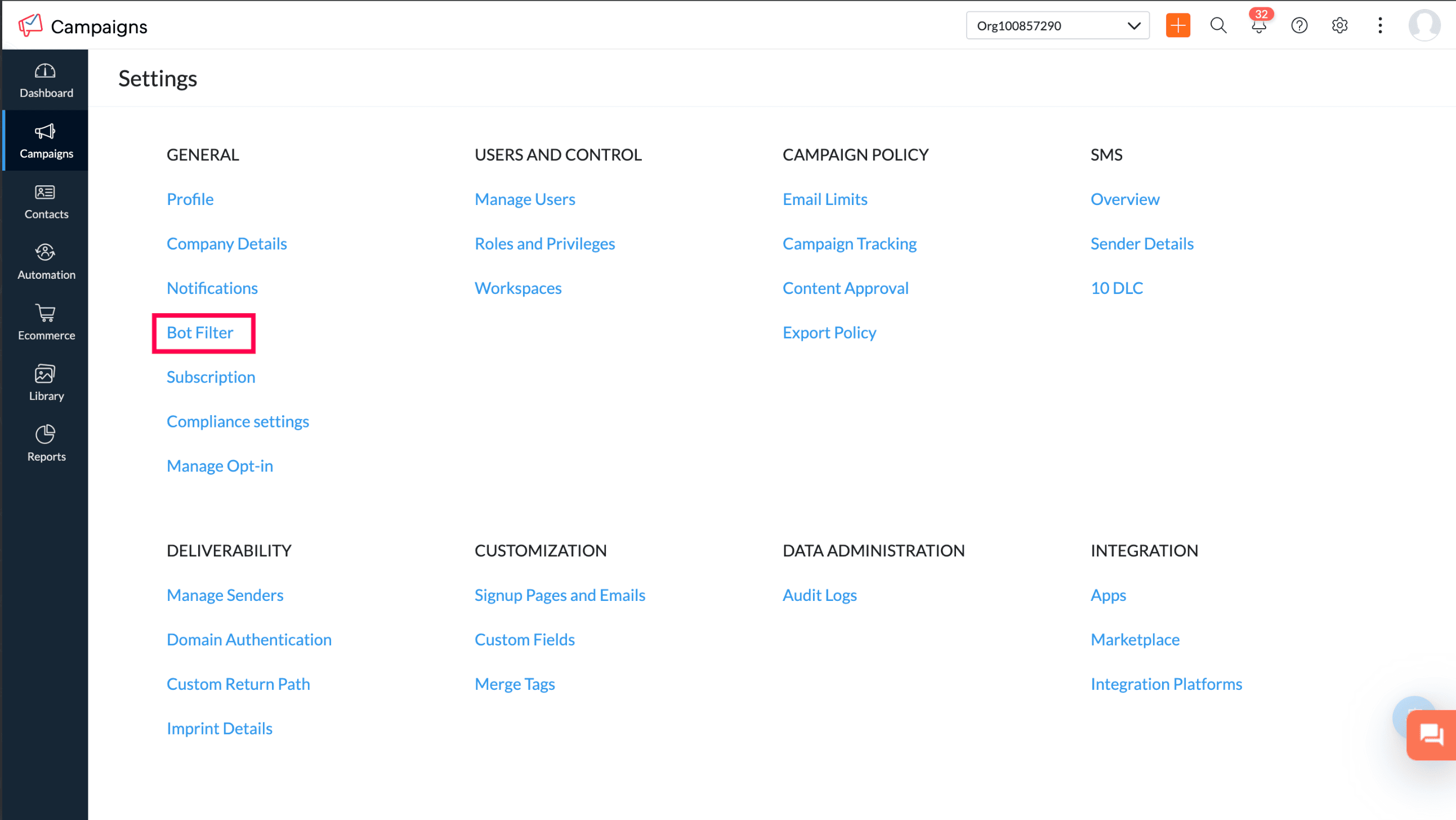
Go to Settings > General Settings to find the Bot Filtering setting.
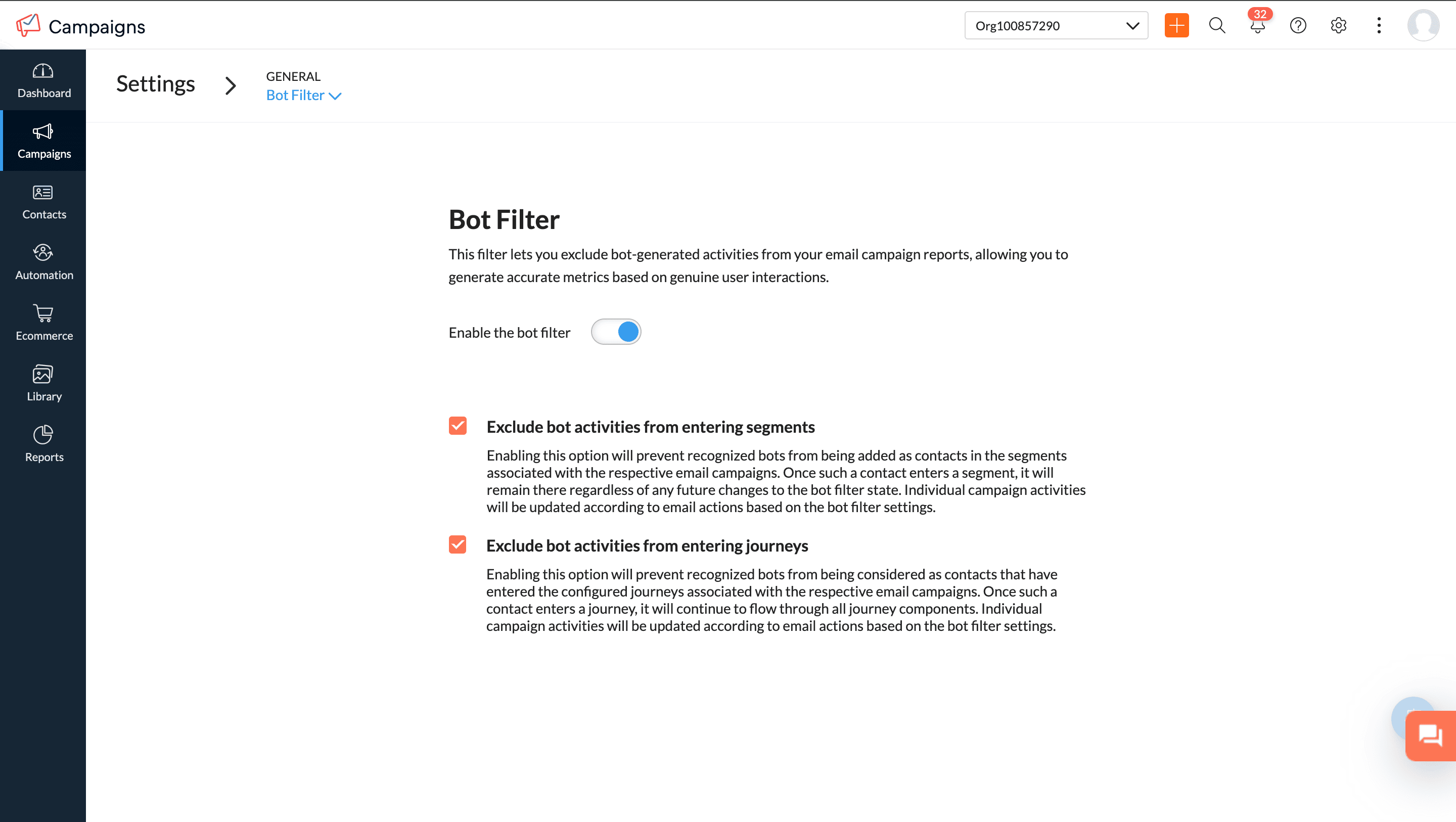
Step 2: Enable or disable bot filtering
Enabled (default): Your reports will prioritize real user engagement while still displaying bot activity separately.
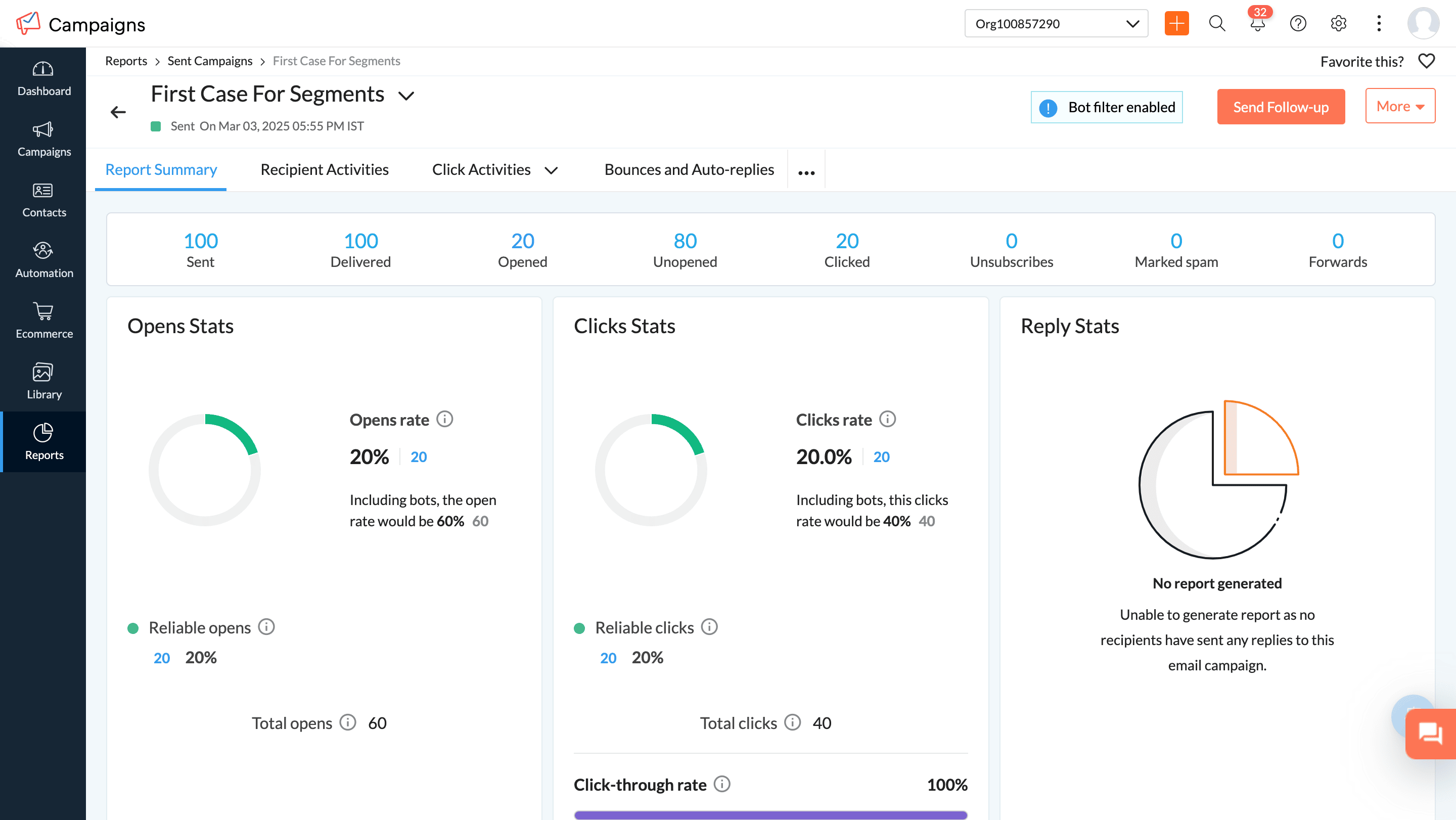

Step 3: Confirmation pop-up when disabling bot filtering
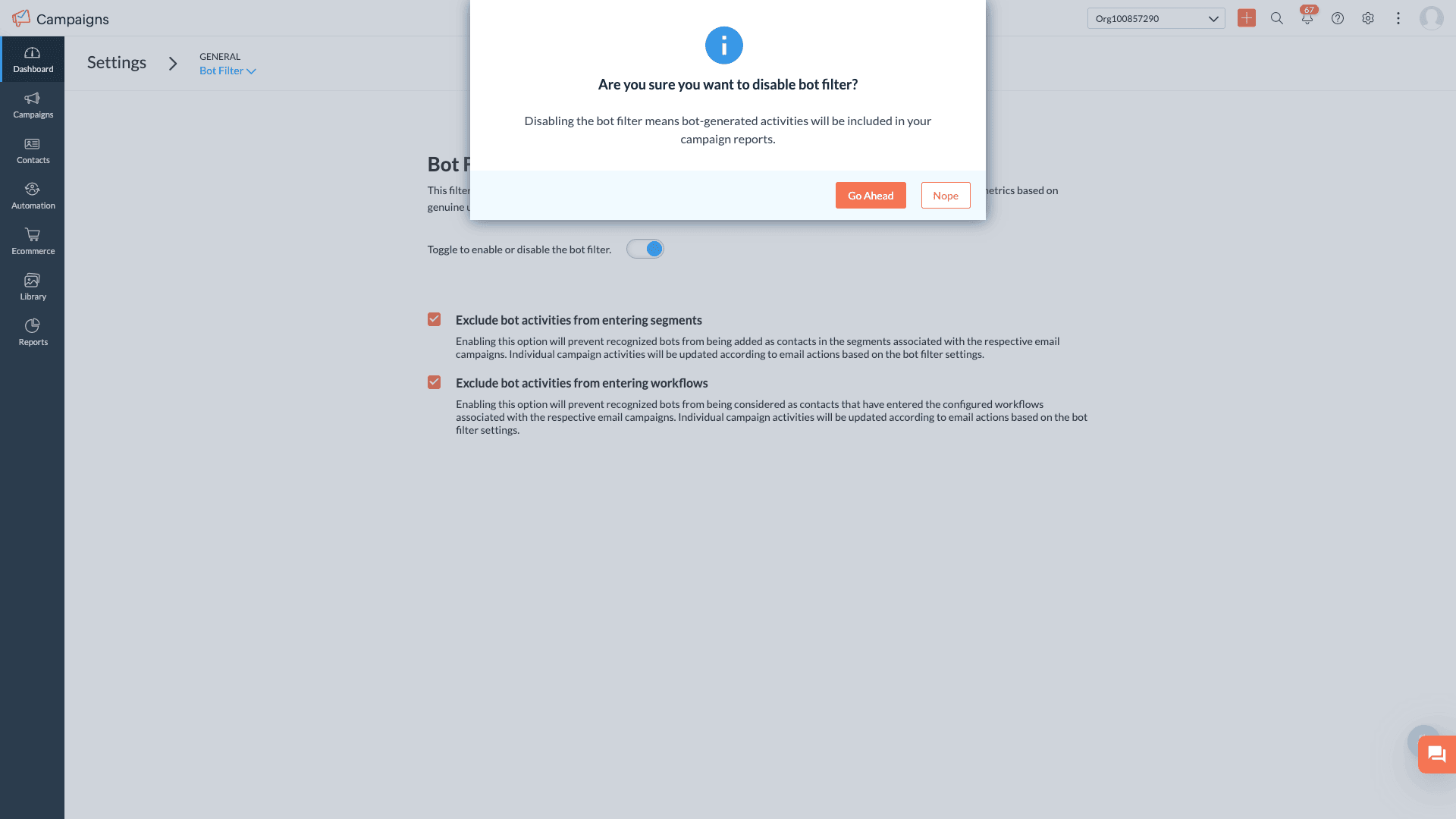
 Notes: With the enhanced bot filtering now active, you may notice a more accurate reflection of your open and click rates. Prior to April 1st 2025, campaigns filtered out some bot requests to show open rates. Now, with this update, our bot detection has been significantly improved, allowing us to identify a greater number of bot interactions. Consequently, you might observe a slight decrease in open and click rates compared to previously inflated numbers, as we now detect and filter more bots than before
Apple MPP opens will be included in segments and workflows by default.
Campaign reports from April 1st 2025, onward will show updated data, including reliable opens, unreliable opens, and bot opens based on bot filter settings.
- For past campaigns, we have filtered out the bot engagement by default, hence the campaign reports will show reliable and MPP opens.
New filters in the Contacts section allow for deeper analysis of reliable opens vs. bot opens.
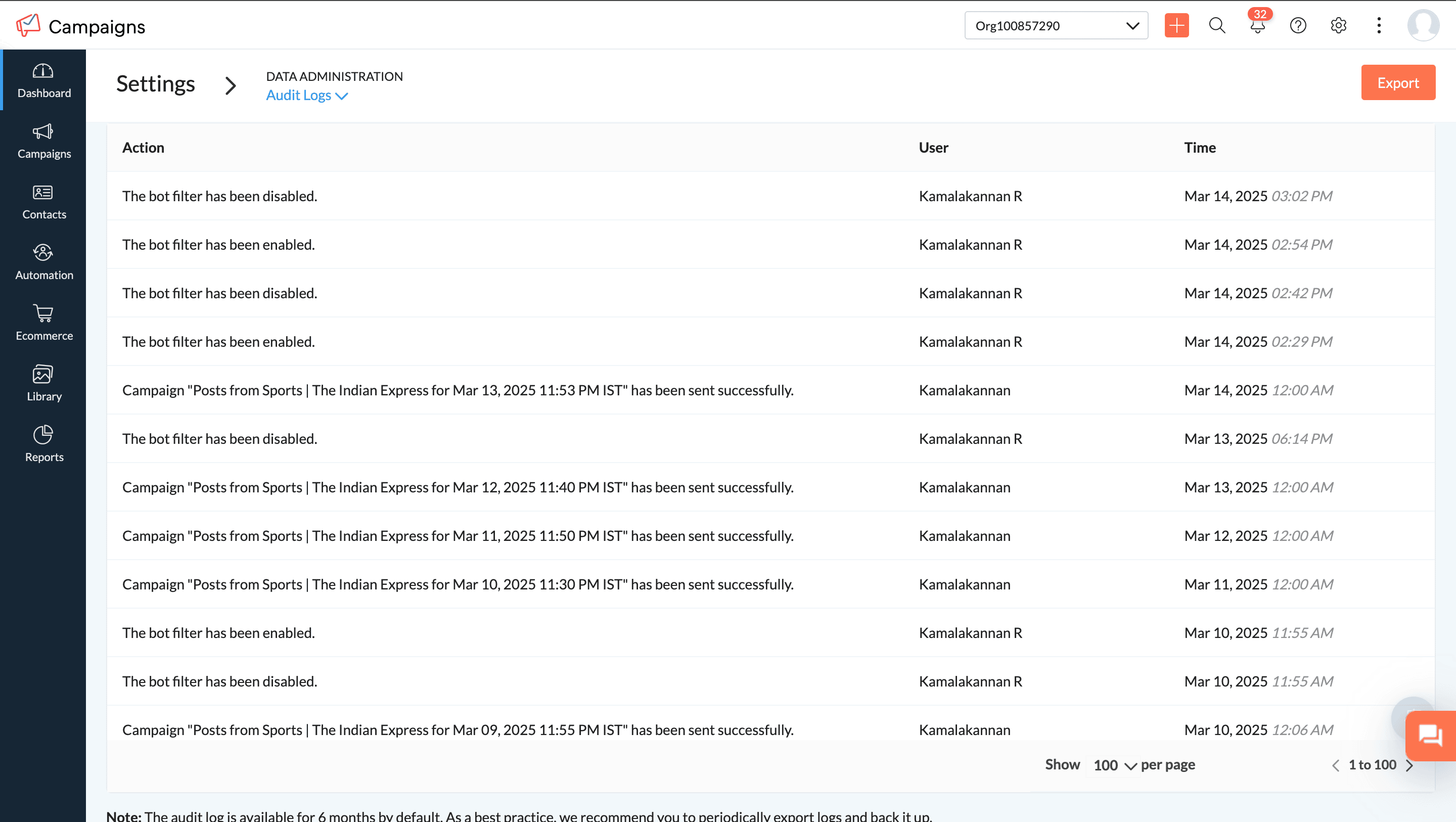
Changes to bot filtering settings will be tracked in Audit Logs.
Bot engagement data is now available when exporting campaign reports.
We’re Here to Help!We believe this update will give you more confidence in your email analytics and help you optimize your campaigns with precision. Try it out, and let us know how it works for you!
Happy email marketing!
Best regards,
Zoho Campaigns
Topic Participants
Moncy Samuel
Denny Weber
Meyyappan CT
Alexis
Sticky Posts
Marketer's Space: Proven tips to improve open rates – Part II
Hello Marketers! Welcome back to another post in Marketer's Space! We're continuing from where we left off a fortnight ago. We ended the previous post discussing the subject line, and we'll continue from there. Let's dive right in. Pre-header Pre-headerTip of the week 03 - Sending emails in batches
Today's marketers not only want their email marketing to be efficient, but also smart. For an email campaign, you may think you have all the essential elements for lead conversion—a big mailing list, an attractive template design, and the most-engaging message content, but after hitting the ‘send’ button, you may not get the expected conversions. Wondering why? Here’s one of the major reasons. Many marketers miss out on sending the email campaign the right way. Did you know that you should not beTip of the week 04 - Know about your recipients' 'prime open time.'
In today's market, the importance of customer behavior is astounding, with a vast amount of research and resources going into finding how customers make decisions. The process of persuading your customers to open your email and click on your call-to-action becomes easy when you understand the psychology behind their behavioral traits. Time to turn into a psychologist! Let's get to the basics—you want your emails to resonate well with your recipients. So, what's the primary thing involved here? It'sZoho Campaigns Expert Diaries on SoundCloud, Spotify, Apple Podcasts, and YouTube
Hi email champs, As email marketers, we find great lessons in each other's works—be it the subject lines that worked good, the design that was received well, or the CTA that had the maximum clicks. Email marketing encompasses a wide variety of topics spanning everything from creation and design to development and deliverability. Here's when we from the Zoho Campaigns team found the need to build an email marketing community comprising of seasoned marketers and email geeks who can help each otherEmail Deliverability Tip #3: Seal the deal with the preheader
In the last post, we learned about the subject line. Today we'll be learning about the preheader. A preheader is the short text that follows the subject line in an email. The preheader is designed to hint at what your email message is all about. A good preheader should act as a second subject line and convince your contacts to open the email. Now, let's learn the best way to craft a preheader. Your subject line and preheader should work together and accurately convey the gist of your email. Keep
Recent Topics
CRM
How do I build an email funnel of 10 emails with decision tree ie; if yes use this email if no use this email. Also I cannot figure out how to add more groups or see my whole groups. I've set up different groups like attorneys is one group of companies/peopleWebDAV support
I need WebDAV support so that I can upload/download (and modify) documents from my local file system. Is anything planned in his direction?Replying from same domain as a catch-all?
I have 2 domains setup on Zoho, both with associated email addresses. They look something like this: john@example.com (primary address) john@test.com (this domain also has a catch-all setup) I use the catch-all for test.com as a public-facing email addressIs there a way to show contact emails in the Account?
I know I can see the emails I have sent and received on a Contact detail view, but I want to be able to see all the emails that have been sent and received between all an Accounts Contacts on the Account Detail view. That way when I see the Account detailInternal Fillable Contract with Zoho Writer (Before Sending to Client)
Hi everyone, I’m trying to automate the following process in Zoho CRM and would appreciate some guidance. Process: When a Deal moves to a specific stage, CRM triggers an automation. CRM sends a contract template to an internal team member so they canImport Quote from CRM into document in Writer?
Hi, I created a quote for a proposal in the Zoho CRM and was wondering if there is a way to embed the quote into a document in Zoho Writer so I can make our sales proposals look a little nicer. Is that possible?Zoho Sheet for Desktop
Does Zoho plans to develop a Desktop version of Sheet that installs on the computer like was done with Writer?Can I convert MSG to HTML on Mac?
Yes, you can convert MSG files to HTML on a Mac using software Aryson MSG file Converter. This tool allows you to convert Outlook MSG emails into multiple formats, including HTML, PDF, EML, PST, and more. It preserves all email content, attachments, metadata,Duplicate Leads Notification Help!
Hello! I have several web forms that have a duplicate lead notification that are being sent to the creator of the web form. I understand how to change the form entry notification, but I am specifically looking to change the recipient of the "Duplicate Lead" notification. Any help you can offer is greatly appreciated! TIA, ~ JennAdding Calendar Display to Home Page
I would like to display my calendar in a module on the Zoho CRM Home Page. I can't figure out a way to do this. Is it possible to display the CRM Calendar on the Home Page?Schedule a Call by Date and Time when a specific lead status is selected
Hi Wanting to create a workflow where a call can be scheduled by date & time when a specific lead status is selected. Can only currently set the date by Due Date - Trigger Date - Plus 'x' day(s) ThanksIncoming email replies not automatically associating with Deals/Opportunities - Is this possible in Zoho CRM?
Hello Zoho Community, I'm running a travel agency (B2B and B2C) and we've been struggling with what seems like a basic functionality that we cannot get to work properly. Our use case: We send emails to suppliers (hotels, transportation companies) andDuplicate Leads Concerns with Round Robin and Lead Approval Process
It is great to have the Duplicate Lead Approval Process, there are a few issues with the process that I would greatly appreciate taken consideration in enhancing. It appears that A Lead comes in Lead owner assigned by the Round Robin Check for Duplicate,Private email threads
When sending a Private email or receiving a response once the email thread has been marked as 'Private'- is there a way to trigger the system to "restart the clock"? I am finding that when someone responds to a 'Private' thread that it is opening theSLA Notification
Team members have been receiving this notification and feel as though it is as random. Explanation on this notification is appreciated! Also, is there a way to disable this notification?Map: Output None
Hi, Checking if you help me inspect this block The code below triggers during Successful form Submission from another Form. // rec_a = formA[ID!=0]; rec_b = formB[ID!=0]; ListA = List(); //subformA for each recA in rec_a.ItemSubform { for each recB inUse arbitrary images in deluge
I am sending emails from my deluge code and I would like to be able to include a few images in the email template. While I know that I could put the on a website somewhere and link to them in the HTML, that is not what I want due to email client securityHow to add "All Open AND Overdue" back to the Home Page Task Component?
Hi everyone, I’m looking for a way to restore the Tasks component dropdown list on the Zoho CRM Home Page. Since the recent update to the Task area in my Home Page Classic View, the dropdown options (e.g., My Next 7 Days + Overdue) are too restrictiveSync Attachments in Comments from Zoho Desk to Zoho Projects
Hello Zoho Desk Team, We hope you're doing well. We are actively using the Zoho Desk–Zoho Projects integration, especially for reporting and managing bugs/issues between support and development teams. Current Limitation: After creating a bugs/issues viaAdd a way to connect Log360 Cloud logs with Zoho analytics
Hi, Several month ago Log360 Cloud was added to zoho one - and this is great. But as far as I see there is no prebuilt way to connect Zoho analytics to the logs we have in Log360 Cloud. Please add a prebuilt connection like we have for so many other zohoAuto sync Photo storage
Hello I am new to Zoho Workdrive and was wondering if the is a way of automatically syncing photos on my Android phone to my workdrive as want to move away from Google? ThanksFuncionalidades y configuration ZohoDesk
Creo que no estoy sacando el provecho adecuado a la application quisiera solicitar una capacitación al respectoHow to call Functions and perform Write Operations using Page Scripts?
Hi everyone, How to call a function from a Zoho Creator application within a Page Script, also how to perform write operations (adding or updating records) using page scripts?Connecting Airwallex in Zoho Books
I have a question. I’m trying to connect our Airwallex account to Zoho Books, but the integration does not seem to work. Could you please guide me on how to properly connect Airwallex? I need to see the expenses also, since it only shows the profits nowQuestions Regarding Helpdesk & SalesIQ Customization and Email Setup
Hello, I hope you’re doing well. I have a few questions regarding Helpdesk and SalesIQ: Can the emails sent to customers via helpdesk tickets be fully customized — including signature, subject line, and other elements? Also, is it possible to send theseButton Duplication when emails forwarded or replied
When I create a new email template in campaigns and send it out it looks fine to all the users, however if that email is then on forwarded or replied to then all buttons within the email duplicate. See below The one on the left is the original one.Workdrive backup and default storage selection
Hi community, I have been informed by Zoho that workdrive will be the default storage mechanism for crm and projects. These 2 Apps seem to have different design on how they interact with workdrive for storage. 1. Crm: seems to have files saves at theAsk the Experts 27: Onboarding and managing support reps
Hello everyone, We are back with our Ask the Experts (ATE) series for 2026. This year, we bring experts to help you address customer support challenges using Zoho Desk. For our first ATE, we are getting into the human side of customer support. "EveryIntroducing Rollup summary in Zoho CRM
------------------------------------------Moderated on 5th July'23---------------------------------------------- Rollup summary is now available for all organizations in all the DCs. Hello All, We hope you're well! We're here with an exciting update thatEnhancements for Currencies in Zoho CRM: Automatic exchange rate updates, options to update record exchange rates, and more
The multi-currency feature helps you track currencies region-wise. This can apply to Sales, CTC, or any other currency-related data. You can record amounts in a customer’s local currency, while the CRM automatically converts them to your home currencyMarketer's Space: Why your open rates suddenly drop to zero?
Hey everyone—welcome back to another post in Marketer's Space! If you regularly track the performance of your campaigns, open rates are probably one of the first numbers you check after sending an email. So it can be quite alarming when a campaign suddenlyBulk upload images and specifications to products
Hi, Many users have asked this over the years and I am also asking the same. Is there any way in which we can bulk upload product (variant) images and product specifications. The current way to upload/select image for every variant is too cumbersome.I'd like to Import Contacts for an SMS Campaign, but they don't have email addresses.
I've got a contact list of about 4000 contacts. Some only have mobile phone and not email. Can I still import the contacts?How to sync overtime from zoho people to zoho payroll
Hi everyone, I’m currently setting up Zoho People with Zoho Payroll. While configuring the sync, I noticed I can only fetch Employee Profiles, LOP (Loss of Pay), and enable the Employee Portal. I can’t seem to find a way to automatically pull OvertimeBulk Associate Tasks/Task Lists to Milestones (Similar to Issues)
Hello Zoho Projects Team, We hope you are doing well. We would like to request an enhancement regarding Milestone management for Tasks in Zoho Projects. Current Behavior: In the Issues module, it is possible to select multiple issues and easily associateIs Zoho Sites still actively being developed?
Hello, Is Zoho Sites still actively being developed as part of the Zoho ecosystem? I noticed that the What's New page (https://www.zoho.com/sites/whats-new.html) does not show any updates since Q1 2025. We were considering migrating our website from SquarespaceAdding new data to the sheet with most recent data being added to top row.
I am using a form that I built from within sheets. When the form is submitted, is it possible to have the data entered in (for example) row 2 (since row 1 is the heading) instead of being added into the next available row which should be hundreds ofneed a packing list feature
In our business, goods listed on an invoice are packed in separate boxes and shipped off. for e.g. an invoice may have 10 items. each item could then be packed in different boxes depending on qty of each item. this packing list is as important as the invoice for purposes of shipping documents. Request you to add this feature asap.Editing Item Group to add Image
I did not have the image of the product when the Item Group was created. Now I have the product image, and would like to associate/add to the Item Group. However the Item Group Edit functionality does not show/allow adding/changing image. Please helZoho CRM Queries Now Support Databases and Cloud Data Sources
Hello everyone! We're thrilled to announce a major enhancement to the Queries feature in Zoho CRM! Queries now support a broader range of external data sources, allowing you to fetch live data and combine it with CRM records, all using a unified queryNext Page