Canvas templates can now be shared with different CRM organizations

Canvas templates can now be shared with different CRM organizations

----------------------------------------Moderated on 14th February, 2023-------------------------------------------
Dear all, This feature is now open for all users in all DCs. To learn more about importing and exporting canvas templates, read our help doc - Customizing Record Detail Page Using Canvas

Dear All,

We hope you're well! We're here with a useful update for Canvas in Zoho CRM.

Canvas is our flagship feature that helps you add context to your record details pages. With the help of templates, elements, and styles, you can design your CRM records in a way that's coherent and relevant to your business. However, it hasn't been possible so far to share a Canvas template.

In this update, we're adding a new capability to share templates with different CRM organizations. Imagine your business has multiple CRM organizations for different purposes. If you wanted to apply your brand elements uniformly for all your CRM organizations, you had to create new templates each time, one by one. With this new sharing feature, you can now easily transmit templates created in one organization to another.

How is a template transmitted?
You can share a template from one organization to another via a unique key. This key is a combination of alphanumeric characters that is specific to each template. All you have to do is to export the key from one CRM organization and import it into the other. Your template UI will be transmitted immediately.

Let's get further into the details!

Exporting a template: As mentioned above, you can export a template by sharing a unique key with the recipient.
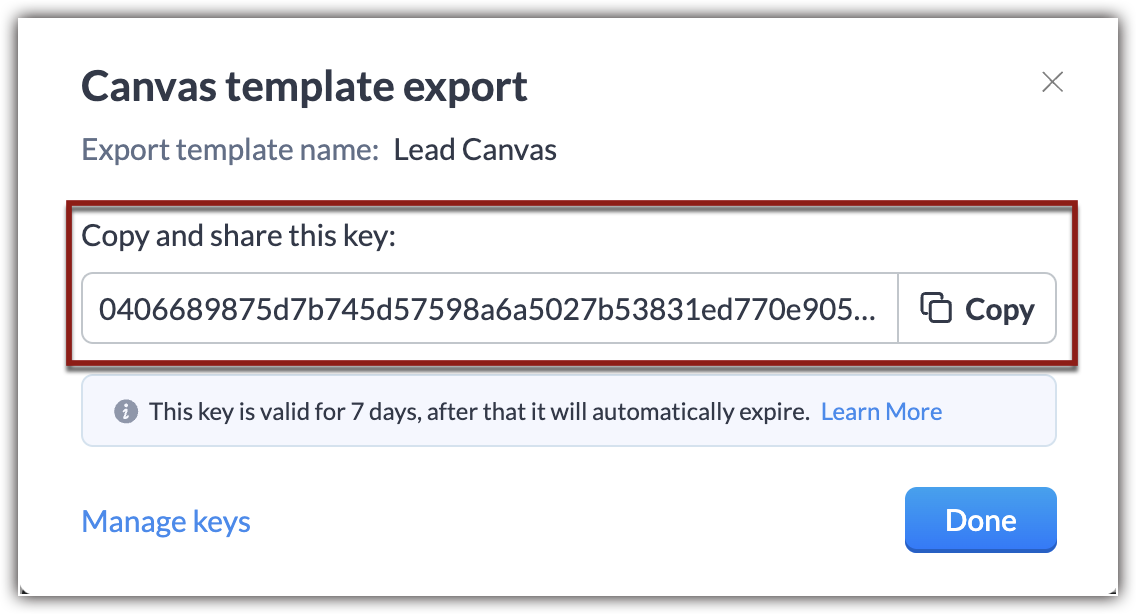
This key is valid for seven days after the date of export, and an organization can have up to 10 active exports at a time. In the event you reach this limit, you'll have to delete old keys to enable new exports.
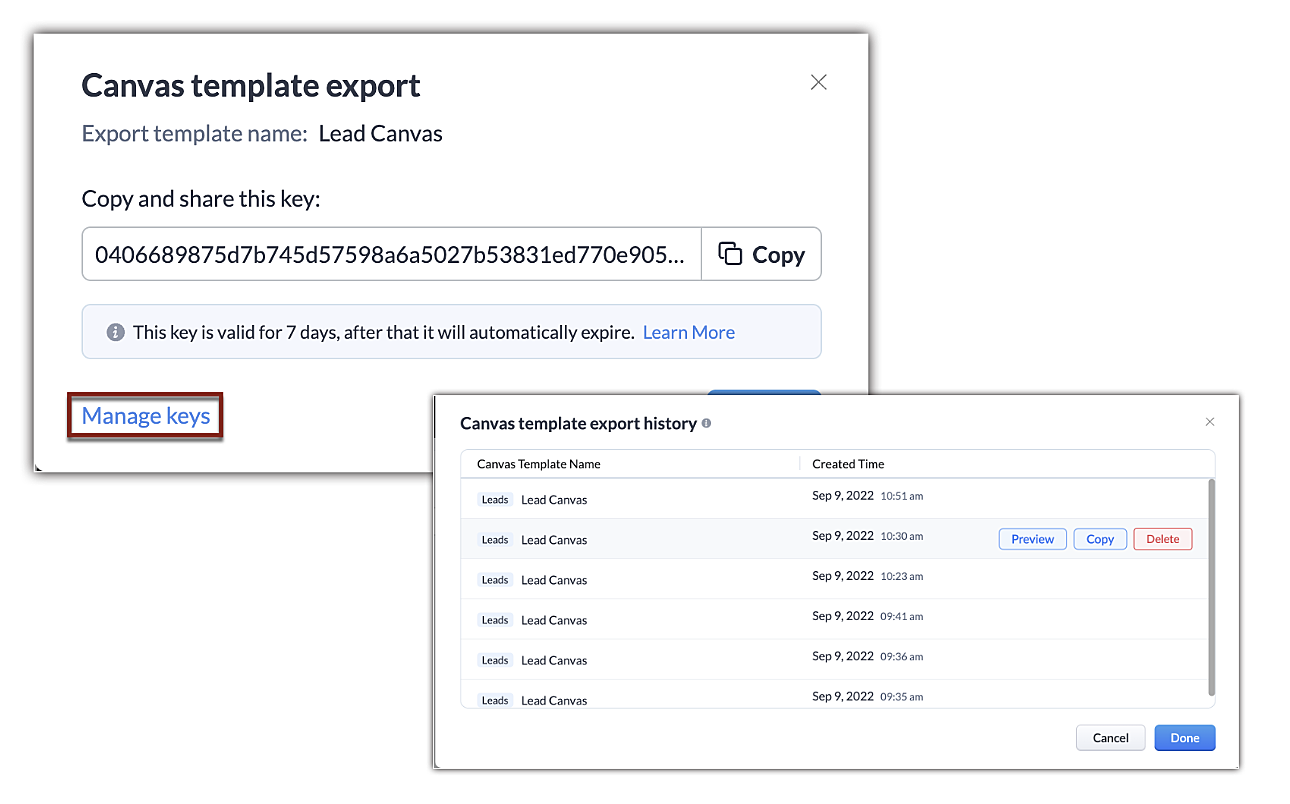


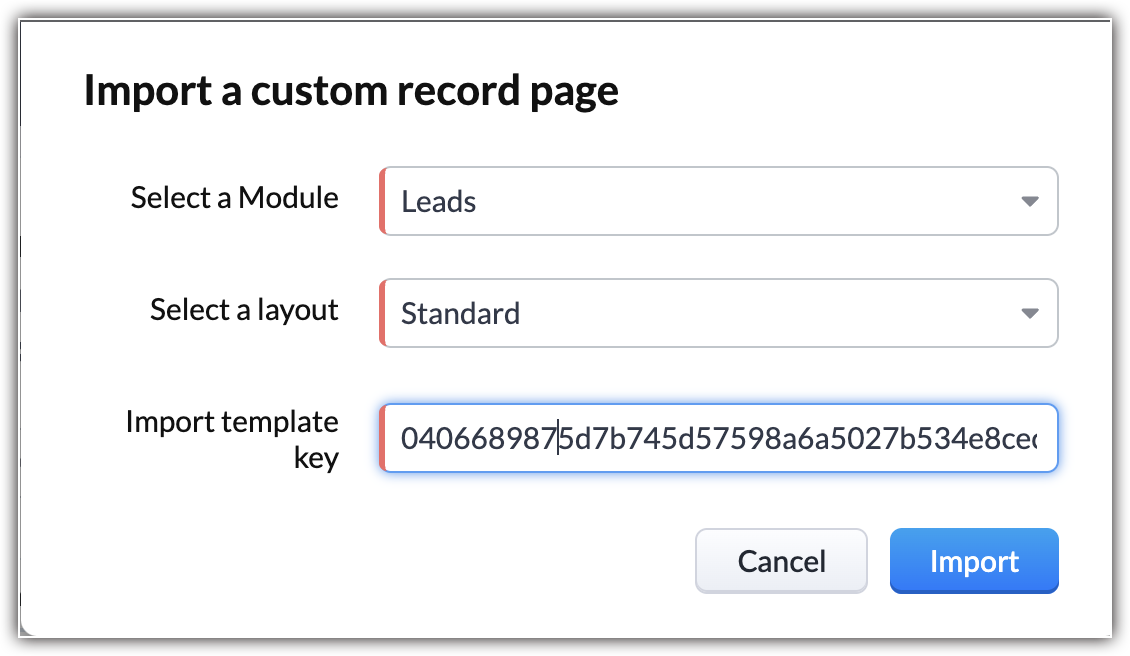
Importing a Canvas template: You can import a canvas template by applying the unique code shared with you. This code will transmit the design elements from the source and Canvas will automatically incorporate values in accordance to the module you're importing the template into.
Some additional pointers about importing/exporting templates:

  • In addition to the template transfer between CRM organizations, you can also transmit a canvas within the organization.
  • There is no limit to the number of times you can import a template using a key. You can have multiple imports as long as the key is valid.
  • You can import a template into any module or layout.
  • Importing a template counts as creating a new template. CRM follows the same template limits as usual. Click here to learn about the limits of each module.
  • If the export code is deleted or expires before you import, the code will no longer be valid and you'll have to obtain the updated code.
  • Only the formatting and UI placeholders of the template will be transmitted. The values, images, and rules ascribed to them will not be transmitted.
  • Components and presets you've saved to reuse will be carried over.
That's it for the update. We have opened this feature for all users in US DC for now. For the rest of the DCs,  it will be gradually opened.

We hope this added capability will make your work easier. If you have feedback or comments, feel free to start a conversation.

Thanks and have a good one!

Kind Regards, 
Saranya Balasubramanian
    • Recent Topics

    • How to integrate Zoho CRM, Zoho Forms and a WIX Web Site

      Attached video demonstrates how to use Zoho Forms included in Zoho One, to design a Contact Us form to be embedded into a WIX web site and integrated into Zoho CRM.
    • Bug Causing Major Sync & SO Access Failures in Zoho POS

      We are experiencing critical and recurring issues in Zoho POS that all trace back to role-permission handling defects in the latest POS app version. These issues directly affect syncing, login ability, and Sales Order access for role-restricted users
    • OAuth2 Scope Error - Incorrectly defaulting to CRM instead of Analytics.

      Hello Zoho Team, I am trying to connect n8n to Zoho Analytics API V2 for a simple automation project. Despite using the correct Analytics-specific scopes, my OAuth handshake is failing with a CRM-related error. The Problem: The authorization screen shows:
    • Add Custom Reports To Dashboard or Home Tab

      Hi there, I think it would be great to be able to add our custom reports to the Home Tab or Dashboards. Thanks! Chad Announcement: The feature is being rolled out across DC's and Edition in phases. To know more refer to the announcement post here.
    • Hiding Pre-defined Views

      You can enhance Zoho with custom views - but you cannot hide the pre-defined views. Most users focus on 4 or 5 views. Right now for EVERY user EVERY time they want to move to one of their 4 or 5 views - they have to scroll down past a long list of pre-defined
    • why can't agent see accounts & contacts

      My new user, with 'Agent' privileges, cannot see records that don't belong to them. How can I give them access? Why isn't this the default configuration in Zoho?
    • Sender Email Configuration Error.

      Hello Team, Hope you are all doing well. We are in the process of creating the Zoho FSM environment in the UAE. When we try to add the sender email address “techsupportuae@stryker.com”, we receive the error message: “Error occurred while sending mail
    • 【Zoho CRM】フィルター機能のアップデート:ルックアップ項目を使ったデータフィルタリング

      ユーザーの皆さま、こんにちは。コミュニティチームの藤澤です。 今回は「Zoho CRM アップデート情報」の中からフィルター機能のアップデートをご紹介します。 ルックアップ項目を使ったデータフィルタリングがより詳細に行えるようになりました。 この機能は詳細フィルターとカスタムビューで利用でき、必要な情報を正確に取得できます。 これにより、タブ間を移動することなく、より深く正確な方法でデータを絞り込むことが可能になります。 ◉できること 詳細フィルターとカスタムビューで、ルックアップ先タブの項目が選択可能
    • This will be long, Please bear with me - Next Gen Layout - Search

      In general, I think that Zoho are going in the right direction with the Next Gen UI. The latest update brings some nice improvements and all-in-all from a user's perspective I think the improvements are generally very good. However, there are some areas
    • Zoho Books | Product updates | July 2025

      Hello users, We’ve rolled out new features and enhancements in Zoho Books. From plan-based trials to the option to mark PDF templates as inactive, explore the updates designed to enhance your bookkeeping experience. Introducing Plan Based Trials in Zoho
    • Zoho Books | Product updates | August 2025

      Hello users, We’ve rolled out new features and enhancements in Zoho Books. From the right sidebar where you can manage all your widgets, to integrating Zoho Payments feeds in Zoho Books, explore the updates designed to enhance your bookkeeping experience.
    • Quotes Approval

      Hey all, Could you please help in the following: When creating quotes, how to configure it in a way, that its approval would work according to the quoted items description, not according to quote information. In my case, the quote should be sent to approval
    • Important Update: Facebook Pages API Deprecation

      Dear Zoho Analytics users, As of January 26, 2026, Facebook has officially deprecated Facebook Pages API version 18. This update involves the removal of several metrics that were previously supported by the API. As a result, these changes will affect
    • Adding a Deal to and Existing Contact

      I want to easily add a Deal to an existing Contact. If I click on New Deal on the Contact page this currently this is what happens: All of the mandatory field (and other field) information exists within the Contact. Is there a simple way for it to automatically
    • Custom SMTP is now available in Zoho Sign

      Hi there! Want to send Zoho Sign emails from your organization's or personal email server? Look no further! Zoho Sign has introduced custom Simple Mail Transfer Protocol (SMTP) for Enterprise users across all data centers. By enabling custom SMTP, you
    • Email was sent out without our permission

      Hi there, One customer just reached out to us about this email that we were not aware was being sent to our customers. Can you please check on your end?
    • Flexible Partial-Use Coupons (Stored Value Credits)

      Subject: Feature Request: Ability for users to apply partial coupon balances per transaction Problem Statement Currently, our coupons are "one-and-done." If a user has a $50 coupon but only spends $30, they either lose the remaining $20 or are forced
    • Prevent accidental duplicate entry of Customer Ordersome

      Zoho Support has confirmed that Zoho currently does not have any method (using Deluge, flow or any other method) to alert a user when a sales order has been entered twice using the same customer reference number (i.e. a duplicate). Most ERP platforms
    • Collapsing and expanding of lists and paragraphs

      hello Would you ever implement Collapsing and expanding of lists and paragraphs in zoho writer ? Best regards
    • Migrating Brevo Automation Logic to Zoho Campaigns

      Hello Zoho Campaigns Support Team, I am in the process of migrating my email marketing from Brevo to Zoho Campaigns. I have around 10,000 contacts, which I have already successfully exported from Brevo and imported into Zoho Campaigns. I now need guidance
    • Is there a way to delete workspaces?

      I want to remove one of the workspaces in my Campaigns account. I don't see any obvious way to do this. Am I missing something?
    • New Custom View -Sorting the Custom fields

      While creating a New Custom View in invoice , Customers, Bills ,expense etc , the sorting of custom fields are not available , a query function "order by / sort by  " may also be included in  Define new criteria module  which will be more beneficial to
    • Make CAMPAIGNS email look as simple as possible

      Hi there I'm trying to make my Campaigns email look as much like a normal email as possible. I'm a bit stuck with the "justification" of the email email block. Can I LEFT JUSTIFY the "whole email" to make it look "normal"? (Please see screenshot attached)
    • [Webinar] Top 10 Most Used Zoho Analytics Features in 2025

      Zoho Analytics has evolved significantly over the past year. Discover the most widely adopted features in Zoho Analytics in 2025, based on real customer usage patterns, best practices, and high-impact use cases. Learn how leading teams are turning data
    • Sorry! we encountered some problems while sending your campaign. It will be sent automatically once we are ready. We apologize for the delay caused.

      Hello. Lately we are having problems with some campaigns, which show us this error message. Sorry! we encountered some problems while sending your campaign. It will be sent automatically once we are ready. We apologize for the delay caused. We can't find
    • Can I remove or divert certain contacts from an active Campaigns workflow?

      I have created a workflow in Zoho Campaigns, which sends different emails, once contacts have been added to a mailing list. To choose which email to send to the contacts, there are conditions, which divert contacts based on their company type and their company size. There was a subsection of this workflow, where company size wasn't selected correctly, and some contacts have been sent down the wrong path and received the wrong email. The workflow contains a reminder loop and a further series of emails.
    • How to map fields from Zoho Recruit to Zoho People

      I've got these fields from my Job Offer that I'm trying to map to the Work information fields in Zoho People, but they arent showing up. For example, how do I get the department name field (in the job post) to map to the work information field in Zoho
    • UTM in zoho campaigns

      Helloo everybody!!! Someone know how IF ZOHO CAMPAIGNS has UTM for tracking the url of any campaigns. thank u
    • Full Context of Zoho CRM Records for Zia in Zoho Desk for efficient AI Usage

      Hello everyone, I have a question regarding the use of Zia in Zoho Desk in combination with CRM data. Is it possible to automatically feed the complete context of a CRM record into Zia, so that it can generate automated and highly accurate responses for
    • Knowledge base printing

      I saw a posting about printing the knowledge base as I was looking for the answer, but we would like the ability to print out the entire knowledge base with a click, keeping the same organization format.   Bonus would include an index of keywords and
    • Search not working!

      I have items in my notebook tagged but when I search for a tag nothing comes up! Any fix for this?
    • Zoho Books | Product updates | January 2026

      Hello users, We’ve rolled out new features and enhancements in Zoho Books. From e-filing Form 1099 directly with the IRS to corporation tax support, explore the updates designed to enhance your bookkeeping experience. E-File Form 1099 Directly With the
    • Updates for Zoho Campaigns: Merge tag, footer, and autoresponder migration

      Hello everyone, We'd like to inform you of some upcoming changes with regard to Zoho Campaigns. We understand that change can be difficult, but we're dedicated to ensuring a smooth transition while keeping you all informed and engaged throughout the process.
    • Sharing my portal URL with clients outside the project

      Hi I need help making my project public for anyone to check on my task. I'm a freelance artist and I use trello to keep track on my client's projects however I wanted to do an upgrade. Went on here and so far I'm loving it. However, I'm having an issue sharing my url to those to see progress. They said they needed an account to access my project. How do I fix this? Without them needing an account.
    • How do i integrate google analytics to Zoho Campaigns?

      Looking to track Zoho Traffic from email Current topic is outdated
    • How do teams manage meeting follow-ups across Zoho tools?

      We’re using Zoho tools for collaboration and tracking, but managing meeting notes, action items, and follow-ups across teams is still challenging. Curious how others are handling this within Zoho workflows. Are there best practices or integrations that
    • Customize Colors used on graphs and charts according to users desire.

      It would be great if we could customize the graph's colors as we see fit. I hate that yellow is always the default color!
    • Let us view and export the full price books data from CRM

      I quote out of CRM, some of my clients have specialised pricing for specific products - therefore we use Price Books to manage these special prices. I can only see the breakdown of the products listed in the price book and the specialised pricing for
    • Mejoras urgentes para ZOHO MEETING

      Tengo unos meses usando Zoho Meeting. En general, es buena, pero hay cosas vitales que no logra cumplir con mínima calidad. 1) Calidad de audio y video: urge mejoras. Audio con retraso, imagen borrosa, mal recorte de silueta con fondos virtuales. Además,
    • Multiple header in the quote table???

      Hello, Is it possible in Zoho CRM to add multiple headers or sections within the Quote product table, so that when the quote is printed it shows separate sections (for example “Products” and “Services”)? To clarify, I’m asking because: This does not appear
    • Next Page