Client Script | Update - Introducing ZRC: Simplified HTTP request library
Hello Developers!
Are you tired of juggling different methods to make API calls? Are you confused with multiple syntaxes and version restrictions? Have you ever wished for one simple way to make all API calls in CRM?
We heard you :)
Here comes ZRC (Zoho Request Client), the new way of making any API call in Client Script with one simple syntax!

What is ZRC?
ZRC (Zoho Request Client) is a built-in SDK that simplifies making API calls in Client Script. It uses one simple and consistent syntax to handle,
- CRM APIs
- Connection requests
- Public APIs .
There is no setup or configuration needed, making API calls hassle free.
ZRC is now available for use in Client Script, helping you build faster with less effort.
Why use ZRC ?
APIs serve as the backbone for customizing Zoho CRM, powering vital tasks like updating records, adding leads, and integrating with external services. For developers, working with these APIs has not always been simple. Each type of API, whether internal CRM APIs, Connection APIs, or external APIs, requires different methods and boilerplate codes, which creates friction and slows down building solutions. Here comes ZRC to address this by handling authentication, supporting all CRM API versions, and managing requests and responses automatically, so developers can focus on building meaningful solutions.
Here is why ZRC is a game changer for scripting in Zoho CRM:
Supports Any CRM API Version
With ZRC, you can use any version of the CRM APIs, even the latest ones like v7 and v8.
Self domain calls
For CRM API calls, ZRC requires only the API endpoint without specifying the domain. This enables usage across different domains and simplifies API calls.
Unified Syntax for All Calls
Whether it is a CRM API, a custom Connection, or an external public API, all calls follow the same simple syntax.

No Authentication Needed for Same CRM Org
You do not have to worry about tokens or domain configurations. Just pass the endpoint, ZRC takes care of authentication behind the scenes.
Smart JSON Handling
ZRC automatically handles JSON responses. There is no need to manually stringify or parse response objects.
Async/Await & Clean Code
Write clean, modern code with full support for async/await and promise chains using `.then().catch().`
Let us see how to use ZRC to make API calls for different scenarios.
Use Cases
1. CRM API Use Case - Create Task with one click
At Zylker, a custom button “Log Call Attempt” should prompt the user to enter call details, save them as a Note on the Lead, update the Lead_Status to “Contacted”, and create a follow-up task for the next day, streamlining the process and reducing errors.


Click here to view source code
2. Connection based Use Case - Export Subform Data to Zoho Sheet via API
At Zylker Finance, users maintain multiple loan options under each lead using a subform in Zoho CRM. The Admin requires the ability to export these subform rows to Zoho Sheet via API. This export should allow structured data transfer for further analysis, comparison, and reporting, all without manual copying or downloading.
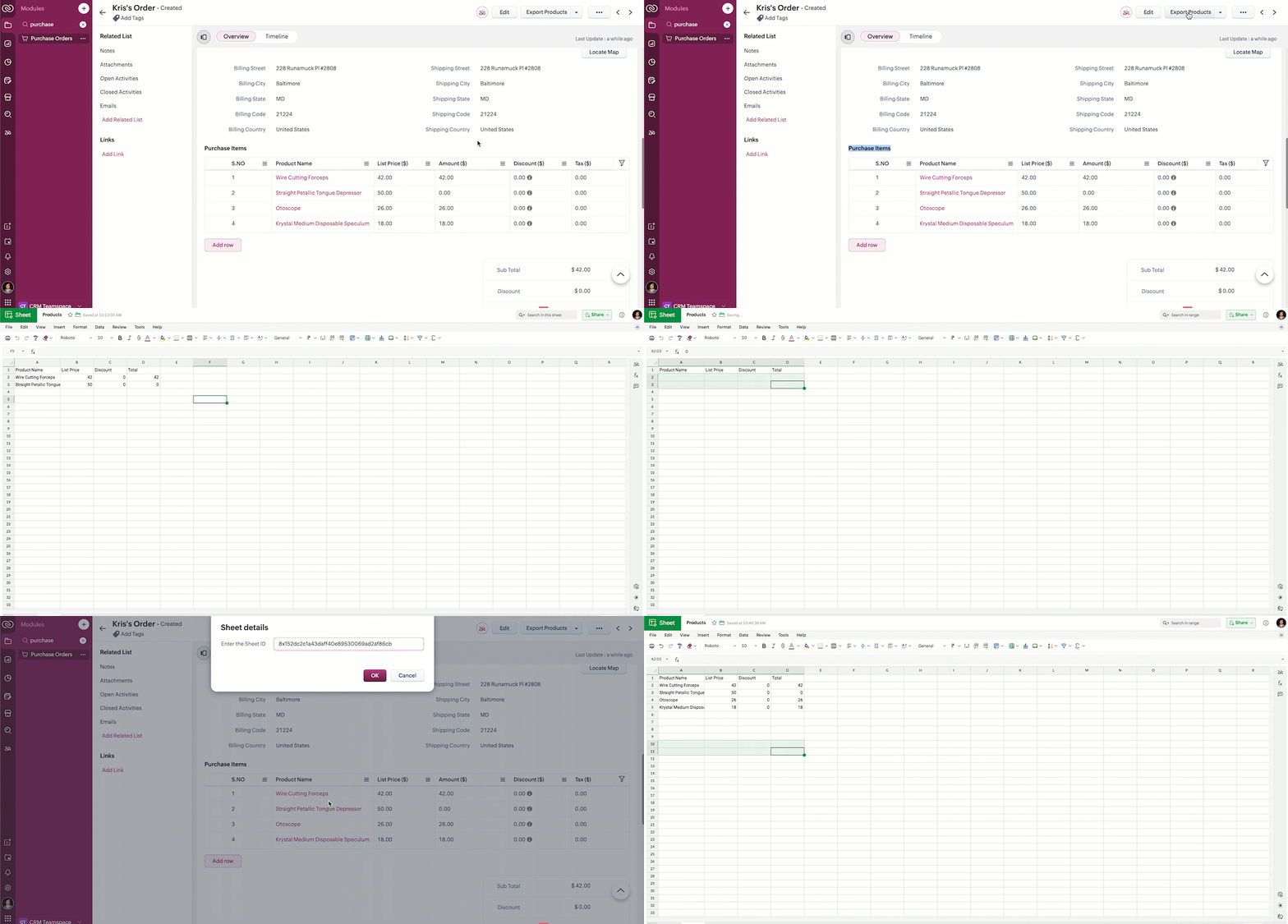

Click here to view source code.
3. Public API - Instantly retrieve real-time gold prices and perform currency conversions directly within the CRM interface
At Zylker, a gold jewelry company using Zoho CRM, the Admin needs the ability to instantly retrieve real time gold prices and perform currency conversions directly within the CRM interface without switching to external tools or websites.
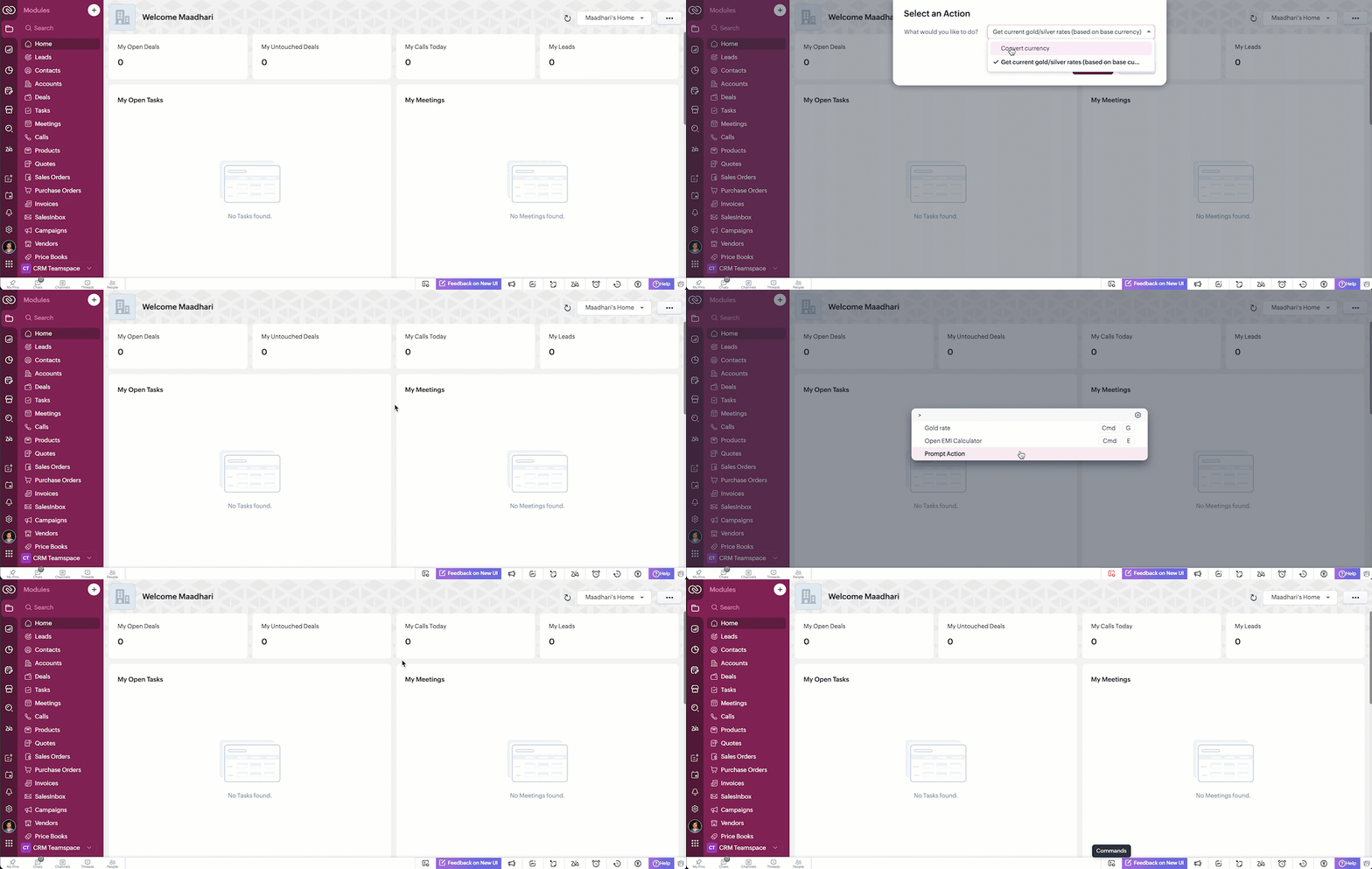

Click here to view source code.

Note :
- Now, all your API calls are made using one SDK, one format, and with full browser capabilities.
- No need to worry about authentication, domains, or response formats.
- Available now in Client Script. ZRC support in Mobile App will be available soon.
- Coming soon to Widgets
- Function Invoke APIs also follow the same fundamentals as ZRC.
From fetching CRM data to integrating with third-party tools, you can now achieve powerful customizations in Zoho CRM.
This feature is live across all DCs.
Go ahead. Try ZRC in your next Client Script, and feel the difference. Let us know your comments and feedback!
The help documentation of ZRC is available here.
Happy Coding!
Topic Participants
Maadhari M
Haiku Technical Support
Sticky Posts
Kaizen #198: Using Client Script for Custom Validation in Blueprint
Nearing 200th Kaizen Post – 1 More to the Big Two-Oh-Oh! Do you have any questions, suggestions, or topics you would like us to cover in future posts? Your insights and suggestions help us shape future content and make this series better for everyone.Kaizen #226: Using ZRC in Client Script
Hello everyone! Welcome to another week of Kaizen. In today's post, lets see what is ZRC (Zoho Request Client) and how we can use ZRC methods in Client Script to get inputs from a Salesperson and update the Lead status with a single button click. In thisKaizen #222 - Client Script Support for Notes Related List
Hello everyone! Welcome to another week of Kaizen. The final Kaizen post of the year 2025 is here! With the new Client Script support for the Notes Related List, you can validate, enrich, and manage notes across modules. In this post, we’ll explore howKaizen #217 - Actions APIs : Tasks
Welcome to another week of Kaizen! In last week's post we discussed Email Notifications APIs which act as the link between your Workflow automations and you. We have discussed how Zylker Cloud Services uses Email Notifications API in their custom dashboard.Kaizen #216 - Actions APIs : Email Notifications
Welcome to another week of Kaizen! For the last three weeks, we have been discussing Zylker's workflows. We successfully updated a dormant workflow, built a new one from the ground up and more. But our work is not finished—these automated processes are
Recent Topics
How to set the value of the Phone field importing contacts in Zoho Desk
Hi everyone, i'm new in Zoho Desk, we're setting up the environment and i'm importing contacts from another CRM using a file CSV and i'm getting a problem with phone numbers (italian): the leading zero is cut away, also if the value is inside double quotes.How to center a field inside a section?
I’ve been trying to center a field inside a section in Zoho Canvas. When I align it visually, it looks centered in the editor, but after clicking Save, the field appears misaligned on the actual canvas. I also tried setting the field to full width, butShowing the map along with mileage expense
When you use the GPS to track mileage, it shows you the map of the actual path travelled. It would be very useful and practical to save that map with the mileage expense, so that when the report is created, it provides a map of each mileage expense associatedEnable Validation Rule for Multi-Select Picklist Field
Zoho, Please allow validation rules for multi-select fields.CRM Custom function updating a module record shows the Super Admin user as the record modifier
Dear Zoho CRM Team, Is there any way to update this so that when a custom function has updated a record the Super Admin user doesn't become the modifier? This happens on the record as a modifier and shows up in the audit logs. It would be more usefulBest way to fetch employee names from Zoho People into Zoho Creator Inventory Stock Form field Employee Name Lookup
Hi Team, I have a requirement in my Zoho Creator application (Inventory Stock Adjustment) where I need to fetch employee names from Zoho People and use them as a lookup in a form. Currently, I am considering using an integration field to fetch this dataget file api is returning Junk data
I am working on extension development where at one point I need to retrieve attachments on records I found out I can use only invokeconnection and not invokeurl in extension development The invoke connection returns the image in raw binary format. WhenNeed help with message box
End user updates many records at once. Each have unique serial number. They want a confirmation box that says starting number, ending number and qty. Is there any way to do this? I been searching and asking support but seems like no great solution.[Webinar] The Transformative Power of Gen BI
Traditional decision-making tools are no longer enough. The integration of generative AI into business intelligence (BI) is proving to be a true game changer—enabling businesses to make faster, smarter, and better informed decisions. Early adopters ofBackorder process review - Automating Removal of Sales Order from "On Hold" When PO is Received
Hello Zoho Inventory Team, Currently, sales orders in On Hold status are released only when the bill for the purchase order is created. In our workflow, it would be much more efficient if the sales order could automatically move out of On Hold as soonHow to access the saved Query using API?
I have created a query in setting. Is it possible to access it from a API? What's the endpoint? I tried /v8/queries/important_deals but didnt' work.création d'une base de données
base de donnee d'un lycéeUser Session variables to recall after form submit & redirect to menu
Hey, Forgive me if this is a simple answer I have overlooked. I have built a big onboarding process for my SAAS platform which is built and managed by an external Dev team. I am hoping to embed my new creator app on the SAAS platform. I have a menu pageZoho Writer Merge Template with data from Zoho Analytics Views
Hello, Is there any way to pull information from Zoho Analytics and put it into a Merge Template? I am trying to create a bulk export of one report that filters on a field to create a single document for each of the filter fields.Having to enter bill before stock shows as available.
Hi, Am I right in thinking you must create a bill from the purchase order receipt before the goods are available for shipping?Agent Availability Report
From data to decisions: A deep dive into ticketing system reports Businesses need to track when their support agents check in and check out from work. This report, titled Agent Availability, is one of the static reports that helps managers track the numberAI-driven construction analytics using Zoho Projects Plus
Construction projects thrive on timelines; if a project is completed on or before the expected time, it makes headlines, but if it gets delayed, the company’s credibility will be at risk. Such projects require precise planning and constant monitoring,Canadian payroll
Hello ZOHO, is any updates on when payroll for Canada will be available?Unified customer view: Bringing product intelligence into your CRM data
For businesses today, applications and digital interfaces are the main touch points in the customer journey. While Zoho CRM data already tells who your customers are and what they buy, Zoho Apptics tells you how they interact and engage with your product.Zoho Creator SaaS app with multiple client AND multiple users
I am close to finalizing a Zoho Creator app that will be used by different companies to manage sale info, and each company can have multiple users using the app. Things were going perfectly until I tried a search on a report. I use a database field in each table to separate the data for each company, which works great. BUT when I do a search, I get to see ALL the data. This means that Company A could easily see the data from Companies B and C via the built-in search. Is there a way to set up thePossible to send Zoom AI Companion transcripts and summaries to contacts in CRM?
Title says it all. Is it possible to send Zoom AI Companion transcripts and summaries to contacts in Zoho CRM?Clarity on extended contract status
Clarity on “extended” status- How does Zoho “extend” a contract? E.g. if client extends by 1 month, can the “end date” be adjusted accordingly in Zoho and tagged as “Extended” with a clear audit trail that also captures the client’s email? Note- EmailCustomizing contract status
Can we customize/add/remove status on Zoho contracts ourselves or does Zoho needs to do this? Context- There is a long list of status on Zoho but not all of them are relevant for us . There are few status which are missing and needs to be added. E.g-Set Custom Business Calendars and Holidays for Global Teams
Managing a project across diverse teams means accounting for more than just tasks and deadlines; it means acknowledging how and when each team actually works. Users might follow different working days or observe region-specific holidays that cannot be[Integration edition] Deluge learning series - Integrations between Zoho apps and Third-party services with Deluge | 28 August 2025
We’re excited to welcome you to the Deluge learning series: Integration edition! The Integration edition will run for three months: Session 1 – Integrating Zoho Apps with Deluge using inbuilt integration tasks Session 2 – Integrating Zoho Apps with DelugeCritical Vulnerability in all major password manager plugins - is Zoho Vault affected?
Hi Zoho, a security researcher found a critical clickjacking vulnerability in all major browser password managers: DOM-based Extension Clickjacking: Your Password Manager Data at Risk | Marek Tóth Is Zoho Vault affected as well? Apparently the Vault extensionNeed Your Insights
Hi Zoho, I'm confused why the flow only sends to one output. setVariable15 is from a list. It doesn't consider the 2nd entry. Any thoughts?Map Dependency Fields - How can can I limit picklist values from a multi-select Parent field?
I know the "Map Dependency Fields" feature doesn't allow a multi-select parent field. However, I need the functionality. Can I do it through a deluge function, and would it still support color coding picklists? We need the color coding for quick scanningDYK 1 - Color Palette for Enhanced Visual Identification of Status
Introducing the Did You Know series of posts. The goal of this series is to familiarize users with certain features or enhancements in Zoho Projects that may not be evident at first glance. The first post in this series deals with color palettes for indicatingInvalid field in the COQL query
Dear Zoho Support! I believe that you already helped me with a similar problem a few years ago. One of my clients has a custom field named "LOB" in the "Deals" Module (see the field's metadata below). The COQL query using this field: : "select id, Deal_Name,Transferring domain registration to new registrar and switching email hosting at the same time?
I need to transfer an existing domain uv cure adhesive that's currently with SiteGround to Porkbun. I also need to move the existing custom email addresses from SiteGround to Zoho Mail. I'm not sure if I should transfer the domain first and then tackleSplit deposits
Can Zoho do split deposits. One deposit, two checks for two separate invoices from different customers. This is one of the most common tasks I can imaging. When I mark the two invoices paid, there are two deposits in bank register. When I try to match,Deactivate Desk Contact without Deleting Contat
We have a client who has multiple tenants for regulatory purposes, and as such, has a few users that have email addresses in both tenants. They've then emailed into the ticketing system, so we have multiple contacts (no big deal, we want to keep their[Free Webinar] Learning Table Series - Zoho Creator for Asset Management with AI Enhancements
Hello Everyone! We’re excited to invite you to another edition of Learning Table Series, where we showcase how Zoho Creator empowers industries with innovative and automated solutions. Each month highlights a specific sector, and this time our focus isIs there any way to get notified when a failure execution happens on a Workflow ?
Hello, I wanted to know if it was possible to get notified (like with a mail for example) when a single failure happens on a specific flow of my organization ? I know that there's a mail which warns you when there's 20 failure in a row on the same flow,Menu Building is completely broken
I have been 3 hours, I have not been able to edit the menu. Either it is completely broken, very little intuitive or I do now know anything... There is no way to create a megamenu, no way to create a menu. Despite the fact I go to menu configurartionCan you sell Subscriptions using Zoho Commerce?
In addition to physical products and the apparently coming soon 'Digital Products', it is possible to sell Subscriptions using Zoho Commerce?Kaizen #197: Frequently Asked Questions on GraphQL APIs
🎊 Nearing 200th Kaizen Post – We want to hear from you! Do you have any questions, suggestions, or topics you would like us to cover in future posts? Your insights and suggestions help us shape future content and make this series better for everyone.Multiple Languages for Product Names
Hi, I use 2 languages: spanish and english. I want to have for every product a name in spanish and a name on english. I want to have to possibility of choosing one of these languages when making an invoice or a purchase order. Is there any way to doItem with name in different languate
Hello, is there a way to have an item with its name in different languages? For example: I sell an item in different markets and I'd like to have a Proposal and the Invoice with the Item Name in a specific language. Rino Bertolotto Zoho Specialist, STESA srlNext Page