Enhance Data Visibility with Mapping Fields from Lookup Module
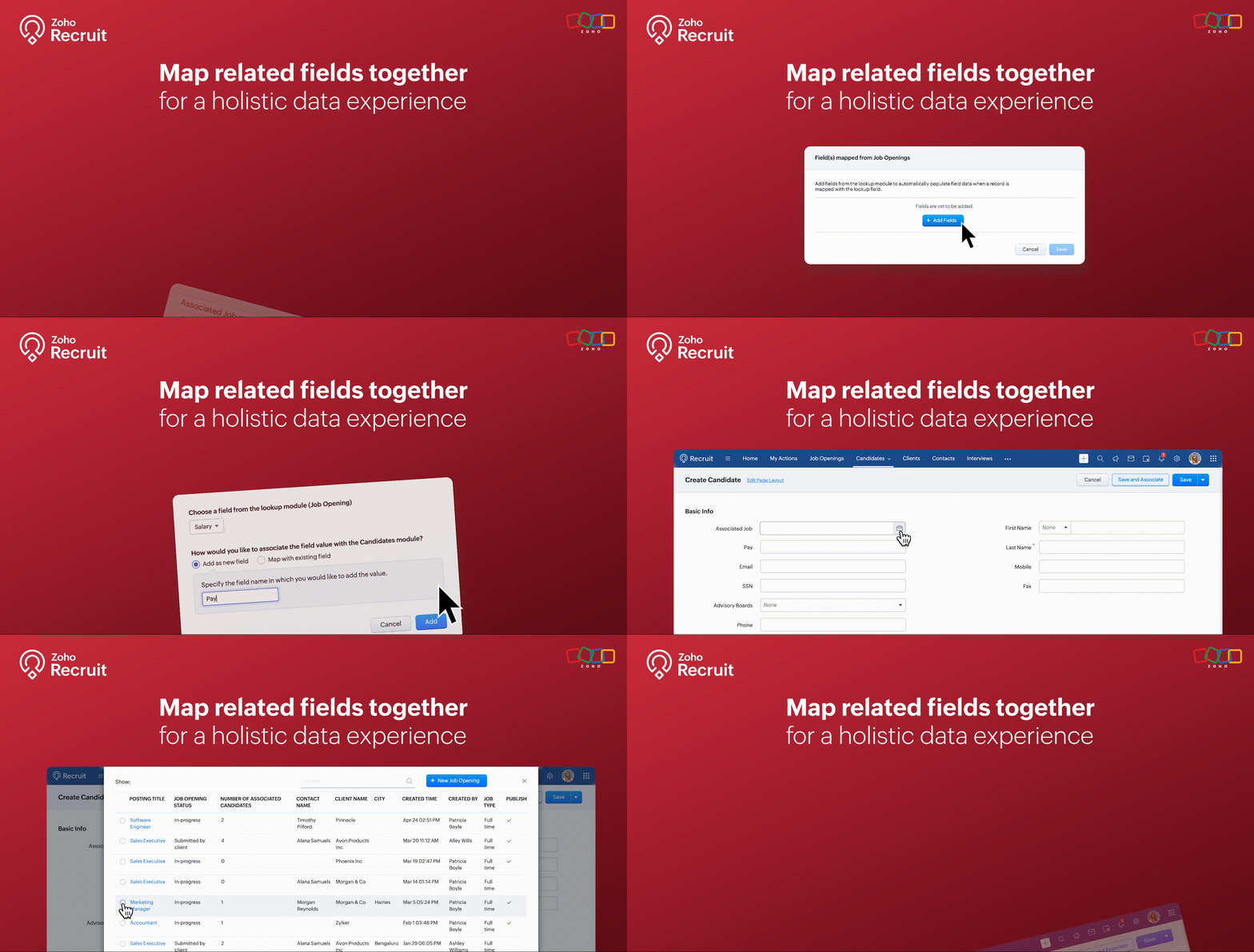
We’re thrilled to announce an exciting new feature in Zoho Recruit: Mapping Fields from Lookup Module! This powerful addition is designed to display additional details from a related module when using lookup fields. This enhances data visibility and provides more context within a single module view.
What is Mapping Fields from Lookup Module?
The "Mapping Fields from Lookup Module" feature allows you to incorporate additional fields from related (lookup) modules directly into your primary module's layout. This means you can now view more contextual information within a single view without the need to switch back and forth between different modules.
For example, if you're in the Candidates module, you can map fields like Job Location, Job Type, and Hiring Manager from the Job Openings module. This way, you can see all key details about the job opening a candidate applied for right within the candidate’s record.
Benefits
- Enhanced Data Visibility: By mapping fields from related modules, you can see all pertinent information at a glance. This comprehensive view enables better decision-making since all the relevant data is readily accessible within a single module.
- Improved Workflow Efficiency: Say goodbye to the constant toggling between different modules. With mapped fields, you have a more streamlined workflow, saving time and reducing the chances of missing critical information.
- Better Data Consistency: Ensure that all necessary information is consistently available across different modules. This reduces data silos and enhances the reliability of your recruitment data.
Use Cases
1. Streamlined Candidate Evaluation:
Managing candidate evaluations often requires accessing various details about job openings they’ve applied for. Mapping fields from the Job Openings module to the Candidates module makes this process seamless and efficient.
Example:
A recruiter at a healthcare organization is evaluating candidates for multiple nursing positions. By mapping fields like Shift Type, Department, and Hiring Manager from the Job Openings module, they can view all relevant job details directly within the candidate’s profile. This comprehensive view helps the recruiter quickly assess each candidate's fit for the roles based on the specific requirements of each department, without needing to navigate to the Job Openings module.
2. Comprehensive Interview Scheduling:
Scheduling interviews for candidates can be a complex task, especially when coordinating with multiple hiring managers. Mapping fields from the Interview Schedule module to the Candidates module can streamline this process.
Example:
An HR coordinator at a retail company is responsible for scheduling interviews for various store manager positions. By mapping fields such as Interview Date, Interview Time, and Interviewer from the Interview Schedule module to the Candidates module, they can keep track of all upcoming interviews directly from the candidate’s profile. This ensures that the coordinator can efficiently manage interview schedules and communicate details to candidates without missing any critical information.
3. Enhanced Client-Specific Job Management:
Recruitment firms often manage job postings for multiple clients, each with specific requirements and details. Mapping fields from the Clients module to the Job Openings module can provide a unified view of client-specific job postings.
Example:
A recruitment consultant at a staffing agency is managing job postings for several clients in the finance sector. By mapping fields such as Client Industry, Client Contact, and Special Requirements from the Clients module to the Job Openings module, the consultant can view all client-related information directly within each job opening. This comprehensive view helps the consultant tailor their recruitment efforts to meet the unique needs of each client, ensuring better client relationship management and more successful job placements.
How to Use the Mapping Fields from Lookup Module
- Identify the Fields: Determine which fields you want to map from the lookup module to your primary module.
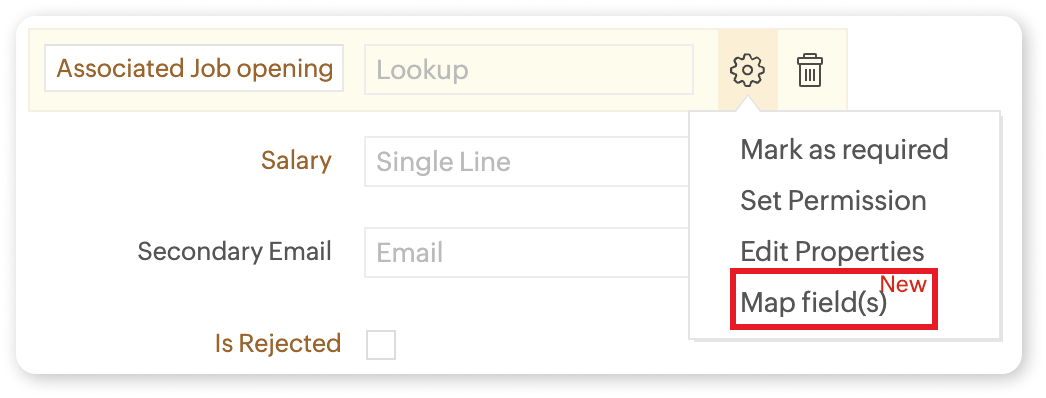
- Add the Lookup Field: Include the lookup field in your module layout where you want the additional information to appear.
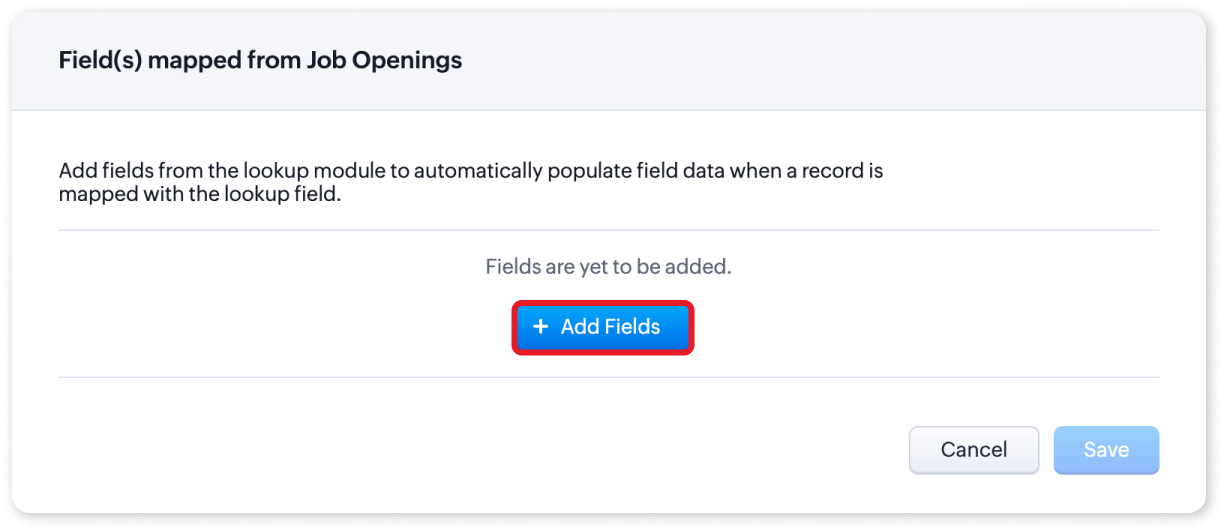
- Map the Fields: Click on the settings icon and select "Map Field(s)". You can choose to add the fields as new or map them to existing fields.
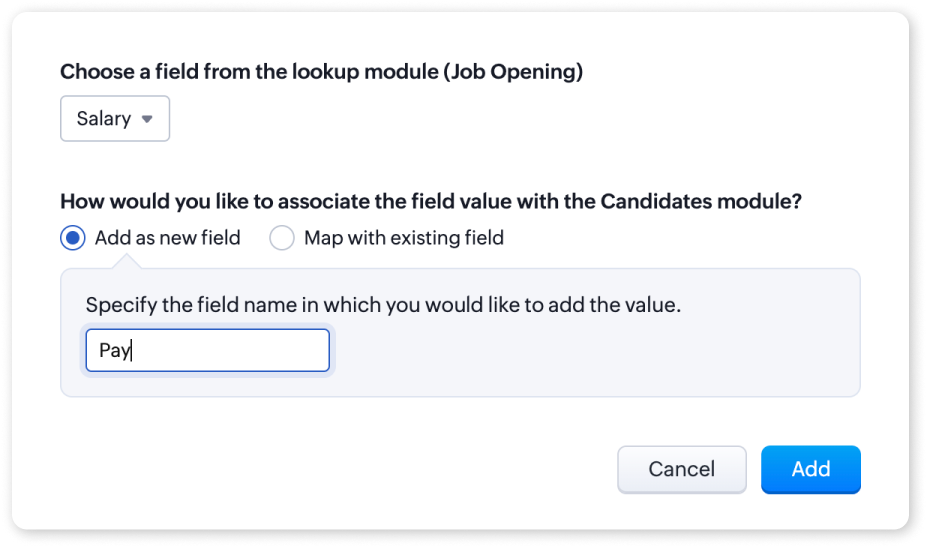
- Save Changes: Once you have mapped the fields, save the changes to your layout.
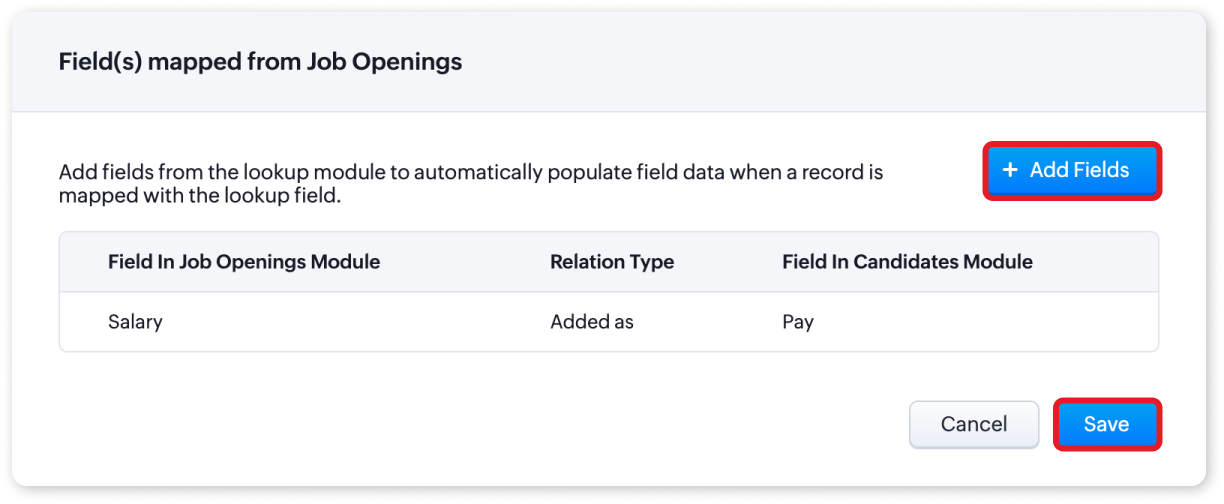
For more detailed information, please refer to our help article on Mapping fields from Lookup Module. If you have any questions or suggestions regarding this update, feel free to leave a comment below or reach out to our customer support team at support@zohorecruit.com.
Regards
Team Zoho Recruit
Topic Participants
Akshaya P
fundae Careers
Gowtham Prashanth
Sticky Posts
An update to improve email delivery | Email Authentication & Relay
Update Rollout Latest Update: Enterprise users (8th July, 2025) This update is now live for Enterprise plan users in all regions. This includes People Plus, but not Zoho One, which will be covered in an upcoming update. Professional users (31st May 2025)Zoho Recruit User Group Meet-up | INDIA 2025 (Venue Finalised)
Hello Zoho Recruit users from India, We’re pleased and excited to announce our 2025 edition of Zoho user group meet-up in India in five cities! In this meet-up, our team of experts will help you understand the intricate nuances to use Zoho Recruit better,Zoho Recruit is coming to the UK | Zoho Community Learning Series
Customers from the United Kingdom, Exciting news: We will be in London for the Zoho Recruit user meet up. Our team will help you better understand the intricate nuances of Zoho Recruit to help you hire faster, inform about new and upcoming features, andAsk the experts - A live Q & A discussion on Zoho Recruit
We are delighted to come back with another edition of Ask the Experts community series. This edition, we'll be focusing on everything about Zoho Recruit. The topics will focus on the features that are used/asked by the majority of users and also basedRestriction on 'From' addresses with a public domain
Dear Zoho Recruit Community, We hope this message finds you well. This post is to inform you about some important updates regarding email restrictions within Zoho Recruit. Effective post 31st March 2025, we will be implementing changes to the use of email
Recent Topics
When will Zoho Books offer native NFS-e issuing, now with Brazil's National Standard?
Hello Zoho Team and Community, I'd like to follow up on my previous suggestion regarding the critical need for Zoho Books to natively issue Brazilian Service Invoices (NFS-e). My original idea was that this could be achieved by extending the same integrationAdmin Access to Subscriber Information for System/Default Bots in Zoho Cliq
Dear Zoho Cliq Team, Greetings, We would like to request an enhancement to Zoho Cliq's bot management capabilities. Specifically, we are asking for the ability for organization administrators to view the list of subscribers for system/default bots, suchzoho webmail keeps opening an empty tab when on log in/vist webmail
as the the title says, whenever i log in or visit the page in a new tab, zoho webmail with open a new tab, but it errors out (see attachment). how do you stop it from doing this?FSM work order creation on books quote approval
I have followed https://help.zoho.com/portal/en/kb/fsm/custom-integrations/zoho-books/articles/perform-actions-in-zoho-fsm-on-estimate-approval-in-zoho-books#Step_1_Create_a_connection_for_Zoho_FSM_in_Zoho_Books in order to create a work order in FSMTip of the week #46 - Stay more organized by moving threads between inboxes
Have you ever come across a thread in your inbox that should have been handled by a different team or inbox? Or maybe you've wrapped up your part of the conversation, but another team needs to step in to finish the task or assist further? Keeping suchText summarization and field detection with Zia, Zoho's AI assistant
Have lengthy documents that take forever to read and sign? Tired of placing fields into hundreds of pages? Here's a single solution to solve both challenges: Zia, Zoho's AI assistant. With Zia's integration with OpenAI, you can summarize long documentsSending Links to Functions in CRM
Maybe I'm crazy, but currently there's no way to send someone a link to a custom function. The only link you can get is to the myfunctions page, which is very frustrating. This should work like workflow rules where when you click on one, it should havezohoからの自動メールについて
zohoからの自動メールにおいてちょっと困ったことが起こっており、サポートにも相談中なのですが ほかの方にも同現象が発生していないか相談したい。 ▼事象 zohoからの自動メールにおいて時折「このメールが送信者からのものであると確認できないため、このメールに安全に返信できない可能性があります」とメーラーから警告が出る。 ▼状況 発信元:設定した独自ドメイン SPF/DKIM設定:済 利用メーラー:outlook 発生頻度:稀(連続するときもあるが、パタッとでなくなる時もある) サポートへの連絡:ただいま継続相談中Using Deluge scripting to create/update data in TabularSections
I am having following Form structure with some other usual fields, and a tabular section which allows putting question, self rating and lead rating. (pic below) I am trying to create a record of this form via Deluge, but can't figure out way to populateZoho Recruit: How to link lookup fields using record ID instead of name during import?
Hi, I'm having an issue with lookup fields in Zoho Recruit during data import. When I import records into a module that includes a lookup field (e.g., to an Interview record), Zoho Recruit matches the lookup by the display name (string) instead of theAdd a "Success" Route to the "Forward to Operator" Card in Zobot
Hello Zoho SalesIQ Team, We hope you're doing well. We would like to request an enhancement to the "Forward to Operator" card in Zobot. Current Limitation: At present, the "Forward to Operator" card provides the following routes: Operator Not AvailablePower of Automation :: Auto-update Project status based on Tasklist completion
Hello Everyone, A Custom function is a user-written set of code to achieve a specific requirement. Set the required conditions needed as when to trigger using the Workflow rules (be it Tasks / Project) and associate the custom function to it. Requirement:Multi Module Lookup Fields
🎯 Use Case: In many custom implementations, especially those involving financial tracking, service operations, or project-based work, a single record (e.g. an invoice or bill) often relates to one of several different modules — but only one at a time.Introducing AI Modeler—a no-code approach to adding AI to your business applications
Forward-thinking businesses today are embracing AI to make life easier for themselves, their employees, and their customers. But if you haven't started yet, you might be concerned that your business will be left behind. Or maybe you're worried becauseZoho People how do i view the history of leave taken
Hi All What is the report that i am unable to view the history of the leave taken for an individual and team?UK Registration for VAT with existing stock/inventory
We have an existing inventory of stock and are investigating how to handle the conversion from a UK VAT unregistered company to a UK VAT registered company. Enabling VAT registered status looks extremely easy, but we cannot find any way within Books toTrigger action after workflow
I would like to trigger a deluge function after the approval workflow is complete. Is this possible? The objective is to take the approved document and move it over to Zoho Contracts to send out to our customer for review and signature. The reason weIs it possible to create a meeting in Zoho Crm which automatically creates a Google Meet link?
We are using Google's own "Zoho CRM for Google" integration and also Zoho's "Google Apps Sync" tools, but none of them provide us with the ability to create a meeting in Zoho CRM that then adds a Google Meet link into the meeting. Is this something thatUnable To Enable Google Calendar Sync
Hi Folks, I am unable to enable google calendar sync. I get Internal Error, Problem Occurred Internally. Screenshot attached. How do I solve this?Export to Zoho CRM Not Triggering Workflow Rules
Hello, I have set up an automated export from DataPrep to Leads in CRM but none of my Workflow Rules are triggering once the leads are created. The Timeline history is completely empty in every lead. How can I fix this issue? Do I need to set up a Schedule【Zoho Projects】サンドボックス機能(テスト環境)リリースのお知らせ
本投稿は、本社のZoho コミュニティに投稿された以下の記事を参照し作成したものです。 Sandbox - Your Secure Testing Space in Zoho Projects ユーザーの皆さま、こんにちは。コミュニティチームの中野です。 本投稿では、Zoho Projects のサンドボックス機能リリースについてご紹介します。 サンドボックス(テスト環境)とは? Zoho Projects の「サンドボックス」は、新たな設定を作成、検証、そして既存の処理を妨げることなく本番環境に適用することができるテスト環境です。Sending from domain alias
In the Control Panel/Domains, I have set up some domains as aliases for my main domain. Only my main domain has mail hosting. The other domains are verified as aliases for the main domain, and emails sent to <user>@<alias domain> arrive successfully atDifficult to Purchase More users
It's surprisingly difficult and un-intuitive to purchase more user licenses in Zoho One under the new UI. It's not actually possible to do it anywhere from the admin interface. You have to leave the admin/directory section, then click your profile icon,How to link web sales payments through Stripe to invoices?
I have just set up an online shop website which accepts payments through Stripe. The payment appears in Zoho Books through the Stripe feed as 'Sales without invoices'. In order to keep Zoho Inventory in step, I manually (for now) create a Sales InvoiceAnnouncing New Features in Trident for macOS (v.1.22.0)
Hello everyone! Trident for macOS (v.1.22.0) is here with thoughtful updates to improve your daily workflow. Here's a quick look at what's new. Switch email response type easily. You can now switch between Reply, Reply All, and Forward directly in theLayout Rules / Quick create
Hello, is there a way to create a layout rule for quick create option? Regards, KatarzynaZoho Notebook Will Not Open After App Install
I am a new user of Notebook. I was able to successfully import my data from Evernote and the product is working well on a Windows 11 computer and Pixel device. I have also installed Notebook on a Samsung S6 lite tablet however the software freezes onLeads, contacts, deals table view is not sorting
i am unable to sort the table view of leads, contacts and dealsZoho CRM Multi-select values not translated
Hello! I have some issue with translate custom multi-select fields in zoho CRM in other language. I download export file, but it has all my custom fields and picklist values exept multi-select fields picklist values. Please, help me to undestand, isUnable to Download Invoices via API – Code 57 Authorization Error
I’m integrating the Zoho Billing API with the scopes ZohoInvoice.invoices.CREATE,ZohoInvoice.invoices.READ. I’ve completed the OAuth2 flow successfully, including generating the auth code, access token, and refresh token. All tokens are valid and fresh.Weekly Tips : Stay in loop with Conversation View
You receive a series of emails back and forth with a client regarding a project update. Instead of searching through your inbox for each separate email, you would want to see the entire email conversation in one place to understand the context quicklyIntroducing Zoho PDF Editor: Your free online PDF editing tool
Edit your PDFs effortlessly with Zoho PDF Editor, Zoho's new free online PDF editing tool. Add text, insert images, include shapes, embed hyperlinks, and even transform your PDFs into fillable forms to collect data and e-signatures. You can edit PDFsRSC Connectivity Linkedin Recruiter RPS
It seems there's a bit of a push from Linkedin Talent Solutions to keep integrations moving. My Account Manager confirmed that Zoho Recruit is a Certified Linkedin Linkedin Partner but does not have RSC as of yet., (we knew that :-) She encouraged meWater-Scrum-Fall approach for finance institutions with Zoho Projects Plus
Finance is a highly regulated sector with strict rules and compliance requirements. Handling sensitive client data and complex transactions like multi-currency deals requires elaborate workflows and precise management. Implementing project managementGet instant summaries of your notes with the help of Zia
Hello all, We've added a simple yet powerful feature to Zoho CRM that we're excited for you to try: Zia Notes Summary. It's designed to make the daily lives of a CRM user a bit easier by giving you quick summaries of your CRM notes. Whether it's a glanceZoho one web page are not available
Why I am not able to enter to zoho one web page?Zoho People > Onboarding > Candidate do not view all the data field on the Employee Onboarding
Hello In my onboarding portal I do not see all the fields that i want the candidate to fill in In my Employee Onboarding Form These details i can see In the work information, i have enable the Company View but in the Employee Portal i do not see I haveHas anyone implemented a ""switch"" to redirect emails in production for testing?
Hi everyone, In our production Zoho CRM we have a fairly complex setup with multiple Blueprints and Deluge functions that send emails automatically — to managers and internal staff — triggered by workflows. We’re looking for a way to *test changes safely*,Restrict Access/Shared Access
Sometimes access to documents that go out from Zoho Sign need to be restricted or shared. For example: 1) HR department send out employment contracts. Any Zoho Sign admin can view them. Access should be restricted to those that HR would allow to viewTip#44: Integrate with Xero to manage your financial operations
Managing your project finances becomes more efficient with Xero integration in Zoho Sprints. With this integration, you can sync your Zoho Sprints data with Xero. Once you sync them to Xero, you can easily create invoices in Xero. This feature significantlyNext Page