Kaizen #116 - Client Types in Zoho API Console
Hello everyone!
Welcome back to another post in the Kaizen series!
This week, we will discuss different client types available in Zoho API Console, and when to use each.
When you register an app in Zoho API Console, you typically choose a client type based on how your application interacts with Zoho services.
Let us discuss the available client types and how authorization is handled for each.
Available client types
- Server-based
- Client-based
- Self client
- Non-browser-based
- Mobile-based
1. Server-based
If you have a web-based application that runs on a dedicated HTTP server and interacts with Zoho services by calling Zoho APIs via that server, you must register your app with this client type.
This client type is for applications that redirect the users to another URL on a web browser to authorize themselves, where they give consent to your application to use their data.
In other words, you must use this client type when you have a front-end web UI and require user intervention before your app can access user data via the dedicated server.
Consider that you are developing a web-based custom application. Users authorize that app via browser to allow their Zoho CRM data to be accessed and used by that application.
During the registration process in Zoho API Console, you would choose the "Web-based" client type.
OAuth 2.0 would be used for user authentication, allowing your app to securely access and interact with Zoho CRM data on behalf of the users.
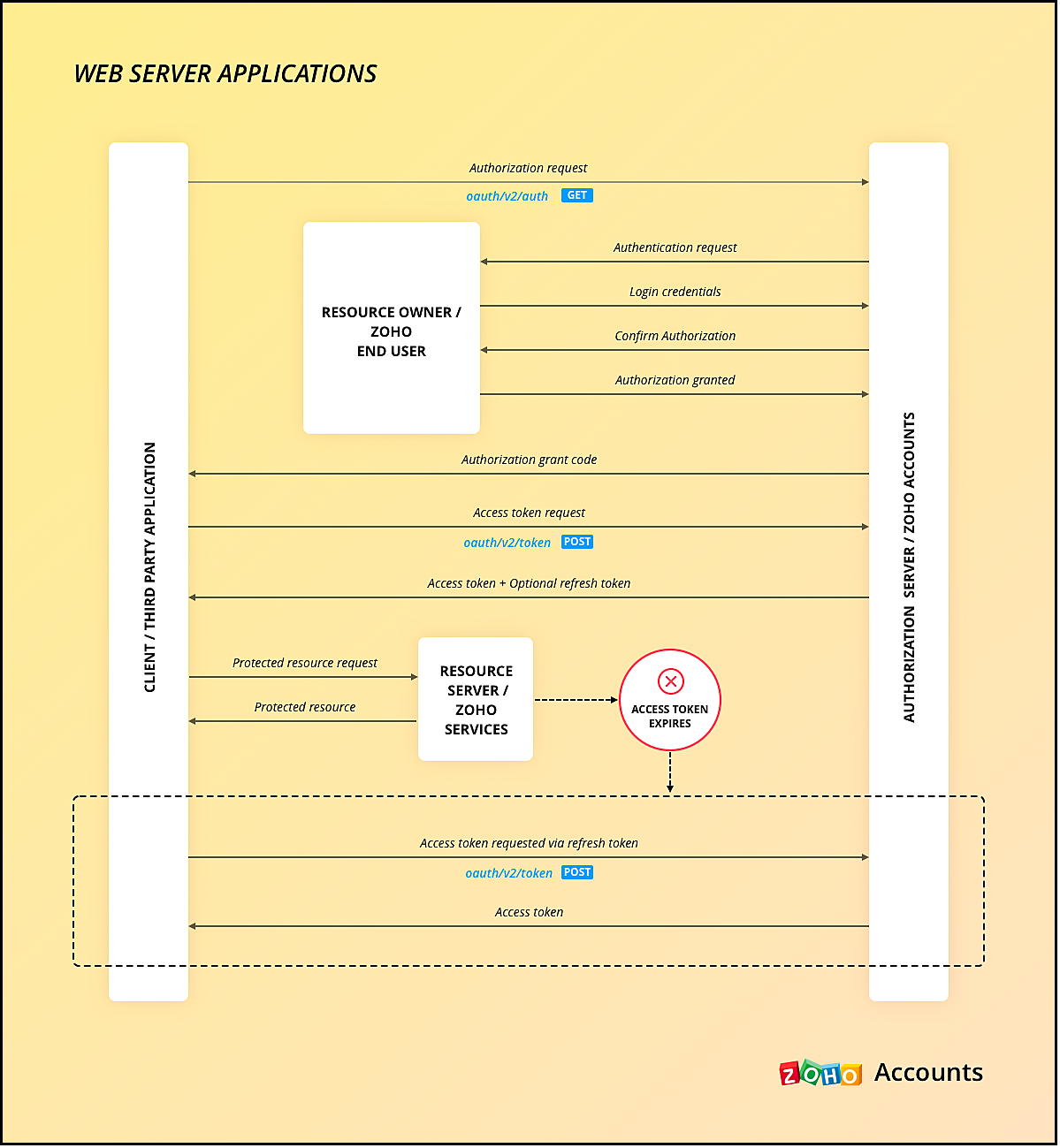
Here is a gist of what happens:
- Users visit your website where you have the Login with Zoho button.
- When a user clicks it, that user will be redirected to accounts.zoho.com with the details of your app such as client ID, scope, redirect uri, access type as the URL parameters.
- Your app must make an API call to Zoho Accounts with the client ID, scope, redirect uri, and access type. Users are shown the data that your application wants to use.
- When users give their consent, Zoho redirects them back to your app.This will be the "Redirect URL" you give while registering your app.
- The redirect URL will have the authorization code(grant token) as one of the parameters, along with the location(user's domain).
- Your app must then make API calls from your web server to Zoho Accounts to generate access and refresh tokens with the generated grant token.
- You must store these tokens in your DB to access that user's data in Zoho CRM. While making API calls, you must send this access token in the header.
- Your app must also have the logic to regenerate access tokens from refresh tokens when the access token expires.
Note that your app must take care of storing user's details like email, organization ID, and tokens.
The following image shows the protocol flow.
You can use any of our server-side SDKs to simplify this process.
When you use our SDK, all you have to do is, generate the grant token and initialize the SDK with the client details and this token. The SDK takes care of access token generation, refreshing it, and token storage.
Refer to these older Kaizen posts on Integrating a third-party app using Java SDK and Java SDK for Self Client.
For more details, you can refer to the Accounts guide and CRM help doc.
2. Client-based applications
This client type is for applications that do not have a server and run exclusively on a web browser.
This is also called the Implicit flow as your app makes API calls to Zoho only when users are using your app.
This type of application loads data dynamically on the webpage, and accesses Zoho CRM data by making API calls via Javascript.
Consider the same example where there is a Login with Zoho button on your webpage.
Here is a gist of what happens when a user clicks it.
- Your app redirects the user to Zoho Accounts.
- Your app makes the authorization request with the client ID, redirect uri, scope, and response type as token.
- The user is shown the data that your webpage would use.
- When the user gives consent, Zoho Accounts sends the access token to the redirect uri as a parameter, along with the expiry time and the location of user's data in Zoho's accounts server.
- You can include the "email" in your scope parameter in the access token request to get user's information. The response will have a parameter called id_token that will be in the header.payload.signature format. You need to decrypt the payload section of the parameter using the base-64 decryption algorithm to get user information.
- Your app must then make API calls to Zoho with this access token to fetch data.
- When the access token expires, your app must take care of regeneration and storage.
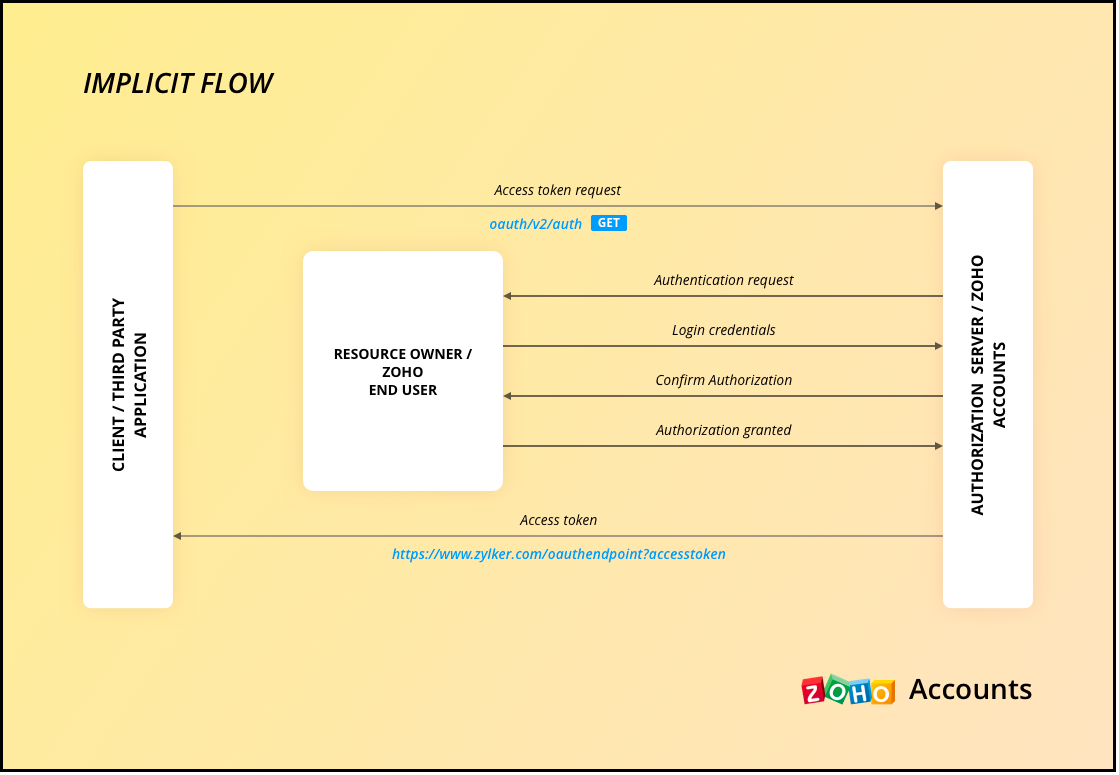
As the API calls are made from your domain to a different domain(zohoapis.com), for security reasons, the browser will throw the CORS error. So, your domain will be registered while registering your app, and Zoho will know to allow the API calls made from that domain.
As the tokens are available on the browser itself, we recommend handling them with care.
When you use our client-side JS SDK, it automatically generates a new access token upon expiry.
3. Self Client Applications
When your application does not have a redirect URL or a UI, but performs only a backend job, and does not need user intervention, then you must choose this client type.
A self client is often used when the application and Zoho services are operated by the same entity, and you want to enable secure communication between them. For example, you have an internal reporting tool and integrate it with Zoho Analytics. In this case, both the tool and Zoho Analytics are operated by the same entity.
Similarly, consider that you have a legacy product management system and want to perform data sync between Zoho CRM and the system, then you must use the self client.
Here is a gist of what happens.
- You register your app as self client in Zoho API Console.
- You will get the client details such as ID and secret.
- You provide the scopes required for your app to access CRM data.
- You will receive the grant token.
- Your app must then make API calls to Zoho Accounts to generate access and refresh tokens.
- Your app can then use this access token to make API calls to Zoho CRM and use data.
You can refer to our older Kaizen post on this topic for more details.
Note that self client apps can also use any of our server-side SDKs. As already said, the SDK takes care of access and refresh token generation, refreshing the access token, and token storage.
4. Non-browser applications
This client type is for devices that do not have a user agent such a web browser. A TV, for instance.
Let us consider an example involving a smart TV application that integrates with Zoho ShowTime. In this scenario, the smart TV application acts as a non-browser client.
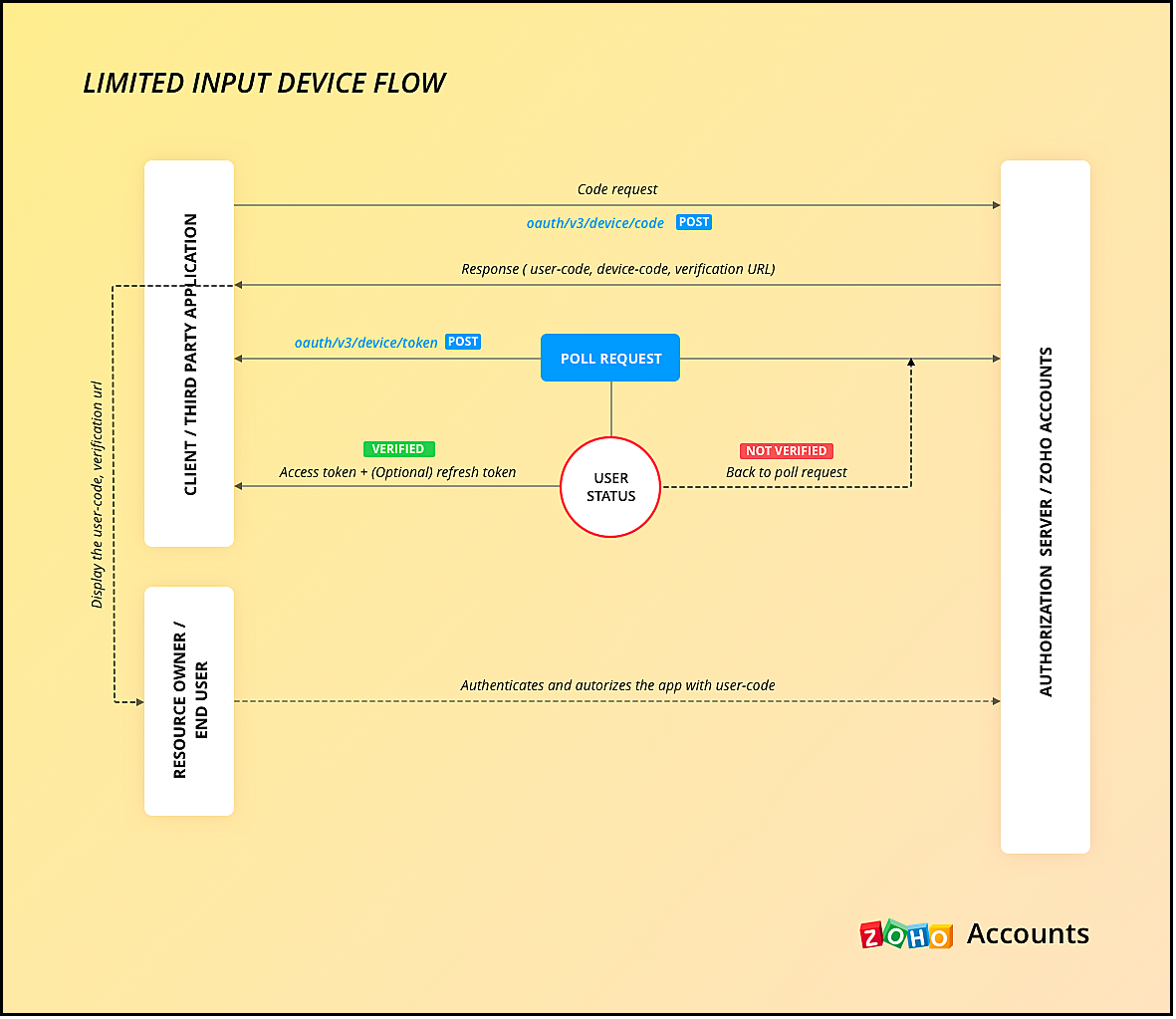
Here is how authentication is handled:
- You must register your smart TV app in Zoho API Console with the type "Non-browser application".
- Users install a dedicated Zoho ShowTime application on their smart TVs.
- When users launch the Zoho ShowTime application on their smart TV, they are prompted to authenticate with their Zoho ShowTime account.
- When they successfully authenticate, Zoho Accounts sends the grant token to your app, along with the user-code, device-code and verification URL,The user must go to this verification URL on a browser and enter the user-code to grant permission to the app.
- Meanwhile, your app must poll the accounts server using the grant token to check if the token has been received.
- When the user enters the user code, Zoho Accounts sends the access token to your app.
- Your app can then use the access token to make API calls to Zoho. Your app must take care of token storage and renewals.
Here is the protocol flow. For more details, refer to this doc.
5. Mobile-based applications
You must use this client type when you have developed an app exclusively for mobile devices. The protocol flow is similar to server-based application where a browser session is required for the users to authenticate.
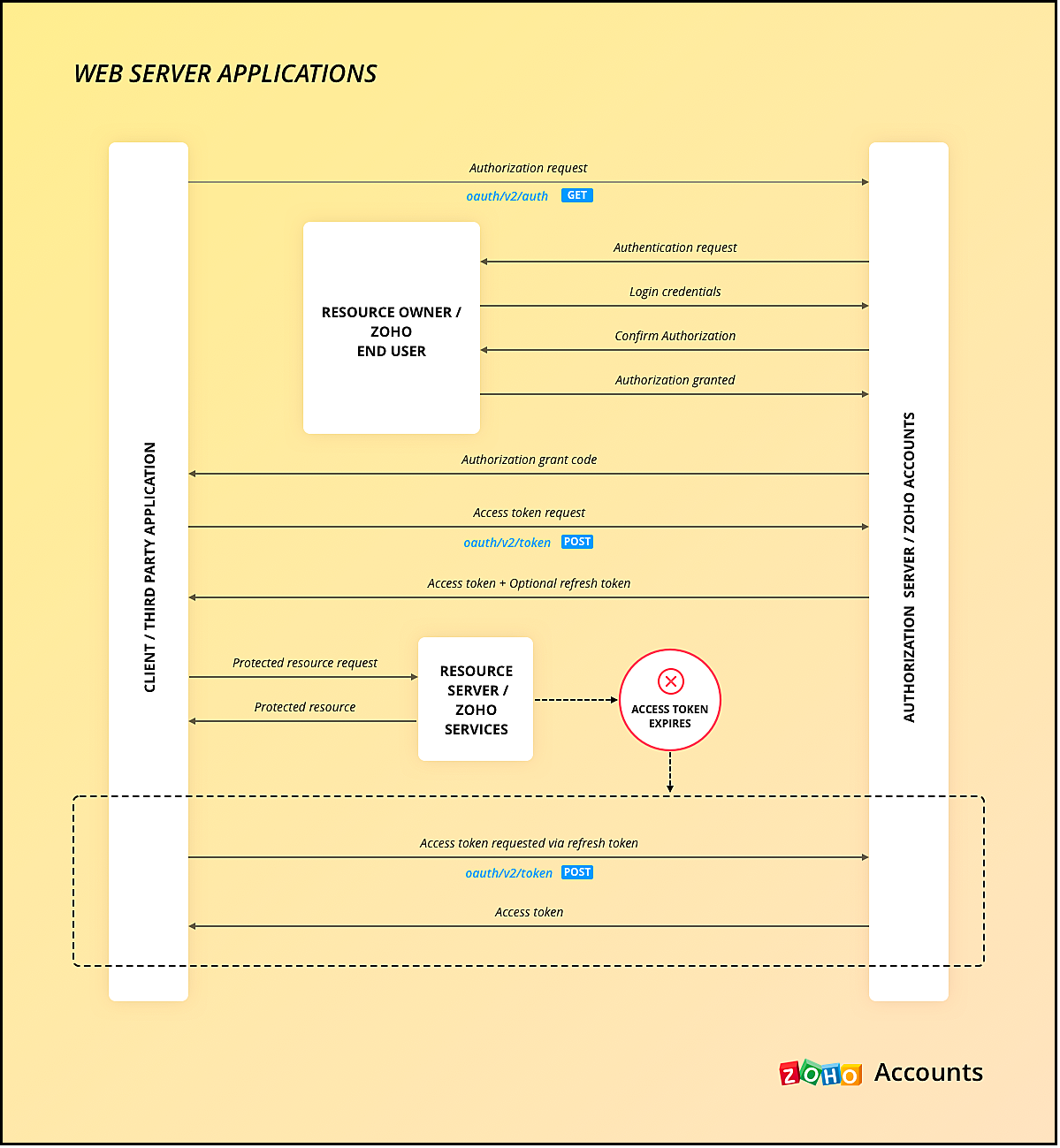
Similar to server-side apps, mobile apps also need to handle redirection, token generation and storage.
If you use any of our Mobile SDKs, the SDK itself handles token generation and storage.
We hope you found this post useful. Let us know your thoughts in the Comment section or write to us at support@zohocrm.com.
Cheers!
Topic Participants
Shylaja S
Piyush Dwivedi
Ishwarya SG
Onur Gulay - Smile Center Turkey®
Sunderjan Siddharth
Sticky Posts
Kaizen #198: Using Client Script for Custom Validation in Blueprint
Nearing 200th Kaizen Post – 1 More to the Big Two-Oh-Oh! Do you have any questions, suggestions, or topics you would like us to cover in future posts? Your insights and suggestions help us shape future content and make this series better for everyone.Kaizen #226: Using ZRC in Client Script
Hello everyone! Welcome to another week of Kaizen. In today's post, lets see what is ZRC (Zoho Request Client) and how we can use ZRC methods in Client Script to get inputs from a Salesperson and update the Lead status with a single button click. In thisKaizen #222 - Client Script Support for Notes Related List
Hello everyone! Welcome to another week of Kaizen. The final Kaizen post of the year 2025 is here! With the new Client Script support for the Notes Related List, you can validate, enrich, and manage notes across modules. In this post, we’ll explore howKaizen #217 - Actions APIs : Tasks
Welcome to another week of Kaizen! In last week's post we discussed Email Notifications APIs which act as the link between your Workflow automations and you. We have discussed how Zylker Cloud Services uses Email Notifications API in their custom dashboard.Kaizen #216 - Actions APIs : Email Notifications
Welcome to another week of Kaizen! For the last three weeks, we have been discussing Zylker's workflows. We successfully updated a dormant workflow, built a new one from the ground up and more. But our work is not finished—these automated processes are
Recent Topics
Deactivated Zoho One account can sign in
I am concerned by the fact that deactivated users in Zoho One have the ability to sign in even after their account has been deactivated (not deleted). these inactive identities have no access to individual Zoho apps or data. based on my experience theyHow can I reset the password for a user in Zoho Projects
We need to reset the password for a user in Zoho Projects. I am the admin portal owner and there was nothing to be found to do this. very confusing.How can I add a comment to an existing ticket via API?
I need to add comments/notes to the history of an existing ticket using the API without overwriting the original ticket description. Thanks!Marketer's Space: Proven tips to improve open rates – Part III
Hello Marketers! Welcome back to another post in Marketer's Space! This is the final post in the "open rate series". In the first and second parts, we discussed topics ranging from sender domains to pre-headers—but we're not done yet. A few more importantAttention Deluge Developers: Important Update Regarding "Send Email Deluge Task"
Hi Deluge Users, We hope this message finds you well. We would like to inform you about a recent update on the Send emails deluge task. If you are using this deluge task (SalesIQ Scripts) for your Zobot, widgets, or form controllers to send emails, pleaseZoho Social - Feature Request - Reviewer Role
Hi Social Team, I've come across this with a couple of clients, where they need a role which can review and comment on posts but who has no access to create content. This is a kind of reviewer role. They just need to be able to see what content is scheduledZoho Books/Inventory - Update Marketplace Sales Order via API
Hi everyone, Does anyone know if there is a way to update Sales Orders created from a marketplace intigration (Shopify in this case) via API? I'm trying to cover a scenario where an order is changed on the Shopify end and the changes must be reflectedZoho Inventory / Finance Suite - Add feature to prevent duplicate values in Item Unit field
I've noticed that a client has 2 values the same in the Unit field on edit/create Items. This surprised me as why would you have 2 units with the same name. Please consider adding a feature which prevents this as it seems to serve no purpose.Kaizen #224 - Quote-driven Deal Reconciliation Using Zoho CRM Functions and Automation
Hello everyone! Welcome back to another instalment in the Kaizen series. This post covers quote-driven deal reconciliation, emphasizing Functions and Automation to address practical sales challenges. Business Challenge Sales organizations often mark dealsBARCODE PICKLIST
Hello! Does anyone know how the Picklist module works? I tried scanning the barcode using the UPC and EAN codes I added to the item, but it doesn’t work. Which barcode format does this module use for scanning?Zoho Inventory - Allow Update of Marketplace Generated Sales Orders via API
Hi Inventory Team, I was recently asked by a client to create an automation which updated a Zoho Inventory Sales Order if a Shopify Order was updated. I have created the script but I found that the request is blocked as the Sales Order was generated byHow do I create an update to the Cost Price from landed costs?
Hi fellow Zoho Inventory battlers, I am new to Zoho inventory and was completely baffled to find that the cost price of products does not update when a new purchase order is received. The cost price is just made up numbers I start with when the productVoC in Zoho CRM is now data savvy: Explore response drilldown, summary components and participation in CRM criteria
VoC has all the goods when it comes to customer intelligence—which is why we're constantly enhancing it. We recently added the following: A customer drilldown component that shows you the list of prospects and customers behind a chart's attribute ExpandedLet’s Talk Recruit: LinkedIn Cheatsheet
Welcome to the first edition of Let’s Talk Recruit for 2026. We are kicking off the year by revisiting one of the most asked about topics in Zoho Recruit. How our LinkedIn integrations actually work and how recruiters can get the most value from them.Zoho Forms API
Is there any way to get all form entry list using API? Looking forward to hear from youAbility to Set Client Name During Portal Invitation
Hi Zoho Team, We would like to suggest an important enhancement to the Zoho Creator Client Portal functionality. Zoho Creator recently introduced the option to set a client’s display name in the Client Portal settings, which is very helpful for creatingPDF Attachment Option for Service Reports
Hello Team, I would like to check with you all if there is an option to attach PDF documents to the service reports. When I try to attach a file, the system only allows the following formats: JPEG, JPG, and PNG. Could you please confirm whether PDF attachments【Zoho CRM】データ一覧画面でのメモのバッジ機能リリースのお知らせ
ユーザーの皆さま、こんにちは。コミュニティチームの藤澤です。2026年度もゾーホーユーザーコミュニティをどうぞよろしくお願いいたします! 今回は「Zoho CRM アップデート情報」の中から、新機能のデータ一覧画面でのメモのバッジ機能をご紹介します。 目次 概要 メモのバッジ機能について メモの作成について メモに関する様々な処理について 最近追加したメモについて メモのバッジの非表示について クライアントスクリプトの対応 概要 メモのバッジ機能について 既存の活動バッジに加えて、すべてのタブのデータ一覧表示画面に、各データごとに利用できる「メモのバッジ」(キャプチャ内の赤枠部分)が新たに導入されました。is it possible to add more than one Whatsapp Phone Number to be integrated to Zoho CRM?
so I have successfully added one Whatsapp number like this from this User Interface it seems I can't add a new Whatsapp Number. I need to add a new Whatsapp Number so I can control the lead assignment if a chat sent to Whatsapp Phone Number 1 then assignCan’t find fsm in zoho one
Every other app is available to me in Zoho one except fsmPosibility to add Emoticons on the Email Subject of Templates
Hi I´ve tried to add Emoticons on the Subject line of Email templates, the emoticon image does show up before saving the template or if I add the Emoticon while sending an Individual email and placing it manually on the subject line. Emoticons also showTask Deletion Restriction & Strict Stage Control
Hello Zoho Community, We have the following two issues currently pending and under testing, for which we require a workable and reliable solution: 1. Task Deletion Restriction We are testing ways to ensure that staff users are not able to delete tasksUnable to mass update a picklist field
Hello, I have the records within our Accounts module divided between two account types: Parent Accounts & Member Accounts. I am attempting to mass update accounts from one picklist value to the other (within other specific criteria in our custom fields)Process checklist in CRM
Hi We've created a new sales process that I'm mapping into the CRM - issue I have is that some of the tasks / milestones I would like to capture require very simple tick box responses but there are quite a few under a variety of sub categories so I don'tCRM project association via deluge
I have created a workflow in my Zoho CRM for closing a deal. Part of this workflow leverages a deluge script to create a project for our delivery team. Creating the project works great however, after or during the project creation, I would like to associateWhere is the settings option in zoho writer?
hi, my zoho writer on windows has menu fonts too large. where do i find the settings to change this option? my screen resolution is correct and other apps/softwares in windows have no issues. regardsThis user is not allowed to add in Zoho. Please contact support-as@zohocorp.com for further details
Hi Team, when I,m trying to create a email account (imagixmidia.com.br) it's showing this error >> This user is not allowed to add in Zoho. Please contact support-as@zohocorp.com for further details plz help me thanksHow to manage task lists in Zoho Desk?
Hello, I use Zoho Desk for IT customer support. I have a list of standard operating procedures (SOPs), including SOPs for onboarding new users, offboarding users, losing a device, etc. These are lists of tasks to be performed depending on the situation.Zoho Books' 2025 Wrapped
Before we turn the page to a new year, it’s time to revisit the updates that made financial management simpler and more intuitive. This annual roundup brings together the most impactful features and enhancements we delivered in 2025, offering a clearActivating Zobot instead of chat
Hi folks, I know this will be obvious, but I have not been able to locate the details on this via google or youtube. We've had SalesIQ life chat set up for a while now and it is working perfectly. I have just finished development of a Zobot (using codeless)Adding a new section to the related details sidebar when creating a new ticket.
Hello, I was wondering if you can add a new section to the related details sidebar when creating a new ticket. I was wanting to have it to where it also shows the account information related to the contact chosen as well. This is the section I am referringDisplaying only unread tickets in ticket view
Hello, I was wondering if someone might be able to help me with this one. We use filters to display our ticket list, typically using a saved filter which displays the tickets which are overdue or due today. What I'd really like is another filter thatIs Zoho Shifts included in the Zoho One plan?
In case the answer is no: there's any plan to make it available via One? Thank youZoho Tracking Image location
So we've been having an issue with tracking email opens. Specifically in Gmail. Our emails are not that long either, maybe 4 sections of image/250 characters of text/button per section. But all my test accounts I used via Gmail we're showing opens. But then come to find out the tracking image is at the very bottom of the email. So If the message is clipped (It always just clips our social icons on the bottom) and the user doesn't click the show more button it never tracks the open. Looking at otherCreating an invoice to be paid in two installments?
Hi there, I own a small Photographic Services business and have not been able to find a way to fit my billing system into Zoho, or any other Accounting software. The way my payments work is: 1. Customer pays 50% of total price of service to secure theirZoho Tables is now live in Australia & New Zealand!
Hey everyone! We’ve got some great news to share — Zoho Tables is now officially available in the Australian Data Center serving users across Australia and New Zealand regions! Yes, it took us a bit longer to get here, but this version of Zoho TablesDelivery and handling of documents e-stamped using Zoho Sign
Hello everyone! Zoho Sign makes it easy to pay non judicial stamp duty online and automatically attach the digitally generated e-stamp challan to electronic documents. We also manage the delivery of physical e-stamped papers. We periodically receive theseIntroducing Dedicated Modules for Plans, Addons, and Coupons in Zoho Billing
We’ve enhanced the way you manage Plans, Addons, and Coupons in Zoho Billing. Previously, all three grouped together under Subscription Items. Now, each one has its own dedicated module, giving you a cleaner and more intuitive experience. This updateSortie de Zoho TABLE ??
Bonjour, Depuis bientôt 2 ans l'application zoho table est sortie en dehors de l'UE ? Depuis un an elle est annoncée en Europe Mais en vrai, c'est pour quand exactement ??Drop Down Value
Hi, May I know why Zoho Flow treat this drop down as number and not as string. If so, how can I fetch the right value for filtering. This field is from Creator, in Creator upon checking by default it is a string since it's not a lookup field.Next Page