Client Script Support for Notes Related List

Client Script Support for Notes Related List


Hello everyone!

Welcome to another week of Kaizen. The final Kaizen post of the year 2025 is here! 

With the new Client Script support for the Notes Related List, you can validate, enrich, and manage notes across modules. In this post, we’ll explore how to prevent unwanted changes to notes by specific profiles based on custom criteria. With Client Script, you can enforce rules that control edits based on user profile and deal stage, ensuring critical notes remain accurate and protected. This use case was taken from the context discussed in this post.

In this Kaizen post, 


  1. Supported Events for Notes Related List
  2.  Supported ZDKs for Notes Related List
  3. Use Case
  4. Solution
  5. Summary
  6. Related Links


1. Supported Events for Notes Related List

onBeforeAdd

This event occurs just before a new note is added to the Notes Related List. Use this event to validate the data or modify note content automatically before the note is created.

onBeforeUpdate

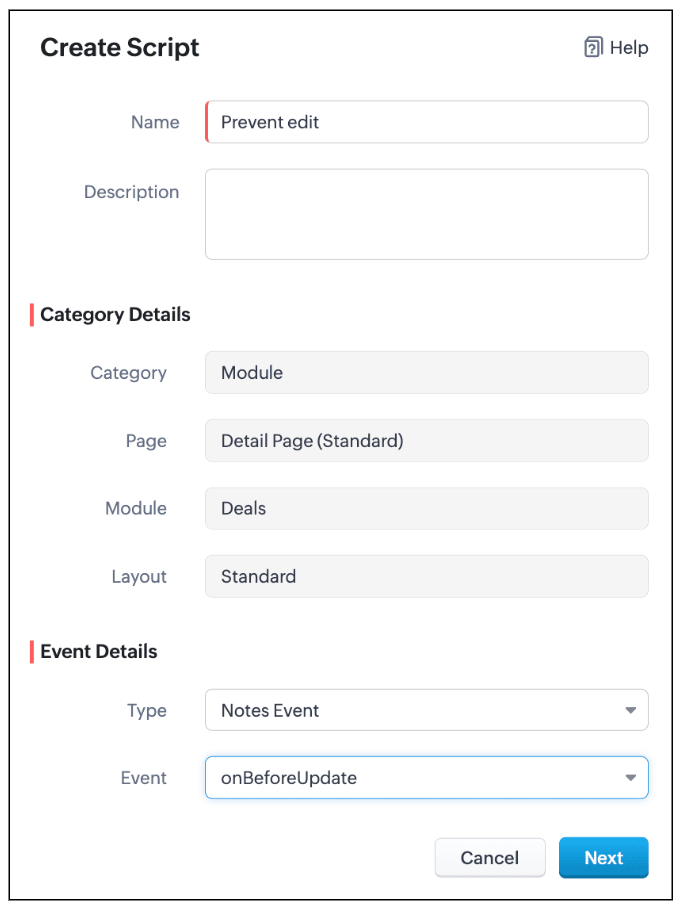
This event occurs just before an existing note in the Notes Related List is updated. It allows you to enforce validation or make changes to the note data before the update is saved.

Click here to know more about the supported events.

2.  Supported ZDKs for Notes Related List

The following Client Script ZDKs can be used to perform actions in Notes Related List.

Retrieves the current value of a field in Notes Related List.

Sets or updates the value of a field in Notes Related List.

3. Use Case: Stage-Based Notes Lock for Specific User Profiles based on Deal stage

Quote
At Zylker, when a Deal is in Proposal/Price Quote, Negotiation/Review, or Closed Won/Closed Lost, a Sales Representative should not edit existing notes. This ensures that critical approval comments, pricing details, and final decisions remain unaltered, maintaining clarity and audit compliance.
Preventing edits ensures critical approval comments, pricing details, and final decisions remain accurate.

4. Solution

  1. Go to Setup > Developer Hub > Client Script. Click +New Script.

  2. Specify the details to create a script and click Next.

  3. Enter the following script and click Save.
  1. var dealStage = ZDK.Page.getField("Stage").getValue();
  2. // Stages where notes should not be editable by Sales Reps
  3. var restrictedStages = [
  4.     "Proposal/Price Quote",
  5.     "Negotiation/Review",
  6.     "Closed Won",
  7.     "Closed Lost"
  8. ];
  9. // Get current user profile
  10. var currentUserProfile = $Crm.user.profile;
  11. // Profiles allowed to edit notes
  12. var allowedProfiles = ["Manager", "Admin"];
  13. // If the stage is restricted and user is not allowed
  14. if (restrictedStages.includes(dealStage) && !allowedProfiles.includes(currentUserProfile)) {
  15.     // Log original note (optional)
  16.     log("Original Note:", ZDK.Page.getComponent("notes-editor").getValue());
  17.     // Show alert
  18.     ZDK.Client.showAlert("Your profile is *not authorized* to edit notes of a deal in " + dealStage +" stage.");
  19.     // Prevent further action
  20.     return false;
  21. }
  1. Define a variable restrictedStages that contains all the deal stages where notes should not be editable.

  2. Get the current deal stage using ZDK.Page.getField("Stage").getValue(), you fetch the stage of the deal currently being viewed.

  3. Get the profile of the current user using $Crm.user.profile. This helps you to find out the profile of the person trying to edit the note.

  4. Create an array allowedProfiles for profiles that are always allowed to edit notes.

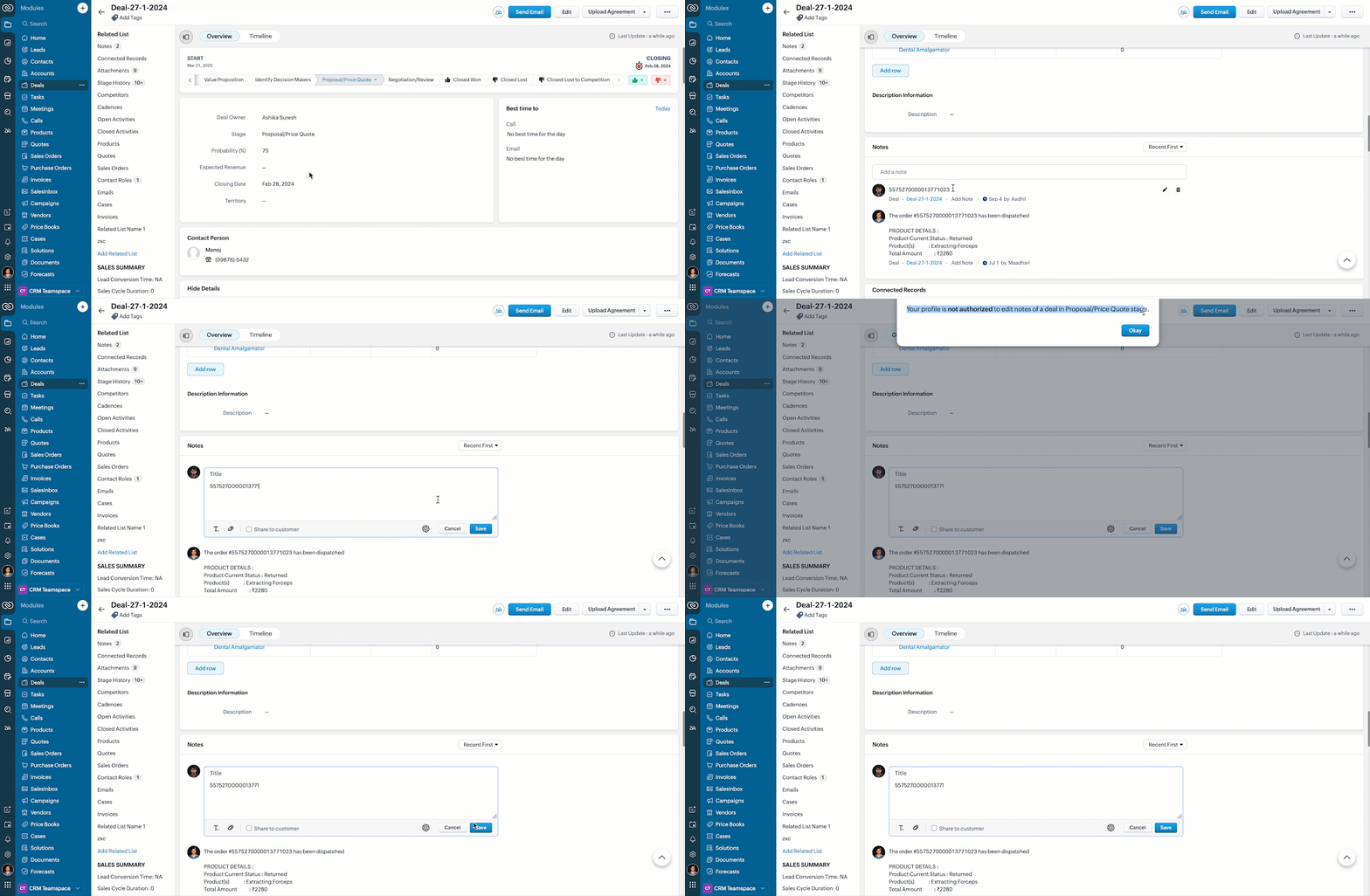
  5. If the deal is in a restricted stage and the current user is not in the allowed profiles, show an alert to the user explaining they cannot edit the note.

  6. Stop the note from getting saved using return false.

  7. This way, the script protects important notes from being edited by unauthorized users during critical deal stages.

  8. Here is how the Client Script works.


5. Summary

In this post we have discussed,
  1. The Client Script events supported in Notes
  2. The ZDKs available for use in Notes Related List
  3. How to prevent a note from being saved with custom criteria


Wishing you a joyful, successful, and inspiring New Year 2026 See you next week as we kick off an exciting New Year! 😄


    • Sticky Posts

    • Kaizen #198: Using Client Script for Custom Validation in Blueprint

      Nearing 200th Kaizen Post – 1 More to the Big Two-Oh-Oh! Do you have any questions, suggestions, or topics you would like us to cover in future posts? Your insights and suggestions help us shape future content and make this series better for everyone.
    • Kaizen #226: Using ZRC in Client Script

      Hello everyone! Welcome to another week of Kaizen. In today's post, lets see what is ZRC (Zoho Request Client) and how we can use ZRC methods in Client Script to get inputs from a Salesperson and update the Lead status with a single button click. In this
    • Kaizen #222 - Client Script Support for Notes Related List

      Hello everyone! Welcome to another week of Kaizen. The final Kaizen post of the year 2025 is here! With the new Client Script support for the Notes Related List, you can validate, enrich, and manage notes across modules. In this post, we’ll explore how
    • Kaizen #217 - Actions APIs : Tasks

      Welcome to another week of Kaizen! In last week's post we discussed Email Notifications APIs which act as the link between your Workflow automations and you. We have discussed how Zylker Cloud Services uses Email Notifications API in their custom dashboard.
    • Kaizen #216 - Actions APIs : Email Notifications

      Welcome to another week of Kaizen! For the last three weeks, we have been discussing Zylker's workflows. We successfully updated a dormant workflow, built a new one from the ground up and more. But our work is not finished—these automated processes are
    • Recent Topics

    • Zoho CRM with Built-In MCP Support

      Zoho CRM now provides built-in support for Model Context Protocol (MCP), enabling AI tools to connect and perform CRM actions using natural language. Zoho CRM MCP servers act as a bridge between AI agents and Zoho CRM, exposing CRM capabilities as callable
    • Allow Zia Agents using Zoho One Account

      When I went to try Zia Agents, it forced the creation of a new, separate account. This seems counter-intuitive to me. I don't want to manage a separate account. Plus, aren't Zoho One users the ones most likely to adopt Zia Agents most quickly? It seems
    • Introducing SlyteUI : From Idea to a Working Interface in Minutes

      Hello everyone! Are you spending hours building basic UIs? Does even the smallest customization feel like a major task? CRM customization should feel intuitive and straightforward, not time consuming or exhausting. SlyteUI makes this possible by simplifying
    • My Zoho mail stopped receiving or sending emails about 3 hours ago

      Its a pop 3 account. The emails get into the actual mailbox on the server and I can send emails directly from the server, but they are no longer in Zoho, in neither of my Zoho accounts. All green ticks under Mail Accounts under Settings
    • POP mailbox limits

      If I am accessing a remote POP mail server using Zoho Mail is there a mailbox quota for the account or is it all related to my mail account storage limits?
    • SPF: HELO does not publish an SPF Record

      I am using Zoho mail. Completed all of the required prerequisites from the dashboard to avoid any issues with mail delivery. But when checking on mail-tester.com getting the following error. Can anyone help me solve this?
    • Check out in Meetings

      Why there is no check out in Meetings of Zoho CRM, very difficult to track
    • Ability to Attach Images When Reporting Issues to Zoho Projects from Zoho Desk

      Hi Zoho Desk Team, Hope you’re doing well. We’re using the Zoho Desk–Zoho Projects integration to report bugs directly from support tickets into the Zoho Projects issue tracker. This integration is extremely useful and helps us maintain smooth coordination
    • Zoho Show Keeps Crashing and Goes Down with the Data

      Today, I am experiencing something unusual: Zoho Show keeps crashing and goes down with the data. When you try to reopen the same deck, you get that lovely "Presentation not found" error. This has happened today rather frequently with multiple decks.
    • Outgoing Mail Blocked – Suspicious Login Activity (Need Clarification and Solution)

      Hello, I’m currently facing an issue where my Zoho Mail account has been blocked due to “suspicious login activity,” and outgoing emails are restricted. Here are the details shown: Block type: Outgoing mail blocked Reason: Suspicious login activity A
    • Escalate the tickets to the escalation team through email

      Hi Zoho Team, I would like to ask if it is possible to escalate the tickets when the status changed to "Escalated" by sending an email to them. I have attached the snapshot from my Zoho desk where I want it to email to a certain group(escalation team).
    • Mailbox storage showing incorrect usage

      My mailbox shows 4.99 GB used out of 5 GB. However, actual mailbox usage is only around 394 MB. Trash and Spam are already empty. IMAP/POP is not enabled. WorkDrive is not in use. This appears to be a storage calculation issue. Please help to recalculate
    • Google Fonts Integration in Pagesense Popup Editor

      Hello Zoho Pagesense Team, We hope you're doing well. We’d like to submit a feature request to enhance Zoho Pagesense’s popup editor with Google Fonts support. Current Limitation: Currently, Pagesense offers a limited set of default fonts. Google Fonts
    • Have to ask: WHY is Zoho Purposefully blocking Apple Reminders?

      I just have to ask: Why is zoho purposefully blocking Apple reminders (CalDav). This is just strange... I just can't see a reason why this is done both within the Zoho calendar and mail calendar? These are both paid services. Why? This little simple feature is forcing me to leave Zoho. Our workflow depends on Reminders and after talking with an Apple engineer, they noticed theat Zoho is purposefully blocking this caldav port call. I just don't understand why. Thanks!
    • I am not able to check in and checkout in zoho people even location access allowed

      This issue i am facing in mackbook air m1, I allowed location in chrome browser and i also tried in safari but getting similar issue. Please have a look ASAP.
    • Issue with attaching files to a task through the API

      Hello! I've implemented a function that creates a task for every new bill that is created but I haven't been able to attach to the task the files which are attached to the bill. I have encountered multiple errors but the most common one is error 33003:
    • Printing receipts with 80mm thermal printer and Zoho Creator

      I have a sales form in my Zoho Creator app and I would like to print receipts for customers. Question 1: From what I've read on this forum there's no way to submit and have the receipt print automatically, you'd have to go through the printer dialog,
    • Integrate with WooCommerce using Wordpress Plugin

      We’re thrilled to announce a powerful update to the Zoho Marketing Automation WordPress plugin with WooCommerce integration! This enhancement enables new possibilities for businesses running online stores using WooCommerce, empowering them to merge seamless
    • Removing To or CC Addresses from Desk Ticket

      I was hoping i could find a way to remove unnecessary email addresses from tickets submitted via email. For example, a customer may email the support address AND others who are in the helpdesk notification group, in either the TO or CC address. This results
    • When I schedule calendar appointments in zoho and invite external emails, they do not receive invites

      Hello, We have recently transitioned to zoho and are having a problem with the calendar feature. When we schedule new calendar appointments in zoho the invite emails aren't being sent to the external users that we list in participants. However, this works
    • Sync desktop folders instantly with WorkDrive TrueSync (Beta)

      Keeping your important files backed up and accessible has never been easier! With WorkDrive desktop app (TrueSync), you can now automatically sync specific desktop folders to WorkDrive Web, ensuring seamless, real-time updates across devices. Important:
    • Unable to send

      Hello, I am unble to send any single email during the whole time due to the Zoho IP 136.143.188.16 being bloked by SpamCop.net Please help can somebody help me?
    • Errorcode 554

      Hello, I am unble to send any single email during the whole time due to the Zoho IP 136.143.188.16 being blocked by SpamCop. Please can somebody help me?
    • Spamcop

      Have been trying to email several of our clients and many of our emails keep getting bounced back with an error that states: ERROR CODE :550 - "JunkMail rejected - sender4-op-o16.zoho.com [136.143.188.16]:17694 is in an RBL: Blocked - see spamcop.net/bl.shtml?136.143.188.16"
    • Emails being blocked / spamcop

      Hello, I am unablr to send any single email during the whole time due to the Zoho IP 136.143.188.16 being blocked by SpamCop.net Please help on this.
    • Zoho IP blocked by SpamCop 136.143.188.16

      Hello, I am unble to send any single email during the whole time due to the Zoho IP 136.143.188.16 being blocjed by SpamCop.net Please help on this.
    • This domain is not allowed to add in Zoho. Please contact support-as@zohocorp.com for further details

      After not using the domain rcclima.org.pe for some time, I'm trying to set up the free version of Zoho Mail. When I tried to validate my domain, rcclima.org.pe, I received the error message discussed in this thread: "This domain is not allowed to be added
    • 554 5.1.1 – Mail sending blocked for the domain(s): [gmail.com]

      Here's your corrected text: Hello, I hope you are doing well. I was unable to send a message and received the following error: "554 5.1.1 – Mail sending blocked for the domain(s): [gmail.com]" I tried to send and deliver an email but got this error. I
    • Can I hide empty Contact fields from view?

      Some contacts have a lot of empty fields, others are mostly filled. Is there a way I can hide/show empty fields without changing the actual Layout? I would like to de-clutter my view, and also be able to add information later as I am able. I would be
    • Replying from same domain as a catch-all?

      I have 2 domains setup on Zoho, both with associated email addresses. They look something like this: john@example.com (primary address) john@test.com (this domain also has a catch-all setup) I use the catch-all for test.com as a public-facing email address
    • Account and Email and Password

      I'm signing up as a Partner so I can move my website clients across to a separate email server from their current cPanel one.. So I have a Zoho account and then I moved one of my emails across to that account to test the import process... So the question
    • Zoho CRM Copilot Connector

      Hello, Are there plans to release a connector for Zoho CRM and Copilot? I'm in the early research stages of potentially switching our CRM solution to Microsoft Dynamics because of its out of the box integration with Copilot. The advantage being that we
    • Approval Workflow for Purchase Orders Abrir

      The requirement is , that all purchase orders greater than or equal to 5000 go through an approval process from certain people, but within books I only see that the approvers can be by levels or any approver but we cannot enter a rule like these. Can
    • Zoho mail admin panel not opening

    • Cloning Module Customizations in Zoho FSM

      Hello Latha, I have two Zoho FSM accounts, each in a different data center. I would like to know if it is possible to clone the module customizations I have already completed in one account to my new account in the UAE from the backend. In other words,
    • is it possible to adjust the date field to show Monday as a first day

      Hi, Is it possible to adjust somewhere the date field, so the first day of the week is Monday (instead of Sunday)? Thank you! Ferenc
    • Create your own Zoho CRM homepage using Canvas - Home View!

      Hello Partners We are excited to share a new enhancement to Canvas in Zoho CRM that gives users more control over how their homepage looks and works. Introducing Canvas Home View! What is Canvas Home View? You can now create and design a custom homepage
    • can change deal colors in bigin?

      can be super useful if we can change colors deals process any way to do it?
    • Transferring Data and Double Lookup Help

      I would like to ask how I would do the following actions/codes. So I have a Budget Request Application where a User needs a request for a specific Project and lists all their needs in a subform via per-item lists. So, for my questions. 1. I have a dropdown
    • New Account, Setting up Domain Question

      Hello, I recently set up a new account with a custom domain. But after paying and setting up my account, it says OpenSRS actually owns the domain, and I have to sign up with them to host my site. But OpenSRS wants to charge me $95, which is ridiculous.
    • Next Page