Kaizen #199: FAQs on Multi-Select Lookup (MxN) Field in Zoho CRM

Kaizen #199: FAQs on Multi-Select Lookup (MxN) Field in Zoho CRM

 Nearing 200th Kaizen Post – We want to hear from you!
Do you have any questions, suggestions, or topics you would like us to cover in future posts? Your insights and suggestions help us shape future content and make this series better for everyone. 

Hey everybody!!!
Welcome back to another post in the Kaizen series!
In this post, we will address some of the most frequently asked questions about the Multi-Select Lookup(MxN) field from the Zoho CRM developer community forum.

1. What is a Multi-select lookup field?

A multi-select lookup field in Zoho CRM lets you create a many-to-many relationship between two modules. This means a record in one module can be linked to multiple records in another module and vice versa.
For example, using an multi-select lookup field, you can associate multiple skills with an employee.

2. How does the Mutli-Select Lookup relationship work?

When you create a Multi-Select Lookup between two modules, for example, Employees and Skills, Zoho CRM automatically creates a hidden linking module, which is also known as an MxN module. This module stores the associations between records in the two modules, enabling you to track and manage many-to-many relationships.

For instance, if you link Employees and Skills, a linking module named EmpXSkills will be created.

This linking module is accessible only via API.

Backend Flow of multi-select lookup Relationship
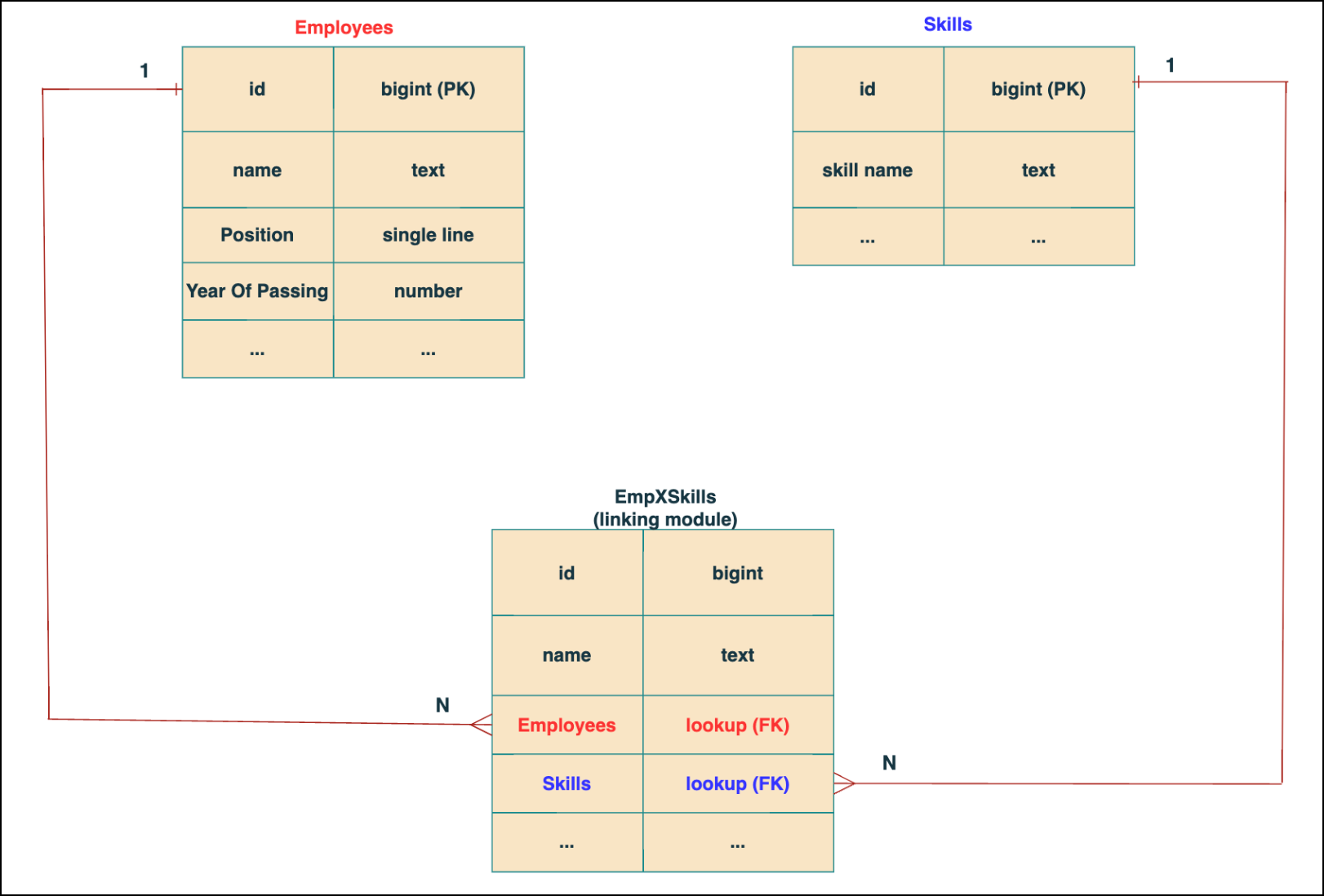


In the linking module, two lookup fields (lookup fields with api names - Employees and Skills) will be created. The lookup fields, one pointing to Employees and the other pointing to Skills from the linking module, establish a connection between the linking module and its associated module.

Why you cannot use a lookup field for this use case? 
In Zoho CRM, a lookup field creates a one-to-many relationship between two modules i.e. one record in the source module can be linked to only one record in the target module.

Example :
If you create a lookup field for Skills in the Employees module, each employee can be linked to only one skill. So, use a multi-select lookup field instead of a lookup field when you need to represent complex relationships like one employee - many skills and one skill - many employees.

3. How to create a multi-select Lookup field using Zoho CRM APIs?

To create a Multi-Select lookup field between two modules using Zoho CRM APIs, follow these steps:

Step 1: Identify the Module API Name
Before creating the field, you should know the API names of the Employees and Skills modules. For that, use the Get Module Metadata API.  

Request URL  : {{api-domain}}/crm/v8/settings/modules
Request method : GET
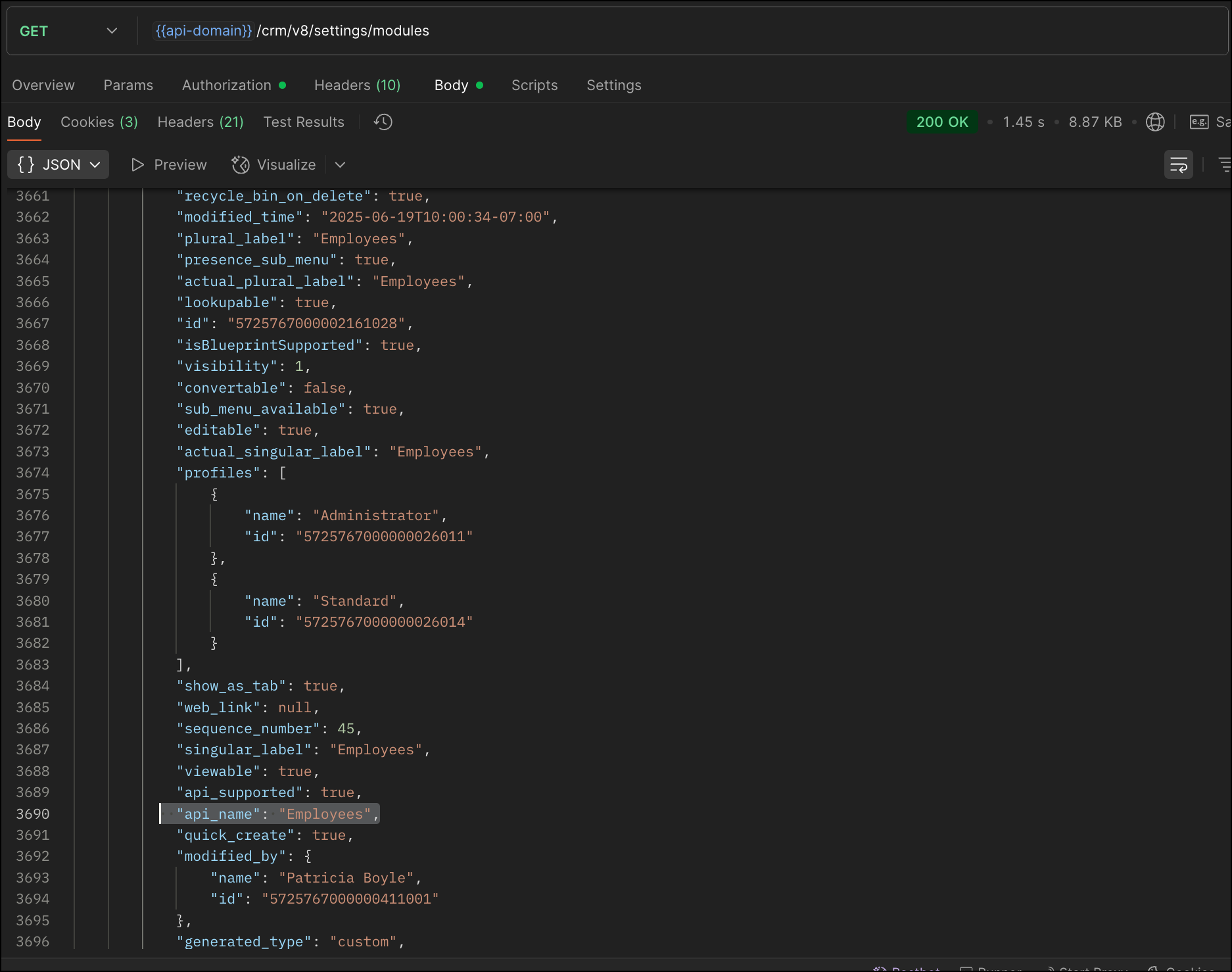


Now, search for the Employees module in the response and note its API name.

Step 2: Use the Create Custom Fields API

To establish a many-to-many relationship between two modules, in our case, Employees and Skills, you need to create a custom field of type multi-select lookup in the Employees module (parent module).  Here, we will associate multiple skills to an employee.

This custom field requires:
  • The related module you want to link to - Skills.
  • A display field from the related module
  • The linking module (EmpXSkills), which stores the actual associations.
Use the Create Custom Fields API to create custom fields.

Request URL : {{api_domain}}/crm/v8/settings/fields?module=Employees
Request method : POST

Sample input :


{
    "fields": [
        {
            "field_label": "Skills", //Name of the field in your module
            "data_type": "multiselectlookup", //Type of the field
            "multiselectlookup": { //This JSON object contains the multi-select lookup relationship details

                "connected_details": { //Details about the module and field you want to link
                    "module": {
                        "api_name": "Skills" //API name of the related module
                    },
                    "field": {
                        "field_label": "Skills" //The field in the related module to display
                    }
                },
                "linking_details": { //Details about the junction or linking module that manages the many-to-many relationship
                    "module": {
                        "plural_label": "EmpXSkills" //Plural label of the junction module
                    }
                }
            }
        }
    ]
}


4. How Do You Find the Linking Module and Field API Names?

To know the API name of the linking module:
Use the Get Modules API and search for "generated_type" : "linking" in the response to identify MxN modules. In our case, EmpXSkills.

Request URL : {{api_domain}}/crm/v8/settings/modules
Request method : GET
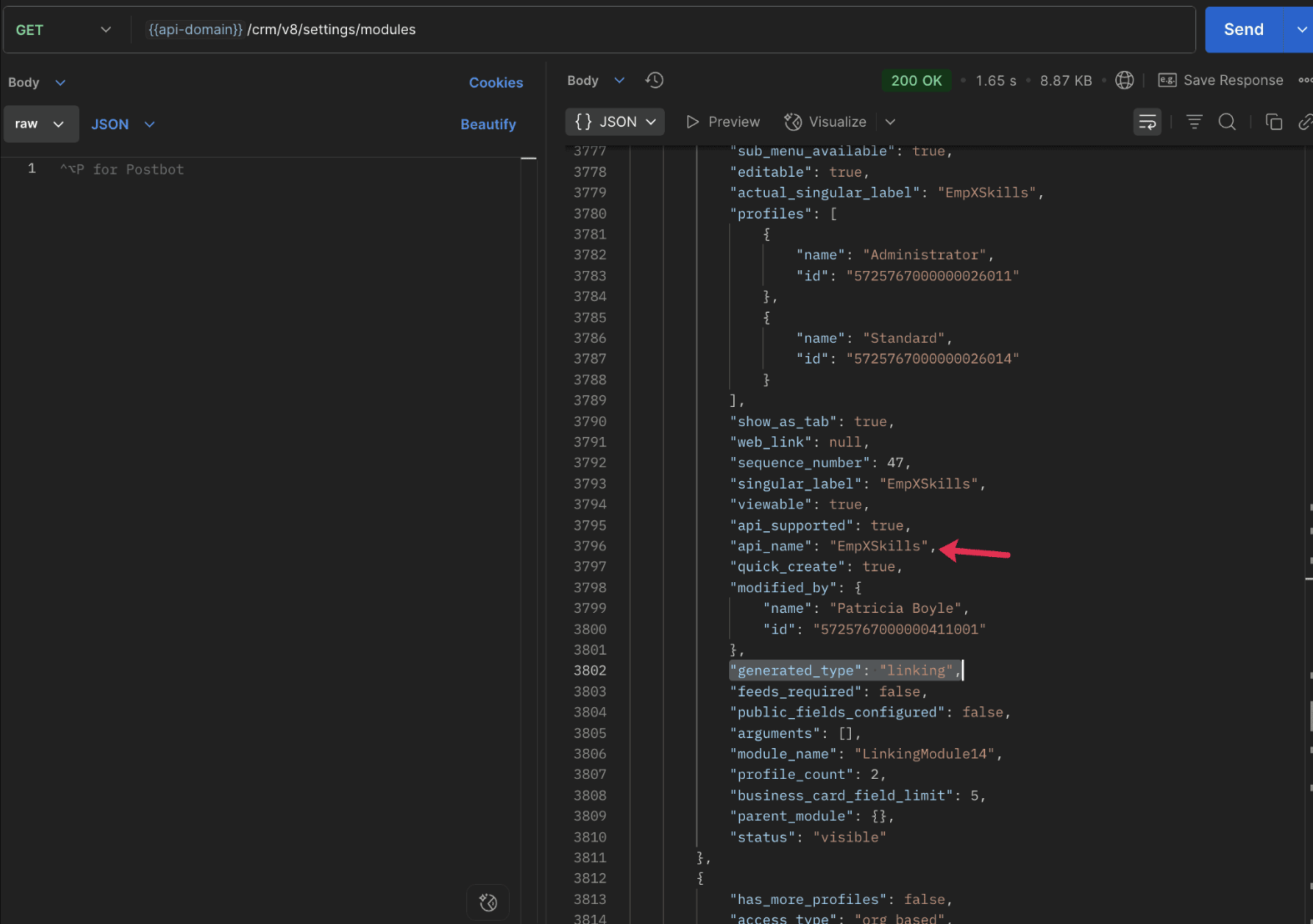


To know the field API names in the linking module:
Use the Get Fields Metadata API to retrieve the API names of lookup fields within the linking module.

Request URL : {{api_domain}}/crm/v8/settings/fields?module=EmpXSkills
Request method : GET

5. How do I associate records via a multi-select lookup field using the Insert Records API in Zoho CRM?

To associate records using a multi-select lookup field, you must provide the record IDs from the related module. The association is made through the linking module.

Example :
Associating multiple skills with an employee using the multi-select lookup field.

Request URL : {{api-domain}}/crm/v8/Employees
Request method : POST

Sample input :


{
  "data": [
    {
      "Name": "Patricia",
      "Email": "patricia@mail.com",
      "Position": "Marketing Specialist",
      "Year_of_Experience": 5,
      "Skills": [   // API name of the multi-select lookup field in the Employees module
        {
          "Skills": { // API name of the lookup field in the linking module pointing to the Skills module
            "name": "Marketing",
            "id": "5725767000002149427"  //ID from the Skills module are mandatory to establish the link
          }
        },
        {
          "Skills": {
            "name": "Social Media Marketing",
            "id": "5725767000002149476"
          }
        }
      ]
    }
  ]
}


6. How do I associate an Employee's skills using the linking module in Zoho CRM?

To establish a relationship between the Employees and Skills modules through the linking module, use the Insert Records API to create a record in the linking module, EmpXSkills.

To do this,
  • Use the appropriate lookup field API names to reference the parent module.
  • You must need the record IDs from both the Employees and Skills modules to create the associations.
Request URL : {{api-domain}}/crm/v8/EmpXSkills
Request method : POST

Sample input :


{
  "data": [
    {
      "Name": "Patricia",
      "Employees": {
        "id": "5725767000002161001"  // Record ID from the Employees module
      },
      "Skills": {
        "id": "5725767000002149476"  // Record ID from the Skills module
      }
    }
  ]
}


7. When should I use create/update operations in the Employees module vs the EmpXSkills module?

                Employees Module

               EmpXSkills (linking) Module

Use when you want to create or update an Employee and associate Skills using the Multi-select Lookup field.

Use when you want to create or remove associations between existing Employee and Skill records without modifying the actual Employee or Skill data.

Creating a new employee and assigning their skills at once.

Managing relationships between existing records i.e., linking and unlinking skills to employees.


8. How to update a record in the linking module?

To update a record in the linking module, use the Update Records API.
Request URL : {{api-domain}}/crm/v8/EmpXSkills/5725767000006269044
Request method : PUT

Sample input :


{
    "data": [
        {
            "Skills": {
                "name": "Marketing",
                "id": "5725767000002170035" //Associating another skill with the employee 
            }
        }
    ]
}

In the above sample, we have replaced an existing skill associated with an employee with another Skill in the linking module.This is done by updating the Skills lookup field in the EmpXSkills record.

Please note that in the linking module, Skills is a lookup field, so you can associate only one skill per linking record. But in the Employees module, Skills is a multi-select lookup field, so an employee can be associated with multiple skills.

9. How to unlink records from the parent module as well as the linking module?

Unlink the associated records from the parent module:

Using the Update records API, you can remove an associated skill from an employee, use the "_delete": null key within the multi-select lookup field in the Employee record update.

Request URL : {{api-domain}}/crm/v8/Employees/5725767000006269044
Request method : PUT

Sample input :

{
"data": [
        {
            "Skills": [
               {
                    "Skills": {
                        "name": "Marketing", 
                        "id": "5725767000002170035" // The Skill record you want to unlink
                    },
                    "id": "5725767000007228047", //record ID - The record created in the linking module for the employee with the Marketing skill
                    "_delete" : null 
                }
            ]
        }
    ]
}


Replace an associated record from the linking module:

Use the Update Records API to replace an existing association in the linking module.

Request URL : {{api-domain}}/crm/v8/EmpXSkills/5725767000007228035
Request method : PUT

Sample input :


{
    "data": [
        {
            "Skills": {
                "name": "Java",
                "id": "5725767000005259075" //replacing a new skill 
            }
        }
    ]
}

In the above sample, we have replaced the existing skill with Java.

10. Why am I seeing the error "DUPLICATE_LINKING_DATA"  in the Update Records API

This error occurs when you try to associate records with the parent record that are already linked with the Multi-select lookup field. To resolve this, check the records you are trying to link and make sure your association is only with records that are not already linked.

Know your existing linked records:

Before the Update Records API, use the Get Related Records Data API and search for the multi-select lookup field. In our case, Skills is the multi-select lookup field created in the Employees module. This will return all records already associated.

Example :
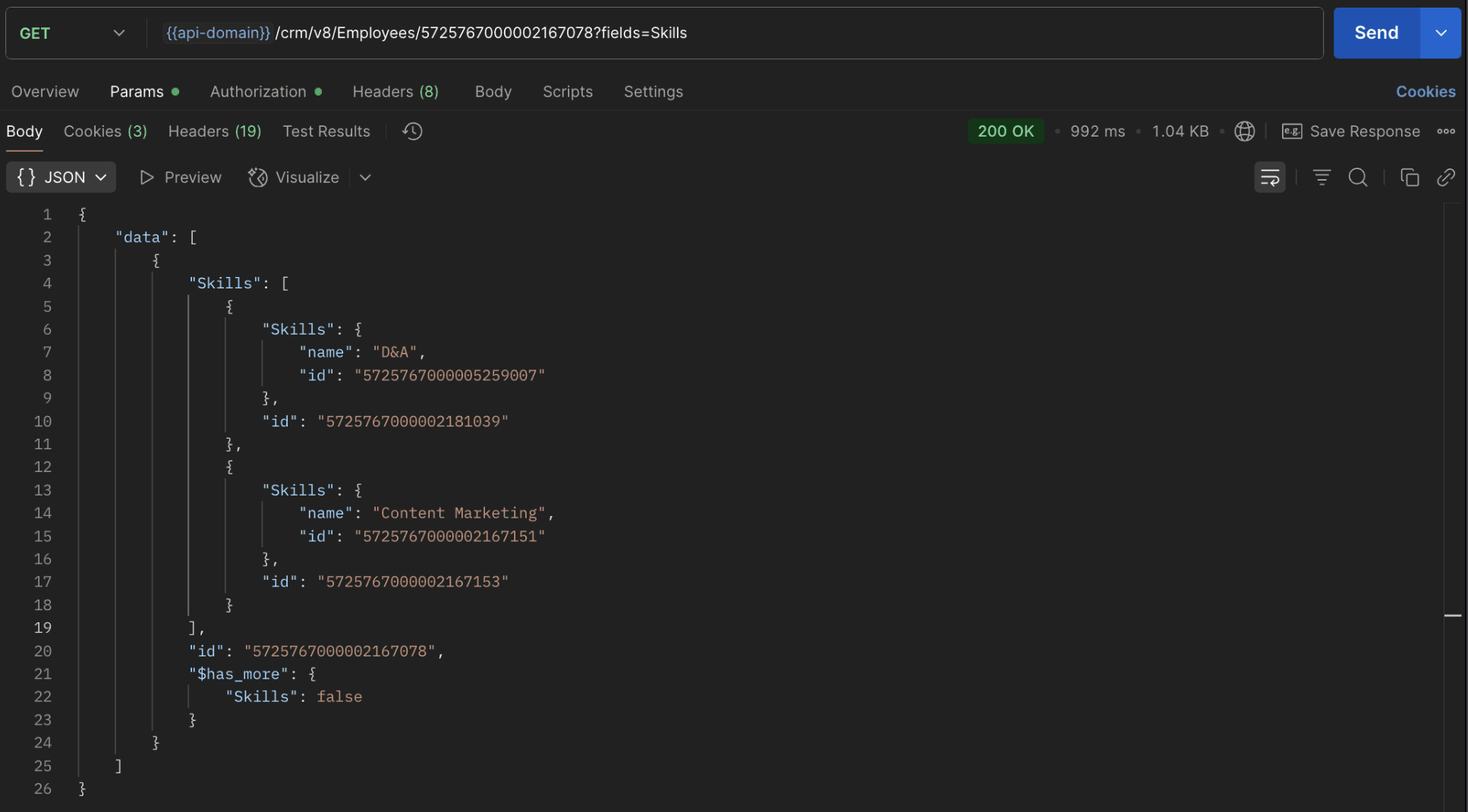

The response returns all Skills already linked with that Employee.

Using this way, compare the IDs from the API response with the new records you are about to link, and only proceed with non-duplicate IDs. This avoids duplicate entries and prevents the "DUPLICATE_LINKING_DATA" error.

11. What happens if I delete a record in the linking module?

When you delete a record in the linking module, it only removes the association between the related records in the Employees and Skills modules.

Note :
  • Deleting a linking module record removes only the relationship between two records from the Employees and Skills modules.
  • Deleting an Employee or Skill record deletes all corresponding entries in the linking module as well.

12. How do I query linked records?

Use the COQL API to query multi-select lookup data by specifying the corresponding linking module's API name directly in your query. The linking module is treated as a separate module in Zoho CRM, so you can retrieve associated records by querying it like any other module.

Sample query :


{
  "select_query": "select Skills.Name as skill, Employees.Name as employee from EmpXSkills where Skills.Name like '%Marketing%'"
}


Use the Get Module Metadata API to know the linking module's API name.

13. How do I export multi-select lookup records using the Bulk Read API?

To export multi-select lookup data, linking module records efficiently, use the Bulk Read API with the linking module’s API name.

Request method : POST

Sample Request :


{
    "callback": {
        "method": "post"
    },
    "query": {
        "module": {
            "api_name": "EmpXSkills" //API name of the linking module
        },
        "fields": [
            "Employees.Name",
            "Employees.Year_of_Experience",
            "Skills.Name"
        ],
        "criteria": {
            "group": [
                {
                    "field": {
                        "api_name": "Employees.Year_of_Experience" 
                    },
                    "comparator": "greater_than",
                    "value": "4"
                },
                {
                    "field": {
                        "api_name": "Skills.Name"
                    },
                    "comparator": "contains",
                    "value": "Social"
                }
            ],
            "group_operator": "AND"
        }
    }
}


14. Can I import my linking module's data using the Bulk Write API?

Yes. Like the Leads and Contacts modules, you can also import linking module's data into Zoho CRM using the Bulk Write API by directly specifying the linking module’s API name.

If you are importing data that involves both a parent module, Employees and its associated MxN linking module, follow these steps:

1. Create separate CSV files:
  • One for the parent module - Employees
  • One for the linking module - EmpXSkills
2. Zip the files into a single ZIP file.
3. Upload the ZIP in a single Bulk Write API request.
4. Ensure accurate field mappings are provided in the API request body.

Refer to Kaizen #131 - Bulk Write for parent-child records using Scala SDK for more details on handling parent-child records.


15. Can I receive notifications if a multi-select lookup field in a module is modified or updated?

Yes, you can receive notifications when a MxN field is updated using the Notification API. To enable instant notifications for actions performed in a module, use the respective API names of the linking module in the input body.

Request method : POST

Sample input :


{
    "watch": [
        {
            "channel_id": "10000",
            "events": [
                "EmpXSkills.all"  //EmpXSkills represents the API name of the linking module
            ],
            "return_affected_field_values": true  
        }
    ]
}


16. Can I use criteria-based filtering when accessing multi-select lookup data using the Search API?

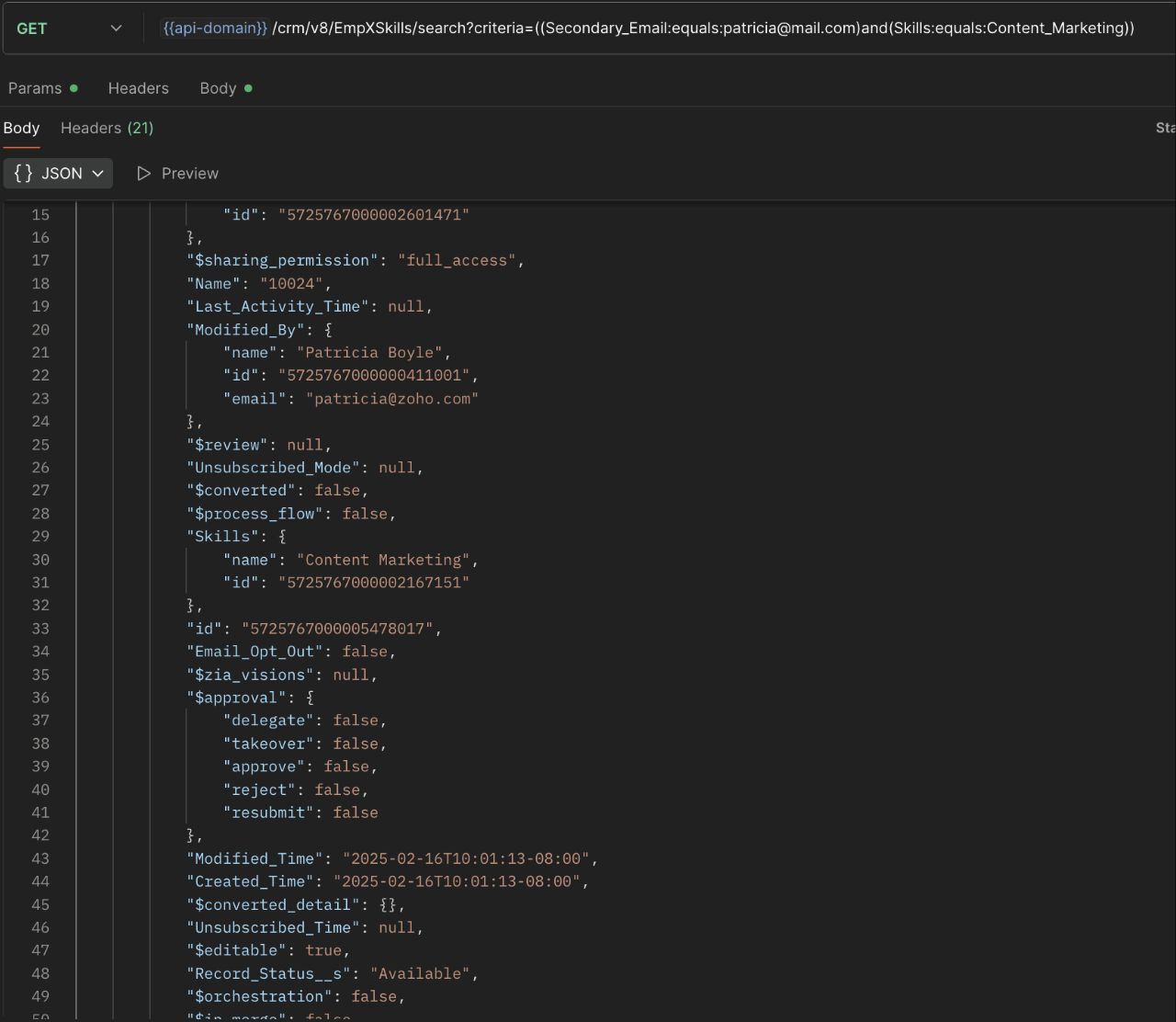
Yes, you can filter multi-select lookup data using the criteria parameter in the Search API's URL.

Here is an example that fetches records from the EmpXSkills linking module.

Request URL : {{api-name}}/crm/v8/EmpXSkills/search?criteria=((Secondary_Email:equals:patricia@mail.com)and(Skills:equals:Content_Marketing))
Request method : GET

Sample response :


                                                                                                                               x-----------------------------x


We trust that this post meets your needs and is helpful. Let us know your thoughts in the comment section or reach out to us at support@zohocrm.com 

Stay tuned for more insights in our upcoming Kaizen posts!


Other FAQs in the Kaizen series :


    • Sticky Posts

    • Kaizen #198: Using Client Script for Custom Validation in Blueprint

      Nearing 200th Kaizen Post – 1 More to the Big Two-Oh-Oh! Do you have any questions, suggestions, or topics you would like us to cover in future posts? Your insights and suggestions help us shape future content and make this series better for everyone.
    • Kaizen #226: Using ZRC in Client Script

      Hello everyone! Welcome to another week of Kaizen. In today's post, lets see what is ZRC (Zoho Request Client) and how we can use ZRC methods in Client Script to get inputs from a Salesperson and update the Lead status with a single button click. In this
    • Kaizen #222 - Client Script Support for Notes Related List

      Hello everyone! Welcome to another week of Kaizen. The final Kaizen post of the year 2025 is here! With the new Client Script support for the Notes Related List, you can validate, enrich, and manage notes across modules. In this post, we’ll explore how
    • Kaizen #217 - Actions APIs : Tasks

      Welcome to another week of Kaizen! In last week's post we discussed Email Notifications APIs which act as the link between your Workflow automations and you. We have discussed how Zylker Cloud Services uses Email Notifications API in their custom dashboard.
    • Kaizen #216 - Actions APIs : Email Notifications

      Welcome to another week of Kaizen! For the last three weeks, we have been discussing Zylker's workflows. We successfully updated a dormant workflow, built a new one from the ground up and more. But our work is not finished—these automated processes are
    • Recent Topics

    • Webinar Alert: Learn how to decode your landing page performance with analytics

      Every click, scroll, and drop-off tells a story. Are you listening? Join our Landing Page Analytics webinar to understand how data can reveal what’s working and what’s costing you conversions. In this session, you'll discover The most important metrics
    • Campaign Status Field in CRM

      I'm wanting to create a custom view in CRM that shows all those who have recently hard bounced in past campaigns so we can clean up the database. An old Zoho article said it was possible, but I don't see the option to push campaign status field to CRM,
    • Zoho Forms for Vertical Studio Subscriber Organizations

      We’re excited to introduce the Zoho Forms integration with Vertical Studio. This allows you to capture data using forms and send it directly to your Vertical Studio modules. With this integration, form submissions can be used to create or update records,
    • Zoho Flow not handling Boolean properly

      Hi, I have a checkbox in one system that I'm trying to sync with a checkbox in Zoho CRM. The value from the source system comes in as blank (unticked) or 1 (ticked). I've written the following custom function to convert the output to either boolean false
    • Printing invoice from creator using writer

      Hello. I have created my invoices using Zoho Writer and i'm sending data to them from Zoho Creator by selecting a row in a report and then clicking a button which has workflow connected to it to send the date to the invoice in writer. This is working
    • How to Initiate WhatsApp Message on SalesIQ?

      I've just activated a Business WhatsApp phone number through SalesIQ because of its touted omnichannel chat approach. Sounds exciting. I understand that when a customer sends me a WA message, I can reply to it on SalesIQ and keep the chat going, perfect.
    • i want to delete organization or tranfer ownership

      I accidentally created a Zoho organisation and now I cannot accept an invite from another organisation. I am the Super Admin and cannot leave. Please either delete my organisation or transfer ownership so I can leave.
    • Bulk upload images and specifications to products

      Hi, Many users have asked this over the years and I am also asking the same. Is there any way in which we can bulk upload product (variant) images and product specifications. The current way to upload/select image for every variant is too cumbersome.
    • Zoho FSM API Delete Record

      Hi FSM Team, It would be great if you could delete a record via API. Thank you,
    • Marketing Tip #26: Optimize product images for SEO

      Product images can do more than make your store look good. They can also help customers discover your products through search. Since search engines can’t "see" images, they rely on text signals to understand what an image is about. Two small actions make
    • Allow rejected records (Approval process) to re-enter Blueprints

      Cannot seem to get my head around the key differences between the Blueprints and the Approval Process. For me it seems like different flavours of more or less the same thing - especially now that we have the option of Record Locking. Have a quote to sales
    • Every time an event is updated, all participants receive an update email. How can I deactivate this?

      Every time an event is updated in Zoho CRM (e.g. change description, link to Lead) every participant of this meeting gets an update email. Another customer noticed this problem years ago in the Japanese community: https://help.zoho.com/portal/ja/community/topic/any-time-an-event-is-updated-on-zohocrm-calendar-it-sends-multiple-invites-to-the-participants-how-do-i-stop-that-from-happening
    • Streamlining E-commerce Photography with AI Background Tools

      Hey Zoho Community, I’ve been messing around with ways to make product images less of a headache for fashion brands on Zoho Commerce. You know how boring generic backdrops can get, and how much time traditional photoshoots eat up, right? I tried out this
    • Add @Mention Notifications in Zoho Cliq for Zoho Project Mentions

      Hello Zoho Projects Team, We hope you are doing well. We would like to submit a feature request regarding "Projects Bot" Cliq bot notifications for @mentions inside Zoho Projects comments (Tasks and Issues). Current Behavior: At the moment, when someone
    • WO Completion Status Not Updating Automatically

      Hello Latha, Hope you are doing well. Over the past few days, we have been facing an issue with WO completion. When an AP is marked as complete, the work order status is not automatically updating to “Completed,” and we have to mark it manually. Could
    • Is it possible to create a meeting in Zoho Crm which automatically creates a Google Meet link?

      We are using Google's own "Zoho CRM for Google" integration and also Zoho's "Google Apps Sync" tools, but none of them provide us with the ability to create a meeting in Zoho CRM that then adds a Google Meet link into the meeting. Is this something that
    • Customer Message Edit/Delete Function & Backend Visibility Inquiry

      目前客服已发送的对话支持编辑和删除功能,请问在 Zoho 系统后台,是否可以查看客服具体发送了什么内容,以及删除或修改了哪些信息?如果无法查看,这个功能是否可以通过设置关闭客服的编辑和删除权限?如可以,请告知具体设置路径。 Currently, customer service agents are able to edit and delete messages after sending them. In the Zoho system backend, is it possible to view
    • In App Auto Refresh/Update Features

      Hi,    I am trying to use Zoho Creator for Restaurant management. While using the android apps, I reliased the apps would not auto refresh if there is new entries i.e new kitchen order ticket (KOT) from other users.   The apps does received notification but would not auto refresh, users required to refresh the apps manually in order to see the new KOT in the apps.    I am wondering why this features is not implemented? Or is this feature being considered to be implemented in the future? With the
    • Sync Task Status from Zoho Projects to Zoho Desk

      Hi Zoho Desk Team, Hope you’re doing well. We’re actively using the Zoho Desk–Zoho Projects integration, which helps our support and project teams stay aligned. However, we noticed that when we change a task’s status in Zoho Projects, the change is not
    • Lost the ability to sort by ticket owner

      Hi all, in the last week or so, we have lost the ability to sort tickets by Ticket Owner. Unlike the other columns which we can hover over and click on to sort, Ticket Owner is no longer clickable. Is it just us, or are other customers seeing this too?
    • Placeholder doesnt work in email tempalate

      Hi Team,  I have put in the customer happiness rating place holder in my email template but when I pick the template in my ticket and send it to client, the place holder doesnt get generated. What am I missing here? screenshot attached. 
    • Search API filter/sort ignores comment-triggered modifiedTime updates

      Summary When a comment is added to a Call or Account, the parent record's modifiedTime is correctly bumped. This bumped value is visible in: GET /api/v1/calls/{id} ✅ GET /api/v1/calls/search without a filter ✅ — the record's response body shows the new
    • Automation#17: Auto-Create Tasks in Zoho Projects Upon Ticket Creation in Zoho Desk

      Hello Everyone, This edition delivers the solution to automatically create a task in Zoho Projects when a ticket is created in Zoho Desk. Zylker Resorts uses Zoho Desk for bookings and handling guest requests. Zylker resorts outsources cab bookings to
    • Introducing parent-child ticketing in Zoho Desk [Early access]

      Hello Zoho Desk users! We have introduced the parent-child ticketing system to help customer service teams ensure efficient resolution of issues involving multiple, related tickets. You can now combine repetitive and interconnected tickets into parent-child
    • Remove Bounced email addresses from CRM after running a campaign

      HI, Is there a simple way to remove bounced leads in the CRM where there email doesn't exist anymore after running a campaign?
    • Building a custom site

      do we have an option in Zoho to build custom sites like adding custom functionalities? want to make a site like jumble puzzle answers for today. Is it doable? Please assist.
    • How to Automate an Unsubscribe based on Scoring

      I automatically assign a negative point score to bounced emails and would like to automate unsubscription of these emails from our Campaigns, without losing the contact data. (Oftentimes the lead is no longer at a business, but I want to keep the business
    • Recurring Addons

      Hi, I know you can set the pricing interval for addons to weekly, monthly and yearly & set it for one off or recurring, which these are fine as a base addon item. It really would be helpful if when creating a subscription when you add on the addon item
    • Start Workflow from Deluge Script

      I have developed a customized process from our CRM that leverages a deluge script to create a statement of work document. Once the document has been created via the merge and store function, I would like the ability to start a workdrive review & approve
    • Option+C shortcut conflict

      In the latest Cliq release, you introduced `Option+C` shortcut to start a new audio call. In Polish, `option+C` is used for letter `ć`. I changed this button combo but `Option+C` is still being blocked and doesn't allow me to write letter `ć`.
    • Need Easy Way to Update Item Prices in Bulk

      Hello Everyone, In Zoho Books, updating selling prices is taking too much time. Right now we have to either edit items one by one or do Excel export/import. It will be very useful if Zoho gives a simple option to: Select multiple items and update prices
    • Items Landed Cost and Profit?

      Hello, we recently went live with Zoho Inventory, and I have a question about the Landed Cost feature. The FAQ reads: "Tracking the landed cost helps determine the overall cost incurred in procuring the product. This, in turn, helps you to decide the
    • How to set custom Sales Order numbers

      I am trying to create Sales Orders with data from Jotform submissions. Auto number generation is disabled within Books. Whereas the flow Input recognizes the number (40732 in this example), the Output does not. How can I fix this? I'd like the number
    • Displaying Rate Inclusive of GST per unit

      Hello, Currently when I enter the pricing of a line item it shows the overall amount (price including tax * quantity). I would like to see price/unit inclusive of GST. Is there any way to simplify this and to be able to view it? I've attached my current
    • RouteIQ user Licensefor Non–Zoho One User

      Zoho RouteIQ needs to be purchased for Zoho CRM. The current setup uses the Zoho One plan, but RouteIQ is required for a different user who is not part of Zoho One. However, they need access to routes and customer details within RouteIQ for planning their
    • Introducing the New Applications Module

      We're excited to introduce the Applications module, a powerful new feature designed to revolutionize how you manage job applications. This module offers a more streamlined, efficient approach to tracking and processing candidates throughout your recruitment
    • Zoho Browser??

      hai guys, this sounds awkward but can v get a ZOHO BROWSER same as zoho writer, etc. where i can browse websites @ home and continue browsing the same websites @ my office, as v have the option in Firefox, once i save and close the browser and again when i open it i will be getting the same sites. If u people r not clear with my explanation, plz let me know. Thanks, Sandeep  
    • since the new interface of ZOHO writer can't turn of automatic reminder option for merge documents

      Since the new interface of ZOHO writer I have this problem. I have a large set of templates that I use to send documents to ZOHO Sign. But now in all those templates the box for Sending reminders is ticked, which i don't want. But even if I untick the
    • Sales Allowed Beyond Available Stock and Payment Recorded Without Restriction

      Hi, While testing in Zoho Inventory, I noticed that a sales order can be created with a quantity exceeding the available stock in the selected warehouse. In my case: Available stock: 5 units Ordered quantity: 6 units Despite this: I was able to convert
    • Function #25: Automatically generate purchase orders from a sales order

      We kicked off the "Function Fridays" series with the goal of helping you automate your everyday accounting tasks. As we delve into today's post, I'm delighted to announce that we're here to present the 25th custom function in this series. While it is
    • Next Page