Client Script Support for Notes Related List

Client Script Support for Notes Related List


Hello everyone!

Welcome to another week of Kaizen. The final Kaizen post of the year 2025 is here! 

With the new Client Script support for the Notes Related List, you can validate, enrich, and manage notes across modules. In this post, we’ll explore how to prevent unwanted changes to notes by specific profiles based on custom criteria. With Client Script, you can enforce rules that control edits based on user profile and deal stage, ensuring critical notes remain accurate and protected. This use case was taken from the context discussed in this post.

In this Kaizen post, 


  1. Supported Events for Notes Related List
  2.  Supported ZDKs for Notes Related List
  3. Use Case
  4. Solution
  5. Summary
  6. Related Links


1. Supported Events for Notes Related List

onBeforeAdd

This event occurs just before a new note is added to the Notes Related List. Use this event to validate the data or modify note content automatically before the note is created.

onBeforeUpdate

This event occurs just before an existing note in the Notes Related List is updated. It allows you to enforce validation or make changes to the note data before the update is saved.

Click here to know more about the supported events.

2.  Supported ZDKs for Notes Related List

The following Client Script ZDKs can be used to perform actions in Notes Related List.

Retrieves the current value of a field in Notes Related List.

Sets or updates the value of a field in Notes Related List.

3. Use Case: Stage-Based Notes Lock for Specific User Profiles based on Deal stage

Quote
At Zylker, when a Deal is in Proposal/Price Quote, Negotiation/Review, or Closed Won/Closed Lost, a Sales Representative should not edit existing notes. This ensures that critical approval comments, pricing details, and final decisions remain unaltered, maintaining clarity and audit compliance.
Preventing edits ensures critical approval comments, pricing details, and final decisions remain accurate.

4. Solution

  1. Go to Setup > Developer Hub > Client Script. Click +New Script.

  2. Specify the details to create a script and click Next.
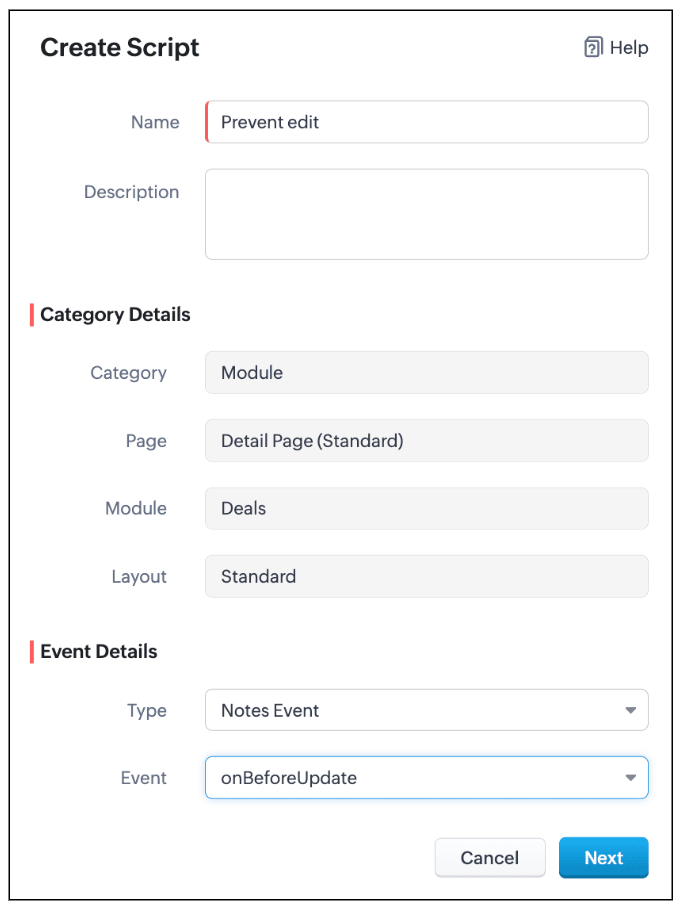

  3. Enter the following script and click Save.
  1. var dealStage = ZDK.Page.getField("Stage").getValue();
  2. // Stages where notes should not be editable by Sales Reps
  3. var restrictedStages = [
  4.     "Proposal/Price Quote",
  5.     "Negotiation/Review",
  6.     "Closed Won",
  7.     "Closed Lost"
  8. ];
  9. // Get current user profile
  10. var currentUserProfile = $Crm.user.profile;
  11. // Profiles allowed to edit notes
  12. var allowedProfiles = ["Manager", "Admin"];
  13. // If the stage is restricted and user is not allowed
  14. if (restrictedStages.includes(dealStage) && !allowedProfiles.includes(currentUserProfile)) {
  15.     // Log original note (optional)
  16.     log("Original Note:", ZDK.Page.getComponent("notes-editor").getValue());
  17.     // Show alert
  18.     ZDK.Client.showAlert("Your profile is *not authorized* to edit notes of a deal in " + dealStage +" stage.");
  19.     // Prevent further action
  20.     return false;
  21. }
  1. Define a variable restrictedStages that contains all the deal stages where notes should not be editable.

  2. Get the current deal stage using ZDK.Page.getField("Stage").getValue(), you fetch the stage of the deal currently being viewed.

  3. Get the profile of the current user using $Crm.user.profile. This helps you to find out the profile of the person trying to edit the note.

  4. Create an array allowedProfiles for profiles that are always allowed to edit notes.

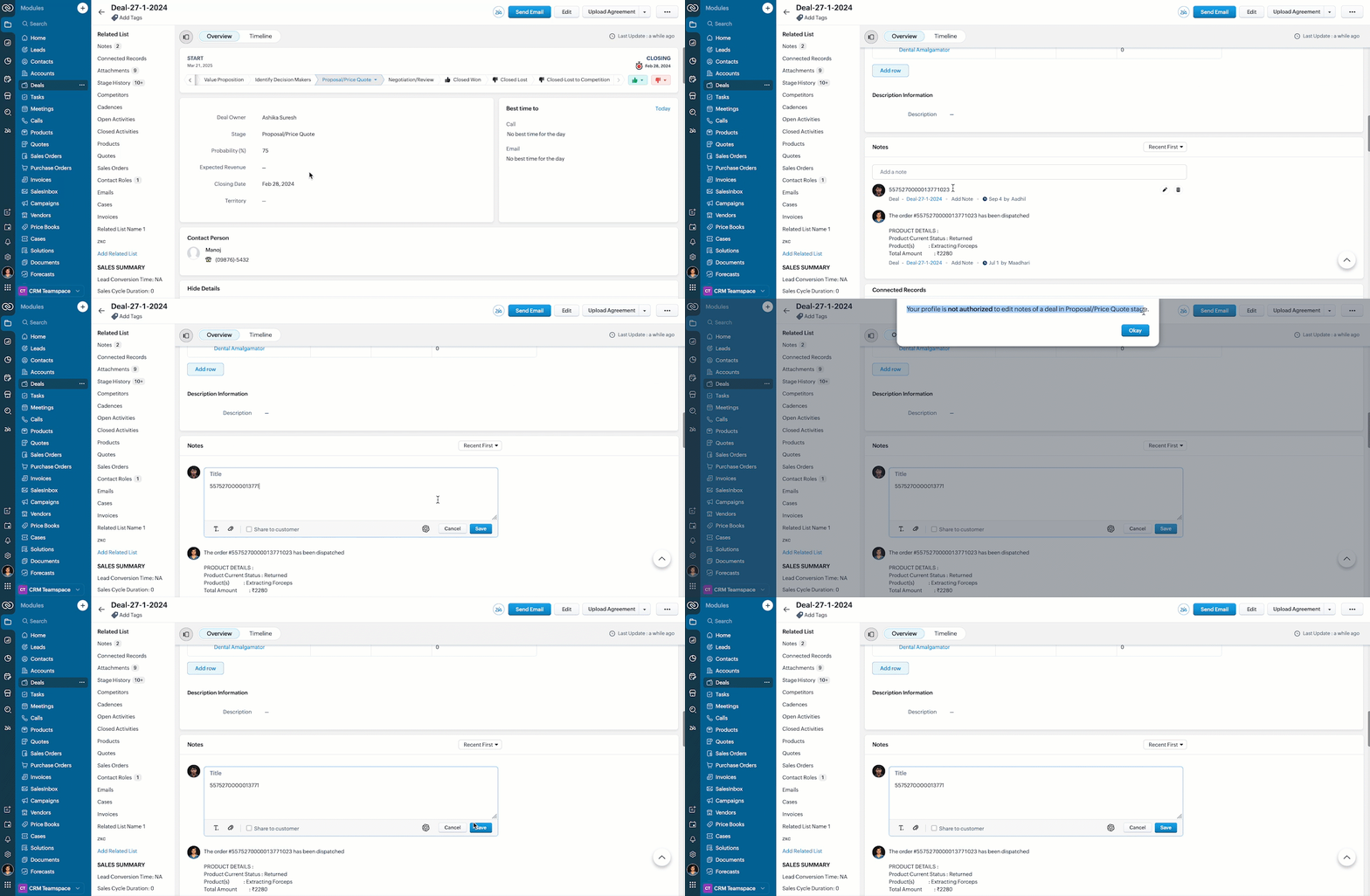
  5. If the deal is in a restricted stage and the current user is not in the allowed profiles, show an alert to the user explaining they cannot edit the note.

  6. Stop the note from getting saved using return false.

  7. This way, the script protects important notes from being edited by unauthorized users during critical deal stages.

  8. Here is how the Client Script works.


5. Summary

In this post we have discussed,
  1. The Client Script events supported in Notes
  2. The ZDKs available for use in Notes Related List
  3. How to prevent a note from being saved with custom criteria


Wishing you a joyful, successful, and inspiring New Year 2026 See you next week as we kick off an exciting New Year! 😄


    • Sticky Posts

    • Kaizen #198: Using Client Script for Custom Validation in Blueprint

      Nearing 200th Kaizen Post – 1 More to the Big Two-Oh-Oh! Do you have any questions, suggestions, or topics you would like us to cover in future posts? Your insights and suggestions help us shape future content and make this series better for everyone.
    • Kaizen #226: Using ZRC in Client Script

      Hello everyone! Welcome to another week of Kaizen. In today's post, lets see what is ZRC (Zoho Request Client) and how we can use ZRC methods in Client Script to get inputs from a Salesperson and update the Lead status with a single button click. In this
    • Kaizen #222 - Client Script Support for Notes Related List

      Hello everyone! Welcome to another week of Kaizen. The final Kaizen post of the year 2025 is here! With the new Client Script support for the Notes Related List, you can validate, enrich, and manage notes across modules. In this post, we’ll explore how
    • Kaizen #217 - Actions APIs : Tasks

      Welcome to another week of Kaizen! In last week's post we discussed Email Notifications APIs which act as the link between your Workflow automations and you. We have discussed how Zylker Cloud Services uses Email Notifications API in their custom dashboard.
    • Kaizen #216 - Actions APIs : Email Notifications

      Welcome to another week of Kaizen! For the last three weeks, we have been discussing Zylker's workflows. We successfully updated a dormant workflow, built a new one from the ground up and more. But our work is not finished—these automated processes are
    • Recent Topics

    • MacOS agent 2026_M02 release notes

      Agent Version: 3.116.0 Release date: 23 February, 2026 Major enhancement: File Manager feature release Minor enhancement: Improved peer to peer connectivity across various network conditions. Minor enhancement: Improvements to Elevate to Admin mode
    • MacOS agent 2026_M01 release notes

      Agent Version: 3.111.0 Release date: 11 February, 2026 Major Enhancement: Quick Support feature release. Upgrades to monitoring protocols for analysing performance. Issue fixing of idle session timing interfering with backend activities.
    • Account Unblock Request

      Dear Sir/Madam, I hope you are doing well. I noticed that my account has been blocked for violation of the usage policy which I believe comes from it being associated with sending spam. I have since then removed the old keys which were compromised in
    • Kaizen #242 Enabling In-Context Order Creation from Deals Using SlyteUI

      Hello everyone! Welcome to another interesting Kaizen post. Today’s spotlight is on SlyteUI, the new UI builder designed to create powerful, intuitive user interfaces in minutes. Built for speed and simplicity, SlyteUI empowers teams to deliver high-impact
    • Auto-sync field of lookup value

      This feature has been requested many times in the discussion Field of Lookup Announcement and this post aims to track it separately. At the moment the value of a 'field of lookup' is a snapshot but once the parent lookup field is updated the values diverge.
    • CRM gets location smart with the all new Map View: visualize records, locate records within any radius, and more

      Hello all, We've introduced a new way to work with location data in Zoho CRM: the Map View. Instead of scrolling through endless lists, your records now appear as pins on a map. Built on top of the all-new address field and powered by Mappls (MapMyIndia),
    • Can't access google from toppings menu

      So... When I click the manage button in toppings, nothing happens. it won't let me access the settings.
    • Best sales insights for target accounts?

      Question for all the sales power-users out there: I would like to gain insights from Zoho CRM for a rotating list of target accounts. Each Outside Salesperson has 5 target accounts, and they can change these targets quarterly with management approval.
    • Emails Disappearing From Inbox

      I am experiencing the unnerving problem of having some of the messages in my inbox just disappear.  It seems to happen to messages that have been in there for longer than a certain amount of time (not sure how long exactly). They are usually messages that I have flagged and know I need to act on, but have not gotten around to doing so yet.  I leave them in my inbox so I will see them and be reminded that I still need to do something about them, but at least twice now I have opened my inbox and found
    • Cadence not stopping on reply (in some cases) – anyone else?

      Hi everyone, we’ve noticed that in a few cases, Cadences don’t stop even though the contact replied (setting “stop on reply” is active). It works fine most of the time, but occasionally the reply is visible in CRM without stopping the Cadence. Our assumption
    • Issue with Resume Parsing and Storage Limit in Zoho Recruit

      Hello Team, We are currently facing an issue with resume parsing in Zoho Recruit. While parsing resumes, we are receiving a message indicating that the storage is full. We would like to delete multiple old resumes from the system to free up storage space.
    • BUG: Related List Buttons with Client Script action now erroring

      There appears to have been a bug introduced over the last few days with Related List buttons that invoke a Client Script action. Button configuration: Configured Client Script: Results: The default loader is presented at the top of the page, and an error
    • SalesIQ Email Delivery Issues to Microsoft

      Is anyone else having delivery issues to Hotmail, Outlook, and Live inboxes when sending transcripts and replies via email from SalesIQ? We’ve detected that emails sent from SalesIQ to these accounts aren't arriving—they don’t even bounce back; they simply
    • Introducing the revamped What's New page

      Hello everyone! We're happy to announce that Zoho Campaigns' What's New page has undergone a complete revamp. We've bid the old page adieu after a long time and have introduced a new, sleeker-looking page. Without further ado, let's dive into the main
    • Multiple Pipelines

      Is it possible to create multiple candidate pipelines?
    • Insert Template not inserting

      I have been using the "Insert Template" feature for years and I use it every single working day. Yesterday it was working fine. Today, on two different browsers (Chrome and Edge), I can select "Insert Template", select the template I want to insert, but
    • Default ticket template in helpcenter

      Hello, I have a web form and a ticket template created. How can I make that my default ticket template? If an user clicks New ticket or create a ticket, I want that template to be the default one. Thank you for the time and info.
    • Zoho Books bill pay option not available with zoho one

      Why isn't Zoho Books bill pay add-on not available for Zoho one customers not even as a purchasable option. I think this is very inconvenient for companies wanting to use this feature all in one system
    • Access images from form submission in power automate

      Images from form submission show up as links in power automate. How do I access the image data?
    • Add personal Facebook to Zoho Social

      Hi. is there any way i can post to my business and personal Facebook and Instagram at the same time when I make or schedule a post?
    • Need help to evaluate if Commerce is good for me

      Hi, I just want to quickly check if Zoho Commerce can fulfill my needs. Here is what I am looking for: - Multi-vendor plateform : We will be 3-4 different farms that will offer similar products (ex. tomatoes) to few selected customers (retaurants). All
    • Smart Feature Compatibility Indicators for CRM Field

      Zoho CRM offers a wide range of field types and advanced customization options. However, several field types have feature-specific limitations that are currently documented only in help articles. For example, while configuring a Rich Text field, admins
    • Ask the Experts: A Live Q&A Session

      Session Closed We've locked this post as the session has ended. We'll see you again in the next session! We’re back with another exciting edition of the Ask the Experts series, this time exclusively for our Zoho Recruit users from the USA & Canada regions!
    • T&C acceptance gate before estimate Accept, with audit trail

      We had to settle a Florida small-claims case in 2025 because we couldn't prove our customer was bound to the venue clause in our Terms & Conditions. The estimate footer mentioned the T&Cs, and Zoho Books logged the customer's IP and timestamp when they
    • Contract to payment flow

      Hi everyone, I’m trying to set up a contract-to-payment flow and want to avoid duplicating invoices or customers in Zoho Books. The flow should be: contract generated from CRM, sent via Zoho Sign, client signs, deposit is paid, and the invoice should
    • Zoho Books | Product updates | May 2026

      Hello users, We're back with the latest updates and enhancements we've rolled out in Zoho Books. From sales tax automation to scanning receipts for free, explore the updates designed to upgrade your bookkeeping experience. Sales Tax Automation [US & Canada
    • Show backordered items on packing slip

      Is it possible to show a column on the Packing Slip that shows number of backordered items when a PO is only partially filled? I would also like to see the Backordered column appear on POs after you receive items if you didn't get ALL of the items or partial amounts of items. And lastly, it would be nice to have the option of turning on the Backordered column for invoices if you only invoice for a partial order. -Tom
    • Many Zoho POS Issues

      Can not apply credits from a customers account as a form of payment. It shows that you can but there is a bug that does not execute the action. Reported many times. Can not view Sessions from Zoho POS WebView, throws a JQUERY error Workflows and actions
    • Control Fields on Mobile App

      On the mobile app, how do we control which fields appear on the screen for records that have a related list? In the example below I want the Inspection Stage and Inspection Type fields to appear, not the record owner (Dev Admin). I changed the Inspections
    • 预期结果 实际结果 "zmverify.zoho.com" "zmverify.zoho.com."

      My domain is tenmokucup.com, I have a TXT record, but verification failed,Please help me, my TXT record is "zoho-verification=zb03390953.zmverify.zoho.com", I have added to DNS. You can confirm it. 预期结果 实际结果 "zmverify.zoho.com" "zmverify.zoho.com."
    • Adding options in the salutation drop down list (Books)

      Hello,  I am a new user still in the trial phase so I apologize if I have missed this. I did search the knowledge base and community first. I need to add a "Mr and Mrs" option in the salutation drop down options in Books. I have tried to find the edit
    • How to make the birthday date field available without the year?

      Hello, I wonder if I can have the date of birthday field without the year. A lot of people dont like to say the year they were born. 
    • Google Drive shared folder

      My deluge script has stopped working, no longer collecting files from Google Drive - have these connections finally been deprecated ?? They seem to be active but errors occur when updating them ?
    • Issue adding/changing mobile number for OTP

      Hi Zoho Community, I’m trying to add or change my mobile number, but I keep getting this error: “We’re unable to send OTP to this mobile number. Please contact support-as@eu.zohocorp.com” Because of this, I can’t verify my number or continue the setup.
    • Journal Entries Do Not Show Multiple Entries to the Same Account

      Another basic accounting function that Books ... Accountants sometimes write journal entries, debiting and/or crediting the same account in the same entry. This is due to the need to record specific activity in an account when we pull reports especially
    • How to setup pricing in Zoho

      Hi everyone, I am relatively new here and have just moved from my old inventory system to the Zoho one. I am trying to get my head around how it all works. I am mostly setup connected to a shopify store, but I do manual sales also For manual invoicing,
    • Work Orders / Bundle Requests

      Zoho Inventory needs a work order / bundle request system. This record would be analogous to a purchase order in the purchasing workflow or a sales order in the sales cycle. It would be non-journaling, but it would reserve the appropriate inventory of
    • Windows agent 2026_M06 release notes

      Agent Version: 2026.03.19.0 Release date: 21 April, 2026 Major Enhancement: Connect as Individual Active users allowing you to connect to the same computer as different users in different tabs. Internal tool implementation to check for vulnerability in
    • Windows agent 2026_M05 release notes

      Agent Version: 111.0.3.335 Release date: 25 March, 2026 Major Enhancement: Quick Support feature compatibility code released. Code refactoring and removal of old code. Minor Enhancement: Updates to trackpad functionalities during remote session. Calendar
    • Windows agent 2026_M04 release notes

      Agent Version: 111.0.3.334 Release date: 10 March, 2026 Agent stickiness on multiple Windows Desktops to avoid confusion. Various other bug fixes and performance improvements.
    • Next Page