Kaizen 241 - Automating Deal Risk Escalation Using Workflow APIs, Connected Workflows, and Functions

Kaizen 241 - Automating Deal Risk Escalation Using Workflow APIs, Connected Workflows, and Functions


Hello everyone!

Welcome to another Kaizen week.

In many organizations, sales teams work in Zoho CRM, finance teams manage invoices in Zoho Books, and support teams handle customer issues in Zoho Desk. Now consider this scenario:

A sales representative is working on a high-value upsell opportunity for an existing customer. The deal has reached the final negotiation stage and is ready to move forward. From the sales team’s perspective, everything looks fine. However, the finance team may know that the customer has unpaid invoices, while the support team may already be handling unresolved tickets for the same customer.

Sales teams typically do not verify these details manually every time a deal progresses, which can lead to risky business decisions.

In this post, we will build a cross-app risk validation flow for high-value deals in Zoho CRM. When a deal enters the Negotiation/Review stage, the automation checks for unpaid invoices in Zoho Books and open support tickets in Zoho Desk, updates risk fields in CRM, escalates risky deals into a connected review process, and resumes deal progression only after approval.

To implement this, we will use a combination of:

 Prerequisites 

Before implementing this flow, make sure the following are already available:

  • Zoho CRM with access to Workflows, Custom Functions, and Connected Workflows.

  • Zoho Books and Zoho Desk configured for the same business context, and integrated with Zoho CRM. Check these links for more details : CRM - Books integration help, CRM - Desk integration help.

  • Active connections from Zoho CRM to Zoho Books and Zoho Desk.

  • The Deals module in CRM.

  • A custom module called Risk Reviews.


NOTE: This implementation assumes that the Zoho Books and Zoho Desk integrations are already configured and CRM connections are available for use inside Deluge invokeurl calls. In the sample function, these are referenced as books_connection and desk_connection.

The connections must include the scopes required by the APIs used in the custom function:

  • the Zoho Books connection should include scope(s) to read invoices

  • the Zoho Desk connection should include scope(s) to read contacts and tickets

If these scopes are missing, the invokeurl calls in the custom function will fail even if the workflow and Deluge logic are configured correctly.

 CRM Setup   

 Fields to Add 

Add three fields to the Deals module:

  • Approval_Status : Tracks the validation/approval state (Picklist field : Pending Validation, Approved, Escalation Required)

  • Invoice_Risk_Count : Number of problematic invoices found (Number field)

  • Open_Ticket_Count : Number of open support tickets found (Number field)

 Risk Reviews Module 

Create a custom module called Risk Reviews to store escalation records for Deals. Each Risk Review record remains connected to the originating Deal so that the review process is traceable and the original Deal can be updated automatically after approval.

Include the following fields in the Risk Reviews module:

  • Review_Status (Picklist: Pending, Approved, Rejected, Needs Clarification)

  • Risk_Type (Multiselect Picklist: Invoice Risk, Support Risk, Both)

  • Deal (Lookup to Deals module)

  • Account (Lookup to Accounts module)

  • Deal_Amount (Currency)

  • Reviewer (User field)

  • Comments (Long Text)

  • Escalated_On (DateTime - auto-populated when created)

  • Reviewed_On (DateTime - populated when review is completed)

 Step 1: Create the workflow rule   

Whenever a deal enters the final negotiation stage, we want the system to validate whether the customer has any financial or support-related risks before allowing the deal to move forward.

Workflow Trigger Conditions:

  • Stage = Negotiation/Review

  • Deal Amount > threshold value. In this example, we use ₹250000 as the high-value threshold.

This ensures that only high-value deals go through this validation process.Create this using the Create Workflow Rule API. The workflow contains a single instant action: execute a custom function.

Find the Workflow Rule API input JSON here.


 Solution flow
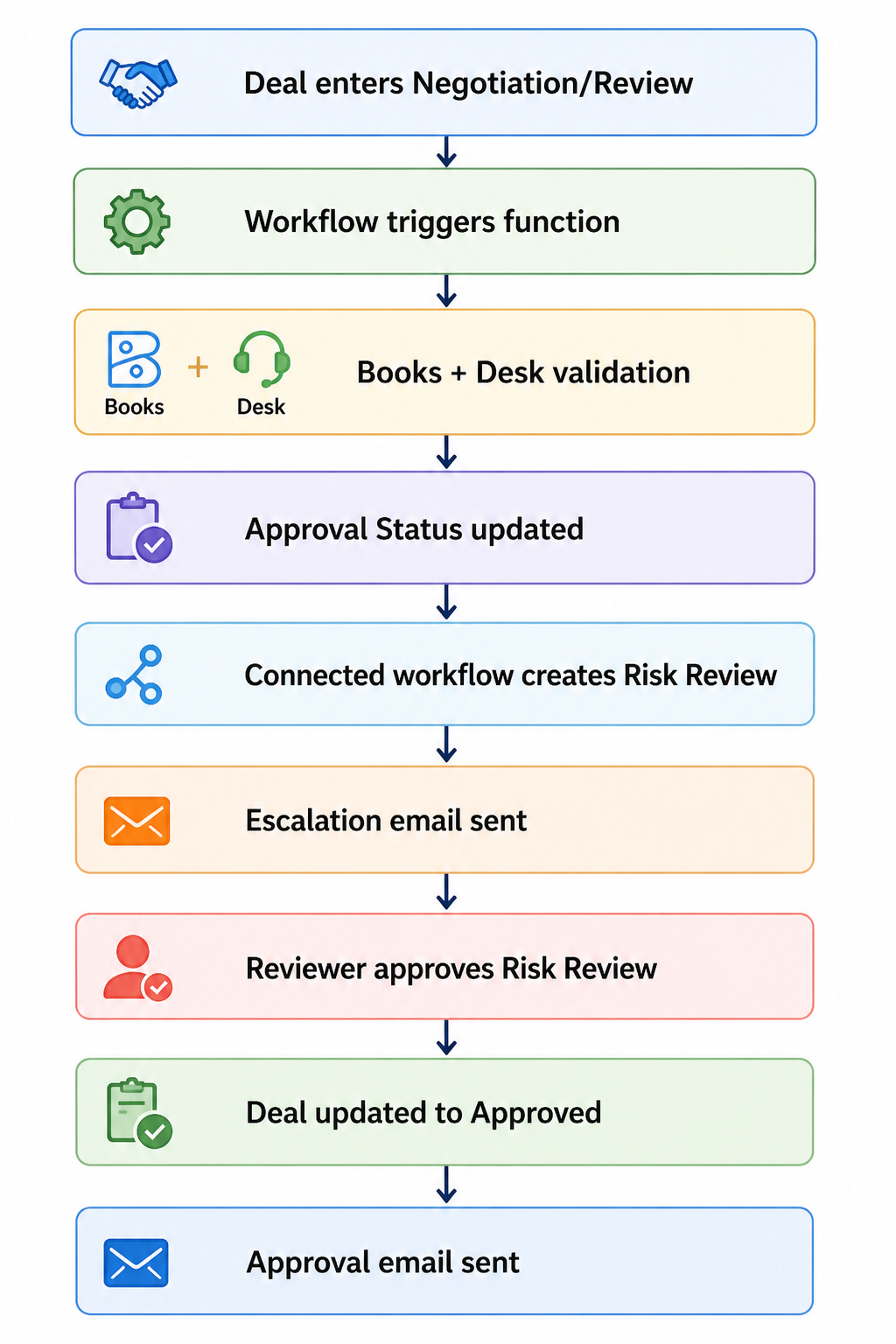

Custom Function 

Once triggered, the workflow executes a custom function.  The function accepts a single input parameter, dealId, from the workflow context and performs the validation logic in five steps.

 1. Fetch deal details from Zoho CRM   

It first fetches the deal record and extracts:

  • Deal stage

  • Deal amount

  • Current approval status

  • Account details

  • Contact details

These values are used both for qualification checks and for matching records across Zoho CRM, Zoho Books, and Zoho Desk.

 2. Check whether the deal qualifies for validation   

We do not want every deal to go through this process. The function exits if:

  • the deal is not in the Negotiation/Review stage

  • the deal amount is below ₹250000

This avoids unnecessary API calls and keeps the validation logic focused only on high-value deals. In a production implementation, this threshold can be moved into a configurable setting instead of being hard-coded in the function.

 3. Check invoice risk in Zoho Books   

The function fetches invoices using the configured Books connector and Zoho Books APIs. It then loops through the returned invoices and counts records where:

  • customer_name matches the CRM Account name

  • status is one of:

    • unpaid

    • overdue

    • draft

The count is stored in Invoice_Risk_Count.

In the current implementation, the CRM Account is matched to Zoho Books using the account display name. This works for simple cases, but according to your implementation,  it is better to match using a stable customer identifier instead of relying only on account names.


 4. Check support risk in Zoho Desk   

The function validates support risk in two stages.

First, it fetches Desk contacts using the configured desk_connection and identifies the matching contact by comparing the Desk contact email with the CRM Contact email.

Once a match is found, the function fetches Desk tickets and counts records where:

  • contactId matches the identified Desk contact

  • status = Open

The final count is stored in Open_Ticket_Count.

 5. Determine approval status   

Once both validations are complete, the function determines the new approval state:

  • if Invoice_Risk_Count > 0 or Open_Ticket_Count > 0, set Approval_Status to Escalation Required

  • otherwise, set Approval_Status to Approved

The function always refreshes:

  • Invoice_Risk_Count

  • Open_Ticket_Count

It updates Approval_Status only if the new value is different from the current one. This avoids unnecessary status updates while still keeping the numeric risk fields current.

Find the full Deluge function code here.

To make this automation safer in implementations, it is also a good idea to prevent duplicate escalations. For example, before creating or triggering a new review cycle, you can check whether an open Risk Review record already exists for the same Deal.  

Note: If you have high invoice volumes or large contact bases, extend this implementation with pagination, server-side filtering, and error handling.

Step 2: Create the Connected Workflow  

At this stage, the function has already identified whether the deal is risky.

If no risks are found, the Deal is approved and moves forward.

If risks are found, the process needs to do more: create a review record, notify stakeholders, wait for a human decision, and then update the original Deal once that decision is made. This kind of multi-record, multi-stage flow can technically be assembled using a combination of separate workflow rules and custom functions, each reacting to field changes across modules. But that means you are manually maintaining the relationships between those rules, keeping track of which record triggered what, and ensuring updates flow back correctly to the originating Deal.

Connected Workflows are built specifically for this pattern. They let you define the entire cross-record process in one place, where each stage is explicitly linked to the record that triggered it. The Risk Review stays connected to the Deal it came from, so when a reviewer approves it, the platform knows exactly which Deal to update, without you wiring that logic together separately.

This keeps the process traceable, reduces the number of moving parts you need to maintain, and makes the flow easier to extend later if you add outcomes like Rejected or Needs Clarification.

The first step is to create a Connected Workflow using the Create a Connected Workflow API, where you define the root node, name and description. After that, you can add rules using the Add a Rule to a Connected Workflow API.

Download the input JSON to create a Connected Workflow for Deals module here.

 First Connected Workflow Rule: Deal > Risk Review   

The first connected workflow rule runs when the Deal record gets updated by the function.

Trigger: Approval_Status = Escalation Required

When this happens, the rule performs two actions.

 Action 1: Create a connected record  

A connected Risk Review record gets created automatically.

Fields such as Deal name, Account, Deal amount, and risk-related details are mapped from the Deal. Additional fields such as Review_Status and Risk_Type are also populated so that reviewers can immediately understand why the Deal was escalated.

Action 2: Send escalation email  

Once the review record is created, an email notification is sent to the relevant stakeholders to inform them that the deal requires review before progressing further. This action is created using the Email Notifications API. Click here for the input JSON to create Email Notification Action request.
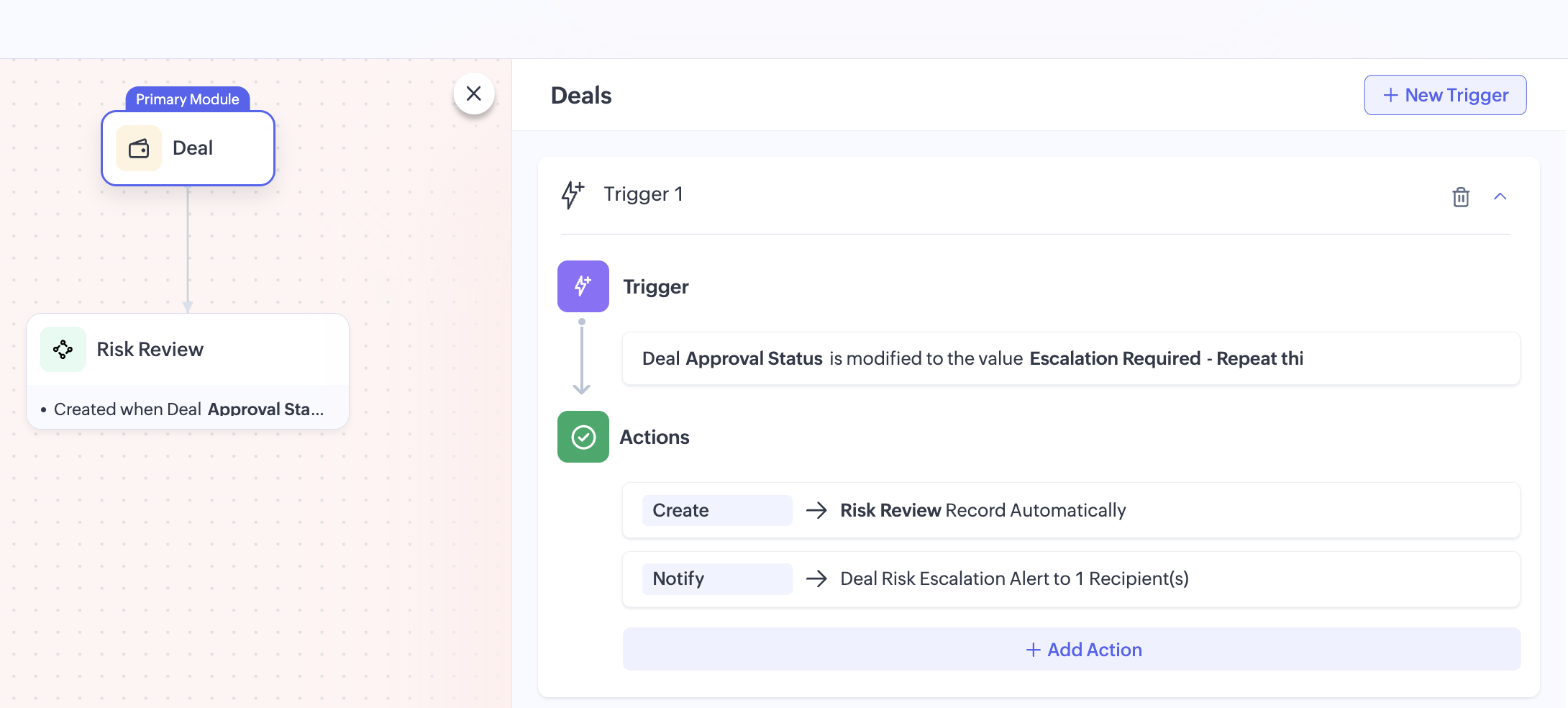

To download the input JSON for adding this rule to the Connected Workflow, click here.

 Second Connected Workflow Rule: Risk Review > Deal   

Once reviewers complete their review, the process should move back to the original Deal. This is handled by the second connected workflow rule.

Trigger: Review_Status = Approved

When the Risk Review record is updated to Approved, the rule performs two actions.

 Action 1: Update the Deal record   

The related Deal record gets automatically updated using a field update action. The Approval_Status will be updated to Approved, allowing the sales team to continue progressing the Deal. 

This action is created using the Create Field Update Action API. Click here to download the input JSON for this request.

 Action 2: Send approval email   

Once the Deal is approved, another email notification is sent.

This informs stakeholders that the review is complete, risks were addressed and the deal can now move forward. This action is created using the Create Email Notification API.

You can also extend this flow by defining additional outcomes such as Rejected or Needs Clarification, depending on your review process.

Attached files:
 

By combining Zoho CRM workflows, custom functions, Connected Workflows, and action APIs, we can turn a manual risk checkpoint into a structured and traceable approval process.

This pattern is useful whenever CRM decisions depend on data spread across multiple Zoho applications. By combining workflows, custom functions, and Connected Workflows, businesses can enforce validations, reduce manual checks, and create more reliable approval processes.

For production use, you can extend this implementation further by:

  • making the threshold configurable

  • storing stable cross-app identifiers for more reliable matching

  • preventing duplicate review creation

  • adding rejection or revalidation paths

  • logging integration failures for easier troubleshooting.

If your business process depends on data spread across multiple Zoho applications, this is a practical way to orchestrate that logic inside CRM.

You can find all the sample files used in this implementation, including the workflow JSONs, Connected Workflow configurations, email actions, field update actions, and Deluge function code here: Project files

We hope you found this useful. If you have any questions, feel free to leave a comment below or reach out to us at support@zohocrm.com


    • Sticky Posts

    • Kaizen #198: Using Client Script for Custom Validation in Blueprint

      Nearing 200th Kaizen Post – 1 More to the Big Two-Oh-Oh! Do you have any questions, suggestions, or topics you would like us to cover in future posts? Your insights and suggestions help us shape future content and make this series better for everyone.
    • Kaizen #226: Using ZRC in Client Script

      Hello everyone! Welcome to another week of Kaizen. In today's post, lets see what is ZRC (Zoho Request Client) and how we can use ZRC methods in Client Script to get inputs from a Salesperson and update the Lead status with a single button click. In this
    • Kaizen #222 - Client Script Support for Notes Related List

      Hello everyone! Welcome to another week of Kaizen. The final Kaizen post of the year 2025 is here! With the new Client Script support for the Notes Related List, you can validate, enrich, and manage notes across modules. In this post, we’ll explore how
    • Kaizen #217 - Actions APIs : Tasks

      Welcome to another week of Kaizen! In last week's post we discussed Email Notifications APIs which act as the link between your Workflow automations and you. We have discussed how Zylker Cloud Services uses Email Notifications API in their custom dashboard.
    • Kaizen #216 - Actions APIs : Email Notifications

      Welcome to another week of Kaizen! For the last three weeks, we have been discussing Zylker's workflows. We successfully updated a dormant workflow, built a new one from the ground up and more. But our work is not finished—these automated processes are
    • Recent Topics

    • Terms & Conditions

      I have defined Terms & Conditions in the invoice setting and have set %TermsAndCondition% where I want it to appear but nothing shows up in that area. Is this something we have to define per invoice or can we have a global variable?
    • Billing Status Update

      Hello Latha, I’m working on a new automation (deluge) to fulfill one of our requirements. In this automation, there is a step to update the Work Order billing status from “Not Yet Invoiced” to “Non-Billable.” I tried to find the API information relevant
    • Export to pdf. Images not showing

      My report contains a column with images. When I export it as a list, the images do not show in the PDF document. I have published the report but the images are still not visible. What should I do so that the photos appear in the export?
    • Zoho CRM Kiosk question – Passing Screen Fields to a Function

      I am building a Kiosk in Zoho CRM to create new Supplier (Vendors) records. Current setup: Screen 1 contains user input fields: Supplier Name (Vendor_Name) First Name (First_Name) I created a Deluge function: createSupplier(vendor_name, first_name) The
    • Introducing Custom Columns in Forecasts in Zoho CRM

      Hello all, Forecasts in Zoho CRM help sales representatives, managers, and business stakeholders evaluate performance and plan future sales activities. While standard metrics such as Target, Achieved Amount, and Pipeline Amount provide a baseline view,
    • パスワード

      ログインするためのパスワード取得したい。
    • Associate Zoho Project with Deal that is in a specific stage?

      Hi there, When a deal hits a certain stage, I'd like to associate it with an pre-exisiting zoho project? I am using blueprints. Using a custom function and deluge, how could I do this? I was thinking that the easiest option would be the modify the pre-made
    • [Product Update] Locations module migration in Zoho Books integration with Zoho Analytics

      Dear Customers, As Zoho Books are starting to support an advance version of the Branches/Warehouses module called the Locations module, users who choose to migrate to the Locations module in Zoho Books will also be migrated in Zoho Analytics-Zoho Books
    • Canvases Auto-Skewing/Adding Scroll Bars When They Were Not There Prior

      Is anyone else noticing rendering issues in their canvases today? It seems to be mainly icons which now have scroll bars added which makes them all look off, though some fields seemed to revert to squished length as well. Were the icons replaced with
    • New UI for Writer - Disappointed

      I've been enjoying Zoho Writer as a new user for about 6 months, and I really like it. One of my favorite things about it is the menu bar, which you can hide or leave out while still seeing most of your page because it is off to the left. I think this
    • Client Script Button in Related List become invalid

      Hi, I am the admin of our organization. And I setup a client script button in related list to raise payment refund request While this button become non selectable recently. I believe there is something wrong from zoho as this button had run for a year.
    • SMTP outgoing problem

      Hello I have a website where the SMTP email is connected through Zoho Mail SMTP. Today I am no longer receiving emails from the website. Joomla shows that the email was sent successfully, but I do not receive it.
    • Fiscal year setting

      Hi, I am looking into using Zoho Books. I cannot understand the organisation fiscal year setting. Our fiscal year runs from 1 April to 31 March. In the organisation profile, I need to set Fiscal Year to “April to March” and Start Date to “2” for the period
    • Issue with payments on invoices

      Hello, I’m having the following issue. When I create an invoice and try to apply a partial payment in a single transaction, the system does not allow it — it only allows full payment. Is this the expected behavior, or am I missing some configuration?
    • auto add as member the contact owner

      is there a way that i can make a zoho flow that will add the owner of the contact as a member of the chat after the round robin assignment?
    • Welcome to Zoho CommunitySpaces

      Hello everyone, This is your space to ask questions, share ideas, and connect with others building and growing their own communities. For those new here, Zoho CommunitySpaces is a platform for building and managing online communities—from discussion spaces
    • Announcing new features in Trident for Windows (v.1.20.4.0)

      Hello Community, Trident for Windows is here with some new features to elevate your work experience. Let's take a quick look at what's new. Export emails. You can now export emails in the .eml file format as compressed zipped files to create a secure
    • Announcing new features in Trident for Windows (v1.14.5.0)

      Hello Community, Trident for Windows is here with new features to elevate your workplace productivity. Let's take a quick look at what's new. Add and edit contacts Previously, you could view all of your personal and organizational contacts in Trident.
    • Announcing Trident desktop app for Zoho Mail & Zoho Workplace users

      Hello Community, I hope you are doing well and staying safe. As you know, our Mail & workplace teams have been constantly working on adding more value to our offerings to ensure you and your organization continue enjoying your Zoho experience. As part
    • Quick way to add a field in Chat Window

      I want to add Company Field in chat window to lessen the irrelevant users in sending chat and set them in mind that we are dealing with companies. I request that it will be as easy as possible like just ticking it then typing the label then connecting
    • Please Remove the Confirmation Popup

      Currently, every time a recruiter changes the status of a candidate in Zoho Recruit, a popup confirmation appears that requires clicking “OK, Got it” before proceeding. This creates unnecessary friction in the workflow, especially for users handling high
    • Team Module Issues?

      We are testing Team Licenses for use by our Customer Service staff. I created a Teamspace called CSR and only assigned two users to this space: Administrator (me) and “Team License Test.” Team License Test is assigned to the Team User profile, with a
    • Announcing new features in Trident for Windows (v.1.41.5.0)

      Hello Community! Trident for Windows just received an exciting update with new ways to collaborate and stay organized without leaving your workspace. Let’s take a look at what’s new! Integrate Zoho Meeting with Trident. You can now schedule, start, and
    • Zoho ERP | Product updates | June 2026

      Hello users, We launched Zoho ERP on January 23, and since then, our goal has been to help businesses streamline and manage their operations with greater efficiency, flexibility, and control. Since the launch, we've continued to enhance the platform every
    • Zia Agent activation in Zoho Desk forces new Organization creation instead of deploying to existing one

      While attempting to complete the deployment and activation sequence of a new Zia Agent within our existing Zoho Desk environment, the activation process failed on the user interface, throwing a generic error (see print). However, despite the activation
    • Allow native Webhooks to authenticate via Connections

      Allow native Webhooks to authenticate via Connections (Basic Auth) instead of plaintext custom headers Summary Please allow native Webhooks (Workflow Rules > Instant Actions > Webhooks) to authenticate against the destination endpoint using the existing
    • Send Email Directly to Channel

      Hi, We are coming from Slack. In Slack each channel has a unique Email address that you can send emails too. I currently forward a specific type of email from my Gmail InBox directly do this channel for Verification Codes so my team doesn't have to ask
    • How do page versions work these days?

      I thought that Zoho Wiki had the capability to display previous versions of a page, and optionally reinstate them. But I can't find a current doc on this subject -- is there one? From what I remember, that capability was accessed via the Version number
    • Price Managment

      I have been in discussions with Zoho for some time and not getting what I need. Maybe someone can help explain the logic behind this for me as I fail to understand. When creating an item, you input a sales rate and purchase rate. These rates are just
    • Warehouse -> Locations Transition Causing Errors

      After saying "okay" to the transition from 'warehouses' to 'locations', I've now got shipped Sales Orders that I cannot invoice. How does one proceed?
    • Problem with the blueprint flow.

      Scenario: 3 departments in a single environment: A-B-C agents from department 1 D-E-F agents from department 2 G-H agents from department 3 Since we've been using Zohodesk (2023), agents can assign tickets to the correct department using the blueprint
    • Introducing the new Zoho Announcements Hub

      Hello, Enterprise Support Community! We are excited to announce a new way to keep up to date with recent product releases and announcements for the Zoho apps you use on a regular basis. Introducing our new centralized location to bring together all Zoho
    • Ability to run report over 180 days

      Is there a reason Zoho limits the ability to run reports for records older than 180 days? In my view, the only reason I can think of is that it forces us to pay for Advanced Analytics (which I do).
    • Cloning a View

      When I clone a View, it doesn't make a copy; it only creates a new copy with the same default fields as if I were creating a new view. What is the purpose of cloning if it doesn't bring in the same fields? Thanks Rudy
    • New tickets with empty image contents

      Dear Support. From the end of last week onwards customers send messages for new tickets through microsoft graph (by email to support at procert.ch using the procert portal). We have an issue with the emails because well packed images are no longer visible.
    • Images not showing up in Desk tickets

      Customers are trying to send us screenshots to diagnose their issues. But Desk seems to be stopping the images/breaking the link when the ticket comes in. (We can see them in an email box getting cc'd on all tickets...so it's not our mail system). Help!
    • Introducing Databridge for Zoho Creator

      Hello, Enterprise Support Community! We'd like to highlight a recent utility that was released for Zoho Creator, that will allow you to connect external, private datasources with your Creator apps, Databridge. Databridge is an application that will need
    • Zoho HTML editor is removing MSO (Outlook) specific code.

      The ability to add in custom HTML is great. We are using MJML to generate our wonderfully cross platform and responsive email code that works on Act-On, Salesforce, Hubspot, Active Campaign, and lead liaison. The way it supports MSO (Outlook) is it included
    • Retail Payment Receipt

      Hi, So "payment receipts" have a "Retail" template for thermal printers, but the template is configured at A4 paper size!!! How is this retail guys? On the other hand, Invoices have 3 Retail templates which have 3 and 4 inch paper size, perfectly fitting
    • Custom Portal URL causing SAMEORIGIN error with embedded Page snippet

      In my app, I have a page that embeds another page. The URL that I have for the embedded page starts with https://creatorapp.zoho.com but the custom domain I have set up is https://kors.kerndell.com. Because the user logged into the app at https://kors.kerndell.com,
    • Next Page