Marketer's Space: Proven tips to improve open rates – Part II - Online Help | Zoho Campaigns
Hello Marketers!
Welcome back to another post in Marketer's Space!
We're continuing from where we left off a fortnight ago. We ended the previous post discussing the subject line, and we'll continue from there. Let's dive right in.
Pre-header
Pre-header text accompanies the subject line. While the subject line tells your contacts what your campaigns are about, the pre-header text adds detail to it. We strongly recommend having it when you're creating campaigns.
The image below shows an email from Perplexity, wherein both the subject line and pre-header are present.

Here, the pre-header text drives home the point of why you need to use it. If you don't include it, you're missing out on important information you can display to your contacts even before they open your campaigns.
Here are some tips for crafting pre-header text:
- Keep the length between five and 12 words, and 30 to 60 characters. Any longer than that, and the text tends to get truncated and your contacts can't read it fully. Adhering to this length is also essential for making your campaigns mobile-friendly and mobile-responsive.
- Don't repeat what you've already mentioned in the subject line. You're wasting precious space by doing that.
- Place the most important hook in the first few words of your pre-header to grab your contacts' attention.
Sender name, from address, and reply-to address
Let's say Patricia is the owner of Zylker Labs, an AI-centric marketing agency. She's new to this business, so she isn't fully aware of the dos and don'ts in email marketing. Though she sent well-crafted email campaigns to her contacts, she was dismayed to find that even after waiting for a couple of months, she didn't receive a single reply from them.
Upon closer inspection, she discovered that the fault lied with the sender name, sender address, and the reply-to address she had used. She didn't provide a sender name, and her sender and reply-to address was no-reply@zylkerlabs.com.
Zoho Campaigns provides granular control over sender details like these to help you avoid such mishaps. When you're creating an email campaign, you can add sender details such as your Sender Name, Sender email address, and Reply-to Address.
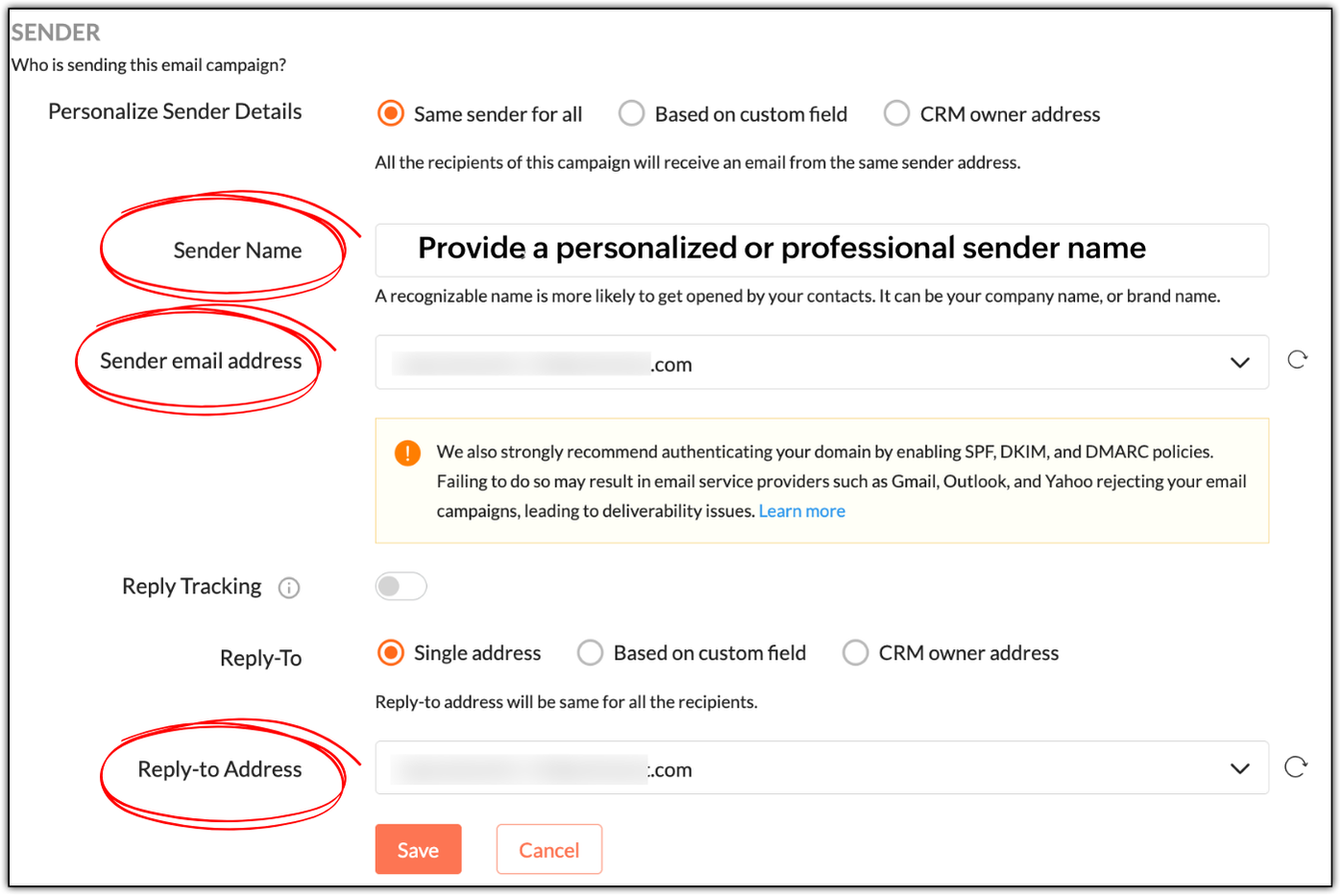
While "Sender Name" is not a mandatory field, it's best to specify a personalized or professional sender name, as it helps build trust. In Patricia's example, she can use:
- Patricia as a personable variant
- Patricia | Zylker Labs for a mixture of personableness and professionalism
- Zylker Labs for a simple, professional sender name
Not having a sender name will put off your contacts; they won't be tempted to open your emails.
 Note: Zoho Campaigns automatically displays your sender address as the sender name if its left empty.
 If you use no-reply email addresses as your sender and reply-to addresses, you're telling your contacts not to communicate with you, which is a red flag. Instead use something like patricia@zylkerlabs.com, support@zylkerlabs.com, or help@zylkerlabs.com as your sender address. The same applies to your reply-to address, but if you wish to track the replies in a separate inbox, you can use a different address like mail-to@zylkerlabs.com or team@zylkerlabs.com.
Get consent
Let's say Julie has built a signup form using Zoho Campaigns and embedded it in her website (https://zylkerfashions.com) to attract customers. Many customers have signed up via the form to receive communications from her. Julie is excited and starts sending them campaigns. Soon, she realizes that half of these customers either marked her campaigns as spam, didn't reply, or unsubscribed—and that some campaigns didn't get delivered at all. Naturally, Julie is disappointed and frustrated, as she doesn't understand what went wrong.
Upon checking, Julie realizes that she didn't follow double opt-in to get consent from her customers. While you may assume that because people have signed up via your website, that means they're ready to receive campaigns—we strongly advise that you always confirm with them once.
Go to Settings > Manage Opt-in to enable double opt-in in Zoho Campaigns.

As soon as your contacts sign up via a signup form, Zoho Campaigns will automatically send a confirmation email that asks them to confirm their email address. Once they've confirmed, they'll be added as contacts in Zoho Campaigns. This is done to ensure that:
As soon as your contacts sign up via a signup form, Zoho Campaigns will automatically send a confirmation email that asks them to confirm their email address. Once they've confirmed, they'll be added as contacts in Zoho Campaigns. This is done to ensure that:
- Your contacts are genuinely interested in receiving communications.
- If they've specified an incorrect email during sign-up, the double opt-in email won't reach them, so they won't get added to Zoho Campaigns.
- You can avoid unnecessary unsubscribes, spam, and abuse complaints.
- Your mailing list remains clean, so you don't send campaigns to invalid email addresses, which can negatively affect your email deliverability.
Warm up your sender domain
If you're starting out or haven't sent emails for quite some time, your sender domain is new or dormant—which means you have a cold domain.
Let's say you've imported 10,000 new contacts, and in your eagerness to start your marketing journey, you've sent campaigns to all of them at once—something called as an email blast. You should avoid this, because you can trigger the spam filters of email clients like Gmail, Yahoo, and Outlook, which not only leads to your campaigns being marked as spam, but also to rejection.
Sending from a cold domain affects your email deliverability negatively. Your domain can ultimately get blacklisted due to poor reputation, as well, which means you'll lose out on the opportunity to do business.
Hence, it's vital to warm up your domain by sending your campaigns in equal or incremental batches. For example, you can send 1,000 campaigns per day for 10 days or increase the number each day number from 1,000 to 1,250 to 1,500, and so on.
We've explored essential techniques to boost your email open rates, from crafting smarter pre-headers to warming up your sender domain for better deliverability. Apply these practices consistently to build trust and achieve long-term campaign success.
In two weeks' time, you'll be reading the final part of this series.
Happy marketing!
Kind regards,
Sai Prashanth
User Education
Zoho Campaigns