Building extensions #1: Creating and testing extensions for Zoho Finance Suite applications
Hello developers!
We're excited to announce a new series called "Building extensions" to assist developers in creating efficient extensions for Zoho Finance Suite products. We'll support and guide you through the process of creating an extension and using the features offered in the developer portal.
What are extensions?
Extensions are installable plugins or add-ons that help enhance the existing functionality of your Zoho product or seamlessly integrate and interact with third-party applications for data transmission.
How can you build extensions?
Zoho offers a developer platform called Zoho Developer that allows you to build different types of applications. Sigma is a platform offered within Zoho Developer that is specifically designed for creating extensions for various Zoho products. Throughout this series, we'll look at how to create and develop extensions for the Zoho Finance Suite applications using Sigma.
Get to know all about extensions and building them further in detail.
Sigma extension support
The Zoho Finance Suite consists of seven applications: Zoho Books, Zoho Inventory, Zoho Expense, Zoho Invoice, Zoho Billing, Zoho Checkout, and Zoho Payroll. Currently, the Sigma platform supports creating and building extensions for these five Zoho Finance applications:
- Zoho Books
- Zoho Inventory
- Zoho Expense
- Zoho Invoice
- Zoho Billing
Creating an extension
- Log in or sign up at developer.zoho.com.
- Go to Sigma and access your workspace.
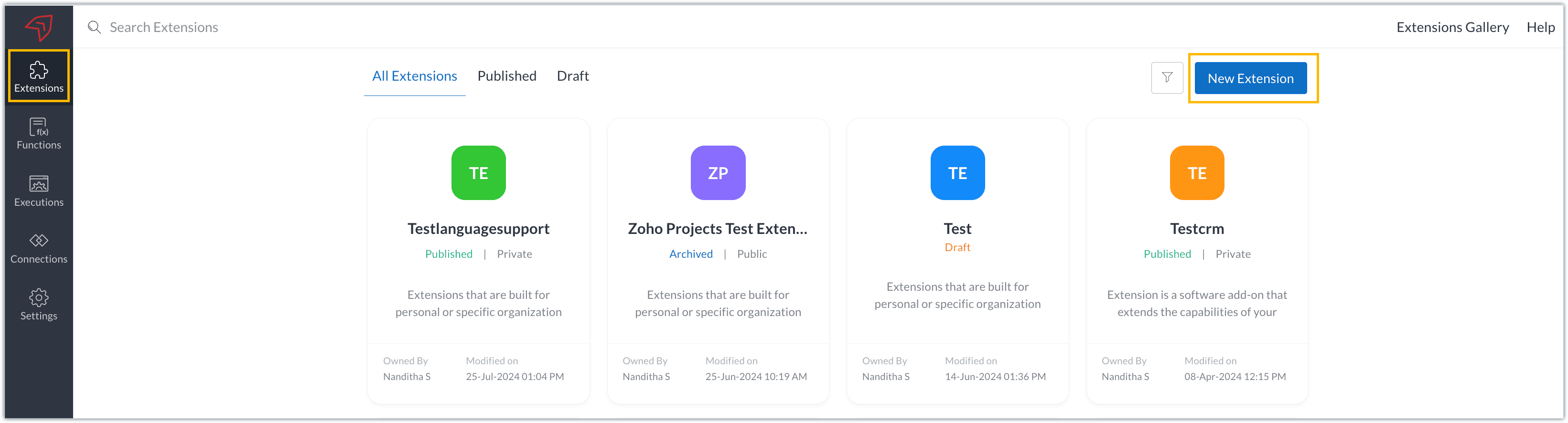
- Once you enter your workspace, you'll be taken to the Extensions section in Sigma.
- Click the New Extension button to start building an extension.
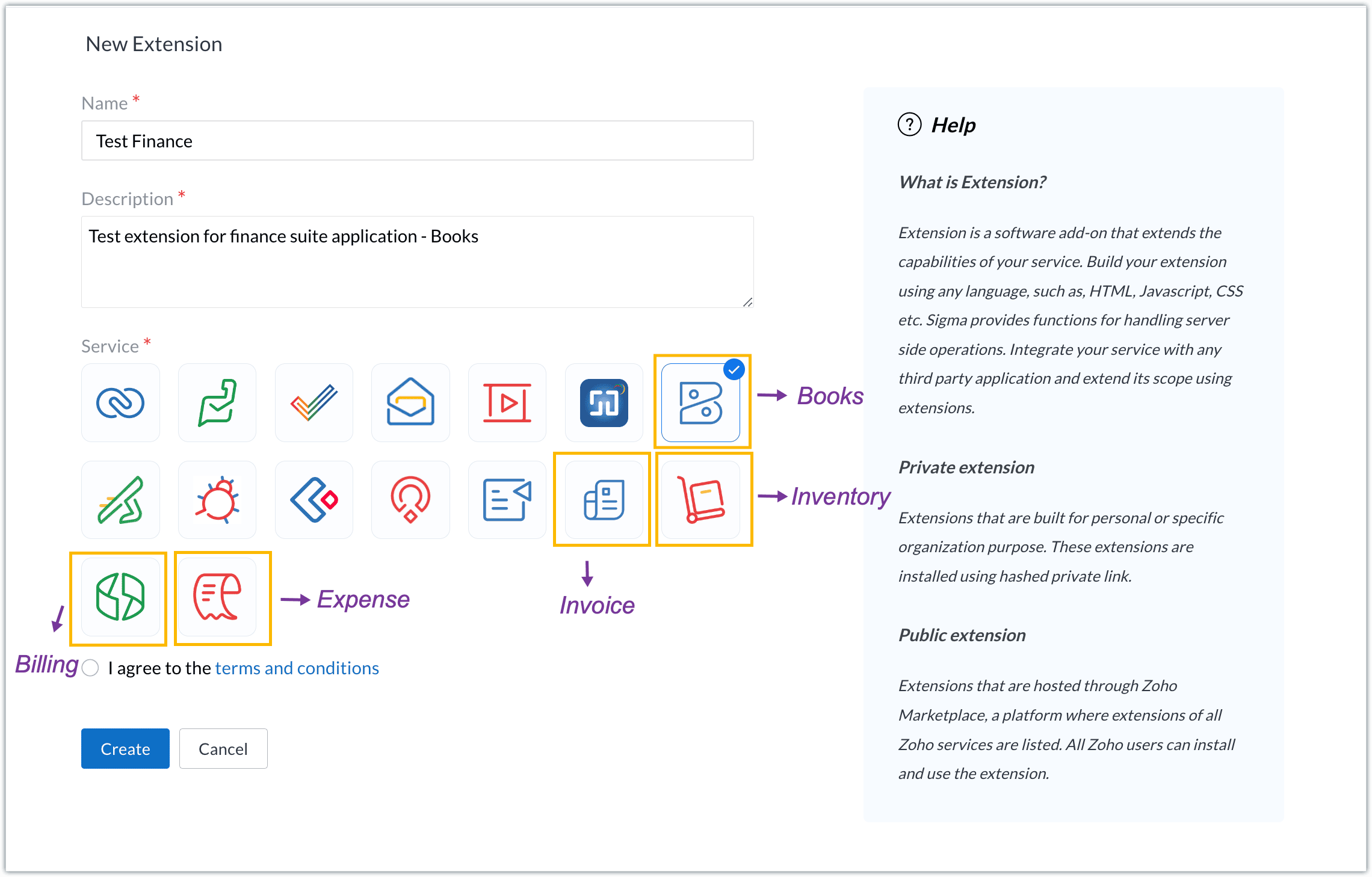
- Enter a name and description for the extension and choose the service you want to build the extension for. As mentioned earlier, Sigma offers support for Zoho Books, Zoho Invoice, Zoho Inventory, Zoho Billing, and Zoho Expense.
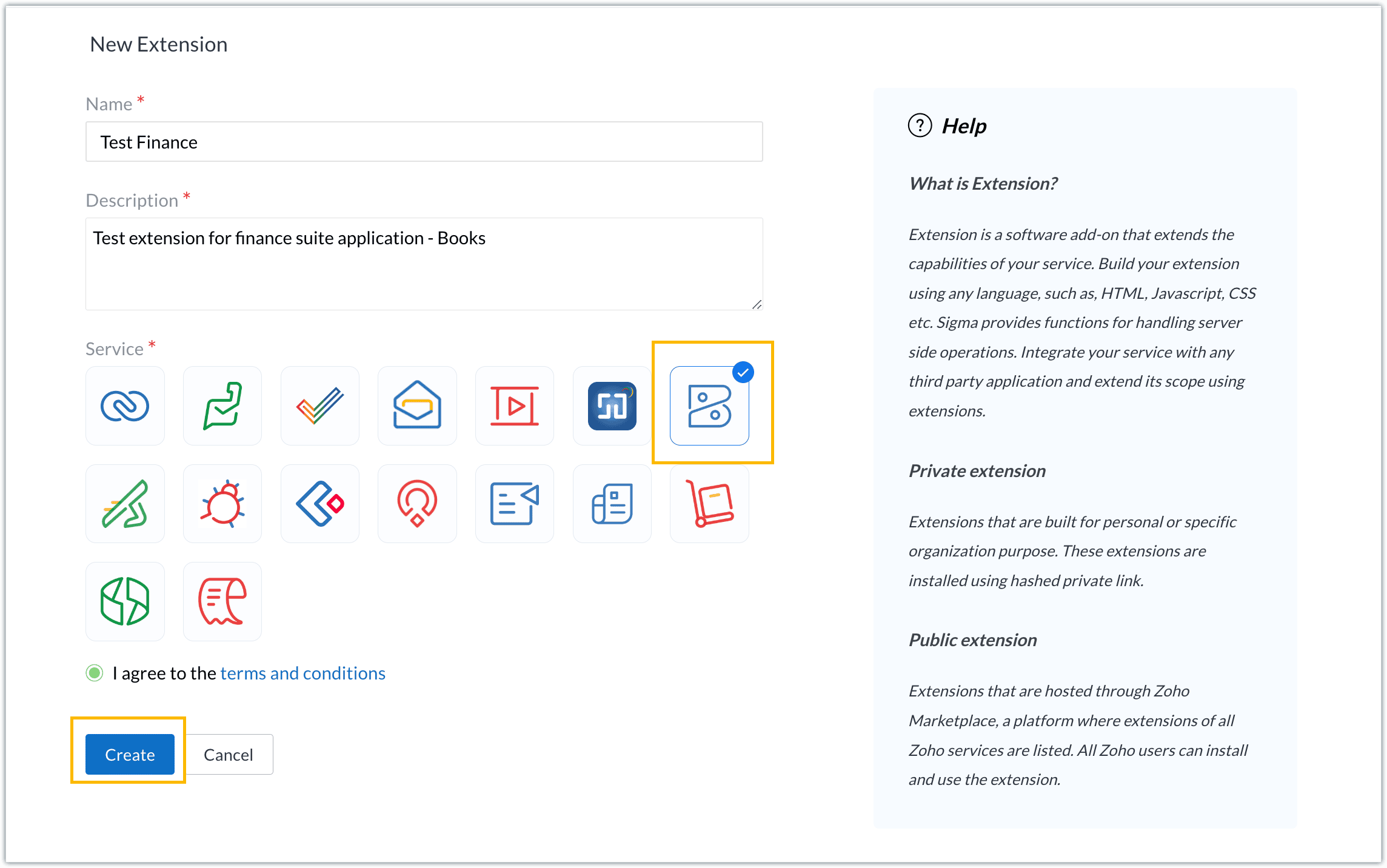
- For our demo, let's choose the service as Zoho Books. Accept the terms and conditions, and then click Create.
- The extension is successfully created. You can click the Extension Details icon to see an overview of the extension.
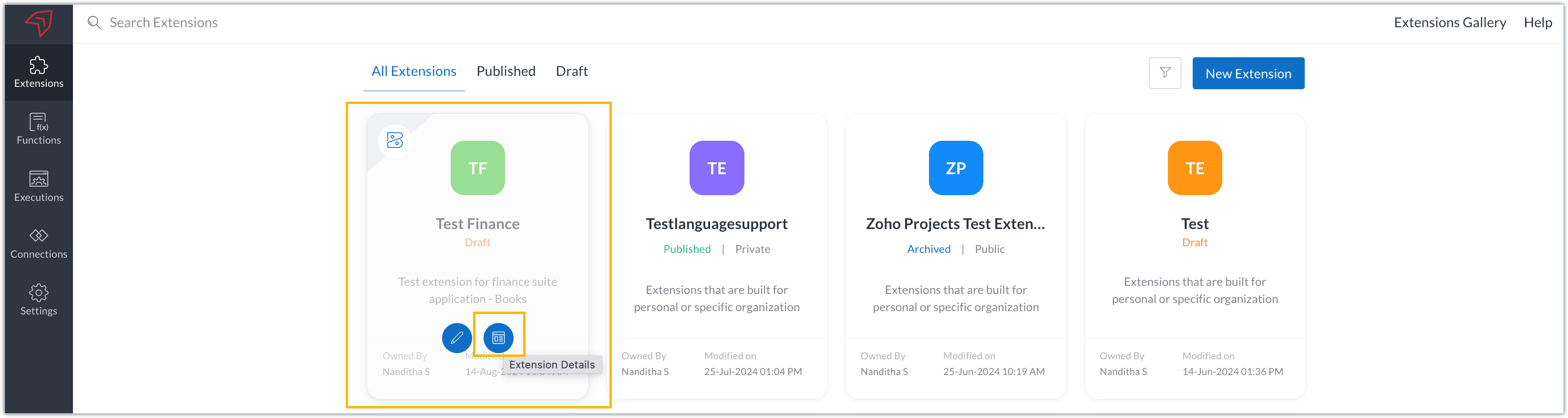
The extension details page shows the general details of the extension, such as creation date, creation time, and version, and allows you to associate developers with the extension.
- Click the Edit Extension icon to start developing the extension.
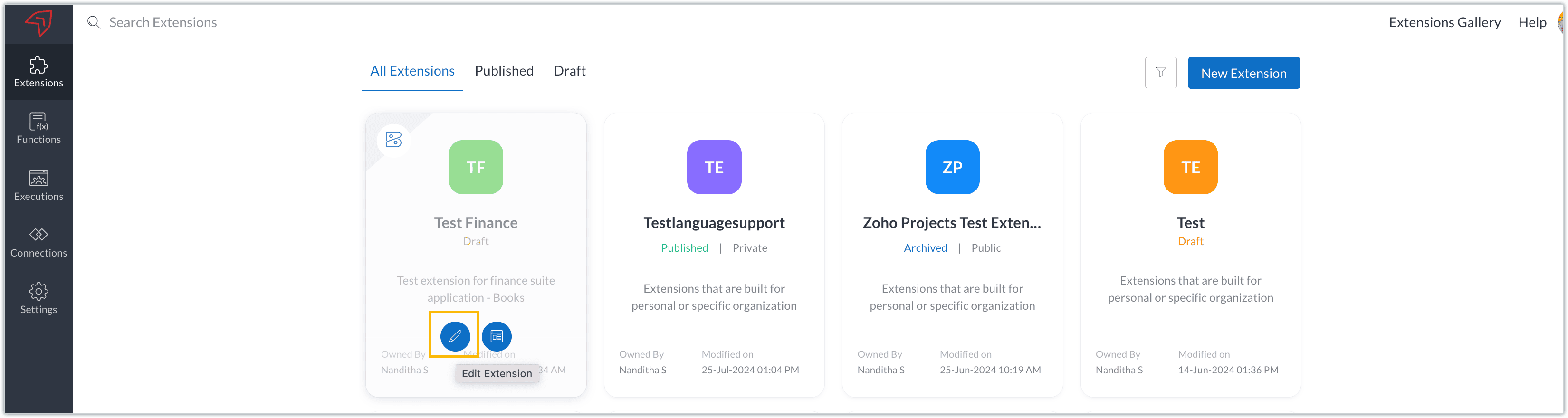
- The Zoho Books Developer Portal opens with the options and native features available to customize, curate, and develop your extension.
Zoho Books Developer Portal sections
The developer portal has four different sections to help customize and build your extension.
Learn: This section lists the native Zoho Books capabilities that can be used to create and develop extensions. Clicking the Set up Now button next to each feature will take you to the feature's development setup page.

Build: This is the development setup section, which includes customization, automation, and components like connections, widgets, schedules, webhooks, and signals. You can customize your extension preferences, establish connections to integrate with other applications, and design custom interfaces to enhance user experience.

Configure: This section assists with handling your extension's required configurations, whether they are generic settings or customizations required from the user. You can add global fields, which can be incorporated as either variables that store static data or through custom widgets that retrieve user inputs. You can also define functionalities that happen during installation and uninstallation.

Publish: Once the extension has been built and configured, you can use this section to publish it for either private or public use. In both cases, the Zoho Books team will review the extension; for public extensions listed on Zoho Marketplace, the Zoho Marketplace approval team will also review them. You can share your privately published extension with other users using the Shared List option.

We will explore more about each of these sections and their features in upcoming posts.
Testing an extension
The Zoho Books Developer Portal offers a dedicated testing environment for each extension, allowing you to test and validate it before publishing.
As a developer, you can use the Test Your Extension option in the top right corner of the portal to access your extension's sandbox environment.

This will redirect you to the sandbox testing environment for the extension you're developing, which is similar to Zoho Books and contains relevant modules to test with.

You can populate necessary data and test your extension functionality. Once everything is validated, you can go ahead and publish your extension for private or public use.
For support or questions related to Zoho Finance Suite extension development, you can email developer@zohofinance.com.
We hope you found this guide useful. Keep following this space for more information!
Topic Participants
Nanditha Somasundaram Somasundaram
Sticky Posts
Building extensions #5: Creating custom connections for extensions
In our previous post, we discussed the significance of connections, identified their types, developed a predefined connection, and demonstrated how it can be integrated with Zoho Books using an example. In this post, we'll walk through the process ofBuilding extensions #4: Integrating Zoho Books with applications using connections
In our last post, we looked at an overview of the key features available for creating a Zoho Books extension, including connections. In this post, we'll go over connections in depth, including their types and applications. What are connections? "Connections"Building extensions #3: Fundamental features of a Zoho Books extension
In our earlier posts, we covered how to create, test, and publish an extension for Zoho Finance suite applications. Moving forward, we'll look specifically at instances relating to one of the products from the Zoho Finance suite: Zoho Books. In this post,Building extensions #2: Publishing an extension
Hello developers, Welcome to our next post about building extensions for Zoho Finance Suite applications. In our previous post, we looked at extensions, their purpose, and how to create and test them. To recap, extensions are installable plugins or add-onsBuilding extensions #1: Creating and testing extensions for Zoho Finance Suite applications
Hello developers! We're excited to announce a new series called "Building extensions" to assist developers in creating efficient extensions for Zoho Finance Suite products. We'll support and guide you through the process of creating an extension and using
Recent Topics
Ecommerce integration with prestashop
Development of campaigns integration with prestahop. When???How to create an article containing images and rich text via the api?
Hi, I'm trying to migrate our kb articles from our previous helpdesk service, and import them to ZohoDesk. Is there any way to create an article that contains images? Is it possible to add formatting to articles created via the API? Thanks, Adam.Number of statement execution limit exceeded on deluge scheduled function
I'm working on a send email functionality in creator that sends out crew work orders at the end of the day each day for the next day. I'm running into the issue that zoho is unable to handle the number of statements that I am doing to be able to successfullyZoho SignForm In Progress But Cannot Be Completed
If a person starts signing a document (via SignForm), but closes the window before submitting, Zoho marks the document "in progress", but how do they finish signing it?How to show Assemblies AND component items in a report
Hi Is there any way in Analytics to create a report that shows the Composite Item AND the Component Items with mapped quantity? It seems that the component item is not exposed in any table that I can find. Also, the same question but for Stock on Hand.....thisMandatory Messages for Specific Members in Zoho Cliq Channels
Hello Zoho Cliq Team, We hope you're doing well. We would like to request a feature enhancement to Zoho Cliq that would allow marking certain messages in a channel as mandatory for specific members — with built-in tracking and reminders. 🎯 Use Case:Admin Access to Message Read Statistics in Zoho Cliq
Hello Zoho Cliq Team, We hope you're doing well. We would like to request a feature enhancement that would allow admins or channel owners to view read/unread statistics for messages, even if they were not the original sender. 🎯 Use Case: Currently, inOnline Member Visibility in Channels (Similar to WhatsApp Group Presence)
Hello Zoho Cliq Team, We hope you're doing well. We’d like to request an enhancement to Zoho Cliq’s channel experience by introducing online presence indicators for channel members — similar to how WhatsApp shows how many people in a group are currentlyShow ticket field in Zoho Desk only if that same field is not empty (API‑created records)
Zoho Team , We have a ticket workflow where every ticket is created via API based on dynamic logic from an external form. That form has complex logic and already decides what’s relevant to ask, and the API only populates fields in Zoho Desk based on thatMultiple Products on Ticket
Good morning. We will classify all tickets based on the product. Users sometimes send different requests on the same ticket, so we are facing some challenges. Is there a way to add more than one product to the ticket, or is there a way to tie the productNão recebo Email de confirmação e validação de cadastro do PagSeguro
Olá, utilizei uma das minhas contas de email Zoho para criar um cadastro no PagSeguro, contigo o email com o link de confirmação da conta não chega no meu email Zoho (nem.ma caixa de spam, nem na lixeira, e nem em outras pastas). Outros emails do PagSeguroaccounts payable and receivable subaccounts
How to create accounts payable and receivable subaccounts? Being that I have several clients and in my balance sheet have to specify the accounts of each client and not only appear "accounts receivable or accounts payable" ??DUPLICATING WORKFLOWS IN CREATOR
Hi all, I want to duplicate and slightly amend 3 workflows in Creator so that I don't have to keep typing in all the rules and properties each time. I can see lots of videos on CRM with the 3 dots at the top of the workflow, but nothing like that in Creator.Add SKU to query options in `items` API endpoint
It would be very useful to be able to pull items by SKU in the API as this is a commonly used unique ID that tends to be consistent across systems.Estimates and invoices being sent from company-wide address, rather than individual
In our organization, team members send estimates and invoices through Zoho Books by using the "Send Email" function. However, for certain users, the system defaults to sending estimates and invoices from a shared organizational email address (e.g., company@example.com)Need profit margins for books in estimates & invoice
https://help.zoho.com/portal/en/community/topic/show-my-cost-or-profit-while-creating-estimateItem Level Notifications
I need to create a custom workflow based on the creation of an estimate that has a SKU/Item name that matches certain criteria. I can have it generated based on a total amount, but not at the item level. Is this possible?Cannot categorize a bank deposit to an income sub-account
When I go to categorize a bank deposit, I am not able to see any income sub-accounts. If I set up an income account without a parent, then I am able to categorize a transaction into that account, but as soon as I make it a child account, it disappearsZV Extension passkey changes in v5.7.0
Has there any changes to the how passkeys are managed in ZV - Chrome extensions v5.7.0? Namely, if the passkeys were already implemented/enforced as 2FA on a certain webpage, but ZV does not track them yet. Would that be the issue for my use case?What's New in Zoho Billing - August 2025
Hello everyone, We are excited to share the latest updates and enhancements made to Zoho Billing in August 2025 to improve your overall billing management experience. Keep reading to learn more. Notify Customers About Subscriptions via WhatsApp BusinessWhy are tasks not showing in Zoho Calendar?
Hi there, I updated the Zoho calendar preferences for Task records to show on the calendar together with Meetings and Calls - see attached screenshot. Despite of that, Task records still won't show on the calendar. Is there a specific reason why thisZoho Payroll: Product Updates - July 2025
Over the past month, we've focused on making Zoho Payroll more flexible, compliant, and easier to use—whether you're processing complex payouts, ensuring accurate calculations, or meeting local tax regulations. Here's what's new: One-Time Payments andDiscussion for “sub product”, “sub item” or “child products”
Hello everyone, In some CRM systems, there is the ability to associate products in a hierarchical manner within a quote. For example: Product A: Gold Plan Product B: Setup Product C: Connector Product D: Silver Plan Product B: Setup Product C: ConnectorRetrieve Accidental Deleted User
Is there a way to undelete a user who accidentally deleted themselves?Request for Support - CRM Integration Issues
I’m reaching out to request assistance with the following items: 1. Zoho Forms Integration with Zoho CRM We are currently using Zoho Forms to send the Global Credit Application form to our customers. The intended workflow is for the form submissions toKnowledge Base Module
How to enable the knowledge base module in zoho crm account. I saw this module in one crm account but unable to find it other zoho crm account. can anyone know about this?Zoho sign changed Indexing of signing_order
Because I missed this Announcement (is there even one?): when you work with the indexes of actions > signing_order. Previous those started with 0 now starts with 1. Changed somewhere between 15.07 and 23.07Zoho CRM Community Digest - June 2025 | Part 2
Welcome back to the Zoho CRM Community Digest! We’re wrapping up June with more fresh updates, smart discussions, and clever workarounds shared by the community. Product Updates: Struggling to keep track of scattered customer interactions? Zoho CRM'sAllow Variable Insertion in Prebuilt "Update Record" Action in Schedules
Hi Zoho Creator Team, Hope you're doing well. We’d like to submit a feature request based on our experience using Zoho Creator schedules to manage workflows integrated with Zoho Desk. We currently have an app where Zoho Desk tickets create records inRich Text Field Editor in Form Builder is Too Small and Not Resizable
Hello, I am experiencing a significant usability issue with the rich text field in the Zoho Forms builder. The editor window for this field is fixed-size and extremely small. It does not adapt to the screen size, which makes it very difficult to managePublicar Formulário
Obs. Não consigo publicar meus formulários, pesquisei alguns artigos, mas me deixou perdido, fala de campo sensível, não consigo entender o que significa. Segue Imagem do problema. Todo formulário que faço sempre termina assim sem o botão de publicar..Anyone else unable to login to ZMA this weekend?
Hey Is anyone else unable to log into Zoho Marketing Automation at all this weekend? I've been trying on multiple devices - despot and mobile - and multiple browser. I've reset browsing data, gone incognito. Nothing - since Friday I've been unable toCustom Action for Subform row
Dears, As for now, we only have 2 actions for each subform row: Edit and Delete. I would suggest to have custom action here, instead of create a button with Fx field within the subform. For example, I would create Duplicate button, which duplicates theUrgent: Unable to Receive OTP Email for Portal User Registration in Zoho Creator
I paid to enable the Portal User feature on 2/25, and followed the official instructions (Youtube video: Customer Portals | Zoho Creator) to set up the Portal User using my Gmail account. However, I am not receiving the OTP email and am unable to successfullyDisplay multiple fields in lookup dropdown
I have a module called Technicians and a related module called submissions that registers technicians for different assignments. The lookup in Submissions to Technicians is the Technician ID (auto generated unique number). How do I display in the dropdownIntegrate with Power BI
Hi, How to connect Zoho CRM dashboards & reports with POWER BI ?No "Import Users" option in Zoho FSM
I recently noticed that there is no option to import Users into Zoho FSM, and this has become a serious challenge for us. When migrating data, especially technicians or other user profiles, we often have hundreds of users to bring into the system. Currently,Finding "like" projects
Hi Everyone! My team is running into several duplicating deals. I've been trying to get them all to name things the same way ex. State is 2 letters not spelled out. Things like that. What I am wondering if there is anything I can do as the superadminNão consigo localizar o Botão de Publicar Formulário no meu app
Depois que finalizar meus formulários, não consigo localizar o botão de publicar para concluir meu aplicativoDATEV-Export Erfahrungen?
Wir würden gern den DATEV-Export in Books nutzen, jedoch ist dieser nicht wirklich nutzbar. Gibt es positive Erfahrungen von Alternativ-Lösungen?Next Page