Building extensions #1: Creating and testing extensions for Zoho Finance Suite applications
Hello developers!
We're excited to announce a new series called "Building extensions" to assist developers in creating efficient extensions for Zoho Finance Suite products. We'll support and guide you through the process of creating an extension and using the features offered in the developer portal.
What are extensions?
Extensions are installable plugins or add-ons that help enhance the existing functionality of your Zoho product or seamlessly integrate and interact with third-party applications for data transmission.
How can you build extensions?
Zoho offers a developer platform called Zoho Developer that allows you to build different types of applications. Sigma is a platform offered within Zoho Developer that is specifically designed for creating extensions for various Zoho products. Throughout this series, we'll look at how to create and develop extensions for the Zoho Finance Suite applications using Sigma.
Get to know all about extensions and building them further in detail.
Sigma extension support
The Zoho Finance Suite consists of seven applications: Zoho Books, Zoho Inventory, Zoho Expense, Zoho Invoice, Zoho Billing, Zoho Checkout, and Zoho Payroll. Currently, the Sigma platform supports creating and building extensions for these five Zoho Finance applications:
- Zoho Books
- Zoho Inventory
- Zoho Expense
- Zoho Invoice
- Zoho Billing
Creating an extension
- Log in or sign up at developer.zoho.com.
- Go to Sigma and access your workspace.
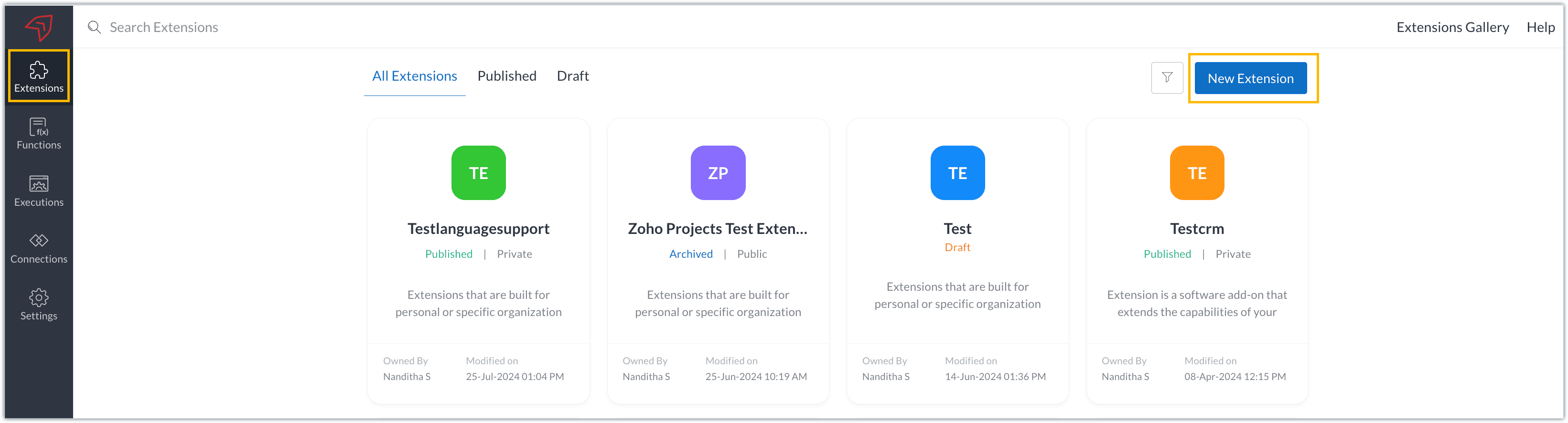
- Once you enter your workspace, you'll be taken to the Extensions section in Sigma.
- Click the New Extension button to start building an extension.
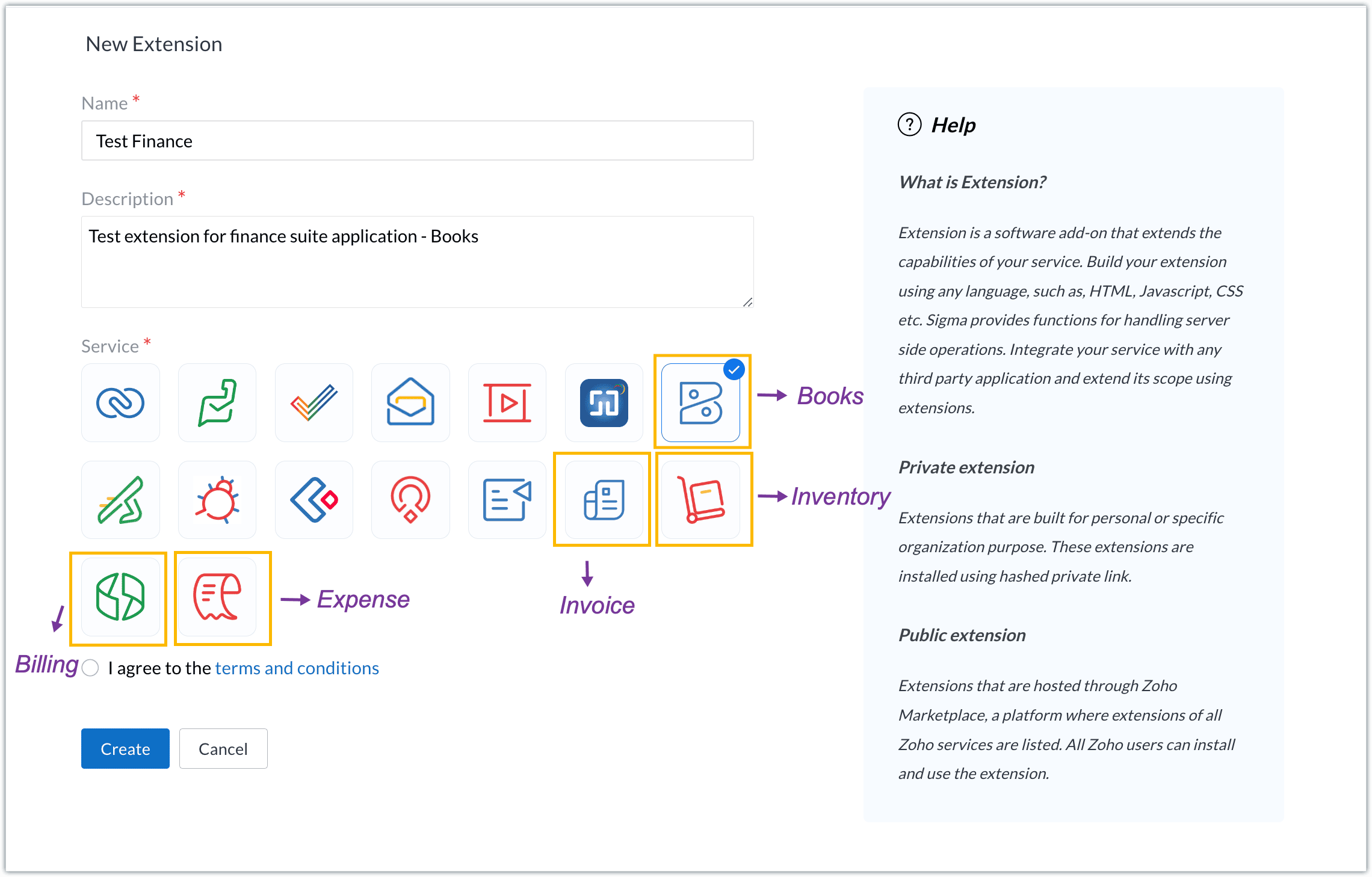
- Enter a name and description for the extension and choose the service you want to build the extension for. As mentioned earlier, Sigma offers support for Zoho Books, Zoho Invoice, Zoho Inventory, Zoho Billing, and Zoho Expense.
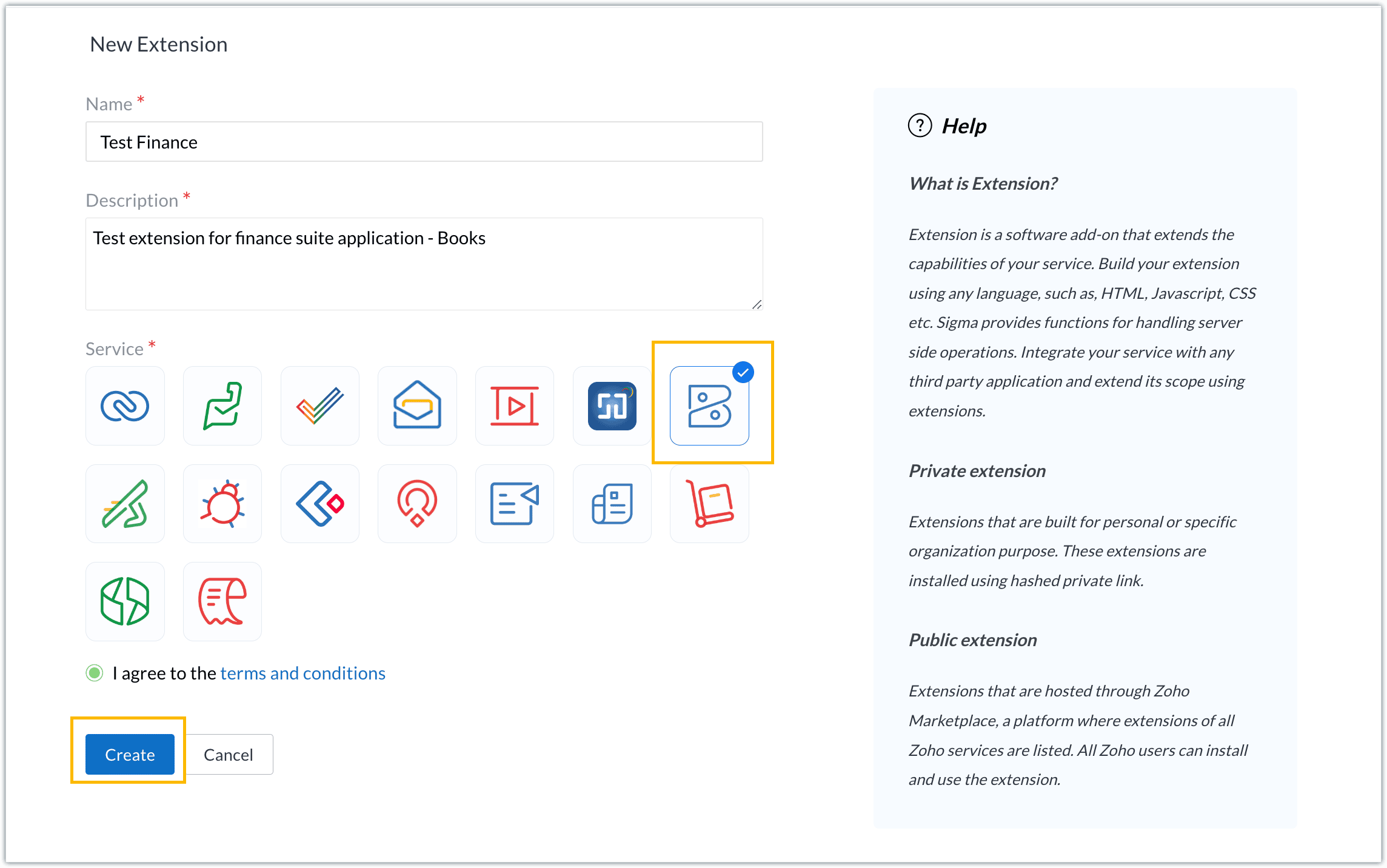
- For our demo, let's choose the service as Zoho Books. Accept the terms and conditions, and then click Create.
- The extension is successfully created. You can click the Extension Details icon to see an overview of the extension.
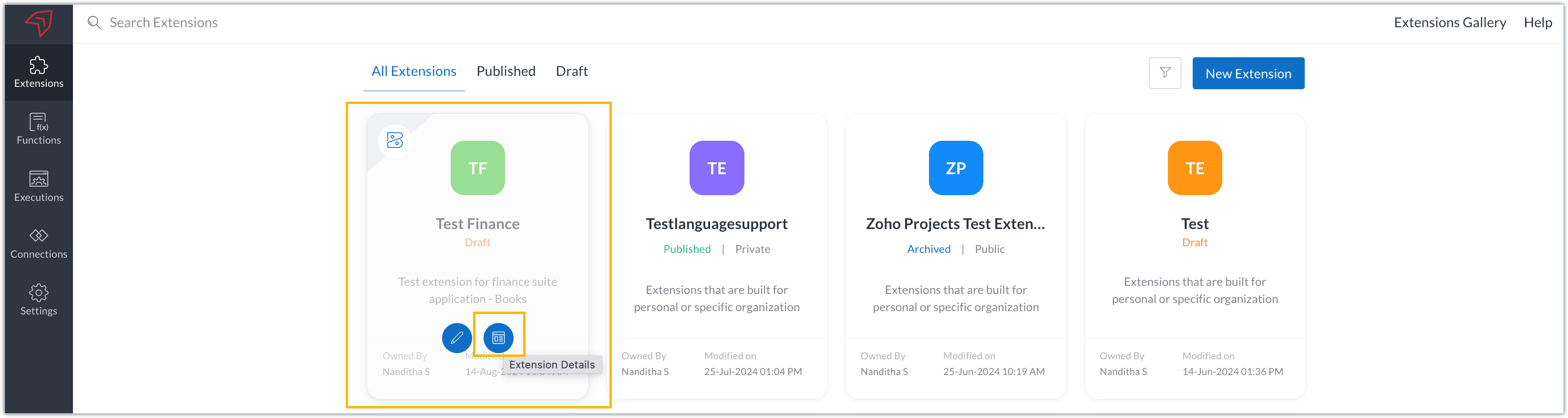
The extension details page shows the general details of the extension, such as creation date, creation time, and version, and allows you to associate developers with the extension.
- Click the Edit Extension icon to start developing the extension.
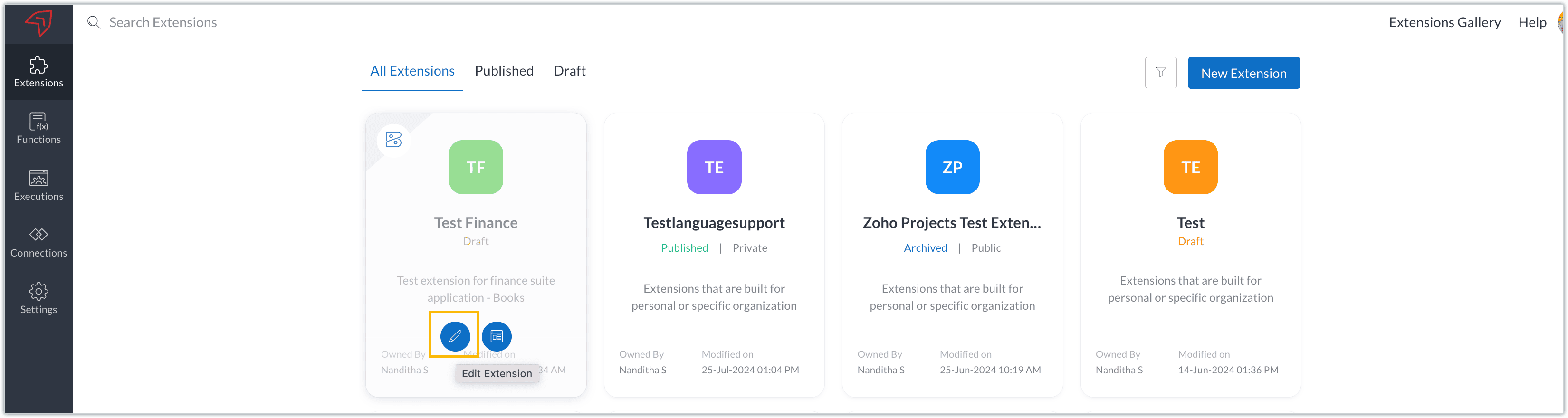
- The Zoho Books Developer Portal opens with the options and native features available to customize, curate, and develop your extension.
Zoho Books Developer Portal sections
The developer portal has four different sections to help customize and build your extension.
Learn: This section lists the native Zoho Books capabilities that can be used to create and develop extensions. Clicking the Set up Now button next to each feature will take you to the feature's development setup page.

Build: This is the development setup section, which includes customization, automation, and components like connections, widgets, schedules, webhooks, and signals. You can customize your extension preferences, establish connections to integrate with other applications, and design custom interfaces to enhance user experience.

Configure: This section assists with handling your extension's required configurations, whether they are generic settings or customizations required from the user. You can add global fields, which can be incorporated as either variables that store static data or through custom widgets that retrieve user inputs. You can also define functionalities that happen during installation and uninstallation.

Publish: Once the extension has been built and configured, you can use this section to publish it for either private or public use. In both cases, the Zoho Books team will review the extension; for public extensions listed on Zoho Marketplace, the Zoho Marketplace approval team will also review them. You can share your privately published extension with other users using the Shared List option.

We will explore more about each of these sections and their features in upcoming posts.
Testing an extension
The Zoho Books Developer Portal offers a dedicated testing environment for each extension, allowing you to test and validate it before publishing.
As a developer, you can use the Test Your Extension option in the top right corner of the portal to access your extension's sandbox environment.

This will redirect you to the sandbox testing environment for the extension you're developing, which is similar to Zoho Books and contains relevant modules to test with.

You can populate necessary data and test your extension functionality. Once everything is validated, you can go ahead and publish your extension for private or public use.
For support or questions related to Zoho Finance Suite extension development, you can email developer@zohofinance.com.
We hope you found this guide useful. Keep following this space for more information!
Topic Participants
Nanditha Somasundaram Somasundaram
Sticky Posts
Building extensions #5: Creating custom connections for extensions
In our previous post, we discussed the significance of connections, identified their types, developed a predefined connection, and demonstrated how it can be integrated with Zoho Books using an example. In this post, we'll walk through the process ofBuilding extensions #4: Integrating Zoho Books with applications using connections
In our last post, we looked at an overview of the key features available for creating a Zoho Books extension, including connections. In this post, we'll go over connections in depth, including their types and applications. What are connections? "Connections"Building extensions #3: Fundamental features of a Zoho Books extension
In our earlier posts, we covered how to create, test, and publish an extension for Zoho Finance suite applications. Moving forward, we'll look specifically at instances relating to one of the products from the Zoho Finance suite: Zoho Books. In this post,Building extensions #2: Publishing an extension
Hello developers, Welcome to our next post about building extensions for Zoho Finance Suite applications. In our previous post, we looked at extensions, their purpose, and how to create and test them. To recap, extensions are installable plugins or add-onsBuilding extensions #1: Creating and testing extensions for Zoho Finance Suite applications
Hello developers! We're excited to announce a new series called "Building extensions" to assist developers in creating efficient extensions for Zoho Finance Suite products. We'll support and guide you through the process of creating an extension and using
Recent Topics
When will Zoho Books offer native NFS-e issuing, now with Brazil's National Standard?
Hello Zoho Team and Community, I'd like to follow up on my previous suggestion regarding the critical need for Zoho Books to natively issue Brazilian Service Invoices (NFS-e). My original idea was that this could be achieved by extending the same integrationAdmin Access to Subscriber Information for System/Default Bots in Zoho Cliq
Dear Zoho Cliq Team, Greetings, We would like to request an enhancement to Zoho Cliq's bot management capabilities. Specifically, we are asking for the ability for organization administrators to view the list of subscribers for system/default bots, suchzoho webmail keeps opening an empty tab when on log in/vist webmail
as the the title says, whenever i log in or visit the page in a new tab, zoho webmail with open a new tab, but it errors out (see attachment). how do you stop it from doing this?FSM work order creation on books quote approval
I have followed https://help.zoho.com/portal/en/kb/fsm/custom-integrations/zoho-books/articles/perform-actions-in-zoho-fsm-on-estimate-approval-in-zoho-books#Step_1_Create_a_connection_for_Zoho_FSM_in_Zoho_Books in order to create a work order in FSMTip of the week #46 - Stay more organized by moving threads between inboxes
Have you ever come across a thread in your inbox that should have been handled by a different team or inbox? Or maybe you've wrapped up your part of the conversation, but another team needs to step in to finish the task or assist further? Keeping suchText summarization and field detection with Zia, Zoho's AI assistant
Have lengthy documents that take forever to read and sign? Tired of placing fields into hundreds of pages? Here's a single solution to solve both challenges: Zia, Zoho's AI assistant. With Zia's integration with OpenAI, you can summarize long documentsSending Links to Functions in CRM
Maybe I'm crazy, but currently there's no way to send someone a link to a custom function. The only link you can get is to the myfunctions page, which is very frustrating. This should work like workflow rules where when you click on one, it should havezohoからの自動メールについて
zohoからの自動メールにおいてちょっと困ったことが起こっており、サポートにも相談中なのですが ほかの方にも同現象が発生していないか相談したい。 ▼事象 zohoからの自動メールにおいて時折「このメールが送信者からのものであると確認できないため、このメールに安全に返信できない可能性があります」とメーラーから警告が出る。 ▼状況 発信元:設定した独自ドメイン SPF/DKIM設定:済 利用メーラー:outlook 発生頻度:稀(連続するときもあるが、パタッとでなくなる時もある) サポートへの連絡:ただいま継続相談中Using Deluge scripting to create/update data in TabularSections
I am having following Form structure with some other usual fields, and a tabular section which allows putting question, self rating and lead rating. (pic below) I am trying to create a record of this form via Deluge, but can't figure out way to populateZoho Recruit: How to link lookup fields using record ID instead of name during import?
Hi, I'm having an issue with lookup fields in Zoho Recruit during data import. When I import records into a module that includes a lookup field (e.g., to an Interview record), Zoho Recruit matches the lookup by the display name (string) instead of theAdd a "Success" Route to the "Forward to Operator" Card in Zobot
Hello Zoho SalesIQ Team, We hope you're doing well. We would like to request an enhancement to the "Forward to Operator" card in Zobot. Current Limitation: At present, the "Forward to Operator" card provides the following routes: Operator Not AvailablePower of Automation :: Auto-update Project status based on Tasklist completion
Hello Everyone, A Custom function is a user-written set of code to achieve a specific requirement. Set the required conditions needed as when to trigger using the Workflow rules (be it Tasks / Project) and associate the custom function to it. Requirement:Multi Module Lookup Fields
🎯 Use Case: In many custom implementations, especially those involving financial tracking, service operations, or project-based work, a single record (e.g. an invoice or bill) often relates to one of several different modules — but only one at a time.Introducing AI Modeler—a no-code approach to adding AI to your business applications
Forward-thinking businesses today are embracing AI to make life easier for themselves, their employees, and their customers. But if you haven't started yet, you might be concerned that your business will be left behind. Or maybe you're worried becauseZoho People how do i view the history of leave taken
Hi All What is the report that i am unable to view the history of the leave taken for an individual and team?UK Registration for VAT with existing stock/inventory
We have an existing inventory of stock and are investigating how to handle the conversion from a UK VAT unregistered company to a UK VAT registered company. Enabling VAT registered status looks extremely easy, but we cannot find any way within Books toTrigger action after workflow
I would like to trigger a deluge function after the approval workflow is complete. Is this possible? The objective is to take the approved document and move it over to Zoho Contracts to send out to our customer for review and signature. The reason weUnable To Enable Google Calendar Sync
Hi Folks, I am unable to enable google calendar sync. I get Internal Error, Problem Occurred Internally. Screenshot attached. How do I solve this?Export to Zoho CRM Not Triggering Workflow Rules
Hello, I have set up an automated export from DataPrep to Leads in CRM but none of my Workflow Rules are triggering once the leads are created. The Timeline history is completely empty in every lead. How can I fix this issue? Do I need to set up a Schedule【Zoho Projects】サンドボックス機能(テスト環境)リリースのお知らせ
本投稿は、本社のZoho コミュニティに投稿された以下の記事を参照し作成したものです。 Sandbox - Your Secure Testing Space in Zoho Projects ユーザーの皆さま、こんにちは。コミュニティチームの中野です。 本投稿では、Zoho Projects のサンドボックス機能リリースについてご紹介します。 サンドボックス(テスト環境)とは? Zoho Projects の「サンドボックス」は、新たな設定を作成、検証、そして既存の処理を妨げることなく本番環境に適用することができるテスト環境です。Sending from domain alias
In the Control Panel/Domains, I have set up some domains as aliases for my main domain. Only my main domain has mail hosting. The other domains are verified as aliases for the main domain, and emails sent to <user>@<alias domain> arrive successfully atDifficult to Purchase More users
It's surprisingly difficult and un-intuitive to purchase more user licenses in Zoho One under the new UI. It's not actually possible to do it anywhere from the admin interface. You have to leave the admin/directory section, then click your profile icon,How to link web sales payments through Stripe to invoices?
I have just set up an online shop website which accepts payments through Stripe. The payment appears in Zoho Books through the Stripe feed as 'Sales without invoices'. In order to keep Zoho Inventory in step, I manually (for now) create a Sales InvoiceAnnouncing New Features in Trident for macOS (v.1.22.0)
Hello everyone! Trident for macOS (v.1.22.0) is here with thoughtful updates to improve your daily workflow. Here's a quick look at what's new. Switch email response type easily. You can now switch between Reply, Reply All, and Forward directly in theLayout Rules / Quick create
Hello, is there a way to create a layout rule for quick create option? Regards, KatarzynaZoho Notebook Will Not Open After App Install
I am a new user of Notebook. I was able to successfully import my data from Evernote and the product is working well on a Windows 11 computer and Pixel device. I have also installed Notebook on a Samsung S6 lite tablet however the software freezes onLeads, contacts, deals table view is not sorting
i am unable to sort the table view of leads, contacts and dealsZoho CRM Multi-select values not translated
Hello! I have some issue with translate custom multi-select fields in zoho CRM in other language. I download export file, but it has all my custom fields and picklist values exept multi-select fields picklist values. Please, help me to undestand, isUnable to Download Invoices via API – Code 57 Authorization Error
I’m integrating the Zoho Billing API with the scopes ZohoInvoice.invoices.CREATE,ZohoInvoice.invoices.READ. I’ve completed the OAuth2 flow successfully, including generating the auth code, access token, and refresh token. All tokens are valid and fresh.Weekly Tips : Stay in loop with Conversation View
You receive a series of emails back and forth with a client regarding a project update. Instead of searching through your inbox for each separate email, you would want to see the entire email conversation in one place to understand the context quicklyIntroducing Zoho PDF Editor: Your free online PDF editing tool
Edit your PDFs effortlessly with Zoho PDF Editor, Zoho's new free online PDF editing tool. Add text, insert images, include shapes, embed hyperlinks, and even transform your PDFs into fillable forms to collect data and e-signatures. You can edit PDFsWater-Scrum-Fall approach for finance institutions with Zoho Projects Plus
Finance is a highly regulated sector with strict rules and compliance requirements. Handling sensitive client data and complex transactions like multi-currency deals requires elaborate workflows and precise management. Implementing project managementGet instant summaries of your notes with the help of Zia
Hello all, We've added a simple yet powerful feature to Zoho CRM that we're excited for you to try: Zia Notes Summary. It's designed to make the daily lives of a CRM user a bit easier by giving you quick summaries of your CRM notes. Whether it's a glanceZoho one web page are not available
Why I am not able to enter to zoho one web page?Zoho People > Onboarding > Candidate do not view all the data field on the Employee Onboarding
Hello In my onboarding portal I do not see all the fields that i want the candidate to fill in In my Employee Onboarding Form These details i can see In the work information, i have enable the Company View but in the Employee Portal i do not see I haveHas anyone implemented a ""switch"" to redirect emails in production for testing?
Hi everyone, In our production Zoho CRM we have a fairly complex setup with multiple Blueprints and Deluge functions that send emails automatically — to managers and internal staff — triggered by workflows. We’re looking for a way to *test changes safely*,Restrict Access/Shared Access
Sometimes access to documents that go out from Zoho Sign need to be restricted or shared. For example: 1) HR department send out employment contracts. Any Zoho Sign admin can view them. Access should be restricted to those that HR would allow to viewTip#44: Integrate with Xero to manage your financial operations
Managing your project finances becomes more efficient with Xero integration in Zoho Sprints. With this integration, you can sync your Zoho Sprints data with Xero. Once you sync them to Xero, you can easily create invoices in Xero. This feature significantlyZoho People Onboarding Unable to Convert to User
Hello All I need help in this onboarding of candidate Currently at this stage the candidate is just being offered and we are filling in his details however not all information are fill up. The candidate is still using his/her personal email When i tryIntegration with SharePoint Online
Is there an integration where we can add a Zoho Sign link to the context menu of a document in the SharePoint document library. Then, we could directly initiate a workflow of sending a document for signature from a document library in SharePoint onlNext Page