Building extensions #1: Creating and testing extensions for Zoho Finance Suite applications
Hello developers!
We're excited to announce a new series called "Building extensions" to assist developers in creating efficient extensions for Zoho Finance Suite products. We'll support and guide you through the process of creating an extension and using the features offered in the developer portal.
What are extensions?
Extensions are installable plugins or add-ons that help enhance the existing functionality of your Zoho product or seamlessly integrate and interact with third-party applications for data transmission.
How can you build extensions?
Zoho offers a developer platform called Zoho Developer that allows you to build different types of applications. Sigma is a platform offered within Zoho Developer that is specifically designed for creating extensions for various Zoho products. Throughout this series, we'll look at how to create and develop extensions for the Zoho Finance Suite applications using Sigma.
Get to know all about extensions and building them further in detail.
Sigma extension support
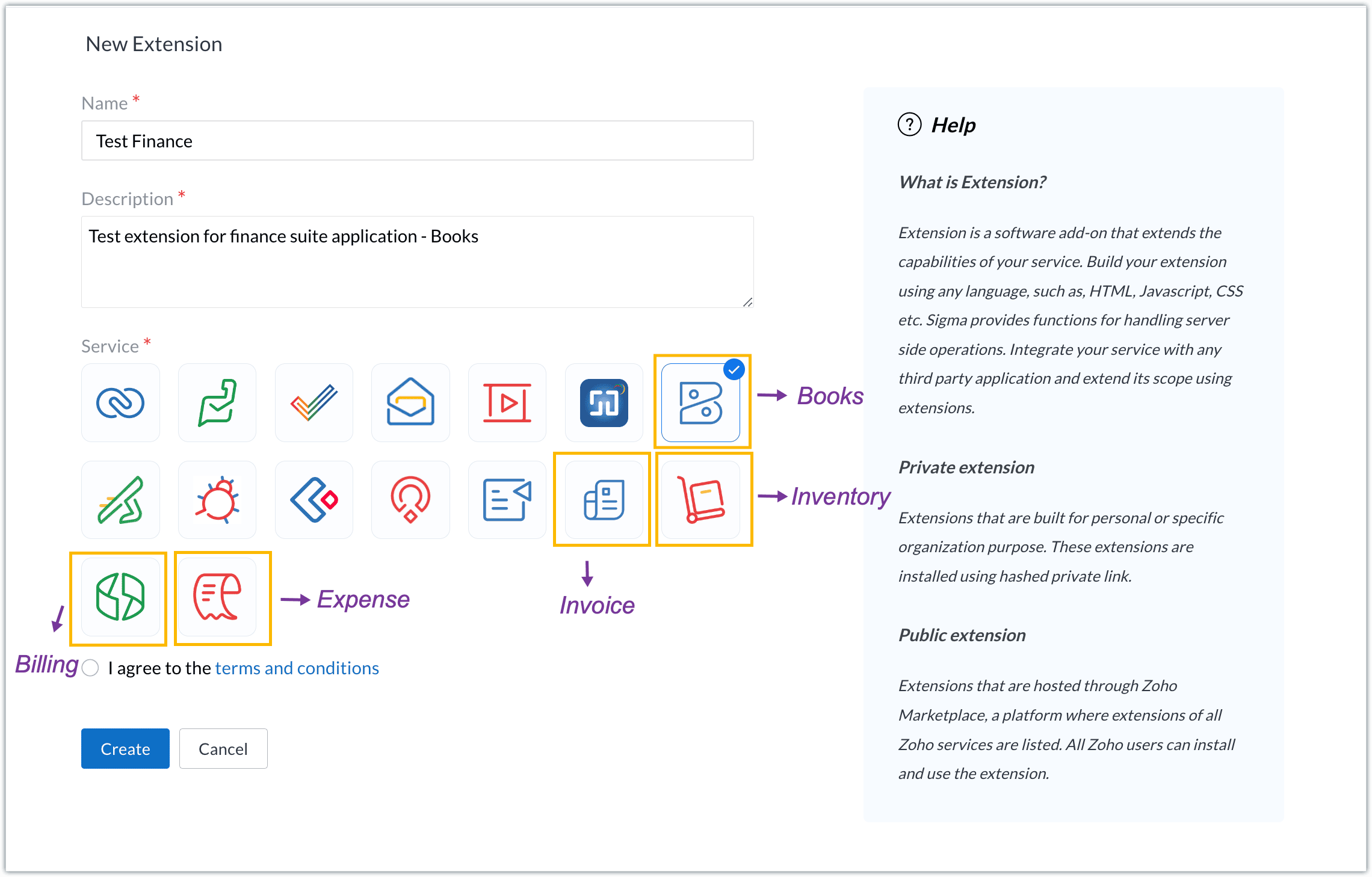
The Zoho Finance Suite consists of seven applications: Zoho Books, Zoho Inventory, Zoho Expense, Zoho Invoice, Zoho Billing, Zoho Checkout, and Zoho Payroll. Currently, the Sigma platform supports creating and building extensions for these five Zoho Finance applications:
- Zoho Books
- Zoho Inventory
- Zoho Expense
- Zoho Invoice
- Zoho Billing
Creating an extension
- Log in or sign up at developer.zoho.com.
- Go to Sigma and access your workspace.
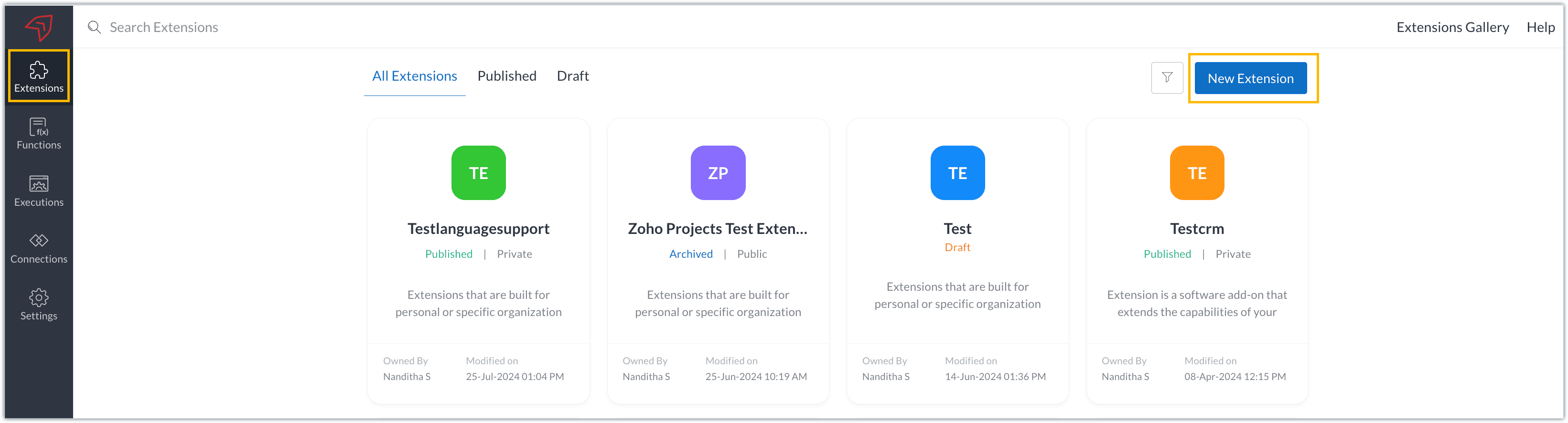
- Once you enter your workspace, you'll be taken to the Extensions section in Sigma.
- Click the New Extension button to start building an extension.
- Enter a name and description for the extension and choose the service you want to build the extension for. As mentioned earlier, Sigma offers support for Zoho Books, Zoho Invoice, Zoho Inventory, Zoho Billing, and Zoho Expense.
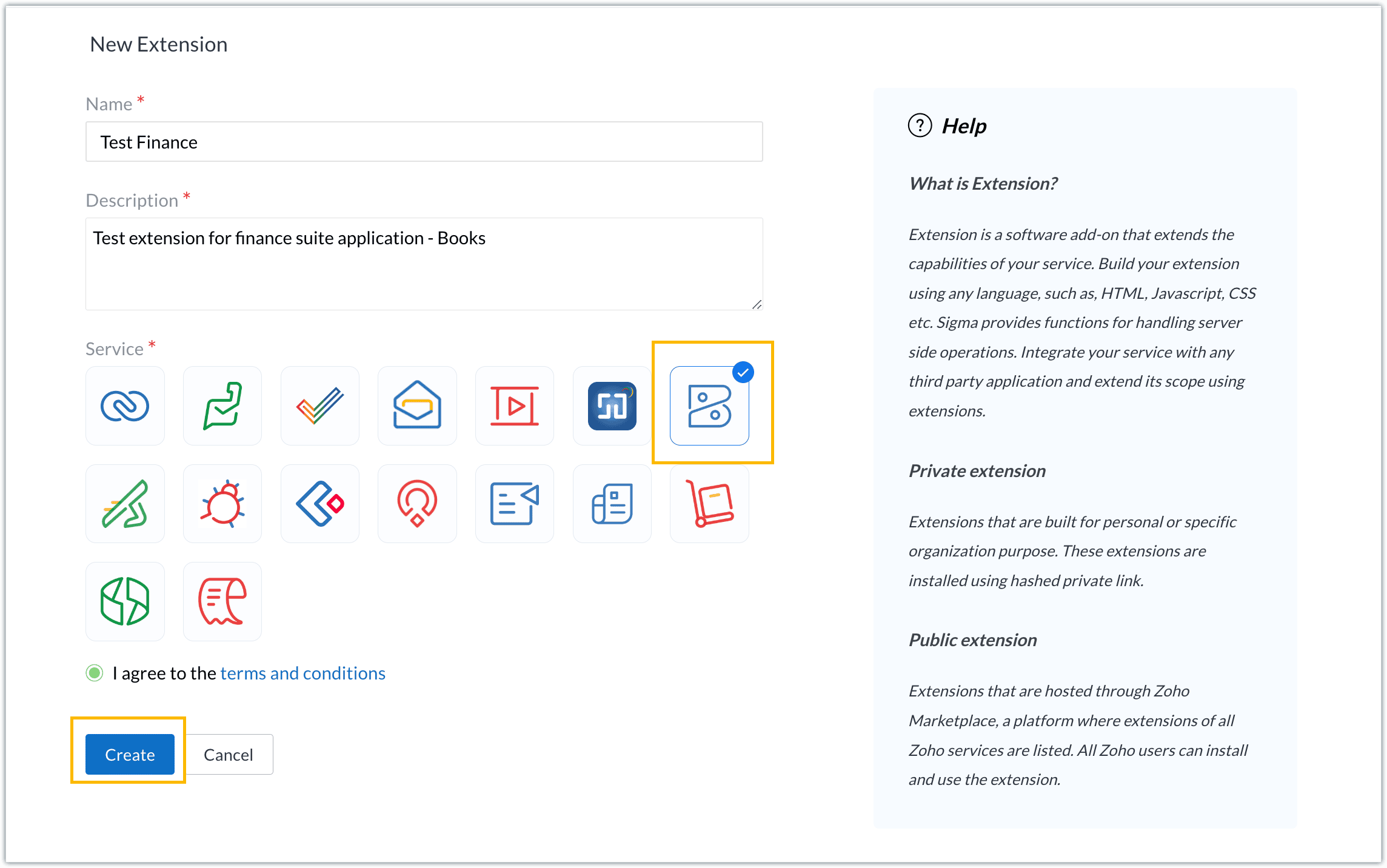
- For our demo, let's choose the service as Zoho Books. Accept the terms and conditions, and then click Create.
- The extension is successfully created. You can click the Extension Details icon to see an overview of the extension.
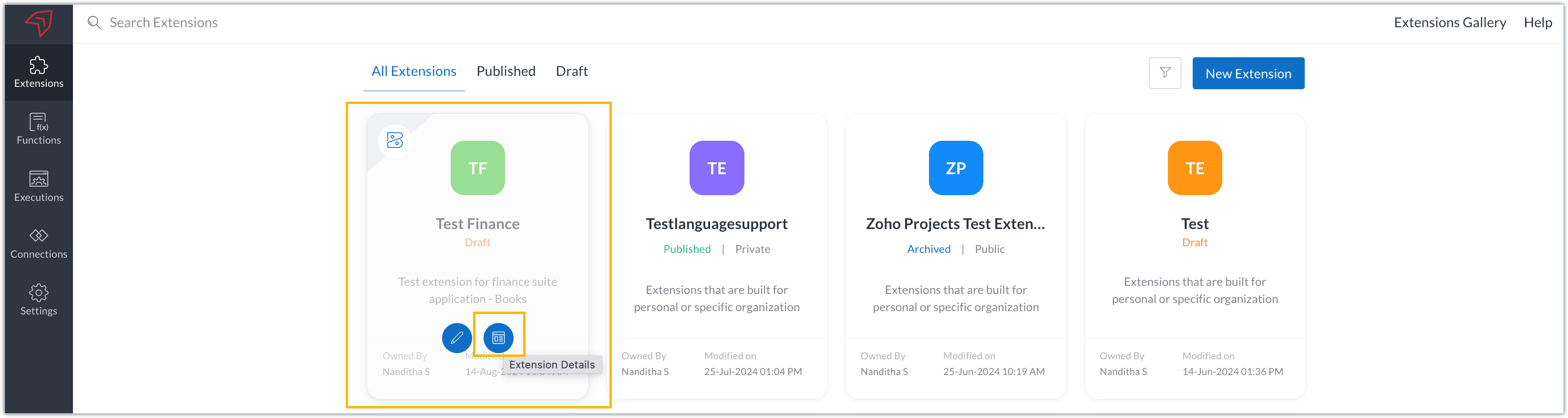
The extension details page shows the general details of the extension, such as creation date, creation time, and version, and allows you to associate developers with the extension.
- Click the Edit Extension icon to start developing the extension.
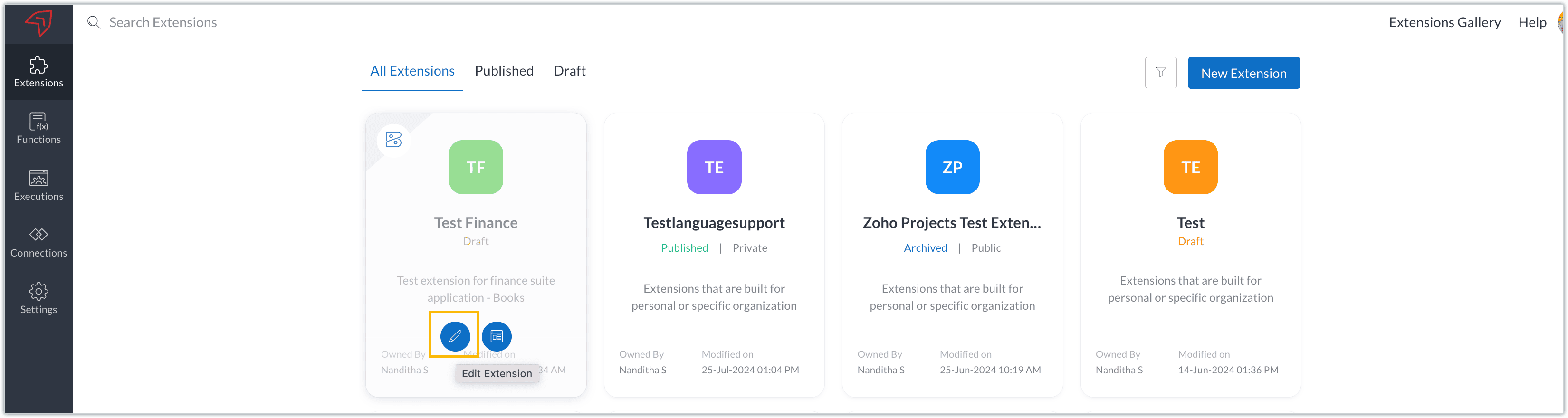
- The Zoho Books Developer Portal opens with the options and native features available to customize, curate, and develop your extension.
Zoho Books Developer Portal sections
The developer portal has four different sections to help customize and build your extension.
Learn: This section lists the native Zoho Books capabilities that can be used to create and develop extensions. Clicking the Set up Now button next to each feature will take you to the feature's development setup page.

Build: This is the development setup section, which includes customization, automation, and components like connections, widgets, schedules, webhooks, and signals. You can customize your extension preferences, establish connections to integrate with other applications, and design custom interfaces to enhance user experience.

Configure: This section assists with handling your extension's required configurations, whether they are generic settings or customizations required from the user. You can add global fields, which can be incorporated as either variables that store static data or through custom widgets that retrieve user inputs. You can also define functionalities that happen during installation and uninstallation.

Publish: Once the extension has been built and configured, you can use this section to publish it for either private or public use. In both cases, the Zoho Books team will review the extension; for public extensions listed on Zoho Marketplace, the Zoho Marketplace approval team will also review them. You can share your privately published extension with other users using the Shared List option.

We will explore more about each of these sections and their features in upcoming posts.
Testing an extension
The Zoho Books Developer Portal offers a dedicated testing environment for each extension, allowing you to test and validate it before publishing.
As a developer, you can use the Test Your Extension option in the top right corner of the portal to access your extension's sandbox environment.

This will redirect you to the sandbox testing environment for the extension you're developing, which is similar to Zoho Books and contains relevant modules to test with.

You can populate necessary data and test your extension functionality. Once everything is validated, you can go ahead and publish your extension for private or public use.
For support or questions related to Zoho Finance Suite extension development, you can email developer@zohofinance.com.
We hope you found this guide useful. Keep following this space for more information!
Topic Participants
Nanditha Somasundaram Somasundaram
Sticky Posts
Building extensions #5: Creating custom connections for extensions
In our previous post, we discussed the significance of connections, identified their types, developed a predefined connection, and demonstrated how it can be integrated with Zoho Books using an example. In this post, we'll walk through the process ofBuilding extensions #4: Integrating Zoho Books with applications using connections
In our last post, we looked at an overview of the key features available for creating a Zoho Books extension, including connections. In this post, we'll go over connections in depth, including their types and applications. What are connections? "Connections"Building extensions #3: Fundamental features of a Zoho Books extension
In our earlier posts, we covered how to create, test, and publish an extension for Zoho Finance suite applications. Moving forward, we'll look specifically at instances relating to one of the products from the Zoho Finance suite: Zoho Books. In this post,Building extensions #2: Publishing an extension
Hello developers, Welcome to our next post about building extensions for Zoho Finance Suite applications. In our previous post, we looked at extensions, their purpose, and how to create and test them. To recap, extensions are installable plugins or add-onsBuilding extensions #1: Creating and testing extensions for Zoho Finance Suite applications
Hello developers! We're excited to announce a new series called "Building extensions" to assist developers in creating efficient extensions for Zoho Finance Suite products. We'll support and guide you through the process of creating an extension and using
Recent Topics
Announcing New Features in Trident for macOS (v.1.21.0)
Hello everyone! Trident for macOS is here with interesting features to elevate your workplace communication and productivity. Let's take a quick look at them. Get better visibility for concurrent events. Quickly compare and manage simultaneous eventsModifying Product Details
I am in the process of setting up new products in Zoho Commerce and have encountered a few problems: 1) Tabs It seems that Product Details pages do not have the ability to create Tabs. eg: https://www.thedebugstore.com/tp240141-aardvark-usb-i2c-spi-host-adapter-total-phase.htmlDisabling specific pages
Can you disable the chat widget/window on specific pages? Thanks!How can I get a nested value attributes inside a key par?
Hello! Im getting the following output when reviewing a record I am after. I am trying to put some conditions based on a data value that is inside another data. For example, lets grab the below output. Info {"Account_Name":{"name":"Liberty ConstructionMulti Line Text Character Limit
I want to export my Help Center articles but I realized that the text in the Answer column is being cut off. I'm guessing there is a character limit for multi line text fields. How can I get around this?Emails bouncing to Hotmail / Outlook.com
Today I have seen multiple emails bouncing all to Hotmail and outlook.com mailboxes, all other emails are being delivered. Is it just me or is this a widespread issue with Zoho Books ? Bounce Reason : uncategorized-bounceBe careful if you want to purchase zoho one
Hi, just to add one more complain to the other similar complains. When I purchased zoho one, Divith, my account manager told me (by email) that I would be able to keep different emails that I have inside the company (contact, privacy, etc.). During theSchedule Timeout 5 minutes vs. stated 15 minutes
I am running into a function run timeout error after 5 minutes for my schedules. The Functions - Limits documents states it should be 15 minutes: Functions - Limits | Online Help - Zoho CRM. What should it actually be? Due to the 5 minute timeout, I'mImporting invoices in bulk using the xls file template - still posting as draft - Is there a way to skip "mark as sent" and post it directly?
Hello everyone, as the title say, is there a way that when I upload from the template file, it will post automatically? I tried changing the "Invoice Status" from draft to approved but it is still appearing as draft and is making me go to invoices soHow to set Sales Order Payment Terms when creating a Sales Order via the Zoho Books API
I am creating Sales Orders via the Zoho Books API. I would like to set the Payment Terms to a particular value from the list of allowed values. Is that possible? I was able to get the list of payment terms via this API call: https://books.zoho.com/api/v3/settings/paymentterms?organization_id=XXXX"How to rename the Submit Button by using deluge script
Hi everyone, As we know, the Submit button can be renamed in the form builder setting. But I have scenario where I need the Submit Button to be renamed differently according to condition. Anyone knows how to do it? Thank YouBanking: Transfer from another account without base currency
Scenario: A banking line item shall be categorised as an "internal transfer" from another bank account. This is a USD to EUR transfer. Our base currency is CHF. What we tried: Category: "Transfer from another account" From: Our USD account To: Our EURItem cost price - How to accomodate changing cost prices
I am in urgent need of assistance with how to accommodate changing cost prices for items, not manually. We import items so their landed cost is always changing. This cost is NOT reflected however in the item cost price. This is going to cause us someMarketer's Space: Targeted messaging : Leveraging Zoho Campaigns for Effective Communication
Hello Marketers, Welcome back to Marketers’ Space! Targeted messaging ensures your communication reaches the right audience - boosting engagement, conversions, and overall campaign success. In this post, we’ll be looking at targeted messaging to create:between: conditions in search?criteria
Hello, please help solve problem I try to select deals by Creater_Time between dates i send this GET request /crm/v4/deals/search?criteria=(Created_Time:between:(2024-02-01T18:52:56,24-02-17T18:52:56)) encoded to /crm/v4/deals/search?criteria=%28Created_Time%3Abetween%3A%282024-02-01T18%3A52%3A56%2C24-02-17T18%3A52%3A56%29%29Zoho Creator : Updating Records via Import. Can't use Autonumber or ZohoRecordID ?
Hi, I am trying to use the function to update a report with an import. I'm running in to the error : "unable to update because the form has no column with unique values" In the release notes it says Only field with unique values can be used to compare💡 Feature Request: Custom App Bundle Plan (Pick Only the Apps You Need)
Request: Allow Users to Build a Custom App Bundle (Choose Only the Apps They Need) Hi Zoho Team, I appreciate the value that Zoho One and the Plus Bundles (CRM Plus, Finance Plus, etc.) offer. However, I’m finding it difficult to get the best fit forSearch Feature Now Broken
I have many hundreds of notes on Zoho Notebook but now when I search for a keyword, I only get 30 results maximum. This is unacceptable and yet another feature that has become broken on this quickly deteriorating software. Please fix immediately.Restrict Zoho One Account Notifications to Admins
Hi Zoho One Team, I hope you're doing well. We recently noticed that end users are receiving administrative pop-ups in Zoho One, such as the DKIM configuration notice (screenshot attached). This type of notification is only relevant to administratorsAutomated Checkout
Hi Team, I’m trying to create an automated checkout function in Zoho People. My requirement is that if an employee forgets to check out, the system should automatically check them out after 10 hours. However, I'm encountering an error while updating theZoho CRM Community Digest - June 2025 | Part 1
**We offer both video and written formats, take your pick and jump in.** CRM FOMO is real. You could be doing everything right and still miss the beat. That’s where we come in. Zoho CRM Community Digest! Every two weeks, we bring you the insider scoopIntroducing Video Tutorials for the Zoho FSM Mobile App
We’re excited to announce the launch of our brand-new video tutorials for the Zoho FSM Mobile App—designed painstakingly to help your field agents get up to speed in no time! Whether you're brand new to the Zoho FSM mobile app or just need a quick refresher,Zoho People > Managed People > User Access Control
Hello All I need your recommendation on how should i go about setting the User Access Control in my Zoho PeopleWhat happened to the tabs in the ribbon on the top in my CRM?
Hi, This morning all of the tabs (modules) in the ribbon on top are no longer showing up. I had the modules in the ribbon in a specific order for easy, one-click access. Now it's only showing the active tab and the rest are hiding under the three dotsConnect to Australian bank
How do I connect to an Australian bank. No Australian bank shows up in my list. I think its because the service provider is Token and not Yodlee. How do I change this?Searching for content within courses
Hello, I have been testing out Zoho One for my company have been exploring Learn. I've noticed that you cannot search for content within a course. You can only locate the title of the course. Example: Course: How to Make Your Bed Chapter: Pillows Lesson:Citations Problem
I'm having an odd problem with the "Add Citations" feature of Zoho Writer. When I add a citation using the "Fetch website details online" feature it works the first time I use it but if I try it a second time by clicking that link nothing at all happensZoho People Leave Balance Show as Negative
Hi All I have the Portugal material Leave that policy allows up to 120 days or 150days for employee to apply within 365 days and employees is able to take minimum of 1 days or up to 120 days In my Leave Grant I have set as the setting.Zoho People > Performance > Appraisal > Mismatch between the template-configured module and the currently enabled module.
Hello There When we enable the performance module there a prompt Mismatch between the template-configured module and the currently enabled module. How do we resolve thisZoho People Leave Application Module Error: Leave balance has exceeded as on 09-07-2025.
Dear All I need to check how do i resolve the issue of Error: Leave balance has exceeded as on 09-07-2025. All my leave have this issuePower of Automation:: Daily Time log summary broadcast to Zoho Cliq using Schedule Custom Functions
Hello Everyone, A Custom function is a user-written set of code to achieve a specific requirement. Set the required conditions needed as when to trigger using the Workflow rules (be it Tasks / Project) and associate the custom function to it. Requirement:When Calls Ends, Creating Note with the call description by deluge code
Hi, i need help with writing deluge code function, to scenario is like this - i want to create a workflow thats after 10 that the call ends the deluge function will create a new note in module calls that link the note in module calls to the his lead ticketDefault Memo from Custom Field (from Bill) when Paying with Check
Hi, we are using "Pay via Check" option to pay for our Bills in Zoho Books. I would like the memo on the check to pull directly from one of the custom field values within the Bill. Is there any way I can do this? The memo that I need is already on theWouldn't it be great to have an option to schedule sending emails in Zoho mail? Schedule send feature request
The subject says it all - but just to clarify: This is to request a new feature that would allow users to schedule the delivery of an email for a given date & time. In small companies it is quite common to work unsocial hours on customer emails. But someStatic vs Standard Subforms - New Feature; But how does it work?
I've just noticed that we now have the option of static or standard subforms, but I can't find any posts on the new feature. So, how does the new subform type work?【Zoho CRM】翻訳機能のアップデート
ユーザーの皆さま、こんにちは。コミュニティチームの藤澤です。 今回は「Zoho CRM アップデート情報」の中から、翻訳機能のアップデートをご紹介します。 翻訳機能が拡張され、Webタブ、レイアウト、セクション、ウィザード、ウィザード画面、セグメントも翻訳できるようになりました。 翻訳をエクスポートする際に、これらの要素に対応する用語もエクスポート先の言語で追加されます。 ※過去の関連記事はこちらから まず、翻訳の設定画面から「エクスポート」を選択してください。すると、TXT形式のファイルがローカル環境に出力されます。Trying to make zoho invoice have a button
Hello I am getting this error with the code below. Anyone know how to fix? Check and update the code in line 5 as there is a Exception : Variable 'invoice_id' is not defined // Define Organization ID (Replace with your actual Zoho Invoice organizationDuplicate Contacts - how to get merge or delete
I have noticed that our list of contacts in Zoho Desk duplicates contacts periodically. I have yet to identify when or why. How do I merge or delete them? I see there is a "Deduplicate" but I am unable to find anything that explains this feature.Another nightmare experience with a "Zoho Partner": Cloud Z Technologies
I found "CloudZTech" on fiverr and I hired them to do a simple $300-$500 task. They did not deliver on time and I was forced to fire them. You guys must watch out for these fake ZOHO PARTNERS, 99% of them don't have the expertise necessary to help. IPickup and delivery
Some of our products are pickup only and some delivery. Is there a way of doing this in commerce. Plus we give volume discount to all customers. We handle this in Books using pricelist and range pricing. Is there a way of doing this within commerce.Next Page