Unveiling Zoho CRM's New User Interface - The NextGen UI
Hello Everyone,
Last Wednesday, May 14th,2025, we announced the public release of Zoho CRM For Everyone, our most significant update yet. This release brings a modernized CRM experience with a redesigned user interface, new capabilities for cross-functional collaboration, and greater flexibility for users across your organization.
Read our PR announcement, our forum announcement, and the blog post to know more about this release.
To help you get the most out of these updates, we’ll be publishing a series of announcements that walk you through the major enhancements now available to all Zoho CRM users.
We’re kicking off this series by spotlighting one of the most noticeable changes — the new and improved user interface, Zoho CRM's Nextgen UI.
What’s New in the NextGen UI?
- A reorganized menu option
- The sidebar
- Teamspaces
- Additional Module Views
- Interactions Tab
- Enhanced Themes and
- Night Mode
Watch this video to get an idea of how your CRM could look!
Let's dive into each of these features in detail :
Reorganization of menu options from the top band to the left-hand side vertical sidebar.
Previously, Zoho CRM housed the menu bar on the top where most of the navigation took place, as shown below.

Now, We moved the top bar to the left with a vertical sidebar that is expandable as shown below. This not only declutters the top space but also makes it easier to access your modules and features with minimal clicks.

The Sidebar
The new sidebar is now an extremely functional piece of the UI with contextual shortcuts for quick settings, neat folders for better organization of modules, and more. Learn more.
The top portion of the Sidebar houses icons to view and work with Modules, Reports, Dashboards, Requests, Marketplace, and Global Search.

The bottom portion of the sidebar now contains intuitive utility icons such as Quick create record, Mail magnet, Calendar, and more. (originally located on the top right corner of the UI).

Expanding the sidebar opens up quick-controls contextual to what you've chosen to work on. This is collapsible in order to allow you to maximize your right-hand side work area.

Contextual Shortcuts through the sidebar
You have contextual shortcuts to Setup options from here, like creating new modules or folders. While the backend Setup is still intact, these options from the sidebar options offer a quick shortcut.
Create Modules
You can create either org modules or team modules from the sidebar. This option makes it easy for users to quickly create their own modules and
configure processes instead of navigating to the setup menu every time.
Create folders
You can create modules or folders right from this location without having to navigate to the backend Setup. Folders are a great way to organize or group modules in different categories. Say you are part of the Sales teamspace and you have certain sales activities that you need to perform to touch base with customers like creating tasks, scheduling calls or meetings. So you can group Tasks, Meetings, Calls into a "Sales Activities" folder for easy access and a clutter free side bar. Learn more.

You can also directly create layouts, webforms, wizards, canvas pages, etc from the sidebar.

Organized Teamspaces for Focused Work
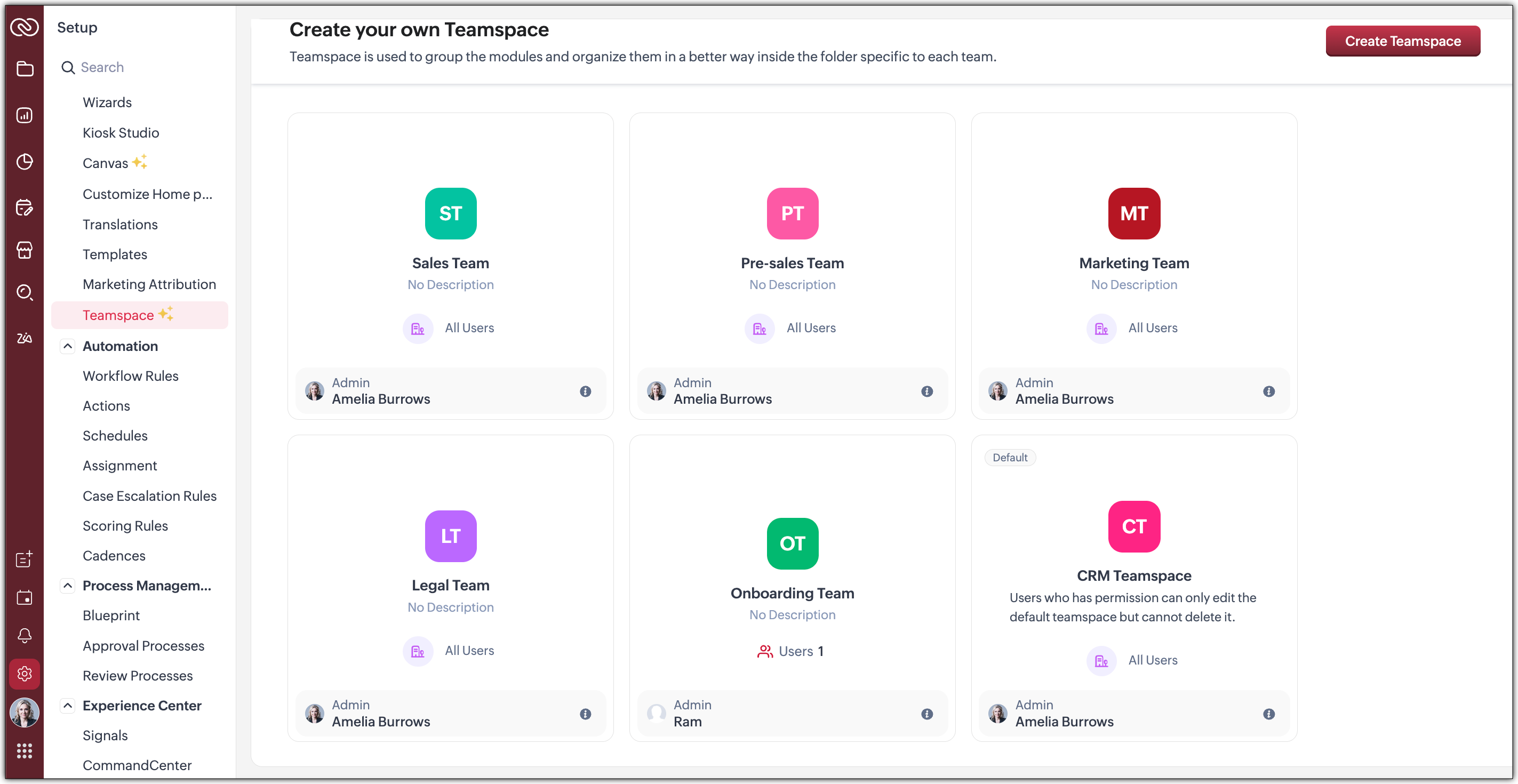
Tab Groups have been transformed into what we now call Teamspaces. If your CRM is used by multiple teams, organizing and managing their work and data can quickly become complex.
We offer a solution by giving each team a dedicated, folder-like space where all their related modules are grouped together. This setup ensures clear separation between teams, making collaboration more focused, and preventing the risk of teams crossing over or accessing modules that are not meant for them.
Hence, Teamspaces are dedicated workspaces for each department or function to organize their work. Whether you're in sales, support, or marketing, Teamspaces help reduce noise and keep your workspace relevant to your role. Learn more.

You have the option to create teamspaces from the bottom of the sidebar or from the Setup menu. The org admin would generally be the one who creates teamspaces, assigns users as teamspace admins and adds users to a teamspace.
Note : Users with the Manage teamspace permission enabled will be able to create and manage teamspaces in an org.
Teamspace Admin
A teamspace admin is generally the head of a department or a team. For example, a Sales Director could be assigned as the Sales Teamspace's Admin. Once a user becomes a teamspace admin, they can add or remove users, allow reports and dashboards to be created for modules within a teamspace.
Note : If a user is a Teamspace admin but does not have the "Manage Teamspace" permission enabled, they can only manage the specific Teamspace they’ve been assigned to as an admin. They won't be able to create new Teamspaces or manage any others.
Features offered as part of this enhanced UI
- Additional Module Views have been added to provide you with more flexibility, better insights, and improve productivity when working with module data. Thee view added are :
--> Chart View : Get a visual representation of your module data with this View
--> Grid View : Convert your module data into a spreadsheet-like interface where you can edit and manage records directly without having to open each record individually.
--> Timeline View : Look at how your module is created by viewing data plotted over a specific period of time.
--> Split View : Split your module data based on picklist fields /users or criteria to segment them for further inferences. - Interaction tab : This feature displays a timeline of a customer's journey and their engagements across different channels within your CRM.
 We will post individual announcements for each of the above features in the upcoming days.
Themes
The new UI introduces a refreshed theming experience with 13 vibrant colour options to personalize your workspace. These themes go beyond just cosmetic changes: the selected theme isn't limited to the sidebar; it flows throughout the product interface.
Once you choose a theme, the colour is consistently applied across key areas of the CRM, including buttons, tabs, menus, and other interactive elements. This cohesive design enhances visual clarity and gives your team a more engaging, unified experience tailored to their preferences.
If you want to match your brand colours or give your CRM tool a refreshed appearance, the new themes bring both customization and character to your work environment.
Dark-Mode
With the new UI, we’re excited to bring Dark Mode to your CRM experience. This feature was designed with both comfort and usability in mind.
Dark Mode offers a visually soothing alternative to the standard light interface, reducing eye strain during long hours of work, especially in low-light environments. It's not just a cosmetic change; it’s about enhancing usability and making your workspace more comfortable.
Once enabled, Dark Mode is applied consistently across the entire product, including the new UI elements like the left sidebar, buttons, forms, and interaction panels. Whether you're viewing records, managing tasks, or collaborating within Teamspaces, the darker interface ensures clarity without compromising on aesthetics or function.
This addition is part of our effort to make Zoho CRM more adaptable to user preferences and modern work styles. You can switch to Dark Mode at any time from your profile settings and choose what works best for you. Learn more.
What can you choose in this implementation?
Day : Prefer a brighter interface? Day Mode offers a clean, crisp, and classic appearance of your CRM, making it not just functional but also visually pleasing.

Night : Enjoy a sleek, modern look with reduced eye strain, especially in low-light environments. Darker UI minimizes glare and helps reduce fatigue, making it easier to work for longer periods.

Auto : Let the system decide! Auto Mode automatically switches between dark and light themes based on your device settings.

Resources
We invite you to explore these exciting updates and see how productivity increases in your CRM journey. Stay tuned for our upcoming announcements where we’ll dive deeper into each feature, helping you make the most of everything the NextGen UI has to offer.
Regards,
Serena Woolridge
Topic Participants
Serena Woolridge
Andréa Kérébel
Andrew
Ishwarya SG
K'an Thomas
Sticky Posts
Introducing Multiple Sandbox Types and Support for Module's Data Population
Register here for the upcoming Focus Group webinar on Multiple Sandbox | Help documentation to learn more about the new enhancements Hello everyone, Sandbox in CRM is a testing environment for users to create and test new configurations like workflowGood news! Calendar in Zoho CRM gets a face lift
Dear Customers, We are delighted to unveil the revamped calendar UI in Zoho CRM. With a complete visual overhaul aligned with CRM for Everyone, the calendar now offers a more intuitive and flexible scheduling experience. What’s new? Distinguish activitiesVoC in Zoho CRM is now data savvy: Explore response drilldown, summary components and participation in CRM criteria
VoC has all the goods when it comes to customer intelligence—which is why we're constantly enhancing it. We recently added the following: A customer drilldown component that shows you the list of prospects and customers behind a chart's attribute ExpandedWrapping up 2025 on a high note: CRM Release Highlights of the year
Dear Customers, 2025 was an eventful year for us at Zoho CRM. We’ve had releases of all sizes and impact, and we are excited to look back, break it down, and rediscover them with you! Before we rewind—we’d like to take a minute and sincerely thank youPresenting ABM for Zoho CRM: Expand and retain your customers with precision
Picture this scenario: You're a growing SaaS company ready to launch a powerful business suite, and are looking to gain traction and momentum. But as a business with a tight budget, you know acquiring new customers is slow, expensive, and often delivers
Recent Topics
How to integrate Zoho CRM, Zoho Forms and a WIX Web Site
Attached video demonstrates how to use Zoho Forms included in Zoho One, to design a Contact Us form to be embedded into a WIX web site and integrated into Zoho CRM.Bug Causing Major Sync & SO Access Failures in Zoho POS
We are experiencing critical and recurring issues in Zoho POS that all trace back to role-permission handling defects in the latest POS app version. These issues directly affect syncing, login ability, and Sales Order access for role-restricted usersOAuth2 Scope Error - Incorrectly defaulting to CRM instead of Analytics.
Hello Zoho Team, I am trying to connect n8n to Zoho Analytics API V2 for a simple automation project. Despite using the correct Analytics-specific scopes, my OAuth handshake is failing with a CRM-related error. The Problem: The authorization screen shows:Add Custom Reports To Dashboard or Home Tab
Hi there, I think it would be great to be able to add our custom reports to the Home Tab or Dashboards. Thanks! Chad Announcement: The feature is being rolled out across DC's and Edition in phases. To know more refer to the announcement post here.Hiding Pre-defined Views
You can enhance Zoho with custom views - but you cannot hide the pre-defined views. Most users focus on 4 or 5 views. Right now for EVERY user EVERY time they want to move to one of their 4 or 5 views - they have to scroll down past a long list of pre-definedwhy can't agent see accounts & contacts
My new user, with 'Agent' privileges, cannot see records that don't belong to them. How can I give them access? Why isn't this the default configuration in Zoho?Sender Email Configuration Error.
Hello Team, Hope you are all doing well. We are in the process of creating the Zoho FSM environment in the UAE. When we try to add the sender email address “techsupportuae@stryker.com”, we receive the error message: “Error occurred while sending mail【Zoho CRM】フィルター機能のアップデート:ルックアップ項目を使ったデータフィルタリング
ユーザーの皆さま、こんにちは。コミュニティチームの藤澤です。 今回は「Zoho CRM アップデート情報」の中からフィルター機能のアップデートをご紹介します。 ルックアップ項目を使ったデータフィルタリングがより詳細に行えるようになりました。 この機能は詳細フィルターとカスタムビューで利用でき、必要な情報を正確に取得できます。 これにより、タブ間を移動することなく、より深く正確な方法でデータを絞り込むことが可能になります。 ◉できること 詳細フィルターとカスタムビューで、ルックアップ先タブの項目が選択可能This will be long, Please bear with me - Next Gen Layout - Search
In general, I think that Zoho are going in the right direction with the Next Gen UI. The latest update brings some nice improvements and all-in-all from a user's perspective I think the improvements are generally very good. However, there are some areasZoho Books | Product updates | July 2025
Hello users, We’ve rolled out new features and enhancements in Zoho Books. From plan-based trials to the option to mark PDF templates as inactive, explore the updates designed to enhance your bookkeeping experience. Introducing Plan Based Trials in ZohoZoho Books | Product updates | August 2025
Hello users, We’ve rolled out new features and enhancements in Zoho Books. From the right sidebar where you can manage all your widgets, to integrating Zoho Payments feeds in Zoho Books, explore the updates designed to enhance your bookkeeping experience.Quotes Approval
Hey all, Could you please help in the following: When creating quotes, how to configure it in a way, that its approval would work according to the quoted items description, not according to quote information. In my case, the quote should be sent to approvalImportant Update: Facebook Pages API Deprecation
Dear Zoho Analytics users, As of January 26, 2026, Facebook has officially deprecated Facebook Pages API version 18. This update involves the removal of several metrics that were previously supported by the API. As a result, these changes will affectAdding a Deal to and Existing Contact
I want to easily add a Deal to an existing Contact. If I click on New Deal on the Contact page this currently this is what happens: All of the mandatory field (and other field) information exists within the Contact. Is there a simple way for it to automaticallyCustom SMTP is now available in Zoho Sign
Hi there! Want to send Zoho Sign emails from your organization's or personal email server? Look no further! Zoho Sign has introduced custom Simple Mail Transfer Protocol (SMTP) for Enterprise users across all data centers. By enabling custom SMTP, youEmail was sent out without our permission
Hi there, One customer just reached out to us about this email that we were not aware was being sent to our customers. Can you please check on your end?Flexible Partial-Use Coupons (Stored Value Credits)
Subject: Feature Request: Ability for users to apply partial coupon balances per transaction Problem Statement Currently, our coupons are "one-and-done." If a user has a $50 coupon but only spends $30, they either lose the remaining $20 or are forcedPrevent accidental duplicate entry of Customer Ordersome
Zoho Support has confirmed that Zoho currently does not have any method (using Deluge, flow or any other method) to alert a user when a sales order has been entered twice using the same customer reference number (i.e. a duplicate). Most ERP platformsCollapsing and expanding of lists and paragraphs
hello Would you ever implement Collapsing and expanding of lists and paragraphs in zoho writer ? Best regardsMigrating Brevo Automation Logic to Zoho Campaigns
Hello Zoho Campaigns Support Team, I am in the process of migrating my email marketing from Brevo to Zoho Campaigns. I have around 10,000 contacts, which I have already successfully exported from Brevo and imported into Zoho Campaigns. I now need guidanceIs there a way to delete workspaces?
I want to remove one of the workspaces in my Campaigns account. I don't see any obvious way to do this. Am I missing something?New Custom View -Sorting the Custom fields
While creating a New Custom View in invoice , Customers, Bills ,expense etc , the sorting of custom fields are not available , a query function "order by / sort by " may also be included in Define new criteria module which will be more beneficial toMake CAMPAIGNS email look as simple as possible
Hi there I'm trying to make my Campaigns email look as much like a normal email as possible. I'm a bit stuck with the "justification" of the email email block. Can I LEFT JUSTIFY the "whole email" to make it look "normal"? (Please see screenshot attached)[Webinar] Top 10 Most Used Zoho Analytics Features in 2025
Zoho Analytics has evolved significantly over the past year. Discover the most widely adopted features in Zoho Analytics in 2025, based on real customer usage patterns, best practices, and high-impact use cases. Learn how leading teams are turning dataSorry! we encountered some problems while sending your campaign. It will be sent automatically once we are ready. We apologize for the delay caused.
Hello. Lately we are having problems with some campaigns, which show us this error message. Sorry! we encountered some problems while sending your campaign. It will be sent automatically once we are ready. We apologize for the delay caused. We can't findCan I remove or divert certain contacts from an active Campaigns workflow?
I have created a workflow in Zoho Campaigns, which sends different emails, once contacts have been added to a mailing list. To choose which email to send to the contacts, there are conditions, which divert contacts based on their company type and their company size. There was a subsection of this workflow, where company size wasn't selected correctly, and some contacts have been sent down the wrong path and received the wrong email. The workflow contains a reminder loop and a further series of emails.How to map fields from Zoho Recruit to Zoho People
I've got these fields from my Job Offer that I'm trying to map to the Work information fields in Zoho People, but they arent showing up. For example, how do I get the department name field (in the job post) to map to the work information field in ZohoUTM in zoho campaigns
Helloo everybody!!! Someone know how IF ZOHO CAMPAIGNS has UTM for tracking the url of any campaigns. thank uFull Context of Zoho CRM Records for Zia in Zoho Desk for efficient AI Usage
Hello everyone, I have a question regarding the use of Zia in Zoho Desk in combination with CRM data. Is it possible to automatically feed the complete context of a CRM record into Zia, so that it can generate automated and highly accurate responses forKnowledge base printing
I saw a posting about printing the knowledge base as I was looking for the answer, but we would like the ability to print out the entire knowledge base with a click, keeping the same organization format. Bonus would include an index of keywords andSearch not working!
I have items in my notebook tagged but when I search for a tag nothing comes up! Any fix for this?Zoho Books | Product updates | January 2026
Hello users, We’ve rolled out new features and enhancements in Zoho Books. From e-filing Form 1099 directly with the IRS to corporation tax support, explore the updates designed to enhance your bookkeeping experience. E-File Form 1099 Directly With theUpdates for Zoho Campaigns: Merge tag, footer, and autoresponder migration
Hello everyone, We'd like to inform you of some upcoming changes with regard to Zoho Campaigns. We understand that change can be difficult, but we're dedicated to ensuring a smooth transition while keeping you all informed and engaged throughout the process.Sharing my portal URL with clients outside the project
Hi I need help making my project public for anyone to check on my task. I'm a freelance artist and I use trello to keep track on my client's projects however I wanted to do an upgrade. Went on here and so far I'm loving it. However, I'm having an issue sharing my url to those to see progress. They said they needed an account to access my project. How do I fix this? Without them needing an account.How do i integrate google analytics to Zoho Campaigns?
Looking to track Zoho Traffic from email Current topic is outdatedHow do teams manage meeting follow-ups across Zoho tools?
We’re using Zoho tools for collaboration and tracking, but managing meeting notes, action items, and follow-ups across teams is still challenging. Curious how others are handling this within Zoho workflows. Are there best practices or integrations thatCustomize Colors used on graphs and charts according to users desire.
It would be great if we could customize the graph's colors as we see fit. I hate that yellow is always the default color!Let us view and export the full price books data from CRM
I quote out of CRM, some of my clients have specialised pricing for specific products - therefore we use Price Books to manage these special prices. I can only see the breakdown of the products listed in the price book and the specialised pricing forMejoras urgentes para ZOHO MEETING
Tengo unos meses usando Zoho Meeting. En general, es buena, pero hay cosas vitales que no logra cumplir con mínima calidad. 1) Calidad de audio y video: urge mejoras. Audio con retraso, imagen borrosa, mal recorte de silueta con fondos virtuales. Además,Multiple header in the quote table???
Hello, Is it possible in Zoho CRM to add multiple headers or sections within the Quote product table, so that when the quote is printed it shows separate sections (for example “Products” and “Services”)? To clarify, I’m asking because: This does not appearNext Page