Unveiling Zoho CRM's New User Interface - The NextGen UI
Hello Everyone,
Last Wednesday, May 14th,2025, we announced the public release of Zoho CRM For Everyone, our most significant update yet. This release brings a modernized CRM experience with a redesigned user interface, new capabilities for cross-functional collaboration, and greater flexibility for users across your organization.
Read our PR announcement, our forum announcement, and the blog post to know more about this release.
To help you get the most out of these updates, we’ll be publishing a series of announcements that walk you through the major enhancements now available to all Zoho CRM users.
We’re kicking off this series by spotlighting one of the most noticeable changes — the new and improved user interface, Zoho CRM's Nextgen UI.
What’s New in the NextGen UI?
- A reorganized menu option
- The sidebar
- Teamspaces
- Additional Module Views
- Interactions Tab
- Enhanced Themes and
- Night Mode
Watch this video to get an idea of how your CRM could look!
Let's dive into each of these features in detail :
Reorganization of menu options from the top band to the left-hand side vertical sidebar.
Previously, Zoho CRM housed the menu bar on the top where most of the navigation took place, as shown below.

Now, We moved the top bar to the left with a vertical sidebar that is expandable as shown below. This not only declutters the top space but also makes it easier to access your modules and features with minimal clicks.

The Sidebar
The new sidebar is now an extremely functional piece of the UI with contextual shortcuts for quick settings, neat folders for better organization of modules, and more. Learn more.
The top portion of the Sidebar houses icons to view and work with Modules, Reports, Dashboards, Requests, Marketplace, and Global Search.

The bottom portion of the sidebar now contains intuitive utility icons such as Quick create record, Mail magnet, Calendar, and more. (originally located on the top right corner of the UI).

Expanding the sidebar opens up quick-controls contextual to what you've chosen to work on. This is collapsible in order to allow you to maximize your right-hand side work area.

Contextual Shortcuts through the sidebar
You have contextual shortcuts to Setup options from here, like creating new modules or folders. While the backend Setup is still intact, these options from the sidebar options offer a quick shortcut.
Create Modules
You can create either org modules or team modules from the sidebar. This option makes it easy for users to quickly create their own modules and
configure processes instead of navigating to the setup menu every time.
Create folders
You can create modules or folders right from this location without having to navigate to the backend Setup. Folders are a great way to organize or group modules in different categories. Say you are part of the Sales teamspace and you have certain sales activities that you need to perform to touch base with customers like creating tasks, scheduling calls or meetings. So you can group Tasks, Meetings, Calls into a "Sales Activities" folder for easy access and a clutter free side bar. Learn more.

You can also directly create layouts, webforms, wizards, canvas pages, etc from the sidebar.

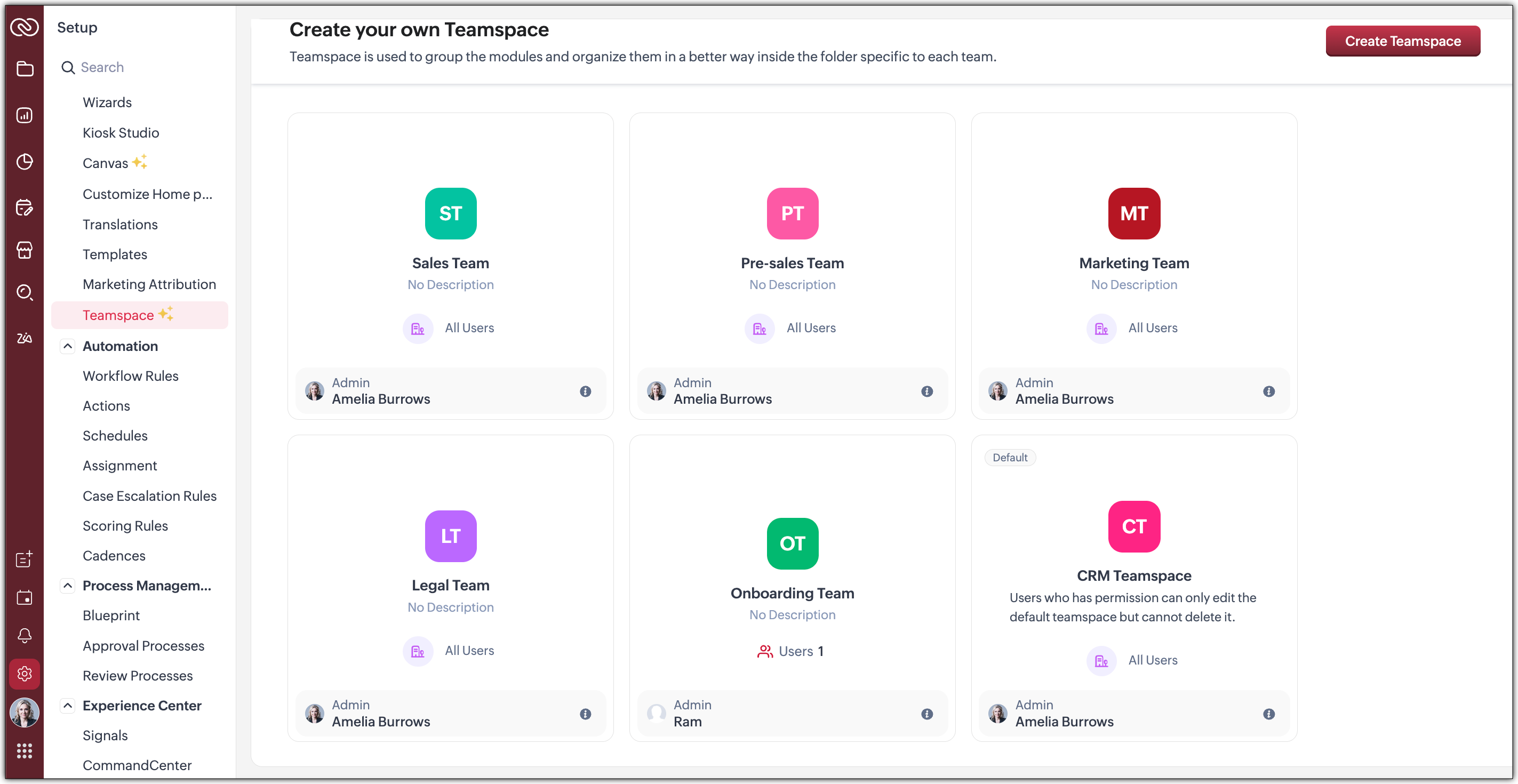
Organized Teamspaces for Focused Work
Tab Groups have been transformed into what we now call Teamspaces. If your CRM is used by multiple teams, organizing and managing their work and data can quickly become complex.
We offer a solution by giving each team a dedicated, folder-like space where all their related modules are grouped together. This setup ensures clear separation between teams, making collaboration more focused, and preventing the risk of teams crossing over or accessing modules that are not meant for them.
Hence, Teamspaces are dedicated workspaces for each department or function to organize their work. Whether you're in sales, support, or marketing, Teamspaces help reduce noise and keep your workspace relevant to your role. Learn more.

You have the option to create teamspaces from the bottom of the sidebar or from the Setup menu. The org admin would generally be the one who creates teamspaces, assigns users as teamspace admins and adds users to a teamspace.
Note : Users with the Manage teamspace permission enabled will be able to create and manage teamspaces in an org.
Teamspace Admin
A teamspace admin is generally the head of a department or a team. For example, a Sales Director could be assigned as the Sales Teamspace's Admin. Once a user becomes a teamspace admin, they can add or remove users, allow reports and dashboards to be created for modules within a teamspace.
Note : If a user is a Teamspace admin but does not have the "Manage Teamspace" permission enabled, they can only manage the specific Teamspace they’ve been assigned to as an admin. They won't be able to create new Teamspaces or manage any others.
Features offered as part of this enhanced UI
- Additional Module Views have been added to provide you with more flexibility, better insights, and improve productivity when working with module data. Thee view added are :
--> Chart View : Get a visual representation of your module data with this View
--> Grid View : Convert your module data into a spreadsheet-like interface where you can edit and manage records directly without having to open each record individually.
--> Timeline View : Look at how your module is created by viewing data plotted over a specific period of time.
--> Split View : Split your module data based on picklist fields /users or criteria to segment them for further inferences. - Interaction tab : This feature displays a timeline of a customer's journey and their engagements across different channels within your CRM.
 We will post individual announcements for each of the above features in the upcoming days.
Themes
The new UI introduces a refreshed theming experience with 13 vibrant colour options to personalize your workspace. These themes go beyond just cosmetic changes: the selected theme isn't limited to the sidebar; it flows throughout the product interface.
Once you choose a theme, the colour is consistently applied across key areas of the CRM, including buttons, tabs, menus, and other interactive elements. This cohesive design enhances visual clarity and gives your team a more engaging, unified experience tailored to their preferences.
If you want to match your brand colours or give your CRM tool a refreshed appearance, the new themes bring both customization and character to your work environment.
Dark-Mode
With the new UI, we’re excited to bring Dark Mode to your CRM experience. This feature was designed with both comfort and usability in mind.
Dark Mode offers a visually soothing alternative to the standard light interface, reducing eye strain during long hours of work, especially in low-light environments. It's not just a cosmetic change; it’s about enhancing usability and making your workspace more comfortable.
Once enabled, Dark Mode is applied consistently across the entire product, including the new UI elements like the left sidebar, buttons, forms, and interaction panels. Whether you're viewing records, managing tasks, or collaborating within Teamspaces, the darker interface ensures clarity without compromising on aesthetics or function.
This addition is part of our effort to make Zoho CRM more adaptable to user preferences and modern work styles. You can switch to Dark Mode at any time from your profile settings and choose what works best for you. Learn more.
What can you choose in this implementation?
Day : Prefer a brighter interface? Day Mode offers a clean, crisp, and classic appearance of your CRM, making it not just functional but also visually pleasing.

Night : Enjoy a sleek, modern look with reduced eye strain, especially in low-light environments. Darker UI minimizes glare and helps reduce fatigue, making it easier to work for longer periods.

Auto : Let the system decide! Auto Mode automatically switches between dark and light themes based on your device settings.

Resources
We invite you to explore these exciting updates and see how productivity increases in your CRM journey. Stay tuned for our upcoming announcements where we’ll dive deeper into each feature, helping you make the most of everything the NextGen UI has to offer.
Regards,
Serena Woolridge
Topic Participants
Serena Woolridge
Andréa Kérébel
Andrew
Ishwarya SG
K'an Thomas
Sticky Posts
Presenting ABM for Zoho CRM: Expand and retain your customers with precision
Picture this scenario: You're a growing SaaS company ready to launch a powerful business suite, and are looking to gain traction and momentum. But as a business with a tight budget, you know acquiring new customers is slow, expensive, and often deliversGood news! Calendar in Zoho CRM gets a face lift
Dear Customers, We are delighted to unveil the revamped calendar UI in Zoho CRM. With a complete visual overhaul aligned with CRM for Everyone, the calendar now offers a more intuitive and flexible scheduling experience. What’s new? Distinguish activitiesCreate and populate a record in an instant: Introducing zero-shot field prompting to Zia's ICR
A couple of months ago, we upgraded our in-house AI image detection and validation tool, Zia Vision, with intelligent character recognition (ICR). By training Zia with sample images, you could create and enrich CRM records with data extracted from standardIn-person ZUG Meetups for Real Estate Professionals - US Q1 2026
The Real Estate Zoho User Group is going on a multi-city, in-person meetup tour across the US, and we’d love to see you there! These meetups are a great opportunity to: Connect with fellow real estate professionals using Zoho Share challenges and discoverNimble enhancements to WhatsApp for Business integration in Zoho CRM: Enjoy context and clarity in business messaging
Dear Customers, We hope you're well! WhatsApp for business is a renowned business messaging platform that takes your business closer to your customers; it gives your business the power of personalized outreach. Using the WhatsApp for Business integration
Recent Topics
can I use zoho sheet for survey?
Hi I wanna use zoho sheet for my ARY to know consumer better so i wanna have permission to do soHow to Avoid Impacting Other Users When Hiding Columns in Zoho Sheet
Hi Team, We’re experiencing a challenge with the column-hiding feature on Zoho Sheet during collaborative sessions. When one user hides a column, it becomes hidden for all users working on the file, which disrupts others' workflows. In comparison, ExcelWhat are the benefits of procurement software in a growing business setup?
I’ve been exploring tools that can help automate purchasing and vendor-related tasks. I keep hearing about the benefits of procurement software, especially for businesses that are scaling. I want to understand how it helps in streamlining operations,What formula to use in computing total hrs and decimal hrss
So , my data includes log im column , 2 breaks with 2 columns that says back and lunch and 1 column that says back and logged out. What formula should i use to be able to automatically have my total hours as I input time in each column? ThankyouReplacing email ID,
In zoho sheets If I am sending it as an email attachments can I replace sender email ID from notifications to my email ID.Latest Enhancements and Bug Fixes in Zoho Meeting
Hello there, We hope you're doing well. The latest updates from Zoho Meeting include enhancements like adding names for instant meetings, renaming participants, enabling text notifications for participant entry/exit, viewing details of bandwidth optimization,Multi-video feed in webinars, custom domain options, and our integration with MS Outlook
Hi there, We hope you're doing well. With your help, we have been able to release many useful features and enhancements in 2020. We, the Zoho Meeting team, would like to thank you all for the feedback, support, and encouragement you've given as we workedAdd co-hosts in meetings, manage webinar registration and other enhancements
Hello all, This month's updates allow you to add co-hosts while scheduling meetings. You can also control your webinar registrations better by allowing or blocking registrations from the domain or country of your choice. Read on to learn more. MeetingA new UI for distraction-free engagement in online meetings and webinars that scale up for 3000 attendees
Hello all, We're excited to share our new, refined UI for online meetings. Here's how the new UI will improve your experience during online meetings: We've re-designed Zoho Meeting's online meeting UI to enable users to fully engage in conversationsI Can't Clone Webinar that I Co-Organize
How do i get our account admin to give me permission to clone our webinars? I am a co-organizerLatest updates in Zoho Meeting | Calendar view, Zia integration with OpenAI, edit the recurring pattern in a recurring meeting, device error notifications revamp, and more.
Hello everyone, We’re glad to share a few updates and enhancements in Zoho Meeting, including the Calendar view, being able to edit the recurring pattern in a recurring meeting, revamped device error notifications, and other enhancements that you’ll findNew enhancements in the latest version of the Zoho Meeting Android mobile app.
Hello all, In the latest version of Zoho meeting Android mobile app (v2.2.6), we have brought in support for the below enhancements. Close account: Now users will be able to close their Zoho account directly from the app. Unmute toast message: If a userShare material, Lock Meeting and revamped feedback UI in the latest version of the Meeting iOS app.
Hello all, In the latest version of the Zoho Meeting iOS mobile app (v1.6), we have brought in the below enhancements. Share material in meeting: We have introduced share material during meeting that allows participants to view supported materials suchLatest updates in Zoho Meeting | New chat feature between an organizer and co-organizer in webinars, recording consent for webinar co-organizers and attendees in the Android app, and more.
Hello everyone, We’re excited to share a few updates for Zoho Meeting. Here's what we've been working on lately: A new chat feature between an organizer and co-organizer in webinars, recording consent for webinar co-organizers and attendees in the AndroidLatest updates in Zoho Meeting | A new Files tab to manage all your PDFs, PPTs, Video files and recordings, live transcription , ability to lock settings and adaptive echo cancellation.
Hello everyone, We’re excited to share a few updates for Zoho Meeting. Here's what we've been working on lately: A new Files tab to manage all your PDFs, PPTs, Video files and recordings, live transcription during sessions, ability to lock settings andLatest updates in Zoho Meeting | Meeting Rooms , Pin video feeds and customize from and reply-to email addresses
Hello everyone, We’re excited to share a few updates for Zoho Meeting. Here's what we've been working on lately: Introducing Zoho Meeting Rooms, an immersive solution for teams to connect over virtual meetings in video conference rooms. You can also pinLatest updates in Zoho Meeting | New top bar video layout, a revamp of our in-session settings and now import webinar registrations with a CSV file
Hello everyone, We’re excited to share a few updates for Zoho Meeting. Here's are some of them : We have moved audio, video, virtual background and preferences under a single settings pop-up for better user navigation. You can now upload a CSV file containingImportant update: Changes in email sender policies
Hello, This is to announce important changes to email sender policies from Google that may impact your use of Zoho Meeting. Restriction on public domains Effective February 1, 2024, Google is implementing policies that will affect the configuration ofCamera access
My picture doesn't appear in a group discussion. (The audio is fine.) The guide says "Click the lock icon on address bar," but I can't find it. Advise, pleaseChat for webinar session, schedule meeting session for 24 hours - Zoho Meeting iOS app update
Hello, everyone! In the most recent iOS version of the Zoho Meeting app, we have introduced the chat functionality for the webinar session. To access this feature, the Organizer should have the 'Public chat' option enabled on the Zoho Meeting desktopInvoice Copy 2005116990189
Please provide the invoice for the trancaction 2005116990189Darshan Hiranandani About
Hi, I’m Darshan Hiranandani, a dedicated software developer with a strong passion for creating efficient and user-friendly applications. With a degree in Computer Science and several years of experience in the tech industry, I specialize in full-stackLatest update in Zoho Meeting | On-demand webinars
Hello everyone, We’re excited to introduce our new on-demand webinar feature, you can now provide pre-recorded sessions that your audience can access immediately, no need to wait for scheduled sessions. Benefits of On-demand webinars : Scheduling flexibilityZoho Meeting iOS app update - Join breakout rooms, access polls, paste links and join sessions, in session host controls
Hello, everyone! In the latest iOS version(v1.7) of the Zoho Meeting app, we have brought in support for the following features: Polls in meeting session Join Breakout rooms Paste link in join meeting screen Foreign time zone in the meeting details screen.Zoho Meeting app update.
Hello, everyone! In the latest Android (v2.3.7) and iOS (v1.7.1) versions of the Zoho Meeting app, we have brought in support for the following features: Report Abuse option. WorkDrive integration. Report Abuse option You can now report to us any deceptiveZoho Meeting Android app update - v2.4.0
Hello everyone! We are excited to announce that we have brought in support for the following features in the latest version of the Zoho Meeting Android app(v2.4.0): 1. Start Personal Meeting Rooms 2. Revamp of the schedule meeting screen and meeting detailsIntroducing Zoho Desk integration and a few minor enhancements
Zoho Desk Integration We've now introduced an integration between Zoho Meeting and Zoho Desk to efficiently manage meeting-related customer inquiries. With this integration, you can track, respond to, and resolve meeting-related tickets directly fromZoho Meeting iOS app update: Hearing aid, bluetooth car audio and AirPlay audio support.
Hello everyone! We are excited to announce the below new features in the latest iOS update(v1.7.4) of the Zoho Meeting app: 1. Hearing aid support: Hearing aid support has been integrated into the application. 2. Bluetooth car Audio, AirPlay audio support:Zoho Meeting Android app update: Breakout rooms, noise cancellation
Hello everyone! In the latest version(v2.6.1) of the Zoho Meeting app update, we have brought in support for the following features: 1. Join Breakout rooms. 2. Noise cancellation Join Breakout rooms. Breakout Rooms are virtual rooms created within a meetingiOS 12 update: Introducing autofill passwords and Siri Shortcuts in Zoho Vault
With this iOS 12 release, Zoho Vault users can now autofill usernames and passwords on Safari and other third-party apps. Users can enjoy a seamless login experience to their everyday apps without compromising security and also access passwords stored in Zoho vault with Siri Shortcuts by adding personalized phrases. How to enable autofill password on your iOS device? First, you need to update your device to iOS 12. Apple recommends you to take a backup before you update your device to the latestZoho Vault: A look at what's new for iOS, iPadOS, and macOS
Hi everyone, At Zoho Vault, we constantly aim to improve your security experience. Based on both internal and external feedback, we have recently rolled out updates across our iOS, iPadOS, and support for macOS platforms. Introducing the desktop app forBiometric Access Support on Zoho Vault Desktop App
Is there any plans to add biometric authentication (fingerprint, face recognition) for Vault desktop apps (Windows/macOS) to enhance security and ease of access. I would love to hear other members view on thisFree webinar: Learn the benefits of migrating to Zoho Vault's new interface
With remote work becoming more and more common across the globe, productivity and time management are now pivotal concerns for every organization. With the number of business applications employed by companies constantly increasing, a password manager like Zoho Vault saves a lot of productive hours for your team. Vault's new interface has been carefully designed to address these pressing needs, helping users increase their productivity while improving their overall online experience. This July,Free Webinar: An exclusive live Q&A session with the Zoho Vault team
As 2020 draws to an end, we're closing out a year that has seen drastic changes all around the world. Many businesses have adopted cloud solutions and a remote work culture for the first time, and this has given rise to newer cyber risks and threats thatWhy passwordless authentication should be your top security project for 2021
Hello users! We know that nobody likes to remember passwords, yet they form an indispensable part of our lives. Many of us working with any kind of technology today manage numerous passwords for personal and business accounts. With the widespread adoptionFree Webinar: See why Zoho Vault is the best alternative to LastPass
When LastPass was acquired by LogMeIn in Oct 2015, we expressed our genuine concern about how this would change the LastPass business model and how customer trust would transfer from one company to another. As we suspected, LastPass doubled their pricingManaging cyber threats when working remotely | A Customer Survey Report
The nearly universal adoption of remote work has changed the way businesses function. Globally, enterprises continue to work to find new ways to make life easier for employees working remotely. However, a commonly cited concern has been the lack of cybersecurityWorld Password Day: 5 interesting facts about passwords
It's World Password Day: that time of the year when we talk about password hygiene and the importance of safe password management. World Password Day is observed on the first Thursday of every May, and this year, we'd like to talk about some of the mostFree Webinar: Go passwordless in 2022 with Zoho Vault
Passwords have long been the preferred authentication method, largely due to their universal appeal. While they're easy for people to use and implement, they're also convenient for hackers to exploit. Reports from 2021 state that weak and stolen passwordsMyki has announced EOL for its services | Learn why Zoho Vault password manager is the best alternative
Hello Myki users, Myki has announced end-of-life for its Teams, MSP, and GUARD services, after being acquired by JumpCloud. In their recent announcement, Myki stated that they will be removing their apps and extensions from the respective stores, turningNext Page