What's New in Zoho Inventory - January - May 2024
Hello, users!
We are back with the latest features and enhancements we've made to Zoho Inventory in the last few months. Let's take a quick look at what's new:
Customer and Vendor Portal Domain Change
We are updating the Customer and Vendor Portal's default domain from inventory.zoho.com/portal to inventory.zohosecure.com/portal for enhanced security. Starting June 5, 2024, users will automatically be redirected to the new domain. This change will not affect your users' data on the portal, including transactions, comments, and more. They will be able to access their portal as usual.
UPS v2.0 Shipping Integrations
We're excited to announce the new and improved UPS v2.0 integration, which leverages OAuth 2.0 for a more secure and seamless user experience in authentication. We've already started migrating our existing integration users to ensure a smooth and uninterrupted transition. UPS will stop providing new licenses starting from June 6, 2024.
Manually Push E-Invoices [India Edition]
You can now manually push your e-invoices to the IRN. If you wish to make any changes to the manually pushed e-invoices, you can delete the e-invoice from IRN, make the changes to the transaction in Zoho Inventory, and push it again. Once the associated e-invoice details are deleted from the IRN, the transaction's status will revert to Yet To Be Pushed.
Note: You can only delete e-invoices that are manually pushed.
Klarna Payment Method for Stripe [Global Edition]
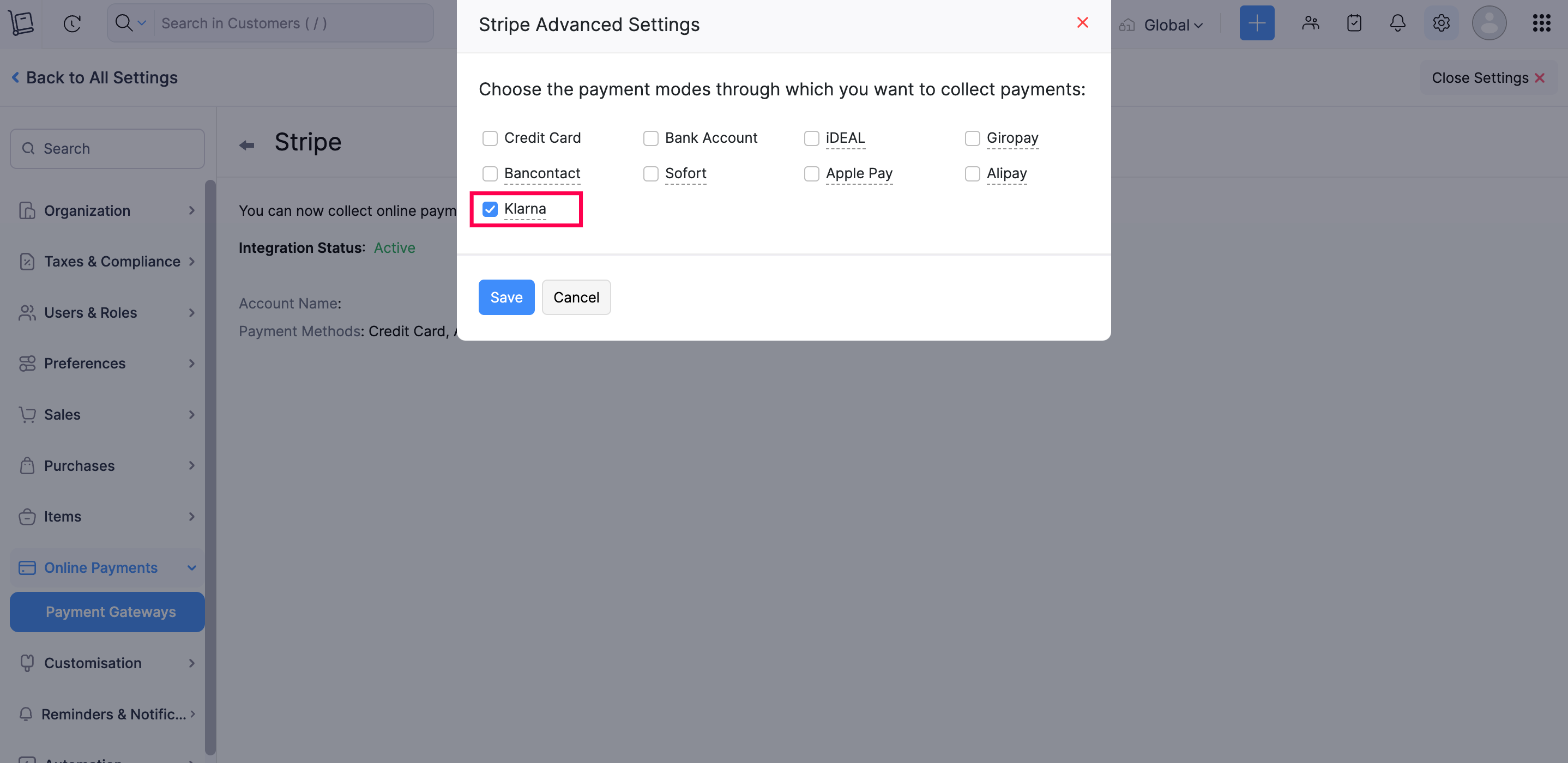
Introducing Klarna, a global payment method now available in Zoho Inventory through Stripe. With Klarna, you can make payments immediately or split them in instalments. This offers your customers greater flexibility and convenience in managing their payments.
To enable Klarna: Navigate to Settings > Online Payments > Payment Gateways, and click Edit Settings under Stripe. Then, select the Edit icon next to Payment Methods, and choose Klarna from the list of payment methods.
Alipay Payment Method for Stripe [All Editions except India]
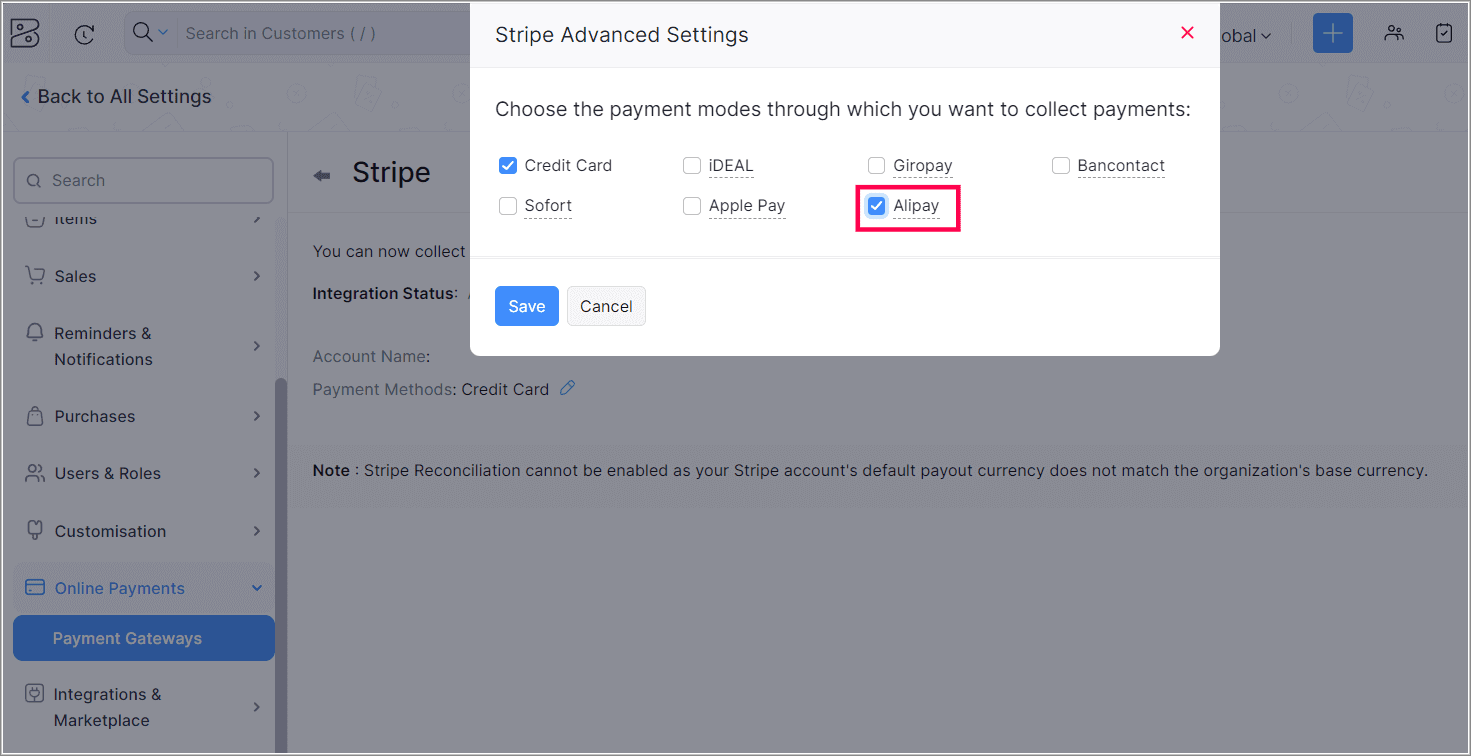
Alipay, a popular digital wallet in China, is now available as a payment method for Stripe payments in Zoho Inventory. With Alipay, you can securely make payments online. You can collect payments in Chinese Yuans from any location. Additionally, based on your Stripe account's location, you can receive payments in AUD, CAD, EUR, GBP, HKD, JPY, SGD, MYR, NZD, and USD.
To enable Alipay, navigate to > Online Payments > Payment Gateways, and click Edit Settings under Stripe. Then, select the Edit icon next to Payment Methods, and choose Alipay from the list of payment methods.
UPI ID Option for Invoice QR Codes
We have introduced the UPI ID option for your invoice QR codes. You can include your UPI ID as a QR code in the PDF of your invoices. This allows your customers to scan the QR code with their device and make payments directly to your UPI ID.
To use this feature, go to Settings > Sales > Invoices > General and select UPI ID as the QR code type in the Invoice QR Code section.

WhatsApp Integration
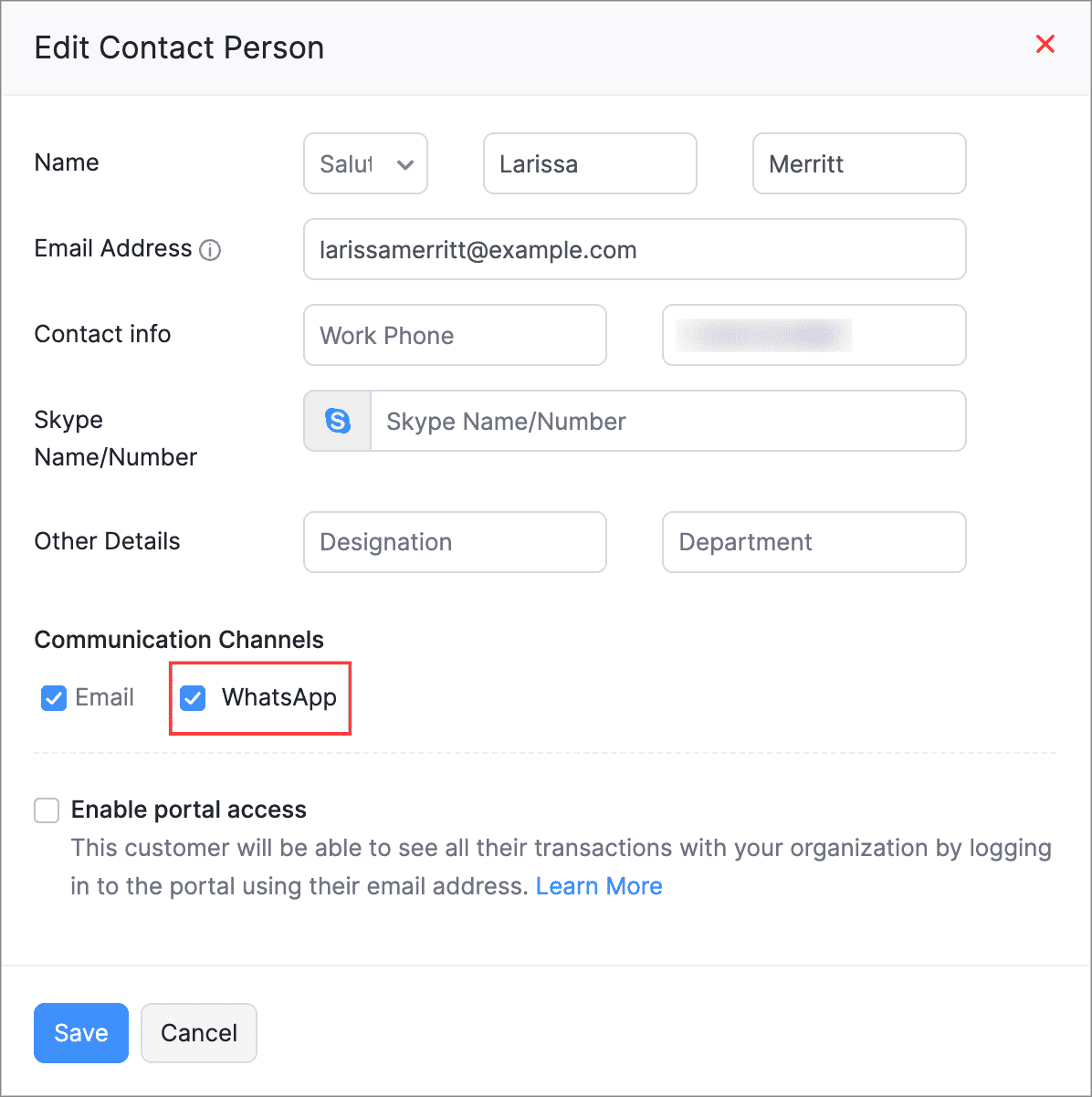
You can now link your WhatsApp to your Zoho Inventory organization, which enables direct notifications of payments and sales transactions to your customers. You can customize it for marketing and sales templates for each module to send notifications, as well as directly initiate conversations with your customers from your Zoho Inventory organisation
To enable WhatsApp for your customers: Navigate to Sales > Customers, select a customer, and edit their Primary Contact or Contact Person details on the overview page. Then, mark WhatsApp as their Communication Channel.
New Unique Quantity Codes for Items
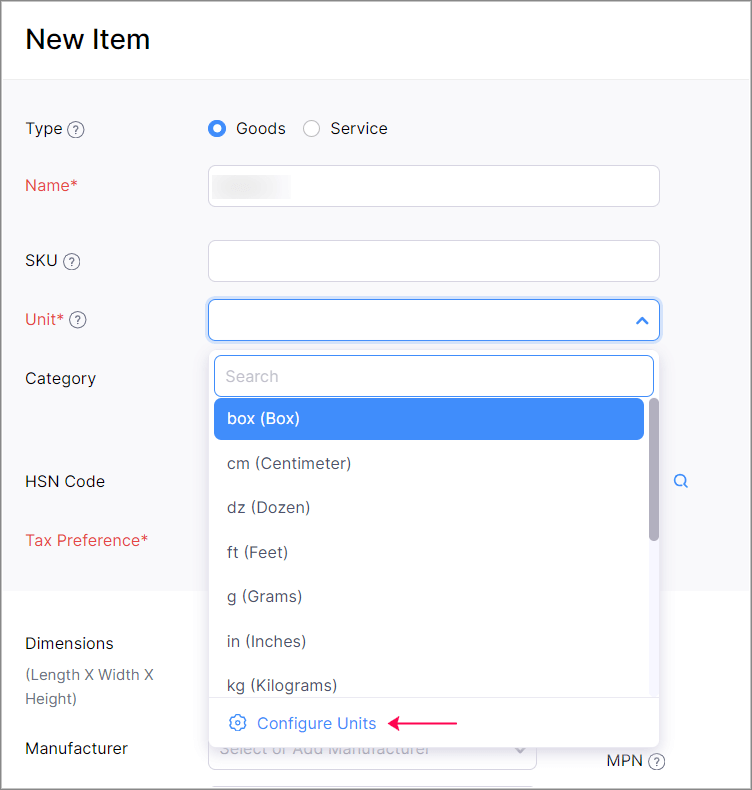
We have added two new unit codes to the Unique Quantity Codes: BAL (Bale) and TGM (Ten Gross). A Bale refers to materials packaged together, while Ten Gross represents a quantity of 1,440 items. These units are especially useful for businesses dealing with wholesale goods.
To access this option: Click Configure Units from the Unit dropdown in the Item creation or edit page.
Bulk Export Option for Two Reports
We have introduced a bulk export option that allows you to export over 50,000 rows of the Inventory Aging Summary and Inventory Valuation Summary reports. You can choose to export the report in sections or as a full report. These reports are in early access and available only in the Premium and higher plans. You can contact support@zohoinventory.com to enable it in your organisation.
Send Item Identification Codes for Electronic Invoicing [Mexico Edition]
You can now include unique codes, such as the Stock Keeping Unit (SKU), when sending item details to SAT for e-invoicing. By default, no code will be shared with SAT, however, you can configure it under item setting when needed. Once configured, the code will be visible in the item table of the transactions. Additionally, you can choose to send a single code for all items in your organization.
You can also include codes such as the Universal Product Code (UPC), European Article Number (EAN), International Standard Book Number (ISBN), and Manufacturer Part Number (MPN).
To configure this preference: Go to Settings > Taxes & Compliance > Electronic Invoicing> Edit icon next to Item Information.

Additional VAT Treatment Options [UK Edition]
We've introduced VAT Exempt and Out of Scope VAT treatment options for items. These options are available only for customers whose VAT treatment is set as United Kingdom or Overseas Customer. VAT Exempt can be applied only to items that are classified as services.
Safaricom M-PESA Integration [Kenya Edition]
The Safaricom M-PESA integration is now available in Zoho Inventory. M-PESA is a digital mobile payments service in Kenya that lets you seamlessly process payments using e-wallets. You can set up the integration and receive payments in Kenyan Shillings from your customers.
To enable Safricom M-PESA: Go to Settings > Payment Gateway > Alternate Modes > Set Up Now near Safricom M-PESA.

Give these features a try and let us know your thoughts in the comments section below. If you have any queries, send an email to support@zohoinventory.com. We'll be happy to help.
Regards,
The Zoho Inventory Team
Topic Participants
Akshin Eniyavel S
Deanna
ted
r.prasad
John Legg
Recent Topics
How to Integrate Zoho Books with Xero (No Native Connection Available)
Hi everyone, I’m currently facing an issue with integrating Zoho Books invoices with Xero, as I’ve noticed Zoho does not provide a native integration with Xero at this time. I would like to ask: What are the common or recommended solutions for syncingHow to install Widget in inventory module
Hi, I am trying to install a app into Sales Order Module related list, however there is no button allow me to do that. May I ask how to install widget to inventory module related list?Add specific field value to URL
Hi Everyone. I have the following code which is set to run from a subform when the user selects a value from a lookup field "Plant_Key" the URL opens a report but i want the report to be filtered on the matching field/value. so in the report there iserror while listing mails
I can't access email in any of my folders: Oops, an error occurred - retry produces the second error response: error while listing mails (cannot parse null string). I've signed in and out of Zoho, restarted my iMac.Unlocking New Levels: Zoho Payroll's Journey in 2025
Every year brings its own set of challenges and opportunities to rethink how payroll works across regulations and teams. In 2025, Zoho Payroll continued to evolve with one clear focus: giving businesses more flexibility, clarity, and control as they grow.Introducing Connected Records to bring business context to every aspect of your work in Zoho CRM for Everyone
Hello Everyone, We are excited to unveil phase one of a powerful enhancement to CRM for Everyone - Connected Records, available only in CRM's Nextgen UI. With CRM for Everyone, businesses can onboard all customer-facing teams onto the CRM platform toSend Supervisor Rule Emails Within Ticket Context in Zoho Desk
Dear Zoho Desk Team, I hope this message finds you well. Currently, emails sent via Supervisor Rules in Zoho Desk are sent outside of the ticket context. As a result, if a client replies to such emails, their response creates a new ticket instead of appendingform data load issue when saving as duplicate record is made
Hello. I have a form with a lookup when a value is selected the data from the corresponding record is filled into all of the fields in the form. But the form is loaded in such a state that if any value is changed it will take all of the values pre loadedCRM project association via deluge
I have created a workflow in my Zoho CRM for closing a deal. Part of this workflow leverages a deluge script to create a project for our delivery team. Creating the project works great however, after or during the project creation, I would like to associateZoho Browser??
hai guys, this sounds awkward but can v get a ZOHO BROWSER same as zoho writer, etc. where i can browse websites @ home and continue browsing the same websites @ my office, as v have the option in Firefox, once i save and close the browser and again when i open it i will be getting the same sites. If u people r not clear with my explanation, plz let me know. Thanks, SandeepWhere can we specify custom CSS in Zoho Forms custom theme ?
I'm using a form with a dark theme. The OTP popup window is unreadable, because for some reason, the OTP popup background fixes color to white, but still takes the font color specified in the custom theme. This ends up as white on white for me, renderingMCP no longer works with Claude
Anyone else notice Zoho MCP no longer works with Claude? I'm unable to turn this on in the claude chat. When I try to toggle it on, it just does nothing at all. I've tried in incognito, new browsers, etc. - nothing seems to work.Enable History Tracking for Picklist Values Not Available
When I create a custom picklist field in Deals, the "Enable History Tracking for Picklist Values" option is not available in the Edit Properties area of the picklist. When I create a picklist in any other Module, that option is available. Is there a specific reason why this isn't available for fields in the Deals Module?The reason I switched away from Zoho Notebook
My main reason for switching to Zoho was driven by three core principles: moving away from US-based products, keeping my data within India as much as possible, and supporting Indian companies. With that intent, I’ve been actively de-Googling my digitalAdd RTL and Hebrew Support for Candidate Portal (and Other Zoho Recruit Portals)
Dear Zoho Recruit Team, I hope you're doing well. We would like to request the ability to set the Candidate Portal to be Right-to-Left (RTL) and in Hebrew, similar to the existing functionality for the Career Site. Currently, when we set the Career SiteAbility to Edit YouTube Video Title, Description & Thumbnail After Publishing
Hi Zoho Social Team, How are you? We would like to request an enhancement to Zoho Social that enables users to edit YouTube video details after the video has already been published. Your team confirmed that while Zoho Social currently allows editing theFree Webinar : Unlock AI driven business insights with Zoho Inventory + Zoho Analytics
Are you tired of switching between apps and exporting data to build customized reports? Say hello to smarter & streamlined insights! Join us for this exclusive webinar where we explore the power of the Zoho Inventory–Zoho Analytics integration. LearnCritical Issue: Tickets Opened for Zoho Support via the Zoho Help Portal Were Not Processed
Hi everyone, We want to bring to your attention a serious issue we’ve experienced with the Zoho support Help Portal. For more than a week, tickets submitted directly via the Help Portal were not being handled at all. At the same time no alert was postedHide/Show Subform Fields On User Input
Hello, Are there any future updates in Hide/Show Subform Fields "On User Input"?Cloning Item With Images Or The Option With Images
Hello, when I clone an item, I expect the images to carry over to the cloned item, however this is not the case in Inventory. Please make it possible for the images to get cloned or at least can we get a pop up asking if we want to clone the images asArchiving Contacts
How do I archive a list of contacts, or individual contacts?WorkDrive and CRM not in sync
1/ There is a CRM file upload field with WorkDrive file set as the source: 2/ Then the file is renamed in WorkDrive (outside CRM): 3/ The File in CRM is not synced after the change in WorkDrive; the file name (reference) in CRM record is not updated (hereCustom validation in CRM schema
Validation rules in CRM layouts work nicely, good docs by @Kiran Karthik P https://help.zoho.com/portal/en/kb/crm/customize-crm-account/validation-rules/articles/create-validation-rules I'd prefer validating data input 'closer to the schema'Adding Default Module Image into mail merge field
As with most people finding their way to these forums i have a specific requirement that doesn't seem to be supported by Zoho I have created 2 custom modules to suit my purpose 1 is an inventory type module that lists aluminium extrusions, and all relevantSync Data from MA to CRM
Currently, it's a one-way sync of data from the CRM to MA. I believe we should have the ability to select fields to sync from MA to the CRM. The lead score is a perfect example of this. In an ideal world we would be able to impact the lead score of aIs it possible to roll up all Contact emails to the Account view?
Is there a way to track all emails associated with an Account in one single view? Currently, email history is visible when opening an individual Contact record. However, since multiple Contacts are often associated with a single Account, it would be beneficialUpdate CRM record action
Currently, MA only offers a "Push Data" action to push data to a CRM module. This action is built to cover the need to both create a new record and update an existing record. Because it has been implemented this way all required fields on the CRM moduleNotes badge as a quick action in the list view
Hello all, We are introducing the Notes badge in the list view of all modules as a quick action you can perform for each record, in addition to the existing Activity badge. With this enhancement, users will have quick visibility into the notes associatedWhat's new in Zoho One 2025
Greetings! We hope you have all had a chance by now to get hands-on with the new features and updates released as part of ZO25. Yes, we understand that you may have questions and feedback. To ensure you gain a comprehensive understanding of these updates,Good news! Calendar in Zoho CRM gets a face lift
Dear Customers, We are delighted to unveil the revamped calendar UI in Zoho CRM. With a complete visual overhaul aligned with CRM for Everyone, the calendar now offers a more intuitive and flexible scheduling experience. What’s new? Distinguish activitiesAdd deluge function to shorten URLs
Zoho Social contains a nice feature to shorten URLs using zurl.co. It would be really helpful to have similar functionality in a Deluge call please, either as an inbuilt function or a standard integration. My Creator app sends an email with a personalisedEdit default "We are here to help you" text in chat SalesIQ widget
Does anyone know how this text can be edited? I can't find it anywhere in settings. Thanks!Quick way to add a field in Chat Window
I want to add Company Field in chat window to lessen the irrelevant users in sending chat and set them in mind that we are dealing with companies. I request that it will be as easy as possible like just ticking it then typing the label then connectingHow to create a two way Sync with CRM Contacts Module?
Newbie creator here (but not to Zoho CRM). I want to create an app that operates on a sub-set of CRM Contacts - only those with a specific tag. I want the app records to mirror the tagged contacts in CRM. I would like it to update when the Creator appZoho Sheet for Desktop
Does Zoho plans to develop a Desktop version of Sheet that installs on the computer like was done with Writer?Allow Manual Popup Canvas Size Control
Hello Zoho PageSense Team, We hope you're doing well. We would like to request an enhancement to the PageSense popup editor regarding popup sizing. Current Limitation: Currently, the size (width and height) of a popup is strictly controlled by the selectedWhere is the settings option in zoho writer?
hi, my zoho writer on windows has menu fonts too large. where do i find the settings to change this option? my screen resolution is correct and other apps/softwares in windows have no issues. regardsHow to set page defaults in zoho writer?
hi, everytime i open the zoho writer i have to change the default page settings to - A4 from letter, margins to narrow and header and footer to 0. I cannot set this as default as that option is grayed out! so I am unable to click it. I saved the documentDevelop and publish a Zoho Recruit extension on the marketplace
Hi, I'd like to develop a new extension for Zoho Recruit. I've started to use Zoho Developers creating a Zoho CRM extension. But when I try to create a new extension here https://sigma.zoho.com/workspace/testtesttestest/apps/new I d'ont see the option of Zoho Recruit (only CRM, Desk, Projects...). I do see extensions for Zoho Recruit in the marketplace. How would I go about to create one if the option is not available in sigma ? Cheers, Rémi.How to import data from PDF into Zoho Sheet
I am looking to import Consolidated Account Statement (https://www.camsonline.com/Investors/Statements/Consolidated-Account-Statement) into zoho sheet. Any help is appreciated. The pdf is received as attachment in the email, this document is passwordNext Page