Why should you integrate Zoho SalesIQ with Google Analytics?

Why should you integrate Zoho SalesIQ with Google Analytics?

Hello everyone. Greetings from Zoho SalesIQ!


Today, we are going to take a detailed look at the possibilities and outcomes when integrating SalesIQ with Google Analytics. Some of us may have lingering questions on this topic and here we are, with a clear explanation on the differences in data obtained from these two platforms and the benefits of integrating these, to get the best analytics experience for your business.

How does Google Analytics integration in SalesIQ help you?

Zoho SalesIQ is an all-in-one customer engagement and support platform that provides essential data about your website visitors, making it a game-changer for your website visitor conversions. It also provides a lot of vital analytical information that includes reports such as visitor analysis, operator activity, website traffic summary etc., for your analytics purposes.

In addition to the already available analytics on SalesIQ, if you also use Google Analytics for your business, then we have a bonus for you there as well. SalesIQ allows integration with Google Analytics that will enrich and enhance your analytics experience, by letting you analyse the various SalesIQ chat events as well, within your Google Analytics dashboard. This opens the doors to exploring and interpreting SalesIQ's chat-related data such as the number of chat button clicks, chats closed, chats connected, chats initiated, chats missed, visitor feedback and so much more that will add to your analytical data immensely, on your Google Analytics dashboard.
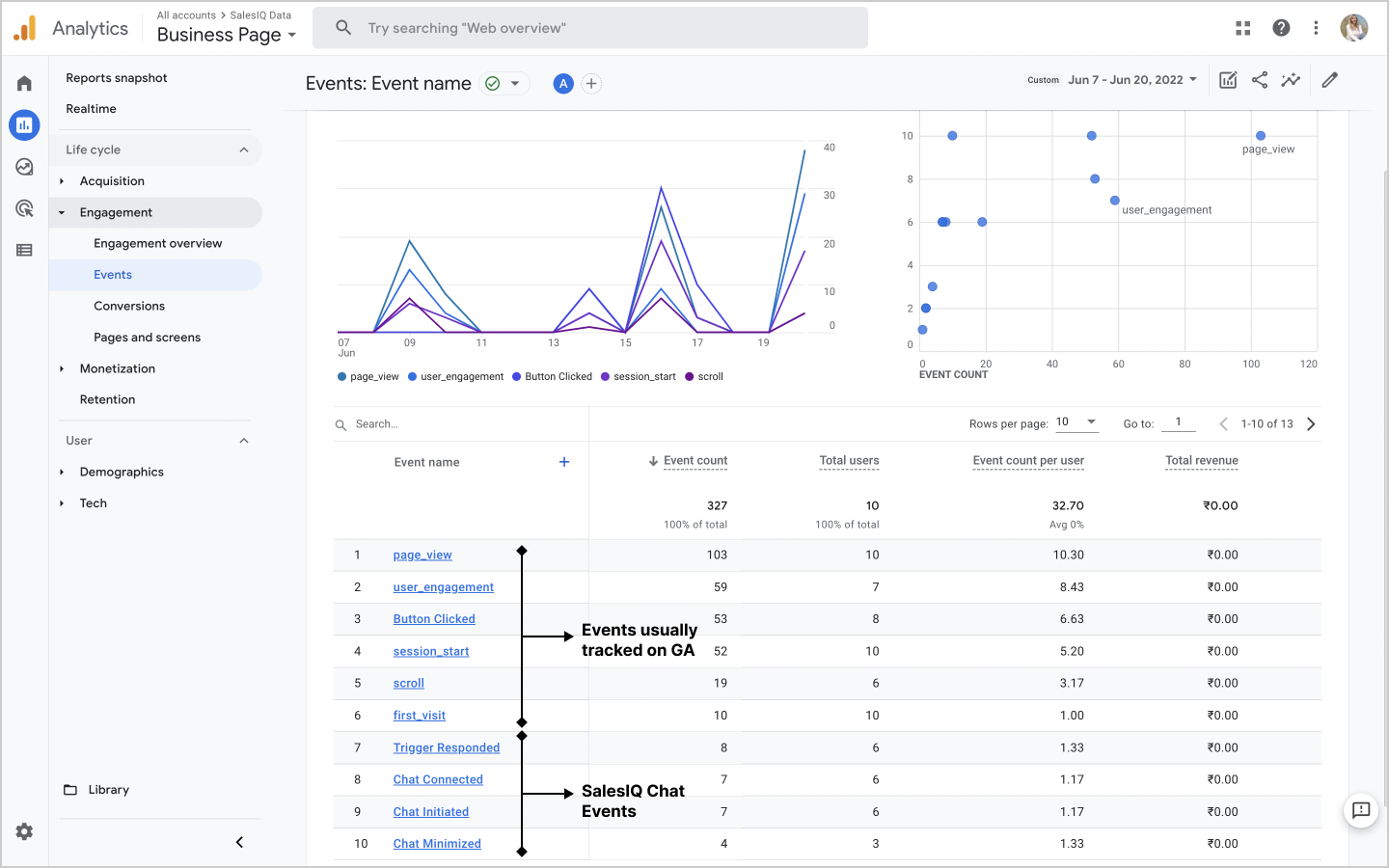

What difference in data is there on SalesIQ and Google Analytics?

Both SalesIQ and Google Analytics give important data about your website visitors, that can help you streamline your business operations and in taking informed business decisions.
SalesIQ's Reports Module provides all the necessary analytical information that you will need for your business. It has various sections that will give a detailed view of the website visitor activities, portal operator activities, and overall website activity.
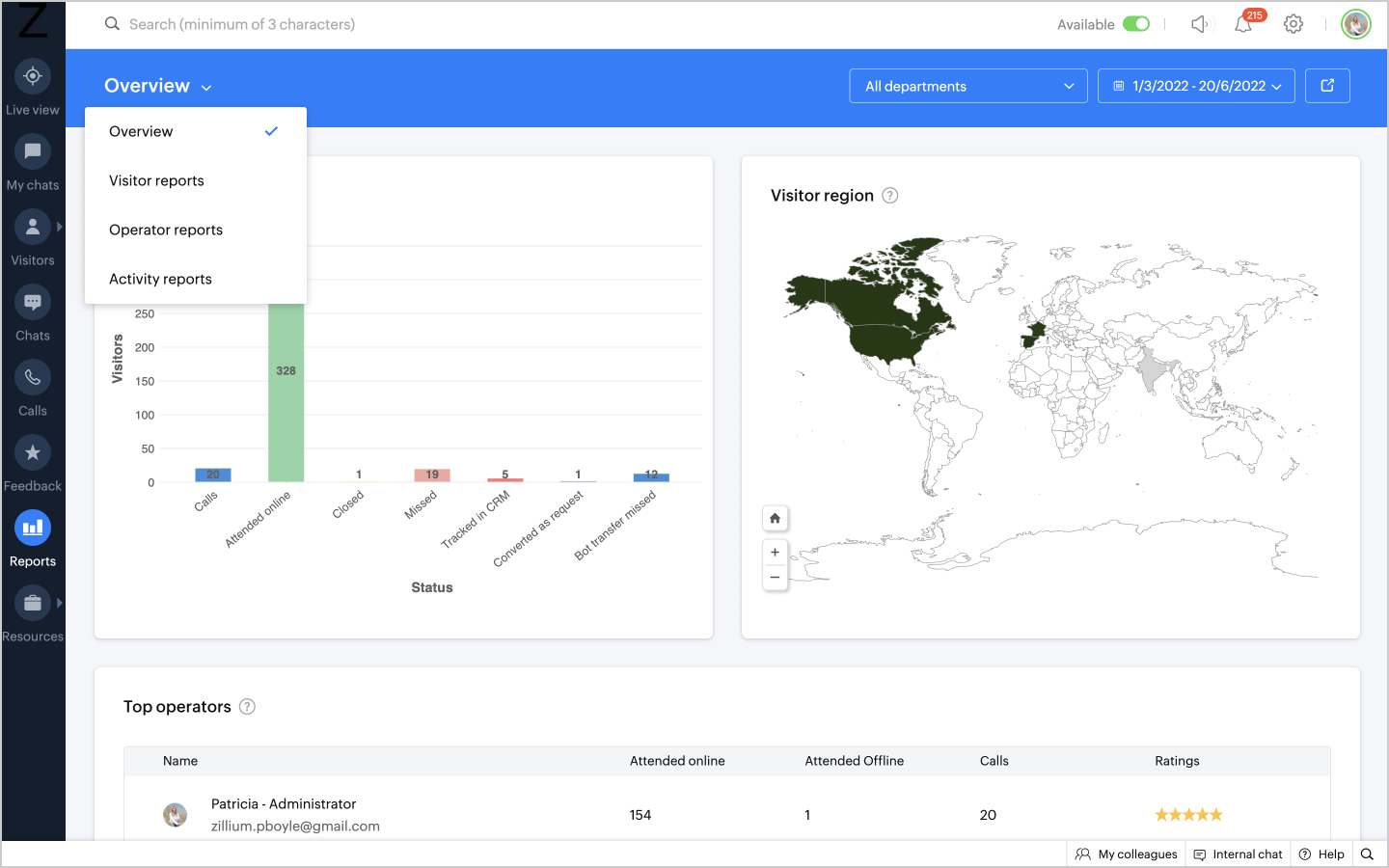


Google Analytics, on the other hand, also provides a wide variety of data and analytical information relating to your business performance.
There may be a slight difference in the data received from both these platforms, as SalesIQ can efficiently distinguish a new visitor from a returning visitor, thereby giving you a more accurate and practical view of your website visitors.
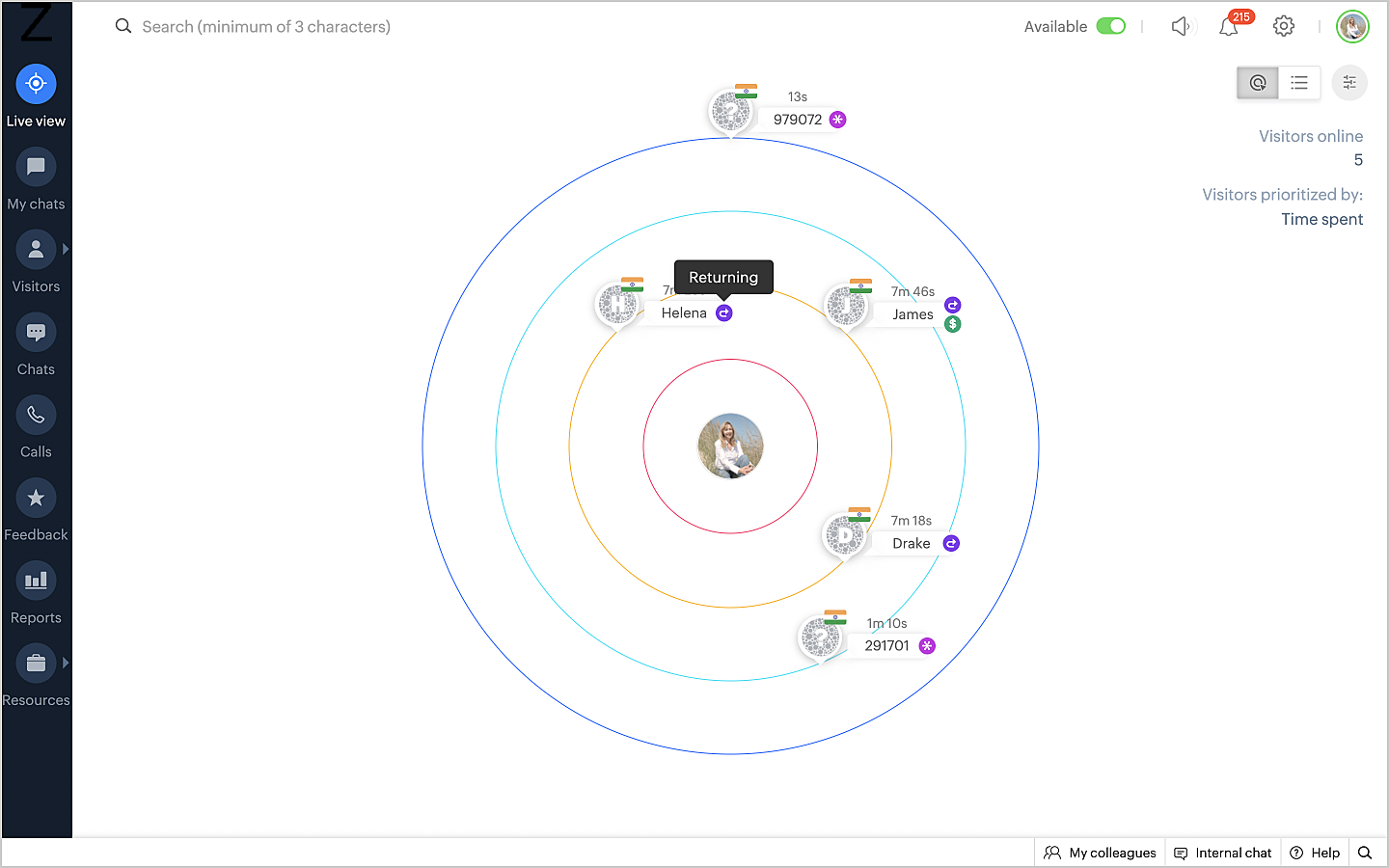


Additionally, there have been recent features in certain web browsers that specifically block Google Analytics from tracking visitors and getting any information about them. Google Analytics will not be able to pick up any data about such users and visitors, while they will show up on your SalesIQ dashboard. Convenient, right?


Why is SalesIQ a must-have?

Every business today needs to keep track of their analytics to understand their business position and get important insights into their performance. But is that all that's required?

SalesIQ has real-time customer engagement and support features that help connect a business with its website visitors. With SalesIQ you can actually see who is currently on your website. It lets you engage and interact with them proactively, allowing you to target the right visitors strategically and then convert them to customers.
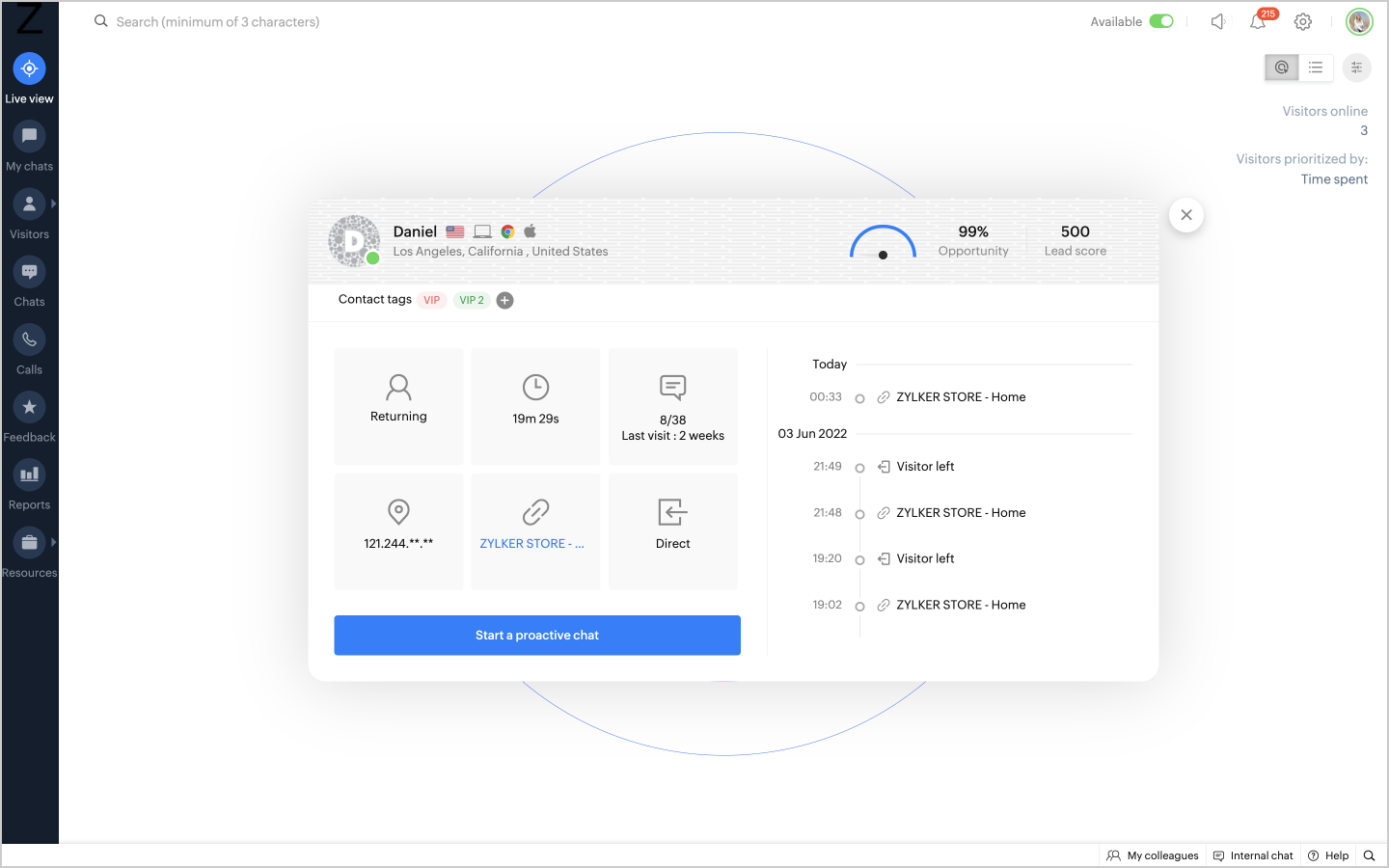


Isn't that reason enough to use Zoho SalesIQ for your business?

I'll leave you with that intriguing thought. Thank you for reading through and we will see you in another informative and useful post soon. For additional information on integrating SalesIQ with Google Analytics, please refer to our help guide here.

    • Recent Topics

    • Cliq iOS can't see shared screen

      Hello, I had this morning a video call with a colleague. She is using Cliq Desktop MacOS and wanted to share her screen with me. I'm on iPad. I noticed, while she shared her screen, I could only see her video, but not the shared screen... Does Cliq iOS is able to display shared screen, or is it somewhere else to be found ? Regards
    • Introducing Smart Fields in Zoho Forms

      Hello form builders! We are excited to introduce Smart Fields in Zoho Forms - a faster way to add calculations to your forms without writing formulas. Instead of creating multiple fields and configuring complex calculations yourself, you can now drag
    • Checkbox not displaying correctly in subform

      Greetings: I have shared my app (wv) with support.  I am having problems with a checkbox field not displaying correctly in a subform.  The main form is called volunteers and the subform is called volunteers_subform.  The field in question is called roles. When you access the subform by itself the checkbox lookup displays as checkboxes.  But when you view it in the main volunteers form, it displays as a multi-select dropdown instead.   I have attached jpegs showing the difference.   Any thoughts?
    • Unbundle feature for composite items

      We receive composite items from our vendors and sell them either individually or create other composite items out of them. So, there is a lot of bundling and unbundling involved with our composite items. Previously, this feature was supported in form
    • The reason I switched away from Zoho Notebook

      My main reason for switching to Zoho was driven by three core principles: moving away from US-based products, keeping my data within India as much as possible, and supporting Indian companies. With that intent, I’ve been actively de-Googling my digital
    • Lookups and Custom Modules

      I created a Custom Module that I'm calling "Item Purchasing Group". This module will store information for groups of Items that must be purchased together (including minimum overall quantities and/or values, etc.). This will have a one-to-many relationship
    • Valid characters for use in email addresses using Zoho's apps/APIs

      We have found an issue with the + sign character in zoho subs - we are allowed to create a customer with an email address that has a plus sign but the API doesn't allow the + so the billing portal is not created. We are going to prevent users from using
    • Expand Zoho Analytics Spatial Capabitlities

      Dear Analytics team Thanks for the great product - I'm a big fan on Analytics and the monthly release highlights is one of my favourite emails to receive. I'd like to request expansion and improvement of Zoho Analytics spatial data capabilities, namely:
    • Automate customer follow-ups with Sequences in Bigin

      Greetings, We hope you're all doing well! We're happy to announce a new feature that we've added to Bigin. Following up with every lead at the right time can be challenging, especially when your team is managing multiple conversations across emails, calls,
    • Dashboards for Customers

      Is it possible to build dashboards for each customers in the community for their tickets?
    • Displaying only unread tickets in ticket view

      Hello, I was wondering if someone might be able to help me with this one. We use filters to display our ticket list, typically using a saved filter which displays the tickets which are overdue or due today. What I'd really like is another filter that
    • Adding Custom Status Options in Work Order Action Menu

      Hello FSM Team, We would like to inquire if it is possible to add more custom options in the Work Order action/status dropdown (e.g., Cancel, Terminate, Non-Billable, Void, etc.). Currently, the available options are limited, and we are unable to customize
    • Can we have an automated TDS Receivable Recon with Form 26AS of Income Tax Portal ?

      Can we have an automated TDS Receivable Recon with Form 26AS of Income Tax Portal ?
    • Tag Limi?

      is there any way to create more than 20 tags? 
    • prefill_data for Creator + Merge & Sign

      Hello, Is there an option to use prefill_data for signer fields from creator? I see the option for CRM but it will not work with creator? I have tried passing the value in the signer data, and that also does not work. Alternatively, is there a way to
    • Delug script

      I have been looking at auto-update a amount (home currency) field from another module. Zoho native multicurrency was used in the other module (we have 4 here). Custom script was input with no error, but the field was not updated on trigger. Script as
    • Can I Build a Gaming Website Using Zoho? Need a Quick Roadmap

      Hi Dear Members, I want to create a gaming website using Zoho. Is it possible? My goal is to build a sleek, unique, easy-to-navigate, and fast-loading website for a gaming project. I want the site to look professional, user-friendly, and optimized for
    • Remove Due Date from Statements

      Is it possible to remove the Due Date on the Invoice transation line on statements? I have figured work arounds to get the Invoice detail on the Statement but cannot work out haw to simplify the stament by removing the "- due on xx/xx/2026" - it really
    • What Should an Agent-Native Project Workspace Look Like

      AI is moving beyond assistants that simply answer questions. With tools like MCP, agents can now interact directly with project data and perform actions. That makes me wonder: what should an agent-native project workspace actually look like? For me, it
    • unable to join meeting due to speaker issue

      unable to join meeting due to speaker issue
    • How to add formatting in zoho.cliq.postToUser(...) message?

      In a CRM Deluge function, I'm trying to use the message formatting guidelines given here: https://www.zoho.com/deluge/help/cliq/posting-to-zoho-cliq.html#message-formats My message is: message: #Title text. The result in Cliq is: #Title text. (no large
    • Marketing Tip #50: Sell digital products and use them to grow your store

      Physical products need packaging, shipping, and stock management. Digital products need none of that. Once created, they can be sold an unlimited number of times, delivered instantly, and never go out of stock. What counts as a digital product? A digital
    • Turn off Mobile Optimize

      Hello is it possible to stop the automatic mobile optimization of my site as it looks much better on a mobile in full site format rather than mobile format. Thanks
    • How to select from pricebook when creating a salesorder or quote

      I am creating a sales order and when selecting the Products I do not see any where to select from pricebooks. How do i associate this to my orders?
    • API - Available Stock Definitions

      Okay, Zoho team... your copywriters fell down on the job for this one :) I think these warrant a bit more explanation as to what they include and what they don't.
    • Cross-application Deluge calls fail when application link name starts with a number

      I encountered an issue when calling a custom function in another Zoho Creator application within the same account. The target application’s URL/application link name began with a number, similar to: 27_example_application The following cross-application
    • Transformez vos webinaires en opérations automatisées

      Organiser un webinaire, c’est bien plus que passer en direct. Il faut gérer les inscriptions, suivre les participants, envoyer les enregistrements, mettre à jour le CRM… et s’assurer que chaque étape se déroule au bon moment. L’automatisation des workflows
    • Marketing Tip #1: Optimize item titles for SEO

      Your item title is the first thing both Google and shoppers notice. Instead of a generic “Leather Bag,” go for something detailed like “Handcrafted Leather Laptop Bag – Durable & Stylish.” This helps your items rank better in search results and instantly
    • How can I filter inactive/disable agent tickets?

      Hello, We have an user-agent that left the company and we inactive/disabled his agent. So, now I can no longer filter or search tickets that he is the current owner, or even create a rule to reassign tickets to another person when the ticket is reopen.
    • How do i move multiple tickets to a different department?

      Hello, i have several tickets that have been assigned to the wrong department.  I am talking about hundreds of automatically generated ones that come from a separate system. How can i select them all at once to move them to another department in one go? I can select them in "unsassigned open tickets view" but i can't find a "move to another department" option. I also can't seem to assign multiple tickets to the same agent in that same view. Could somebody advice?
    • Add Reauthentication Option for Zoho Bug Tracker Integration in Zoho Desk

      Hello Zoho Desk Team, We hope you're doing well. We would like to request an enhancement to the Zoho Bug Tracker integration within Zoho Desk. Current Limitation: At the moment, there is no option to reauthenticate the Zoho Bug Tracker integration in
    • Create Package From A Picklist

      Dear Zoho, Can it be made possible to create a package from a picklist? The reason our company makes a picklist is for that to become a package Our sales orders have 600-1000 items I hope that makes it clear that it's hard to delete 990 items when we
    • Migrating from Zoho Checkout to Zoho Billing

      I have an active Zoho Checkout account where I'm charging customers for subscriptions. Now I'm looking to upgrade and only use Zoho BIlling, in which my account in on read only mode at the moment. I can see is also tracking the customers and its payments.
    • Step up your lead generation game with online forms

      Hello fellow form builders,   Generating leads for your sales team gets easier when you integrate your CRM with online forms. To help show you how to use forms as part of your lead generation strategy, we have exclusive tips and tricks on how to collect, update and prioritize lead information in Zoho CRM based on form responses.  1. Create new leads If CRM software is designed to help you handle your business easily, that means getting data into it should also be easy. Check out the article on how
    • API - Bank Accounts | Reconciliation Discrepancy

      Unless I'm reading it wrong, the documentation for the Bank Reconciliations API is inconsistent with itself. https://www.zoho.com/books/api/v3/bank-accounts/#create-a-bank-reconciliation The text definition says that the transaction_id should be a string,
    • another little issue

      So to get over showing prices with VAT we used the price lists and made the prices inclusive. The problem is now on the items it wants to show the orginal retail value which makes no sense. Ideas please
    • Handle Leading Zeros in a Number Field

      Hi, If I use a Number Field, set with Min 7 Digits and Max 7 Digits, and enter 0000001, it will result in 1 and an error as it removes the leading zeros, the same with entering 0012340 will result in 12340 and error. So I have to use a Text Field and
    • can't access zoho account

      I can't log in to my zoho account, can you help me
    • HTML PDF Templates / Build From Scratch option not visible for Custom Modules

      Hi everyone, I am working with Zoho Books Custom Modules and trying to create a custom 4x4 package label PDF template using HTML/CSS. According to the official Zoho Books documentation for HTML PDF Templates, there should be an option like: Settings →
    • Virtual Option for Fields

      Hi, I would like to be able to choose another option other than Read-Only or Disabled, such as Virtual. And with Virtual, the field is shown on the form and avilable in rules, but NOT saved to the Database. A use case is having multiple Large Lists of
    • Next Page