Zoho Payroll | Quarterly Product Updates For 2024
As we navigate through the ever-changing payroll landscape, we bring you the latest updates that span the first quarter of 2024, tailored to meet the diverse needs of employers and employees in India, the UAE, and the US. From useful integrations to refined functionalities, each enhancement aims to simplify your day-to-day payroll operations.
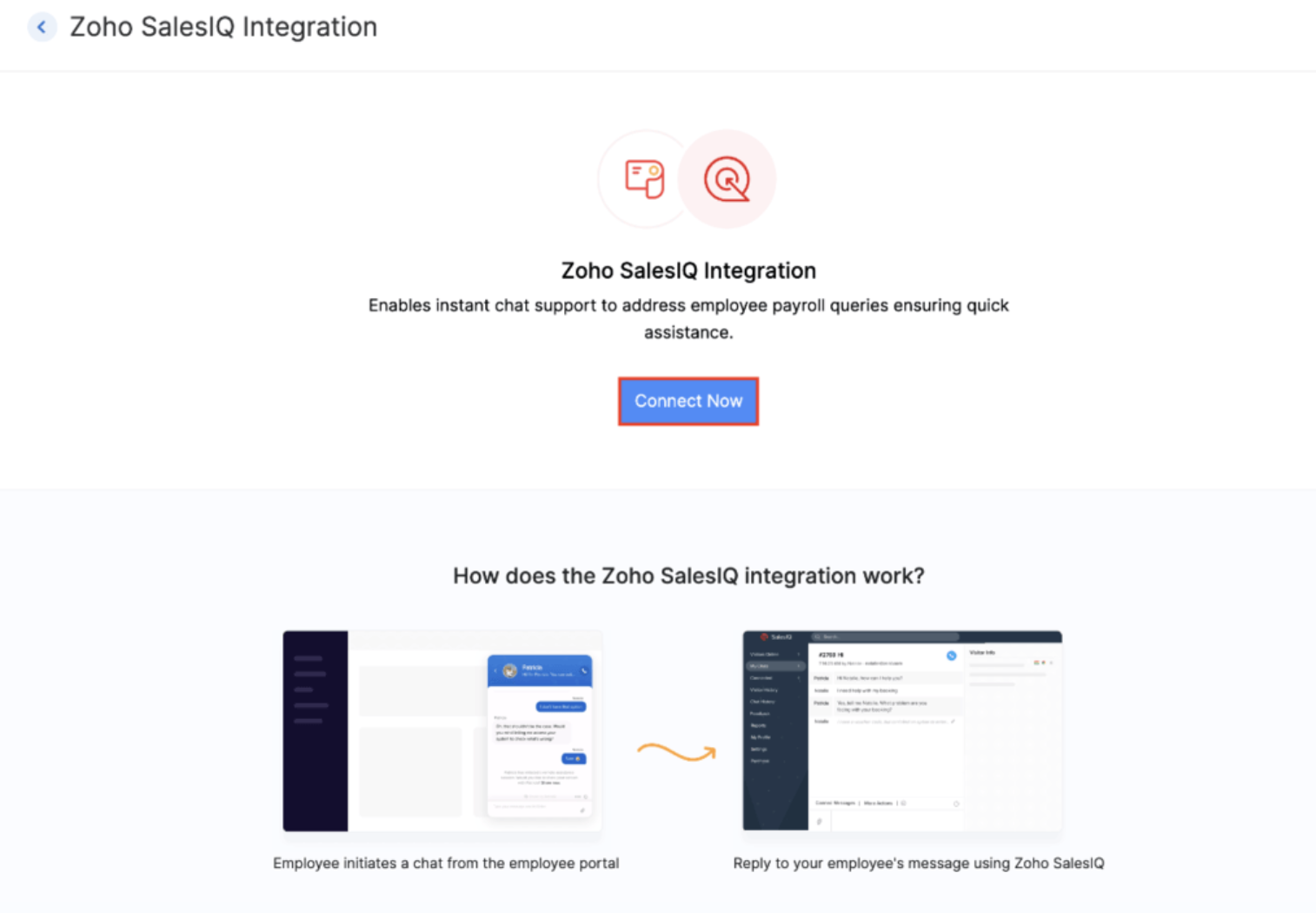
Zoho Payroll - Zoho Sales IQ Integration
In today's fast-paced world, effective communication and instant support are crucial for employers and employees. That's why we're excited to introduce the Zoho Payroll - Zoho Sales IQ integration, designed to streamline communication and support between you and your employees in the employee portal.
How? The integrations enables your employees to reach out to you in real-time for queries or concerns regarding payroll via chat or call, from the Zoho Payroll employee portal ensuring immediate support.
That's not all. You can also attach relevant help documents and frequently asked questions (FAQs) are readily accessible within the chat interface. You will also be able to automate conversations with the enterprise-ready AI Sales IQ chatbot platform.
Introducing Ohio state support (Early Access)
We're thrilled to announce the latest addition to Zoho Payroll's US edition: support for the Ohio state. This update ensures that businesses operating in Ohio can effortlessly navigate the intricacies of payroll management specific to this region.

Note: Currently, Zoho Payroll is tailored to support businesses operating within a single state. We understand that operating across multiple states presents unique challenges, and while we're continuously enhancing our platform, multi-state support is not yet available.
Here's the list of all the states we support in US:
- California
- Florida
- Illinois
- Kansas
- New Hampshire
- New York
- North Carolina
- South Dakota
- Tennessee
- Texas
- Utah
- Washington
- Alaska (Early Access)
- Georgia (Early Access)
- Minnesota (Early Access)
- Montana (Early Access)
- Nevada (Early Access)
- North Dakota (Early Access)
- South Carolina (Early Access)
- Wyoming (Early Access)
- Wisconsin (Early Access)
- Virginia (Early Access)
- Ohio (Early Access)
If you'd like to access Zoho Payroll for your business in the Ohio state or the other states in the early access mentioned above, submit a request, and we'll enable it for you. And yes, we are working on a lot more states, and we'll share it with you in this space.
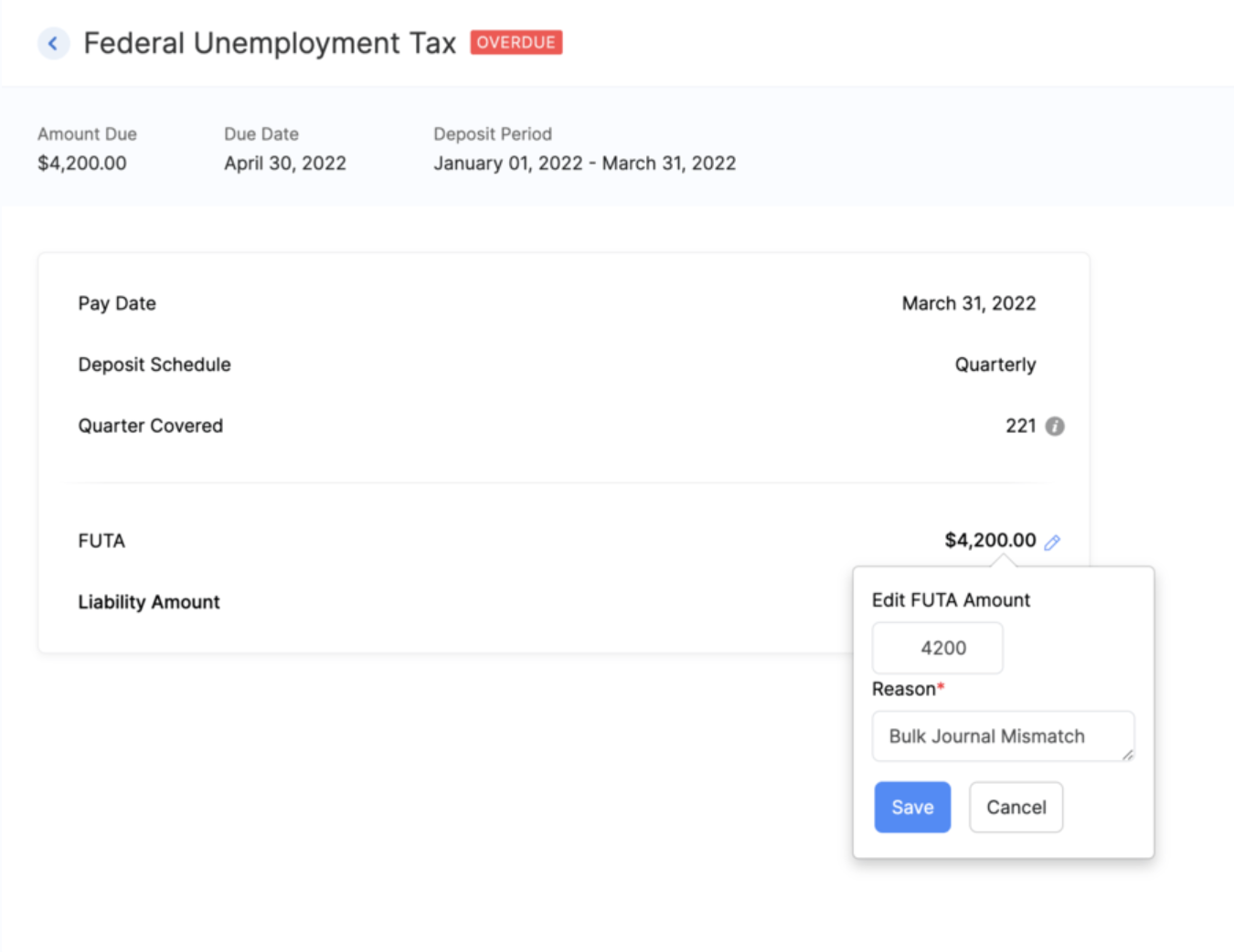
Edit FUTA Rate
You now have the option to edit the FUTA rate in the Taxes section of Zoho Payroll, according to your specific requirements, ensuring accuracy and compliance.
Notable Enhancements in India and UAE:
1) Import/Export Tax Regime Preferences of Employees
Now, you can import and export tax regime preferences for your employees in bulk via CSV or XLS files, eliminating the need for manual entry for every employee.
Here's a sample CSV file which you can use as a reference for the import file you upload in Zoho Payroll.

2) View Pre-Tax Deductions/Benefits in the Employee Portal [IN, UAE]
Your employees can now view the pre-tax deductions or benefits in the salary structure section of the employee portal.
3) Enhanced Filtering Options
We've introduced new filters in the employee list page. Users can now filter employees based on their work location, department, and designation, streamlining the search process for specific criteria. Similarly, in the Approvals section, for proof of investments, users can now filter employees based on their tax regime, whether it's old or new, allowing for more efficient management of investment approvals.
4) Annual CTC Projection
You now have the ability to project employee CTC details annually. By default, users can view monthly earnings, gross pay, and CTC. Click Show Yearly Projection to reveal the annual projection, providing comprehensive financial insights at your fingertips.
5) Petty Cash Account for Employee Payments
Organisations using the Zoho Payroll-Zoho Books integration to post journal entries for their payroll, can nowselect petty cash as the designated account for employee payments.
6) Cost of Goods Sold Account for Payroll Earnings
Another enhancement for users utilizing the Zoho Payroll-Zoho Books integration, is the capability to select Cost Of Goods Sold as the credit account for syncing payroll earnings.
7) Customizable Headers and Footers for Payslips (Early Access)
You can now personalize the headers and footers of the payslips sent to your employees. Customize important details such as company logo, address, and contact information in the header while adding legal disclaimers or special messages in the footer. With placeholders and other customization options available, you have full control over the look and feel of your employees' payslips.
Dive into our What's New page if you'd like to see all the features and enhancements we've released so far.
That's a wrap for now! We are always eager to hear your suggestions so we can help you better. If you have a feature request, please share it in the comments below.
If you require assistance, please write to us at support@zohopayroll.com, and we'll get back to you. Stay tuned for more updates from Zoho Payroll!
With a shared purpose,
The Zoho Payroll Team
Topic Participants
Bennet Noel L
Sticky Posts
Zoho Payroll | Quarterly Product Updates For 2024
As we navigate through the ever-changing payroll landscape, we bring you the latest updates that span the first quarter of 2024, tailored to meet the diverse needs of employers and employees in India, the UAE, and the US. From useful integrations to refinedIntroducing Academy 🎉: your go-to hub for all things payroll
Hello! We're thrilled to launch our newest payroll resource hub - Academy by Zoho Payroll [for India] - the information repository where you can go to learn everything about payroll. Introducing Academy by Zoho Payroll Why did we build Academy? Payroll
Recent Topics
Custom report
Hello Everyone I hope everything is fine. I've tried to To change the layout of the reports, especially the summary page report, and I want to divide summary of each section in the survey but I can't For example: I have a survey containing five differentZoho Journey - ZOHO MARKETING AUTOMATION
I’ve encountered an issue while working with a journey in Zoho Marketing Automation. After creating the journey, I wanted to edit the "Match Criteria" settings. Unfortunately: The criteria section appears to be locked and not editable. I’m also unableCustom Fields in PDF outputs
I created a couple of custom fields. e.g Country of Origin and HS Tariff Code. I need these to appear on a clone of a sales order PDF template but on on the standard PDF template. When I select "appear on PDFs' it appears on both but when I don't selectHow to create a Service Agreement with Quarterly Estimate
Hello, I'm not sure if this has been asked before so please don't get mad at me for asking. We're an NDIS provider in Australia so we need to draft a Service Agreement for our client. With the recent changes in the NDIS we're now required to also includeZoho Social - Post Footer Templates
As a content creator I often want to include some information at the end of most posts. It would be great if there was an option to add pre-written footers, similar to the Hashtag Groups at the end of posts. For example, if there is an offer I'm runningAllow to pick color for project groups in Zoho Projects
Hi Zoho Team, It would be really helpful if users could assign colors to project groups. This would make it easier to visually distinguish groups, improve navigation, and give a clearer overview when managing multiple projects. Thanks for consideringZoho Books - Quotes to Sales Order Automation
Hi Books team, In the Quote settings there is an option to convert a Quote to an Invoice upon acceptance, but there is not feature to convert a Quote to a Sales Order (see screenshot below) For users selling products through Zoho Inventory, the workflowCan't find imported leads
Hi There I have imported leads into the CRM via a .xls document, and the import is showing up as having been successful, however - when I try and locate the leads in the CRM system, I cannot find them. 1. There are no filters applied 2. They are notCustom Button Disappearing in mobile view | Zoho CRM Canvas
I'm working in Zoho CRM Canvas to create a custom view for our sales team. One of the features I'm adding is a custom button that opens the leads address in another tab. I've had no issue with this in the desktop view, but in the mobile view the buttonThe connected workflow is a great idea just needs Projects Integrations
I just discovered the connected workflows in CRM and its a Great Idea i wish it was integrated with Zoho Projects I will explain our use case I am already trying to do something like connected workflow with zoho flow Our requirement was to Create a TaskZoho Projects MCP Feedback
I've started using the MCP connector with Zoho Projects, and the features that exist really do work quite well - I feel this is going to be a major update to the Zoho Ecosystem. In projects a major missing feature is the ability to manage, (especiallyemail template
How do I create and save an email templateEnhancements in Portal User Group creation flow
Hello everyone, Before introducing new Portal features, here are some changes to the UI of Portals page to improve the user experience. Some tabs and options have been repositioned so that users can better access the functionalities of the feature. FromAlways display images from this sender – Is this feature available?
In Zoho mail, I had my "Load external images" setting set to "Ask me", and that's fine. That's the setting I prefer. What's not fine though is I always need to tick "Display now" for each email I get, regardless if I've done that multiple times from severalZoho Notebook Sync problem
I'm facing a problem with syncing of notebook on android app. It's not syncing. Sometimes it syncs after a day or two. I created some notes on web notebook but it's not syncing on mobile app. Please help!!!!Cant Save Gauge on Creator Page
How to Save Gauge on Creator Page see movie https://vimeo.com/1116410860?share=copy#t=0Apply Advance option not shown in report
We are facing an issue in Zoho Expenses. While approving an Expense Report, the "Apply Advance" option is not appearing under the three dots (More Options). Details: Module: Expense Reports Issue: "Apply Advance" option not visible Status of Report: AwaitingAuto Capitalize First Letter of Words
Hi I am completely new to ZOHO and am trying to build a database. How can i make it when a address is entered into a form field like this: main st it automatically changes is to show: Main St Thank YouFollow-up emails via Workflow Automation not staying in the same thread
Dear Zoho Support Team, I am currently using Workflow Automation in Zoho Campaigns to send follow-up emails. In my test case, I noticed the following behavior: All emails in the automation have the same subject line. If the follow-up email is sent withinClient Script refuses to set an initial value in Subform field
I tried a very simple, 1 line client script to set a default value in a custom subform field when the "Add Row" button is clicked and the user is entering data. It does not work - can someone tell me why? ZDK documentation suggests this should be doable.Help Center IFrame Issue
I have had a working Help Center on my website using an iframe for a while. But now for some reason the sign in page gets a refused to connect error. Can someone please help. If I go to the url manually it works correcltyComment Templates
Is it possible to add a template option for comments? We have some agents in the process who's responses require a pre-formatted layout. It would be incredibly handy to have a template for them where they can insert the template and then add their responses[ZohoDesk] Improve Status View with a new editeble kanban view
A kanban view with more information about the ticket and the contact who created the ticket would be valueble. I would like to edit the fields with the ones i like to see at one glance. Like in CRM where you can edit the canvas view, i would like to editAdding Markdown text using Zoho Desk API into the Knowledge Base
Hi Zoho Community members, We currently maintain the documentation of out company in its website. This documentation is written in markdown text format and we would like to add it in Zoho Knowledge Base. Do you know if there is REST API functionalityAn Exclusive Session for Zoho Desk Users: AI in Zoho Desk
A Zoho Community Learning Initiative Hello everyone! This is an announcement for Zoho Desk users and anyone exploring Zoho Desk. With every nook and corner buzzing, "AI's here, AI's there," it's the right time for us to take a closer look at how the AIShared values: From classroom lessons to teaching moments in customer service
While the world observes Teachers’ Day on October 5, in India, we celebrate a month earlier, on September 5, to mark the birth anniversary of Dr. Sarvepalli Radhakrishnan, a great teacher, renowned scholar, educationist, and advocate for empowerment.Create a list of customers who participated in specific Zoho Backstage events and send them an email via Zoho CRM
How to create a list of customers who participated in specific Zoho Backstage events and send them an email via Zoho CRM? I was able to do a view in CRM based on customer that registered to an event, but I don't seems to be able to include the filterZoho Desk blank page
1. Click Access zoho desk on https://www.zoho.com/desk/ 2. It redirects to https://desk.zoho.com/agent?action=CreatePortal and the page is blank. Edge browser Version 131.0.2903.112 (Official build) (arm64) on MacOSI hate the new user UI with the bar on the left
How can I reverse this?Question regarding import of previous deals...
Good afternoon, I'm working on importing some older deal records from an external sheet into the CRM; however, when I manually click "Add New Deal" and enter the pertinent information, the deal isn't appearing when I look at the "Deals" bar on the account'sClient Script also planned for Zoho Desk?
Hello there, I modified something in Zoho CRM the other day and was amazed at the possibilities offered by the "Client Script" feature in conjunction with the ZDK. You can lock any fields on the screen, edit them, you can react to various events (fieldOne person/cell phone to manage multiple accounts
Hi. I have a personal Free account to keep my own domain/emails. Now I need to create a Business account to my company's own domain, but I have only one mobile phone number I use to everything. How do I do to manage this? Can I manage a Free domain andTracking KPIs, Goals etc in People
How are Zoho People users tracking employee targets in People? For example, my marketing assistant has a target of "Collect 10 new customer testimonials every month". I want to record attainment for this target on a monthly basis, then add it to theirZoho Desk: Ticket Owner Agents vs Teams
Hi Zoho, We would like to explore the possibility of hiding the ‘Agents’ section within the Ticket Owner dropdown, so that we can fully utilise the ‘Teams’ dropdown when assigning tickets. This request comes from the fact that only certain agents andCan not Use Attachment Button on Android Widget
this always pops up when I touch the attach button on android widget. going to settings, there is no storage permission to be enabled. if I open the app, and access the attach feature there, I can access my storage and upload normally.Announcing new features in Trident for Mac (1.24.0)
Hello everyone! Trident for macOS (v.1.24.0) is here with interesting features and thoughtful enhancements to redefine the way you plan and manage your calendar events. Here's a quick look at what's new. Create calendar events from emails. In additionMass Mail Statistics - Number of unsent emails
How do I find out which emails were not sent?Est-il possible d'annuler l'envoi d'un mail automatique ?
Bonjour, Lorsque je refuse un candidat, il reçois un mail dans les 24h pour l'informer que sa candidature n'est pas retenue. J'ai rejeté un candidat par erreur. Savez-vous s'il possible d'annuler l'envoi de ce mail ? Merci d'avance pour votre aide.embed a form in an email
Hello, how to embed a form in an email that populates Zoho CRM cases? I would like to send emails to a selected audience offering something. In the same email the recipients - if interested - instead of replying to can fill in a Zoho CRM form that createsHow to add Zoho demo site page designs to my Zoho Sites website
Hi, I would like to add the design from the following demo URLs into my current Zoho website. I have already created two new pages on my site, named “Menu2” and “Menu3.” For the “Menu2” page, I want to use the design from this demo: https://naturestjuice-demo.zohosites.com/menuNext Page