We are excited to introduce the Inbox in Zoho Social to help manage all social media interactions from Facebook, Instagram, X (formerly Twitter), Google Business Profile and YouTube for your brand in one place. You can track and assign them to your team members to ensure a timely response from your brand.
Why Inbox?
More than 10 years ago, reaching out to brands regarding issues could be frustrating. Most of us have been in the situation where we had to dial a toll free helpline, wait for the entire IVR message, try and press the right combination of numbers and hope somehow we hear the voice of a service representative. But no! You are #234 in queue and this is what you hear "your call is important to us, please stay on the line" followed by soulful music.
It's still predominantly used but apart from that, consumers can also reach out to brands via emails, raise a ticket through online forms, live chat, chat bots, WhatsApp, and across various social media channels.
More than half the world's population are active across social media platforms and an estimated 67% of consumers use social channels like Twitter, Facebook to resolve issues that they face on a day to day basis.
Therefore, it's essential for brands to be available across all channels and take service right where their customers are. Many businesses actively respond to customer queries on Twitter, Facebook, Instagram, Google Business Profile, and so on. Since these interactions are held in a public forum, it's critical for the brands to have a quick response time, which goes a long way in offering an exceptional experience for the customer. Prospects evaluating your brand will also get the affirmation that their voice will also be heard, no matter what.
What can you do with Inbox in Social?
Track interactions across social media channels
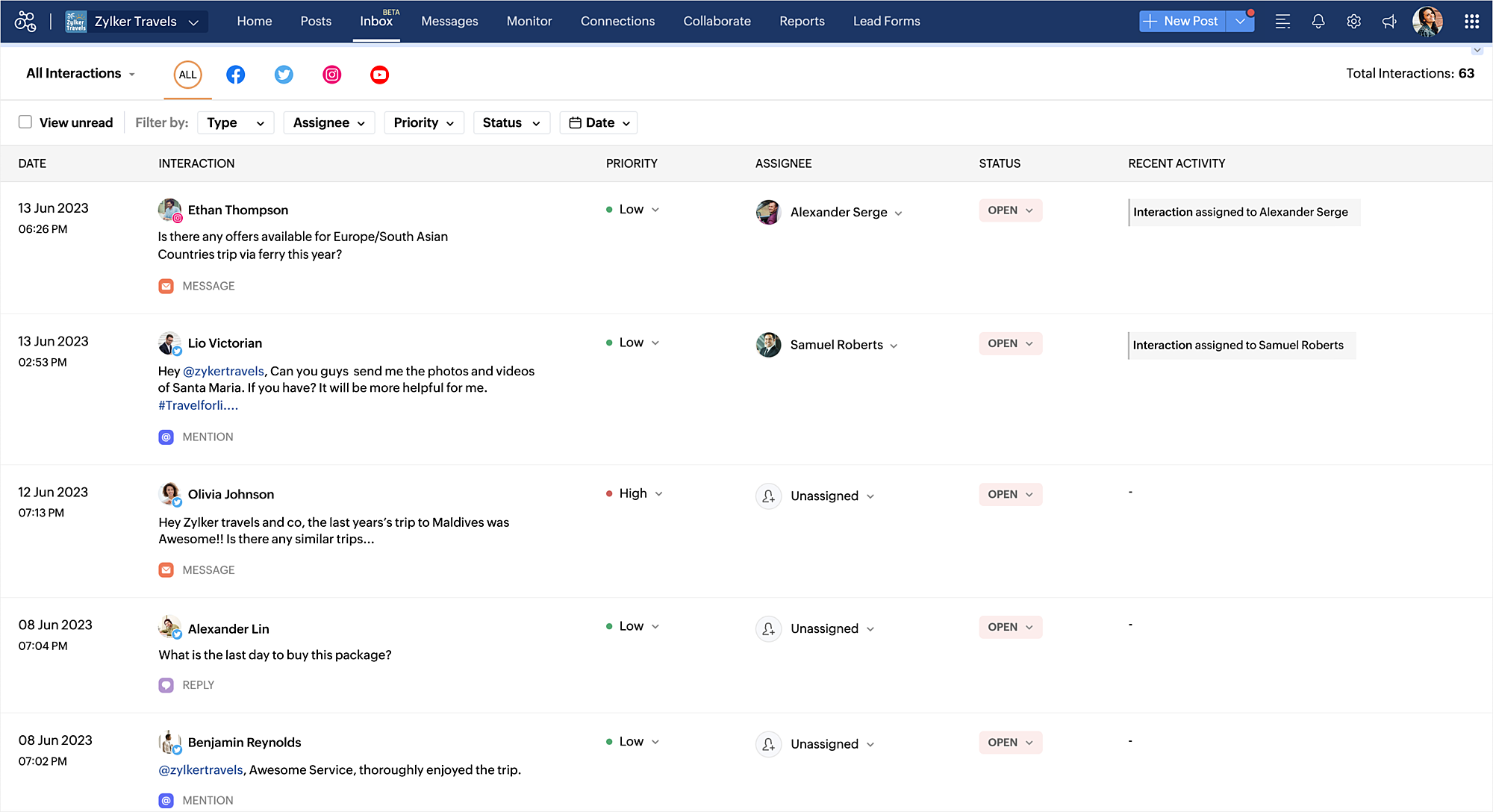
You can view all the comments/replies, messages, reviews, questions, dark comments, and @mentions across Facebook, Twitter, Instagram, Google Business Profile, and YouTube in one place. You can also use the filters available to drill-down and find the exact type of interaction that you are looking for. Priority can be specified for these interactions which can help team members address the most important ones at the earliest.
Reply to interactions with Zia

While interacting with your audience, you can get the help of Zia - generative AI powered by ChatGPT to draft the reply, or rephrase your message.
Assign interactions to your team
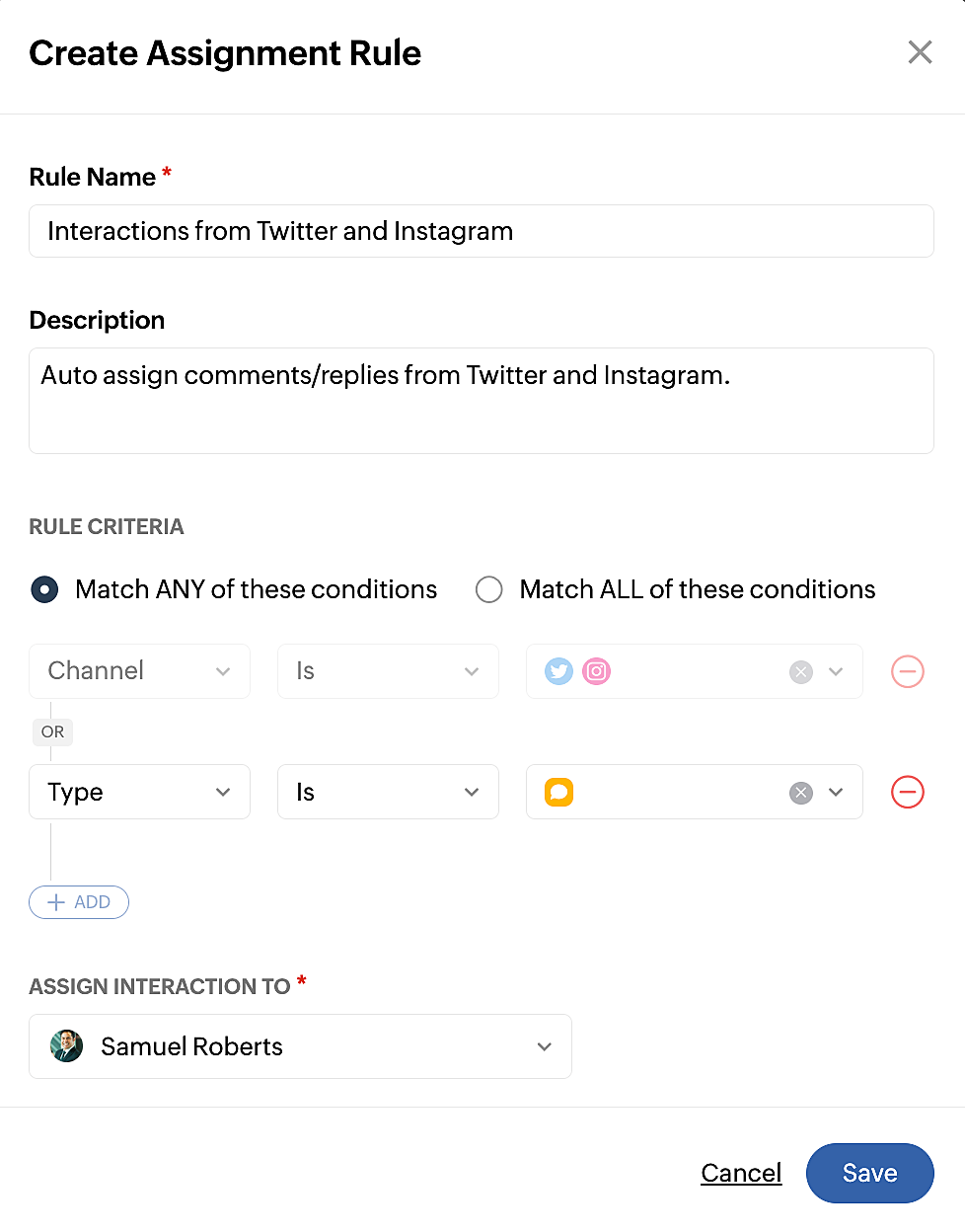
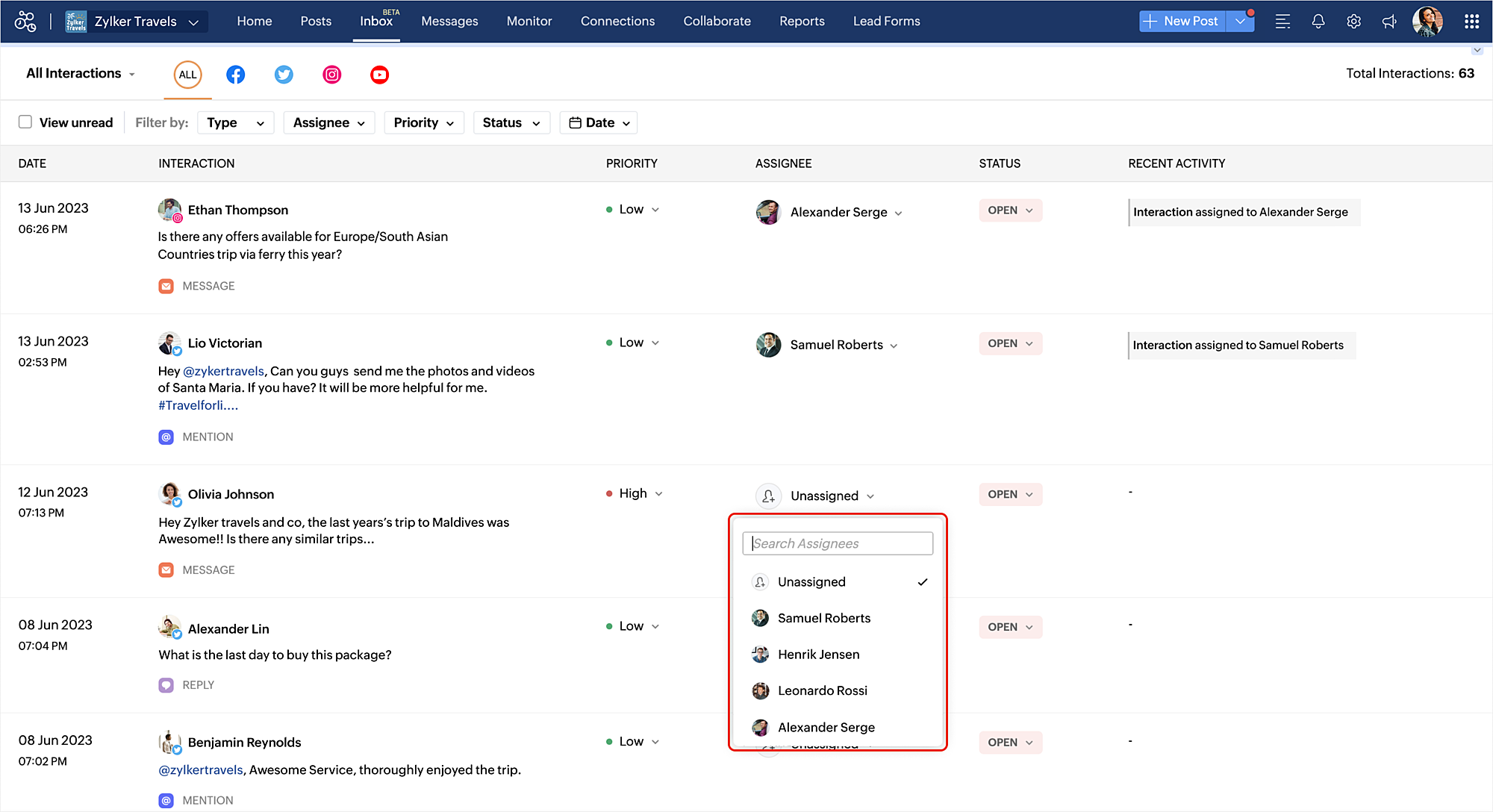
Assignment rules can be created to assign the interactions to your team members automatically. You also have the option to assign a team member manually for an interaction. To create assignment rules, you can click the gear icon on the top right corner of the Inbox module or go to Settings > Inbox Preferences and click + Create New Rule.
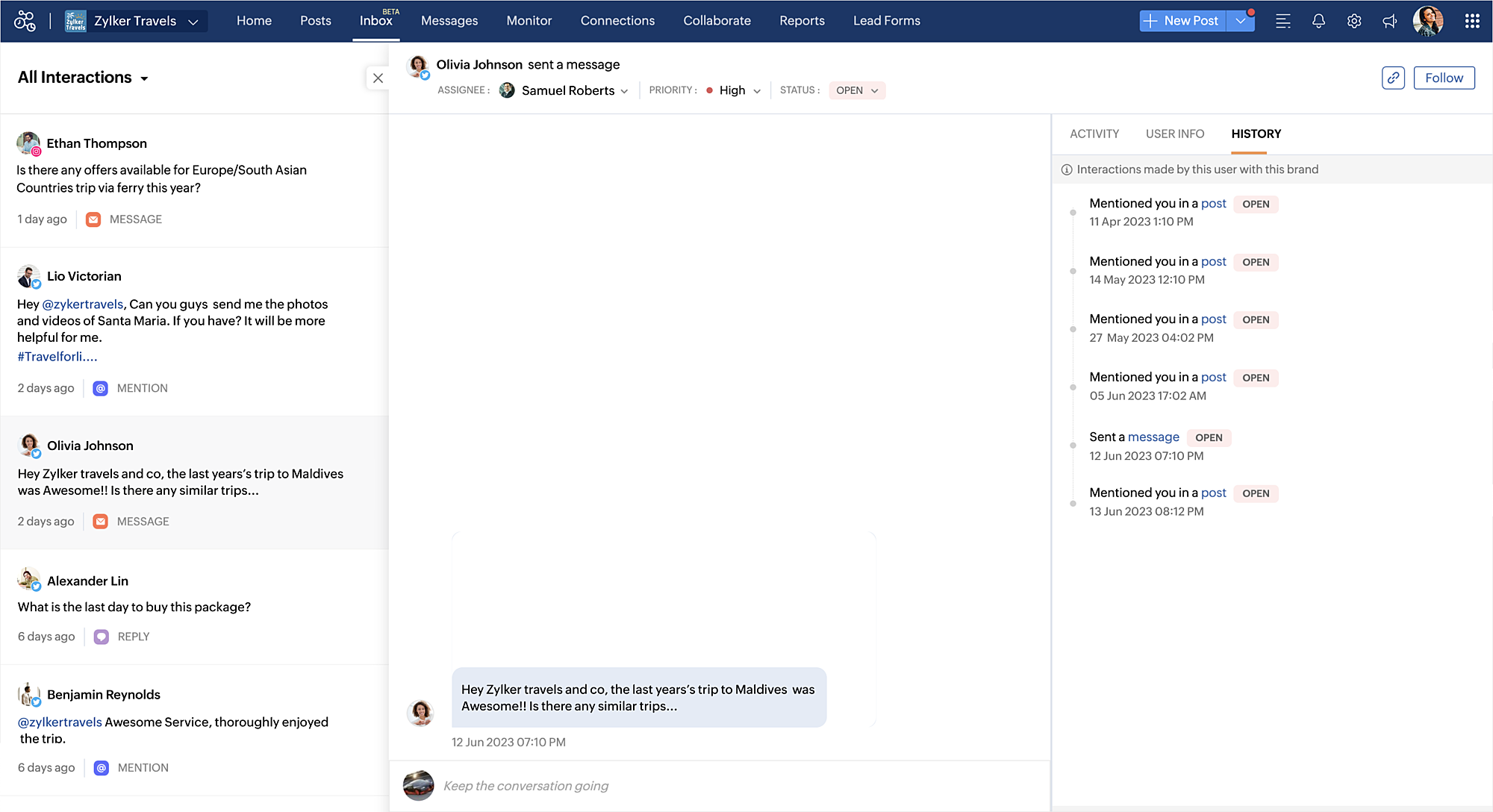
View history of interaction between the user and the brand
To get complete context of an interaction, it might be important to take a look at all the previous interactions between your brand and the user. The history tab lists out all the interactions along with the date and the status to help you understand if there are any open queries to be addressed.
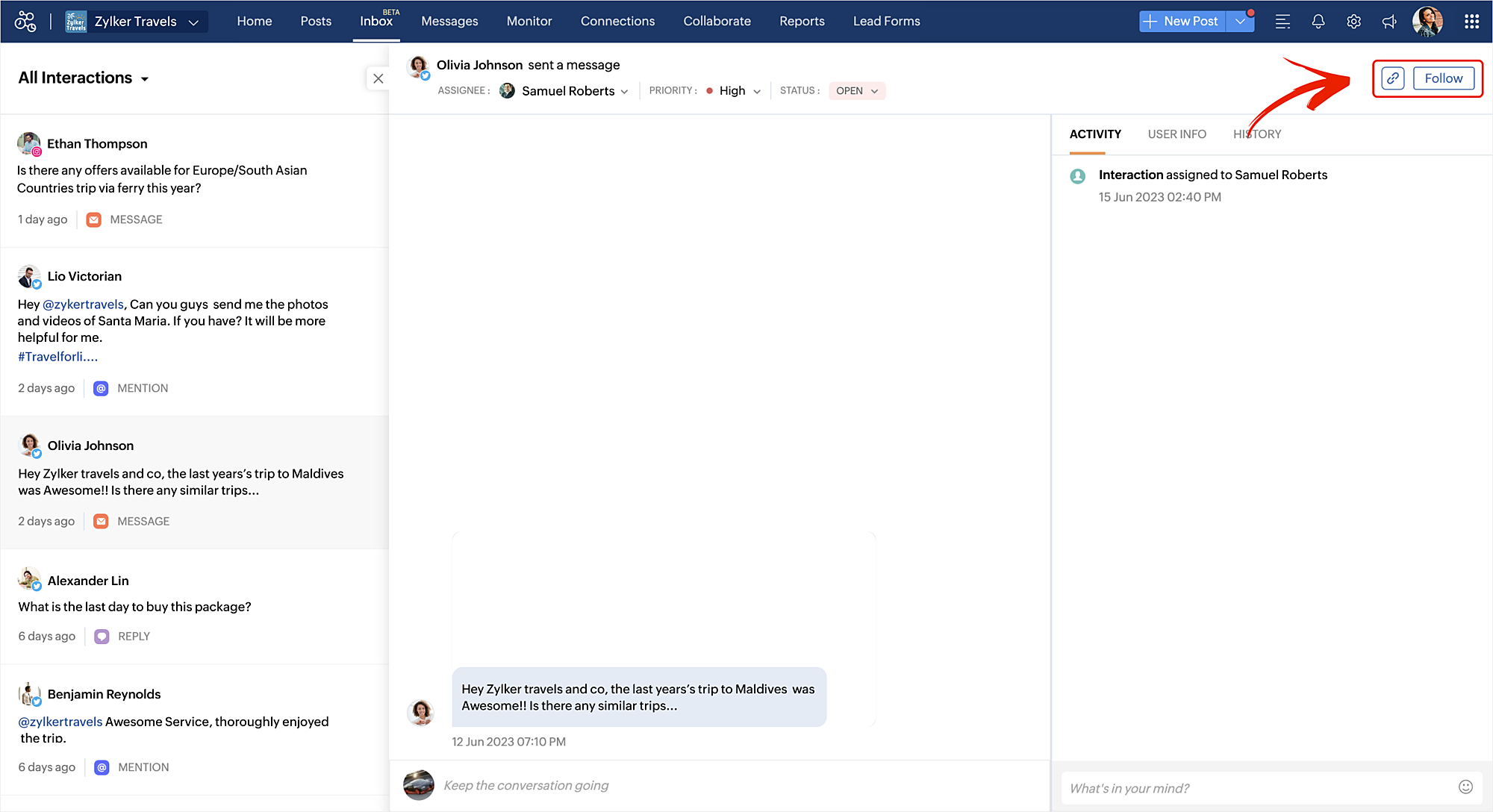
Follow and share an interaction
You can use the Follow option to be notified about a particular interaction, whether a reply is added, or whether the status is changed and so on. You can also copy the permalink of an interaction and share it with your team wherever required.
Group interactions using views
Inbox comes with various pre-defined views which helps you group all the interactions that you are looking for such as all open interactions, interactions assigned to you, high priority and low priority ones and so on. You can also create a custom view by specifying various filters and share it with your team.
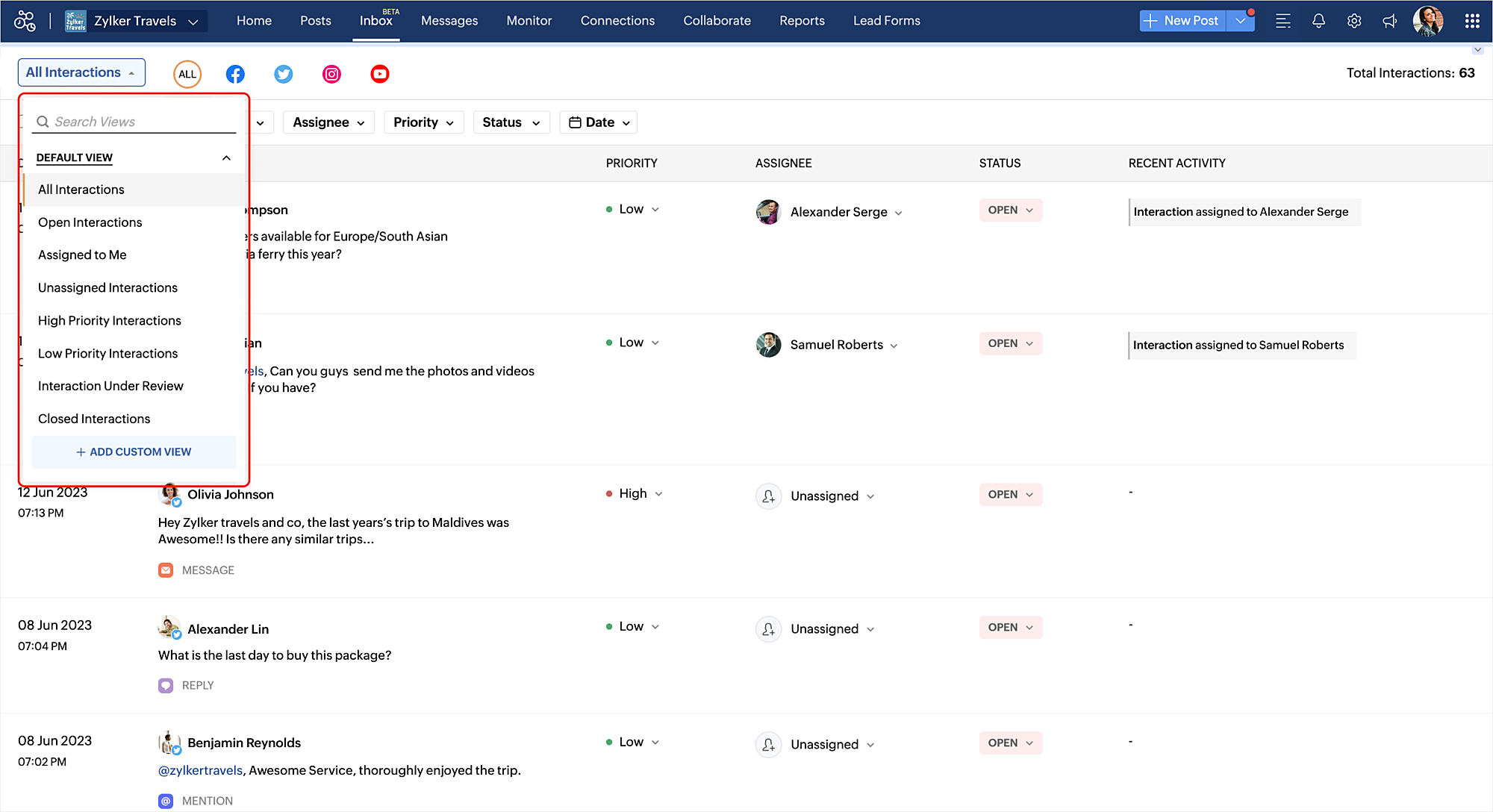
For example, you can create a custom view to track only the comments/replies from Twitter that are tagged as high priority over the last 30 days.
Refer to the help document to understand all about how Inbox can help your brand on Social Media. Please feel free to leave your feedback or suggestions in the comment section.
Hello everyone, We've rolled out a bunch of exciting updates in Q3, and we're thrilled to walk you through them. Here's a quick look at everything we released in July, August, and September to help you experiment with content, automate engagement workflows,
Hey everyone, Snapchat is now on Zoho Social! You can now connect your Snapchat account to Zoho Social and manage your Snapchat content alongside your other social channels. Create and schedule Spotlights and Stories, save your best content as Saved Stories.
Hello everyone, We’ve rolled out a bunch of updates in Q2, and we’re excited to walk you through them. Here’s a quick look at everything we released in April, May, and June to help you manage your social media presence more effectively. Threads updates
Dear social media marketers, this one’s for you… From the outside, it may look like you're just scrolling through feeds or switching between tabs. But we know better. Team Zoho Social sees the real story. We understand the challenges you face—and we’ve
Hey everyone, We are excited to introduce the Inbox in Zoho Social to help manage all social media interactions from Facebook, Instagram, X (formerly Twitter), Google Business Profile and YouTube for your brand in one place. You can track and assign them
Hi, We have a Creator App for B2C about to get released. We are experiencing the Portal User license challenge. Unable to predict the number of users who will download and Subscribe. When a User is about Subscribe and the portal licenses does not exists,
On the time tracker in Reminder Settings I created a reminder according to the Zoho manual. But a manager asked me to change the message that goes in the email. Is it possible to change the message? I didn't find that in the Zoho manual. Another question: I configured to receive the reminder everyone who logged in less than 40 hours. Does Zoho consider less than 40 hours of the current week or the whole month? Another situation, I put it so that I and another specific user would receive the notification,
Hello everyone, We're rolling out two key updates to help you engage better and scale smarter with Cadences in Zoho CRM. Reach customers on WhatsApp, directly from Cadences Previously, Cadences have enabled you to automate follow-ups through emails, calls,
I had mentioned this to ZOHO, but I mainly wanted to see if others in the Community are also facing this problem. I created a Canvas ListView for a Custom Module, and then created a Canvas Home page (technically on a tab item, but I'm not sure if that
Hello, I am the Super Administrator of the Zoho Mail organization for carrytrail.com. The domain has already been verified, but when I try to create the user. I receive the following error: “This user is not allowed to add in Zoho. Please contact support-as@zohocorp.com
Hello Zoho Assist Community! As a support team grows, so does the complexity. Different customers, different products, technicians spread across regions, and each group needing its own way of working. When everyone operates from a single shared space,
Hi Zoho Team, Could you please look into this recurring alert and provide clarification on why this restriction is still in place? This issue has become a bottleneck in our workflow, significantly limiting our automation capabilities. We are unable to
Hi users, We are excited to announce Zoho Office Desktop, a single app to install, update, and open Zoho Writer, Sheet, Show, and PDF Editor on Windows and macOS. It includes: One home for every app: Choose the apps you want, and a guided installation
Broken internal links are a common technical SEO issue. They can send visitors to missing pages, interrupt navigation, and make website maintenance more difficult. On a large website, checking every link manually is simply not practical. So, how can you
Hi users, We are excited to announce the Q2 2026 updates for Zoho Writer for Android. This includes: Formatting parity with the web app: Choose from multiple ordered and unordered list styles, adjust line spacing, apply your custom paragraph styles, change
Hello, I noticed some hard bounces while sending emails, and upon checking the details, I see that we have been added to the blacklists of certain spam lists: Bounce category: Policy failure Reason: ip-issues Message: 5.7.1 Service unavailable; client
Hi, I'd like to push for this to be included in ZohoBooks: In a "account transactions" report all the numbers are right, but I'd really like to see the "Description" as part of this report, i.e. the line-item-description as I would see it in the bank statement. Essentially all you see is a list of numbers adding up to the total. It is very difficult to see if things are right without being able to see what exactly each transaction refers to. Going into each transaction one-by-one is not a workable
Hello everyone, Here's a roundup of everything we released from July to September. We have added some new features as well as improved some of the existing ones. Project Financials Finance Integration Integrate your Project with Zoho Books, Zoho Invoice,
Hello everyone, Your customers reach you on the apps they already use. Zoho CRM now supports one more: our very own Arattai! When someone messages your Arattai Business number, the conversation arrives in the Messages module in CRM, right beside your
I AM CURIOUS TO KNOW IF WE CAN MAKE IT MORE USER FRIENDLY WHILE MAKING BILLS , I MAJORLY USE OVER DESKTOP SO I AM SUGGESTING TO REMOVE TAB TIME WHILE ENTERING BILL OR MAKING INVOICE DIRECT JUMP TO ONLY REGULAR PARTS OF THE BILL . YOURS RAKESH 782866
Hi Zoho Community, We are unable to export reports in Zoho CRM. When attempting an export, we receive the following error: “Cannot Export Report — You do not have permission to export one or more modules used in this report. Please contact your administrator.”
I am using the Free plan of Zoho Books. I need to add the bank details/ UPI details on the invoice. How can I do that. I have added the details in the Bank Section.
Hello CRM community, Customer records in your CRM are often accessible across multiple teams, but not every team needs visibility into every field. A non-sales team, for instance, has no real need to see a contact's mobile number, and a support agent
From time to time I get a response "I never received your you e-document for electronic signature" is there a way to generate a Zoho Sign link to share.
Using the native notes option within CRM is fine, it works and the RTF features are great, however, would it be possible - if there isnt already something in place, where we can add a reactions button, similar to teams/whatsapp to show that its been read
Please consider adding functionality that would all a user to copy a reminder link so that we can include it in a personalized email instead of sending a Zoho reminder. Or, allow us to customize the reminder email. Use Case: We have clients we need to
I'm using the template downloaded from the application. When I try to import my expenses, I get the message: Duplicate entry in the Expense Date column. Ensure it contains unique values. None of the rows will import. There are duplicate dates, but they
Meera's studio became a two-person business in month five. Adding the second person took ten minutes. Working out why Meera herself was showing up as Staff took considerably longer. The Usual Way To Do This Covered in our published General FAQ, with the
Our workflow is Shopify-->SO -->Picklist-->Package-->Shipment. We would like to have the Picklist template to include a custom field "Customer_Notes" (we have created this field already). This way we get alerted when a customer has notes on their account.
I believe this is an essential feature that Zoho should provide us, when adding products we want the ability to add titles for our product, in quotes: The Solution/Category Title Product1 Product2..... and then it would show the sub-total of that title
All widget heights in the Details Canvas view are broken. Moderation Update: This issue with widget heights in Client Script popups and flyouts has been resolved. Widgets should now display at their expected heights.
There are multiple reasons to get corrupted PST files (due to a power failure, system crash, or forced shutdown) and several other reasons. If You are using this ScanePST.EXE Microsoft inbuilt recovery tool, it only supports the minor corruption issue
Moderation update: Currently available in the following DC's CA, AU, CN, UAE, JP, SA - All Editions EU - Free, Standard and Professional Hello everyone, Notes help users capture important updates, collaborate with teammates, and maintain context for records.
Hello developers! Welcome to our new video series on building extensions for Zoho People! If you're new to extension development or looking for guidance on building extensions for Zoho People, you're in the right place. We've curated a series of videos
Hello Zoho Projects Team, We hope you are doing well. We would like to submit a feature request regarding "Projects Bot" Cliq bot notifications for @mentions inside Zoho Projects comments (Tasks and Issues). Current Behavior: At the moment, when someone
I use Thunderbird to access Zoho Mail via POP and SMTP. I have configured an app-specific password for Thunderbird to use. Everything is properly configured and works correctly — until I enable my VPN. I'm using a paid commercial VPN service (Mullvad).
Hello, I’m currently facing an issue where my Zoho Mail account has been blocked due to “suspicious login activity,” and outgoing emails are restricted. Here are the details shown: Block type: Outgoing mail blocked Reason: Suspicious login activity A
We don't take many online credit card payments so the merchant service provider (PayPal) charges us the 2.9% fee for processing the amount. I would like the ability for the fee to be automatically added to the total amount for "ease of payment". We'd
Tenho uma equipe com vários vendedores e cada um deles tem um celular corporativo usando o Whatsapp Business para se comunicar com os clientes. Estamos no plano Zoho One e esses mesmos vendedores também usam o SalesIQ para atender os leads que vem do
Dear Zoho Desk Support Team, We are writing to request a new feature that would allow users to easily merge tickets directly from the contact page in Zoho Desk. Currently, the only option to merge tickets is from the Tickets list view page, which can
Hello, We merge tickets when they are about the same topic from the same client. It happens sometimes. We recently noticed that after the merger only the description from the master ticket is left in a thread. And the slave-ticket description is erased.
People have been requesting the ability to delete e-mail attachments without deleting the e-mail for more than ten years now. The latest I see is marked "Working On It" and a year ago it was supposedly being added, see here: https://help.zoho.com/portal/en/community/topic/is-there-a-way-to-delete-mail-attachments-without-deleting-the-text