Automating Attendance Tracking with Zoho Cliq Developer Platform
I wish remote work were permanently mandated so we could join work calls from a movie theatre or even while skydiving! But wait, it's time to wake up! The alarm has snoozed twice, and your team has already logged on for the day.

How does this solution benefit a business?
- Real-time reminders reduce instances of ghost check-ins and ensure accurate recording of everyone's logged hours.
- Essential for attendance tracking, payroll accuracy, compliance with labour laws, and audits.
- The entire team stays informed, fostering a cohesive workflow that eliminates the need for micromanagement.
Before beginning to script the code below, we must create a connection in Cliq with Zoho People. Once a connection is created and connected, you can use it in Deluge integration tasks and invoke URL scripts to access data from the required service.
Create a Zoho People default connection with any unique name with the scopes - ZohoPeople.Attendance.ALL , ZohoPeople.forms.ALL and ZohoPeople.leave.ALL
ⓘ Document for reference : Connections in Cliq
How to obtain or locate the channel unique name in Cliq?
Navigate to the top right corner of the channel and locate the three dots. Click it.
In the menu that appears, select "Channel info" and a pop-up will open, displaying detailed channel information.
- After a successful login in Cliq, hover to the top right corner and click your profile. Post clicking, navigate to Bots & Tools > Schedulers.
- On the right, click the "Create Scheduler" button.
- To learn more about schedulers and their purposes, refer to the Introduction to Schedulers.
- Create a scheduler using your preferred name. Specify the following details: the scheduler name and a description.

- For the recurring period, choose the type "Weekly." Select Monday through Friday and set the time of execution to 11 AM or any other time that aligns with your company's check-in time, or customise the recurring period based on your specific use case.
- Finally, click "Save & edit code" and paste the following code.
- currentDate = zoho.currentdate;
- currentDateString = currentDate.toString("dd-MMM-yyyy");
- fromIndex = 1;
- toIndex = 200;
- // Get all active users
- users = zoho.people.getRecords("employee",fromIndex,toIndex,{},"{CONNECTION_LINK_NAME}");
- usersList = List();
- usersList.addAll(users);
- iterations = {1,2,3,4,5,6,7,8,9,10,11,12,13,14,15,16,17,18,19,20,21,22,23,24,25};
- // Get All Employees ( 4000 MAX )
- if(users.size() == 200)
- {
- for each iteration in iterations
- {
- fromIndex = fromIndex + toIndex;
- toIndex = toIndex + 200;
- users = zoho.people.getRecords("employee",fromIndex,toIndex,{},"{CONNECTION_LINK_NAME}");
- if(users.size() > 0 && users.size() == 200)
- {
- usersList.addAll(users);
- }
- else if(users.size() > 0 && users.size() < 200)
- {
- usersList.addAll(users);
- break;
- }
- else
- {
- break;
- }
- }
- }
- // Get all the employees checkedin from the morning.
- getAttendenceEntries = invokeurl
- [
- url :"https://people.zoho.com/api/attendance/fetchLatestAttEntries?duration=240"
- type :GET
- connection:"{CONNECTION_LINK_NAME}"
- ];
- latestAttendanceRecords = getAttendenceEntries.get("response").get("result");
- checkedInUsers = List();
- for each userRecord in latestAttendanceRecords
- {
- checkedInEmployeeEmail = userRecord.get("emailId");
- checkedInUsers.add(checkedInEmployeeEmail);
- }
- // Get all the employees who applied for leave both approved and pending ( Remove PENDING to exclude only the leave approved employees )
- leaveApprovedEmployees = invokeurl
- [
- url :"https://people.zoho.com/api/v2/leavetracker/leaves/records?from=" + currentDateString + "&to=" + currentDateString + "&dateFormat=dd-MMM-yyyy&approvalStatus=[APPROVED,PENDING]"
- type :GET
- connection:"{CONNECTION_LINK_NAME}"
- ];
- info leaveApprovedEmployees;
- leaveApprovedEmployeesList = List();
- for each member in leaveApprovedEmployees.get("records")
- {
- leaveApprovedEmployeesList.add(member.get("EmployeeId"));
- }
- info leaveApprovedEmployeesList;
- // Add the users to yet to checkin list if they are not checked from the morning and not applied for leave
- usersYetToCheckIn = list();
- for each user in usersList
- {
- employeeEmail = user.get("EmailID");
- employeeId = user.get("EmployeeID");
- employeeStatus = user.get("Employeestatus");
- if(!checkedInUsers.contains(employeeEmail) && !leaveApprovedEmployeesList.contains(employeeId) && employeeStatus.equals("Active"))
- {
- usersYetToCheckIn.add(employeeEmail);
- }
- }
- // Mention the list of users in the channel.
- if(usersYetToCheckIn.size() == 0)
- {
- info "No users were found yet to checked-in at 11 PM today. Great to see everyone wrapping in on time! ✅";
- }
- else
- {
- usersYetToCheckInString = "";
- for each user in usersYetToCheckIn
- {
- usersYetToCheckInString = usersYetToCheckInString + "[" + user + "](mail:" + user + ") \n";
- }
- usersYetToCheckInString = usersYetToCheckInString.subString(0,usersYetToCheckInString.length() - 2);
- response = Map();
- card = Map();
- card.put("title","Employees who haven’t checked in yet ( " + usersYetToCheckIn.size() + " )");
- card.put("thumbnail","https://i.pinimg.com/originals/85/e9/f3/85e9f3f5ac31fc5aab586e208297f43d.gif");
- card.put("theme","modern-inline");
- response.put("card",card);
- response.put("text",usersYetToCheckInString);
- info zoho.cliq.postToChannel("{CHANNEL_UNIQUE_NAME}",response);
- }
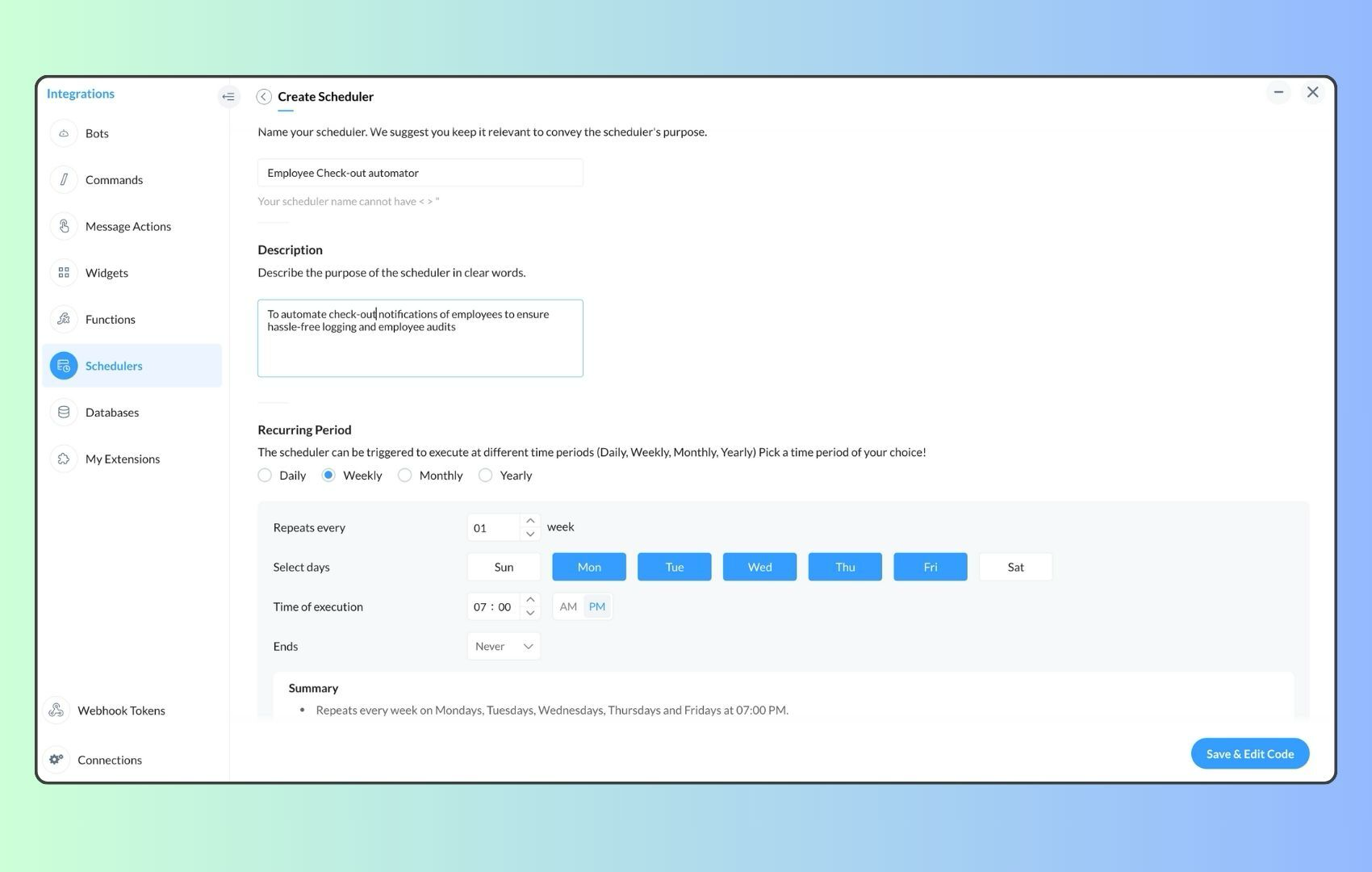
- Now, let's follow the same steps and create a scheduler for checkout reminders. Under the recurring period, choose the type as "Weekly." Select Monday through Friday and set the time of execution to 7 PM or any other time that aligns with your company's checkout time, or customise the recurring period based on your specific use case.
- Click "Save & edit code" and paste the following code.
- attendanceResponse = invokeurl
- [
- url :"https://people.zoho.com/api/attendance/fetchLatestAttEntries?duration=600"
- type :GET
- connection:"{CONNECTION_LINK_NAME}"
- ];
- info attendanceResponse;
- todayDate = zoho.currenttime.toString("YYYY-MM-dd");
- latestAttendanceRecords = attendanceResponse.get("response").get("result");
- usersWithoutCheckout = list();
- if(latestAttendanceRecords.size() > 0)
- {
- for each userRecord in latestAttendanceRecords
- {
- userEmail = userRecord.get("emailId");
- dailyEntries = userRecord.get("entries");
- for each dailyEntry in dailyEntries
- {
- if(dailyEntry.containsKey(todayDate))
- {
- todayEntryDetails = dailyEntry.get(todayDate);
- attendanceLogs = todayEntryDetails.get("attEntries");
- for each logEntry in attendanceLogs
- {
- if(!logEntry.containsKey("checkOutTime"))
- {
- usersWithoutCheckout.add("{@" + userEmail + "}");
- }
- }
- }
- }
- }
- }
- usersWithoutCheckoutString = usersWithoutCheckout.toString("\n");
- if(usersWithoutCheckoutString.trim().length() == 0){
- usersWithoutCheckoutString = "No users were found checked-in after 7 PM today. Great to see everyone wrapping up on time! ✅";
- }
- response = Map();
- card = Map();
- card.put("title","List of users who remain checked in ( " + usersWithoutCheckout.size() + " )");
- card.put("thumbnail","https://media.tenor.com/Hd8nLZZTPRYAAAAi/alarm-clock-alarm.gif");
- card.put("theme","modern-inline");
- response.put("card",card);
- response.put("text",usersWithoutCheckoutString);
- info zoho.cliq.postToChannel("{CHANNEL_UNIQUE_NAME}",response);
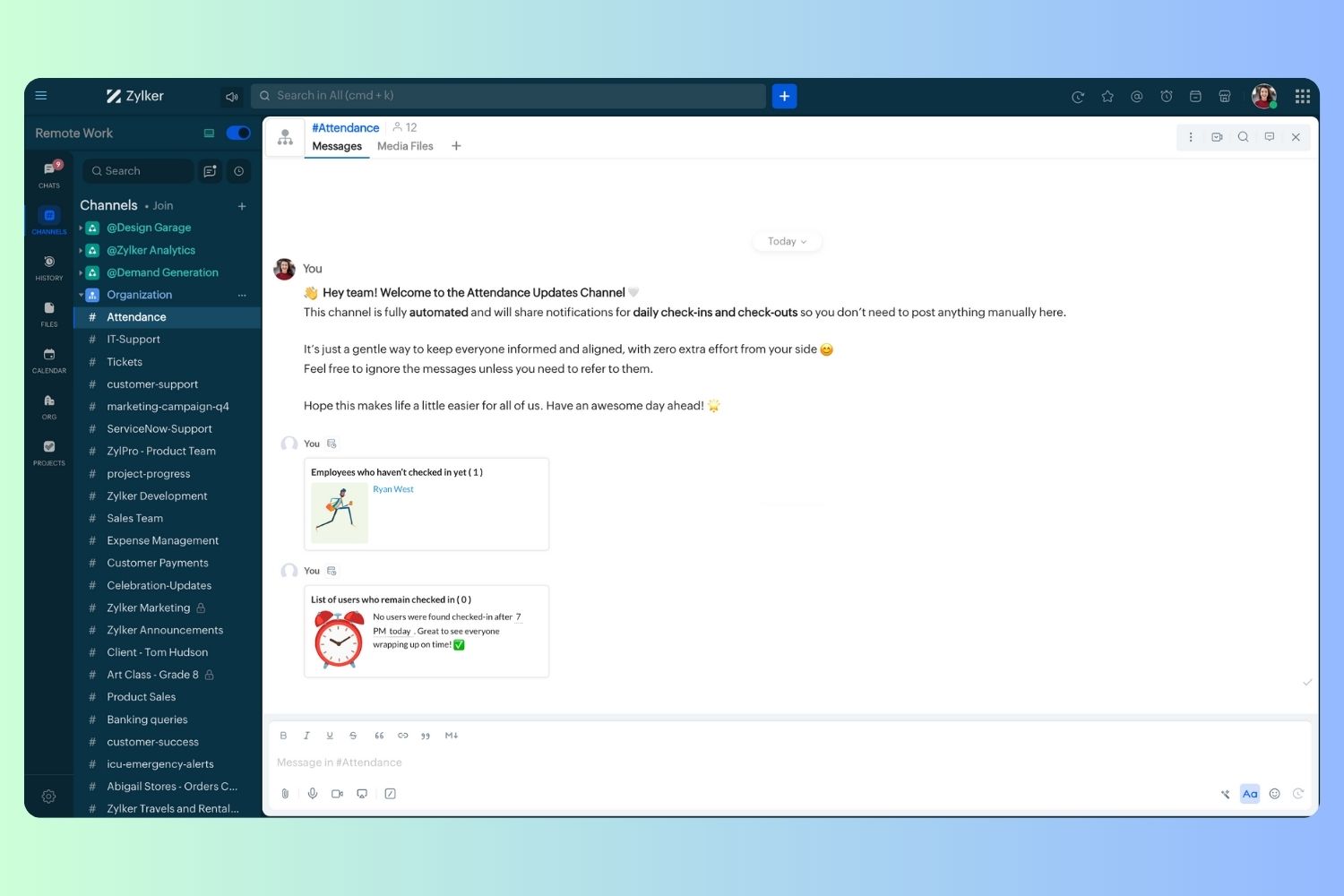
Wrapping up and checking out for the day, hopefully
Topic Participants
Harsha SS
Ram Freedman
Sticky Posts
Automate attendance tracking with Zoho Cliq Developer Platform
I wish remote work were permanently mandated so we could join work calls from a movie theatre or even while skydiving! But wait, it's time to wake up! The alarm has snoozed twice, and your team has already logged on for the day. Keeping tabs on attendanceAutomating Employee Birthday Notifications in Zoho Cliq
Have you ever missed a birthday and felt like the office Grinch? Fear not, the Cliq Developer Platform has got your back! With Zoho Cliq's Schedulers, you can be the office party-cipant who never forgets a single cake, balloon, or awkward rendition ofCustomer payment alerts in Zoho Cliq
For businesses that depend on cash flow, payment updates are essential for operational decision-making and go beyond simple accounting entries. The sales team needs to be notified when invoices are cleared so that upcoming orders can be released. In contrast,Accelerate Github code reviews with Zoho Cliq Platform's link handlers
Code reviews are critical, and they can get buried in conversations or lost when using multiple tools. With the Cliq Platform's link handlers, let's transform shared Github pull request links into interactive, real-time code reviews on channels. ShareApp Spotlight : PagerDuty for Zoho Cliq
App Spotlight brings you hand-picked apps to enhance the power of your Zoho apps and tools. Visit the Zoho Marketplace to explore all of our apps, integrations, and extensions. In today's fast-paced world, seizing every moment is essential for operational
Recent Topics
Simplest way to convert XML to a map?
I've reviewed the help info and some great posts on the forum here by Stephen Rhyne (srhyne). At the moment I'm using XPath to generate a list of xml nodes, iterating through that to fetch the field name/value pairs and adding them to a map (one map for each record in the data). I then convert the row map to a string and add it to a list. Here's the function: list xml.getRecordListFromXML(string xml_data, string ele_name) { result = List(); // get list of record nodes rec_list = input.xml_data.toXML().executeXPath("//"Introducing Creator Simplified: An exclusive learning series to enhance your app development skills
Hey Creators! Welcome to Zoho Creator's new learning series, Creator Simplified. In this series, we'll dive into real-world business use cases and explore how to translate your requirements into solutions in your Creator application. You can also expect[Product update] Updated Data Synchronization Process for QuickBooks - Zoho Analytics Integration.
Dear QuickBooks integration users, We’re making an important update in the way data is currently synced in your QuickBooks integration within Analytics workspace. What’s changing: Previously, with every data synchronization, Zoho Analytics used to fetchZoho CRM new calander format cannot strikethrough completed task
Hi, Recently there is a new format for calendar within Zoho CRM However, found out that a completed task will not cross out or strikethrough like previous format. Without strikethrough, it will be difficult to identify which task is still in Open status.Employees not Users
Hello, We are a construction company that has +180 employees and most of them are in remote location working onsite with no access to internet. Is it possible that we have data stored for all employees but have only 5-10 users who will be in charge of entering employees data? or do we have to pay for all +180 employees? even though they won't be using the system?Zoho people generatimg pdf
Hello , now i want to make a customm button in zoho people that is inside a deduction module , that fetches all the records and generate a pdf with a template that i have done in the mail merges template , i was told that i have to upload template onzohorecruit.com career form postcode bug
Dear, When I select a postcode from the drop down on a zohorecruit.com career form, the street text field is automatically filled with the name of the city, which should not happen. Any idea how I can fix this? Thanks, BartOffice-365-agenda and Microsoft Teams Integration
Dear, I have a trial version of Zoho Recruit and trying to evaluate the Microsoft Teams Integration in Zoho Recruit. After registering with my Office 365 account and checking the result of the registration/sign-in at https://mysignins.microsoft.com/ (whichHow to add Connector in developer platform zoho?
Hi, I am working on creating an Extension, and part of the development is to retrieve Email templates. In my CRM instance I can invokeURL by creating Zoho OAuth connection and get the template. But developer platform does not provide Zoho OAuth or anyHow to archive Lost/Junk Leads so sales reps don’t see them, but keep them for reporting?
Hi everyone, In our Zoho CRM we have two Lead Status values: Lost Lead and Junk Lead. What I want to achieve is: When a lead is marked as Lost or Junk, it should disappear from my sales reps’ Lead views (so they only see active leads). At the same time,Zoho CRM Canvas Copy Original Layout
Hello all, I want to use Canvas to make small changes to certain views, not to make huge changes. Is it possible to copy the original Zoho layout and set-up and start from there? I checked and all I can find are some templates which are far from the originalRevenue Management: #5 Revenue Recognition in SaaS
If you're building or running a SaaS business, you've probably encountered this. You get paid upfront for a subscription and a one-time onboarding fee, but you end up with confusion about when to consider it revenue. Can I book all of it now? Should IZoho Learn Course Access Issue
One of the learners in a specific course can't see any lessons. They are registered as both a user and learner for this course in Zoo Learn. What could be the reason?ZOHOLICS Japan 2025 開催のお知らせ(再投稿)
【コミュニティユーザーの皆さまへお知らせ】 Zoho 最大のユーザーイベント「ZOHOLICS Japan 2025」を9月19日(金)に開催します。 AI活用に関する特別講演、ユーザー事例、Zoho 製品の活用例のご紹介など、Zoholicsならではのセッションをご用意しています。 Zoho コミュニティ開催のMeetupとはまた違った雰囲気のイベントです。 ご都合のつく方はお気軽にご参加ください✨ 詳細はこちら https://events.zoho.jp/zoholics2025#/?affl=forumpost2Phone Number format for Bulk Upload via csv for Zoho Sign
What is the phone number format that we need to use for a bulk recipient upload via csv in zoho sign, should the country code be included for ex if its US should it be +18889007865 ior 18889007865 or without country code 8889007865? the sample csv providedFilter Page Elements By Selectable Date Range
I have created a basic Page that will serve as a client dashboard with elements that will provide simple counts & sums of data in reports. There are no reports or forms added to the page, just elements. It currently functions as needed, but shows theCan’t Enter my Notebook is Locked
I’ve been using Notebook for taking notes at my college for a month and I never signed in and I never established a password. Today I tried to enter the app after the update and it asked me for a password. I need to access to my notes urgently and I can’tSend Email Directly to Channel
Hi, We are coming from Slack. In Slack each channel has a unique Email address that you can send emails too. I currently forward a specific type of email from my Gmail InBox directly do this channel for Verification Codes so my team doesn't have to askSecure your external sharing process with OTP Authentication
For any business, it's crucial to share files externally in a way that is both secure and controlled. Let's say you want to share confidential data with your partners and vendors. You must ensure that only your intended recipients can access the sharedItems attribute questions
Many of my items have attributes, such as size and color. How can I add new fields to the "New Items" screen to capture that in my Purchase Orders, Items, and Sales Order pages? I only see these attribute fields when adding an Item Group. Also, on theIs there a way to search mail for items you haven't yet responded to?
I'm trying to create a search to show emails that haven't been responded to and that have also been assigned a tag or label. Is there a way to search for the inverse of replied?Subtotals per Header
Hey, we would like to display subtotals per header in our invoices:upgrade storage
how to upgrade my storageLinking items from books and subscription
Linking books and subscription It is a pity that it is not possible to associate with a product an article present in ZohoBooks This would make it possible to manage products composed of a nomenclature of articles of booksAdd the ability to view number of hours planned for a workorder while in the Dispatch Console
Hi Zoho, When dispatching a work order through the Dispatch Console, there's currently no way to view the number of planned hours for the service tasks associated with that specific work order. Having to click into the details each time to check plannedUploading Files from uploads api
I tried uploading the image from the API call but its giving me unauthorized error even i have given valid token in header. After uploading i need that id to pass in create ticket api uploads but its not uploading that file. Please help me out in thChange format of quantity format
Hi, I would like to change the qunatity format from 1,00 to 1. Is this possible? thanks!square up and Zoho books
Since we set up the app connection between square up and Zoho books we have realised that when the amounts are getting transferred Zoho is adding VAT again making the numbers 20% more than they should be. We have checked our settings and they VAT/ TaxHow to provide Access rights to specific Bank accounts
We have several bank accounts. I want to provide certain members access to only 2-3 accounts. It appears that when I give permissions, they are for ALL bank accounts. How do I do that?Errors Getting a Bank Transaction
Using Postman(for testing), I am receiving errors when attempting to get a single bank transaction. I am able to receive the list of bank transactions with https://www.zohoapis.com/books/v3/banktransactions/?organization_id={org_id} but when I try toSubscriptions Plans and CRM Products Integration?
Is there any way to set up plans and pricing in Zoho Subscriptions and have those available as Products in the CRM? We are trying to set up the CRM and the Products seem to be more geared toward selling products that are not subscription based. So if we sell annual or monthly contracts which are $10/seat/month, I can set this up as a plan in Subscriptions, but how can I set the same thing up in the CRM for the salespeople to sell/quote? What is the best practice for setting up the CRM Products toMapping Zoho Subscription Plans and Products to CRM and Books
We have products that are one time products and subscription products. 1) We would like to have the ability to create an opportunity in CRM that includes both one-time charge products and subscription products. Currently the only way of creating a subscription product is by defining a "Product->Plan" hierarchy in Zoho Subscription. It appears that the only SYNC between Subscription and CRM is around contacts and the Product->Plan hierarchy doesn't sync to CRM, thus, you would need a duplicateBulk update fields based on date
Hi! I need all the quotes with "Quote Stage" set to "Next Year" to update to "Draft" every January 8 (every year). Can you help?Target for a campaign
Hi, Hope you can help me. I need to create a report (for a marketing campaign) that combines Deals and Contacts to export all the contacts with closed deals. I can easily do that, what I cannot do is to remove from the target the contacts that have moreZoho Desk + Jira integration - Email notifications and comments posted by administrator instead of real user
Dear All, I set up the integration under my admin account, and now when users leave comments in Jira (to created tickets in Zoho Desk), the email notifications show that the ‘Administrator’ left a comment, not a real user. The same happens in the ticketCelebrating the power of visuals
On World Photography Day, we would like to highlight the power of visuals in customer service. Visuals promote learning and understanding in less time. A photograph can rekindle a memory, convey more than words, and give a fresh perspective. How doesBlocking / black listing customers
Hi, We have a situation, we observed that certain customers are blocking multiple appointments with our advsiors but not showing up. Some of these are repeat offenders. This leads to those service hours getting blocked and not available for genuine customers.Feature Request: Email Templates for notifications accross all services
Currently in Zoho Bookings, email notifications (such as booking confirmations, reminders, and cancellations) must be customized individually for each service. This becomes time-consuming and error-prone when managing multiple services that require consistentApproval-based booking with Zoho Creator and Zoho Bookings
Hi community members, We have developed a workaround for approval-based booking using Zoho Creator and Zoho Bookings! This provides a temporary solution as we work on the native feature, and it's useful for anyone needing an approval workflow when confirmingMember Accounts in Related List
Hi Team, Currently, when a parent account is associated with an account in FSM, there is no related list displaying the associated member accounts under the parent account’s related list section. To view member accounts, I have to manually search usingNext Page