Automation#35 : Auto-Add Comments under the Owner's Name in Tickets via Macros

Hello Everyone,
This week's custom function provides simple steps to configure a Macro for adding comments to tickets with the name of the Comment owner.
When managing tickets, you can use the Comment feature to communicate internally with your team and keep everyone updated. If you select Comment(Private), the information will only be visible internally within your Zoho Desk. If you choose Comment(Public), the comment will be visible to your customers on the Help Center.
While automating comments using Macros, it can be challenging to track progress or identify the comment owner if no agent is attributed to the automated entry. This custom function ensures that the comment will appear under the name of the agent who applied it, rather than the person who configured the Macro.
Additionally, this Macro allows you to include a standardized comment to save time for frequently repeated updates.
While automating comments using Macros, it can be challenging to track progress or identify the comment owner if no agent is attributed to the automated entry. This custom function ensures that the comment will appear under the name of the agent who applied it, rather than the person who configured the Macro.
Additionally, this Macro allows you to include a standardized comment to save time for frequently repeated updates.
For example, Zylker Techfix collaborated across multiple departments and often required detailed customer information before transferring tickets between teams. They used comments to inform colleagues about the ticket status. To streamline this process, they automated a frequently used comment: "Awaiting additional information from the customer to proceed further." This clearly communicated to team members why a ticket was on hold. Additionally, this custom function allowed them to track which agent who applied the Macro.
To configure this within your Macros, please follow the steps below.
To configure this within your Macros, please follow the steps below.
Create a connection
1.1 Go to Setup(S) and choose Connections under Developer Space.
1.2 Click Create Connection.
1.3 Select Zoho Desk under Default Services.
1.4 Set the connection name as deskconnection.
1.2 Click Create Connection.
1.3 Select Zoho Desk under Default Services.
1.4 Set the connection name as deskconnection.
1.5 Under Choose Scopes, choose the below scope values:
Desk.basic.READ
Desk.settings.READDesk.tickets.UPDATE
1.6 Click Create and Connect.
1.7 Click Connect.
1.8 Choose the Desk's organization to connect with Deluge, and click Submit.
1.9 Click Accept.
1.7 Click Connect.
1.8 Choose the Desk's organization to connect with Deluge, and click Submit.
1.9 Click Accept.
Connection is created successfully.
Configure Custom Function within the Workflow Rule
1. Go to Setup, choose Macros under Automation.
2. Under Macros, click Create Rule.
3. Check if the right department is selected
4. Under Basic Information, give a Rule Name and Description.
5. Under Availability, select All agents/Specific Agents based on your requirement. If you choose Specific Agents, select the agents for whom you want to make this Macro available. Click Next.
6. Under Actions, click on the drop-down in the + icon and select Custom Functions >> New.
6.1 Under Basic Information, enter Name and Description. Choose Tickets under Module.
6.1 Under Basic Information, enter Name and Description. Choose Tickets under Module.
6.2 Under Argument Mapping, give a desired Method Name. Map the arguments as below:
6.2.1 In the Argument Name field, type ticketId and select Ticket Id in the Tickets Section.
6.2.1 In the Argument Name field, type ticketId and select Ticket Id in the Tickets Section.
7. In the script window, insert the Custom Function given below:
- // ----<<<< User Inputs >>>>----
- // --- Replace ".com" with appropriate domain extension based on customer's location/DC ---
- deskURL = "https://desk.zoho.com";
- commentContent = "<<Your_comment_content>>";
- // ----<<<< Initial Configs >>>>----
- logs = Map();
- ticketCommentParam = Map();
- loginUserEmail = zoho.loginuserid;
- logs.insert("ticketId": ticketId);
- logs.insert("loginUserEmail": loginUserEmail);
- //---------------------------
- try {
- // ---- start your logic from here ----
- agentDetailsResponse = invokeurl
- [
- url :deskURL + "/api/v1/agents/email/" + loginUserEmail
- type :GET
- connection:"deskconnection"
- ];
- logs.insert("agentDetailsResponse":agentDetailsResponse);
- if(agentDetailsResponse != null && agentDetailsResponse != "" && agentDetailsResponse.size() > 0 && agentDetailsResponse.containKey("id"))
- {
- agentId = agentDetailsResponse.get("id");
- ticketCommentParam.insert("commenterId":agentId);
- }
- // ---- Add comment in the ticket ----
- ticketCommentParam.insert("content":commentContent);
- ticketCommentParam.insert("isPublic":"false");
- ticketCommentParam.insert("contentType":"html");
- logs.insert("ticketCommentParam":ticketCommentParam);
- commentAddResponse = invokeurl
- [
- url :deskURL + "/api/v1/tickets/" + ticketId + "/comments"
- type :POST
- parameters:ticketCommentParam.toString()
- connection:"deskconnection"
- ];
- logs.insert("commentAddResponse":commentAddResponse);
- }
- catch(errorInfo) {
- logs.insert("errorInfo": errorInfo);
- }
- info "logs: \n" + logs;
- if(logs.containKey("errorInfo"))
- {
- throws "Error happen in the CF execution";
- }

Note
a. In Line 3, replace .com in the address with .in/.eu/.ca based on your DC.
b.In Line 4, enter the text which you would like to include as a ticket.
8. Click Save to save the custom function.
9. Click Save again to save the Macros.
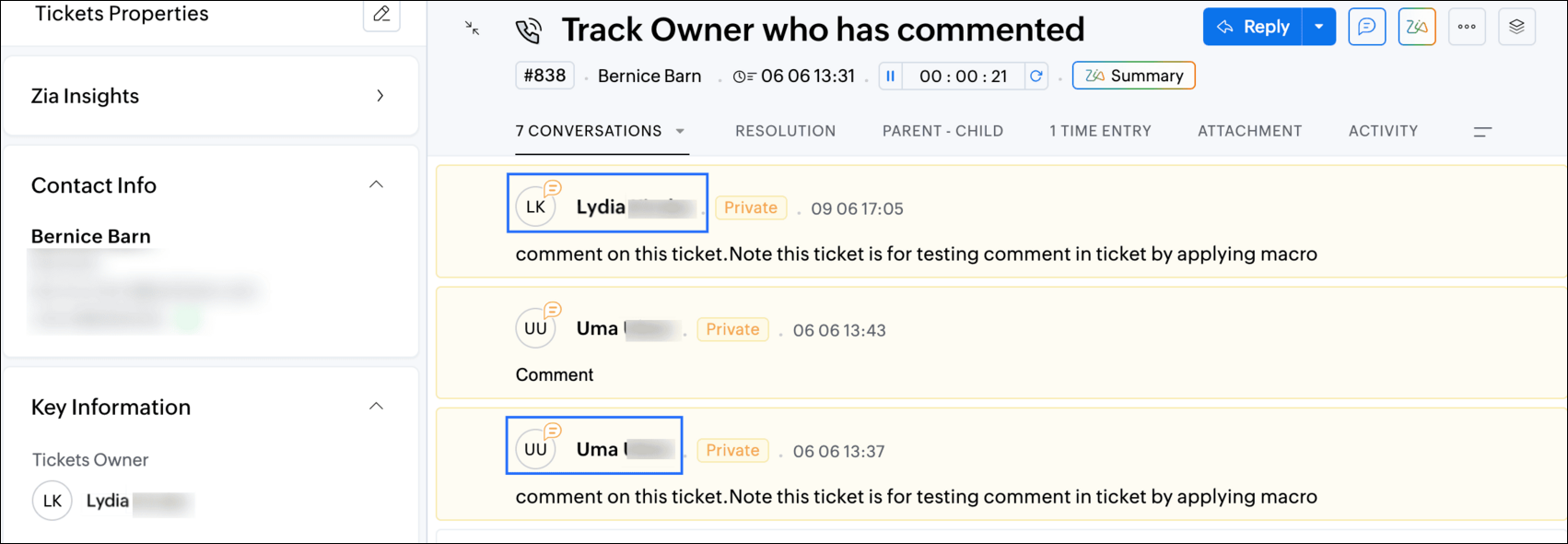
9. Click Save again to save the Macros.
We hope this custom function helps streamline your team's communication and enhances your ticket management process. If you have any questions or need further assistance, feel free to reach out to us at support@zohodesk.com .
Regards,
Lydia | Zoho Desk
Topic Participants
Lydia | Zoho Desk
Sticky Posts
Register for Zoho Desk Beta Community
With the start of the year, we have decided to take a small step in making the life of our customers a little easier. We now have easy access to all our upcoming features and a faster way to request for beta access. We open betas for some of our featuresShare your Zoho Desk story with us!
Tell us how you use Zoho Desk for your business and inspire others with your story. Be it a simple workflow rule that helps you navigate complex processes or a macro that saves your team a lot of time; share it here and help the community learn and grow with shared knowledge.Tip #1: Learn to pick the right channels
Mail, live chat, telephony, social media, web forms—there are so many support channels out there. Trying to pick the right channels to offer your customers can get pretty confusing. Emails are most useful when the customer wants to put things on record. However, escalated or complicated issues should not be resolved over email because it's slow and impersonal. When you need immediate responses, live chat is more suitable. It's also quick and convenient, so it's the go-to channel for small issues.Welcome to Zoho Desk Community - Say hello here!
Hello everyone! Though we have been here for a while, it’s time to formally establish the Zoho Desk Community; we’re really happy to have you all here! This can be the place where you take a moment to introduce yourself to the rest of the community. We’d love to hear all about you, what you do, what company or industry you work for, how you use Zoho Desk and anything else that you will like to share! Here’s a little about me. I am Chinmayee. I have been associated with Zoho since 2014. I joined hereWebinar 1: Blueprint for Customer Service
With the launch of a host of new features in Zoho Desk, we thought it’ll be great to have a few webinars to help our customers make the most of them. We’re starting off with our most talked about feature, Blueprint in Zoho Desk. You can register for the Blueprint webinar here: The webinar will be delivered by our in-house product experts. This is a good opportunity to ask questions to our experts and understand how Blueprint can help you automate your service processes. We look forward to seeing
Recent Topics
Ability to Export Field Dependency Structure in Zoho Desk
Hi Zoho Team, We’d like to request a feature enhancement in Zoho Desk that would greatly improve configuration management for organizations like ours: Requested Feature: The ability to export the full structure of Field Dependencies, especially for multi-level[URGENT] Allow reorder (drag&drop) of subform record
Very simple user case: a wedding planning app where you want to send your client a form to fill with information about their wedding. Form includes some field for general purpose information and a subform for event pacing/schedule. Clients are invited to create a new row (When? - What? - Where? - Who?) for each thing happening during their wedding chronologically. Ex: When What 10h Something TBD Speech After speech Yet another thing happeningDepartments in Zoho
I'm trying to set up a department. It looks like Departments have been removed from Zoho One. Is there another option? We have our main account setup, but want to set up a separate small department that can't see our tabs.Add Timer for Agent Status Duration in Zoho Desk Dashboard
Hello Zoho Desk Team, We hope you're doing well. We would like to submit a feature request to further enhance the agent status tracking functionality within the Zoho Desk Dashboard. 🎯 Current Functionality As it stands, Zoho Desk allows us to view the[Beta Feature] Parent-Child Ticketing
Hello there, a beta parent-child ticketing feature has recently been made available for some, read more here: https://help.zoho.com/portal/en/kb/desk/ticket-management/articles/understanding-parent-child-ticketing-system#Business_scenarios I would likeEnable Sorting by Ticket Count in Category Reports
Hi Zoho Desk Product Team, I hope you're doing well. We would like to submit a feature request to improve the reporting capabilities in Zoho Desk. 🎯 Feature Request: Sorting by Ticket Count in Category Reports Currently, category-based reports in ZohoReactivating a CRM user...
I'm a 1-man business primarily using CRM under my Zoho1 subscription (I have NO other employees or users). I wish to re-activate a prior user (my son, once more working with me) but when changing his status from inactive to active I receive this message:Zohoサポートにスコープ開放を依頼する
お世話になっております。 現在、弊社にてZoho DeskのナレッジベースをAPI経由で取得し、AIツール(NotebookLM等)に連携する仕組みの構築を検討しています。 つきましては、ZohoDesk.articles.READ スコープを使用したOAuth認証の許可をいただけますでしょうか。 API Console から Server-based アプリを作成済みですが、認可URLにアクセスすると「スコープが登録されていません」と表示されます。 お手数をおかけしますが、スコープの開放をごWhere can I configure the notifications for everything KB-related?
Hi all, I'm receiving notifications for some actions happening in our Knowledge Base (e.g. someone leaving a feedback) and I would like to customise the template or have the choice to enable/disable such notifications like it is possible for ticket notificationSelf Client Authorization Code Flow for Mail returns 404
Hello, I'm having trouble getting the Zoho mail api setup and want a sanity check. I am trying to follow this guide to get an access token for the mail api: https://www.zoho.com/accounts/protocol/oauth/self-client/authorization-code-flow.html UnfortunatelyZoho Knowledgebase Help Center Categories linkages are wrong
Greetings, I am build a help center in zoho desk, based on the additional custom brand I have paid for. My knowledge base has 4 main categories. I have this setup this way in my knowledgebase customization theme area. The page layout is like this: HereCan Answer Bot read private articles if I have ChatGPT activated?
I've uploaded an article that is basically a data dump of our website. I want Answer Bot to be able to look through that article and find answers via OpenAI. I've connected with OpenAI API and all seems well, however it doesn't seem to find anything.Zoho Social integration with Zoho Flow
Is there any plans for Zoho Social integration with Zoho Flow?Connecting Learn to a Custom GPT
Hi all! I am attempting to connect a Learn Space and all it's articles into a custom GPT. Has anyone successfully done this? I have worked on it with no success so far.Tip 12: How can you customize the display name while sending emails from Zoho Creator.
Hi folks, Usually when you send emails to your users, the display name defaults as your From email address. Most often, you would like to set a custom display name to represent your organization or the context of the email. You can mask or customize the display name (From Address) using Deluge script as long as the From email address has been verified. This would be very useful to you if you want to send bulk emails to a large audience. Let's say you have a Student Registration form for your danceImporting Data to update and not add
I'm very new to Zoho created and tried searching the forums for the answer. Nothing I found has helped me make sense of how to do this. I created a app based on an excel spreadsheet but no matter what I do, whenever I import data it duplicates the record. I have a field I would like to use as a unique identifier, but I'm not sure how to tell my app that. Any assistance, even a link to a tutorial on creating functions in the workflow of the app, would be very helpful. Unfortunately I can't shareAllow me to duplicate a field
Hi, Many times I need to create new field with slightly change compare to an existing one. So when I click an existing field, can you add one more option "duplicate"? That'd be very helpful. You mayc heck wufoo.com to see this feature. Thanks, Li lhong1Community Digest Noviembre 2024 - Todas las novedades en Español Zoho Community
¡Hola, Español Zoho Community! Wow, ya termina el año, ¡gracias a vuestra participación se nos ha pasado volando! Por eso mismo estamos preparando sorpresas para todos los que participáis en la Español Zoho Community para el próximo año, ¡estad atentosZoho Mail iOS app - Complete revamp of the UI including insert image option, toolbar customization, calendar widgets and more!
Hello everyone! The new Zoho Mail iOS app introduces a fresh look, blending native iOS features with a refined UI and UX to make email management more intuitive. The updated design focuses on simplicity, ensuring smoother navigation throughout the app.Adding a work order for Assets vs. changing the contact person
When adding a work order for an existing Assets (e.g. service), the assigned contact cannot be changed (deleting the contact deletes the selected Assets). This results in such an illogical operation that if you want to change the person to be contacted,DOMIN NME
How many email account do zoho supportsAssign admins to the application
I want to know who to assign admins to UAE Payroll application. I tried from inside the application, and from one.zoho.com >> directory and nothing is happening, knowing that I have enabled zoho people integration with payroll. Can someone help me?Zoho Marketing Campaign
I want a details report of marketing API . which API i can use to get a full flexed detail of email campaign , sms , social media ,and all other campaigns ?¿Puedo migrar mi sitio desde WordPress a Zoho? ¿Zoho admite herramientas con código personalizado?
¡Hola comunidad! Estoy evaluando la posibilidad de migrar mi sitio web https://calculadoradenotas.cl/ desde WordPress a una solución Zoho, y tengo algunas dudas técnicas que espero puedan aclararme. Mi sitio no es solo informativo: es una herramientaAutomating SharePoint Folder Creation based on Equipment Module
Dear Team, I would like to seek your valuable advice on one of my requirements. My objective is to automatically create a SharePoint folder whenever a record is created in the Equipment module. The folder should be named based on the equipment name. OnceCan I view a gallery of attachments related to an Account, Contact, or Subscription
It is often useful to review photos related to an account or contact by service type. It would be nice to be able to see the photos collected through workorders or appointments all associated.Language Field on Contact Person-level
Dear at Zoho Books, would it be possible for you to have a Field for 'Language' for the Contact Persons under a Company. In CRM and Bigin we could create a Custom Field (Dropdown) for this effect but without any present in Zoho Books we could never syncCustomise Zoho FSM Work Order Name
Hi there, is there a way for us to customise the work order number? For example - I want to add auto look up for company name or dates at the end of the work order number. WO4 - Company ABCIntroducing Dynamic Display in Zoho CRM mobile apps
Hello everyone, We're happy to announce that Dynamic Display is now available in the Zoho CRM mobile app for both iOS and Android devices. Mobile apps have become synonymous with convenience and flexibility. As more and more businesses rely on mobileHow we can integrate pdf attachments in zoho crm with xero
when i tried to integrate the data and attchment from zoho crm to to xero only the data get integrated with xero how we can integrate the pdf attachment as well nb zoho apis are not working via functionsDelete user profile
Hello, How can I delete a User Profile?Send emails directly via Cases module
Greetings all, The ability to send emails from the Cases module, which users have been eagerly anticipating, is now available, just like in the other modules. In Zoho CRM, Cases is a module specifically designed for managing support tickets. If your organizationIntroducing delegate signing in Zoho Sign
Hi everyone! We are happy to announce a new feature in Zoho Sign — Delegate Signing! Whether you're tied up in meetings, away on vacation, or managing multiple responsibilities, you can now assign a delegate to sign documents on your behalf. This ensuresZoho Voice VS in Zoho CRM for logging calls
I don't understand the differences between logging calls in Zoho Voice VS in Zoho CRM. Why the 2 separate platforms? Seems confusingUpdates to Auto-Upgrade in Zoho Campaigns
Hello everyone, We've rolled out a new update that slightly modifies how the auto-upgrade option in Zoho Campaigns works. Even if you hit the contact limit, this update ensures that your account is upgraded and that contacts are imported smoothly—withoutAdding Sub-Forms to Merge Documents
I am setting up a Mail Merge, which includes sub-form table data. I've done it before but now I am having issues: 1. The headings don't show. I had to enter these manually 2. The table lines are separated. I want them together. Anyone know how to fixZoho Bookings Online Training | July 31, 2025
Hi everyone! We’re back with the second session of our Zoho Bookings training series! This time, we’ll show you how to automate your scheduling, manage appointments more efficiently, and explore advanced features for your industry. Join our free, two-hourCREATE button is grayed
On Android adding new notes to notebooks with collections is impossible because the CREATE button is grayed. What can be done?Can Zoho Creator Apps have multiple actors and steps? Example
Mortgage Application App- Outside party fills out form via published website form, Inside party approves for additional documentation, outside party recieved requests for x, y, and z documents. Outside party submits x, y and z but z is wrong. InsideRe-Apply SLA When Ticket Reopened from Closed Status?
If you have an SLA applied, timers are deactivated when going to "On Hold" status type and reactivated when going back to an Open status type. What we discovered is when a customer replies to a closed case and it reopens, the SLA is not applied and timersNext Page