Automation#35 : Auto-Add Comments under the Owner's Name in Tickets via Macros

Hello Everyone,
This week's custom function provides simple steps to configure a Macro for adding comments to tickets with the name of the Comment owner.
When managing tickets, you can use the Comment feature to communicate internally with your team and keep everyone updated. If you select Comment(Private), the information will only be visible internally within your Zoho Desk. If you choose Comment(Public), the comment will be visible to your customers on the Help Center.
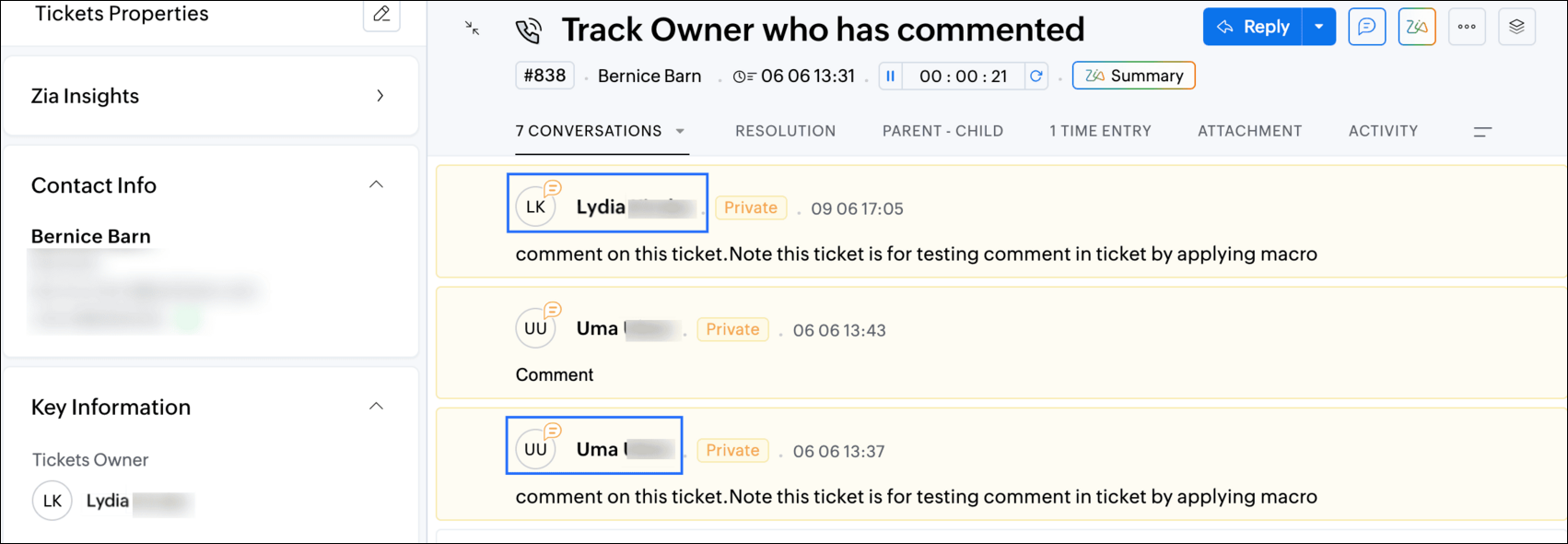
While automating comments using Macros, it can be challenging to track progress or identify the comment owner if no agent is attributed to the automated entry. This custom function ensures that the comment will appear under the name of the agent who applied it, rather than the person who configured the Macro.
Additionally, this Macro allows you to include a standardized comment to save time for frequently repeated updates.
While automating comments using Macros, it can be challenging to track progress or identify the comment owner if no agent is attributed to the automated entry. This custom function ensures that the comment will appear under the name of the agent who applied it, rather than the person who configured the Macro.
Additionally, this Macro allows you to include a standardized comment to save time for frequently repeated updates.
For example, Zylker Techfix collaborated across multiple departments and often required detailed customer information before transferring tickets between teams. They used comments to inform colleagues about the ticket status. To streamline this process, they automated a frequently used comment: "Awaiting additional information from the customer to proceed further." This clearly communicated to team members why a ticket was on hold. Additionally, this custom function allowed them to track which agent who applied the Macro.
To configure this within your Macros, please follow the steps below.
To configure this within your Macros, please follow the steps below.
Create a connection
1.1 Go to Setup(S) and choose Connections under Developer Space.
1.2 Click Create Connection.
1.3 Select Zoho Desk under Default Services.
1.4 Set the connection name as deskconnection.
1.2 Click Create Connection.
1.3 Select Zoho Desk under Default Services.
1.4 Set the connection name as deskconnection.
1.5 Under Choose Scopes, choose the below scope values:
Desk.basic.READ
Desk.settings.READDesk.tickets.UPDATE
1.6 Click Create and Connect.
1.7 Click Connect.
1.8 Choose the Desk's organization to connect with Deluge, and click Submit.
1.9 Click Accept.
1.7 Click Connect.
1.8 Choose the Desk's organization to connect with Deluge, and click Submit.
1.9 Click Accept.
Connection is created successfully.
Configure Custom Function within the Workflow Rule
1. Go to Setup, choose Macros under Automation.
2. Under Macros, click Create Rule.
3. Check if the right department is selected
4. Under Basic Information, give a Rule Name and Description.
5. Under Availability, select All agents/Specific Agents based on your requirement. If you choose Specific Agents, select the agents for whom you want to make this Macro available. Click Next.
6. Under Actions, click on the drop-down in the + icon and select Custom Functions >> New.
6.1 Under Basic Information, enter Name and Description. Choose Tickets under Module.
6.1 Under Basic Information, enter Name and Description. Choose Tickets under Module.
6.2 Under Argument Mapping, give a desired Method Name. Map the arguments as below:
6.2.1 In the Argument Name field, type ticketId and select Ticket Id in the Tickets Section.
6.2.1 In the Argument Name field, type ticketId and select Ticket Id in the Tickets Section.
7. In the script window, insert the Custom Function given below:
- // ----<<<< User Inputs >>>>----
- // --- Replace ".com" with appropriate domain extension based on customer's location/DC ---
- deskURL = "https://desk.zoho.com";
- commentContent = "<<Your_comment_content>>";
- // ----<<<< Initial Configs >>>>----
- logs = Map();
- ticketCommentParam = Map();
- loginUserEmail = zoho.loginuserid;
- logs.insert("ticketId": ticketId);
- logs.insert("loginUserEmail": loginUserEmail);
- //---------------------------
- try {
- // ---- start your logic from here ----
- agentDetailsResponse = invokeurl
- [
- url :deskURL + "/api/v1/agents/email/" + loginUserEmail
- type :GET
- connection:"deskconnection"
- ];
- logs.insert("agentDetailsResponse":agentDetailsResponse);
- if(agentDetailsResponse != null && agentDetailsResponse != "" && agentDetailsResponse.size() > 0 && agentDetailsResponse.containKey("id"))
- {
- agentId = agentDetailsResponse.get("id");
- ticketCommentParam.insert("commenterId":agentId);
- }
- // ---- Add comment in the ticket ----
- ticketCommentParam.insert("content":commentContent);
- ticketCommentParam.insert("isPublic":"false");
- ticketCommentParam.insert("contentType":"html");
- logs.insert("ticketCommentParam":ticketCommentParam);
- commentAddResponse = invokeurl
- [
- url :deskURL + "/api/v1/tickets/" + ticketId + "/comments"
- type :POST
- parameters:ticketCommentParam.toString()
- connection:"deskconnection"
- ];
- logs.insert("commentAddResponse":commentAddResponse);
- }
- catch(errorInfo) {
- logs.insert("errorInfo": errorInfo);
- }
- info "logs: \n" + logs;
- if(logs.containKey("errorInfo"))
- {
- throws "Error happen in the CF execution";
- }

Note
a. In Line 3, replace .com in the address with .in/.eu/.ca based on your DC.
b.In Line 4, enter the text which you would like to include as a ticket.
8. Click Save to save the custom function.
9. Click Save again to save the Macros.
9. Click Save again to save the Macros.
We hope this custom function helps streamline your team's communication and enhances your ticket management process. If you have any questions or need further assistance, feel free to reach out to us at support@zohodesk.com .
Regards,
Lydia | Zoho Desk
Topic Participants
Lydia | Zoho Desk
Sticky Posts
Register for Zoho Desk Beta Community
With the start of the year, we have decided to take a small step in making the life of our customers a little easier. We now have easy access to all our upcoming features and a faster way to request for beta access. We open betas for some of our featuresShare your Zoho Desk story with us!
Tell us how you use Zoho Desk for your business and inspire others with your story. Be it a simple workflow rule that helps you navigate complex processes or a macro that saves your team a lot of time; share it here and help the community learn and grow with shared knowledge.Tip #1: Learn to pick the right channels
Mail, live chat, telephony, social media, web forms—there are so many support channels out there. Trying to pick the right channels to offer your customers can get pretty confusing. Emails are most useful when the customer wants to put things on record. However, escalated or complicated issues should not be resolved over email because it's slow and impersonal. When you need immediate responses, live chat is more suitable. It's also quick and convenient, so it's the go-to channel for small issues.Welcome to Zoho Desk Community - Say hello here!
Hello everyone! Though we have been here for a while, it’s time to formally establish the Zoho Desk Community; we’re really happy to have you all here! This can be the place where you take a moment to introduce yourself to the rest of the community. We’d love to hear all about you, what you do, what company or industry you work for, how you use Zoho Desk and anything else that you will like to share! Here’s a little about me. I am Chinmayee. I have been associated with Zoho since 2014. I joined hereWebinar 1: Blueprint for Customer Service
With the launch of a host of new features in Zoho Desk, we thought it’ll be great to have a few webinars to help our customers make the most of them. We’re starting off with our most talked about feature, Blueprint in Zoho Desk. You can register for the Blueprint webinar here: The webinar will be delivered by our in-house product experts. This is a good opportunity to ask questions to our experts and understand how Blueprint can help you automate your service processes. We look forward to seeing
Recent Topics
ERROR 554 5.1.8 Sender Address Blocked code(554)
We have an email with Zoho ( comercial@bruiser.com.br), but, when we try associate the account in GMAIL, the server shows this message: 554 5.1.8 Sender Address Blocked code(554) I see this error appear when the limits of returns exceded 10 messages,Zoho mail stopped receiving emails
Our email are stopped to receive outsider email. i have checked the DSN, it's pointed to ZOho mail. Can anyone help me to fix this issue urgently? Thankssend email from web application
Hello, I'm experiencing an issue with sending emails from my web application. Here are the configuration parameters currently in use: ini Copia Modifica quarkus.mailer.from=noreply.sedis@mondonovo.net quarkus.mailer.host=smtp.zoho.com quarkus.mailer.port=465Custom CSS in Zoho Form
Hi, Please let me know, how we can add custom css in Zoho Form. ThanksZoho Recruit
Getting this issueMissing Email
We recently started using ZohoMail we migrated our users from google workspaces. The migration process seemed to have gone smoothly however not all emails are showing in the inbox folder. For example: If I sort the inbox folder from old to new. (OldestClient Script Quality of Life Improvements #1
Since I'm doing quite a bit of client scripting, I wanted to advise the Zoho Dev teams about some items I have found in client script that could be improved upon. A lot of these are minor, but I feel are important none-the-less. Show Error on SubformAccount blocked after accessing via VPN
All my accounts are blocked after using a VPN. I have submitted multiple support tickets without response. It’s critical that my email be restored asap Can you please provide a way to unblock my accountsCourses without signup
Can I create "real" public courses where no signup is needed?Espace Sandbox – Votre environnement de test sécurisé dans Zoho Projects
Zoho Projects propose un sandbox sécurisé pour tester des configurations, des personnalisations et des modifications sans compromettre les données en production. Note : Disponible avec le plan Enterprise le plus récent basé sur les utilisateurs (y comprisDescargas en learn
Buenos dias, yo en mis cursos para no tener que cargar los archivos que utilizare en las lecciones decidi utilizar la opcion de bloques para añadir un enlace de mi workdrive con el video que deseo para que sea todo mas organizado, pero hay un problema.Mail delivery
I initially had a problem sending any outgoing mail and was able to fix it on my own, given Zoho support never got back to me. However, despite being able to send emails now, none of my mail to different Gmail addresses are arriving, and they are notMermaid Support & Zoho Learn
Hi Zoho Team, I’m currently working with Zoho Learn and was wondering if there’s any way to add support for Mermaid syntax to create flowcharts, sequence diagrams, and other visual elements within articles or lessons. Mermaid is widely used in technicalBlocked due to VPN
Hi My account outgoing mails and IMAP access have been blocked due to using a vpn being interpreted as suspicious logins. I’ve tried to mail support but not sure if this is also blocked. This is extremely frustrating as I’m using a vpn because I’m travellingreset admin access.
I am a user under the domain @lanutraceuticals.com. I do not have admin access. Kindly let me know the administrator contact or help me reset admin access.”Unsubscripation booked domin
Kindly Un subscription booked domainHow to change Super Admin
Good Day, Can someone kindly guide me on how to change the super Administrator. I have tried many times but could not succeed.Events disappearing in Calendar
To reproduce the bug: 1.- Add a new event in Calendar 2.- Type any name for the Event 3.- Click "Create" 4.- The event appears 5.- Click on the event to open it 6.- Optional: Edit the event 7.- Click OK 8.- After two seconds, the event disappears Now, click on another day and then come back to the inserted event's day. The event appears.Mail transfer to a contact with multiple accounts
Hi, Since we can only associate one email for a Contact across Zoho, would it be a problem if we want to merge our mailbox in the future? For example, Mr. Jones is the main POC for 5 accounts, once we merge our mail where would the messages go-- is it@mention not working in Mail
Am I missing something? When trying to forward a message there is a hint you could do this also by "@mention" at the end of the message. When typing (for example) "@s.." there should appear addresses from my contacts, shouldn´t it? But nothing happens! So what can I do? Best regards and thanks for any help in advance! JH P.S.: Sorry for my bad English.Enable Zia-Powered Deluge Assistance and AI Agent Without Mandatory OpenAI Integration
Hi Zoho Creator Team, Hope you're doing well. We’d like to request a feature enhancement related to Zia's AI capabilities in Zoho Creator, particularly regarding Deluge Assistance and the AI Agent. Currently, as shown in your documentation (Generate DelugeZoho Sign community meetup series - India
Hello everyone! Zoho Sign is a comprehensive digital signature application tailor-made for Indian businesses with unique features like Aadhaar eSign, eStamping, USB/PFX signing. We are now excited to announce our first meetup series for Zoho Sign in India,Product Updates in Zoho Workplace applications | June 2025
Hello Workplace Community, Let’s take a look at the new features and enhancements that went live across all Workplace applications this June. Zoho Mail Slideshow view for inline images in Notes View all your inline images added in a notes in a effortlesslyAssign multiple vendors to the same product
Guys, My business often purchase the same product from several vendors (based on price and availability). Is it possible to assign more than one vendor to the same product? I saw this same question in this forum, from some time ago. Is this feature available or, at least, in Zoho's roadmap? If not, is there any trick to solve my problem? Without this feature, I simply cannot manage my company's inventory, limiting very much the use of Zoho CRM. Waiting for your reply. Leonardo Kuba Sao Paulo / BrazilIs there as way to shut off the invitation when you set up a new user?
Is there as way to shut off the invitation when you set up a new user? I would like to get all my users in the system, my org structure set up and tested, etc, BEFORE I invite the users. I did not see a way to shut of the automatic invitation email. The only way to get around it is to set up the users with no Email ID. However, when you do that - you get into the problem of not being able to update a user's Email ID (which makes NO sense whatsoever). If I set up a user with an incorrect emailManage Engine login issue
App not available The app you're trying to access isn't yet available in the in data center region, where your account is present. To use ManageEngine, you can sign up for a new account in another data center region. Learn How Go to Zoho accounts PleaseZoho Creator - users "Name" Column
Hi, When you add user to an application inside Zoho Creator, the system generate an account name for it. We don't have the ability to change this name. According to Zoho creator Support (Case:11523656) : "The values displayed under 'Name' column of 'Users & permissions' section, is actually the respective account's username and not the actual name specified on the account. Usernames are system designated based on the account email address and cannot be modified from your end." We need to have theZoho Assist Unattended - devices disappearing
Hello, I've recently introduced a new model of laptops into our environment (Lenovo Legion). We are experiencing an issue where only the latest installed agent - laptop is visible in Assist. This issue does not appear with our Dell inventory. Example:Searchable email tab in Bigin
Hi team, Could I please request a feature update, to be able to search emails within the email tab of Bigin. We have large correspondence with some agents and it would be very helpful if we are able to search from this section:The silent force behind great customer service
Customer service is known to be a demanding role. Customer service agents are expected to bring empathy, clarity, and human connection to every voice call, chat, and remote session, even if the situation requires some time for customers facing stressful,New From Email in Zoho Desk
Dear ZohoSupport, We are trying to establish a new From Address in Zoho Desk but we are facing difficulties. When trying to use the smtp.office365.com SMTP Server, after clicking the Save and Verify button, the Authentication Failed error pops up although,Option in pipeline deal to select which hotel or branch or store if client has more than one local store
Hi, I would like to know if there is an option in the deal pipeline to select which hotel, branch, or store a deal is related to—if the company has more than one location. For example, I have a client that owns several hotels under the same company, andAggregate SalesIQ Knowledge Base Interactions into Zoho Desk Knowledge Base Dashboard
Hello Zoho Desk Team, We hope you're doing well. We’d like to request a feature enhancement related to the Zoho Desk Knowledge Base dashboard and its integration with Zoho SalesIQ. 🎯 Current Limitation When customers interact with knowledge base articlesAdmin Visibility and Control Over Group Chats in Zoho Cliq
Hello Zoho Cliq Team, We hope you're doing well. While we appreciate the current capabilities in Zoho Cliq — including the ability to restrict who can create group chats and configure user permissions — we would like to request several enhancements toUpdate Regarding Zoho Finance Applications' Domains For API Users
Hi users, Until now, both the Zoho Finance apps and their APIs shared a common domain. We've recently introduced separate domains for APIs. You can now start using the new domains for API calls. The old domains will not work for API users starting AprilAbility for Agents to Initiate Voice Calls With Site Visitors Without Active Chat Session
Dear Zoho SalesIQ Team, Greetings, We would like to request a feature enhancement related to the voice call functionality in Zoho SalesIQ. Current Limitation: At the moment, voice calls can only be initiated by agents after a chat session has been startedAdd new Card
How do you add a new credit card to a contact with Zoho API as can be done on web. I am not able to find way to do this with Books API, CRM API or Subscriptions API. This is an issue for our company as we do migration from a different system. I can add card to a subscription through Subscriptions API, but some of our customers may not have a subscription, but only invoices set up in Zoho Books. Is there any way in Zoho API to add new credit card to contact/customer?Benchmark for Using Mail Merge in Service Order Scopes
Hello, I was wondering if Zoho CRM has a benchmark or best practices for utilizing Mail Merge in service order scopes. Specifically, I'm looking for guidance on how to effectively integrate this feature for creating and managing service orders, especiallyWhy don't we have better integration with Mercado Pago or Pagseguro?
Currently, the integration between Zoho Commerce and Mercado Pago for Brazil is very poor... Since it is old, it does not include the main payment method in Brazil today, which is PIX. Is there a date for this to finally be launched? There are numeroustwo columns layout
it's actually frustrating to not have this feature, I actually had to convince my employer to subscribe to zoho forms and integrate it with zoho crm, but because of this feature not beeing provided, our forms looks unnecessarly long and hideous.Next Page