Automation#35 : Auto-Add Comments under the Owner's Name in Tickets via Macros

Hello Everyone,
This week's custom function provides simple steps to configure a Macro for adding comments to tickets with the name of the Comment owner.
When managing tickets, you can use the Comment feature to communicate internally with your team and keep everyone updated. If you select Comment(Private), the information will only be visible internally within your Zoho Desk. If you choose Comment(Public), the comment will be visible to your customers on the Help Center.
While automating comments using Macros, it can be challenging to track progress or identify the comment owner if no agent is attributed to the automated entry. This custom function ensures that the comment will appear under the name of the agent who applied it, rather than the person who configured the Macro.
Additionally, this Macro allows you to include a standardized comment to save time for frequently repeated updates.
While automating comments using Macros, it can be challenging to track progress or identify the comment owner if no agent is attributed to the automated entry. This custom function ensures that the comment will appear under the name of the agent who applied it, rather than the person who configured the Macro.
Additionally, this Macro allows you to include a standardized comment to save time for frequently repeated updates.
For example, Zylker Techfix collaborated across multiple departments and often required detailed customer information before transferring tickets between teams. They used comments to inform colleagues about the ticket status. To streamline this process, they automated a frequently used comment: "Awaiting additional information from the customer to proceed further." This clearly communicated to team members why a ticket was on hold. Additionally, this custom function allowed them to track which agent who applied the Macro.
To configure this within your Macros, please follow the steps below.
To configure this within your Macros, please follow the steps below.
Create a connection
1.1 Go to Setup(S) and choose Connections under Developer Space.
1.2 Click Create Connection.
1.3 Select Zoho Desk under Default Services.
1.4 Set the connection name as deskconnection.
1.2 Click Create Connection.
1.3 Select Zoho Desk under Default Services.
1.4 Set the connection name as deskconnection.
1.5 Under Choose Scopes, choose the below scope values:
Desk.basic.READ
Desk.settings.READDesk.tickets.UPDATE
1.6 Click Create and Connect.
1.7 Click Connect.
1.8 Choose the Desk's organization to connect with Deluge, and click Submit.
1.9 Click Accept.
1.7 Click Connect.
1.8 Choose the Desk's organization to connect with Deluge, and click Submit.
1.9 Click Accept.
Connection is created successfully.
Configure Custom Function within the Workflow Rule
1. Go to Setup, choose Macros under Automation.
2. Under Macros, click Create Rule.
3. Check if the right department is selected
4. Under Basic Information, give a Rule Name and Description.
5. Under Availability, select All agents/Specific Agents based on your requirement. If you choose Specific Agents, select the agents for whom you want to make this Macro available. Click Next.
6. Under Actions, click on the drop-down in the + icon and select Custom Functions >> New.
6.1 Under Basic Information, enter Name and Description. Choose Tickets under Module.
6.1 Under Basic Information, enter Name and Description. Choose Tickets under Module.
6.2 Under Argument Mapping, give a desired Method Name. Map the arguments as below:
6.2.1 In the Argument Name field, type ticketId and select Ticket Id in the Tickets Section.
6.2.1 In the Argument Name field, type ticketId and select Ticket Id in the Tickets Section.
7. In the script window, insert the Custom Function given below:
- // ----<<<< User Inputs >>>>----
- // --- Replace ".com" with appropriate domain extension based on customer's location/DC ---
- deskURL = "https://desk.zoho.com";
- commentContent = "<<Your_comment_content>>";
- // ----<<<< Initial Configs >>>>----
- logs = Map();
- ticketCommentParam = Map();
- loginUserEmail = zoho.loginuserid;
- logs.insert("ticketId": ticketId);
- logs.insert("loginUserEmail": loginUserEmail);
- //---------------------------
- try {
- // ---- start your logic from here ----
- agentDetailsResponse = invokeurl
- [
- url :deskURL + "/api/v1/agents/email/" + loginUserEmail
- type :GET
- connection:"deskconnection"
- ];
- logs.insert("agentDetailsResponse":agentDetailsResponse);
- if(agentDetailsResponse != null && agentDetailsResponse != "" && agentDetailsResponse.size() > 0 && agentDetailsResponse.containKey("id"))
- {
- agentId = agentDetailsResponse.get("id");
- ticketCommentParam.insert("commenterId":agentId);
- }
- // ---- Add comment in the ticket ----
- ticketCommentParam.insert("content":commentContent);
- ticketCommentParam.insert("isPublic":"false");
- ticketCommentParam.insert("contentType":"html");
- logs.insert("ticketCommentParam":ticketCommentParam);
- commentAddResponse = invokeurl
- [
- url :deskURL + "/api/v1/tickets/" + ticketId + "/comments"
- type :POST
- parameters:ticketCommentParam.toString()
- connection:"deskconnection"
- ];
- logs.insert("commentAddResponse":commentAddResponse);
- }
- catch(errorInfo) {
- logs.insert("errorInfo": errorInfo);
- }
- info "logs: \n" + logs;
- if(logs.containKey("errorInfo"))
- {
- throws "Error happen in the CF execution";
- }

Note
a. In Line 3, replace .com in the address with .in/.eu/.ca based on your DC.
b.In Line 4, enter the text which you would like to include as a ticket.
8. Click Save to save the custom function.
9. Click Save again to save the Macros.
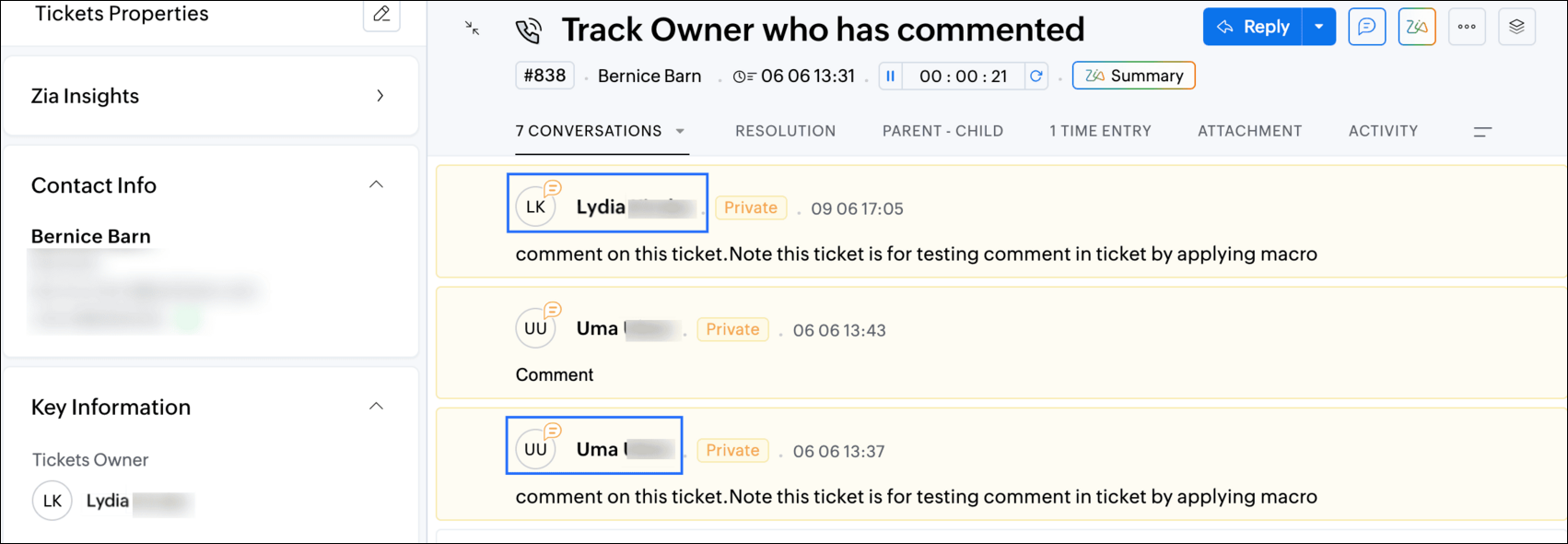
9. Click Save again to save the Macros.
We hope this custom function helps streamline your team's communication and enhances your ticket management process. If you have any questions or need further assistance, feel free to reach out to us at support@zohodesk.com .
Regards,
Lydia | Zoho Desk
Topic Participants
Lydia | Zoho Desk
Sticky Posts
Register for Zoho Desk Beta Community
With the start of the year, we have decided to take a small step in making the life of our customers a little easier. We now have easy access to all our upcoming features and a faster way to request for beta access. We open betas for some of our featuresShare your Zoho Desk story with us!
Tell us how you use Zoho Desk for your business and inspire others with your story. Be it a simple workflow rule that helps you navigate complex processes or a macro that saves your team a lot of time; share it here and help the community learn and grow with shared knowledge.Tip #1: Learn to pick the right channels
Mail, live chat, telephony, social media, web forms—there are so many support channels out there. Trying to pick the right channels to offer your customers can get pretty confusing. Emails are most useful when the customer wants to put things on record. However, escalated or complicated issues should not be resolved over email because it's slow and impersonal. When you need immediate responses, live chat is more suitable. It's also quick and convenient, so it's the go-to channel for small issues.Welcome to Zoho Desk Community - Say hello here!
Hello everyone! Though we have been here for a while, it’s time to formally establish the Zoho Desk Community; we’re really happy to have you all here! This can be the place where you take a moment to introduce yourself to the rest of the community. We’d love to hear all about you, what you do, what company or industry you work for, how you use Zoho Desk and anything else that you will like to share! Here’s a little about me. I am Chinmayee. I have been associated with Zoho since 2014. I joined hereWebinar 1: Blueprint for Customer Service
With the launch of a host of new features in Zoho Desk, we thought it’ll be great to have a few webinars to help our customers make the most of them. We’re starting off with our most talked about feature, Blueprint in Zoho Desk. You can register for the Blueprint webinar here: The webinar will be delivered by our in-house product experts. This is a good opportunity to ask questions to our experts and understand how Blueprint can help you automate your service processes. We look forward to seeing
Recent Topics
Aggregate SalesIQ Knowledge Base Interactions into Zoho Desk Knowledge Base Dashboard
Hello Zoho Desk Team, We hope you're doing well. We’d like to request a feature enhancement related to the Zoho Desk Knowledge Base dashboard and its integration with Zoho SalesIQ. 🎯 Current Limitation When customers interact with knowledge base articlesAdmin Visibility and Control Over Group Chats in Zoho Cliq
Hello Zoho Cliq Team, We hope you're doing well. While we appreciate the current capabilities in Zoho Cliq — including the ability to restrict who can create group chats and configure user permissions — we would like to request several enhancements toUpdate Regarding Zoho Finance Applications' Domains For API Users
Hi users, Until now, both the Zoho Finance apps and their APIs shared a common domain. We've recently introduced separate domains for APIs. You can now start using the new domains for API calls. The old domains will not work for API users starting AprilAbility for Agents to Initiate Voice Calls With Site Visitors Without Active Chat Session
Dear Zoho SalesIQ Team, Greetings, We would like to request a feature enhancement related to the voice call functionality in Zoho SalesIQ. Current Limitation: At the moment, voice calls can only be initiated by agents after a chat session has been startedAdd new Card
How do you add a new credit card to a contact with Zoho API as can be done on web. I am not able to find way to do this with Books API, CRM API or Subscriptions API. This is an issue for our company as we do migration from a different system. I can add card to a subscription through Subscriptions API, but some of our customers may not have a subscription, but only invoices set up in Zoho Books. Is there any way in Zoho API to add new credit card to contact/customer?Benchmark for Using Mail Merge in Service Order Scopes
Hello, I was wondering if Zoho CRM has a benchmark or best practices for utilizing Mail Merge in service order scopes. Specifically, I'm looking for guidance on how to effectively integrate this feature for creating and managing service orders, especiallyWhy don't we have better integration with Mercado Pago or Pagseguro?
Currently, the integration between Zoho Commerce and Mercado Pago for Brazil is very poor... Since it is old, it does not include the main payment method in Brazil today, which is PIX. Is there a date for this to finally be launched? There are numeroustwo columns layout
it's actually frustrating to not have this feature, I actually had to convince my employer to subscribe to zoho forms and integrate it with zoho crm, but because of this feature not beeing provided, our forms looks unnecessarly long and hideous.Sync Zoho Desk Help Center Category Icons to SalesIQ Articles
Dear Zoho SalesIQ Team, Greetings, We are using the integration between Zoho SalesIQ and Zoho Desk to sync articles from our Zoho Desk Knowledge Base into SalesIQ. While this integration works well for syncing article content, we’ve noticed a visual inconsistency:Company Name not pre-populating when using Quick Create: Contact
Hi Devs, This has bugged me for a long time, and it's a simple UX design change to solve it. Problem: Users creating Contacts not linked to Companies/Accounts Cause: When a user creates an Opportunity where after browsing the Contacts they realise theySpell Checker in Zoho desk
Is there a way to set always check spelling before sending? Outlook does this and it is a handy tool to avoid typosEnable Sync of SalesIQ Article Interactions to Zoho Analytics for Unified Knowledge Base Reporting
Dear Zoho SalesIQ and Zoho Analytics Teams, Greetings, We’d like to formally request an enhancement to enable SalesIQ article interaction data to be synced with Zoho Analytics, so that we can obtain a unified view of our knowledge base performance metricsHow to enter membership share, sold or reimburse
Hello, First, I am just begining taking care of the accounting of my organisation, and new also to Books. In Books, our accounting plan has an account #3900 - Share capital, that cumulates the share our member pay. How do I write a sale or a reimbursementAbility for me to take the issued PDF certification on successful completion of a course then push to zoho sign in order that it is digitally certified
How can I take the issued PDF certification on successful completion of a Zoho Learn course then trigger a workflow to push to Zoho Sign in order that it is digitally certified, hosted on the blockchain and then push to Zoho Workdrive to be hosted offCandidates rejection process
Is there a way to get ZOHORecruit to automatically send out an email to candidates that are rejected?Passing the image/file uploaded in form to openai api
I'm trying to use the OpenAI's new vision feature where we can send image through Api. What I want is the user to upload an image in the form and send this image to OpenAI. But I can't access this image properly in deluge script. There are also some constraintsCalendar Year View?
Is there a way I can view the calendar in year view? Maybe create a page with a view like this?ABN Amro
Hi, We are trying to add Abn AMRO as a bank in Zoho Books. However we get the following error: Type of Error: User Action Required Description: The request cannot be completed because the site is no longer supported for data updates. Possible workaround: Please deactivate or remove the account. Suggested Action: The site will no longer be supported by Zoho Books and should be removed. Does that mean it's no longer supported? Thanks!Add bank transfers via a webhook or API
Hello ZOHO Books Community, is there anyway to add single transactions to bank accounts via an API or webhook? I found in docs to upload a bank statement. But i want to add a transaction from an external (unsupported bank) in the moment there is a transactionBooks does not allow 19% tax rate for invoice - Please help!
Hi there, I need to do an import of invoices into Zoho Books. The process worked smoothly before we migrated to the Books Germany Edition in December 2024. It does import 13 out of 14 invoices from my csv-file. For the one it does not import I get theWhen will Zoho Books offer native NFS-e issuing, now with Brazil's National Standard?
Hello Zoho Team and Community, I'd like to follow up on my previous suggestion regarding the critical need for Zoho Books to natively issue Brazilian Service Invoices (NFS-e). My original idea was that this could be achieved by extending the same integrationAdmin Access to Subscriber Information for System/Default Bots in Zoho Cliq
Dear Zoho Cliq Team, Greetings, We would like to request an enhancement to Zoho Cliq's bot management capabilities. Specifically, we are asking for the ability for organization administrators to view the list of subscribers for system/default bots, suchzoho webmail keeps opening an empty tab when on log in/vist webmail
as the the title says, whenever i log in or visit the page in a new tab, zoho webmail with open a new tab, but it errors out (see attachment). how do you stop it from doing this?FSM work order creation on books quote approval
I have followed https://help.zoho.com/portal/en/kb/fsm/custom-integrations/zoho-books/articles/perform-actions-in-zoho-fsm-on-estimate-approval-in-zoho-books#Step_1_Create_a_connection_for_Zoho_FSM_in_Zoho_Books in order to create a work order in FSMTip of the week #46 - Stay more organized by moving threads between inboxes
Have you ever come across a thread in your inbox that should have been handled by a different team or inbox? Or maybe you've wrapped up your part of the conversation, but another team needs to step in to finish the task or assist further? Keeping suchText summarization and field detection with Zia, Zoho's AI assistant
Have lengthy documents that take forever to read and sign? Tired of placing fields into hundreds of pages? Here's a single solution to solve both challenges: Zia, Zoho's AI assistant. With Zia's integration with OpenAI, you can summarize long documentsSending Links to Functions in CRM
Maybe I'm crazy, but currently there's no way to send someone a link to a custom function. The only link you can get is to the myfunctions page, which is very frustrating. This should work like workflow rules where when you click on one, it should havezohoからの自動メールについて
zohoからの自動メールにおいてちょっと困ったことが起こっており、サポートにも相談中なのですが ほかの方にも同現象が発生していないか相談したい。 ▼事象 zohoからの自動メールにおいて時折「このメールが送信者からのものであると確認できないため、このメールに安全に返信できない可能性があります」とメーラーから警告が出る。 ▼状況 発信元:設定した独自ドメイン SPF/DKIM設定:済 利用メーラー:outlook 発生頻度:稀(連続するときもあるが、パタッとでなくなる時もある) サポートへの連絡:ただいま継続相談中Using Deluge scripting to create/update data in TabularSections
I am having following Form structure with some other usual fields, and a tabular section which allows putting question, self rating and lead rating. (pic below) I am trying to create a record of this form via Deluge, but can't figure out way to populateZoho Recruit: How to link lookup fields using record ID instead of name during import?
Hi, I'm having an issue with lookup fields in Zoho Recruit during data import. When I import records into a module that includes a lookup field (e.g., to an Interview record), Zoho Recruit matches the lookup by the display name (string) instead of theAdd a "Success" Route to the "Forward to Operator" Card in Zobot
Hello Zoho SalesIQ Team, We hope you're doing well. We would like to request an enhancement to the "Forward to Operator" card in Zobot. Current Limitation: At present, the "Forward to Operator" card provides the following routes: Operator Not AvailablePower of Automation :: Auto-update Project status based on Tasklist completion
Hello Everyone, A Custom function is a user-written set of code to achieve a specific requirement. Set the required conditions needed as when to trigger using the Workflow rules (be it Tasks / Project) and associate the custom function to it. Requirement:Multi Module Lookup Fields
🎯 Use Case: In many custom implementations, especially those involving financial tracking, service operations, or project-based work, a single record (e.g. an invoice or bill) often relates to one of several different modules — but only one at a time.Introducing AI Modeler—a no-code approach to adding AI to your business applications
Forward-thinking businesses today are embracing AI to make life easier for themselves, their employees, and their customers. But if you haven't started yet, you might be concerned that your business will be left behind. Or maybe you're worried becauseZoho People how do i view the history of leave taken
Hi All What is the report that i am unable to view the history of the leave taken for an individual and team?UK Registration for VAT with existing stock/inventory
We have an existing inventory of stock and are investigating how to handle the conversion from a UK VAT unregistered company to a UK VAT registered company. Enabling VAT registered status looks extremely easy, but we cannot find any way within Books toTrigger action after workflow
I would like to trigger a deluge function after the approval workflow is complete. Is this possible? The objective is to take the approved document and move it over to Zoho Contracts to send out to our customer for review and signature. The reason weUnable To Enable Google Calendar Sync
Hi Folks, I am unable to enable google calendar sync. I get Internal Error, Problem Occurred Internally. Screenshot attached. How do I solve this?Export to Zoho CRM Not Triggering Workflow Rules
Hello, I have set up an automated export from DataPrep to Leads in CRM but none of my Workflow Rules are triggering once the leads are created. The Timeline history is completely empty in every lead. How can I fix this issue? Do I need to set up a Schedule【Zoho Projects】サンドボックス機能(テスト環境)リリースのお知らせ
本投稿は、本社のZoho コミュニティに投稿された以下の記事を参照し作成したものです。 Sandbox - Your Secure Testing Space in Zoho Projects ユーザーの皆さま、こんにちは。コミュニティチームの中野です。 本投稿では、Zoho Projects のサンドボックス機能リリースについてご紹介します。 サンドボックス(テスト環境)とは? Zoho Projects の「サンドボックス」は、新たな設定を作成、検証、そして既存の処理を妨げることなく本番環境に適用することができるテスト環境です。Next Page