Collecter les fichiers

Toute tâche implique, à un moment ou à un autre, la collecte de données ou de documents. Qu'il s'agisse de rapports de projet d'employés, de rapports médicaux de clients ou de devoirs d'étudiants, WorkDrive vous permet de collecter et de gérer des fichiers en toute sécurité grâce à cette fonctionnalité. Une fois que les utilisateurs ont téléchargé leurs fichiers, vous serez en mesure de voir leurs soumissions et de gérer les dits fichiers en toute simplicité.
Choisissez un dossier pour stocker tous les fichiers téléchargés, fixez des délais pour les soumissions et définissez des limites de téléchargement pour la taille et le nombre de fichiers. Cette fonctionnalité vous permet de créer des liens de collecte séparés pour les utilisateurs internes et externes avec des paramètres de lien personnalisés, tels que la date d'expiration, la limite du nombre de fichiers et la limite de la taille des fichiers.
Activer "Collecter les fichiers"
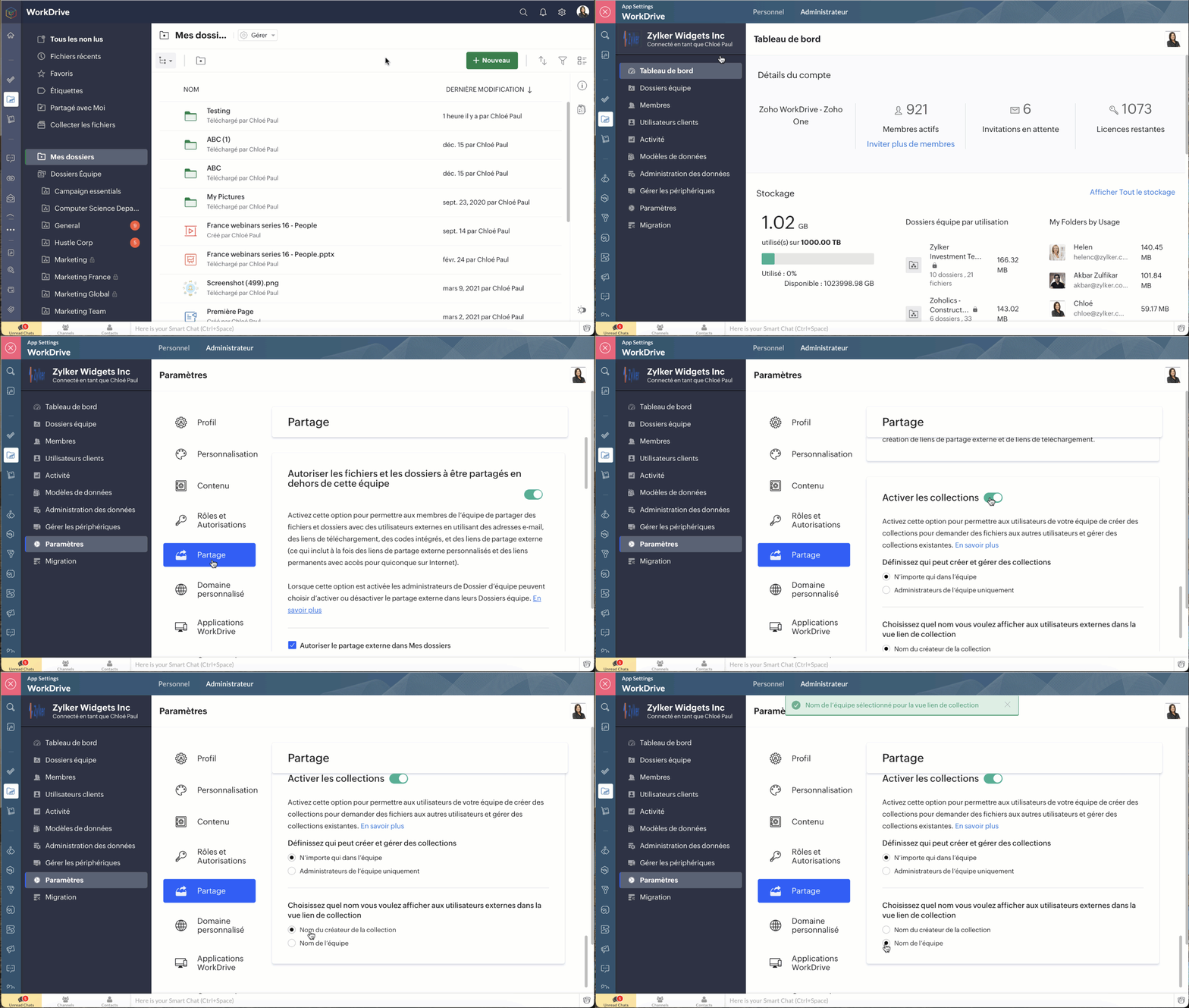
Cette fonctionnalité doit d'abord être activée au niveau de l'équipe à partir de la console d'administration, et en fonction des autorisations, soit les administrateurs uniquement, soit tout le monde dans l'équipe pourront créer et gérer des collections.
- La console d'administration >> Paramètres >> Partage
- Activez l'option "Activer les collections" pour permettre à vos coéquipiers de créer des collections.
- Choisissez qui a le droit de créer des collections dans WorkDrive :
- Toute personne de l'équipe
- Uniquement les administrateurs de l'équipe
D'un autre côté, il est parfois préférable de désactiver la collecte de fichiers pour des raisons diverses.
Bon à savoir
Une fois que les collections ont été désactivées pour une équipe :
- Les liens de collections existants cesseront de fonctionner. Les utilisateurs externes ne seront pas en mesure d'accéder aux liens de collecte pour télécharger des fichiers.
- Les nouveaux liens de collection ne peuvent pas être créés.
- Les propriétaires de collections pourront toujours accéder aux collections qu'ils ont créées et aux fichiers collectés. Cependant, ils ne pourront plus modifier les paramètres de la collection.
Sélectionnez un nom d'affichage dans la vue des liens
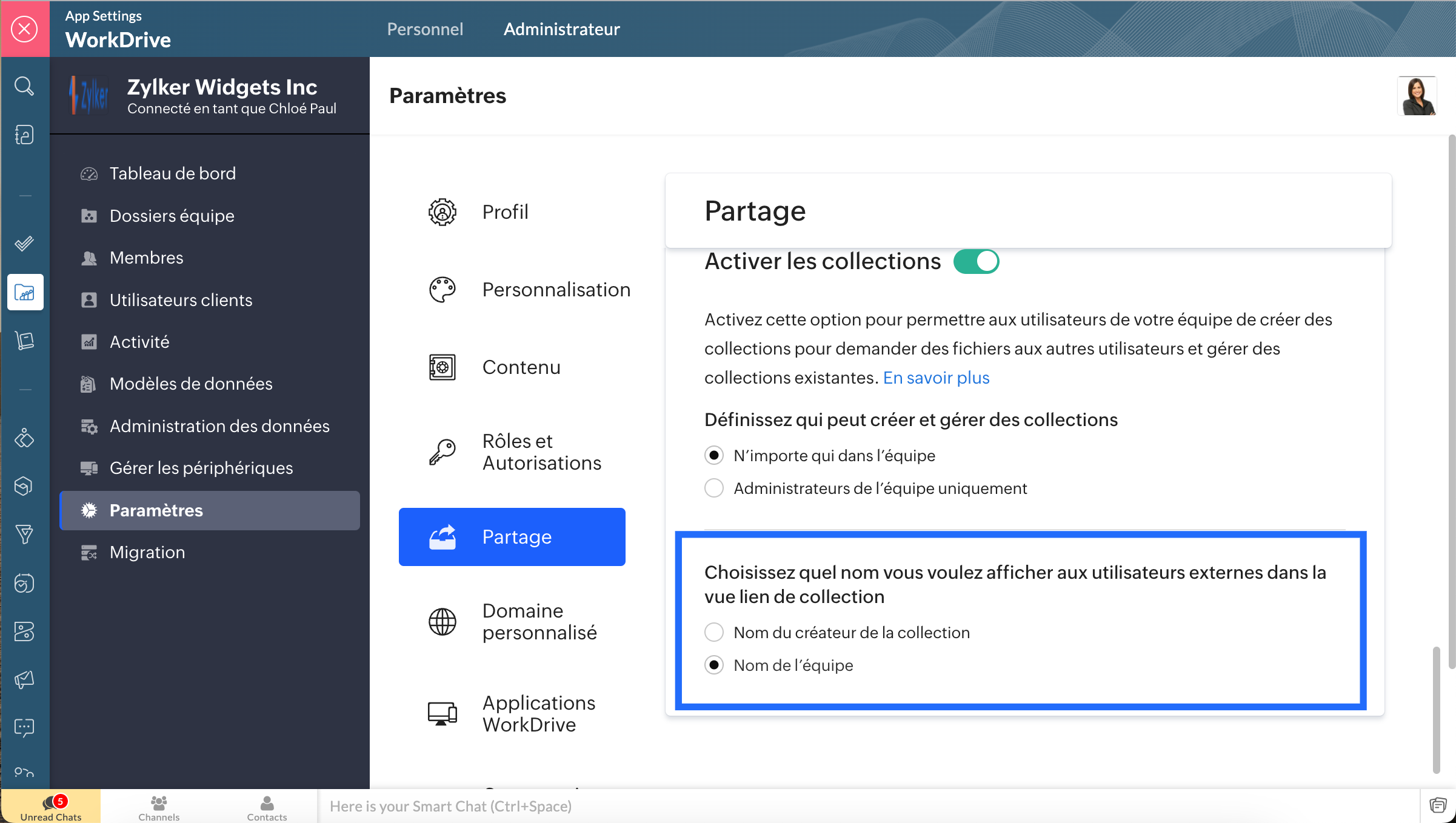
Pour faciliter l'identification, il est possible de basculer entre le nom du créateur de la collection et le nom de l'équipe. Cette option est utile par exemple dans les cas où vous souhaitez qu'une partie externe reconnaisse l'organisation que vous représentez. De même, il serait plus facile d'utiliser votre nom pour la communication interne.
Choisir un nom d'affichage
- La console d'administration >> Paramètres >> Partage
- Sous la section "Activer les collections", choisissez le nom que vous voulez afficher pour les utilisateurs externes dans la vue du lien de la collection.
- Sélectionnez le nom à afficher lorsque vous liez la collection à des utilisateurs externes :
- Nom du créateur de la collection : affiche le nom de la collection et de son créateur.
- Nom de l'équipe : affiche le nom de la collection et de l'équipe à laquelle elle appartient.
Créer la collection
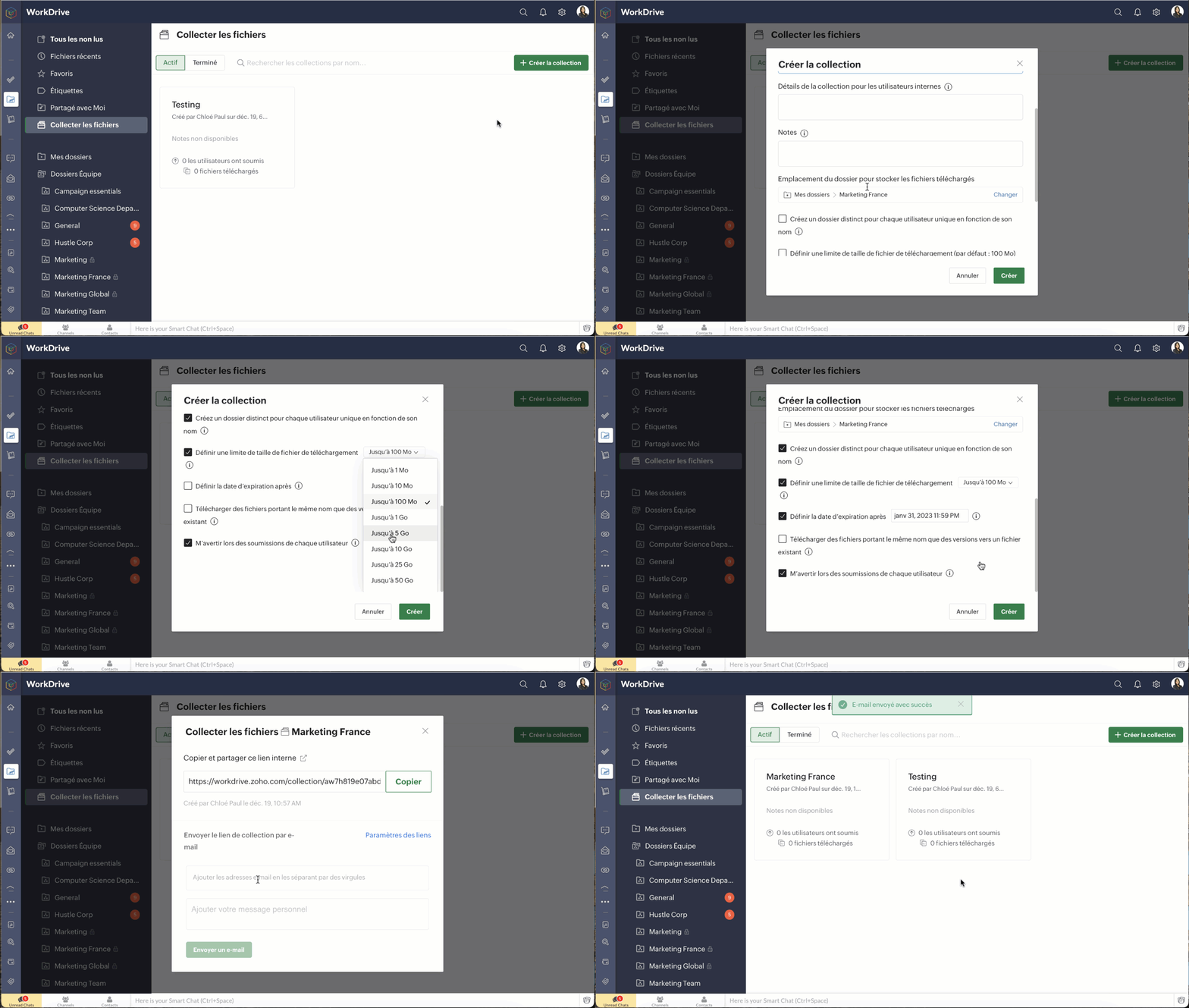
- Sélectionnez l'onglet "Collecter des fichiers" dans le panneau de gauche.
- Sélectionnez " Créer la collection".
- Saisissez les informations demandées.
- Sélectionnez un emplacement de dossier pour stocker tous les fichiers téléchargés par les utilisateurs. Vous pouvez choisir un dossier soit dans "Mes dossiers", soit dans un dossier d'équipe où vous avez au moins un rôle d'organisateur.
- Pour créer un dossier distinct pour chaque utilisateur, cochez la case correspondante.
- Le nom de l'expéditeur sera le nom de dossier par défaut.
- Pour fixer une limite à la taille des fichiers téléchargés, sélectionnez la case correspondante et sélectionnez la limite requise.
- Les limites de taille de téléchargement disponibles sont : 1 Mo, 10 Mo, 100 Mo, 1 Go, 5 Go, 10 Go, 25 Go et 50 Go.
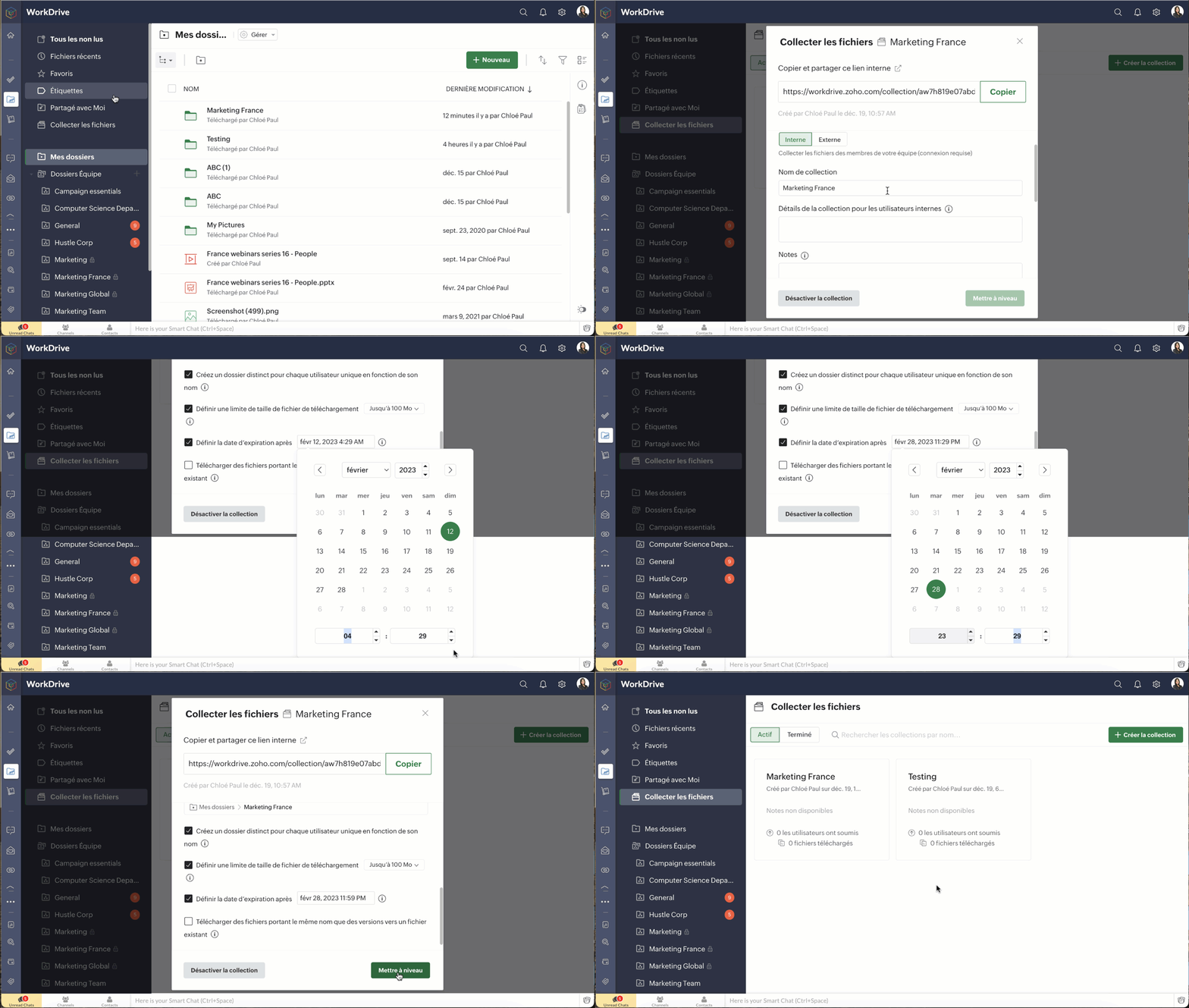
- Définissez une date d'expiration, si nécessaire.
- Les notifications vous aident à avoir la main lorsqu'un utilisateur ajoute des fichiers.
- Pour partager le lien, copiez-le et ajoutez-le au canal de communication de votre équipe ou, pour l'envoyer par e-mail, ajoutez des adresses e-mail et un message sous "Lien de collecte par e-mail" et envoyez.
- Cliquez sur "Paramètres du lien" pour modifier les paramètres du lien de collecte.
Bon à savoir
- En fonction des paramètres de collecte de l'équipe, le nom de l'équipe ou le nom du créateur de la collection s'affiche dans la vue du lien de collecte pour faciliter l'identification.
- Avant de partager le lien de la collection avec les utilisateurs prévus, copiez et collez le lien de la collection dans un nouvel onglet, testez et vérifiez.
Consulter et gérer vos collections
- Accéder à l'onglet "Collecte de fichiers" dans votre WorkDrive pour gérer tous les fichiers partagés.
- Vous avez l'accès aux liens actifs et inactifs.
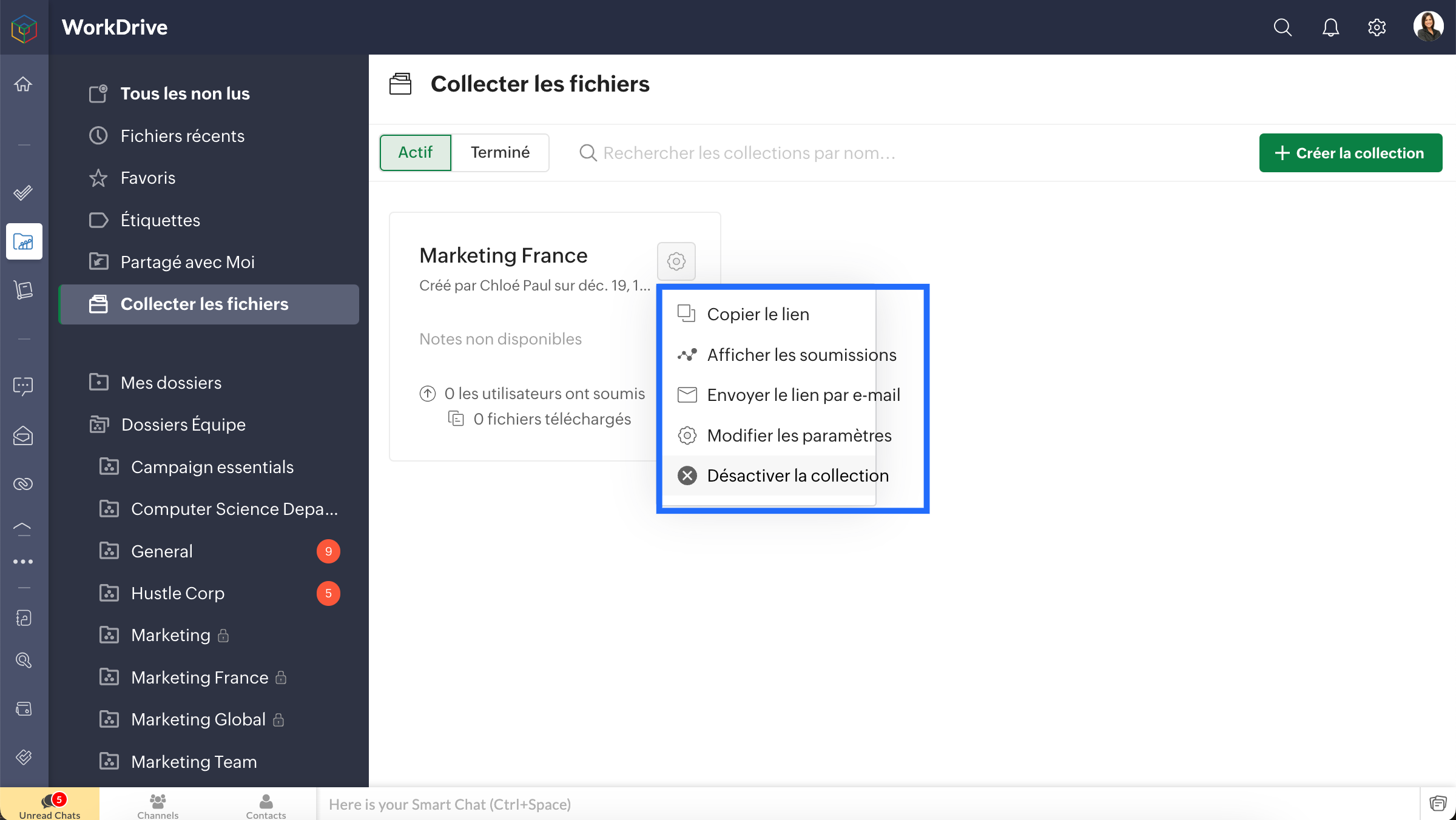
- Pour modifier les paramètres d'un lien particulier ou pour des actions ultérieures, allez sur l'icône des paramètres et les options suivantes seront disponibles :
- Copier le lien
- Afficher les soumissions
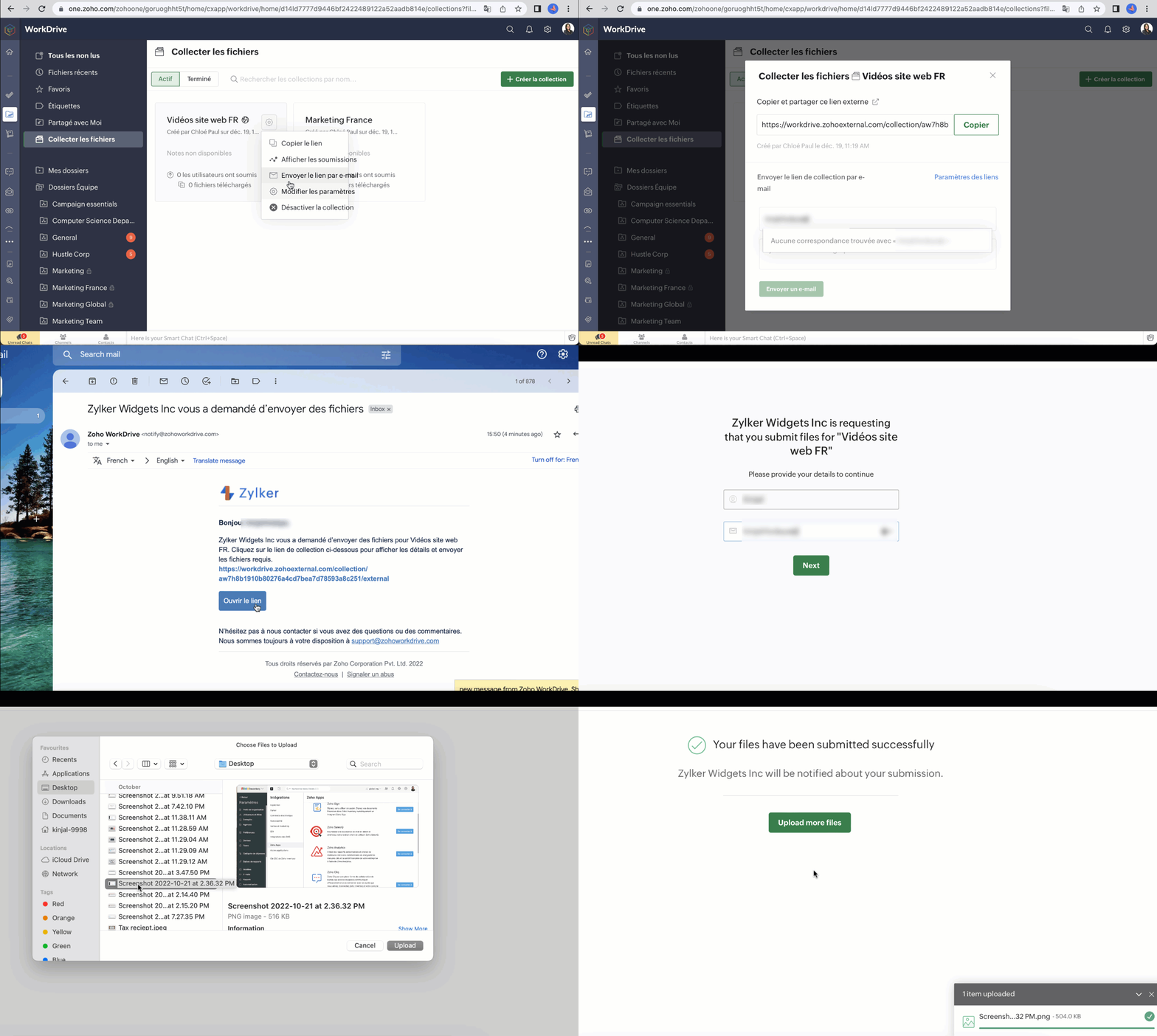
- Envoyer le lien par e-mail
- Modifier les paramètres
- Désactiver la collection
Télécharger des fichiers via un lien de collecte
- Lorsque vous partagez un lien de collecte avec des utilisateurs, cliquez sur le lien partagé et téléchargez un document existant. Dans l'écran de téléchargement, vous pouvez voir les limitations, y compris la taille du fichier à télécharger et le nombre maximum de fichiers à télécharger.
- Pour les collections externes, les utilisateurs doivent saisir les données utilisateur requises, telles que le nom, le numéro de téléphone et l'adresse électronique, afin de pouvoir télécharger des fichiers.
N'hésitez pas à partager vos questions en commentaire
L'équipe Zoho France
Topic Participants
Kinjal Lodaya
Sticky Posts
Collaboration sans faille avec Zoho One
Bonjour à tous, Dans cet article nous allons voir comment Zoho One permet une collaboration à différents niveaux . La façon dont nous travaillons évolue. À mesure que les entreprises se mondialisent, la plupart des activités sont menées en équipe.
Recent Topics
Tip 2: Recursive functions in Deluge: How to dynamically run a function for a specified number of times.
Hi folks, As part of the Zoho Creator - Tips and Tricks series every fortnight, we are back today with a new tip on Recursive functions. Let us first quickly understand what Recursive functions are: A function that calls itself one or more times is known as a Recursive function. That is, you can execute a function to perform a particular action a specific number of times. And, at the end of each iteration, a new output is generated. Recursive functions are commonly used by programmers as it enablesFunction #48: Manage fixed installment payments using Zoho Books
Hello everyone, and welcome back to our series! Businesses offer installment payment options to their customers, particularly for expensive purchases, to ease the financial burden on them. By breaking down the total cost into smaller, more manageableSpotlight series #6: The Show app for Android TV has a new look!
Hello everyone! We are delighted to introduce our revamped and redesigned Show app for Android TV. Smart TVs are exploding in popularity. Android TV alone has over 110 million active monthly devices. Zoho Show, as part of a constant effort to improveCan’t create alias “Email alias already exists”
Hi, I’m trying to create the following alias for my domain email. contact@ personal@ private@ But I get a email alias already exists. I had a soho account previously which I deleted which I suspect is causing the issue. Can someone assist? Kind RegaAppraisals - Order of Previous Reviews Should Be Newest to Oldest
The new Zoho People layout generally does a decent job at providing the necessary information for performing appraisals of employee performance. One example of this is the Previous Reviews section: This information is helpful when conducting a review.Paging through API results. a major gap in your documentation.
There is no way for me. to get all of my data through a single API call. Typically REST APis have mechanisms for paging through API results. But the documentation for the API I am using: https://desk.zoho.com/DeskAPIDocument#Introduction Has no mentionRecurring invoices were generated with old template...
I have recurring invoices setup. Ones generated on 10.20.2025 used the modified template I had used. But for some reason, on the ones created on 11/20/2025, it seems the invoices created reverted to the previous version of the invoice template. Notably,Tip #54- Exploring the Files Icon in Zoho Assist- 'Insider Insights'
As we’re already in mid-December, it’s a good time to take a closer look at one of the most useful options in the Zoho Assist remote support dashboard—the Files icon. To get started, log in to Zoho Assist using your credentials. Once you’re in, navigateTip#47: Estimation planner
Sprint planning becomes easier, smoother, more collaborative and more accurate with the Estimation Planner extension. Most work items involve multiple users, and each user's role and effort vary. To provide an unbiased and fair estimation point to theTime Tracking on Iphone doesn't stop
When I start a time tracking session the timer starts as expected. However when I hit stop, the timer remains on that project. The only buttons available are discard and start. Start runs the timer more and discard says it will throw away the data fromZoho Sign - Zoho CRM extension upgrade
Hi everyone, We've updated Zoho Sign extension for Zoho CRM with significant internal changes. Impact on existing Zoho Sign extension users Users using the extension without customization If you are using the integration without implementing Zoho Sign'sGroup by Owner/ Owner Kanban /Group by Custom Field
Hi, We are missing the option of viewing Tasks grouped by their owner, as it is an essential function for us to manage our employees' working tasks. We find it hard to inspect what are the tasks that our employees are working on. We are seeking an optionFlow using way too many tasks
I built a flow that is using way too many tasks for what it is doing. I reached out to support a week ago but never heard back so hoping the community can help. Does a filter count as a task? I am seeing tons of records filtered with < 1 Sec Time TakenRegarding the integration of Apollo.io with Zoho crm.
I have been seeing for the last 3 months that your Apollo.io beta version is available in Zoho Flow, and this application has not gone live yet. We requested this 2 months ago, but you guys said that 'we are working on it,' and when we search on GoogleStart Workflow from Deluge Script
I have developed a customized process from our CRM that leverages a deluge script to create a statement of work document. Once the document has been created via the merge and store function, I would like the ability to start a workdrive review & approveSaved Sections?
In sites editor, the + button reveals options to add a section, element, etc. It includes Saved Sections, but I can find no way to save a section I've already created. Otherwise, is there a way to copy a section from one page to another?Marketer's Space: Unable to select a sender address? Here's the fix
Hello Marketers, Welcome back to yet another post! So you've added a sender address in Zoho Campaigns and later found that you're not able to select it while creating an email campaign. Has this ever happened to you? If so, don't worry—you're not alone.Loading Project Balances in ZOHO Books for each project
Hello, What is the best method for loading project balances actual and budget into ZOHO books to provide tracking to our project managers. We have projects and federal awards (also treated as projects) which span multiple years. We are converting fromScale up your writing style with content analysis tool in Knowledge Base
Hello everyone, Sometimes writers may have strong knowledge about the subject but may find it challenging to articulate clearly or produce comprehensible, jargon free content. To make the process easier and to ensure consistent, high-quality articles,Zoho Books "Update" Trigger for Zapier?
Hi Zoho Team, I've been in talks with Zapier about using their services to connect my Zoho Books account to various apps, but I require an additional trigger beyond the "New" trigger. I require an "Update" trigger, which will allow me to filter and create Zaps only when certain conditions are fulfilled on the Zoho Books end before I automate a separate app. Specifically this will help me create invoices in QuickBooks Online only when payments are recorded in Zoho Books, rather than when a new invoiceHow to prevent editing of closed tickets in Zoho Desk?
I would like to confirm whether it is possible to completely prevent agents from editing tickets once their status is set to Closed. Is there any configuration, permission, or best practice in Zoho Desk to ensure that closed tickets remain read-only andZoho Desk Limitations
Good day, all, I would like to know whether others share my frustration with some of Zoho's limitations. Don't get me wrong, I like Desk (and I also have a subscription for Analytics), I have been with them for close to 10 years, and unfortunately, INew Mandatory One-Click Unsubscribe Link Overshadowing Custom Unsubscribe Link
I was recently informed by Zoho CRM Support that they are now mandated by the large email service providers like Google and Yahoo to provide a one-click unsubscribe option in the header (not the body) of all mass emails. I have a custom unsubscribe linkhow to undoreconciled transaction
how to undo reconciled transactionExciting Updates to the Kiosk Studio Feature in Zoho CRM!
Hello Everyone, We are here again with a series of new enhancements to Kiosk Studio, designed to elevate your experience and bring even greater efficiency to your business processes. These updates build upon our ongoing commitment to making Kiosk a powerfulChange eMail Template for Event-Invitations
Hello ZOHO-CRM Team How I can change the eMail Template for Event-Invitations? I work with the German Version of the Free Version. I know how I can modify eMail alerts or Signature Templates, but where I can other eMails modify you send out? Thank you for your answer. Regards, JuergService Title in Service Report Template Builder
I am currently working on the Service Report Template Builder in Zoho FSM. I have created three separate service report templates for different workflows: Preventive Maintenance Report Requested Service Report Installation Report My issue is that I cannotZoho Sign for Zoho Projects
Documents authorization and validation with signature is now easier in project management with Zoho Projects' Zoho Sign extension. Sign documents or send them for signatures directly from tasks and issues using Zoho Sign extension in Zoho Projects. ExtensionDeluge Learning Series – Best Practices in Deluge | December 2025
We’re excited to bring you the next session of the Deluge Learning Series, focused entirely on writing cleaner, faster, and more reliable Deluge code. In this edition, we’ll dive deep into the essential best practices every Deluge developer should followAssociate a Contact to a Campaign using deluge?
If I want to add one record to another related list, which zoho function do I use? zoho.updateRelatedRecord is not it I don't think. I simply want to take a "Contact" and associate it to a "Campaign" using deluge. Can anyone help? contactId = 5122008000000796037;Add "Groups" above "Users" in the Zoho Forms Left Menu
Hi, We have Groups but you have to go to a Form and Share or use the Directory App to manage them, please add "Groups" above "Users" in the Zoho Forms Left Menu so you can manage them in 1 place within Zoho Forms too. Thanks DanZoho Books | Product updates | October 2025
Hello users, We’ve rolled out new features and enhancements in Zoho Books. From iOS 26 updates to viewing reports as charts, explore the updates designed to enhance your bookkeeping experience. Zoho Books Updates for Apple Devices At WWDC 2025, AppleAdding Taxes to paid consultations in Zoho Bookings
I created a 'paid' consultation under Zoho Booking and integrated it with payment gateways for online/instant payment before a booking is done. How can I add 'taxes' to the price of consultation? I can add taxes to other Zoho apps (liks Books, Checkout,Zoho CRM Reports Module on Mobil App
I have the mobile app and the reports module doesn't appear in the sidebar for some reason. I saw a Youtube video where the user had the Reports module on mobile. Is there a setting to show it on mobile? Thanks.Inquiry on Help Centre Tab Customisation
Hi Zoho team, I’m wondering if it’s possible to further customise the Help Center tabs, specifically the descriptions under Knowledge Base, Community, and Tickets. While the current setup allows customising tab names, being able to tailor the descriptionsPassing a form object to a function
Suppose I have a sort_order field in multiple tables and I want to increment it by +1 onCreate of a new record. Is there a way to pass the form object as an argument into the function to keep things DRY? The following function from Zia works, but I'dCan you copy and paste a page within a form?
I have been looking at trying to copy/duplicate a whole page within a form. I can't see how I can do this without having to add all the data in again. This is very time consuming. Any help would be great.Unable to sort as Descending order
Trying to change the sort order for a lookup field (checkboxes) from Ascending to Descending and keep getting an error in Deluge that the order must be Ascending Did anyone ran into this? Thanks EyalHow do I copy an email message to one or more other folders?
I can move a message to another folder using the "move to" option but I can't figure out how to copy a message.New feature request: Allow copy of email message to another folder
Hello Zoho team, This is a suggested new feature to allow copy an email message to either another folder or the same folder. Within the same Zoho account. This is not a support request about "label". This is a suggested new feature to allow copies ofNext Page